CRM Implementation Starts With the Rulebook, Then the Pitch
CRM implementation guides end at go-live, and the CRM fails after it. A step-by-step CRM implementation plan for HubSpot, Salesforce and Pipedrive that starts with the rules reps follow and ends with a test you can run each morning.
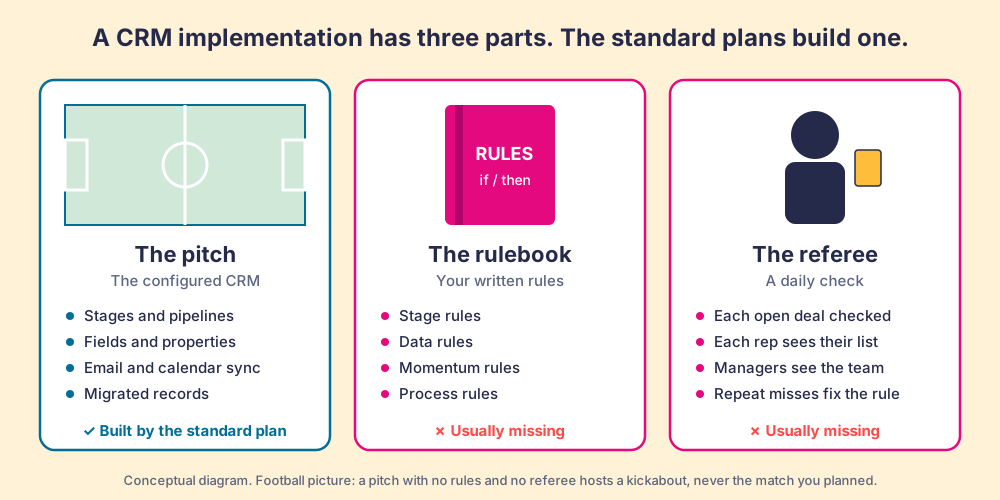
CRM implementation is the project of setting up a CRM so a team runs its sales process inside it (stages, fields, data migration, integrations and training), and it is finished on the day the CRM checks each open deal against your written rules without anyone asking.
A football pitch takes real work to build. Someone levels the ground, lays the turf, paints the lines, hangs the nets and puts up the floodlights, and when it is finished it looks ready for a cup final. Hand two teams a ball on that pitch with no rulebook and no referee and you get a kickabout, which can be fun and is never the match you planned. CRM implementation is the project of setting up a CRM so a team runs its sales process inside it (stages, fields, data migration, integrations and training), and it is finished on the day the CRM checks each open deal against your written rules without anyone asking.
The guides that rank for this term are good at the pitch. They walk you through configuration, data migration, integrations and go-live in nine or ten careful steps. My position, from the years I spent running HubSpot Sales Hub implementations at RevPartners: the pitch is the easy half. Write the rulebook before you configure anything, and put a referee on the field from the first day the CRM goes live. Below is the CRM implementation plan I would run on HubSpot, Salesforce or Pipedrive, and the one test that tells you it worked.
What does a CRM implementation include, and where do the standard guides stop?
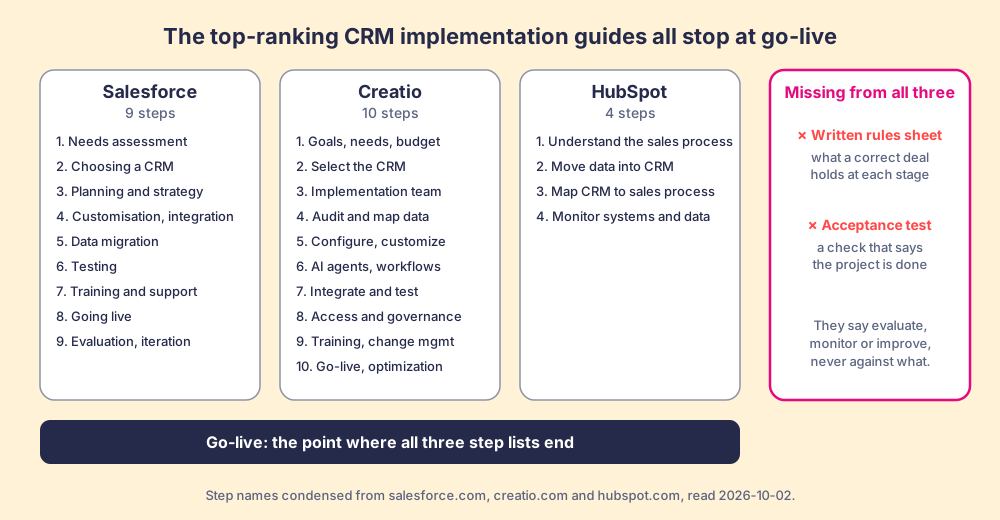
I read the three pages Google ranks highest for “crm implementation” on 2026-10-02. All three are written by CRM vendors, and all three are sensible.
- Salesforce’s guide. Nine steps: needs assessment, choosing a CRM, planning and strategy, customisation and integration, data migration, testing, training and support, going live, then evaluation and iteration (Salesforce, 2024).
- Creatio’s guide. Ten steps that run from goals and budget through AI agents, governance and training to “official go-live and post-launch optimization” (Creatio, updated February 19, 2026).
- HubSpot’s guide. Four steps, and the first is the best advice of the three: understand your sales process and lead ownership before you move data (HubSpot).
Read them side by side and a pattern shows. The steps describe the system. After go-live, all three say “evaluate,” “monitor” or “post-launch optimization,” and none of them says what you evaluate against. HubSpot comes closest by asking you to understand the sales process, then moves straight to data. None of them asks you to write down, in testable sentences, what a correct deal looks like at each stage, and none defines a test for the day the project is done.
That gap is old. In February 2002, Harvard Business Review published “Avoid the Four Perils of CRM” by Darrell Rigby, Frederick Reichheld and Phil Schefter of Bain. They cited Gartner’s finding that “55% of all CRM projects don’t produce results,” and a Bain survey of 451 senior executives in which one in every five users said their CRM initiatives had failed to deliver profitable growth and had also damaged long-standing customer relationships (HBR, 2002). One manufacturer-retailer in the article spent $30 million on a CRM and scrapped it two years later.
Twenty-four years of better software later, the data side still looks shaky. Validity’s survey of more than 600 CRM admins found that 24% said less than half of their CRM data is accurate and complete, and 31% said poor-quality data costs them at least 20% of annual revenue (Validity, State of CRM Data Management in 2024). Those figures come from admins grading their own systems, so treat them as a direction. The direction is clear enough: the systems got configured, and the records inside them drifted.
Why does a configured CRM not mean a followed process?
Because configuration describes what is possible, and a process is what people do on an ordinary afternoon with three deals open and a buyer waiting.
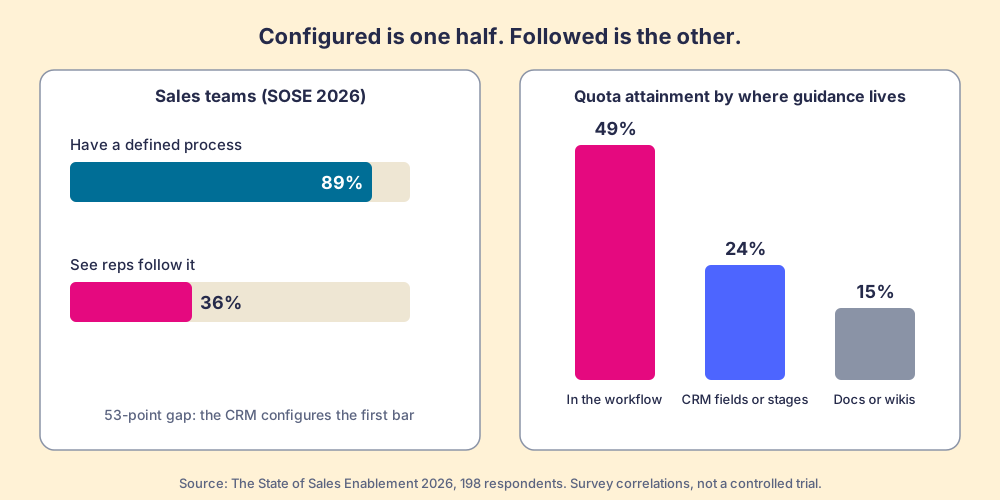
In The State of Sales Enablement 2026, our survey of 198 sales and enablement respondents, 89% of teams said they have a defined sales process and 36% said their reps follow it, a 53-point gap (The State of Sales Enablement). A CRM implementation usually delivers the 89%. The stages exist, the fields exist, the pipeline board looks right. The 36% is the half that decides whether the project paid off, and the standard CRM implementation steps leave it to “training and support.”
The same survey points at what closes the gap. Teams that inspect deals against a defined process at the highest frequency hit quota at 6.3x the rate of the lowest band. Where the guidance sat mattered too: quota attainment was 49% where guidance was embedded in the workflow, 24% where it lived in CRM fields or stages, and 15% where it lived in docs or wikis. Those are correlations from a survey, not a controlled trial, and I would not hang a business case on any single number. Read together, they say the same thing the pitch picture says: rules that get checked, shown where the rep works, go with the teams that hit their number.
At RevPartners we did only sales implementations on HubSpot, and we sold roughly twice as much Sales Hub as any other partner. The go-lives that went sideways were seldom badly configured. The usual pattern was a tidy pipeline and no written answer to the question a new rep asks in week three: what has to be true before I move this deal to Proposal? Each manager carried a different answer in their head. The CRM had no way to check any of them.
How do you write the rules before you configure the CRM?
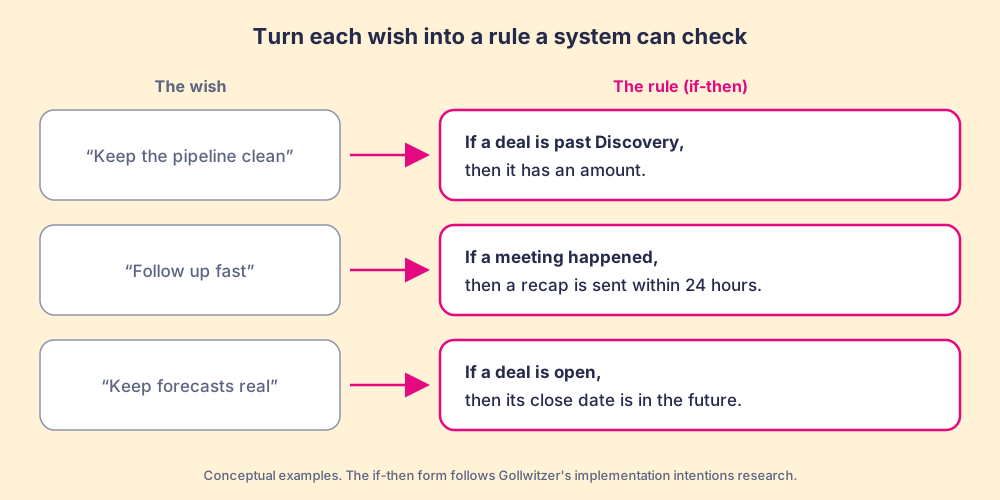
Write them as if-then sentences a machine could check. The psychology behind this form is well tested. Peter Gollwitzer’s work on implementation intentions shows that plans written as “whenever situation x arises, I will initiate the goal-directed response y” make people more likely to follow through, and a meta-analysis by Gollwitzer and Sheeran of 94 independent tests found a medium-to-large effect, d = 0.65 (Gollwitzer, 1999; Gollwitzer and Sheeran, 2006). The word implementation means the same job in both fields: tying a behavior to the moment that should trigger it.
So “keep your pipeline clean” is a wish. “If a deal is past Discovery, it has an amount” is a rule. Your rules sheet starts from the complaints you already make in pipeline review, because those complaints are rules you never wrote down. Four kinds cover most of it:
- Stage rules. What must be true for a deal to sit in a stage: an amount past Discovery, a decision maker named before Proposal, a closed-lost reason on every lost deal.
- Data rules. Fields that feed reports someone reads: close date, forecast category, deal source, the associated company.
- Momentum rules. Expectations about time: no close date in the past, no open deal without a dated next step, no overdue task left for more than a few days.
- Process rules. The buyer-facing steps your best reps already run: a pre-call email before a scheduled meeting, a recap after it.
For a sense of scale, my own board in Supered, the one I call the Zero Board, runs 22 rules against my open deals. On the night I filmed it for a video, it showed 11 violations: close dates in the past, no amount past Discovery, overdue tasks, no pre-call email within 24 hours, no recap sent, no decision maker. That is one founder’s pipeline, not a benchmark. It does show what a working rules sheet looks like, and how quickly a careful person drifts from it.
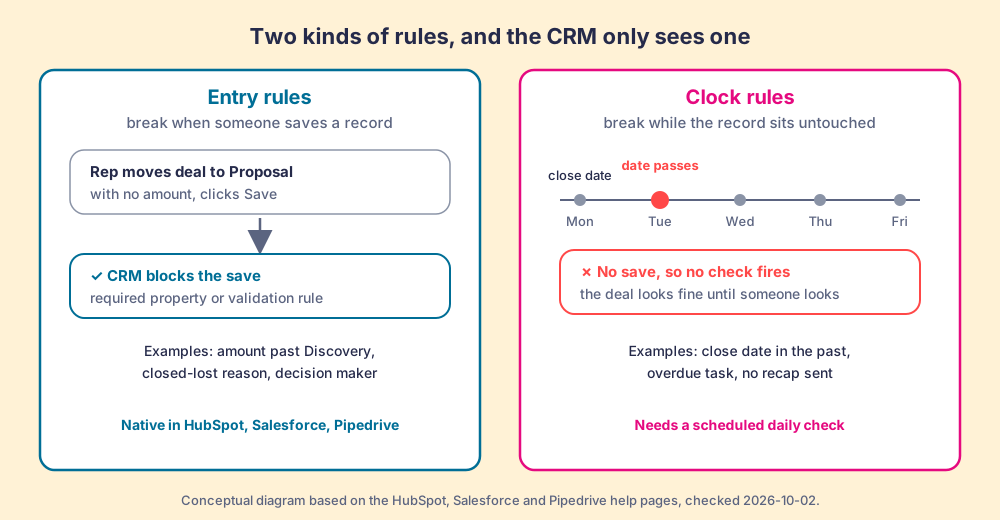
Which rules can the CRM enforce natively, and which slip past it?
Sort every rule on the sheet into one of two piles before you configure anything, because the CRM handles them differently.
- Entry rules. They break at the moment a user saves a record: moving a deal to a stage without an amount, closing a deal without a reason. All three major CRMs can stop these at the door.
- Clock rules. They break while the record sits untouched: the close date that slides into the past overnight, the task that goes overdue, the recap that never gets sent. No save happens, so no save-time check fires.
The native tools are built for the first pile. Salesforce describes a validation rule as a formula that “evaluates the data in one or more fields,” and the check runs when “a user saves a record” (Salesforce Help). HubSpot’s conditional stage properties work the same way: “If a property is required, users cannot create or update the record until they set a value for it” (HubSpot Knowledge Base, updated September 8, 2026). Pipedrive offers required fields on Professional and higher plans, and its help center adds that they “won’t stop deals from progressing if the fields are updated via import, bulk-editing, API, automations, or third-party integrations” (Pipedrive Support, updated September 3, 2026).
| Rule type | Example | HubSpot native | Salesforce native | Pipedrive native |
|---|---|---|---|---|
| Entry rule | Amount required past Discovery | Conditional stage property, required | Validation rule on save | Required field (Professional and up) |
| Entry rule, bulk path | Imported or API-updated deals | Test your import path | Test your bulk loads and API saves | Required fields skipped on import, bulk edit, API, automations |
| Clock rule | Close date in the past | No save-time check fires | No save-time check fires | No save-time check fires |
| Clock rule | Open deal with no dated next step | Needs a report or workflow someone reads | Needs a report, flow or scheduled job | Needs a filter or report someone reads |
Sources checked 2026-10-02: the three help pages linked above. The “test” cells are my advice for your own instance, not vendor claims.
Sort my own board this way and the clock pile is the larger one. Four of the six violation types on it (close dates in the past, overdue tasks, no pre-call email within 24 hours, no recap sent) break with the passage of time. A CRM implementation that puts all its rules into validation and calls the job done has covered the entry pile and left the clock pile to whoever has time to run reports.
What are the CRM implementation steps, in order?
The CRM implementation process I would run has eight steps. Steps three to six appear, in some form, in every guide above. Steps one, two, seven and eight are the ones I add.
- The rules sheet. Interview your two best reps and your sales leader, and write the stage, data, momentum and process rules as if-then sentences. Keep it short enough to read in five minutes; a first version of 15 to 25 rules is plenty.
- The two piles. Mark each rule as an entry rule or a clock rule. The entry pile becomes configuration. The clock pile needs a scheduled check, and you should decide now what runs it.
- The CRM choice, tested against the rules. If you are still choosing, hand each vendor three of your rules and ask them to show you how their product enforces each one. A feature list tells you what the product can do; three of your rules tell you whether it can run your process.
- Configuration from the rules. Build stages whose names match the rules sheet, create only the fields a rule or a report needs, and put the entry rules into required properties or validation. An unread field still costs each rep a few seconds on each deal.
- Migration, tested against the rules. Move the data, then run the rules over the migrated records before anyone logs in. Imports skip some native checks (Pipedrive says so in writing), so old deals arrive already breaking rules. Clean them or close them. The detail is in CRM data migration.
- Training on the rules, inside the CRM. Teach each rule on the screen where it applies, at the moment it applies, and keep the classroom for the day-one basics. The timing argument is in CRM onboarding.
- Go-live with the referee on. From the first day, each rep sees a daily list of their open deals that break a rule, and the manager sees the same list for the team. In my experience, clock rules that are not running at go-live are rarely running six months later.
- The acceptance test. The implementation is done when the daily violation count per rep has fallen and stayed low for a stretch you choose in advance (four weeks is a sensible default), and no single rule keeps failing across several reps. A rule that fails for most of the team points at bad guidance or a bad rule, so fix the system before you coach anyone.
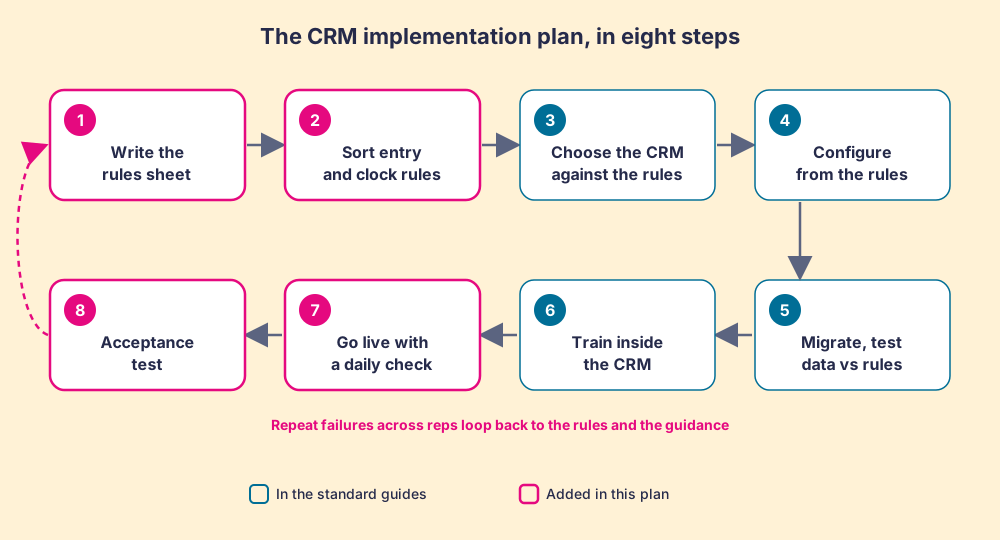
The loop at the end matters as much as the steps. When three reps miss the same rule, the rule is unclear, the guidance sits in the wrong place, or the rule is wrong. That is a system problem, and the fix belongs in the system. A sales team that skips a step is usually telling you the right action costs more effort than the wrong one at that moment.
What should a CRM implementation plan document include?
A CRM implementation plan is a table more than an essay. Give each phase an owner, a deliverable and an exit test, so the project team can settle whether a phase is finished by looking at the test.
| Phase | Owner | Deliverable | Exit test |
|---|---|---|---|
| Rules | Sales leader with two top reps | Rules sheet, each rule marked entry or clock | Leader signs off; each rule can be checked by a machine |
| Selection | RevOps or admin | CRM choice | Vendor showed how three of your rules are enforced |
| Configuration | Admin or partner | Stages, fields, required properties, validation | Each field maps to a rule or a report someone reads |
| Migration | Admin or partner | Records moved, duplicates merged | Migrated open deals checked against the rules; failures cleaned or closed |
| Training | Enablement or sales leader | Guidance on the screens where each rule applies | Reps can find the answer on the screen without asking |
| Go-live | Sales leader | Daily rule check per rep and per team | The check runs from day one, and reps see their own list |
| Acceptance | Sales leader and RevOps | Four weeks of daily counts | Count fell and stayed low; no rule failing across several reps |
Two notes on the table. The sales leader owns the first and last rows, and that is deliberate: the rules and the test of whether they hold are the leader’s job, and a partner or admin cannot own them on the leader’s behalf. And the timeline is missing on purpose. A ten-rep team on a near-default CRM can move through it far faster than a Salesforce org with years of custom objects, and a fixed date on the plan tends to turn the acceptance test into the first thing cut when the date slips.
If you run HubSpot, the platform-specific version, including the Sales Hub settings and the order I would build them in, is in the HubSpot implementation guide. For a short read on the same topic there is HubSpot implementation, and for large portals with several business units, HubSpot Enterprise implementation.
Where does Supered fit in a CRM implementation?
Supered does not run CRM implementations. HubSpot partners do that work, and our preferred partners add Supered to their scope; for in-house teams we support the admin directly. What Supered does is the referee from the pitch picture, on HubSpot, Salesforce and Pipedrive.
- Process Rulesets and Process Rules. The rules sheet from step one, built inside Supered as rules the system checks, covering entry rules and clock rules alike.
- Process Boards. The daily list from step seven: each rep sees their deals that break a rule, and the manager sees the team.
- Cards and step-by-step guides. The training from step six, shown on the CRM screen where each rule applies.
- The same rules in Claude. When Supered and the CRM are connected to Claude, it reads the same rules and can fix the violations it finds, such as updating a close date from the calendar or drafting a recap. On my 22-rule board that took about 10 minutes against about 45 by hand, which is one example from my own deals, not an average.
Process Compliance, which includes the rules and boards, costs $40 per user per month paid yearly with a five-user minimum, and includes the Digital Adoption plan (cards, guides, page triggers) that is $13.50 per user per month on its own (Supered pricing, checked 2026-10-02). We hold a 4.9 rating from 81 reviews on G2 and 5.0 from 122 on the HubSpot App Marketplace (checked 2026-10-01).
Choose something else if all of your rules are entry rules, because the native validation in your CRM covers those for free. Choose something else if your team sells mostly from phones in the field, since Supered has no mobile product and fits teams of 10 or more who work at a computer. And if you are still at the configuration stage, start with a partner and the rules sheet; the referee comes later.
What we recommend
Write the rulebook before the admin opens the settings page. Interview your best reps, write 15 to 25 if-then rules, and sort them into the ones the CRM can stop at the door and the ones that break while the record sits untouched. Configure only what the rules and your reports need. Test the migrated records against the rules before launch. Go live with a daily check running, and refuse to close the project until four weeks of daily counts say the rules hold.
The case for doing it this way rests on evidence you can check. Gartner’s 55% figure and Bain’s survey said in 2002 that configured CRMs often fail to deliver. Our 2026 survey says the gap sits between a defined process and a followed one, and that teams inspecting against the process most often hit quota at 6.3x the rate of the lowest band. The CRM vendors’ own help pages say their native checks fire on save, which leaves the clock rules to someone. Assign that someone, or a system, before go-live.
If the CRM is already live and the records have drifted, the next read is CRM hygiene as a nightly check. If the rules exist and reps still skip them, the longer fight is sales process adoption, and the use case that shows the daily board end to end is sales expectations.
Frequently asked questions
What is CRM implementation?+
What are the steps in a CRM implementation process?+
What should a CRM implementation plan include?+
Why do CRM implementations fail?+
How do you know a CRM implementation worked?+
Should you hire a CRM implementation partner?+
Your process, running itself.