Sales Pipeline Tracker: a Free Template With a Sell-By Date on Every Deal
A free sales pipeline tracker template (.xlsx) with weighted amounts, stale-deal flags, and a prospect tab. What each column is for, when a spreadsheet is enough, and the weekly review that keeps it true.
A sales pipeline tracker is a list of every open deal with its stage, value, and a dated next step, kept current enough that a manager can see at a glance which deals are moving and which have gone stale.
A sales pipeline tracker usually begins life on a good afternoon. A founder or a first sales hire opens a blank spreadsheet, types Deal, Stage, and Amount across the top, fills in a dozen rows, and feels organized. Then the sheet starts to behave like a refrigerator whose dates go unread. Nothing looks wrong from the door. The deals are all there in tidy rows, the amounts add up to a comforting total, and it is only when someone opens the carton that they learn the biggest deal on the list has not heard from the buyer in five weeks.
A tracker exists to catch that deal, which is why the columns people argue about (stage names, probability, amount) matter less than the one they leave out. A tracker proves its worth on the dated next step the buyer agreed to, and on a rule that reads that date and says, plainly, this one has gone off. Without a sell-by date, a pipeline tracker is an inventory list.
Below: the template, what each column is for, when a spreadsheet is enough and when it breaks, and the weekly habit that keeps any tracker true.
Free sales pipeline tracker template: what is inside?
Download the free sales pipeline tracker template (.xlsx). There is no form in front of it, and it opens in Excel or Google Sheets. It has four working tabs and a one-page guide.
- Pipeline. One row per deal. You type the white columns; the shaded ones (probability, weighted amount, days in stage, stale flag) are formulas, filled down 200 rows.
- Stages. Your stage names, a default probability for each, the exit criteria written as something the buyer did, and a stale limit in days. Edit this tab first, and the Pipeline tab follows it.
- Prospect tracker. A prospect tracker template for people you are working before a deal exists, with a next-touch date and an overdue flag.
- Summary. Deal counts, amounts, weighted amounts, and stale counts by stage and by owner. Each figure is a SUMIFS or COUNTIFS formula over the Pipeline tab; there are no typed totals to drift out of date.
Sample rows start with “[Sample]”; their dates are formulas relative to today, so the flags stay live until you delete them.
What should a sales pipeline tracker include?
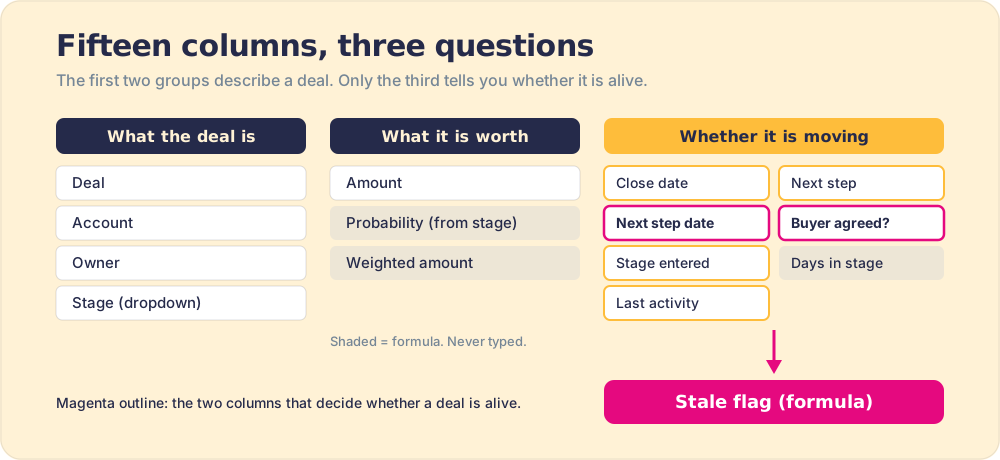
The columns answer three questions a manager asks of any deal. The first two are easy to fill and easy to fake. The third tells you something you did not already believe.
- What the deal is. Deal, account, owner, stage. Stage is a dropdown fed by the Stages tab, so a tired rep cannot invent “Proposal-ish.”
- What it is worth. Amount, probability, and weighted amount. Probability is looked up from the stage, never typed, and weighted amount is amount times probability. HubSpot computes its board totals the same way: “the total amount in each stage” multiplied “by the stage probability” (HubSpot Knowledge Base).
- Whether it is moving. Close date, next step, next step date, buyer agreed (Y or N), stage entered, days in stage, and last activity. These seven columns are the reason the sheet exists.
The probabilities deserve a word of caution. HubSpot’s default pipeline ships with stages named after things the seller did, “Appointment scheduled” at 20% through “Contract sent” at 90%. Those numbers are placeholders, and so are ours. Our Stages tab names each stage by a buyer commitment instead, because a stage should say where the buyer stands, and we cover why in sales pipeline stages.
| Stage | Placeholder probability | Exit criteria (what the buyer has done) |
|---|---|---|
| Qualified | 10% | Confirmed a problem worth solving and agreed to a discovery conversation |
| Discovery complete | 20% | Agreed on the pain, what it costs, and who else decides |
| Solution validated | 40% | Saw the solution against their own criteria and named the economic buyer |
| Proposal in review | 60% | Economic buyer agreed to review a proposal by a specific date |
| Negotiation / paper process | 80% | Shared the approval steps and a target signature date |
Replace the percentages with your own stage-to-close rates once you have a couple of quarters of closed deals. Keep the last activity column, too: logging what the rep did is how you verify the process ran at all. The stage carries the buyer’s position; the activity log proves the work behind it.
When does a deal count as stale?
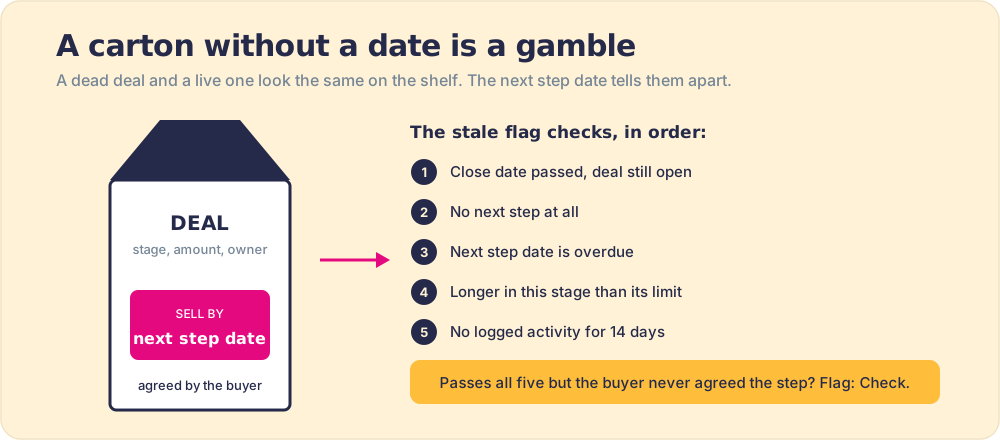
Milk does not announce that it has turned. It looks exactly like fresh milk, and you tell them apart only by the printed date and the habit of reading it. A deal that died three weeks ago and a deal about to sign look identical in a spreadsheet row: same stage, same amount, same hopeful close date. The next step date is the carton’s stamp. The stale flag is the habit of reading it, done by a formula so the manager does not have to remember.
The template checks five rules, in this order, and shows the first one that fires:
- Close date passed. The deal was supposed to be signed by now and is still open. Either it closed and the row was never updated, or the date was a wish.
- No next step. Nothing is scheduled. A deal with no next step is waiting for the buyer to remember you exist.
- Next step overdue. The date came and went. Usually the call did not happen, or it happened and the rep never set the next one.
- Over the stage limit. The deal has sat in one stage longer than the limit on the Stages tab. A fair starting limit is about 1.5 times the median days a won deal spent in that stage.
- No recent activity. No logged touch in 14 days, a threshold you can change in one cell.
A deal that passes all five without a buyer-agreed next step gets a gold “Check” flag. A next step the buyer never heard about is a hope with a date on it.
From the field
We do help people standardize process, but you don’t have to have a process to start. What you do is there’s a baseline of expectations. They grow over time as you build your processes. Like, every deal you have better not have a close date in the past. That would be your deal hygiene stuff.
Stale deals rarely die loudly. Matthew Dixon and Ted McKenna analyzed more than 2.5 million recorded sales conversations and found that “anywhere between 40% and 60% of deals” are lost to buyers who say they intend to buy and then fail to act (Harvard Business Review, June 2022). They never show up as losses, only as rows going off on the shelf. Teams usually know it before the tracker admits it. As an ops lead at a small UK mobility-equipment retailer said of a follow-up queue on a call with us, “The three-day chase should never hold more than one or two. We are way behind at the moment.” When a flag fires, read it as a signal about the process around the deal (no agreed step, no inspection), not a verdict on the rep who owns it.
Prospect tracker template: before a deal exists
The Prospect tracker tab keeps one row per person: name, company, title, contact, source, status, owner, first touch, last touch, touch count, next touch date and channel, and notes. Its flag works like the pipeline one. A prospect in an active status with no next touch, or a next touch in the past, turns magenta. Once a prospect books a meeting, the Pipeline tab takes over.
Is a spreadsheet good enough, or do you need a CRM?
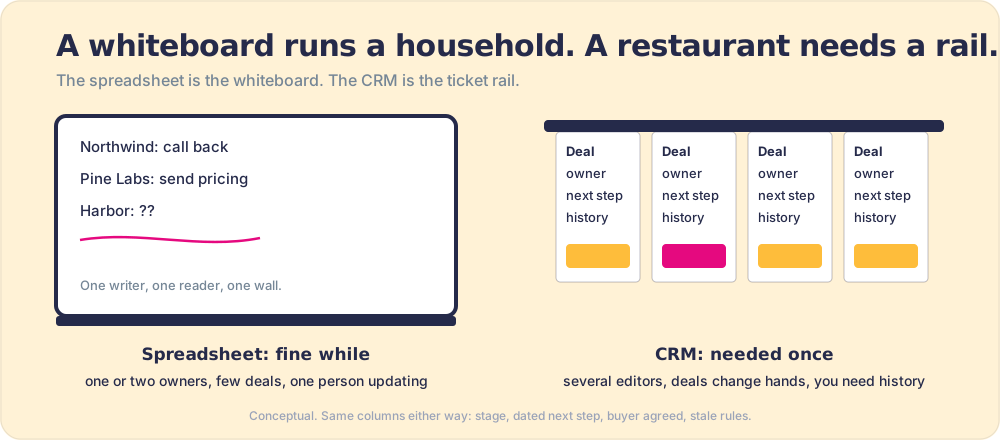
A kitchen whiteboard runs a family of four perfectly well. Anyone in the house can read it and change it, and the person who wrote “dentist Thursday” is standing right there if you have a question. Put the same whiteboard in a restaurant with twelve cooks and forty tables and it fails within an hour, which is why restaurant kitchens run on a ticket rail: one ticket per order, a time on each, and a clear owner.
A spreadsheet tracker is the whiteboard: right when one or two people own the pipeline, the deals fit in one sitting, and one person updates it. It fails at predictable points.
- More than one editor. Two people sorting and pasting in one sheet overwrite each other, with no record of who changed what.
- Hidden formula errors. Raymond Panko’s review of field audits found errors in 94% of the 85 real-world spreadsheets examined, with cell error rates between roughly 1% and 2.5% (Panko, 2015). A tracker is a spreadsheet like any other.
- Double entry. If reps log calls in one tool and update the tracker in another, the tracker loses. Salesforce’s 2024 survey of 5,500 sales professionals found reps already spend 70% of their time on non-selling tasks (Salesforce State of Sales). A second place to type is where updates die.
- No history. A spreadsheet shows today. It cannot tell you how long deals sat in each stage last quarter, which is the number you need to set sensible stale limits.
When those start to bite, move to a CRM, and bring the columns with you: stage, dated next step, buyer agreement, and the stale rules translate directly into CRM properties and views. Getting reps to live in it is its own job: CRM adoption.
How do you keep a pipeline tracker current?
With a weekly review that runs off the stale flag. Reps update deals as they work them; once a week, the team opens the tracker together, filtered to the flags. Thirty minutes is enough if it has a fixed shape:
- The stale filter. Filter the Pipeline tab on the stale flag. Nothing else gets airtime until the flagged rows are handled.
- One of three outcomes per flagged deal. Get a dated next step the buyer agreed to, move the stage back to where the buyer stands, or close it lost. “Still working it” is not one of the three.
- The Summary tab last. Read open pipeline, weighted amount, and the share of open deals flagged stale. That share, week over week, is the cleanest health number the sheet produces.
- One deal to coach. Pick a single flagged deal and work the next step with its owner, since a review that only inspects never builds the skill that prevents the next flag.
For a deal over the stage limit, the owner walks into that meeting with one job:
From the field
There’s nothing to do here except, you need to be ready and prepared to answer the question, why has this been in the stage for so long?
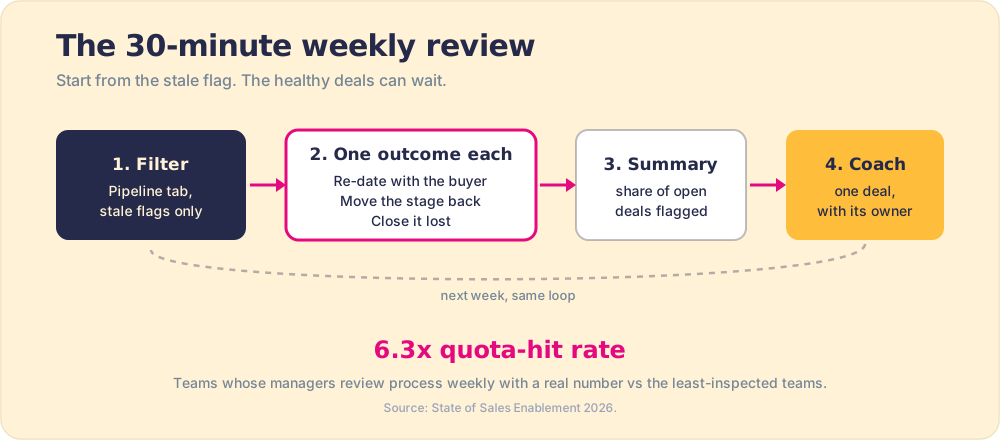
The evidence for the habit is consistent. Jason Jordan and Robert Kelly reported in HBR that companies spending at least three hours a month managing their pipeline saw 11% greater revenue growth than those spending less (Harvard Business Review, 2015). Our own survey of 198 sales leaders found the same shape from the inspection side: teams whose managers reviewed process compliance weekly, with a real number, hit quota at 6.3 times the rate of the least-inspected teams (The State of Sales Enablement).
The weekly review is the floor. It still leaves up to six days between a next step going overdue and a manager noticing, and it puts the whole inspection burden on the manager’s calendar. The next step up is inspection that happens as the deal moves, which is the subject of sales pipeline management. The difference between a tidy tracker and a true one is the subject of pipeline hygiene.
Where we would start
For one to three sellers, start with the spreadsheet and hold the thirty-minute review every week without exception. Download the sales pipeline tracker template, rewrite the exit criteria in your buyers’ terms, and let the stale flag set the agenda. The value sits in two columns and one habit: a dated next step the buyer agreed to, a stale flag that reads it, and a manager who looks every week. The 6.3x gap in our data comes from the looking, and HBR’s 11% revenue-growth edge came from the same three hours a month. Skip the habit and the 40% to 60% of deals lost to indecision stay on the sheet as live rows.
Once a second editor, a handoff, or a request for last month’s numbers shows up, move the same columns into your CRM rather than bolting a second spreadsheet onto the first, and push the next step to the rep in the moment of work so the weekly review can go to coaching. If your stages still describe what your team did rather than where the buyer is, fix that first with what is a sales pipeline.
Frequently asked questions
What is a sales pipeline tracker?+
What columns should a sales pipeline tracker have?+
Is there a free sales pipeline tracker template?+
When is a deal considered stale?+
Should I track my sales pipeline in a spreadsheet or a CRM?+
How often should you update a sales pipeline tracker?+
What is a prospect tracker template?+
Your process, running itself.