HubSpot Calling: Calls, Recording, Call Tracking, and What Comes Next
HubSpot calling lets reps dial from any contact or deal record in the browser.
What each plan includes in 2026, how recording and transcription work, what call tracking means in HubSpot, and why byproduct logging changes the data you can trust.
HubSpot calling is the browser-based calling tool built into HubSpot that lets reps dial contacts directly from a contact or deal record and captures the call log, outcome, and notes automatically as a byproduct of making the call.
HubSpot calling is the browser-based calling tool built into HubSpot CRM that lets reps dial directly from a contact or deal record without opening a separate app, switching to a personal phone, or leaving the page where the work is happening. When the call ends, the log writes itself to the record. Duration, outcome, notes. No return trip required.
That design matters more than it sounds. Many sales teams treat call logging as a chore done after the call, when there is a minute, if the rep remembers. The result is a CRM full of missing calls and calls rebuilt from memory. HubSpot calling does not fix this through discipline. It fixes it by design: the log is a byproduct of making the call. This guide covers how the tool works in 2026, what each plan includes, how recording and transcription work, what “call tracking” does and does not mean in HubSpot, and the one job the native tool leaves to the process layer.
How does HubSpot calling work?
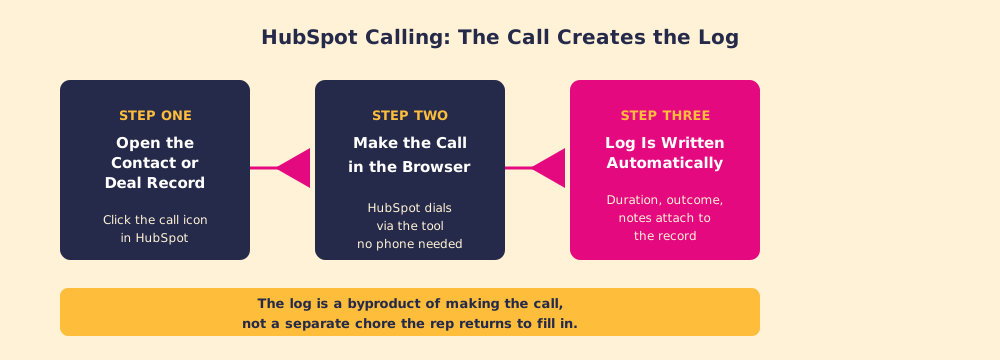
You open a contact, company, or deal record in HubSpot and click the call icon. A dialer opens in the browser. You pick which of the contact’s numbers to call and which number to call from: HubSpot’s calling article (last updated September 12, 2026) lists “a HubSpot-provided number, a registered outbound number, or a third-party calling provider.” The audio runs through your computer’s microphone and speakers. No desk phone, no separate dialer login, no tab switching.
During the call you type notes in the panel. When you hang up, you pick an outcome (Connected, Left voicemail, No answer, Wrong number, or a custom outcome your admin built), and the call, with duration, timestamp, outcome, and notes, is written to the record. The same article lists the tool under Sales Hub and Service Hub Starter, Professional, and Enterprise, and notes that “The number of calling minutes you have depends on your subscription.”
How many calling minutes does each HubSpot plan include?
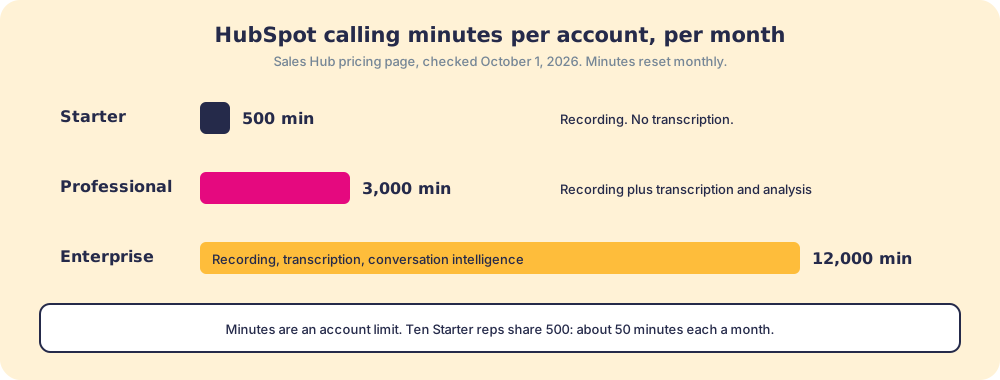
HubSpot’s Sales Hub pricing page, checked October 1, 2026, lists 500 calling minutes a month on Starter, 3,000 on Professional, and 12,000 on Enterprise. Two details change how far that goes. The minutes are an account limit shared by every user (HubSpot’s product catalog sells extra capacity as an increase to “your account’s calling minute limit”), and “Unused calling minutes don’t roll over into the following month.”
Run the arithmetic for a ten-rep team on Starter: 500 minutes split ten ways is about 50 minutes per rep per month, a couple of minutes a working day. That covers a team that books calls by email and dials now and then. It does not cover an outbound team. Professional and Enterprise accounts can buy 1,000 extra minutes a month for $50; Starter accounts cannot, so a calling-heavy team on Starter either moves up a plan or connects a third-party calling provider.
How does HubSpot call recording and transcription work?
Recording is a setting an admin turns on, and the controls go further than an on-off switch. HubSpot’s call settings article (last updated September 1, 2026) lets admins choose “Record inbound calls only,” “Record outbound calls only,” or exempt specific phone numbers, users, or regions, and customize the consent message inbound callers hear, as text-to-speech or an uploaded audio file. Changing these settings takes Super Admin or Account access permissions.
Transcription is a separate switch. Turning on “Transcription and analysis” adds a searchable transcript and analysis to recorded calls, and it needs a Sales Hub or Service Hub Professional or Enterprise seat. The pricing page lists 750 hours of transcription per account per month on Professional and 1,500 on Enterprise. Recordings and transcripts live on the call record and in the call index, where managers can search across calls for an objection or a competitor’s name without listening to each one.
Three practical notes from the settings:
- Consent by region. Recording laws differ by state and country. The exemption by region and the custom consent message exist for that reason; set them with whoever owns legal review before you turn recording on.
- Required outcomes. “Make call outcome required” forces an outcome on outbound calls placed through the HubSpot browser tool. It does not apply to inbound, mobile, or imported calls, so a report on outcomes only covers the calls the setting reaches.
- Video meetings are not calls. As of August 31, 2026, meetings recorded with HubSpot’s Notetaker or synced from a video conferencing integration create meeting records only, not call records (Notetaker article). A “calls made” dashboard that used to include Zoom calls will drop them.
Does HubSpot have call tracking?
It depends which job you mean, because “call tracking” names two different jobs.
The first is activity tracking: who called whom, when, for how long, with what outcome, plus the recording and transcript. HubSpot does this natively, and hubspot call logging is the part of it that happens automatically. A manager can pull outcomes by rep, by stage, or by outcome type, which is the raw material for coaching.
The second is source tracking, the marketing meaning: which ad, keyword, or landing page made the phone ring. That job uses dynamic number insertion, which shows each visitor a phone number tied to the source that brought them, and HubSpot calling does not do it natively. Teams add an app. CallRail’s listing on the HubSpot App Marketplace describes it as bringing “call tracking and lead engagement data directly into HubSpot,” mapping “PPC keywords, landing pages, and marketing sources to HubSpot contacts,” and shows about 5,000 installs with a 4.2 out of 5 rating from 96 reviews (CallRail app listing, checked October 1, 2026).
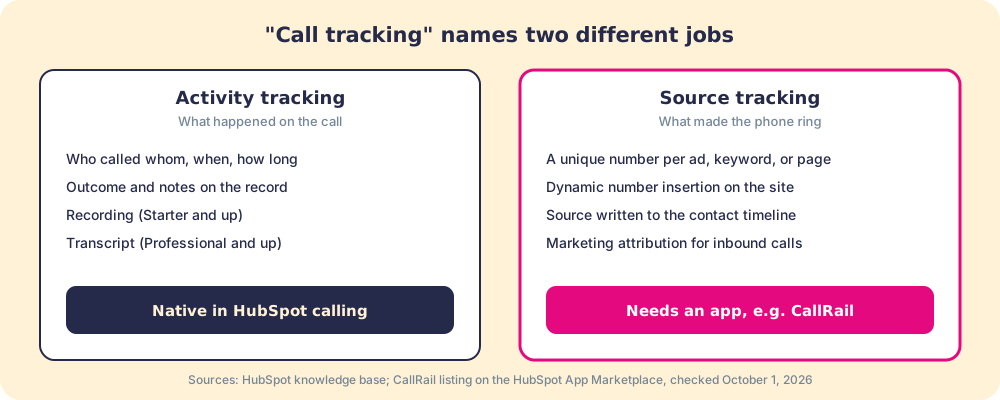
If your question is “did the rep make the calls and what happened,” native HubSpot answers it. If your question is “which campaign is producing phone leads,” buy a source-tracking tool and connect it.
Why does byproduct logging matter more than it seems?
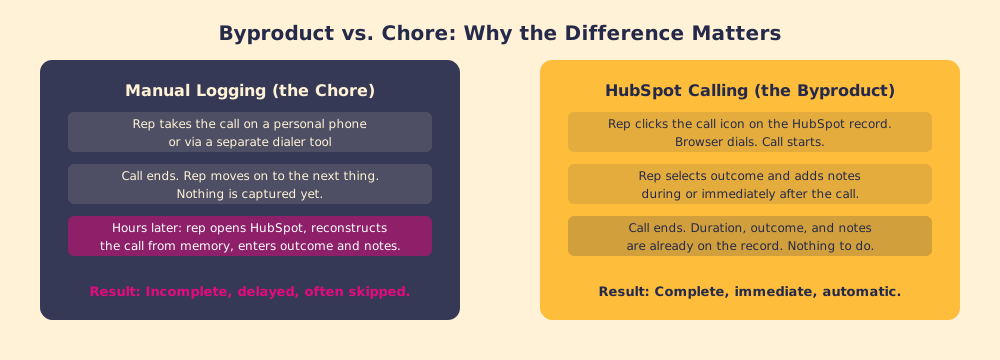
A missing call log looks like a discipline problem and is usually a friction problem. The rep who skips the log is making a rational call: the last call ended two minutes ago, the next starts in twelve, logging takes five, and the benefit of a complete CRM lands mostly on someone else.
BJ Fogg, who founded the Behavior Design Lab at Stanford, reduces behavior to three factors arriving together: motivation, ability, and a prompt (Fogg Behavior Model). In manual logging, motivation is fine and the prompt is often there. What is missing is ability, which Fogg defines as ease. The update is hard to do in the moment, so it does not happen.
HubSpot calling removes the friction instead of asking for discipline. A car’s odometer is the right picture. It counts miles because the wheels turned, so the number is always complete. A mileage logbook filled in at the end of the month holds the trips the driver remembered. Manual call logging is the logbook. Byproduct logging is the odometer.
Does byproduct logging solve the full problem?
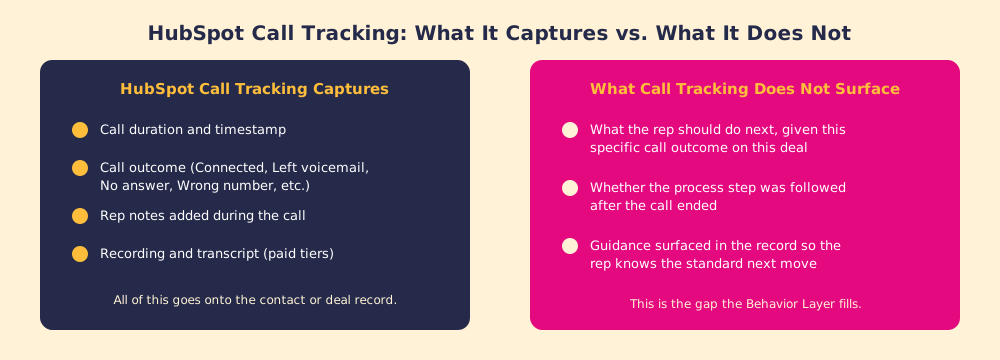
No. HubSpot call tracking captures what happened: the call was made, lasted this long, ended with that outcome, and the recording sits on the record. That lets managers see activity patterns, check outcomes, and verify that calls happen. For teams that had none of this, the improvement is real and immediate.
What the log does not do is say what should happen next.
A rep hangs up a discovery call where the prospect said budget approval is two months away. The log reads: Connected, thirty-two minutes, notes. Accurate. But it says nothing about whether the rep should send the proposal now, book a check-in in six weeks, or bring in a technical contact before the evaluation starts. The process step that follows this outcome on this kind of deal is not written anywhere the rep can see without going to look.
In our survey of 198 sales leaders for The State of Sales Enablement, 89 percent of teams had a defined process and 36 percent saw reps follow it. Reps know the process exists. In the minute after a specific call, they do not always know what it says to do next. The odometer records the trip. It does not choose the next turn.
How does the HubSpot calling tool connect to the broader workflow?
The calling tool is one part of HubSpot’s activity capture. Emails sent through HubSpot log on their own. Meetings booked through the HubSpot meetings tool log on their own. Calls placed from a HubSpot task queue log on their own and advance the queue. The pattern holds: an activity taken inside the platform generates its own record.
The value compounds when the log drives inspection. A manager who can pull call outcomes by rep or stage has the material for a real coaching conversation. Paired with the HubSpot Chrome extension, which brings HubSpot’s activity panel into Gmail and other browser tabs, almost no activity in a structured sales process needs a deliberate logging step, and CRM adoption becomes a side effect of how the tools are built.
The remaining gap, which any CRM faces, is guidance. The CRM records that the call happened. The Behavior Layer surfaces what should happen next, inside the record the rep already has open, tied to the process standard for this deal type and stage. Supered is that layer for HubSpot: after the call, it shows the step your process expects for that outcome, checks the deal against your rules, and flags it when the follow-up does not happen. See how it works for the mechanics.
A quick recap
- The calling tool. Browser-based, no desk phone, calls placed from any contact, company, or deal record on Sales Hub or Service Hub Starter and up.
- Minutes. 500 on Starter, 3,000 on Professional, 12,000 on Enterprise, per account per month, no rollover.
- Recording and transcription. Recording is an admin setting with inbound, outbound, and regional controls. Transcription and analysis need a Professional or Enterprise seat.
- Call tracking. Activity tracking is native. Source tracking for marketing attribution needs an app such as CallRail.
- The guidance gap. The log captures what happened. It does not surface what the process says the rep should do next.
What we recommend
Use HubSpot calling if your reps live in HubSpot, and turn on required outcomes so the outcome report means something. Check minutes before you roll it out to an outbound team: 500 shared minutes on Starter will not carry daily dialing. Turn on recording with region exemptions and a consent message reviewed by whoever owns legal, and move to Professional if searchable transcripts are the reason you are recording at all. If marketing wants to know which campaigns make the phone ring, add a source-tracking app instead of stretching the native log.
Then look past the log. If every call is recorded and deals still stall after discovery, the record was never the constraint. Book a demo to see how Supered turns each logged outcome into the next step your process expects, in the record where the rep already works.
The call log is the foundation. The next step is what you build on it.
Frequently asked questions
What is HubSpot calling?+
How many calling minutes does HubSpot include?+
Does HubSpot record and transcribe calls?+
What is HubSpot call tracking?+
Do I need a separate phone to use HubSpot calling?+
Can HubSpot require reps to log a call outcome?+
Does HubSpot calling show reps what to do next on a deal?+
Your process, running itself.