HubSpot Meetings: What the Scheduler Solves (and What It Leaves Unsolved)
A practical guide to HubSpot Meetings in 2026: scheduling pages, calendar sync, round-robin routing, plan limits, embedding, and how it compares to Calendly. Plus the one job a faster booking cannot do on its own.
HubSpot Meetings is a scheduling tool inside HubSpot Sales Hub that lets reps share a booking link, sync real-time availability from Google Calendar or Outlook, and log the meeting to the CRM automatically when a prospect books.
A rep wants thirty minutes with a buyer. Seven emails later, after a proposed Thursday, a counter-proposed Friday, and an apology about a time zone, the slot is booked and two days have gone. The HubSpot Meetings tool exists to kill that exchange, and it does it well. This guide covers how it works in 2026, why HubSpot has no calendar of its own (the question that sends many people to this page), how to set up each type of scheduling page, what each plan includes, how it stacks up against Calendly, and where the booking ends and the sales process begins.
HubSpot Meetings is a scheduling tool inside HubSpot Sales Hub that lets reps share a booking link, sync real-time availability from Google Calendar or Outlook, and log the meeting to the CRM automatically when a prospect books. It is a scheduling tool. It does not run your pipeline or your sales process, and holding that line early saves a lot of confusion about what it can move.

How does the HubSpot meeting scheduler work?
A rep creates a scheduling page inside HubSpot, connects a Google Calendar or Microsoft calendar, and shares the resulting URL with prospects. The link opens a booking page showing the rep’s real availability, pulled from the connected calendar. The prospect picks a slot, fills in a short form (first name, last name, email, plus any contact properties or custom questions the rep added), and the meeting is confirmed. HubSpot creates the meeting in the CRM, adds it to the rep’s calendar, and sends confirmations to both sides. No manual entry and no calendar switching.
A small vocabulary change is worth knowing before you search the help docs. HubSpot’s knowledge base now calls these booking pages “scheduling pages” (its scheduling pages article was last updated August 27, 2026), while the pricing page still says “meetings links.” They are the same object.
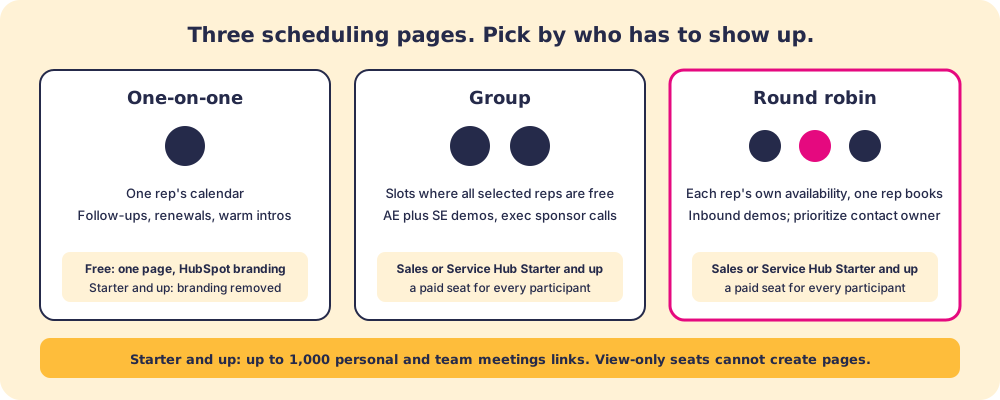
Round-robin pages extend this to teams. Instead of routing every booking to one rep, a round-robin page shows each teammate’s own availability and books the meeting with one of them. It is the right setup for inbound demo requests and SDR-to-AE handoffs, where balancing load matters more than routing to a specific person.
A booking link works like a well-placed road sign: it removes one detour completely and gets the driver to the destination faster. Arriving faster is real value. The sign has no say in what happens once the driver walks through the door.

Does HubSpot have a calendar?
No, not a standalone calendar for sales scheduling. HubSpot reads the calendar you already keep. Each user connects one Google (Workspace or free Gmail), Office 365, or Exchange calendar, and the scheduling page borrows that calendar’s busy blocks to decide what a prospect can book. HubSpot’s own help article puts the effect plainly: contacts “can schedule meetings on your calendar while preventing them from booking meetings over existing calendar events” (Connect your calendar to HubSpot, last updated September 2, 2026).
Think of HubSpot as the receptionist at a dental practice who reads the dentist’s appointment book but never owns it. The receptionist can tell a caller which times are open and pencil a new patient in. The book itself stays on the dentist’s desk, and if the dentist scribbles a lunch into it, the receptionist sees the lunch and stops offering that hour.
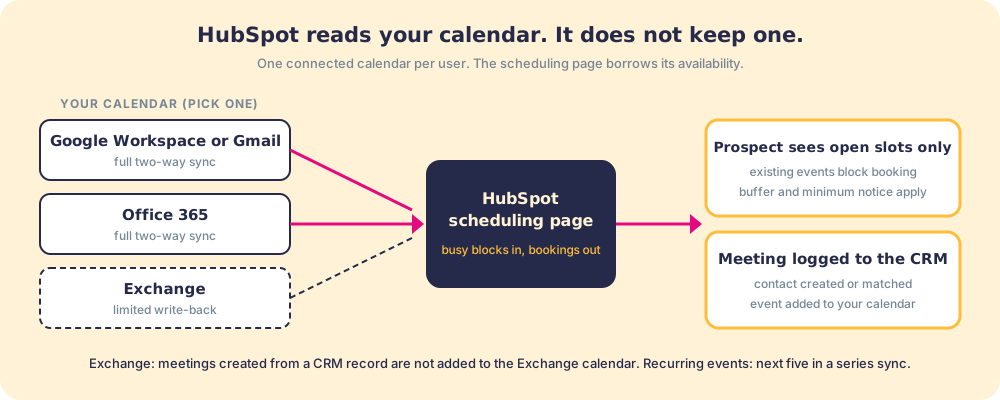
Four details from the help docs decide whether the sync behaves the way you expect:
- One calendar per user. You can connect “one Google, Office 365, or Exchange calendar” per user. A rep who splits life across two Google accounts will find that only the connected one blocks time.
- Recurring events. HubSpot syncs “the next five upcoming events in the series, up to a year in advance.” A weekly standup is protected for about five weeks at a time.
- Exchange write-back. On Exchange, “Meetings created via a CRM record won’t be added to an Exchange calendar,” and meetings created in Exchange do not sync into HubSpot as calendar events. Teams on Exchange should book through the scheduling page, which still respects availability.
- No calendar, no booking. A connected calendar is not required to create or edit a scheduling page, but it is required for a page that shows availability and accepts bookings. “Personal email access” must also be enabled for the user.
If you searched “HubSpot calendar” hoping for a shared team calendar view inside the CRM, that is the gap. The scheduling side is solved by connecting the calendar you already run; for a team view, the calendar app (Google or Outlook) remains the place to look.
How do you set up a HubSpot scheduling page?
Setup takes about ten minutes per page, and the settings that matter are the ones that protect the rep’s day. The path, in order:
- Connect the calendar. In the meetings tool, connect the one Google, Office 365, or Exchange calendar the rep lives in.
- Create the page and pick a type. One-on-one, group, or round robin. The type cannot carry the wrong people, so decide who must attend first (the graphic below helps).
- Set the duration and video link. HubSpot can attach a Zoom, Microsoft Teams, Google Meet, or UberConference link automatically.
- Set availability rules. Buffer time between meetings, minimum notice (how far ahead a prospect must book), the scheduling window, and the toggle to respect working hours.
- Build the form. First name, last name, and email come by default. Add the one or two contact properties your process needs before the call (company size, current tool), plus CAPTCHA and domain blocking if the page is public.
- Share or embed. Send the link, insert it from Gmail or the HubSpot Outlook add-in, or paste the embed code into a page.
Two settings repay attention. Minimum notice is the one that stops a prospect booking a discovery call forty minutes from now while the rep is in another meeting. On round-robin pages, “Prioritize contact owner” shows the owner’s availability when a known contact books, which keeps an existing relationship from being handed to a stranger by the rotation.
What does each HubSpot plan include for meetings?
The plan question decides most setups, so here it is in one place, from HubSpot’s Sales Hub pricing page and the scheduling pages article, both checked October 1, 2026:
| Plan | Scheduling pages | Group and round robin | Branding |
|---|---|---|---|
| Free | 1 personal page | Not available | HubSpot branding shown |
| Sales Hub Starter | Up to 1,000 personal and team links | Yes, paid seat for every participant | Removable |
| Sales Hub Professional | Up to 1,000 personal and team links | Yes, plus Notetaker after the meeting | Removable |
| Sales Hub Enterprise | Up to 1,000 personal and team links | Yes, plus Notetaker after the meeting | Removable |
Users with View-Only seats cannot create scheduling pages at all, which catches out managers who were given a cheap seat to watch the pipeline and then try to build the team’s round-robin page.
What can you embed a HubSpot meeting link into?
The tool generates an embed code for any scheduling page. Drop it into a landing page, a pricing page, a contact page, or any HTML-aware environment and the booking calendar loads on the page. Visitors book without leaving the site, which removes a click on high-intent pages. The common placements are demo request pages, post-webinar landing pages, and contact pages.
The embedded version behaves like the shared link: real-time availability, automatic CRM logging, confirmation emails. The difference is where the prospect sees it. Put a round-robin page on the demo request page and the inbound demo lands on the next free rep without a coordinator touching it.
How does HubSpot Meetings compare to Calendly?
Calendly is the scheduler teams weigh against HubSpot Meetings, and the choice turns on where your CRM lives. Calendly is a standalone, independent scheduling product that has gone deeper on scheduling itself: more routing logic, more event types, and integrations that reach across CRMs. Its pricing page (checked October 1, 2026) lists Standard at $10 per seat per month with the HubSpot integration, and Teams at $16 per seat per month, which is the plan that adds round robin and “Send meetings to Salesforce.” If your team sells out of Salesforce, Pipedrive, or no CRM at all, Calendly is the stronger standalone pick.
HubSpot Meetings wins on a different axis: it is already inside the CRM you pay for. The booking link, the contact record, the deal timeline, and the logged meeting are one system, with no sync step and no second subscription. Choose Calendly when scheduling is the product you need and your CRM is not HubSpot. Choose HubSpot Meetings when you run on HubSpot, because a native meeting logged to the deal timeline beats a better scheduler that lives outside it.
What the HubSpot meetings tool does well
The accounting, without inflation:
- Scheduling friction. Two people agree to meet with one email instead of seven. The core value, and a genuine win.
- Calendar accuracy. Real-time sync means prospects never book into a blocked slot, which eliminates the awkward reschedule.
- CRM logging. The meeting appears on the contact and deal timeline automatically, so the rep does not create the activity by hand.
- Round-robin distribution. For teams with inbound volume, routing meetings across reps without a coordinator is a staffing gain.
- Embed flexibility. Dropping the scheduler onto a page with high booking intent takes almost no configuration.
These are worthwhile wins. They are also, each one, productivity wins. The booking is easier, faster, and better logged. Nothing on this list changes what the rep does in the meeting, how the deal moves, or whether the process gets run.
What happens after a HubSpot meeting is booked?
The booking is the start of the work. On Sales Hub Professional and Enterprise, HubSpot’s Notetaker can join Google Meet, Microsoft Teams, and Zoom calls to “record and transcribe meetings, generate meeting notes, and suggest next steps” (Notetaker article, last updated September 16, 2026). One recent change matters for reporting: as of August 31, 2026, meetings recorded with Notetaker or synced from a video integration create meeting records only, not separate call records, so any dashboard that counted recorded calls needs a second look.
Notes and suggested next steps tell a rep what was said. They do not tell the rep what your process requires next at this stage of this deal, and a rep who books in four seconds and then walks into the call without a discovery framework has arrived at a bad outcome faster.
In our survey of 198 sales leaders for The State of Sales Enablement, guidance delivered in the flow of work split quota attainment from 15 percent to 49 percent. The scheduler is not part of that gap. What decided the number was whether the rep got the right next step at the moment of the work, deal by deal.
The behavior layer is the name for that job: surfacing what the rep should do next, in the flow of work, and making adherence visible to the people who manage the process. Supered is the behavior layer that rides alongside HubSpot. When a meeting lands through HubSpot Meetings, Supered is what shows the rep the prep step your process expects before the call and the follow-up it expects after, and it flags the deal when the recap never goes out. The scheduler and the behavior layer solve adjacent problems. Treating a faster booking as a substitute for a followed process shows up later as a pipeline full of meetings that went nowhere.

A quick recap
- Scheduling pages. One-on-one pages route to one rep; group pages need every selected rep free; round robin spreads bookings across a team. All three are the hubspot meeting scheduler doing its job.
- Calendar sync. One connected Google, Office 365, or Exchange calendar per user. HubSpot has no calendar of its own; it reads yours.
- Plan limits. Free gets one branded page. Starter and up get up to 1,000 links, no branding, and group and round-robin pages with a paid seat per participant.
- Embedding. Drop the scheduler onto a demo or pricing page to cut friction on high-intent traffic.
- The gap. Booking faster does not make the rep run the right play. The behavior layer, which surfaces the next step in the flow of work and captures adherence deal by deal, is a separate job.
What we recommend
Set up HubSpot Meetings. If reps lose time to scheduling email chains, a booking link solves it the same day and the first page costs nothing. If you have inbound volume, round robin with “Prioritize contact owner” switched on earns the Starter seats. If high-intent pages convert to form fills but not to meetings, embed the scheduler there. If your team is on Exchange, book through the scheduling page rather than from the CRM record so the calendar stays whole.
Then look at the pipeline. If reps book more meetings and the deal-to-win rate does not move, scheduling was never the constraint. The next question is whether the right plays run once the meeting lands, and whether you can see that deal by deal. The HubSpot Chrome extension guide covers that layer in full, the HubSpot Sequences guide covers the follow-up that books the meeting in the first place, and you can see how Supered works or book a demo to watch the behavior layer run against your own process.
Booking faster earns the meeting. Running the process earns the close.
Frequently asked questions
What is HubSpot Meetings?+
Does HubSpot have a calendar?+
Is the HubSpot meeting scheduler free?+
What is the difference between a personal, group, and round-robin meeting link?+
Can you embed a HubSpot meeting link on a website?+
Is HubSpot Meetings better than Calendly?+
Does HubSpot Meetings replace the need for a sales process?+
Your process, running itself.