Einstein Activity Capture: What It Records, What It Misses, and Why the Gap Matters
Einstein Activity Capture auto-logs emails and meetings to Salesforce, which solves real friction.
Here is what it records, where its data lives since the Summer '25 change, its real limits, and the job it cannot do.
Einstein Activity Capture (EAC) is a Salesforce feature that automatically syncs email and calendar activity from Gmail or Outlook into Salesforce and relates it to the right contacts, leads, accounts, and opportunities, so reps stop logging it by hand.
There is a useful distinction between a ship’s log and a navigator’s chart. The log records where the ship has been: every heading, every knot, every port of call. The chart shows where it should go next. Both are real tools, and neither substitutes for the other. A captain with a perfect log and no chart knows everything about the past and nothing about the route forward.
Einstein Activity Capture is a ship’s log for the sales CRM. A good one, and a better one than its reputation.
Einstein Activity Capture is a Salesforce feature that automatically syncs emails and calendar events from Gmail and Outlook into Salesforce, reducing manual activity logging for sales reps. Admins and forums shorten it to EAC. It is genuine relief for the data-entry burden (activity, not fields; the blank phone and the stale title are a CRM data enrichment job). Reps send emails from Gmail and the emails appear on the Salesforce contact record automatically. Meetings land on the account timeline without anyone typing them in. The friction that has kept salesforce activity capture rates low for years, the gap between what the rep did and what the CRM knows about it, shrinks materially. The sibling gap, what the CRM knows about the contact, is what enrichment written back to Salesforce closes.
The stakes are measurable. When Salesforce surveyed 7,775 sales professionals for its State of Sales research, reps spent 28 percent of their week selling, with deal management and data entry among the tasks eating the rest.
One more thing before the details, because it changes half of what you will read elsewhere. In Summer ‘25, Salesforce changed where EAC can put your email. Much of the “you cannot report on EAC data” advice still circulating describes the old storage model, and on an org set up since then, it is out of date.
But a log that is full is not the same as a process that is running. The log records what happened. The chart says what happens next.
How does Einstein Activity Capture work?
When you enable salesforce automatic activity capture, EAC connects to each rep’s Google Workspace, Microsoft 365, or Exchange account. In Salesforce’s words, it “tries to associate each address in the From, To, and CC on an email to user, contact, or lead records,” and then matches the activity to account and opportunity records. Calendar events get the same treatment. The activity appears on the Salesforce activity timeline without the rep doing anything.
The sync is background and automatic.

Picture the old workflow before EAC: a rep finishes a call, opens Salesforce in a separate tab, finds the right opportunity, clicks Log a Call, fills in the subject, picks the date, types a note, and saves. This takes two minutes if the rep is organized and five if they are not. Multiply by forty interactions a week and you have a real load, and a real incentive to skip it. EAC eliminates that loop for email and calendar events. The right capture still happens; the rep does not do the work.
Where does Einstein Activity Capture store data?
For most of its life, EAC kept captured email and events in a separate store that Salesforce runs, now called Activity Platform and hosted on Hyperforce. Think of it as a coat check. You hold a ticket (the entry on the timeline), you can see that your coat is safe, but you cannot rummage through the racks to count coats by color, which is roughly what a report does. And the coat check has a rule about unclaimed coats.
The rule is the retention period. Salesforce’s data retention documentation sets it at 6 months by default for orgs with only Standard licenses, adjustable from 3 to 6. Once an org holds at least one paid EAC license, the default rises to 24 months for every EAC user in the org, adjustable from 3 months to 5 years through Salesforce Support. When the period ends, Salesforce deletes the activity. The consolation: data on Activity Platform does not count against your Salesforce storage.
In Summer ‘25, Salesforce added a filing cabinet. A setting called Sync Email as Salesforce Activity makes EAC “capture and store email data as Salesforce records,” which, Salesforce adds, you can “use in reports, workflows, and triggers and access through APIs.” As Salesforce Ben’s Tom Bassett summarized the release in July 2025, email now lands as native Task and Email Message records, and synced events become Event records. Those records follow your org’s storage limits, so the retention clock no longer applies to them. The setting turns on automatically for orgs that sync email in EAC for the first time; orgs that set up EAC earlier have to migrate.
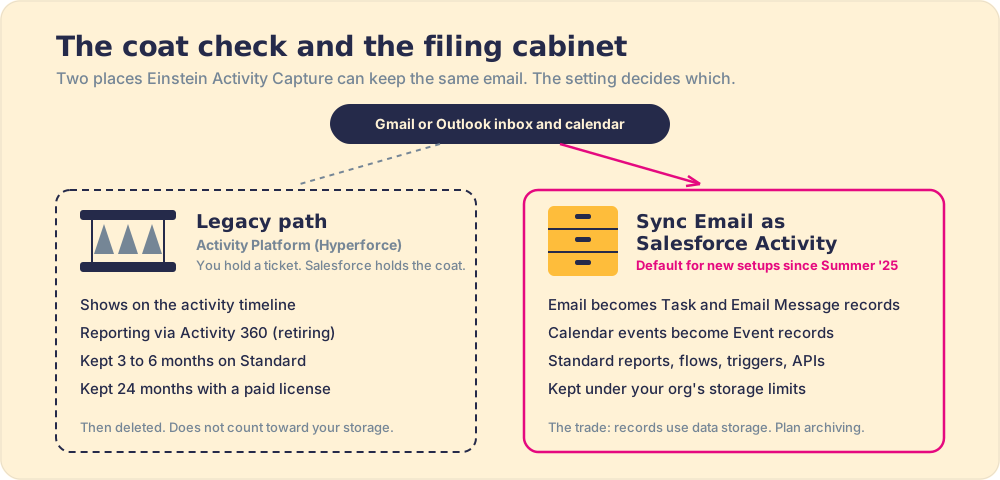
The filing cabinet has a cost, and Bassett’s summary says so plainly: email stored as Salesforce activity consumes data storage, so project the volume and plan an archiving strategy before a 150-rep team starts filing every thread. The coat check is also closing its reporting window. Salesforce is retiring Activity 360 Reporting, Activity Metrics, and the Activities Dashboard, the tools built to report on the old store. Salesforce Ben first reported the retirement for Summer ‘26; Salesforce Help now lists Spring ‘27.
A picture has limits, and this one does too: a coat check does not usually shred your coat after six months. Activity Platform does.
What are the real limitations of Einstein Activity Capture?
Five Einstein Activity Capture limitations matter in 2026. Two of them are the old reputation, reduced; three are newer or less discussed.
- Retention on the legacy path. Activity left on Activity Platform disappears after 3 to 6 months on Standard or 24 months with a paid license. For long sales cycles, that can delete the first meeting of a deal before the deal closes. Syncing email as Salesforce activity removes the clock for email, at the price of storage.
- Reporting in transition. Salesforce’s setup considerations note that data can take up to 24 hours after initial setup to appear in standard reports, and the legacy reporting tools are retiring. An org still running Activity 360 dashboards has a migration to plan.
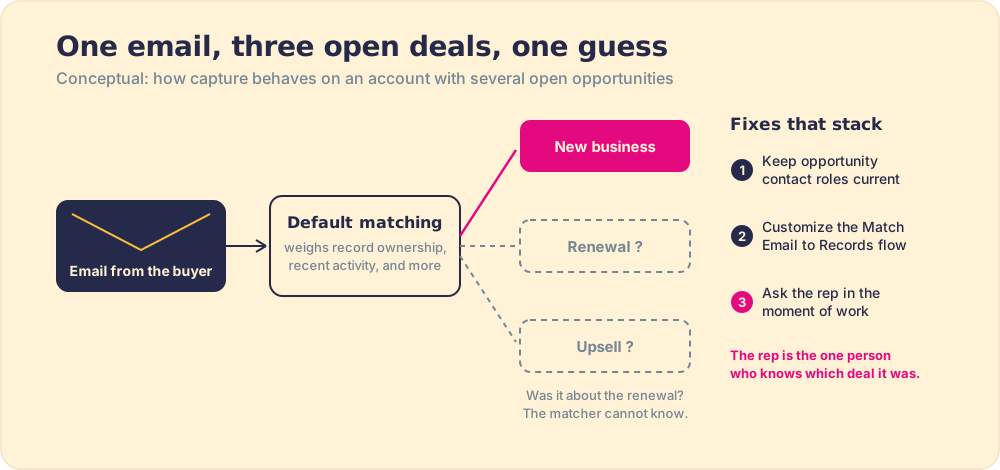
- Opportunity matching on busy accounts. The default matching logic “considers record ownership, recent activity, and other factors.” On an account with one open deal, that works. On an account carrying a renewal, an upsell, and new business, the matcher has to guess.
- Standard caps and connection rules. Salesforce documents EAC Standard as available for 100 users. The connected account must be the user’s primary address, not an alias; EAC cannot run alongside Lightning Sync; one user cannot sync across several orgs; and reps cannot delete emails EAC adds to Salesforce.
- Microsoft plumbing. Microsoft begins disabling Exchange Web Services in Exchange Online in October 2026 and finishes in April 2027. Salesforce documents an upgrade path to Microsoft Graph for Office 365 connections, and an org that skips it will find its Outlook capture going dark.

These limitations do not undermine the value of the tool. EAC does what it was designed to do: reduce manual logging. Each limitation is the cost of an architectural choice, most of them sensible. The fair verdict is that EAC covers one job well and leaves a second one untouched.
The second job is the one that decides the number.
What does Einstein Activity Capture not do?
This is the part that matters most and gets discussed least.
EAC records that an email was sent. It does not know whether the email contained the right talk track for that stage of the deal. It records that a meeting occurred. It does not know whether the rep ran the discovery framework or skipped it. The activity timeline fills up with real, accurate data, and the data tells you what happened. It does not tell you whether the right thing happened, or whether the rep ran the process they were trained to run.
That is the difference between capture and behavior.
In our survey of 198 sales leaders for The State of Sales Enablement, 89 percent of teams had a defined process and 36 percent saw it followed, and guidance in the flow of work split quota attainment from 15 percent to 49 percent. A full activity timeline does not move that needle. A rep who sends the wrong email at the wrong stage logs a beautiful record of doing the wrong thing. The CRM sees the activity; the process sees a miss.

What fills the gap EAC leaves open?
The behavior layer. Supered is the behavior layer that rides alongside Salesforce: it surfaces the next step of your process in the flow of work, delivers the playbook at the moment the rep needs it, captures the CRM update as a byproduct, and makes adherence visible deal by deal. When EAC logs that a rep sent an email, Supered is what determines whether the follow-up was the right one for that stage: the prescribed next step surfaces in the moment the rep is on the record, so the signal from the activity log becomes an action rather than a data point that sits idle. The required field appears when the stage changes. Adherence becomes visible by rep and by stage, which means a manager can coach off real process data rather than hunting for it.
EAC and Supered sit side by side. EAC handles the past-facing job: keeping the activity log clean and accurate without manual entry. Supered handles the future-facing job: what the rep does next, and whether it matches the process they were hired to run. Full-featured CRM adoption requires both. Book a demo to see the behavior layer running against a real process and understand exactly what EAC leaves on the table.
A word on tenet ten, because it matters here: tracking activity is good. EAC exists to make that tracking accurate and automatic. A rep who sends forty emails a week and logs none of them has given you nothing useful. A rep who sends forty and EAC logs all forty has given you an accurate picture of their output. The point is accuracy, and volume follows. Never let activity advance a stage on its own, but do not wave off activity data as meaningless. It is the raw material; the process question is what you build with it.
What are the alternatives to Einstein Activity Capture?
If EAC does not fit your edition, your rep count, or one of its connection rules, the field of automatic activity capture sorts into a few real options, and they answer different questions. A buyer searching for the best activity capture tool is usually solving one of two problems: cleaner logging, or a rep who runs the process.
- The free Gmail and Outlook integrations, plus Salesforce Inbox. The integrations let reps log email and calendar to standard Salesforce objects on demand; Inbox adds open tracking, templates, send later, and insert availability inside Gmail or Outlook. Logging to standard objects used to be their big edge over EAC; since Summer ‘25, EAC can do it too. The details are in the Salesforce Inbox guide.
- Third-party sync tools. Products such as Cirrus Insight and Riva sync email and calendar from Gmail and Outlook into Salesforce for a separate license. Cirrus Insight says it syncs “directly to Salesforce standard and custom objects for standard reporting,” and Riva describes “every email and meeting linked to the right record, including custom objects.” Those are the vendors’ own claims; test them against your edge cases.
- Sales engagement platforms. Tools like Salesloft (which merged with Clari in December 2025) log activity as a byproduct of running cadences, and they nudge the next touch. The nudge is real, but it governs the cadence rather than adherence to your full sales process.
- The behavior layer. This is not a like-for-like swap. It captures the CRM update as a byproduct, the same relief EAC gives, and then does the job none of the capture tools were built for: it surfaces the required next step in the moment the rep is on the record and makes adherence visible by rep and by stage.
Here is how the options compare on the questions buyers ask most. Retention and licensing come from Salesforce’s documentation; third-party rows use the vendors’ own descriptions.
| Option | How capture happens | Gmail and Outlook | Where the data lands | How long it stays | What it costs |
|---|---|---|---|---|---|
| EAC Standard | Automatic, email and calendar | Both, plus on-premises Exchange | Salesforce records with Sync Email as Salesforce Activity on; Activity Platform otherwise | Org storage limits for records; 3 to 6 months on Activity Platform | Included in Starter, Professional, and Enterprise; documented for 100 users |
| EAC with a paid license | Automatic, email and calendar | Both, plus on-premises Exchange | Same as Standard | Org storage limits for records; 24 months on Activity Platform, up to 5 years via Support | Inbox, Sales Engagement, Einstein for Sales, or Revenue Intelligence license, or Performance or Unlimited edition |
| Salesforce Inbox | Rep-side productivity: tracking, templates, send later, availability | Both | Works alongside EAC | One Inbox license lifts org EAC retention to 24 months | Included in Unlimited, Einstein 1 Sales, and Agentforce 1 Sales; extra cost in Professional and Enterprise |
| Native Gmail or Outlook integration | Rep logs on demand | One integration per client | Standard Salesforce records | Org storage limits | Included |
| Third-party sync (Cirrus Insight, Riva) | Automatic, per vendor | Both, per vendor | Standard and custom objects, per vendor | Org storage limits | Separate vendor license |
| Behavior layer (Supered) | CRM update captured as the rep runs the process step | Surfaces in Gmail, Outlook, and Salesforce | Salesforce records | Org storage limits | Separate license; see pricing |

For pure capture, EAC or the native integrations are hard to beat on price and setup. The moment the question shifts from “is it logged?” to “did the rep run the play?”, none of the capture options touch it, and that is a different category of tool. For the wider map of inbox options, the Salesforce email integration guide compares the four native routes side by side.
Einstein Activity Capture: quick answers
These are the questions sales leaders and admins ask about EAC most often, each answered in a few sentences you can lift.
What is EAC in Salesforce?
EAC is the standard abbreviation for Einstein Activity Capture, Salesforce’s built-in sync that pulls email and calendar activity from Google or Microsoft accounts into Salesforce automatically. It matches the people on an email to users, contacts, and leads, then relates the activity to accounts and opportunities. Reps keep working in their inbox, and the timeline fills itself. EAC Salesforce documentation and Einstein Activity Capture documentation describe the same product under two names.
Is Einstein Activity Capture free, and what are its restrictions?
Yes, in its Standard form. Salesforce includes EAC Standard in Starter, Professional, and Enterprise editions and documents it for 100 users. The restrictions: activity left on Activity Platform is kept 3 to 6 months, Activity 360 Reporting and Activity Metrics are unavailable, the Activities dashboard is read-only with 90 days of data, and custom email insights are off, per Salesforce’s edition comparison. Turning on Sync Email as Salesforce Activity takes email off the retention clock.
What are the main limitations of Einstein Activity Capture?
Five, as of 2026: a retention window on data that stays on Activity Platform, a reporting model mid-migration as Activity 360 retires, opportunity matching that guesses on accounts with several open deals, a 100-user Standard allotment with strict connection rules (no aliases, no Lightning Sync alongside it), and a Microsoft connection that needs Graph before Exchange Web Services shuts off. None of the five touches the larger gap. EAC records what happened and says nothing about what should happen next.
Which Salesforce activity capture tool has no data retention limits?
No tool keeps data forever, but any tool that writes activity into standard Salesforce records keeps it as long as your org’s storage and deletion policies do. Since Summer ‘25, that includes EAC itself when Sync Email as Salesforce Activity is on; the 6-month and 24-month windows apply only to activity left on Activity Platform. The native Gmail and Outlook integrations also log to records, and Cirrus Insight and Riva say they write to standard and custom objects.
What’s the best activity capture solution for a team of 50 to 200 sales reps?
Start with EAC Standard plus Sync Email as Salesforce Activity if you run Starter, Professional, or Enterprise with 100 reps or fewer: it is included, native, and reportable. Past 100, Salesforce documents a separate “Standard Einstein Activity Capture (Additional User)” permission set, and a single paid license such as Inbox lifts retention for the whole org, so confirm your contract terms before pricing a third-party tool. At 200 reps, the harder problem is rarely capture. It is whether 200 people run the same process, and in our survey 89 percent of teams had a defined process while 36 percent saw it followed.
What activity capture tools work with both Outlook and Gmail for Salesforce?
EAC does: it connects Google Workspace and Gmail, Microsoft 365, and on-premises Exchange accounts. Salesforce Inbox runs in both, through the Outlook add-in from Microsoft AppSource and the Chrome extension for Gmail. Among third-party tools, Cirrus Insight and Riva both list Gmail and Outlook support. A team with mixed clients can run one capture setup across both.
What’s the best email integration for Salesforce activity capture and email tracking?
The native pair is EAC for capture plus Salesforce Inbox for tracking. EAC logs the email automatically; Inbox adds open tracking, templates, send later, and insert availability inside Gmail or Outlook. Inbox is included in Unlimited, Einstein 1 Sales, and Agentforce 1 Sales and costs extra on Professional and Enterprise. One side effect is worth pricing in: a single paid Inbox license raises the whole org’s EAC retention from 6 months to 24.
How do I build Salesforce reports on captured emails and meetings?
Turn on Sync Email as Salesforce Activity, then report on standard activity objects. Salesforce’s guidance is to use activity reports and the last activity date for general analysis and to make Email Message the primary object for email-specific reports; synced calendar events report as Event records. Allow up to 24 hours after setup before data appears in standard reports. If your dashboards still run on Activity 360 Reporting or Activity Metrics, plan the move now, because Salesforce is retiring both.
How do I handle activity capture when an account has several open opportunities?
Expect EAC to pick one, and plan for the times it picks wrong. The default logic weighs record ownership and recent activity, and since Summer ‘25 matching runs through a standard flow built on the Activities: Match Email to Records actions, which look up opportunities related to the contacts on the email and which admins can customize. Three fixes stack: keep opportunity contact roles current so the flow has a signal, tune the flow to your deal types, and ask the rep at the moment of work, because the rep is the one person who knows whether the email was about the renewal or the upsell.
What’s the difference between Einstein Activity Capture and third-party tools?
EAC is native and included: Salesforce runs the sync, the matching flow, and the storage, and Standard carries no extra license cost for 100 users. Third-party capture tools add a vendor license in exchange for their own sync engine and matching rules, and they describe support for custom objects and CRMs beyond Salesforce. Pick EAC if its rules fit your org; test a third-party tool if one of those rules blocks you, such as email aliases, a user who works in more than one org, or a matching edge case the flow cannot resolve.
What’s the best tool for automatic activity capture of emails and meetings into Salesforce?
For most Salesforce teams in 2026, EAC with Sync Email as Salesforce Activity turned on. It captures both email and meetings, files them as standard records, and ships with the edition you already pay for. Reach for a third-party tool when an EAC rule blocks you, not by default.
What is sales activity capture, and why does it matter?
Sales activity capture is the automatic logging of a rep’s emails, meetings, and calls into the CRM, so the record reflects what happened without anyone typing it. It matters for two reasons. Typing is expensive: in Salesforce’s research, reps spent 28 percent of their time selling. And the log is the raw material of inspection: in our State of Sales Enablement survey, the most-inspected teams hit quota at 6.3 times the rate of the least inspected, and you cannot inspect a step the CRM never saw.
What to use and when
Two decisions sit here, and they are separate:
- Reducing manual entry and keeping the activity log current. EAC does this well, at no extra license cost on the editions that include Standard. Install it, turn on Sync Email as Salesforce Activity, and stop asking reps to log emails and calendar events by hand. Budget for the storage.
- Getting reps to run the process and making adherence visible. That is the behavior layer, and it is a different category of product. The evidence is in the gap between the 89 percent of teams with a documented process and the 36 percent who see it followed. No amount of accurate activity logging closes that gap.
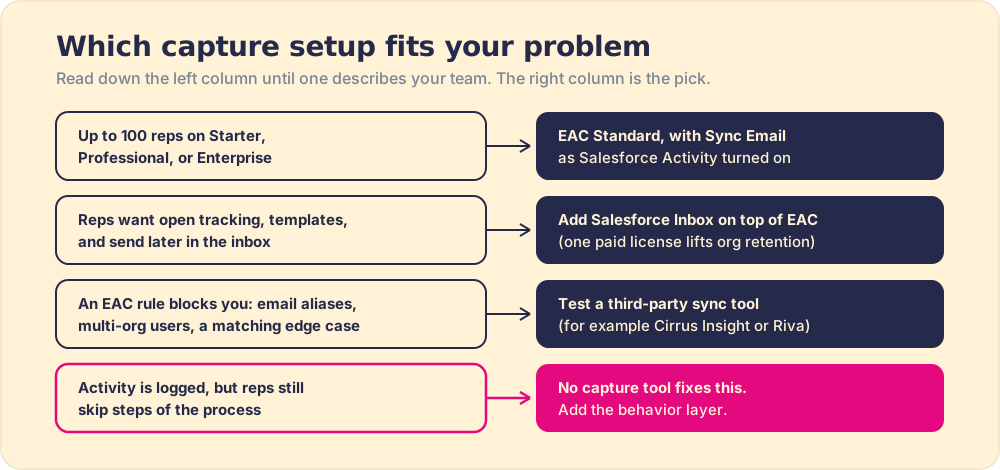
Our recommendation: turn on EAC with Sync Email as Salesforce Activity before buying any capture tool, because on most Salesforce orgs in 2026 it answers the logging question for the price of storage. Then put the money and attention where the SOSE data points, on whether reps run the process, since the 15 percent to 49 percent quota split in our survey tracked where process guidance lived, not how complete the activity log was.
The recap:
- Automatic activity logging. EAC captures emails and calendar events without rep effort, reducing the manual entry burden that has plagued sales productivity for years.
- The storage setting. With Sync Email as Salesforce Activity on, email becomes standard Task and Email Message records and events become Event records, reportable like any other activity.
- Retention on the legacy path. Activity left on Activity Platform expires after 3 to 6 months on Standard or 24 months with a paid license.
- Busy-account matching. Accounts with several open opportunities need current contact roles, a tuned matching flow, and the rep’s judgment.
- The behavior gap. Capture records what happened. Whether the right thing happened is a process question, and that is the job of the behavior layer.
A team with the log and no chart is navigating with half the instruments. The full range of Salesforce Chrome extensions, including where EAC fits relative to other tools, is covered in the best Salesforce Chrome extensions guide and the full Salesforce Chrome extension pillar. If the process adherence question is the one on the table, start there.
Frequently asked questions
What is Einstein Activity Capture?+
Is Einstein Activity Capture free?+
Where does Einstein Activity Capture store data?+
What are the limitations of Einstein Activity Capture?+
How long does Einstein Activity Capture keep data?+
Does Einstein Activity Capture work with both Gmail and Outlook?+
Does Einstein Activity Capture make reps follow the sales process?+
Which Salesforce editions include Einstein Activity Capture?+
Your process, running itself.