Salesforce Adoption: Why It Fails and How to Fix It by Design
Salesforce adoption fails on most teams, and the usual cures make it worse.
Why reps avoid updating Salesforce, what the behavioral science says, and how to drive adoption by fixing the system.
Salesforce adoption is the degree to which reps actually use Salesforce as part of how they sell, and it fails on most teams not because reps are undisciplined but because the system asks them to leave the work to feed it.
Salesforce adoption follows a familiar pattern. A new requirement ships, a training session runs, a message goes out about data hygiene, and for a few weeks the fields fill in. Then they empty again. Within a few months the pipeline board is a work of optimistic fiction, the manager is running weekend audits, and the forecast misses without anyone able to say which deals were never real.
The usual response is more of what already failed: stricter required fields, a heavier training, a policy about commission and CRM completeness. Each initiative treats reps as the problem. Each one fails for the same reason. Reps are not the problem.
Salesforce adoption is a system property. It rises or falls based on how easy the system makes the right action, not on how disciplined the people are. When reps do not update Salesforce, they are responding rationally to a system that asks them to stop selling in order to feed a database. The fix is to the system. The fix is always to the system.

Why does Salesforce adoption fail?
The work of selling does not happen inside Salesforce. It happens in the inbox, on the phone, in the calendar, inside Salesloft or Gong or wherever reps spend the hour. Updating Salesforce means stopping that, opening a new tab, and typing into fields whose purpose was explained once in onboarding and never confirmed again. The fields help the manager build a forecast. The rep gets nothing back.
Salesforce’s own numbers put a figure on the load. Its 2026 sales statistics roundup, published February 3, 2026 alongside the seventh State of Sales report, cites a 2025 Gartner survey: “Sales reps spend 60% of their time on non-selling tasks,” including manually entering customer notes into the CRM (Salesforce). A rep paid to close deals spends most of the week on everything except closing deals, and a slice of that is maintaining a system that does not directly help them close anything.
So the standard cures backfire. More training assumes reps do not know what to do. They know. More enforcement, required fields, commission gated on completeness, buys a complete CRM full of fiction: the rep enters whatever makes the field go green. Both cures misdiagnose the disease. Both treat reps as broken. Reps are behaving sensibly inside a badly designed system.
Is low Salesforce adoption a system failure or a people failure?
It is a system failure, and the distinction decides which fix you buy.
BJ Fogg, who runs the Behavior Design Lab at Stanford, built the behavioral science around exactly this. His model, B=MAP, states: “Behavior happens when Motivation, Ability, and a Prompt come together at the same time. When a behavior does not occur, at least one of those three elements is missing” (Fogg Behavior Model, behaviormodel.org). The rep has motivation. The prompt may even be there (a daily reminder, a manager asking). What is missing is ability, which Fogg defines not as skill but as how easy the action is in context. The CRM update is hard to do in the moment. So it does not happen.
Non-adoption is an ability problem. Which is a friction problem. Which is a system design problem.
Forrester’s Kate Leggett arrived at the same conclusion from the research side. Surveying 414 people who had worked on CRM projects, she found people issues outranked technology as the cause of trouble, and the fix pointed squarely at design: “Don’t expect high adoption rates for CRM processes and technologies that do not have a clear benefit for CRM users.” The graveyard of failed CRM rollouts is not filled with lazy reps. It is filled with systems that asked people to do something that did not help them.
Our data from The State of Sales Enablement makes the stakes concrete. In our survey of 198 sales leaders, 89 percent of teams had a defined process and 36 percent saw it followed, and guidance in the flow of work split quota attainment from 15 percent to 49 percent. When the process reaches the rep where they are already working, they follow it. When it sits somewhere they have to go to, most of them do not.
What are the most common Salesforce adoption problems?
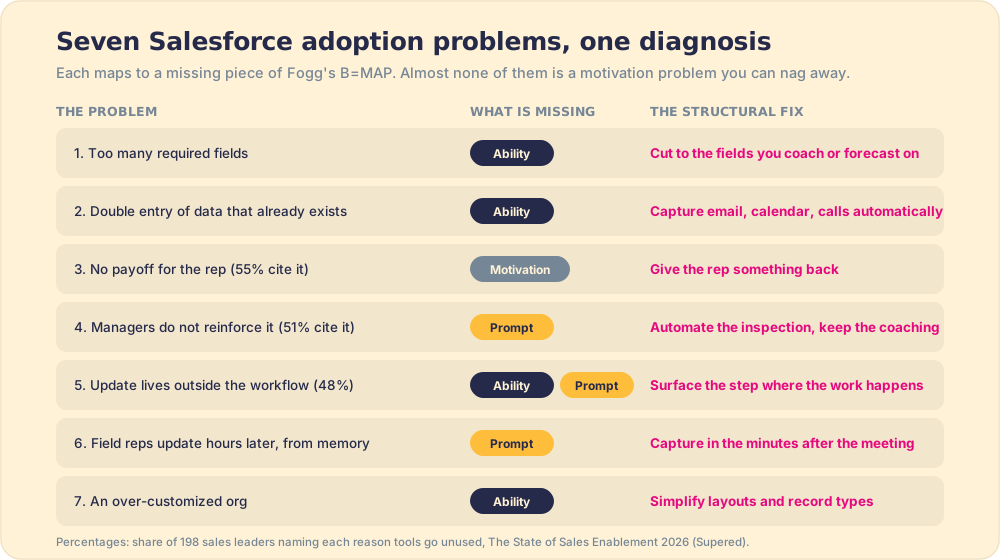
The most common Salesforce adoption problems are too many required fields, double entry of data that already exists elsewhere, no payoff for the rep, managers who do not reinforce the update, an update that lives outside the workflow, field reps updating hours after the meeting, and an over-customized org. Read the list twice and a pattern shows up: six of the seven are about how hard or how late the update is, and only one is about whether reps want to do it.
The research agrees on where the weight sits. Forrester surveyed 414 people who had worked on a CRM project in the previous 36 months: people issues led the list of problems at 38 percent, ahead of the technology itself at 35 percent (Forrester, 2016). In The State of Sales Enablement, the three reasons sales leaders gave for tools going unused were reps not seeing value (55 percent), managers not reinforcing it (51 percent), and the tool not being embedded in the workflow (48 percent).
- Too many required fields. Twenty required fields on an opportunity, four of which anyone reads. Each extra field raises the cost of the update and lowers the odds the other fields are true. Fix: cut to the fields you coach or forecast on.
- Double entry. The meeting is already in the calendar, the email in Gmail, the call in Gong, and the rep is asked to type all of it again. Fix: capture activity automatically and ask the rep only for judgment (next step, buyer’s position).
- No payoff for the rep. The forecast helps the manager; the rep gets a reminder. The 55 percent live here. Fix: make the update give something back, such as the next step, the right asset, or a prep brief.
- Managers who do not reinforce it. The 51 percent, and the SOSE data shows why: at one to five reps per manager, 47 percent of teams report strong process adherence; at six to eight, 23 percent. Managers run out of hours. Fix: automate the inspection so the manager’s time goes to coaching.
- An update that lives somewhere else. The 48 percent. A separate tab is a detour, and teams whose guidance sits inside the workflow hit quota at 49 percent against 15 percent for guidance in docs or wikis. Fix: bring the step to where the work happens.
- Field reps updating from memory. Covered in the next section, because it has its own mechanism.
- An over-customized org. Years of admins adding record types, page layouts and validation rules for edge cases until the opportunity page scrolls for three screens. Fix: an annual layout audit that deletes as much as it adds.
Why do field reps resist updating Salesforce after meetings?
Field reps resist updating Salesforce after meetings because the update arrives at the worst possible moment: they walk out of one meeting, drive to the next, and the only free window to type is the end of the day, when three conversations have blurred into one. What they resist is reconstructing a meeting from memory in a hotel room.
The memory part is measurable. Hermann Ebbinghaus’s forgetting curve, replicated many times since the 1880s, shows people lose roughly 70 percent of new information within a day unless they reinforce it (forgetting curve). A rep who updates the opportunity that evening is writing down the 30 percent that survived, and guessing at the rest. The field that says “next step” gets whatever the rep can recall, which is usually the part the rep said, not the part the buyer agreed to.
So the fix moves the clock. The update has to happen in the parking lot, in the few minutes after the meeting and before the car moves, and it has to be small enough to fit there:
- Three fields, not twenty. Next step, buyer’s commitment, close-date change. Everything else can wait or be captured automatically.
- Capture first, confirm second. A voice note or a call-recorder summary drafts the update; the rep confirms it on the phone instead of composing it.
- The prompt arrives on its own. The calendar event ending is the trigger, so the rep does not have to remember that an update is due.
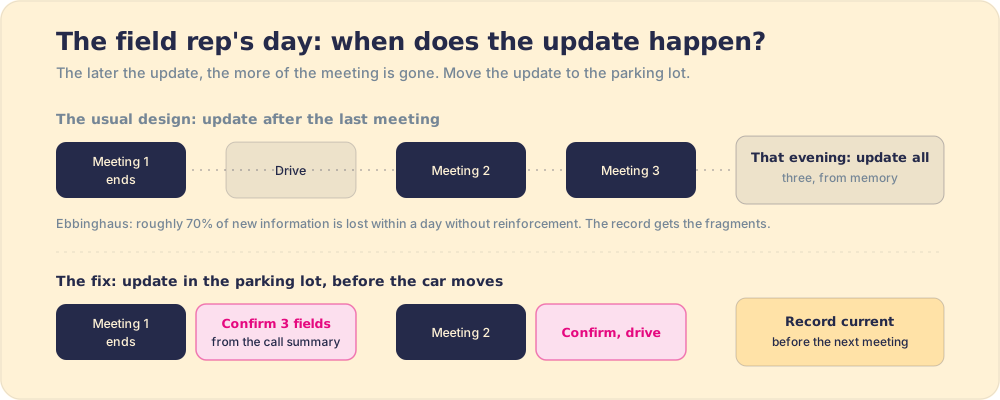
The “lazy” field rep was never the problem. They were filling in forms at the one hour of the day when the meeting was least available to them.
What does a working fix look like?
Consider how a rep experiences a Salesforce update. They are driving a highway: the call, the follow-up email, the next discovery meeting. The CRM update is a tollbooth set off to the side of that road. To pay the toll, they have to exit, park, walk back, enter the data, and return to the highway. On a full day, the rep drives past the exit. You do not raise compliance by posting a sign that says the toll is mandatory. You move the booth into the lane, so the toll is paid as they drive.

Moving the booth into the lane is structural work, not motivational work. The Salesforce activity logging documentation covers the technical layer: what fields exist, what objects they sit on, how to configure required fields and validation rules. The design layer rarely gets the same rigor. Four structural moves make the right action the easy one.
- Curated fields. Cut the form to the fields you will use to coach or forecast. A field you never reference is a toll for no destination. Most Salesforce instances are overbuilt: twenty fields required where four drive every coaching conversation and every pipeline review. Audit what you look at, then require only that.
- Automatic capture. Calls, emails, and meeting activity can be logged by the system rather than re-entered by the rep. It is the most reliable data you have, because no rep had to choose to enter it. Whatever your tech stack allows, capture automatically before asking manually.
- Stage gates. Require input at genuine stage transitions, when a deal moves from discovery to proposal, from proposal to negotiation, not on a daily completeness sweep. A required field at a stage gate asks the rep for something they have freshly thought about. A required field on a daily completeness sweep asks for something they are reconstructing from memory.
- Updates in flow. Bring the next required field and the next process step to the rep inside the tools they already use: HubSpot, Salesforce, Salesloft, Gmail, wherever the work is happening. The update is not a destination they visit. It is part of the motion they are already in.

What tools help with Salesforce adoption?
The right tools for salesforce user adoption are not the ones that add a new destination. They are the ones that remove the detour.
A Salesforce Chrome extension sits in the browser the rep is already working in, surfacing the next required field and the next process step without a tab switch. The update reaches the rep in the flow of the call, the email, the LinkedIn conversation, without asking them to leave it. Adoption rises not because the rep decided to try harder, but because the right action became the easy one.
Supered is the behavior layer built for exactly this: it rides alongside Salesforce and surfaces the next step of your process in the moment of work, delivers the playbook in the flow of work, captures the CRM update as a byproduct, and makes adherence visible deal by deal. The rep does not go to Salesforce to update it. Supered brings the update to the rep, in the tool they are already using, at the moment the step is relevant. Adoption stops being a training problem and becomes a design you can fix. The full range of extensions worth evaluating is in the best Salesforce Chrome extensions guide.
The broader CRM adoption problem has the same root and the same cure. Whether the platform is Salesforce or HubSpot or anything else, the mechanism is identical: if using the system means leaving the work, reps under quota pressure will leave the system. The fix is always to move the system to where the work is.
What we recommend
The conventional Salesforce adoption strategy is a training cycle: announce the expectation, train the behavior, enforce the requirement, watch it decay, repeat. It treats adoption as a willpower problem. Willpower is not the missing ingredient.
The fix starts with a question: where does the work happen, and can the update meet the rep there? If it cannot, the update is a detour, and no amount of training converts a detour into a habit.
Audit your required fields against your actual coaching conversations. Capture everything you can automatically. Gate input at stage transitions rather than sweeping daily. Then ask whether the process can reach the rep in the tools they are already in, rather than asking them to come to it.
Salesforce adoption is not a people problem wearing a CRM costume. It is a design problem. Solve the design and the data follows. Book a demo to see how Supered brings the process to the rep and what that does to adoption, field completeness, and quota attainment on your team.
For the guide to the sales process that Salesforce is meant to capture, and for what happens when that process reaches reps in the moment they need it, the sales enablement software guide covers which tools are built for the flow and which ones add another tab.
Frequently asked questions
What is Salesforce adoption?+
Why does Salesforce adoption fail?+
What is a Salesforce adoption strategy that actually works?+
Is Salesforce adoption a training problem?+
How do you measure Salesforce adoption?+
What are the biggest Salesforce adoption problems?+
Why do field reps resist updating Salesforce after meetings?+
Your process, running itself.