The LeadIQ Chrome Extension in 2026: A Toll Road With a One-Year Pass, and One Town at the End of It
The LeadIQ Chrome extension is free to install and paid per unlock: 1 credit an email, 10 a phone, then free again for a year. What it does on LinkedIn, Gmail and Salesforce, what each plan buys per phone, how to install it, what reviewers report, and the alternatives.
The LeadIQ Chrome extension is LeadIQ's free browser add-on that finds work emails and mobiles from LeadIQ's database on LinkedIn, Gmail, Salesforce and company websites and pushes them to the CRM or sales engagement tool, at 1 credit per email and 10 per phone.
The LeadIQ Chrome extension is LeadIQ’s free browser add-on that finds work emails and mobiles from LeadIQ’s database on LinkedIn, Gmail, Salesforce and company websites and pushes them to the CRM or sales engagement tool, at 1 credit per email and 10 per phone. The install costs nothing. The phone costs ten times the email, and on LeadIQ’s cheapest paid plan five reps share 20 phone numbers a month (leadiq.com/pricing, October 2, 2026). The short version:
- Supered Prospector. The best fit for a team that already pays for Clay: one extension with Clay’s waterfall across 200+ vendors behind it, LeadIQ includable as one step if you keep an account, at $45 per rep per month billed annually.
- LeadIQ’s extension. The best fit for up to five SDRs who capture from LinkedIn straight into Outreach or Salesloft and want CRM ownership shown before they add a record.
- Apollo or Lusha. The non-Clay alternatives: Apollo when phones are most of the spend and a dialer should come in the same seat, Lusha when you want a posted ladder past five users.
What does the LeadIQ Chrome extension do?
LeadIQ’s extension page sells it in its own words: “Add LeadIQ to Chrome to work more effectively without having to jump to yet another platform” (LeadIQ Chrome extension). It does four jobs, and LeadIQ deserves credit for the way it does the second one.
- Contact lookup. Email, mobile and location for the person on the page, on LinkedIn, Gmail, Salesforce or a company website.
- Ownership before the push. The Chrome Web Store copy promises “seeing if records exist, who owns them” in your CRM and sales engagement tool, so a rep can see that a teammate already owns the account before stepping on it (Chrome Web Store, October 2, 2026).
- One-click capture. Contacts go to a lead list, then to Salesforce, HubSpot, Outreach, Salesloft, Gong or Groove. LeadIQ’s June 2024 update added capture from inside Salesforce and Outreach, a “Capture All” button on account pages, and job-change alerts for past champions (LeadIQ blog).
- AI drafting. Scribe, LeadIQ’s AI email writer, inside Outreach, Salesloft and Gmail, and since August 7, 2026 Lando, the agent LeadIQ describes as living “inside your LeadIQ extension,” docked under the Capture button.
The store listing, checked October 2, 2026, reads “LeadIQ: Contact Data in One Click,” with 30,000 users, 4.0 out of 5 from 57 ratings, version 26.9.1, updated October 1. For scale, the same store showed Apollo’s extension at 1,000,000 users and 4.7, and Lusha’s at 400,000 and 4.6, a day earlier. LeadIQ is the smallest of the three by installs, and it has never tried to be the cheapest. It built for the SDR who lives in Outreach.
How does a LeadIQ credit work?
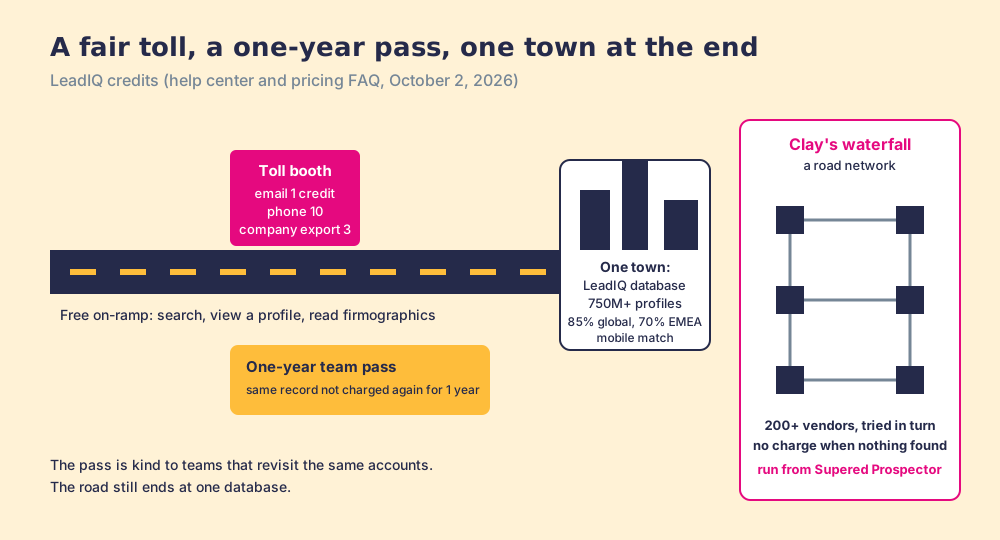
Think of the extension as the on-ramp to a toll road. The ramp is free, and so is driving up to the booth: searching, looking at a profile, reading company firmographics. You pay at the booth when you unlock something, 1 credit for an email and 10 for a phone number, mobile or work, and 3 to export a company (LeadIQ help center, Universal Credits).
Then LeadIQ does something kinder than most toll roads. Once your team has paid for a record, it gets a one-year pass. LeadIQ calls the rule Records Under Management: “You will not be charged again for that same record for one year,” the year starts at the unlock or at the end of your subscription, whichever is later, and “RUM applies at the team level, not just the individual user.” Two reps who both look up the same VP of Sales pay once between them.
The road has one limit that no pass fixes. It leads to one town. Every lookup asks LeadIQ’s database, which its pricing FAQ describes as “a live dataset of 750 million plus professional profiles, refreshed every month,” with “an 85% global match rate, with 70% in EMEA” for mobiles. Those are good numbers, and they are LeadIQ’s own. They also say that roughly one mobile in seven worldwide, and three in ten in EMEA, is somewhere the road does not go.
How much does the LeadIQ extension cost?
All three plans include the Chrome extension, and the Free plan includes it with 50 credits a month for one user. The Pro price on the page is a slider, which is why search results disagree about it: the static HTML reads “$200 /month,” and a script replaces it with the real figure when the page loads. The LeadIQ pricing page walks through that, and the full 53-step ladder. The rungs that matter for an extension user, rendered on October 2, 2026:
| Plan | Annual billing | Monthly billing | Credits a month | Users | Phones a month at most | Per phone (annual) |
|---|---|---|---|---|---|---|
| Free | $0 | $0 | 50 | 1 | 5 | n/a |
| Pro, entry | $15.00 a month | $20.00 a month | 200 | Up to 5 | 20 | 75 cents |
| Pro, 1,000 | $37.50 a month | $50.00 a month | 1,000 | Up to 5 | 100 | about 38 cents |
| Pro, top | $217.69 a month | $290.25 a month | 6,750 | Up to 5 | 675 | about 32 cents |
| Enterprise | Contact LeadIQ, annual only | n/a | Custom | Custom | Custom | n/a |
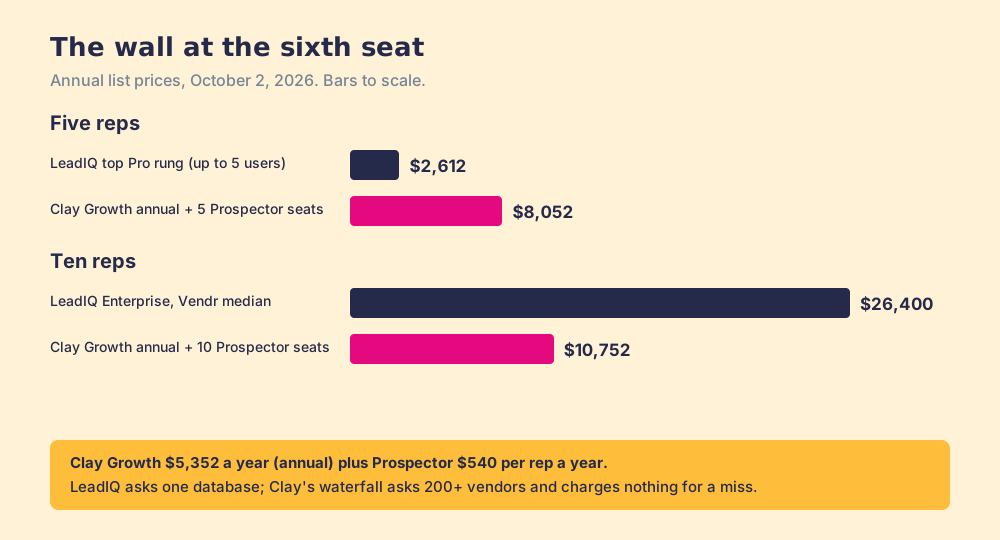
“Phones at most” assumes every credit goes to a phone at 10. The users column is the part to read twice. Pro covers up to five users from one pool, so the $15 entry plan is 20 phones a month for the whole team, four a rep. At the top of the slider, 675 phones a month across five reps is 135 each, about six a working day. Past five users the path is Enterprise, where Vendr reports a median contract of $26,400 a year (Vendr, last updated February 2026), roughly ten times the $2,612 a year that the top Pro rung costs on annual billing.
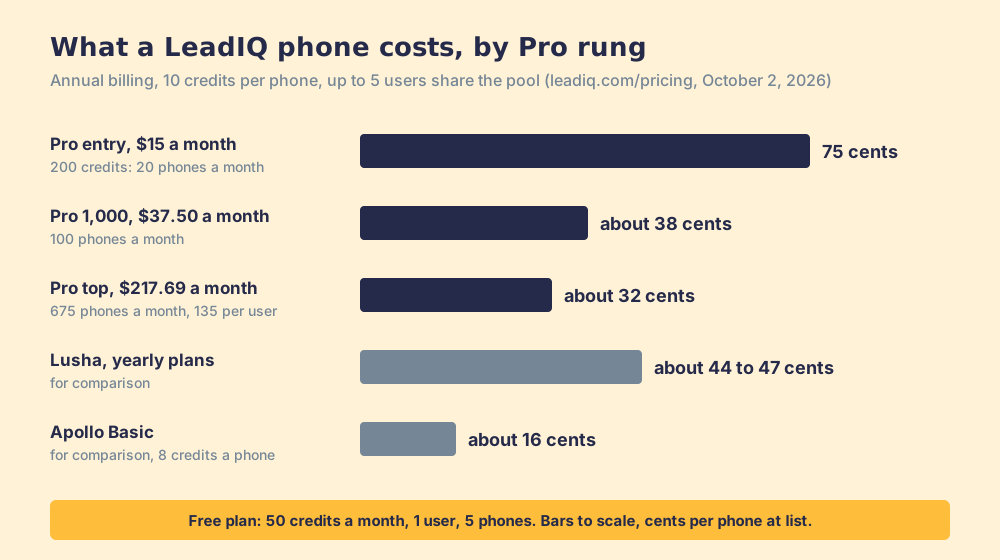
For comparison at list price: Apollo Basic at $49 a seat a month billed annually works out to about 16 cents a phone at 8 credits each, and the Lusha extension to about 44 to 47 cents on yearly plans (the Apollo vs LeadIQ page and the Lusha Chrome extension page show the working). LeadIQ’s one-year pass narrows that gap for a team that keeps revisiting the same accounts, and widens it for a team that always needs new people.
How do you install the LeadIQ Chrome extension?
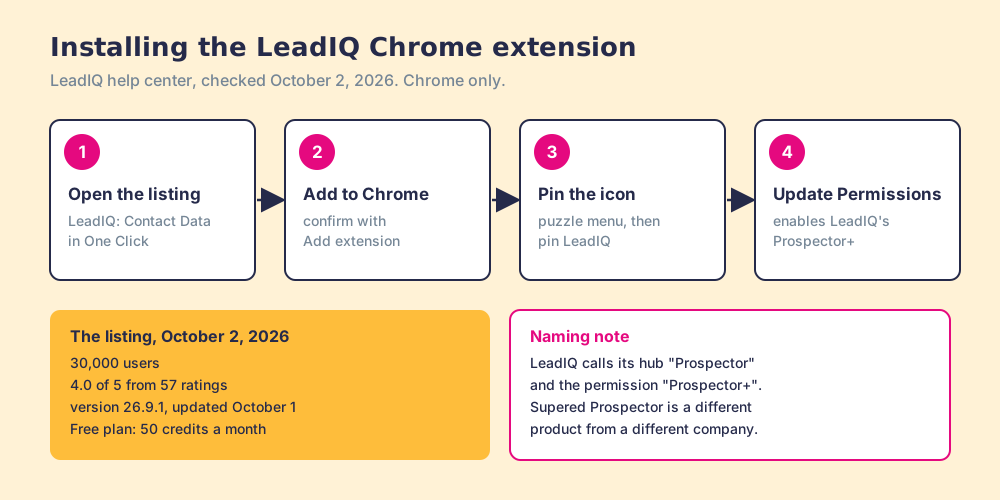
LeadIQ’s install guide lists four steps (LeadIQ help center):
- Open the LeadIQ listing in the Chrome Web Store and click “Add to Chrome.”
- Click “Add extension” in the pop-up.
- Open Chrome’s extensions menu (the puzzle icon) and pin LeadIQ to the toolbar.
- Click the LeadIQ icon and choose “Update Permissions” to enable what LeadIQ calls “Prospector+.”
The guide adds that “the extension is only available through Chrome at this time,” so reps on Edge, Safari or Firefox are out. The panel can sit as a side panel or a pop-up, with the position and width set in Chrome’s settings.
One naming note, because it trips people up in search. LeadIQ uses “Prospector” twice: its prospecting hub carries that label in LeadIQ’s navigation, and the extension permission is “Prospector+.” Neither has anything to do with Supered Prospector, which is our product, runs inside the Supered Chrome extension, and appears later on this page. Seamless.AI, UpLead and Cognism also sell things called Prospector. Read the company name, not the product name.
What do reviewers say about the LeadIQ extension?
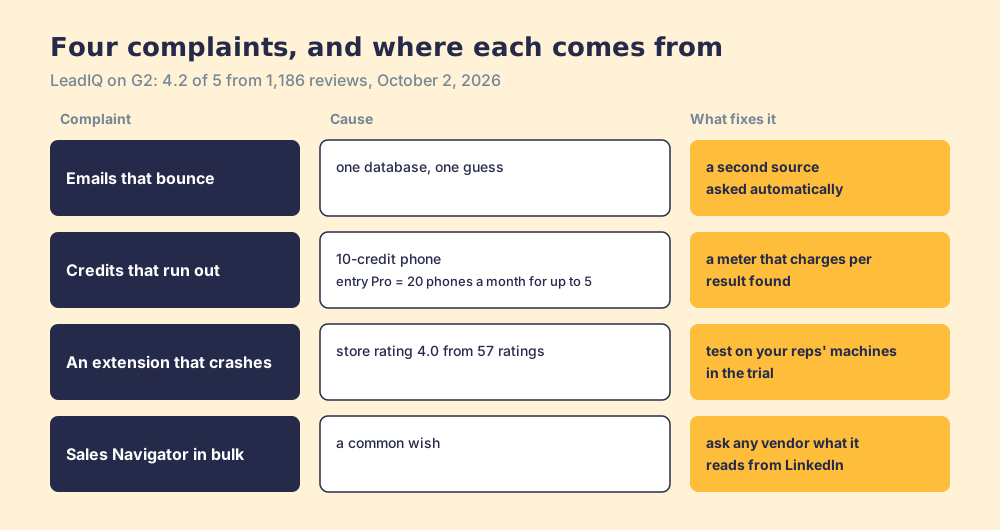
LeadIQ held 4.2 out of 5 from 1,186 reviews on G2 on October 2, 2026. LeadIQ’s own extension page says “4.3/5 G2 rankings,” so trust the live G2 count over the marketing badge. G2’s head-to-head with Apollo scores the two nearly level on ease of setup (8.9 each) and puts LeadIQ behind on quality of support (8.2 against 8.8). The complaints sort into four, and the first two trace back to the town and the toll.
- Emails that bounce. “The only downside that comes to mind is that some of the email addresses extracted by LeadIQ are not correct,” a head of partnerships wrote in September 2026. One database means one guess per contact.
- Credits that run out. “Credits are way too expensive,” a small-business reviewer wrote in June 2026, and an SDR earlier called the basic plan “restrictive due to its insufficient mobile credits.” The 10-credit phone is the cause.
- An extension that misbehaves. “Chrome extension fails critically very often, forcing us to reset Google Chrome completely,” an account development rep at an enterprise wrote in January 2026. The store’s 4.0 from 57 ratings sits below Apollo’s and Lusha’s.
- Sales Navigator in bulk. “I would love to be able to export multiple pages in SalesNav at the same time,” an enterprise reviewer wrote in September 2026. Before you buy any extension for that job, LeadIQ or ours, ask the vendor what it reads from LinkedIn and how. LinkedIn’s help center says it does not permit “browser plug-ins, or browser extensions that scrape, modify the appearance of, or automate activity on LinkedIn’s website” (LinkedIn Help).
None of this makes LeadIQ a bad extension. For five SDRs who capture into Outreach and revisit the same named accounts all year, the one-year pass and the ownership check are worth the toll. The trouble starts at the sixth rep, or at the 15% of mobiles the town does not have.
Why trust this page?
I started RevPartners, a HubSpot partner that did only sales implementations, sold roughly twice as much Sales Hub as any other partner, and reached Elite tier in 13 months. Supered came out of that work and is the #1 sales enablement app on the HubSpot marketplace, with 5.0 from 122 reviews there and 4.9 out of 5 from 81 reviews on G2 (checked October 1, 2026). We make Supered Prospector and rank it first below for teams that have Clay. The weights are printed so you can flip them; flip them for five SDRs on Outreach and LeadIQ climbs into the top two.
How does the LeadIQ extension compare with the alternatives?
The lens is a mid-market or SMB team, ten to fifty reps, that wants contact data reps use where they already work and a leader who can see which lists turn into pipeline. Each criterion is scored 1 to 5 and weighted: coverage of the contact you need (x3), rep-side delivery (x2), price structure for mid-market (x2), what the leader sees after the capture (x2), bundled outreach (x1), out of 50. The scores match the LeadIQ alternatives page so the pages read together.
| Rank | Tool | Grade | Score | Best fit | CRM integration | Setup effort | Pricing (plan with the extension) | Reason to switch from LeadIQ |
|---|---|---|---|---|---|---|---|---|
| ref | LeadIQ extension | B | 27 | Up to five SDRs capturing into Outreach or Salesloft | Native (Salesforce, HubSpot, plus Outreach, Salesloft, Gong) | Minutes | Free; Pro $15 to $217.69 a month billed annually, up to 5 users | Stay if capture into a sequencer is the job |
| 1 | Supered Prospector | A | 44 | Teams that already pay for Clay | Native (HubSpot, Salesforce, Pipedrive) | Live in under a week on an existing Clay account | $45 per rep per month, billed annually, plus your Clay plan | 200+ vendors per lookup, no charge for a miss, seats one rep at a time |
| 2 | Apollo | A- | 36 | Small teams wanting data, dialer and sequences in one seat | Native (HubSpot, Salesforce) | A day | $49 per seat per month, billed annually | About 16 cents a phone, outreach in the plan |
| 3 | Lusha | B+ | 28 | Like-for-like extension with a posted ladder | Native (HubSpot, Salesforce, Pipedrive) | Minutes | From $449.10 a year (Starter) | Posted prices past five seats |
| 4 | Kaspr | B- | 25 | Email-first reps on LinkedIn | Native (HubSpot, Salesforce, Pipedrive) | Minutes | $49 per seat per month, billed annually | Unlimited B2B emails under fair use |
LeadIQ’s 27 is coverage 3, rep-side delivery 4, price 3, what the leader sees 1, outreach 2. The rep-side 4 is earned by the ownership check and the push into five destinations. The leader score is 1 because LeadIQ’s team analytics, on its hub page, track “Leads captured, Connection rates, Email deliverability, Integration usage” (LeadIQ): counts at the booth, with nothing about what happened to the contact afterward. Prospector’s coverage score is Clay’s waterfall coverage, credited to Clay, and its outreach score is low on purpose, since it has no sequencer, dialer or drafting.
Corporate status, checked October 2, 2026: LeadIQ is independent and private, founded in 2015, with $41.5 million raised and a $30 million Series B in March 2021 (Clay dossier); a news search found no acquisition. Its 2026 moves point at AI: Lando in the extension, an official MCP connector in Claude, and since March 24, 2026, data supply to Outreach’s AI Revenue Agent. Kaspr has been part of Cognism since 2022. Apollo and Lusha are independent.
Where does Supered Prospector fit?
If LeadIQ is a toll road to one town, Clay is the road network, and its waterfall is the dispatcher that tries one town after another until it finds the person. A GTM engineer writes the route once: ask this provider first, then that one, stop when a verified email or phone comes back. Clay describes it as checking “multiple providers to return the most verified emails (lower bounce rate) and phone numbers (higher connect rate),” from “200+ data and AI vendors” (clay.com), and its pricing page adds the rule a single database cannot offer: “If an enrichment returns no result, you’re not charged Data Credits or Actions” (clay.com/pricing, October 2, 2026).
LeadIQ can be one of those towns. It joined Clay’s directory on September 1, 2024, marked “Bring Your Own Account Required,” so it runs on your own LeadIQ account. LeadIQ’s own FAQ already frames its match rate as meaning “fewer vendors in your data waterfall.”
Supered Prospector puts that waterfall in the rep’s browser. It runs inside the Supered Chrome extension, on the team’s own Clay account, and reps never log in to Clay. Supered does not bring its own database; it brings Clay’s waterfall, which is every database, routed, and that is why we chose Clay as our only data provider and why Clay is not a row in the table above. What a rep gets:
- Lookups from where they already are. A LinkedIn profile, a Sales Navigator list, a company website, or the HubSpot, Salesforce or Pipedrive record.
- Context before the push. The matching CRM record and whether the prospect was already worked in the past, the same courtesy LeadIQ’s ownership check offers.
- The GTM engineer’s tables as buttons. The rep picks a flow; the Clay table runs, then sends to the CRM. Field mapping is set once.
- Lists the leader can follow. Found, worked, closed: the manager sees which lists reps are working and how each lead ended, qualified, recycled or disqualified, and coaches from what converts.
The arithmetic, on Clay’s annual price. Clay Growth is $446 a month billed annually, $5,352 a year, with 6,000 data credits a month; Prospector is $45 per rep per month, billed annually, $540 a rep a year (Prospector). Five reps cost $5,352 plus $2,700, or $8,052 a year. Ten cost $10,752. LeadIQ’s top Pro rung is $2,612 a year for five users, so on list price LeadIQ is cheaper for a five-rep team, and we would not pretend otherwise. The trade is what stands behind each lookup: one database with a one-year pass on one side, 200+ vendors that charge nothing for a miss on the other, and on the LeadIQ side a wall at the sixth seat.
Choose something else if you do not have Clay. Prospector runs on the customer’s Clay account and does nothing without one, and somebody has to build the tables; Clay’s own homepage says “GTM engineers build on Clay.” Choose something else, too, if you are three SDRs revisiting a fixed list of named accounts, because LeadIQ’s one-year pass makes repeat lookups free and its entry plan is hard to undercut. The sourcing use case shows the setup when Clay is already in place, and the Clay Chrome extension page shows what reps see.
Which should you choose?
Two questions settle it: does your team pay for Clay, and how many reps need the extension.
- LeadIQ’s extension, kept. The pick for up to five SDRs who capture into Outreach or Salesloft, revisit the same accounts, and value the ownership check. Size the credit slider for phones, at 10 credits each, before you size anything else.
- Apollo. The pick when phones are most of the spend and the team wants a dialer and sequences in the same seat, at about 16 cents a phone on Basic.
- Lusha. The pick when you need a sixth seat on a posted price, with a 5-credit phone.
- Supered Prospector. The pick when the team already pays for Clay and wants one extension with every source behind it, added one rep at a time, and a view of which lists got worked and how each lead ended. Keep a LeadIQ account only if its data earns a step in the waterfall.
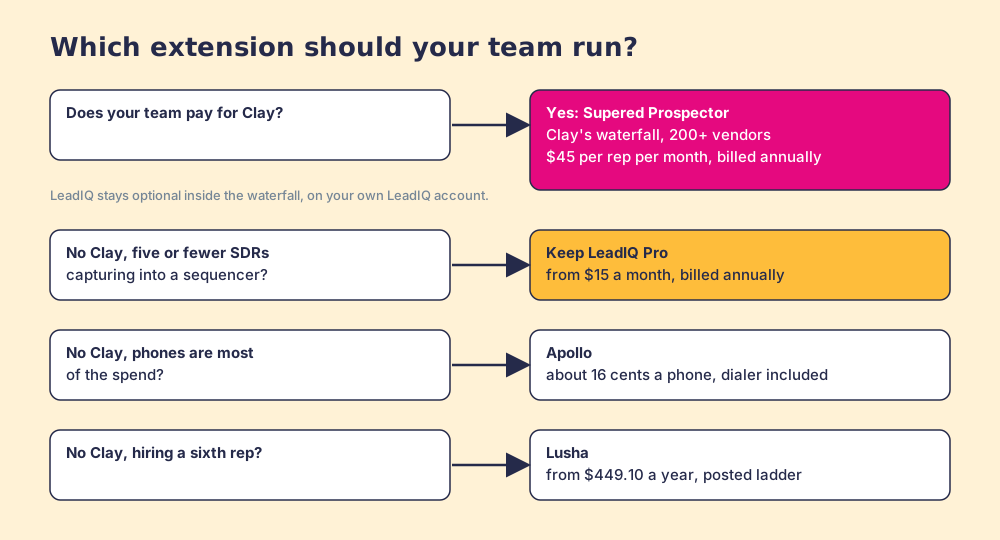
What I recommend depends on one fact about your stack. Without Clay, the LeadIQ extension is a good, fairly priced tool for a small SDR team, and the move before renewal is to count unique phone unlocks: if phones are most of the toll and the accounts keep changing, Apollo’s meter is about a fifth of LeadIQ’s entry rate per number. With Clay, stop paying a second toll on a road to one town. Give reps the dispatcher where they already work, pay nothing for the stops that come back empty, and follow each list from found to closed. A Prospector demo on your own Clay account shows it working from a LinkedIn profile.
Frequently asked questions
Is the LeadIQ Chrome extension free?+
How many credits does the LeadIQ extension use per contact?+
Which browsers and sites does the LeadIQ extension work on?+
Can LeadIQ data run inside Clay instead of the extension?+
Is LeadIQ Prospector the same as Supered Prospector?+
What is the best alternative to the LeadIQ Chrome extension?+
Everything we have written on LeadIQ
More on LeadIQ
Supered Prospector vs LeadIQ: the side-by-side- LeadIQ Alternatives in 2026: Five Seats, One Bucket, and the Sixth Rep
- LeadIQ Pricing in 2026: A $15 Sticker, a $26,400 Median, and a Phone That Costs Ten Credits
- LeadIQ Review 2026: A Fine Faucet, and the Question of the Water
- Apollo vs LeadIQ in 2026: The House, the Delivery Van, and the Market
- ZoomInfo vs LeadIQ in 2026: The Superstore and the Tool Belt
Your Clay waterfall, where reps already work.