HubSpot Data Cleanup Starts With Your Forms: Noah Stambovsky on 160 Forms and One Master Form
Noah Stambovsky once added one question to 160 HubSpot forms by hand. On Becoming Admin he explained how cloned forms corrupt hidden properties, create duplicate companies, and how an AI-built API audit and a master form plan clean it up.
HubSpot data cleanup is the work of finding and fixing the sources of bad CRM records, such as duplicate companies, stale hidden properties and redundant forms, so new data comes in clean instead of being scrubbed after the fact.
A client once asked Noah Stambovsky to add one question to their HubSpot forms: where did you hear about us? It should have been a small job. The account had 160 forms, and every one asked the same questions, so Noah opened all 160 and added the field by hand. “While that’s great, that’s billable time,” he said. “This is approaching the amount of time to just overhaul the forms.”
That job is why Noah starts any HubSpot data cleanup with the forms. He has spent more than five years in HubSpot, writes a tips newsletter, competes in the Admin Arena, and writes dystopian science fiction in Vermont when he is not in a portal. When Cameron Conner and Lindsey Smith had him on Becoming Admin, he called his opening answer a rant, and Cameron gave the problem a name: a form addiction.
How does a HubSpot account end up with 160 forms?
Noah has been on the other side of this, inside a marketing team. A marketer needs attribution for a new campaign or landing page and does not want to build “something technical with UTMs.” So they clone an existing form, and the copy comes with its own built-in list of who filled it out. “I understand in the short term that is very very convenient,” he said. Then someone looks back after two or three years “and your account has 160 forms.”
The hidden fields break first. A form writes a source value into a hidden property, and every clone carries it along. “Now that that property is either being still written in and it has it has no accuracy anymore because it’s just being written into like every form we’ve made in the last year or we’re not even using that property anymore,” Noah said. Any lead source report built on that property counts the wrong thing.
HubSpot’s account cleanup feature will not catch this either. It removes unused contacts, deals, emails, landing pages, workflows and other assets on a monthly schedule, and forms are not on its list (HubSpot Knowledge Base). An admin has to go find them.
Why do form fields create duplicate companies in HubSpot?
Lately Noah keeps running into forms that create other records. A form asks for company name or industry, but not the website. The setting that creates companies from email domains is off. Four people from the same company fill out the form, and the account now holds four duplicate companies. That would not happen, Noah said, “if you just hadn’t had company fields on the form at all.” With the setting on and no company fields on the form, HubSpot would have made “one company made by their email addresses that they would have all been automatically rolled up into and associated to.”
HubSpot’s documentation explains why. HubSpot deduplicates contacts by email address and companies by the company domain name property (HubSpot Knowledge Base). When a form submission includes company properties, the contact is associated with the company in that submission, whatever the automatic association setting says (HubSpot Knowledge Base). A company field without a domain gives HubSpot nothing to match on.
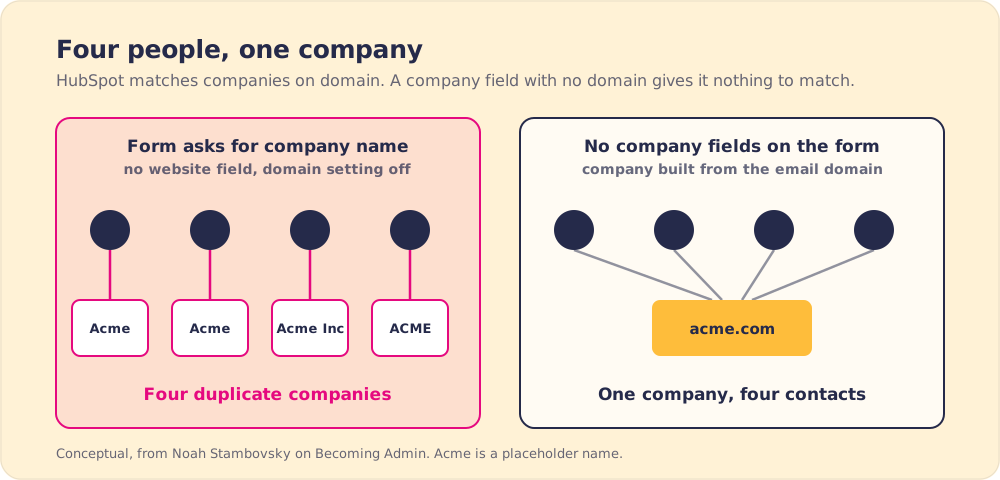
Swapping the company field for a contact property takes minutes on one form. The trouble is the count. “You now have 160 forms where you have to go and do that.”
Gartner puts the average cost of poor data quality at $12.9 million a year per organization (Gartner). In a sales team, duplicate companies show up as a rep calling the copy, missing the history on the real record, and pipeline split across both.
How do you audit hundreds of HubSpot forms quickly?
Noah used to audit forms by hand, opening each one and marking in a spreadsheet which company fields it had. “It took an incredibly long amount of time,” he said. “And it turns out AI can do it in like five minutes.”
He has an LLM code a custom HubSpot app with read-only scopes for forms, companies, contacts and tickets. The standard forms export does not list hidden or company properties, so the app builds “a advanced export spreadsheet that gives me the form name the form ID how many hidden fields does it have what are the hidden fields on this one.” He adds submission counts for the past year, so he knows which forms carry live traffic. The same app flags forms with identical fields and forms “within an 85 percentage similarity to each other.” He then hands the spreadsheet back to an LLM and asks which forms have the problem worst.
In The State of Sales Enablement 2026, 46% of respondents said they already use AI for CRM admin and cleanup (The State of Sales Enablement 2026). Noah keeps his app on read access, so the AI finds the problems and a person makes the changes. He would like the app to swap forms out for him too, “but I’m not there yet.”
What is a master form strategy?
The hosts asked Noah to explain it like they were five. “When a HubSpot admin and a HubSpot account love each other very much,” Noah began, and then settled for explaining it to a 13-year-old. If two pages ask for the same information with two forms, make them one form and embed it in both places. He gave upkeep as the reason, since “one of the hardest things to automate in HubSpot there’s no workflow action for go into this form and change this property.”
He turns the audit into a consolidation plan, a spreadsheet with each existing form, its ID, the pages it lives on, and the master form that will replace it. For one client that meant about six master forms. A pivot table then shows, for example, that the master demo form replaces 12 existing forms, and the team swaps it into those pages.
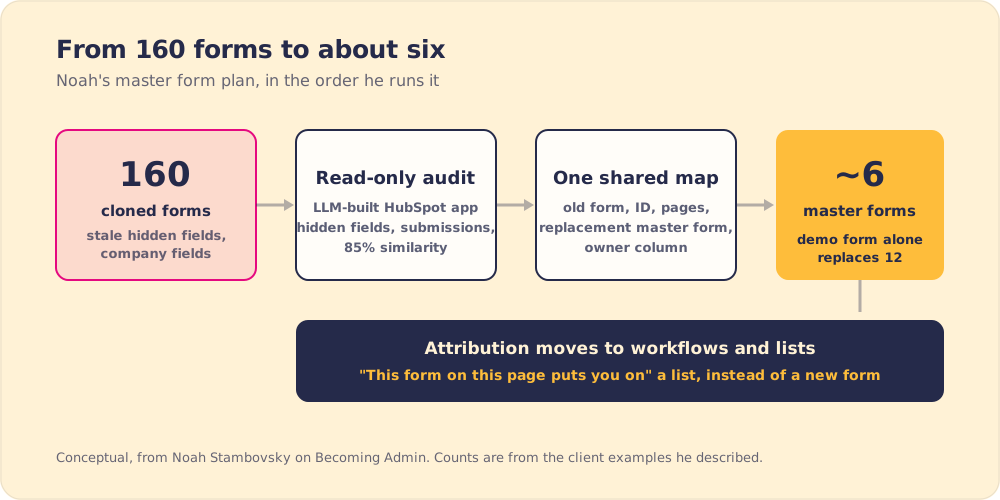
Marketers still need to know where a lead came from, and Noah gives them another way to see it. “Don’t think of a new form as your way of like sort of sectioning someone off,” he said. “Make a workflow that says this form on this page puts you on” a static list, or writes the value that used to live in a hidden field. Our guide to HubSpot workflow dependencies covers what to check before you start rewiring workflows like these.
Should you delete old HubSpot forms?
One host asked a question he said haunts him in his sleep. Is it worth cleaning up forms that get no submissions, or can you leave them to die?
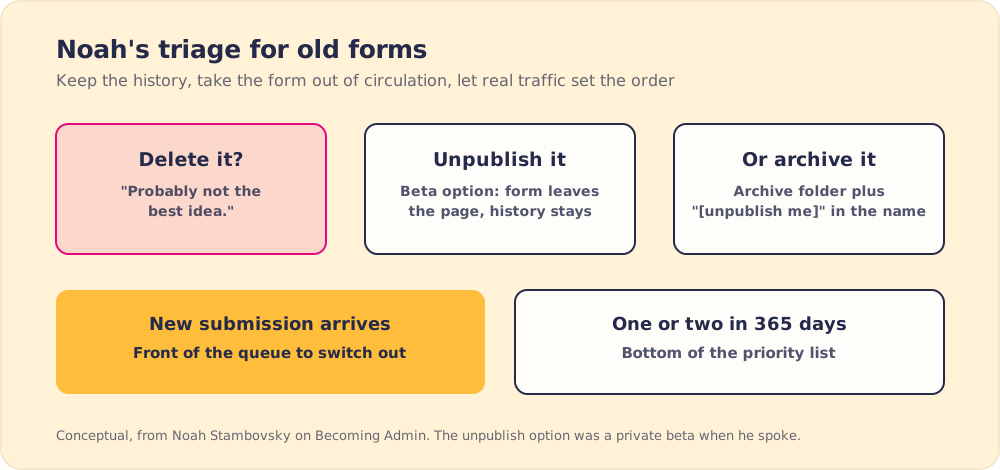
Noah does not delete them. “I think deleting them is probably not the best idea.” He prefers an unpublish option that was in private beta when they spoke. It keeps the form and its submission history but pulls it off the pages. When people object that a page would then have no form, he answers, “good. that will make you feel the urgency of switching these out.”
Without the beta, he moves old forms into an archive folder and puts “[unpublish me]” at the start of each form name, so a marketer does not drop one onto a new page by accident. If a new submission arrives on an “unpublish me” form, that form jumps the queue. Forms with one or two submissions in the last 365 days go to the bottom.

Who should own HubSpot forms after the cleanup?
The hosts asked whether one owner is a bottleneck. Noah has watched it go two ways. At one client a marketing ops person rode along through the whole project, so she knows the rules, controls form permissions and will onboard new marketers. “She’s going to be like the keeper of the knowledge.” At another, five different points of contact are meant to enforce the rules, and none of them was there while the rules were set.
The keeper also has an SOP, a screenshot guide or video showing how to take a master form and make it a campaign’s “own little corner” for tracking. Our SOP template lays out the parts that make a guide like that get followed. Noah also said he “would love for them to get on super,” meaning Supered, because enforcing the process in the moment would make the keeper’s life easier.
For the cleanup itself, he wants one shared spreadsheet. On a 185-form project, teammates kept separate sheets and lost track of what had changed. His fix is “a single authoritative spreadsheet that everyone has access to with owner columns for any proposed change.”
Is a form submission custom object worth it?
The hosts expected listeners to “shudder a little bit” at a custom object for form submissions, and asked Noah to make his case. He sees three or four submissions from one person in a single day. The contact record shows the history, but it does not freeze “what the traffic source was at the point in time that they filled out that form.” With a submission object, the source that moved a contact from lead to MQL is one click away, and one submission’s answers sit beside the next. In Salesforce it shows up in the sidebar for SDRs.
He would drop it once HubSpot’s own submission object gets a record view and full reporting. Custom objects also require an Enterprise subscription (HubSpot Knowledge Base). And in Lindsey’s rapid-fire round, asked whether a custom object or a simple workflow is better in general, he picked the workflow. “I’m a little bit of a custom object radical with my form submission stuff,” he said, but the workflow is the “more common occurrence.”
A HubSpot data cleanup plan for forms
Noah’s order, from the episode, first step to last:
- An audit of every form. Hidden fields, company properties and yearly submissions, pulled by a read-only app.
- A consolidation map. Each form paired with the master form that replaces it, in one shared sheet with owner columns.
- Company fields off. Use a contact property and let the email domain build the company.
- Unpublish or archive. Keep history and let new submissions set the priority.
- One keeper and one SOP. Attribution goes through workflows and lists instead of new forms.
What should an admin fix first?
Noah goes after the forms because they keep writing records after any one-time scrub. Run the audit, pick the master forms, move attribution into workflows, and give one person the keys. HubSpot’s cleanup tool skips forms, so this part is on the admin.
For the wider set of habits that keep a CRM trustworthy, our guide to CRM best practices covers ownership and inspection past the forms. And if you ever need a field added to 180 forms by hand, one host joked, Noah will happily do it over the weekend.
Frequently asked questions
Where should a HubSpot data cleanup start?+
Why do HubSpot forms create duplicate companies?+
Should you delete old HubSpot forms?+
What is a master form in HubSpot?+
Can AI help audit HubSpot forms?+
Who should own HubSpot forms?+
Your process, running itself.
Turn the playbook into rep behavior.
More from Becoming Admin

HubSpot Custom Integration or Third-Party App? George Murray's Rules for Admins
George Murray
How to Become a HubSpot Admin: Jorge Fuentes on Degrees, 51 Certifications and Owning Problems You Didn't Create
Jorge Fuentes