HubSpot Workflow Dependencies: The Iceberg Under Every Copy
A workflow's logic floats on properties, lists, forms, templates, and pipelines it never mentions until it breaks. The full dependency map, type by type, and how each copying approach handles the part below the waterline.
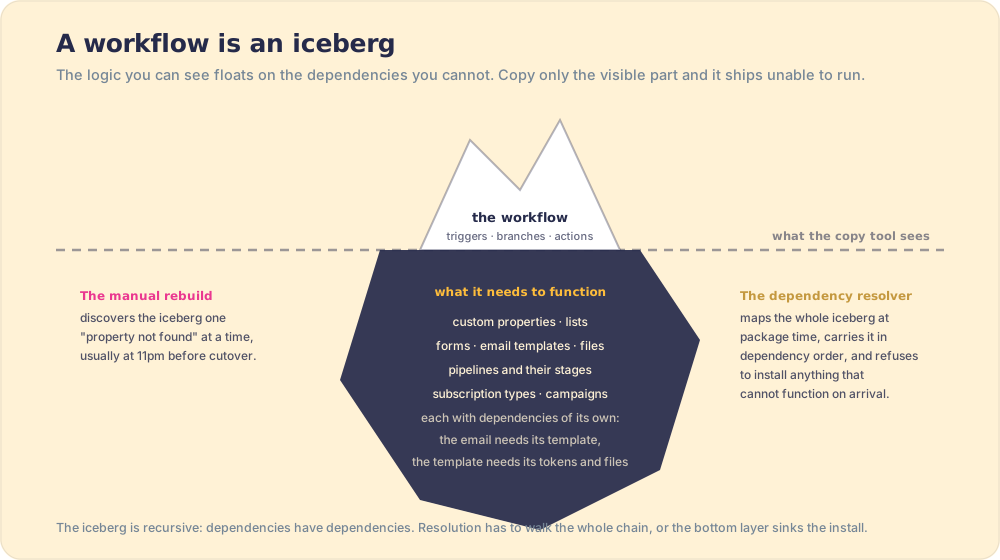
HubSpot workflow dependencies are the assets a workflow needs to function, custom properties, lists, forms, email templates, files, pipelines and stages, and they are recursive: the email needs its template, the template needs its files, so a working copy carries the whole chain.
The crew that moved your piano did an immaculate job, and the piano still will not play in the new house, because the piano was never merely the piano. It was the tuned room, the humidity, the bench at the right height, a system pretending to be an object. HubSpot workflows are systems pretending to be objects, and every broken cross-portal copy traces back to that disguise. The workflow you can see, triggers, branches, actions, floats on assets it never mentions until they are missing: the custom property a branch reads, the list an enrollment checks, the template a send uses, the stage a deal action moves toward.
That submerged part has a shape worth mapping precisely, because every approach to copy hubspot workflows is, underneath, a theory about how to handle it, and a hubspot workflow migration succeeds or fails on that theory. Map first, theories after.
What do HubSpot workflow dependencies include, type by type?
The chain, asset type by asset type, drawn from what installs have to resolve in practice (and documented per type in Supered’s package reference):
- Workflows. Custom properties (read and written), lists, forms, email templates, the pipelines and stages their deal actions touch, and the emails they send, each of which opens its own chain below.
- Marketing emails. Custom properties for personalization, files, the lists in their send-to fields, their templates, their subscription type, and the campaign they report into.
- Email templates. Personalization tokens and embedded files. Sequences multiply this: one sequence carries every template inside it.
- Dashboards. The reports inside them, and the custom properties and objects those reports query.
- Pipelines. Stage properties and stage requirements, the fields your process demands at each gate.
- Custom objects. The deepest chain: associations, properties, and everything required for the object to function as an object.
Two properties of this map decide everything downstream. It is recursive: dependencies have dependencies, and a one-level copy fails one level down. And it is invisible until runtime: nothing in the workflow editor lists the chain, so manual movers discover it the way sailors discover icebergs, by impact, one “asset not found” at a time, traditionally late at night before a cutover.
How does each copying approach handle the iceberg?
Underneath, this is the oldest problem in software engineering: coupling. The degree to which one component depends on others determines how far a change ripples, and tightly coupled assets cannot be moved in isolation without breaking, which is exactly why a workflow is a system pretending to be an object. Each tool below is a different theory about how to handle that coupling.
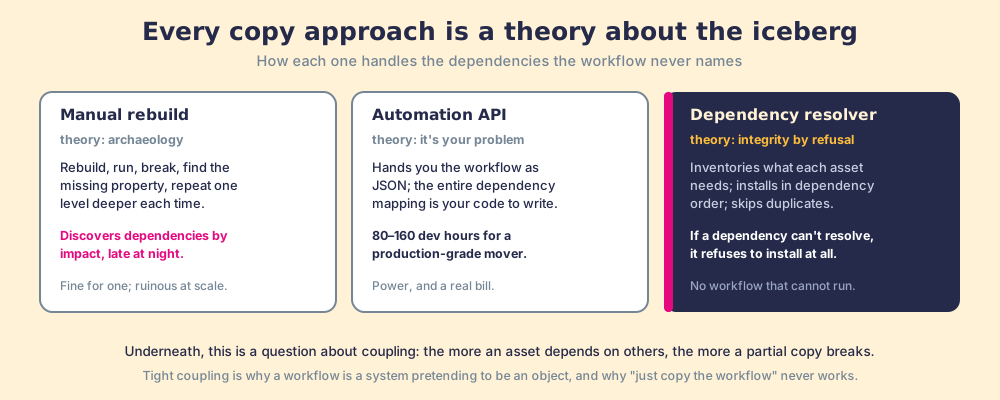
- Manual rebuilds handle it by archaeology: rebuild, run, break, find the missing property, rebuild, break one level deeper. Fine for one simple workflow; ruinous at portfolio scale, and the reason hand-built implementations bill the hours they do.
- The Automation API hands you the workflow definition as JSON and makes the entire dependency mapping your code’s responsibility, which is the honest reason credible estimates for a production-grade custom mover run 80 to 160 development hours.
- JetStack built its product around this problem for implementation pipelines, dependency identification with pre-copy validation, and their dependencies explainer is a fair read on why the problem is hard. Their guide also names the right evaluation question: what happens when a referenced property does not exist in the target?
- Supered’s dependency resolver answers that question across the whole 75+ type catalog, not workflows alone, and the per-type behavior above is public documentation rather than demo-ware. At package time the resolver inventories what each asset needs and adds it without double-adding. At install time, dependencies land first in dependency order; same-name assets are recognized and skipped rather than duplicated; pipelines merge missing stages into existing pipelines with stage properties attached; and an asset whose dependency genuinely cannot be resolved does not install at all, the install errors by design, because shipping a workflow that cannot run is the failure mode this whole field exists to prevent (troubleshooting reference). Integrity by refusal, on every asset type, documented.
Honest edges, also from the docs: campaign assets work as reverse-dependencies (an email picks up its campaign automatically, but a campaign does not drag in every asset that mentions it, deliberately, to avoid hauling half the portal), datasets are unsupported, and complex design templates route through HubSpot’s own copy feature, which handles them well.
Why is dependency order the hard part, not dependency discovery?
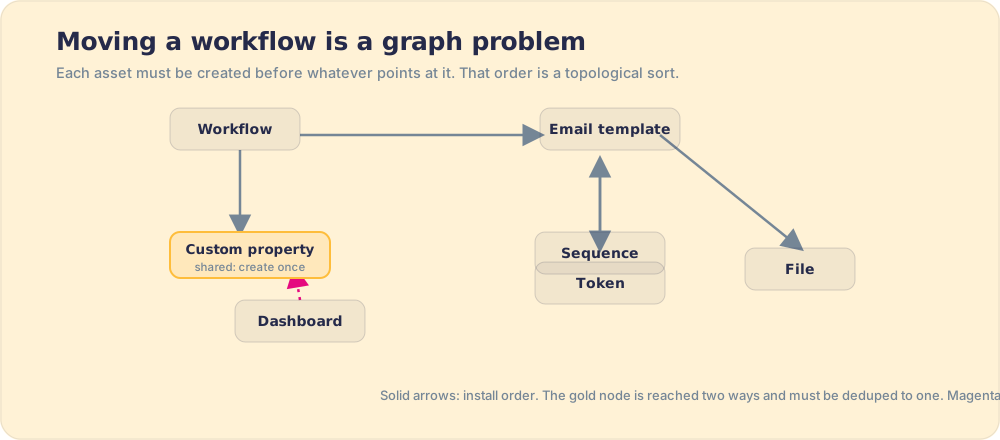
Because finding the dependencies is tedious, but installing them in the right sequence is a genuine algorithmic problem, and getting the sequence wrong breaks the install even when nothing is missing. Picture the chain as a graph: each asset is a node, each “needs” is an arrow. A workflow points at a property; the property must exist before the workflow that reads it. A sequence points at its email templates; the templates must land before the sequence that enrolls into them. Install in the wrong order and a perfectly complete package still fails, because an asset arrives referencing something that has not been created yet. The correct order is what computer scientists call a topological sort of the dependency graph, the same operation a build system like Make or a package manager like npm runs before it compiles or installs anything (on topological sorting). It is a solved problem, but only if you have actually modeled the graph. A human dragging assets across portals by hand has modeled nothing; they are guessing at the order and discovering the edges by failure.
There is a second trap the graph exposes: the cycle. If asset A needs B and B needs A, no clean order exists, and a naive installer either loops forever or double-creates. This is why dedupe-safe behavior is not a nicety. When the same property is reachable through two different assets, the resolver has to recognize that it is the same node and add it once, not twice, or the target portal fills with duplicate “Deal Stage (1)” properties that break reporting in ways nobody traces back to the migration. The package literature has a name for the broader failure when these graphs are mishandled at scale: dependency hell, the tangle that npm, apt, and every serious package manager were built to escape (on dependency hell). A HubSpot portal is a small dependency-hell engine waiting to happen, and the only durable defense is to treat the move as a graph problem, resolve it in topological order, and recognize shared nodes so nothing is created twice.
Why do dependencies decide more than the copy?
Because the dependency chain is also the process chain, and that is the part the copying conversation keeps missing. The custom property a workflow reads is usually a field a rep was supposed to fill; the stage requirement a pipeline carries is an expectation someone set about how deals advance. Move the assets without that context and the new portal has machinery nobody operates: the workflow fires, the field it reads stays empty, and the automation runs perfectly on nothing. The field data behind this is the standing one: 89 percent of teams have a defined process, 36 percent see it followed (The State of Sales Enablement), and no dependency resolver moves that number, because the missing dependency is behavior. That is why Supered packages carry the process layer alongside the configuration, the cards and guidance that reach reps in the flow of work, so the field the workflow depends on has a human dependably filling it. The full three-layer argument runs through lift and shift, applied and the HubSpot implementation guide.
The recommendation
Respect the iceberg. Before any cross-portal move, inventory the chain (or use tooling that inventories it for you), insist on dependency-order installs and dedupe-safe behavior, and ask every vendor the JetStack question, then ask for the documentation behind their answer, because the difference between dependency marketing and dependency engineering is whether the per-type behavior is written down where you can check it. Ours is, type by type, and the full named-and-priced field comparison lives in copy HubSpot assets. And keep one eye on the dependency no tool resolves: the rep on the other end of the field. Machinery that arrives without its behavior runs perfectly on nothing.
Frequently asked questions
What are HubSpot workflow dependencies?+
Why do copied HubSpot workflows break in a new portal?+
How do you find a workflow's dependencies before copying it?+
Does Supered handle workflow dependencies automatically?+
What dependencies does HubSpot's sandbox sync handle?+
Your process, running itself.