Process Documentation Software: Buy a Navigator, Not a Map
Process documentation software has solved writing and storing. The buying decision that matters now is whether the document stays connected to the live work, or starts decaying the day it ships.
Process documentation software is the category of tools for capturing, organizing, and maintaining how work gets done, and the buying decision that matters is whether the documentation stays connected to the live work or sits in a library decaying from the day it is written.
There is a moment in every operations leader’s life when they decide, this time, the processes will be documented properly. A tool is bought. A heroic quarter of writing follows. The library is beautiful, the kickoff is warm, and eight months later a new hire asks how renewals work and a veteran answers, without malice, “ignore the wiki, I’ll show you.” The library did not fail for lack of effort. It failed because the team bought a place to put documents when their problem was keeping documents true and getting them used.
That distinction is the whole buying guide. Process documentation software is the category of tools for capturing, organizing, and maintaining how work gets done, and in 2026 the products in it have specialized so far that “which tool” is the wrong starting point. Start with which of the two hard problems you have, decay or distance, because writing, the problem most tools advertise against, stopped being hard the day AI capture matured.
What jobs does process documentation software do?
Four jobs hide under the label, and most vendors do one well:
- Capture. Turning a performed task into a written, illustrated guide. Scribe is the runaway leader here (a $1.3 billion valuation as of November 2025 and over 5 million users), with Tango close behind on capture quality, though Tango’s April 2025 pivot toward AI browser automation means its documentation roadmap is now the side bet, not the business. Capture is, by any honest reading, solved. Teams shopping the leader usually dislike what the guides do after capture, not the capture itself, which is what a job-sorted list of Scribe alternatives untangles.
- Storage and organization. The library: Notion, Confluence, Document360, SharePoint. Mature, cheap, and already in your stack. Storage was solved a decade ago, which has not stopped teams from buying it twice.
- Maintenance. Keeping the library true as the process changes. Almost nobody sells this directly, because it is partly a software problem (stale-page detection, ownership, review triggers) and partly an operating habit. It is also where most libraries die.
- Operationalization. Moving the document into the work: the checklist that runs (Process Street), the procedure that surfaces inside the CRM at the step where it applies and reports whether it ran (Supered, for revenue teams). This is the job that changes outcomes, and the full tool-by-tool comparison lives in our SOP software breakdown.
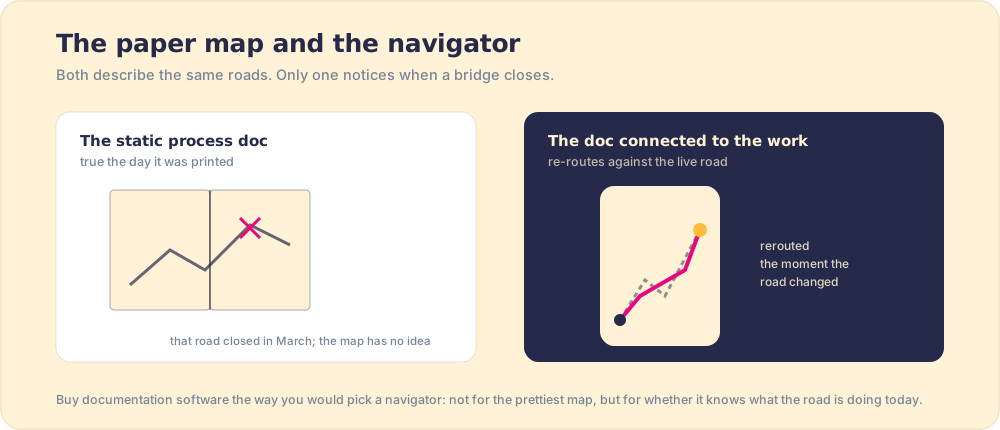
A process document is a map, and the work is the territory. A paper map is a marvel on the day it is printed, and it has one flaw that no amount of cartographic skill fixes: it does not know the bridge closed in March. Most documentation tools are magnificent map-printers. The ones worth a premium are navigators, connected to the road, re-routing when reality moves. (The picture has an edge: GPS never needed the driver to care. Your documentation still does, which is why measurement has to ride along with delivery.)
Why does the library keep failing?
Two structural reasons, and neither is your team’s diligence.
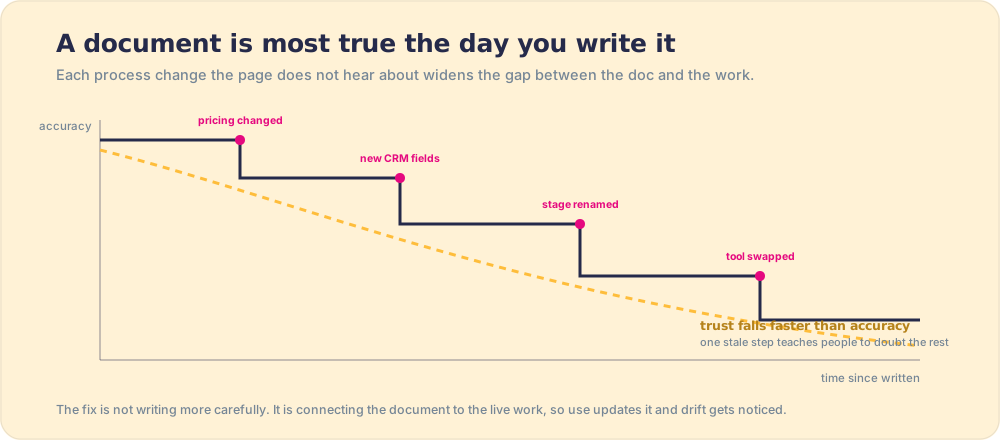
- Decay. The document is most true the day it is written. Pricing changes, a stage gets renamed, a tool gets swapped, and the page hears about none of it. Worse, trust decays faster than accuracy: a reader who hits one stale step starts doubting every other page in the library, and the veteran’s “ignore the wiki” is born. Decay is not an edge case; it is the default physics of documentation, and any tool without a maintenance loop is selling you a depreciating asset.
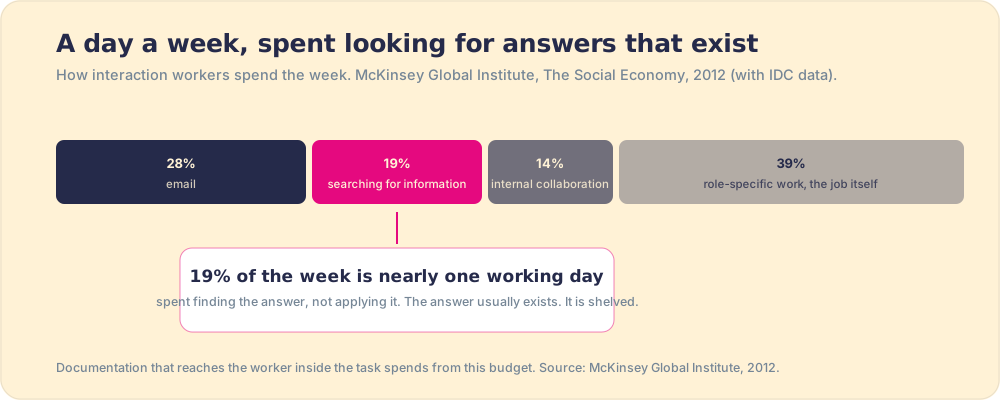
- Distance. The McKinsey Global Institute measured the cost of shelved knowledge: interaction workers spend 19 percent of the week, close to a full working day, searching for and gathering information (McKinsey, 2012). The day is spent finding answers that exist. Worse, leaving the task to go find them is not free: Gloria Mark’s UC Irvine study of interrupted office work found that once a worker breaks off to chase something elsewhere, it takes an average of 23 minutes and 15 seconds to get back to the original task (Mark et al., UC Irvine, 2008). So under time pressure the more common move is not searching at all and running on memory, which is how documented processes go unfollowed by people who would pass a quiz on them.
Our own field data puts a revenue number on the distance problem. In The State of Sales Enablement, 89 percent of 198 sales teams had a documented process and 36 percent saw it followed; teams whose process reached reps in the flow of work hit quota at 49 percent versus 15 percent when it lived in a doc, wiki, or LMS. Two independent bodies of evidence, McKinsey on the cost of fetching and ours on the cost of not fetching, pointing at the same verdict: the shelf is the problem, not the prose.
Is AI making process documentation software obsolete?
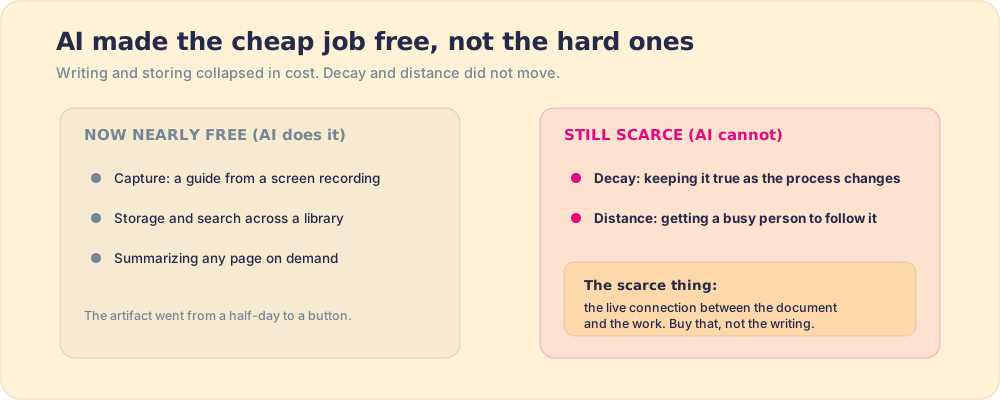
It is making one job free, and it is worth being precise about which one, because the answer reshapes the whole buy. AI capture tools now generate a competent, illustrated guide from a screen recording in minutes, and a copilot will summarize any wiki page on demand. The artifact, the thing the category was built to produce, has gone from a half-day of writing to a button. If documentation software were a writing tool, AI would be eating it alive.
But notice what AI does not touch. It does not keep the guide true to a process that changed yesterday, because the model has no way to know your renewal flow moved unless someone tells it. And it does not cause a busy person to follow the guide mid-task, because following is a behavior and a summary is still information. AI has made the cheap problem cheaper and left the two expensive problems, decay and distance, exactly where they were. So the category is not dying; it is being forced to show its real value. A tool that only writes and stores is now competing with a free feature inside everything else you own. A tool that keeps documentation true and carries it into the work is doing the part AI cannot, which is the part that was always worth paying for. The scarce thing was never the document. It is the live connection between the document and the work, and that is what survives the AI wave intact.
How should you choose process documentation tools?
In this order, each question eliminating options before the next:
- The failing job. No documentation exists: buy capture (Scribe; how to write the artifact well is in how to write an SOP). Documentation exists and cannot be found or trusted: fix maintenance and ownership before buying anything new. Documentation is found, trusted, and still not followed: your problem is delivery, and only the operational layer touches it.
- The maintenance loop. Ask the vendor what happens when your process changes. “Someone edits the page” means you are buying the decay curve above. Look for stale-page signals, named ownership, review triggers tied to events, and ideally documentation that updates as a side effect of use.
- Distance to the work. Where does the document appear relative to where the task happens? Same screen and moment, or a tab and a search away? For operational processes, a runnable checklist closes the distance. For revenue processes, the answer should live inside the CRM, which is the entire argument of where your sales process should live.
- The inspection signal. You can only expect what you inspect. If the tool cannot tell you whether the documented process happened on real work, you will be hoping, and hope does not survive contact with a quota quarter.
One honest caveat the vendor lists skip: if your team is under ten people, the wiki you already own plus the discipline of one named owner beats any new purchase. The tooling earns its price when the team is big enough that the author, the maintainer, and the follower are different people.
The recommendation
Buy in the order the failure happens, not the order the demos impress. Capture is cheap and solved, so take it (Scribe, or the capture features inside whatever you own). Storage you already have; do not buy it twice. Then spend the real budget where the real problem is: the maintenance loop and the last yard into the work. For general operations that means a runnable-checklist layer; for sales teams it means the process living and being measured inside HubSpot or Salesforce, which is the job Supered was built for, the Behavior Layer rather than another library, with the mechanics at how it works. The map-printing era of this category is over. The navigators are what is worth paying for, and the wider field, SOPs, workflow documentation, walkthroughs and all, is mapped in the process documentation guide.
Frequently asked questions
What is process documentation software?+
What is the best process documentation software?+
What is the difference between process documentation and an SOP?+
Why does process documentation fail?+
Is AI making process documentation software obsolete?+
Your process, running itself.