HubSpot Custom Integration or Third-Party App? George Murray's Rules for Admins
George Murray learned integrations by mapping an Italian hotel booking system in a language he does not speak. On Becoming Admin he explained when to buy an app, when to build a HubSpot custom integration, and who should own it.
A HubSpot custom integration is a connection between HubSpot and another system that a team builds for its own data and processes, usually through HubSpot's APIs, because no marketplace app fits without compromise.
George Murray learned his first property mappings in Italian, a language he does not speak. He was living in Europe and working for a travel company that needed to connect a new booking system, “a niche small Italian hotel booking system.” He was working out what each mapping did and what it touched, “but it was all in Italian at the same time.”
Back in the UK, his next company moved off a legacy system into HubSpot and still needed data from the old one. “I absolutely fell into it 100%,” he said of his start in HubSpot. Integrations are now most of his job. In one part of his current work the sales team sits in Salesforce, and in another it sits in Dynamics, so he runs a HubSpot Salesforce integration on one side and a Dynamics connection on the other. Lindsey Smith and Cameron Conner asked him on the Becoming Admin episode about building versus buying how he decides between building in HubSpot, buying an app and writing a HubSpot custom integration, and who should own the result.
When should you use a third-party app instead of building in HubSpot?
George is a fan of the platform. “HubSpot’s brilliant,” he said, and “there are a few things that third-party apps do better.”
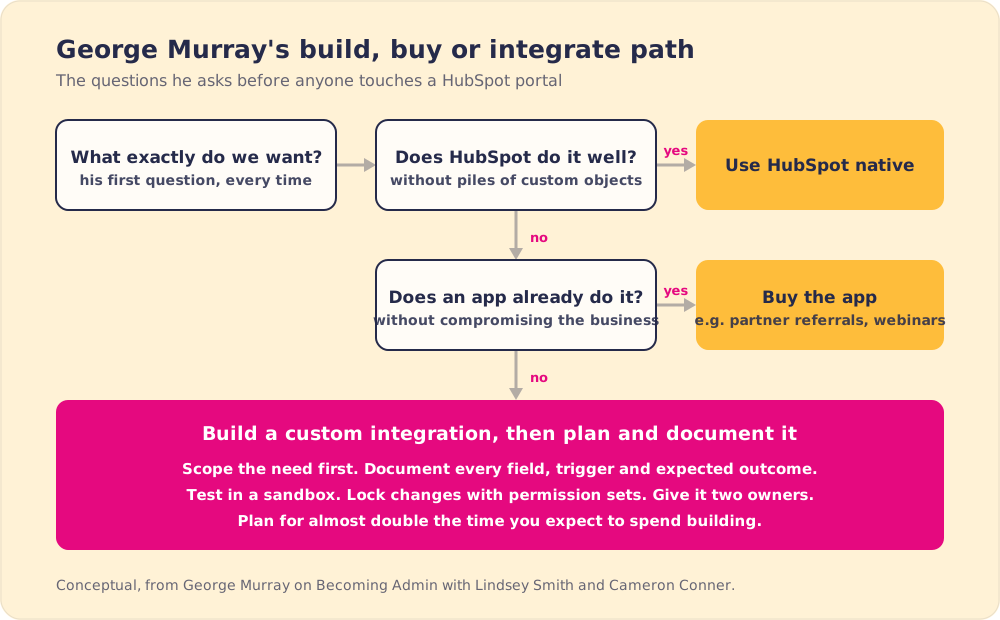
His team’s first question is always the same: “Okay, what is exactly that we want,” and which system does that best. Partner referrals were a recent example. “We could have built it all out in HubSpot. Would have involved a lot of configuration, a lot of sort of custom objects, custom properties.” Systems already did it well, so they asked, “Is it worth the time building something in HubSpot or is it better to integrate and use those sort of third-party apps?”
Lindsey put it in a sentence George liked: “do you want to reinvent the wheel or do you just want to put the wheel on a faster car?” He agreed, and admitted the pull the other way. There is always the thought that a home-built wheel could be a little better. Given how fast businesses move, he usually picks “that wheel on the faster car.”
The gap he hits most is events. For him, “marketing events has always seemed like it’s been lacking,” so his team integrated dedicated webinar software, though he noted HubSpot has been shipping updates and betas in that area. There is plenty to choose from when he shops for HubSpot third-party apps: the HubSpot Marketplace passed 2,000 apps and 2.5 million active installs in October 2025 (HubSpot Community).
Is vibe coding a safe way to build business-critical tools?
Cameron asked about vibe coding, now that anyone can prompt an app into existence. “I’m not a huge fan,” George said, knowing it “may get up a few people’s backs.”
He gave the new tools their due. Teams are building good things quickly, and he likes that it starts the conversation about what could help. His worry is scale. “It might work for a small-time project. It might work with a small sort of data set, but when it comes under real stress loading as a business grows, as a business scales, if that vibe-coded app suddenly comes into issues or breaks or fails, you’ve got a couple of different issues, right?”
The first is repair. “You need someone to be able to fix it, and that isn’t necessarily always going to be the person who’s vibe coded it.” The second is the stakes. “If it’s business critical, all of a sudden you’ve hit a brick wall.” For the long run, “personally, I think it isn’t the way forward long-term.”
Developers who use these tools every day raise the same repair problem. In Stack Overflow’s 2025 Developer Survey, 66% of developers named “AI solutions that are almost right, but not quite” as their biggest frustration with AI tools, and 45.2% said debugging AI-generated code takes more time (Stack Overflow Developer Survey 2025). An integration that is almost right still needs someone on staff who can find the wrong part.
When is a HubSpot custom integration the right call?
George does not want admins to shy away from custom work. “I don’t think people should be afraid of it,” he said. The hoped-for alternative, plug and play, means you turn it on and “everything works wonderfully, which it never does anyway.”
He trusts the people asking for it. “The people who are requesting these know their business better than the plug-and-play options, right?” The usual reason is scale and the direction the business is heading. He does not build custom by default, though. For him it is right when you have reservations about the native option, and when bending your process to fit an app means “it’s going to compromise your business outlook, then custom integrations are the way forward.”
MuleSoft’s 2026 Connectivity Benchmark surveyed 1,050 IT leaders and found the average organization runs 957 applications, only 27% of them connected, with IT teams spending 36% of their time designing, building and testing custom integrations (MuleSoft). If your stack includes HubSpot and a second CRM, as George’s does, our HubSpot integration guide covers what happens after the technical setup.
How do you plan a HubSpot custom integration?
A host asked how an admin juggling several integrations keeps from spreading too thin. George’s answer covered five things, from the first conversation to the permissions after launch.
- A scoping conversation first. “I think those initial conversations are so important,” he said, to agree on exactly what gets built, and to check whether an existing integration already covers it.
- Documentation of cause and effect. Write down what each trigger does and what sets it off, every field in the mappings, “every trigger, every expected outcome.” A process documentation template keeps that record in one shape.
- QA before launch. He tests everything during setup, in sandboxes and developer accounts, never in production. Our guide to moving work from HubSpot sandbox to production covers that handoff.
- Permission sets after launch. Ongoing management “all falls on permission sets. You only want key people making changes,” especially to fields other systems depend on.
- Double the planning time. “People should spend almost double the time planning than implementing,” because planning is where you think it through and build the testing in.
A host summed it up as the tech world’s measure twice, cut once, and George agreed.
Who should own a custom integration, RevOps or the HubSpot admin?
The hosts laid out the usual split. RevOps analyzes the data, the HubSpot admin makes HubSpot fit the business, and a native app clearly belongs to the admin. A non-native integration is murkier.
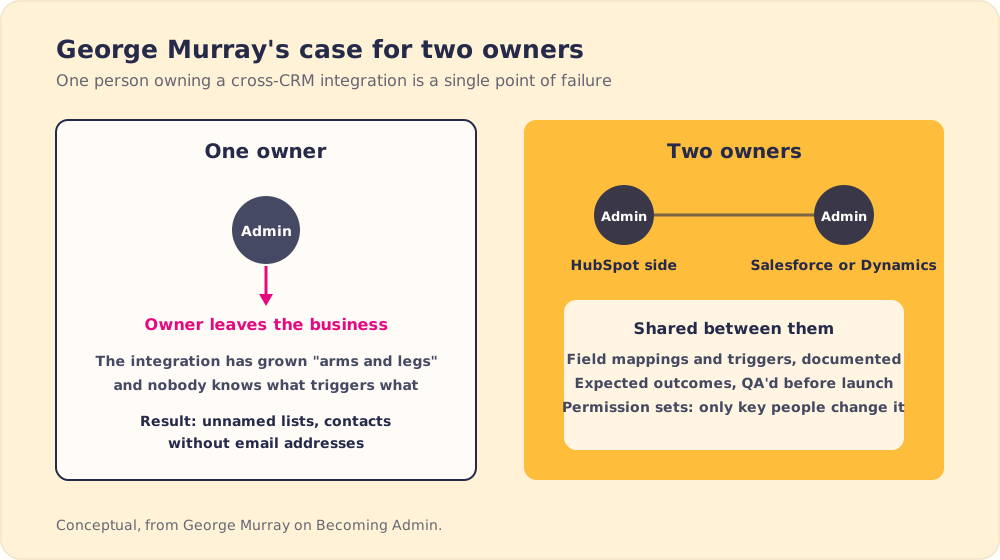
For big cross-CRM connections, George wants two owners: a HubSpot admin and the Salesforce or Dynamics admin on the other side. “I don’t think it should be the same person.” Few people can “put their hands up and say they’re experts in all three,” and the other risk is people leaving. With one owner, “you’ve got this big custom integration that has grown arms and legs since it was first designed, and nobody really knows how it works, how to optimize it, what needs to be turned off.” The result, in his words, is “the messiest HubSpot portals you’ve ever seen,” with unnamed lists and contacts created by hand without email addresses.
One host went further. Even someone who knows every system runs out of hours: “I’ve never met anyone who successfully is doing it all on their own and managing both.”
Do HubSpot admins need to learn to code?
“I don’t think it’s a necessity,” George said. Admins get pulled in many directions: someone switched something off, leads stopped syncing, the attribution model changed lead sources. Going deep on development would take time from that daily work.
He then argued against himself. The basics tell you what is realistic, help you work with developers, and fix one mess he sees often: “a branch upon a branch upon a branch of 40 if statements” in a single workflow, which a custom code action could replace. HubSpot’s custom code actions run JavaScript or Python (in beta) on Data Hub Professional or Enterprise and must finish within 20 seconds (HubSpot developer docs). For a full custom integration, he would still hire a developer, because “that’s their expertise.” Our post on HubSpot workflow dependencies shows how tangled branches spread across a portal.
For admins who want to learn, his advice is to try. “We have sandboxes for a reason. We have developer accounts for a reason.” When the error logs finally come back clean, he said, you will be “dancing for joy.”
In the rapid-fire round, his magic-wand wish was “multi-touch attribution that is bomb-proof and tells us exactly what campaign activity has brought what revenue.” Asked to choose between custom objects and a simple workflow, he went with custom objects: “I do love a simple workflow, but custom objects are fun, aren’t they?”
George Murray’s integration rules for HubSpot admins
- One question before any build. What exactly do we want, and which system does it best?
- Apps before custom code. With more than 2,000 marketplace apps, check whether someone has built your wheel.
- Caution on vibe-coded tools. Fine for a small project, risky when the business depends on it and the builder cannot fix it.
- Custom when the compromise costs too much. If an app forces changes that hurt the business, build.
- Documentation and permission sets. Every field, trigger and expected outcome written down, and only key people allowed to change them.
- Two owners for cross-CRM integrations. A HubSpot admin and an admin for the other system, so no one person takes the knowledge with them.
What should a HubSpot admin do before the next integration request?
George is competing in season two of The Admin Arena, and he says LinkedIn is “probably the only place I’m on.” If you run integrations, follow him there.
Before the next integration request lands, write down George’s first question and make whoever is asking answer it. Then check the marketplace, and build custom only when an app would bend the business out of shape. When you do build, budget almost twice the planning time you think you need, name a second owner, and keep the documentation where the people who touch the fields will see it.
Documentation only helps the people who see it, and a mapping spreadsheet in a shared drive never reaches the rep who is editing a field in HubSpot. Supered puts that kind of guidance inside HubSpot and Salesforce, at the moment someone is about to change a record, so the rules the two owners wrote get followed.
Frequently asked questions
When should you build a HubSpot custom integration instead of using an app?+
Who should own a custom HubSpot integration?+
Is it safe to vibe-code a HubSpot integration?+
Do HubSpot admins need to learn to code?+
How do you plan a HubSpot custom integration?+
Your process, running itself.
Turn the playbook into rep behavior.
More from Becoming Admin

HubSpot Leads vs Contacts: Why Danielle Urban Moves Early Deal Stages Into Leads
Danielle Urban
HubSpot Data Cleanup Starts With Your Forms: Noah Stambovsky on 160 Forms and One Master Form
Noah Stambovsky