HubSpot Leads vs Contacts: Why Danielle Urban Moves Early Deal Stages Into Leads
Danielle Urban of Carttographer Consulting is obsessed with the HubSpot Leads object and despises simple workflows. Here is how she sets up leads, why Salesforce habits confuse admins, and how she stopped being a button clicker.
In HubSpot, a contact is the record of a person, and a lead is a separate record of one buying cycle for that contact or company that moves through its own stages until it is qualified into a deal or disqualified, and it stays in the CRM afterward.
Danielle Urban keeps getting the same call. A company has built its own HubSpot portal, marketing wants to prove ROI, and nothing tracks through. She opens the deal pipeline and reads the stages. “Well, yeah, your deal stages aren’t even defined,” she tells them.
In her episode of Becoming an Admin with Lindsey Smith and Cameron Conner, her favorite fix came up early. She moves the first deal stages into HubSpot Leads. “I am obsessed with HubSpot leads,” she said, and she had two of those projects in the pipeline when they recorded. Much of the conversation turned on HubSpot leads vs contacts, and on leads vs deals.
How did Danielle Urban become a HubSpot expert?
Danielle started in marketing and demand generation at software startups, where most things had to be made to work for the first time. That habit carried over when she went out on her own, and later when she merged with a partner to form Carttographer Consulting. Most of her expertise comes from the last four years of client work, “because you see so much more variation across clients and across industries and across use cases.”
On keeping up, she said, “Especially with how fast the platform is changing, your recent knowledge is the most valuable.” She does not chase every update. She solves real problems for clients and keeps a pulse on what is coming.
She also competed in both seasons of the Admin Arena, the HubSpot admin game show. In season two she lobbied her team from the first day: “Crispy has to go you guys.” In her words, “things went a slightly different way because he won.”
Why does Danielle start with deal stages in a new portal?
Asked what grinds her gears when she inherits a portal, Danielle did not blame the last builder. “Most people were building with the best that they had available,” she said, often on a version of HubSpot from three years earlier. The trouble usually comes from the company itself, “setting it up for what works for them, but not having the oversight to realize the impact that has across like reporting and downstream processes.”
Our own survey found trouble early in the funnel too. In The State of Sales Enablement 2026, 50% of the deal breakdowns respondents named happened in the first half of the funnel, with qualification alone accounting for 16% (The State of Sales Enablement 2026). Our guide to sales pipeline stages covers how to define them by what the buyer has done.
Why is Danielle obsessed with HubSpot Leads?
One of the hosts described a pattern they see often: a qualified lead creates a deal, but the deal lands in a placeholder stage so the team can see where it came from. Danielle’s answer was quick. “Yeah, don’t do that.”
Before leads existed, teams had to use the contact or company as the record of a buying cycle. So reps doing outbound either created deals for every target only to track the activity, or created tasks that “don’t actually tie back to anything that’s going to tell you ROI.” Leads give that activity a home. “When you get to work with leads, it creates a record of this buying cycle that they’re entering,” she said.
She walked through the out-of-the-box flow for outbound. A lead gets a start date when it is created. One outreach message moves it to the next stage. A response moves it again. “If you have a further qualified conversation, that’s when it gets to the next stage and you convert it to a deal.” HubSpot’s own documentation describes the same automation: a lead moves to Attempting when a user logs outreach and to Connected when the lead replies, books a meeting or has a connected call (HubSpot Knowledge Base).
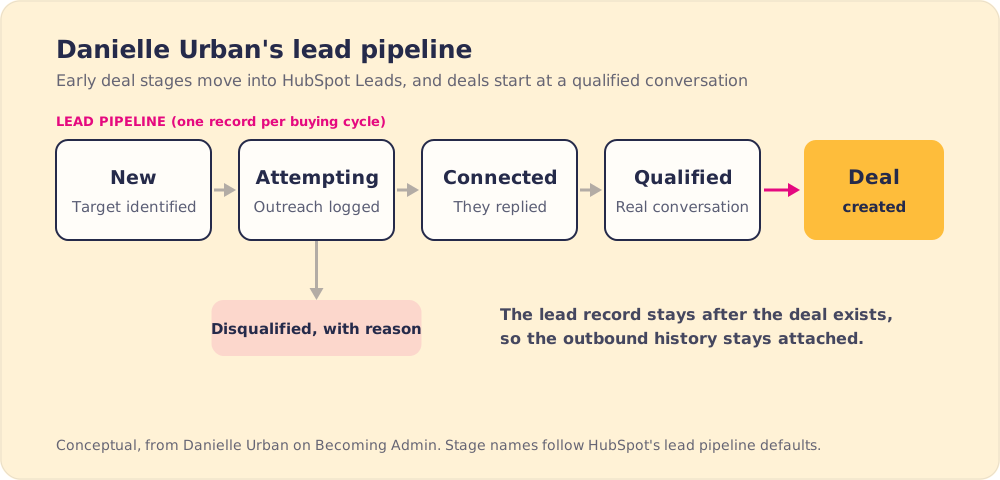
What she likes most is the history the lead keeps. “Now you have a record of how that lead came to be, whether it was inbound or an outbound target,” she said, along with the activity that made it a real deal. “So you can start to stitch together the complete buyer journey from when they actually entered the market to buying your product or not buying it.” Disqualification gets captured at the lead stage, with no need for homemade “latest disqualified reason and first disqualified reason” properties and date stamps.
What is the difference between leads and contacts in HubSpot?
Here are the four records as Danielle and the hosts described them.
| Record | What it holds | What happens when the buyer qualifies |
|---|---|---|
| HubSpot contact | The person, with lifecycle stage and history | Stays the same person record |
| HubSpot lead | One buying cycle for that contact or company | Moves to Qualified, a deal is created, and the lead record stays |
| HubSpot deal | A qualified opportunity | Moves through deal stages to closed |
| Salesforce lead | An unqualified person before conversion | Converts into an account, contact and optional opportunity |
The hosts wondered aloud whether admins’ dislike of leads came from Salesforce. Danielle agreed. “I think it’s the Salesforce hangover,” she said. She had two conversations in the previous two weeks about what to do with Salesforce leads. In Salesforce, converting a lead creates an account, a contact and optionally an opportunity from it (Salesforce Developers). HubSpot works differently. “HubSpot doesn’t have a conversion in the same way,” Danielle said. “That lead record lives on forever, which is fantastic because now we have historical data to to pull from and report on and understand.”
One of the hosts put the Salesforce model in HubSpot terms: it is as if a contact changed into a different object the moment it became an MQL. In HubSpot “you get both,” the contact and the lead, side by side. Danielle added that leads have made lifecycle stages easier to explain. A lifecycle stage is “a benchmark of how far they’ve ever come,” while the lead tracks the current attempt.
Explaining it usually wins the client over. They say “Oh, that makes perfect sense,” she said, “especially for attribution and like nurturing and you know, keeping our pipeline forecasting accurate.” For teams coming across from the other CRM, our Salesforce to HubSpot guide covers the mapping decisions.
How do you stop being a button clicker?
Asked what she would tell an admin thinking about going solo, Danielle started with what she wishes were different. “You have to learn for yourself what’s going to work. And I hate that because I don’t want anyone to have to go through that.” The hard part was positioning. “How do you position yourself as an expert and not a button clicker? And it took me like two or three years to really overcome that.”
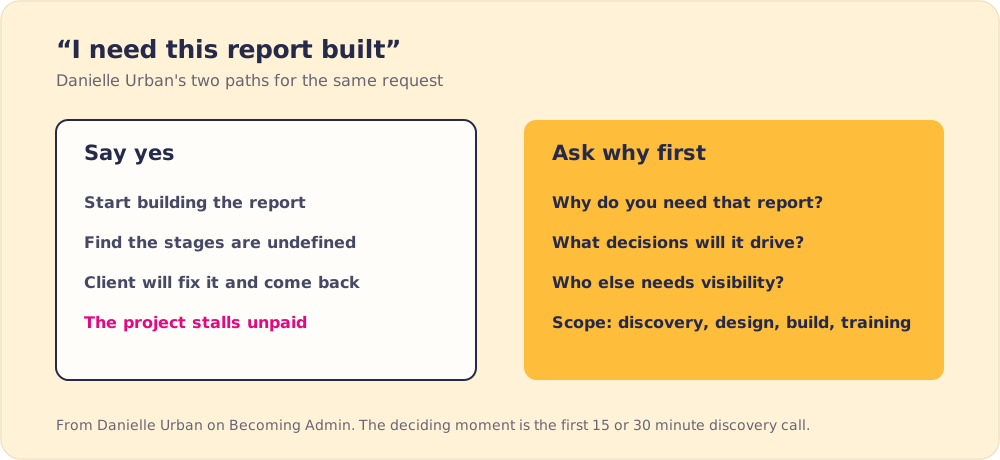
She still catches herself. The temptation is to say yes to “your quick project where we’ll like do a SLA tracker in two weeks.” Her firm now runs a proper sales process with defined phases, discovery, design, implementation and training, so the first call sets the standard for the engagement.
Her example is the report request. When a client says “I need this report built,” the 15 or 30 minute discovery call decides the engagement. Say yes, find out the stages are a mess, and the project stalls. “They’re like, ‘Oh yeah, we’ll we’ll fix that and then we’ll come back to you and then you just never get paid.’” So she asks first. “Why do you need that report? How is that going to help you? What decisions are you making from this?”
How does an admin stop being the yes-person?
Cameron raised the admin version of the same problem: the in-house admin who says yes to every report and burns out. Danielle said there are two sides. One is how you manage up, which means you stop saying yes and keep probing. The other is internal, and it is harder. “You actually have to believe that that is valuable and you bring value beyond building a report,” she said. “That’s definitely one of the pieces that you can’t shortcut.”
She leans on the five whys. “You inherently bring value by asking questions and by saying why five times.” Toyota developed the five whys to trace a production problem back to its root cause (Five whys). On a report request, the later answers tend to surface the decision the report is for. Getting there is what Danielle calls “strategic advisor status.”
Custom object or simple workflow?
In the rapid-fire round, Lindsey asked the question in the episode title. “Custom object,” Danielle said. “I despise simple workflows.”
Her reason is maintenance. The automation in a portal ends up in three places: the main workflows tool, object settings such as lead auto-progression and auto-creating leads from lifecycle stages, and simple workflows tucked inside lead stages or forms. The last group “don’t really exist in the workflows tool and they’re difficult to get to in the forms tool and you can never really track them down.” When you change something, you have to check all three. “So the only use case that I will ever use them for is a form autoresponder and nothing else.” Our guide to HubSpot workflow dependencies covers how to map what fires where.
Her magic-wand wish for HubSpot fit the same theme: campaign mapping and lead mapping in the Salesforce integration.
Danielle Urban’s lead setup in five lines
- Deal stages for real opportunities. Outbound targets and first conversations move into leads, so the deal pipeline shows only qualified deals.
- A lead record for each buying cycle. Outreach, replies and disqualification reasons stay attached to the lead after it becomes a deal.
- Contacts and leads side by side. HubSpot keeps the contact and the lead, and the lead’s history stays reportable after it converts.
- A why before every report. Five whys on a request turns a button click into a scoped project.
- Automation in one place. Simple workflows only for form autoresponders, so a change never surprises the admin.
Should you move early deal stages into leads?
If your deal pipeline starts with stages like “target” or “attempted contact,” I would follow Danielle and move them into the lead pipeline. The deal pipeline then reflects buyers who have shown real interest, which keeps forecasting accurate, and the lead record keeps the outbound history marketing wants for ROI. Poor data quality costs organizations at least $12.9 million a year on average, by Gartner’s estimate (Gartner), and placeholder deals put bad data straight into the forecast.
Once the stages are clean, reps still have to work them the same way, lead after lead.
Frequently asked questions
What is the difference between leads and contacts in HubSpot?+
When should you use HubSpot leads instead of deals?+
Is a HubSpot lead the same as a Salesforce lead?+
Do HubSpot leads move through stages automatically?+
Should you use simple workflows in HubSpot?+
Your process, running itself.
Turn the playbook into rep behavior.
More from Becoming Admin
HubSpot Lead Scoring: Why Casey Hawkins Now Puts Fit First
Casey Hawkins
HubSpot Custom Integration or Third-Party App? George Murray's Rules for Admins
George Murray