Process Documentation Template: Seven Fields, Two Usually Skipped
A process documentation template is only as useful as what you put in it, and two fields most templates omit are the ones that decide whether a process is followed or merely filed. Here is the full structure.
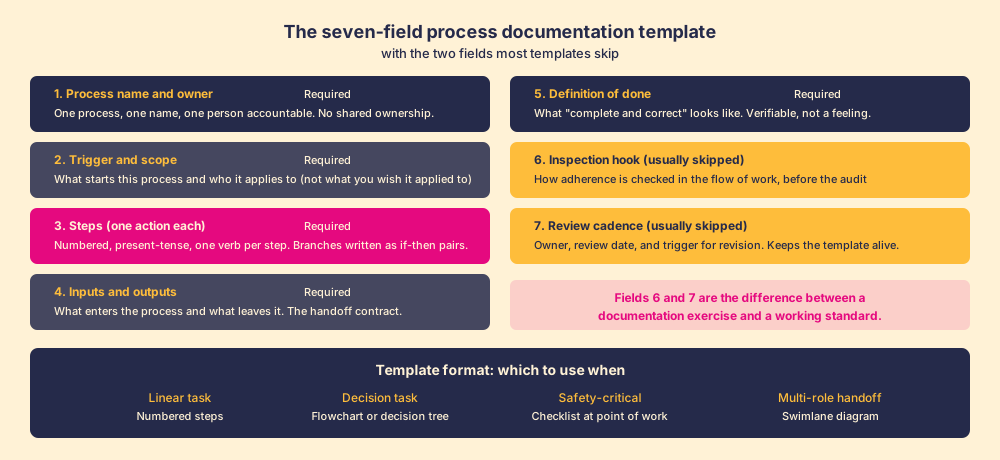
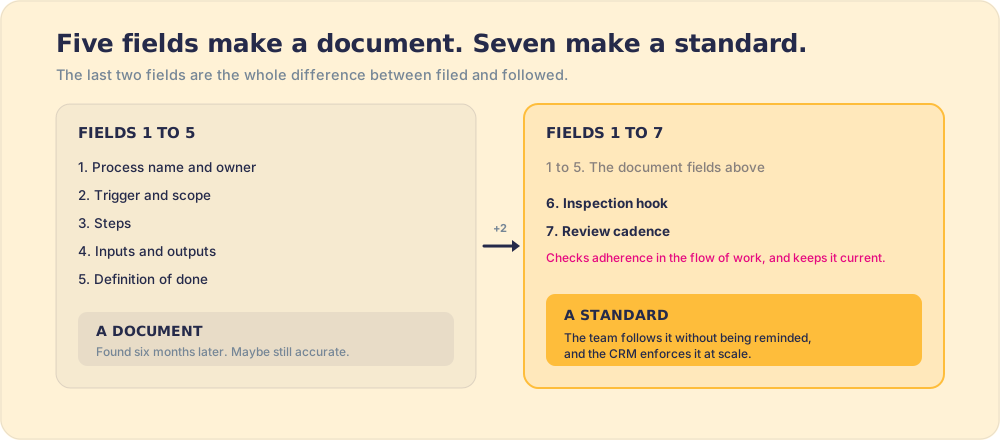
A process documentation template is a reusable structure for capturing how a repeated task should be done, and the most useful ones include seven fields: process name and owner, trigger and scope, steps, inputs and outputs, definition of done, inspection hook, and review cadence.
A process documentation template is a bit like a house key: it looks the same whether it opens the door or not. The seven fields in the right template produce a living standard that the team follows without being reminded. The five fields in the average template produce a document that someone finds six months later and wonders whether it is still accurate.
The difference is not the format. It is two fields most templates omit.
A process documentation template is a reusable structure for capturing how a repeated task should be done, and the most useful ones include seven fields: process name and owner, trigger and scope, steps, inputs and outputs, definition of done, inspection hook, and review cadence. Fill in any template that stops at five and you have done the documentation work. Skip the last two and you have left out the parts that make the documentation function as a standard rather than a file.
What belongs in every process documentation template?
Work through the fields in order. Each one answers a different question, and the order matters because each field scopes the next.
Field 1: process name and owner. Name the process clearly enough that a new team member could find it in a search, and name one person responsible for keeping it accurate. Not a team. Not a role. One named person. Shared ownership in documentation is the organizational equivalent of a shared inbox: a responsibility that belongs to everyone belongs to no one. IBM’s process management research found that processes without a single named owner were three times more likely to fall out of date within six months of a process change (IBM Institute for Business Value, 2012). One owner is not a structural nicety; it is what keeps the document alive.
Field 2: trigger and scope. What event starts this process, and who does it apply to? A trigger is not “when we decide to do it.” It is a specific, identifiable event: a deal moves to Stage 3, a new employee’s start date is confirmed, a support ticket reaches a severity-1 rating. The scope names who is in and, critically, who is out. A discovery call SOP that applies to “all AEs except enterprise AEs, who use a different protocol” is more useful than one that says “for all AEs,” because the qualification prevents people from applying the wrong process confidently. Write the scope you have, not the scope you wish you had.
Field 3: steps. Numbered, one action each, present tense. “Log the call summary in the Discovery Notes field within two hours.” Not “document your call notes.” Not “ensure CRM is updated.” One action, one verb, one object, in an order that matches how the work actually happens, not how it would sound in a training presentation. At every fork, write the if-then pair explicitly: “If the prospect has a contract renewal within 90 days, proceed to step 6b. Otherwise, proceed to step 7.” Assuming the reader will infer the branch is how good documentation creates bad outcomes.
Field 4: inputs and outputs. What enters this process and what leaves it. This is the handoff contract: what does the previous step deliver, and what does this step produce for the next one? In a sales handoff SOP, the input might be “a completed qualification scorecard in the CRM” and the output might be “a booked implementation call and a shared account context document.” Naming inputs and outputs makes the process diagnosable: when something breaks, you can identify whether the break was a missing input (upstream problem) or a missing output (this process’s problem). Without field 4, every failure is ambiguous.
Field 5: definition of done. What does “complete and correct” look like, stated so that two different people would agree on whether the process was finished? Not “the call notes are thorough.” That is a feeling. “The Discovery Notes field contains the prospect’s current tech stack, decision timeline, two named business outcomes, and the names of the economic buyer and champion” is verifiable. The definition of done is the standard the inspection hook is checking against.
Field 6: inspection hook. This is the field most process documentation templates do not include. An inspection hook is the mechanism that checks whether the process was followed at the moment it was being executed, built into the workflow rather than added as a separate audit step. A CRM stage gate that prevents a deal from advancing without the required field. A required checklist item that blocks a document from being submitted. A daily dashboard that flags which team members have not completed the required action for the day. The Hawthorne effect, documented in Elton Mayo’s 1920s Western Electric studies, showed that measurement itself changes behavior: people perform differently when they know adherence is being tracked (Mayo, The Human Problems of an Industrial Civilization, 1933). An inspection hook does not require a manager to manually check; the system surfaces the exception when it happens.
Field 7: review cadence. The date this template will be verified against the current process, and who is responsible. A 90-day default works for most active processes. The stronger trigger is a change event: product update, team restructure, tool migration. Documentation that is not revised when the process changes is the most dangerous kind, because it trains people to do the wrong thing with confidence. The review cadence prevents the problem that Everett Rogers documented in Diffusion of Innovations (1962): that a standard, once adopted, tends to persist past its usefulness because no mechanism exists to dislodge it (Rogers, Diffusion of Innovations, Free Press, 1962).
What format should a process documentation template use?
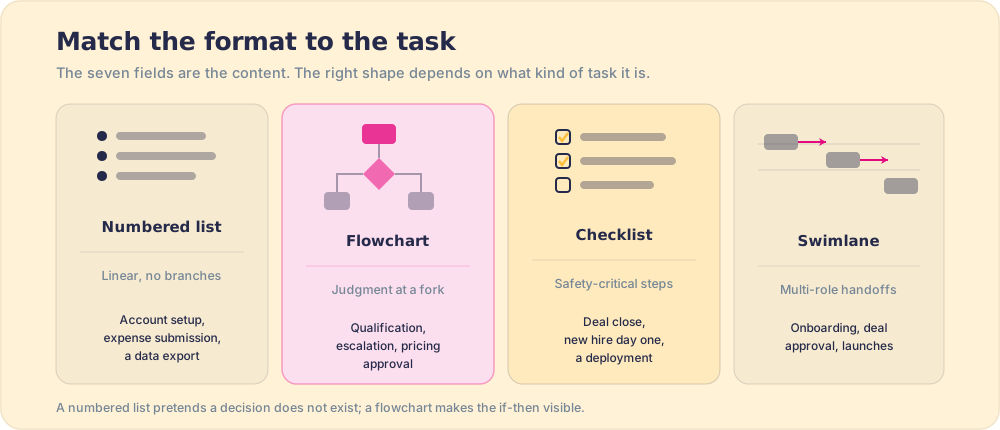
The seven fields above are the content. The format is a separate question, and the right format depends on the type of task.
- Numbered list. For linear processes with no branches: new account setup, expense submission, a data export. Fastest to write and fastest to follow when the task is truly sequential.
- Flowchart or decision tree. For any process that involves judgment at a branch point: deal qualification, objection handling, escalation decisions, pricing approval. A flowchart makes the if-then visible. A numbered list pretends the decision does not exist, which means the reader has to improvise when they reach it.
- Checklist. For safety-critical or high-stakes sequences where each step must be completed before moving on. A deal-close sequence, a new hire’s first day, a product deployment. Atul Gawande’s surgical checklist research (published in the New England Journal of Medicine, 2009) found that a 19-item checklist used at 8 hospitals reduced in-hospital deaths by 47%. The mechanism was not new knowledge; it was reliable completion of steps that were sometimes skipped under pressure (Gawande et al., NEJM, 2009). A checklist posted at the operating table, or at the point of work, is a fundamentally different object from one filed in a folder.
- Swimlane diagram. For processes involving multiple roles with handoffs between them. The swim lanes show who does what and where the baton passes. Customer onboarding, enterprise deal approval, cross-functional product launches. When a process has more than two roles or more than three handoffs, the swimlane format prevents the ambiguity about who is responsible for each step.
Why does process documentation decay?
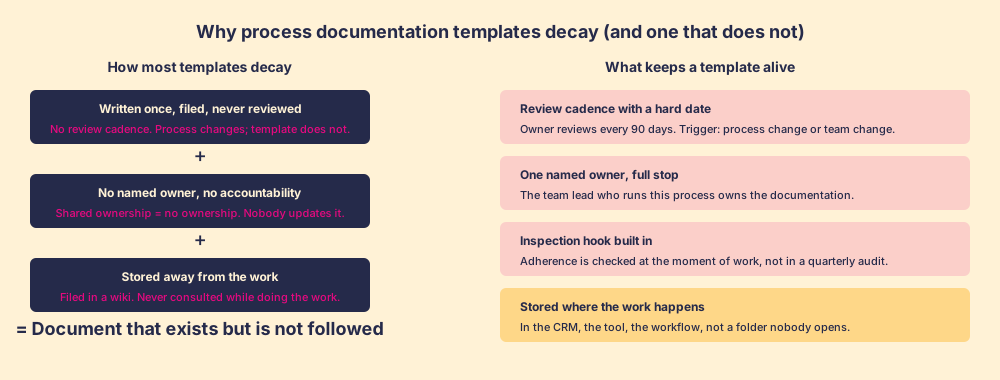
Most templates decay for three predictable reasons, and two of the seven fields exist specifically to prevent each one.
The decay path starts with a template that has no review date and no named owner. The process changes, the tool changes, the team changes, and the document does not. Six months later, it is still in the shared drive, still titled “Current Process,” and now actively wrong.
Jeffrey Pfeffer and Robert Sutton, in The Knowing-Doing Gap (2000), found that organizations routinely produce knowledge assets, process documents included, and then discover those assets have almost no effect on behavior. The gap is not ignorance. The gap is that the document lives in a different place than the work, consulted in onboarding and forgotten by month two (Pfeffer & Sutton, The Knowing-Doing Gap, 2000). A process documentation template stored in a wiki, however well-structured, faces this problem. The person doing the work does not reach for the wiki during the work; they reach for the habit, the shortcut, or the colleague they trust.
The fix is not a better folder structure. The fix is to move the documentation closer to the moment of work. An inspection hook in a CRM is closer than a wiki. A guided sequence that appears in the tool the rep is already using is closer still. The process documentation pillar covers where to store documentation and how to integrate it with the systems where the work actually happens.
How to use a process documentation template in practice
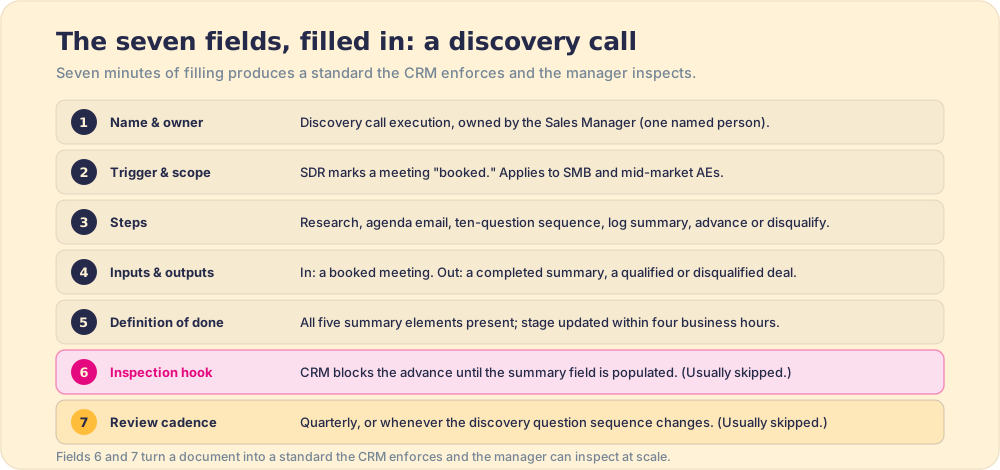
Here is a concrete fill-in for a sales discovery call process, using all seven fields.
Process name and owner: Discovery call execution, owned by the Sales Manager.
Trigger and scope: Applies when an SDR marks a meeting as “booked” in the CRM. Applies to all AEs running discovery on SMB and mid-market accounts. Enterprise accounts use the enterprise discovery protocol.
Steps: 1. Review the prospect’s company page and LinkedIn 24 hours before the call. 2. Confirm the meeting with an agenda email the morning of the call. 3. Run the call using the ten-question discovery sequence. 4. Immediately after the call, log notes in the “Discovery Summary” field covering: current tech stack, decision timeline, budget authority, named business outcomes (minimum two), and economic buyer and champion. 5. If four of five qualification criteria are met, advance the deal to “Qualified” in the CRM. If fewer than four are met, mark “Disqualified” with a reason code and close the deal.
Inputs: A booked meeting with a confirmed decision maker or champion. An initial qualification note from the SDR.
Outputs: A completed “Discovery Summary” field in the CRM. A deal moved to “Qualified” or “Disqualified” with a reason code.
Definition of done: “Discovery Summary” field contains all five required elements. Deal stage updated within four business hours of the call.
Inspection hook: A CRM workflow checks whether the “Discovery Summary” field is populated before allowing a deal to advance from “Meeting Booked” to “Qualified.” If the field is empty 24 hours after the meeting date, the CRM flags the deal for the manager.
Review cadence: Reviewed quarterly by the Sales Manager, or whenever the discovery question sequence is updated.
That is 7 minutes of filling in a template. The result is a standard that the CRM enforces and the manager can inspect at scale, rather than a document that requires a manager to manually audit whether each rep followed the process after the fact.
For the structure behind individual steps, the post on workflow documentation covers how to document the handoffs between roles, which is the part most discovery-to-close SOPs miss. For how to write the steps themselves, how to write an SOP goes deeper on format and step construction.
What we recommend
Use all seven fields, and do not skip the last two. The first five produce a document. The last two produce a standard.
A quick summary of when each of the seven fields does the most work:
- Process name and owner. Prevents shared-but-unowned documentation. One name, full stop.
- Trigger and scope. Sets the moment of application. Without it, nobody knows when to use the template.
- Steps. The SOP template core: one action, one step, no compound verbs. Write branches as explicit if-then pairs.
- Inputs and outputs. Defines the handoff contract. Makes breakdowns diagnosable.
- Definition of done. The verifiable standard. Two people should agree on whether it is met.
- Inspection hook. The mechanism that checks adherence in the flow of work. This is how to document a process so it stays a process rather than becoming a filing exercise.
- Review cadence. The mechanism that keeps the business process documentation template current when the process changes.
Match the format to the task: numbered steps for linear work, flowcharts for decisions, checklists for safety-critical sequences, swimlane diagrams for multi-role handoffs. Keep each template scoped to one process with a clear trigger. When a process has more than about twelve steps, that is usually a signal it is two processes, not one.
Store the template as close to the work as possible. A process documentation template in a CRM field, a guided sequence in the tool the rep already has open, is more likely to be followed than one that requires a separate navigation step. The documentation is not the goal. The behavior is the goal. The template is the mechanism for making the behavior consistent enough to measure and improve.
The renovation is finished when the house has a key. The process is documented when the template is filled in. Whether either one gets used depends on whether the key is in the lock when it needs to be.
Frequently asked questions
What should a process documentation template include?+
How do you write a process documentation template?+
What is the difference between a process document and an SOP?+
How often should process documentation be updated?+
Your process, running itself.