HubSpot Sandbox to Production: What Travels, What Doesn't
The HubSpot sandbox is a dress rehearsal on a replica stage, and the curtain mechanism has rules nobody reads until cutover. What copies down, what deploys up, what never travels, and how to plan around the valve.
Moving from HubSpot sandbox to production means deploying assets built in a standard sandbox up to the live portal, and the valve is asymmetric: definitions copy down at creation, only new sandbox assets deploy up, and records, integrations, and edits never travel.
A theater company about to change a show does not experiment on opening night. It builds a replica stage, rehearses until the blocking is right, and then, and this is the part everyone forgets, somebody still has to carry the changes to the real stage. The rehearsal was never the risky part. The carry is. HubSpot’s standard sandbox is exactly this replica stage, and the carry, from hubspot sandbox to production, runs through a valve with rules that are documented, unread, and discovered at cutover with revenue watching.
The rules are worth twenty minutes before your rehearsal rather than after it, so here they all are, drawn on one card.
What copies down when you create the sandbox?
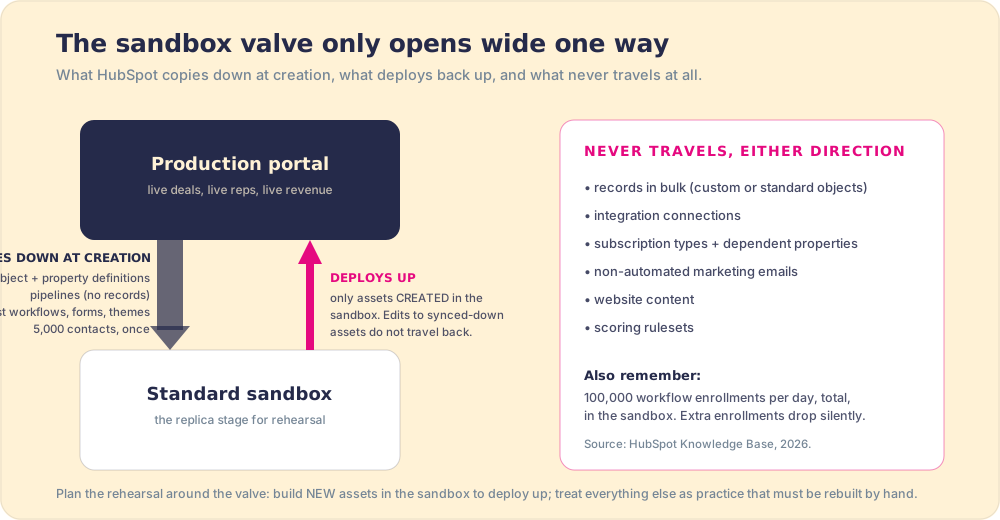
Creating a standard hubspot sandbox account copies your portal’s skeleton, not its body. Object and property definitions come across, custom objects included. Pipelines come across without the records inside them, which is the first surprise for most admins: the stages exist, the deals do not. Most workflows, forms, automated marketing emails, themes, and templates copy. Separately, you can run a one-time sync of your 5,000 most recently updated contacts, each carrying up to 100 associated companies, deals, and tickets (HubSpot Knowledge Base).
The skeleton metaphor pays off when you notice what is missing. Subscription types do not copy, and here HubSpot’s model has a cascade worth respecting: any property that depends on a non-synced feature is also skipped. Integration connections do not exist in the sandbox at all, so the Salesforce sync, the enrichment tool, and the billing webhook are all absent from your rehearsal. Non-automated marketing emails and website content stay home too. Your replica stage has the same floor plan as the real one, and none of the wiring to the outside world.
What deploys back up to production?
Here is the rule that decides whether your rehearsal week was an investment or a writing exercise: only assets first created in the sandbox can deploy up. Edit a workflow that synced down at creation, perfect it over two weeks, and that edit has no road back; the deployment model intentionally refuses in-place updates to production assets, as protection against exactly the overwrite disasters you would expect (HubSpot Knowledge Base).
This asymmetry should drive the whole sandbox migration plan, and it sorts every task into two piles:
- Build-new work. New workflows, new properties, new pipelines, new custom objects: create them in the sandbox, test them, deploy them up. The valve is built for this, and it is the happy path.
- Renovation work. Changes to existing assets: HubSpot’s valve will not carry these up, so natively you rehearse in the sandbox, write the steps down, and rebuild by hand in production, a real line item everyone forgets to budget. There is now a second option: a package layer that sits outside the valve entirely. Supered’s Package Builder lifts assets from any portal, sandbox included, edited or not, and installs them in any other, which turns the renovation pile back into deployable work. It covers 75+ asset types (workflows, pipelines, properties, dashboards, reports, and more), skips same-name assets rather than duplicating them, and does not move records, the same rule the sandbox itself lives by.
Two more numbers belong in the plan. Workflow enrollment in the sandbox caps at 100,000 records per day, total, with overflow dropped without ceremony, so high-volume automation tests need batching. And if you are still on a legacy sandbox, HubSpot has been sunsetting those in favor of the current standard model through 2026, so the rules above are the ones your next rehearsal will live under.
Why is the valve one-way on purpose?
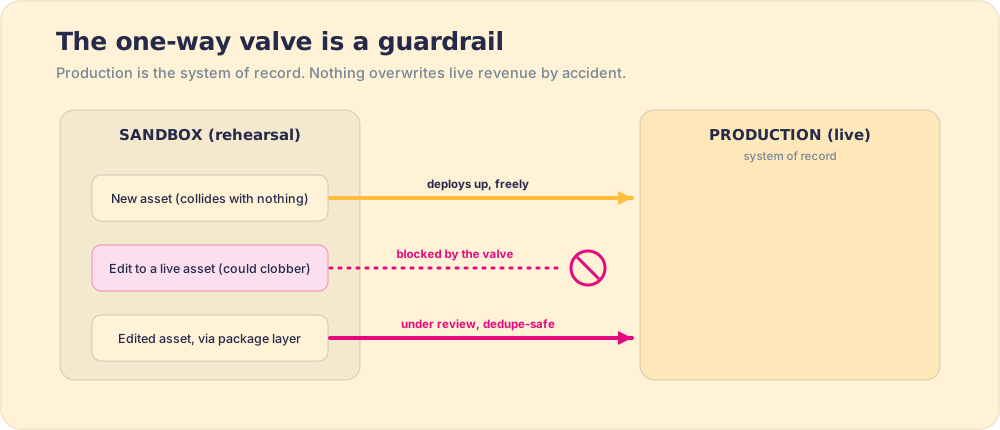
It is tempting to read the asymmetry as a missing feature, a sync HubSpot never got around to finishing. It is the opposite: it is a deliberate guardrail, and understanding why it exists tells you how to plan around it instead of cursing it. Production is the system of record. Real money, real contacts, real automation that fires on real people sit in it, and the cardinal rule of any system of record is that nothing overwrites it by accident. If edits to synced-down assets could deploy back up, then a half-finished experiment in the sandbox could silently clobber the live workflow that sends your renewal notices. So HubSpot drew the line where the blast radius is smallest: brand-new assets, which by definition collide with nothing, are allowed up; in-place edits to live assets, which can collide with everything, are not.
This is the same logic that governs serious software deployment everywhere. You do not edit the running database; you ship a new, reviewed change against it. The sandbox valve is HubSpot enforcing that discipline on people who would otherwise, under deadline, drag a sandbox change straight onto live revenue. Seen that way, the renovation pile stops feeling like a HubSpot failing and starts feeling like the cost of not having a controlled deployment path, which is exactly the gap a package layer fills: it lets edited assets move under review, dedupe-safe, instead of by hand or not at all. The valve is right to be strict. The fix is a safer road, not a looser valve.
Why do sandbox-tested changes still break in production?
Because the rehearsal stage, by design, is missing the audience and the weather. Three gaps account for most cutover surprises:
- The integration gap. No integrations exist in the sandbox, so every workflow branch that fires on an integration event rehearses as a painted door: it looks right and opens onto nothing. The logic tests clean; the connection was never tested at all. Verify integration-dependent automation in production, behind an enrollment filter that admits a handful of records first.
- The data gap. 5,000 contacts, synced once, age from the moment they arrive. The edge cases that break field mappings, the weird legacy records, the duplicate pair with conflicting lifecycle stages, are statistically unlikely to be in your sample. The fix is choosing test records deliberately rather than letting recency choose them: pull your known monsters into the 5,000.
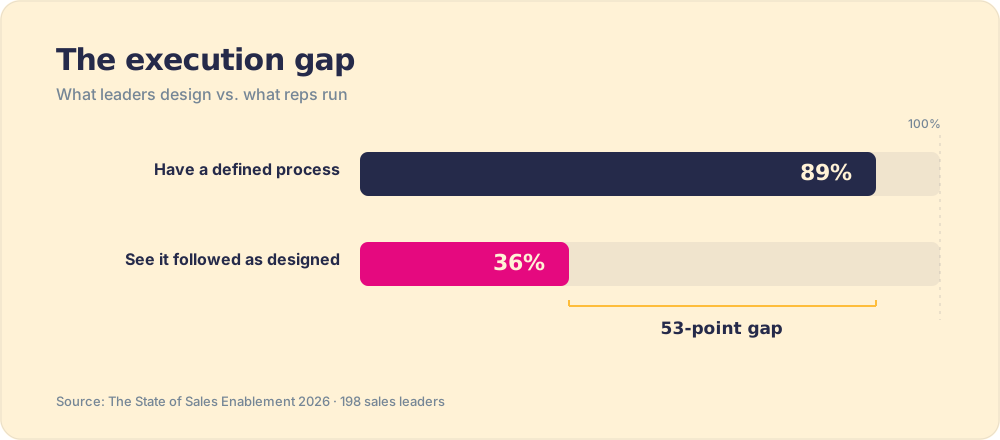
- The people gap. This one is ours to flag, because it is the gap we watch teams fall into from the other side. The sandbox rehearses the system; nothing rehearses the reps. A pipeline restructure can deploy flawlessly and still fail in week three because the humans never moved with it: 89 percent of teams have a defined process, 36 percent see it followed as designed (The State of Sales Enablement). Prosci’s benchmarking of 2,600+ practitioners quantifies the cost of skipping that human side: projects with excellent change management were about seven times more likely to meet their objectives than those with poor change management, 88 percent versus 13 percent (Prosci). The deploy button moves assets. It does not move behavior.
How do you run the HubSpot sandbox to production cutover?
The plan that survives contact, in order:
- The two piles, sorted first. Before rehearsal starts, label every planned change build-new (deployable) or renovation (rehearse, document, rebuild by hand). The second pile gets a time budget and an owner, because the valve will not carry it for you.
- Monsters in the sample. Spend the one-time 5,000-contact sync deliberately: include the records you already know misbehave, rather than letting recency pick the sample.
- Integration verification in production, gated. Anything that touches an integration gets verified live, behind an enrollment filter, on a low-traffic afternoon, with a rollback noted. The sandbox cannot test what it does not contain.
- The rep rehearsal. Whatever process the new configuration encodes, deliver it to reps in the flow of work from day one and measure whether it runs, because the configuration succeeding and the process being followed are separate facts. The placement effect is the largest one in our survey data: 49 percent quota attainment when process guidance reaches reps in the moment versus 15 percent when it lives in docs (The State of Sales Enablement). Wiring that layer is the job Supered does inside HubSpot.
Our recommendation, plainly: use the sandbox for what the valve rewards (building new, deployable assets), route what it refuses (in-place edits) through a package layer instead of a weekend of hand-rebuilding, and treat the week after cutover as part of the cutover, with adherence in the flow of work as your success metric. The full pre-move diligence lives in the HubSpot migration checklist, the wider playbook in the HubSpot implementation guide, and if your rehearsal is the prelude to a bigger move between portals, the field of help is mapped in HubSpot migration services.
Frequently asked questions
What syncs from production to a HubSpot sandbox?+
Can you push changes from a HubSpot sandbox to production?+
What are HubSpot sandbox limitations?+
Do you need a HubSpot sandbox account?+
How do you test workflows in a HubSpot sandbox?+
Your process, running itself.