Cold Email Best Practices: The Inbox Checks Your Domain and Your List Before It Reads a Word
Cold email best practices in order of what the inbox checks first: the 2026 Gmail, Yahoo and Microsoft sender rules with dates, list hygiene and bounce limits, copy for prospecting emails, follow-up timing, and the numbers worth tracking.
Cold email best practices are the rules for sending unsolicited sales email that reaches the inbox and earns replies: authenticate the sending domain, send only to verified addresses, write short single-ask messages, and follow up on a fixed schedule with a stopping rule.
A rep spends forty minutes on one cold email. The subject line names the prospect’s new product launch, the opening line quotes her podcast, the ask is a single sentence. It never arrives. The sending domain had no DMARC record, and the list it went out with had bounced badly the week before. The best sentence the rep wrote all month went straight to a folder the buyer never opens.
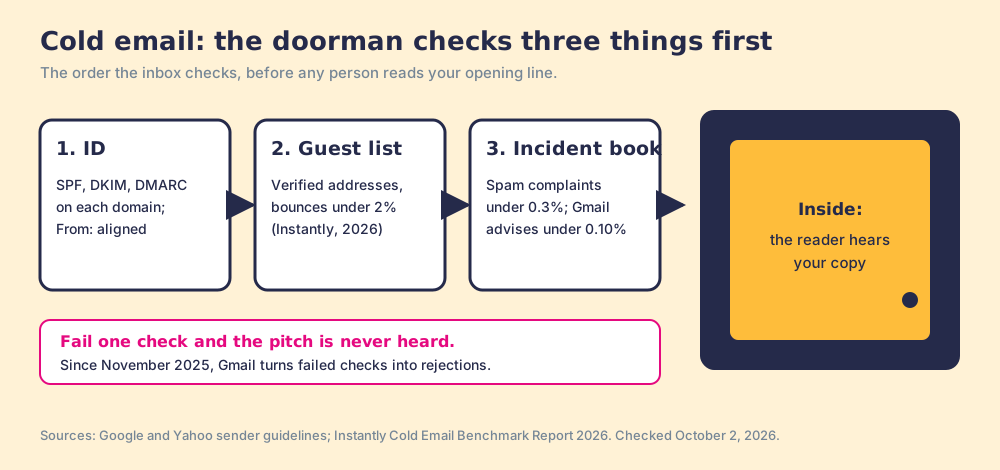
Cold email best practices are the rules for sending unsolicited sales email that reaches the inbox and earns replies: authenticate the sending domain, send only to verified addresses, write short single-ask messages, and follow up on a fixed schedule with a stopping rule. Most guides start with the copy. The inbox starts somewhere else. Gmail, Yahoo, and Outlook check who you are and whether your list is real before any person reads your opening line, and since November 2025 Gmail has been turning failed checks into rejections.
The short version, in the order the inbox checks:
- The domain. SPF, DKIM, and DMARC on every sending domain, a warm-up of 5 to 10 emails a day for new inboxes, and a complaint rate under 0.3%.
- The list. Verified addresses only, catch-all flagged and sent last, bounces under 2%.
- The email. Under 80 words, one reason, one ask, a subject line that names the problem.
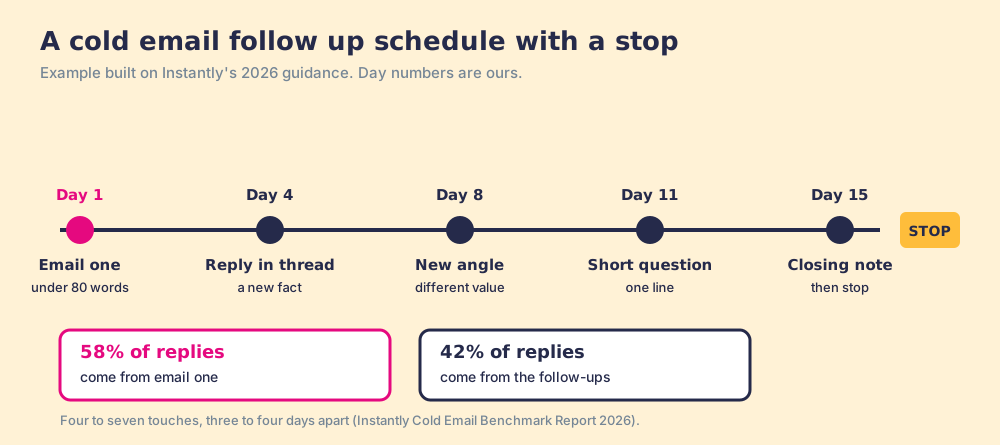
- The follow-up. Four to seven touches, three to four days apart, each with a new reason, then stop.
Why do cold email best practices start before the copy?
A mailbox provider works like the doorman at a members’ club. Before you say a word to anyone inside, he checks three things. Your ID: does the name on the envelope match the domain that sent it (SPF, DKIM, DMARC). The guest list: do the people you asked for exist, or are you reading names off an old phone book (bounces). And the incident book: how many members complained the last time you were in (spam reports). Pass all three and you get in to deliver your pitch. Fail one and the pitch never gets heard, however good it is.
The order matters for where a team spends its time. A sales team that runs a copy workshop while its list bounces is rehearsing a speech for a room it will not be let into. Fix the domain and the list first; they are cheaper than a workshop and they decide whether the workshop pays.
The doorman picture stops being true in one place. A real doorman judges each guest once. A mailbox provider keeps judging, message by message, and good behavior builds credit: replies and “not spam” clicks help your standing the way complaints hurt it.
What are the 2026 cold email deliverability rules?
Three providers set the floor, and they publish it. Checked October 2, 2026:
| Provider | Who it applies to | What it requires | Complaint line | Unsubscribe clock | In force since |
|---|---|---|---|---|---|
| Google (Gmail) | All senders to Gmail accounts | SPF or DKIM; valid forward and reverse DNS; TLS | Below 0.3%; advised below 0.10% | None for all senders | February 1, 2024 |
| Google (Gmail) | 5,000 or more messages a day, counted per primary domain | SPF and DKIM, DMARC record (p=none allowed), aligned From:, one-click unsubscribe for marketing mail | Below 0.3% | Within 48 hours | February 1, 2024; enforcement ramped up November 2025 |
| Yahoo | All senders; stricter rules for bulk senders | SPF or DKIM for all; SPF and DKIM plus DMARC that passes for bulk | Below 0.3%, measured on mail delivered to the inbox | Within 2 days | February 2024 |
| Microsoft (Outlook.com, Hotmail, Live) | 5,000 or more messages a day | SPF, DKIM, and DMARC at least p=none, aligned | No number in the rule | Not specified | Rejection since May 5, 2025 |
Sources: Google email sender guidelines; Google sender guidelines FAQ; Yahoo sender best practices; Microsoft’s rule as reported by dmarcian (updated May 20, 2026), with rejected mail returning “550; 5.7.515 Access denied.”
Three details in the fine print change how a cold email program is set up.
- The November 2025 ramp. Google’s FAQ now says: “Starting November 2025, Gmail is ramping up its enforcement on non-compliant traffic. Messages that fail to meet the email sender requirements will experience disruptions, including temporary and permanent rejections.” Missing authentication used to mean the spam folder. It can now mean the message never lands.
- Subdomains count together. Google counts toward the 5,000 limit “all messages sent from the same primary domain,” and gives the example of 2,500 from solarmora.com plus 2,500 from promotions.solarmora.com. A subdomain does not separate your cold email volume from your main domain’s.
- Bulk status is permanent. “Senders who meet the above criteria at least once are permanently considered bulk senders.” One busy campaign day puts the domain under the stricter rules for good.
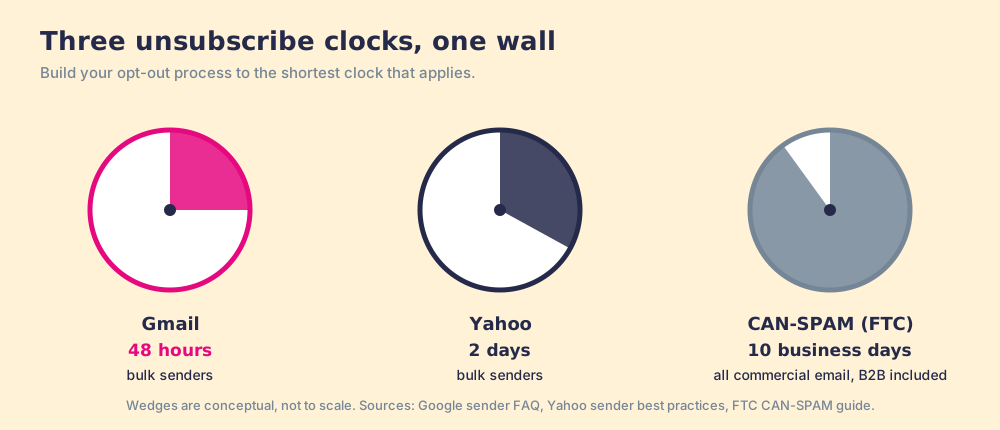
The law is the slowest clock. The FTC’s CAN-SPAM guide says the law “makes no exception for business-to-business email” and requires opt-outs honored within 10 business days (FTC). A team that builds its unsubscribe process to the legal deadline misses the mailbox providers’ deadline by a week. For the complaint arithmetic per thousand emails, see the deliverability section of outbound lead generation.
New domains and inboxes need a ramp before any of this matters. Instantly’s 2026 benchmark advises a warm-up of “5-10 emails per day initially, then gradually increasing over 4-6 weeks,” and warns that erratic sending patterns hurt reputation (Instantly, January 12, 2026; data from billions of cold email interactions on its platform in 2025).
How clean does a cold email list need to be?
A cold email list needs to be clean enough that bounces stay under 2%, the line Instantly’s benchmark sets to protect sender reputation. Bounces are the guest list check: each one tells the provider you are mailing people you never confirmed exist.
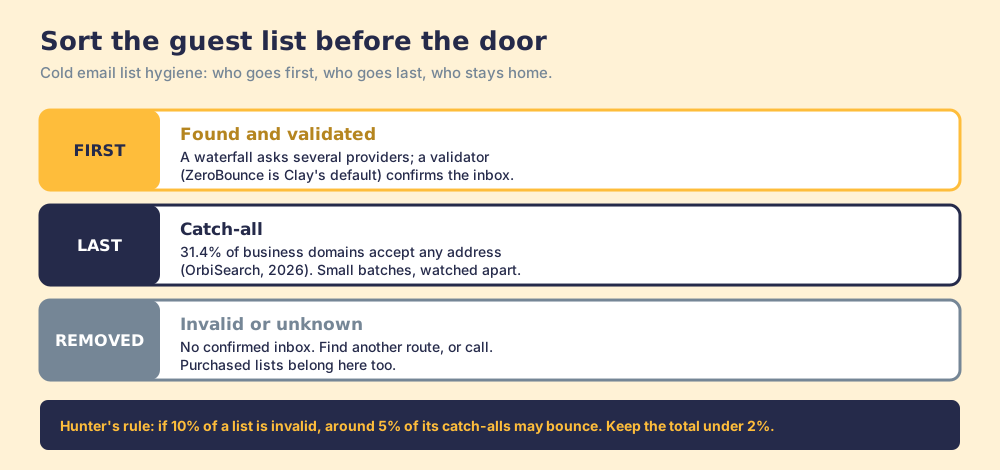
Two facts make that harder than it sounds. A large share of business domains cannot be verified at all: OrbiSearch’s study of 1.6 million business domains found “31.4% of business email domains are catch-all,” configured to accept mail for any address (OrbiSearch, May 2026). And catch-all addresses still bounce. Hunter’s help center gives a rule of thumb: “the bounce rate of the accept-all emails in your list is around half the invalid rate of your full list. For instance, if 10% of the emails in your list are invalid, around 5% of the accept-all emails in the list may bounce” (Hunter, September 1, 2026).
Then the list ages. Apollo cites a vendor estimate that B2B data decays about 2.1% a month, roughly 22.5% a year (Apollo); treat the number as directional, and the direction as certain.
- Verified at the source. Find each email through a waterfall that asks several providers, then validate it. Clay’s waterfall validates with ZeroBounce by default and has a setting to “Only mark Safe to Send emails as valid,” which excludes catch-alls (Clay University). Our email finder tools guide compares how each finder handles the address it cannot confirm.
- Catch-all flagged. Keep catch-all addresses in a separate segment, send to them last, in smaller batches, and watch their bounces on their own.
- Built close to the send. Pull the list days before the first touch, and re-verify anything that sat for a month.
- Duplicates and owners checked. Check the CRM before the first send. A contact another rep is already working should not get a second cold sequence the same week.
- No purchased lists. HubSpot’s own guidance warns that bought contacts are “highly likely to bounce, unsubscribe, mark emails as spam, and may cause blocklistings” (HubSpot).
How do you write prospecting emails that get replies?
The emails that earn replies are short and about one thing. Instantly’s 2026 benchmark found elite first-touch emails run “less than 80 words,” carry a single clear call to action, and use subject lines that name a specific problem; 58% of all replies came from the first email. The average reply rate across its data was 3.43%, the top quarter 5.5% or better, and the top 10% at 10.7% or better.
Eighty words is about four sentences. That is room for a reason, a point, and an ask, and no room for a company history. Good prospecting emails share a shape:
- A subject line about their problem. Three to six words that name the situation, written the way a colleague would write it.
- The reason you are writing. The trigger from the list: the new VP, the open roles, the launch. If the list has no trigger for this person, the email has no first line.
- One sentence of value. What changed for a team like theirs, stated as an outcome they would recognize.
- One ask. A question they can answer in a line, such as whether the problem is on their plate this quarter, and nothing that needs a calendar on the first touch.
- Plain signature. Name, title, company, and the physical address and opt-out line CAN-SPAM requires.
The cold email tips that matter most keep the email relevant. A template scales the skeleton; the reason line has to come from the list, which is why sales email templates work only with the one personalized line in place.
How many cold email follow ups should you send?
Instantly’s guidance is four to seven touches in total, three to four days apart, and then a stop, and the reply split explains it: 58% of replies come from the first email, so the other 42% come from follow-ups. Skipping follow-ups gives away four replies in ten. Running them forever turns the late ones into complaints.
A cold email follow up has to bring something new. Instantly’s report says step two should “feel like replies, not reminders,” meaning a short note in the same thread that adds a fact, a question, or a different angle. “Bumping this to the top of your inbox” adds volume and no reason.
Mix in the other channels where the list supports it. A call between emails two and three, or a LinkedIn touch after email one, reaches the buyer who never reads cold email; our cold outreach guide covers when each channel fits, and the sales cadence guide covers the stopping rule. After the first reply, the job changes to the follow-ups in the sales follow-up email.
Which numbers tell you cold email is working?
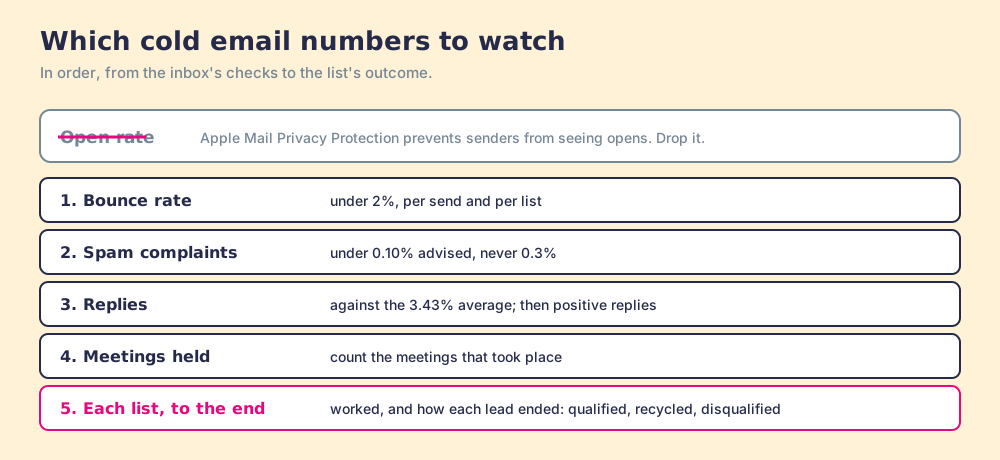
The open rate is the first number to drop. Apple’s Mail Privacy Protection “prevents senders from seeing if you’ve opened the email message they sent you” (Apple), so an open count mixes real reads with machine loads and blanks. Watch these instead, in order:
- Bounce rate. Under 2%, per send and per list.
- Spam-complaint rate. In Google Postmaster Tools, under 0.10% advised and never at 0.3%.
- Reply rate and positive replies. Replies against the 3.43% average, then how many replies were interested.
- Meetings held. Count the meetings that took place; a booked meeting the buyer skips is a reply, at best.
- Each list, followed to the end. How many contacts on the list were worked, and how each one ended: qualified, recycled, or disqualified.
The last line is where a cold email program learns. A list with a strong reply rate and no qualified leads tells you the reason line worked and the targeting did not. A list where half the contacts never got a first email tells you the system gave the rep more than one afternoon could hold, which is a fix to the size of the list, and a reason to let reps build lists they will work.
Where does Supered Prospector fit in cold email?
Prospector sits at the guest list. A rep on a LinkedIn profile, a Sales Navigator list, a company’s website, or a HubSpot, Salesforce, or Pipedrive record runs the team’s Clay table in one click, on the team’s own Clay account, with no Clay login for reps. It runs inside the Supered Chrome extension.
- Verified emails from the waterfall. Clay’s waterfall across 200+ providers finds the email and validates it, and the rep sees the result where they are working.
- The owner check before the push. On the profile the rep sees the matching CRM record, who owns it, and whether the person was worked before, so no contact gets two cold sequences.
- One click to the CRM. Field mapping is set once by Ops; the contact lands in HubSpot, Salesforce, or Pipedrive for your sequencer to pick up.
- Each list, worked. The team’s process applies to worked prospects, so the leader sees which lists got worked and how each lead ended, and coaches from what converts.
Prospector works within LinkedIn’s terms and does not copy search results in bulk; the contact data comes from Clay’s waterfall on the customer’s Clay account. Supered does not bring its own database. It brings Clay’s waterfall, which is every database, routed, and that is why we chose Clay as our only data provider. Prospector does not write or send email; the domain setup, the copy, and the sending stay with your sequencer, for example Instantly through the Instantly Clay integration. It costs $45 per rep per month, billed annually, from one rep. See the Prospector page.
Choose something else if:
- No Clay account. Prospector needs one; a finder with its own verifier is the simpler start.
- A sending problem. If your domain fails authentication or your complaint rate is high, fix that in your sending tool first; no list tool will.
- One rep, a few emails a week. A single email finder’s free tier may be enough.
Why trust this guide?
Before Supered I started RevPartners, a HubSpot partner that did only sales implementations, sold roughly twice as much Sales Hub as any other partner, and reached HubSpot’s Elite tier in 13 months. I have watched good email programs die on a missing DNS record. Supered is the #1 sales enablement app on the HubSpot marketplace, rated 5.0 from 122 reviews there and 4.9 out of 5 from 81 reviews on G2 (checked October 1, 2026). The disclosure: we make Prospector, which builds lists and does not send email.
What we recommend
Fix the door before the speech. This week, check that every sending domain passes SPF, DKIM, and DMARC, set the unsubscribe process to 48 hours, and look up your spam rate in Postmaster Tools. Next, sort the list: verified first, catch-all last in small batches, unknown removed, and nothing older than a month without a re-check. Only then rewrite the copy to under 80 words with one reason and one ask, and set a follow-up schedule of four to seven touches with a stopping rule.
The order comes from the evidence. Since November 2025 Gmail rejects mail that fails the checks, so authentication failures cost every message. Bounces and complaints are counted per domain and remembered, so a dirty list taxes the next campaign too. And copy improves replies only on mail that arrived. A team that works in this order gets more from the same list and the same writers.
For the other doors, phone and LinkedIn, and how to measure all three together, read cold outreach.
Frequently asked questions
What are cold email best practices in 2026?+
What are the Gmail, Yahoo and Microsoft rules for cold email?+
What is a good bounce rate for cold email?+
How many follow-up emails should you send for cold email?+
How long should a cold email be?+
Where does Supered Prospector fit in cold email?+
Your Clay waterfall, where reps already work.