Outbound Lead Generation: Six Joints, One Pipe, Measured to Closed
Outbound lead generation is six steps that multiply, from ICP to closed.
The step-by-step build, the Gmail, Yahoo and Outlook sender rules with sources, the tool stack by job, and why the report most teams run stops one step short.
Outbound lead generation is the work of choosing companies that fit your ideal customer profile, finding the right people there, and contacting them first by email, phone, or LinkedIn until some become qualified opportunities.
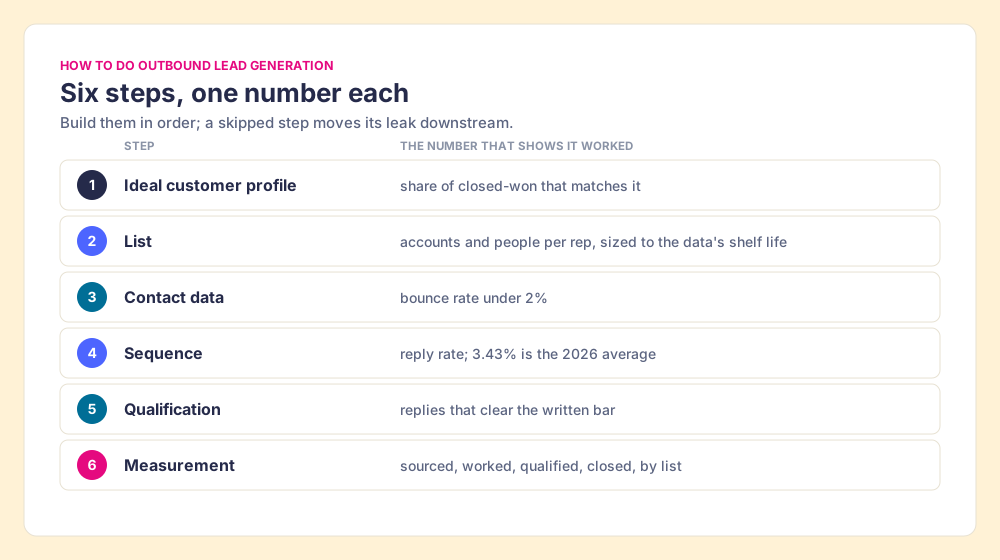
How to build an outbound lead generation system
- 1
Write the ideal customer profile from closed-won deals
Pull your last closed-won deals, write the profile as one sentence with the industry, size, trigger, and the disqualifiers that rule an account out.
- 2
Build the list, accounts first and people second
Choose accounts that match the profile, then the two to four people in the buying group at each, sized to what one rep can touch while the data is fresh.
- 3
Fill and verify the contact data
Run each person through a waterfall or a database, validate every email, and keep the bounce rate under 2% before a single message goes out.
- 4
Write a short sequence across channels
Four to seven touches across email, phone, and LinkedIn, a first email under 80 words with one ask, sent from authenticated domains under the Gmail, Yahoo, and Outlook rules.
- 5
Qualify the replies against a written bar
Decide in advance what turns a reply into a qualified lead, write it down as fields in the CRM, and route only what clears it to an opportunity.
- 6
Measure each list from sourced to closed
Tag every contact with the list it came from and report sourced, worked, qualified, and closed by list, so the team builds more of the lists that close.
A sales team puts last month’s outbound meetings booked on the screen, and the room applauds. The VP running the meeting cannot say how many of those meetings came from which list, or how many of the deals they opened will close. The meeting count is real. It measures the pressure at the first joint of a pipe and reports it as water at the tap.
Outbound lead generation is the work of choosing companies that fit your ideal customer profile, finding the right people there, and contacting them first by email, phone, or LinkedIn until some become qualified opportunities. The pages that rank for it today list channels: cold calls, cold email, social selling. The channels are fine. The trouble is that outbound is six steps in a row, each step passes on only a share of what it receives, and the shares multiply. Two steps decide most of the result, and the top-ranking guides skip both: the sending rules Gmail, Yahoo, and Outlook enforce, and measuring each list all the way to closed.
The short version, for a team building outbound now:
- The six steps. Ideal customer profile, list, contact data, sequence, qualification, sourced-to-closed measurement, built in that order.
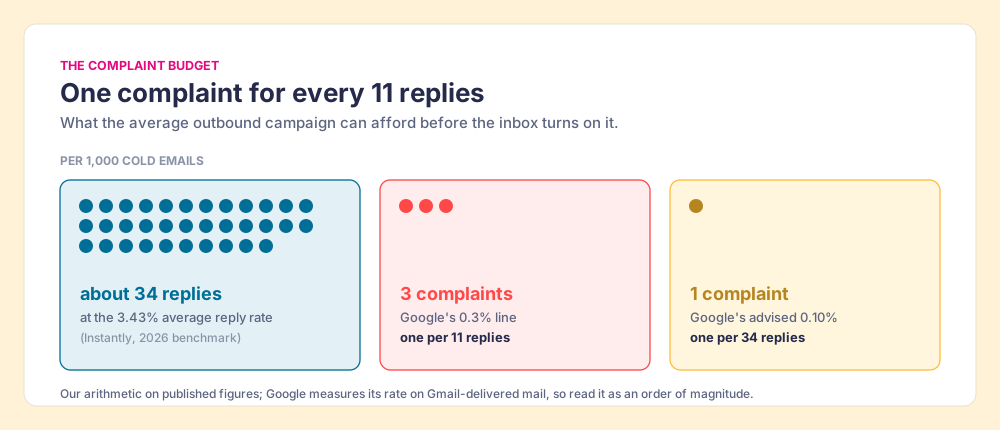
- The inbox’s rules. SPF, DKIM, and DMARC on your sending domains, and a spam-complaint rate under 0.3%, which at an average reply rate gives you about one complaint for every 11 replies.
- The stack. One tool per job, and a report that follows each list to closed-won.
What is outbound lead generation, and what does it leave out?
Outbound starts with the seller. Inbound starts with the buyer: a form fill, a demo request, a chat. The difference matters more than it used to, because Gartner’s research on the B2B buying process finds buyers spend about 17% of their buying time with all potential suppliers combined, inside buying groups of six to ten people (Gartner). Outbound is how a seller gets a share of that 17% before the buyer has a shortlist. For the full outbound-versus-inbound split, see what outbound sales is.
Definitions drift on this term. Cognism’s guide, which ranks for the keyword, lists seven outbound strategies that include pay-per-click and content syndication (Cognism, updated April 24, 2026). Those are paid ways to make a buyer come to you; the buyer still raises the hand. We count only contact the seller starts, because the steps, the rules, and the cost per result all change once the buyer starts it. Outbound sales lead generation, in our sense, is prospecting with a quota attached.
Why is outbound a multiplication problem?
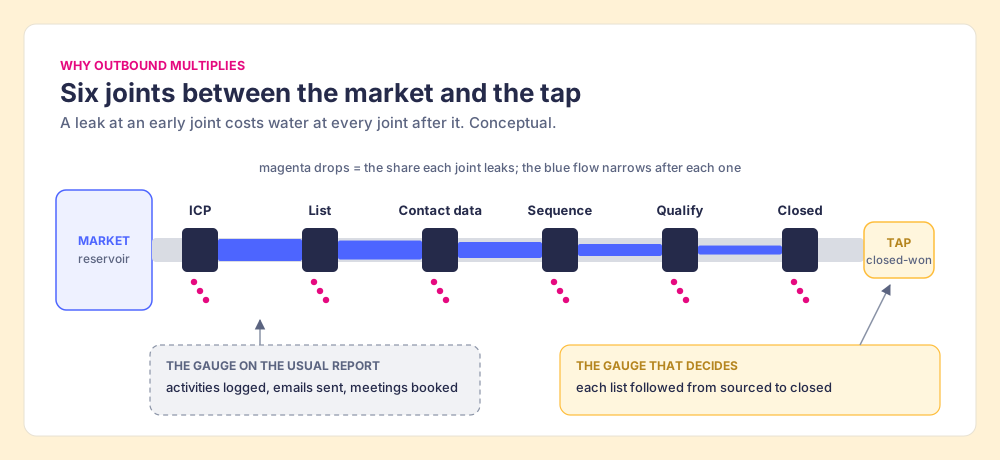
Outbound works like a water main with six joints between the reservoir and the tap. The reservoir is your market. The joints are the profile, the list, the contact data, the sequence, the qualification, and the close. Each joint leaks a share of the water, and a leak at the second joint costs you water at all four joints after it. A plumber who reads the pressure gauge at the first joint (activities logged, emails sent) can report a healthy number while the tap runs dry.
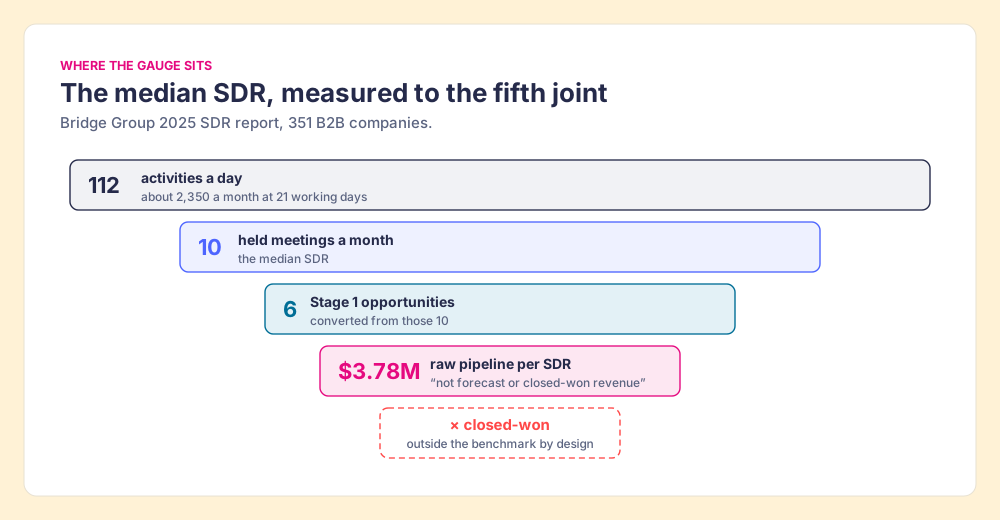
The Bridge Group’s 2025 SDR report shows where the gauge sits in practice. Across 351 B2B companies, the median SDR logs 112 activities a day (44 phone, 41 email, 19 LinkedIn, 8 text or other), holds 10 meetings a month, converts 6 of them to Stage 1 opportunities, and sources $3.78M in pipeline (Bridge Group, 2025). At 21 working days, that is about 2,350 activities for 10 held meetings, or roughly 235 touches per meeting (our arithmetic on the medians). The report is careful about its own limit: “Pipeline figures represent raw pipeline generated, not forecast or closed-won revenue.”
The most-cited benchmark in outbound, run by people who know the work, measures to the fourth or fifth joint and says so. Only 60% of SDRs in the same study hit quota, the lowest in the study’s history. A team that wants to know whether its outbound works has to build the last joint’s gauge itself.
The comparison stops short in one place. Water does not choose to leave a pipe, and buyers do choose. A joint that leaks because the message was wrong for that buyer is information, and a team that measures by list learns from it.
How do you do outbound lead generation, step by step?
The six steps below run in order. Skipping one moves its leak downstream, where it costs more.
Step 1: Write the ideal customer profile from closed-won deals
Pull the deals you closed in the last year and write down what they share: industry, headcount band, the system they ran before you, and the event that made them buy (a new VP, a funding round, a hiring spree). Then write the disqualifiers, the conditions that rule an account out even when it looks right. One sentence with disqualifiers does more work than a slide of personas. Clay’s outbound page lists five common triggers: job changes, hiring activity, funding announcements, web visits, and social mentions (Clay, October 1, 2026). Our guide to what an ICP is turns the profile into the filters you will search with.
Step 2: Build the list, accounts first and people second
Choose the accounts, then find the two to four people at each account who sit in the buying group. Reps usually find them in Sales Navigator, and it has two limits to plan around: LinkedIn “currently doesn’t offer the option to export account and lead information from Sales Navigator into a CSV or XLS file,” and a search shows at most 2,500 lead results (LinkedIn Help; LinkedIn Help). Size the list to what one rep can touch before the data ages. Our lead list guide walks through the build and the case for lists the rep assembles over lists someone hands them.
Step 3: Fill and verify the contact data
A single database misses people. A waterfall asks one provider, then the next, until one returns a verified result; Clay runs that waterfall across 200+ data vendors on one contract (clay.com, October 1, 2026) and charges nothing when an enrichment returns no result (Clay pricing, October 1, 2026). Clay validates the emails it finds with ZeroBounce by default, and a setting excludes catch-all addresses, the ones that accept anything and bounce later (Clay University). Instantly’s benchmark puts the line for bounces at under 2% to protect sender reputation (Instantly, January 12, 2026). A list that bounces at 5% has failed at joint three before anyone wrote a word.
Step 4: Write a short sequence across channels
Instantly’s 2026 report, built on billions of cold email interactions in 2025, puts the average reply rate at 3.43%, the top quarter at 5.5% or better, and the top 10% at 10.7% or better. It finds 58% of replies come from the first email, recommends four to seven touches, and says elite first emails run under 80 words with one ask (Instantly). Phone still carries weight: Gong’s data shows “a 2.1x higher success rate for salespeople who state their reason for calling” (Gong). Outbound sales automation belongs here and only here. A sequencer sends the touches on schedule; it does not choose who deserves them.
Step 5: Qualify the replies against a written bar
Outbound lead qualification is deciding which replies deserve an opportunity, against a bar the team writes before the campaign starts. A useful bar has three parts: the account fits the profile, the buyer names a problem in their own words, and there is a next meeting on the calendar. “Interested, send me info” clears none of them. Write the bar as fields in the CRM so the rep fills them while the call is fresh. The lead qualification guide covers the frameworks; for outbound, the written bar matters more than which acronym you pick.
Step 6: Measure each list from sourced to closed
Tag every contact with the list it came from (the Navigator search, the trigger, the event) and report four numbers per list: sourced, worked, qualified, closed. Report by list as well as by rep. A rep who works a weak list well still loses, and the list report tells you to build fewer of that list, which a rep scorecard never will. Over a few months the lists that close tell you which profile, which trigger, and which source to build more of, and Step 1 gets rewritten from evidence.
What are the email deliverability rules for outbound?
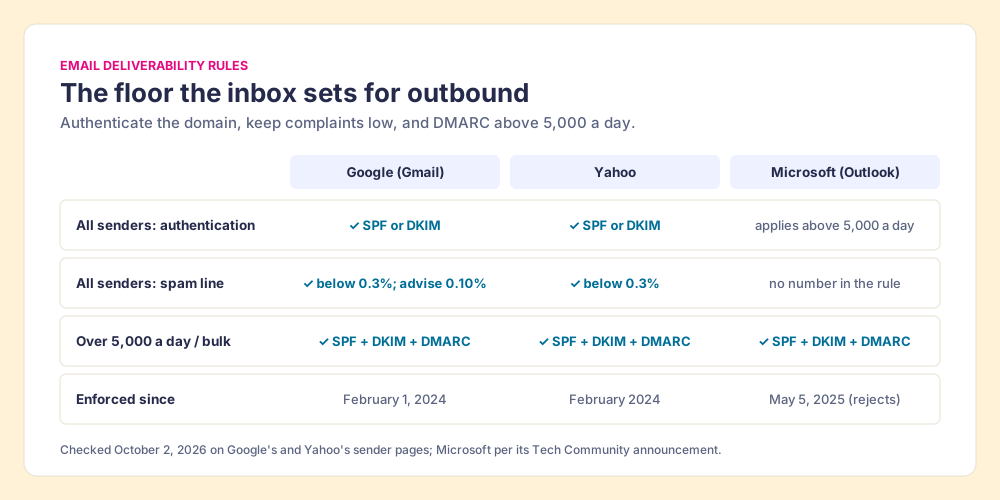
The mailbox providers set the floor, and they publish it. The table shows what each requires, checked October 2, 2026.
| Provider | Applies to | Authentication | Spam-complaint line | Since |
|---|---|---|---|---|
| Google (Gmail) | All senders to Gmail accounts | SPF or DKIM; valid forward and reverse DNS; TLS | Below 0.3%; stay below 0.10% | February 1, 2024 |
| Google (Gmail) | More than 5,000 messages a day | SPF and DKIM, plus DMARC (p=none allowed); From: aligned with SPF or DKIM | Below 0.30% | February 1, 2024 |
| Yahoo | All senders | SPF or DKIM; valid forward and reverse DNS | Below 0.3% | February 2024 |
| Yahoo | Bulk senders | SPF and DKIM, plus DMARC at least p=none | Below 0.3% | February 2024 |
| Microsoft (Outlook.com, Hotmail, Live) | More than 5,000 messages a day | SPF, DKIM, and DMARC at least p=none | No number in the rule | Rejected since May 5, 2025 |
Sources: Google email sender guidelines; Yahoo sender best practices; Microsoft’s announcement on the Microsoft Tech Community blog, with the switch from junk-foldering to outright rejection reported by dmarcian (updated May 20, 2026), which notes rejected mail returns “550 5.7.15 Access denied.”
A scope note, because it matters for B2B lists. Google’s page governs mail to Gmail accounts, and a B2B list is made of company addresses, many hosted on Google Workspace or Microsoft 365, where the receiving company’s own filters apply. Treat the consumer rules as the floor the industry’s sending tools are built around; the receiving company’s filters add a second test.
Now the arithmetic the top-ranking guides leave out. The inbox works like a landlord who keeps a ledger of noise complaints. A few per thousand tenants are tolerated; past the line, the lease is in trouble no matter how pleasant the other tenants find you. Take 1,000 cold emails. At Instantly’s 3.43% average, about 34 people reply. At Google’s 0.3% line, 3 people marking you as spam puts the domain at risk; at the 0.10% level Google advises, the budget is 1. So the average campaign can afford about one complaint for every 11 replies it earns, and one for every 34 if it stays where Google recommends (our arithmetic; Google’s rate is measured on Gmail-delivered mail, so read it as an order of magnitude).
The landlord comparison fails in one useful place. A landlord hears only from the neighbors who complain; the inbox also watches who opens, replies, and moves you out of spam, so good replies help the ledger. The ledger favors a smaller list. The cheapest way to stay under the complaint line is to send fewer emails to people who never fit, which sends you back to Steps 1 and 2.
- Authenticated domains. SPF, DKIM, and DMARC on every domain you send from, with the From: domain aligned.
- A complaint budget. Watch Postmaster Tools and treat 0.10% as the line, not 0.3%.
- Verified contacts. Bounces under 2%, catch-all addresses excluded or sent last.
- A working unsubscribe. CAN-SPAM requires an opt-out honored within 10 business days and “makes no exception for business-to-business email” (FTC).
- A smaller list. Fewer, better-fit contacts lower complaints and raise replies at once.
Which outbound sales software do you need?
Searches for the best outbound sales software usually end at a listicle of thirty tools. The stack that works is shorter: one tool per job, and a named owner for each.
| Job | What decides it | Tools teams use | Price, where checked |
|---|---|---|---|
| Profile and record | Closed-won data, list source on each contact | HubSpot, Salesforce, Pipedrive | HubSpot Sales Hub Professional $90 per seat per month billed annually (HubSpot, October 1, 2026) |
| Finding people | Search filters, buying-group view | LinkedIn Sales Navigator | Core from US$119.99 per month (LinkedIn, October 1, 2026) |
| Contact data | Coverage and verification | Clay’s waterfall across 200+ vendors; single databases such as Apollo, ZoomInfo, Cognism, Lusha | Clay Growth from $495 per month (Clay, October 1, 2026) |
| Rep-built lists on Clay | List and data where the rep works | Supered Prospector | $45 per rep per month, billed annually, plus your Clay plan |
| Sequencing (outbound sales automation) | Touches on schedule, sender health | HubSpot Sequences (Sales Hub Professional or Enterprise), Outreach, Salesloft, Instantly | Varies by seat and volume |
| Qualification and measurement | Written bar as fields; reports by list | Your CRM’s fields and reports | Included in the CRM |
Two corporate notes for anyone shortlisting: Clari and Salesloft merged on December 3, 2025 and operate under the Salesloft brand (RevenueFlow), and HubSpot’s sequences require a Sales Hub or Service Hub Professional or Enterprise seat (HubSpot KB).
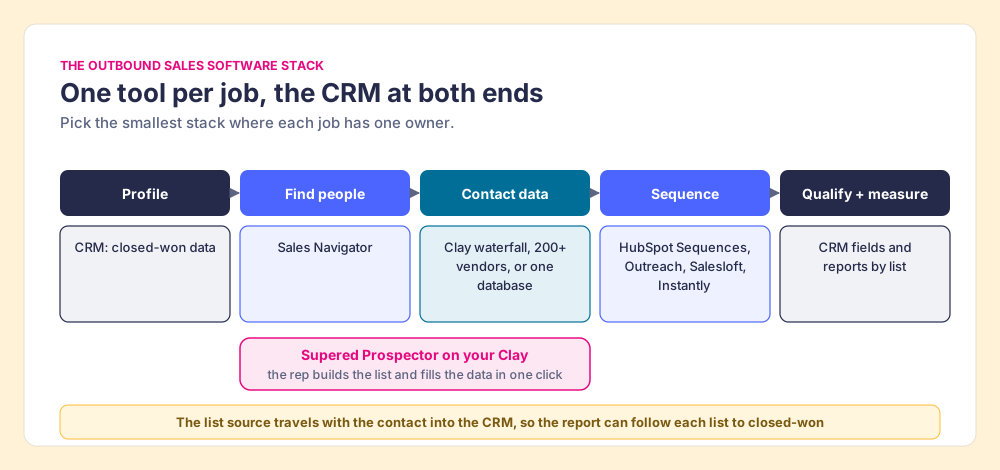
The stack fails most often at the seams. The list lives in a spreadsheet, the contact data in the vendor’s app, the sequence in a sequencer, and the closed deal in the CRM, and the list source never travels with the contact. Then Step 6 is impossible, because the report cannot say which list closed. Whatever you buy, make the list source a CRM field that every tool writes to.
Where does Supered Prospector fit in outbound lead generation?
Steps 2 and 3 are where a rep’s afternoon goes. The rep finds the right VP in Sales Navigator, copies the name into a database tab, checks the CRM for a duplicate in a third tab, and pastes the result into the sequencer. Supered Prospector puts those steps one click from the person the rep is already looking at, on your team’s own Clay account, with no Clay login for reps. It runs inside the Supered Chrome extension.
- The rep’s starting point. A LinkedIn profile, a Sales Navigator lead or list, a company’s website, or a HubSpot, Salesforce, or Pipedrive record.
- The CRM check. On the profile, the rep sees the matching CRM record and whether the person was already worked in the past, before anyone sends a duplicate email.
- The waterfall in one button. The rep runs the team’s Clay table, and Clay’s waterfall across 200+ providers returns the verified email and phone.
- Buying groups and custom workflows. A buying-committee lookup tuned to the team’s titles and seniority, any custom Clay workflow the GTM engineer built, and a whole saved list pushed into a Clay workflow.
- One click to the CRM. Ops sets the field mapping once; the contact syncs to HubSpot, Salesforce, or Pipedrive with the list it came from.
- The list after it ships. The team’s process applies to worked prospects, so a leader sees which sourced lists got worked and which closed, and coaches from the lists that convert.
Prospector works within LinkedIn’s terms and does not copy search results in bulk; the contact data comes from Clay’s waterfall on the customer’s own Clay account. Supered does not bring its own database. It brings Clay’s waterfall, which is every database, routed, and that is why we chose Clay as our only data provider. Clay governs the data. Supered governs the motion. The full rep loop is on the sourcing use case, and the product is on the Prospector page.
Prospector is $45 per rep per month, billed annually, from one rep, and runs on your Clay plan and credits.
Choose something else if:
- No Clay account. Prospector needs one. A single database such as Apollo or Lusha is the simpler start.
- Ops builds every list. If reps never build lists and work what lands in the CRM, Clay’s own CRM sync on its Growth plan does the job.
- AI-written outreach. Prospector does not draft or send emails; it hands the contact to your CRM and sequencer.
Why trust this guide?
Before Supered I started RevPartners, a HubSpot partner that did only sales implementations, sold roughly twice as much Sales Hub as any other partner, and reached HubSpot’s Elite tier in 13 months. Supered is the #1 sales enablement app on the HubSpot marketplace, rated 5.0 from 122 reviews there and 4.9 out of 5 from 81 reviews on G2 (checked October 1, 2026). The disclosure: we make Prospector, and it appears above as one route among several.
What we recommend
Build rep-built lists and measure them to closed. The rep chooses the people from the profile, a waterfall fetches the data days before the first touch, the contact carries its list source into the CRM, and the team reports sourced, worked, qualified, and closed by list.
The evidence in this guide points there for three reasons. A better list improves every joint after it, because the leaks multiply. The complaint budget rewards fewer, better-fit sends: one complaint per 11 replies leaves no room for a list padded with people who never fit. And the Bridge Group’s own limit line shows that the closed-won gauge is the one a team has to build for itself.
The two common alternatives each have a place:
- Volume-first outbound. A big exported list, a long sequence, and success read as meetings booked. It fills calendars for a while, spends the complaint budget fast, and cannot say which list closed. Use it, if at all, for a single test of a new market.
- Ops-built lists. A GTM engineer builds segments in Clay and pushes them to the CRM. Good data and steady segments, handed to a rep who did not choose them. Keep it for rules-based segments that do not need a rep’s judgment.
If your team has Clay, Prospector is the shortest way to put the list and the data in the rep’s hands. Start with the profile in what an ICP is, build the list with the lead list guide, and follow it through the sales prospecting process to the close; the sales prospecting guide covers the whole motion.
Frequently asked questions
What is outbound lead generation?+
What are the email deliverability rules for outbound in 2026?+
What is a good reply rate for outbound email?+
What is outbound lead qualification?+
What is the best outbound sales software?+
Where does Supered Prospector fit in outbound lead generation?+
Your Clay waterfall, where reps already work.