Client Onboarding Software: The Plan Is the Easy Half
Most client onboarding software stores a beautiful plan and never checks whether the team runs it. The first 90 days decide the renewal, and consistency is the product.
Client onboarding software is the system a services company uses to bring a new client live, from kickoff to handoff, storing the plan and tracking each account through it. The harder half it skips is making the team run that plan every time.
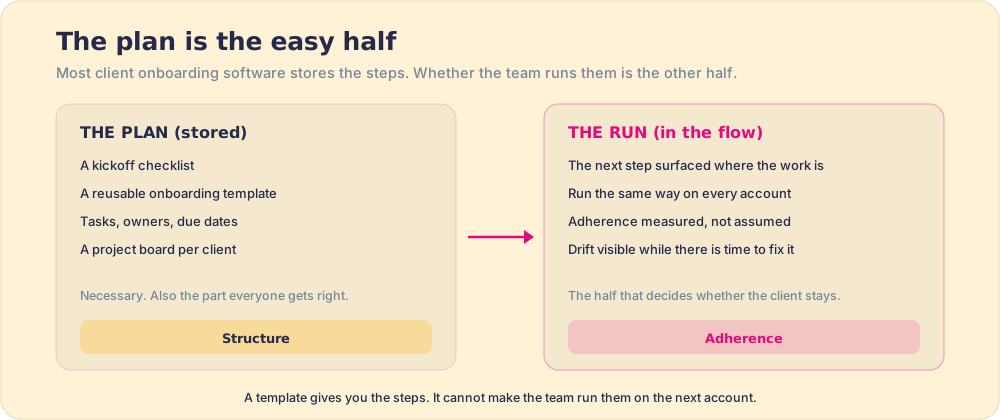
A new client signs, and somewhere a project plan springs to life: a kickoff call booked, a requirements doc spun up, a board of tasks with owners and due dates marching toward go-live. It looks like control. It usually is not. Client onboarding software is good at producing the plan and oddly silent about what decides the relationship: whether your team runs that plan the same way on this account as it ran it on the one that went beautifully last quarter. The plan is the easy half. The run is the half you are buying.
Client onboarding software is the system a services company uses to bring a new client live, kickoff, requirements, implementation, and handoff, by storing the plan and tracking each account through it. The harder half, the one most tools skip, is making the team run that plan the same way on every account. The buying decision turns on that distinction.
What is client onboarding software?
It is the operational backbone for the first stretch of a client relationship: the days between a signature and the moment the client is live and getting the value they paid for. The category sprawls. Some teams run onboarding in a project tool, some in their CRM, some in a product built specifically for client or customer onboarding software. Underneath the branding, almost all of them do the same three things well: they hold a reusable template, they create a project per account, and they track who owes what by when.
All three are about the plan. They store it, copy it, and report on its tasks. None of them, on its own, reaches into the work and changes what the team does on the account in front of them. Keeping a plan and changing behavior are separate jobs, and the word onboarding itself blurs them.
How is client onboarding different from user onboarding?
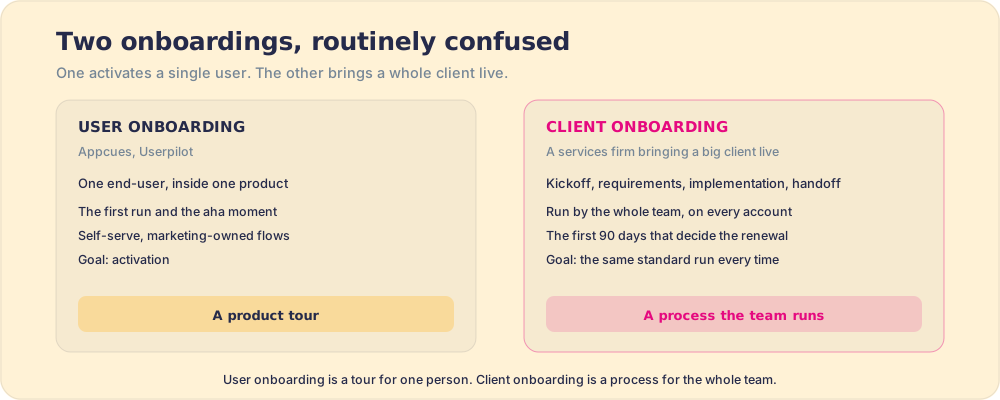
They share a word and almost nothing else. User onboarding is the job of getting one person comfortable inside a product, the welcome flow and the first click, and the tools that own it, Appcues and Userpilot, are built for self-serve activation. That is real work, and we make the distinction in detail in Appcues vs Pendo. Client onboarding is a different animal: a services firm bringing a whole client live, a multi-step process carried by a team, where a bad start is a first impression the client cannot un-see.
The stakes are not symmetric, either. A clumsy product tour annoys a user; a clumsy client onboarding loses an account. Wyzowl’s onboarding research found that the overwhelming majority of people have abandoned a product because they could not figure out how to use it, a reminder that the opening experience carries more weight than its length suggests (Wyzowl onboarding statistics). And the money sits on the back of it: Frederick Reichheld’s classic work at Bain found that raising customer retention by five points can lift profit anywhere from 25 to 95 percent (Reichheld & Sasser, Harvard Business Review). Onboarding is where retention is won or lost, and what loses it is rarely a missing feature. It is an inconsistent run.
Why does client onboarding software keep the plan but lose the run?
Because storing a plan and running it are different problems, and software has historically been built for the first. A template is a static object. Running it is a behavior, repeated by busy people across dozens of accounts, and behavior decays in ways a document never does. The gap is a category-wide blind spot: the easy build (a place to keep the steps) gets sold as if it were the hard result (the team taking them).
Our own field data puts numbers on the gap. In the State of Sales Enablement, across 198 leaders, 89 percent had a defined process and only 36 percent saw their teams follow it, a 53-point gap that is pure adherence. The same pattern governs a client onboarding process: writing it down is not running it, and a documented onboarding that the team does not follow on the hundredth account changed nothing about the client’s experience.
There is a mechanism under it, older than any of these tools. In the 1880s Hermann Ebbinghaus measured how fast we forget, and found that without reinforcement people lose most of what they learn within days, the curve we now call the forgetting curve (Ebbinghaus forgetting curve). Train your onboarding team once, at a kickoff or in a deck, and the standard decays exactly the way Ebbinghaus describes. By the next account, the steps that made the last onboarding excellent are half-remembered, and the team improvises.
The plan did not change. The running of it did.
What should client onboarding software measure?
Adherence, and the outcome adherence is supposed to produce, rather than the count of boxes ticked. A completed checklist is a fact about the checklist, the same way a finished tour is a fact about the tour. It tells you a task was marked done. It does not tell you the kickoff genuinely surfaced the client’s requirements, or that the handoff to the delivery team happened the way it happens when onboarding goes right. Those are the steps that move a client from signed to live, and they are invisible to a tool that counts completion.
The better instrument watches two things. First, did this account follow the standard, the real one, the way your best onboarding ever runs, and where did it drift, early enough that you can fix it before the client feels the slip. Second, did the account reach the outcome the onboarding exists to produce: time to first value, the client live and using what they bought, the result that predicts renewal rather than the activity that precedes it. Point the dashboard at the destination rather than the miles, and the team steers toward it.
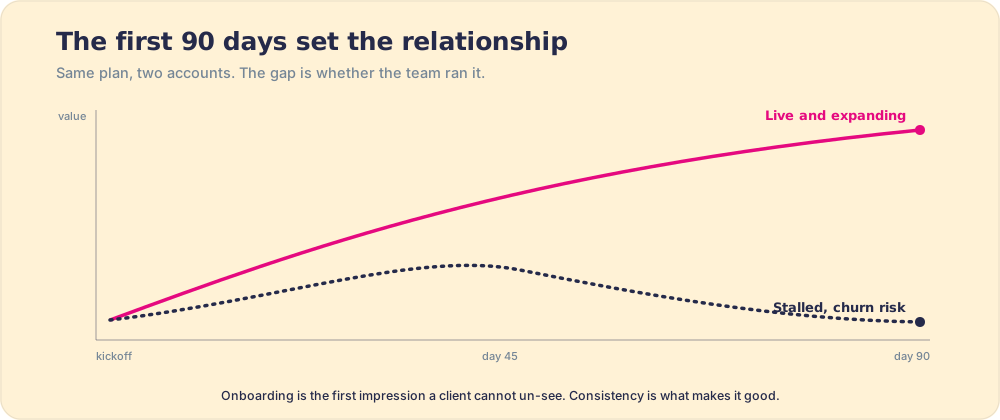
The same reasoning makes client onboarding a process-adoption problem more than a project-management one, and puts it next to the wider field of digital adoption and user adoption: the win is the team running a known-good motion every time, in the flow of the work, with the slips visible while they are still cheap to fix.
A quick recap
- The category’s real job. Client onboarding software stores a reusable plan, creates a project per account, and tracks tasks. All three are about the plan, which is the easy half.
- Client vs user onboarding. A product tour activates one end-user (Appcues, Userpilot). Client onboarding is a team running a multi-step process on every account, where the first 90 days decide the renewal.
- Why the run decays. Behavior fades the way Ebbinghaus’s forgetting curve predicts, and our field data shows the result: 89 percent of teams have a defined process, 36 percent see it followed.
- What to measure. Adherence to the standard per account, plus time to first value. Completion percentage is the odometer, not the destination.
What we recommend
Buy for the run. The plan is real and you need it, so if you have no template and no board, start there, because structure is the floor. But do not mistake the floor for the building. When you evaluate client onboarding software, push past the demo of the pretty project view and ask one question: the week after we document our onboarding, what does your tool tell us about whether the team ran it on the next account, and where it drifted. If all the tool can show is a completion percentage, you are being sold the odometer.
Split it by problem. If your problem is that no onboarding plan exists, a project or onboarding tool that stores and assigns the steps solves it, and you should choose on fit and price. If your problem is that the plan exists and the team runs it brilliantly on the marquee account and unevenly on the rest, no better-formatted template fixes that, because the gap is behavioral. There you want a business logic layer that delivers the next step in the flow of work and measures adherence, account by account. For a services company, that consistency is the first impression every client buys, and the one that decides whether they stay. Book a demo if that is the half you are missing.
Frequently asked questions
What is client onboarding software?+
What is the difference between client onboarding and user onboarding?+
What should client onboarding software measure?+
Is a checklist or template enough for client onboarding?+
Your process, running itself.