Client Onboarding Template: Copy It, Then Run It
A complete, copy-pasteable client onboarding template with phases, owners, kickoff-relative due dates, and exit criteria, filled in for a real services engagement, plus how to adapt it by deal size, migration vs net-new, and team count.
A client onboarding template is a reusable plan for bringing a new client live: the phases, steps, owners, due dates set relative to kickoff, and exit criteria a team copies onto each new account so the first 90 days run the same way every time.
You searched for a client onboarding template because you want the structure without rebuilding it. Fair. Below is a complete one, filled in for an agency engagement, with a kickoff agenda and a 30/60/90 review block attached. A client onboarding template is a reusable plan for bringing a new client live: the phases, steps, owners, due dates set relative to kickoff, and exit criteria a team copies onto each new account so the first 90 days run the same way every time.
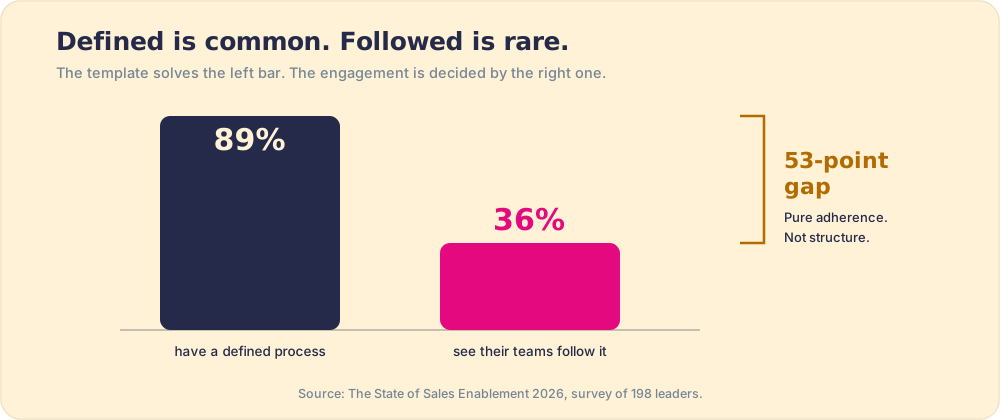
Take it. Then stay for the argument around it, because a template is the floor of good onboarding, and most of the field already stands on it. In our State of Sales Enablement survey of 198 leaders, 89 percent had a defined process and 36 percent saw their teams follow it. Structure was never the missing piece. The run is.
What should a client onboarding template include?
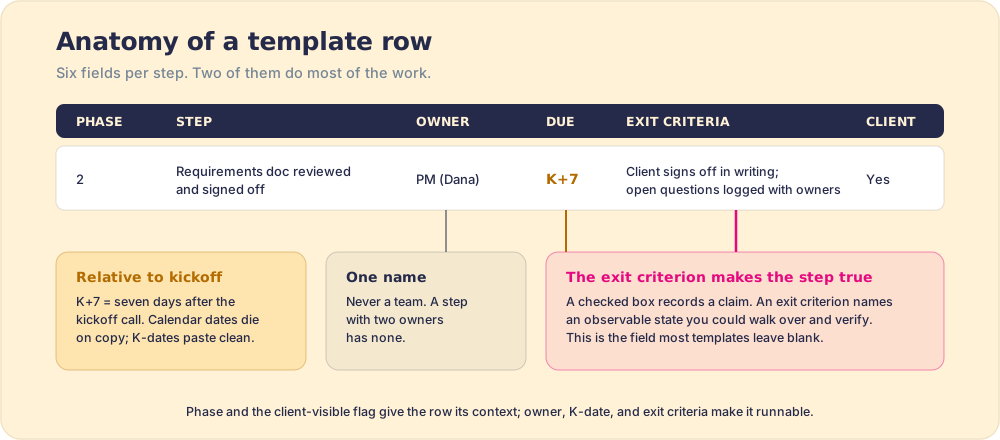
Six fields per row: the phase the step belongs to, the step itself (one action, one verb), one named owner, a due date written relative to kickoff, an exit criterion, and a client-visible flag.
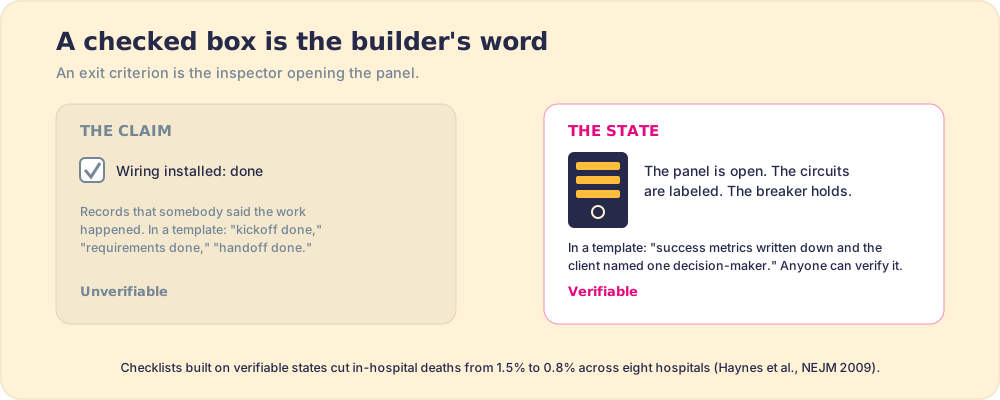
Two of the six do most of the work. Kickoff-relative dates make the plan reusable. A template with calendar dates dies the day after you write it, while one dated K-5 to K+60 (five days before kickoff to sixty after) pastes cleanly onto any account. And exit criteria make a step true. A checked box records that somebody said the work happened. An exit criterion names an observable state: not “kickoff done” but “success metrics agreed in writing, and the client named one decision-maker.”
A building inspector already works on this principle. He does not ask the electrician whether the wiring is finished; he opens the panel and looks. Atul Gawande’s surgical checklist ran the same way: its 19 items named verifiable states (antibiotics given, instruments counted), and in-hospital deaths across eight hospitals fell from 1.5 percent to 0.8 percent, a 47 percent drop (Haynes et al., New England Journal of Medicine, 2009). The checklist added no skill to the room. It made “done” checkable.
The client-visible column pulls weight too. Onboarding is the first product the client experiences, and marking which rows they see forces a decision, per step, about the experience you are producing. It also leaves you a shareable plan with no last-minute redacting.
The client onboarding template (copy this)
The example values below are for a marketing agency bringing a retainer client live, paid media plus a site refresh. Swap the deliverables for yours and keep the fields. K0 is the kickoff call. The tables paste straight into Excel or Google Sheets as six columns, one tab per phase.
Phase 1: pre-kickoff (K-5 to K0)
| Step | Owner | Due | Exit criteria | Client-visible |
|---|---|---|---|---|
| Sales-to-delivery handoff | Account director | K-5 | Delivery team can state the client’s goal, scope, and both promises made during the sale without opening the contract | No |
| Access requests sent (ad accounts, analytics, CMS, brand assets) | Project manager | K-4 | Request list sent and acknowledged by the client contact | Yes |
| Kickoff agenda and welcome packet sent | Account director | K-2 | Client confirms attendees and agenda | Yes |
Phase 2: kickoff and requirements (K0 to K+10)
| Step | Owner | Due | Exit criteria | Client-visible |
|---|---|---|---|---|
| Kickoff call run to the standing agenda | Account director | K0 | Success metrics agreed in writing; client names one decision-maker | Yes |
| Access verified | Project manager | K+3 | Team logs in to each system on the access list | No |
| Requirements doc reviewed and signed off | Project manager | K+7 | Client signs off in writing; open questions logged with owners | Yes |
| Internal build plan locked | Delivery lead | K+10 | Tasks scheduled with owners through launch | No |
Phase 3: implementation (K+10 to K+45)
| Step | Owner | Due | Exit criteria | Client-visible |
|---|---|---|---|---|
| Weekly status cadence running | Project manager | K+14 | Two consecutive status notes sent on schedule | Yes |
| First deliverable shipped (audit plus roadmap) | Delivery lead | K+20 | Client reviewed it on a call; feedback captured in writing | Yes |
| Campaigns and site build complete in staging | Delivery lead | K+38 | Client walkthrough done; punch list agreed | Yes |
| QA against the launch checklist | Project manager | K+42 | Zero open blockers on the punch list | No |
Phase 4: launch and handoff (K+45 to K+60)
| Step | Owner | Due | Exit criteria | Client-visible |
|---|---|---|---|---|
| Go-live | Delivery lead | K+45 | Work live in production; client confirms in writing | Yes |
| Handoff to the ongoing account team | Account director | K+50 | Ongoing owner introduced to the client; first monthly review booked | Yes |
| First results readout | Account director | K+60 | Client sees the metric agreed at kickoff, with a number against it | Yes |
The kickoff agenda (60 minutes, attach it to the K0 row)
| Segment | Time | Exit criteria |
|---|---|---|
| Introductions and roles | 5 min | Client knows who owns what on your side |
| Goals and success metrics | 15 min | Two or three metrics agreed and written down |
| Scope walkthrough and what we need from you | 15 min | Client dependencies listed with dates |
| Ways of working (cadence, channel, who to call) | 10 min | One communication channel and one escalation contact agreed |
| Timeline to first value | 10 min | Client can say what they will see by K+20 |
| Next steps and owners | 5 min | Each open item leaves the call with a name on it |
The 30/60/90 review block
| Review | What you inspect | Exit criteria |
|---|---|---|
| Day 30 | Plan vs actual against the K-dates; any step past due and why | Drifting steps re-dated or escalated; client asked how the start feels |
| Day 60 | First deliverable’s outcome vs the kickoff metric; scope changes | Changes logged and re-scoped in writing, or explicitly declined |
| Day 90 | Results vs the success metric; which template steps got skipped | Renewal or expansion conversation opened; template updated with what the run taught you |
That last cell is the template maintaining itself. Day 90 tells you which steps got skipped and folds the lesson back in.
What should you say on the kickoff call? A client onboarding script
A client onboarding script is the kickoff agenda above with the words filled in, meaning what the account lead says in each segment and the question that produces each segment’s exit criterion. Read it once and then say it in your own voice. The questions matter; the phrasing is yours.
- Introductions and roles (5 min). “Here is who you will hear from and when. Dana runs the day-to-day, and I own the outcome. If anything feels off, you call me.”
- Goals and success metrics (15 min). “Ninety days from now, what has to be true for you to tell your boss this was the right decision?” Then: “How do we measure that, and where is the number today?” Type the answer on the shared screen while they watch.
- Scope and dependencies (15 min). “Here is what we heard during the sale. Tell us what we got wrong.” Then the list of what you need from them, a date on each line.
- Ways of working (10 min). “Where do you want updates, and who do we call when something is stuck?”
- Timeline to first value (10 min). “By the twentieth day you will have the audit and roadmap in hand. What would make that feel late?”
- Next steps and owners (5 min). “Before we hang up, let’s put a name on each open item. Who on your side owns the access list, and by when?” Have the client say the answer out loud.
Two lines in that script do more than they look like. “Tell us what we got wrong” is the cheapest repair in client services: it surfaces the gap between what the seller promised and what delivery heard while it is still a sentence, which is the failure the sales to customer success handoff exists to prevent. And the closing question rests on a measured mechanism. Peter Gollwitzer’s implementation intentions, plans of the form “when situation X arises, I will do Y,” moved follow-through with a medium-to-large effect (d = 0.65) across 94 studies in his meta-analysis with Paschal Sheeran (Gollwitzer and Sheeran, Advances in Experimental Social Psychology, 2006). A client who has said “I will send the access list by the fourth” in front of their own team is a client who sends it.
How do you adapt the template to your engagement?
The fields stay. The rows flex along three axes.
- Deal size. For a small engagement, collapse phases 2 and 3 and pull go-live to K+30: fewer ceremonies, same exit criteria. For a large one, add an executive-sponsor row to phase 1 and a biweekly steering call to phase 3, both client-visible on purpose.
- Migration vs net-new. A migration adds a parallel track: export and verify the old system’s data before touching the new one, with an exit criterion of “record counts match, spot-checked by the client.” Net-new work moves that weight into phase 2, because requirements carry the risk data carries in a migration.
- Single vs multi-team. When delivery crosses teams, keep one named owner per step anyway, and add an explicit handoff row at each boundary: “build handed to media; media confirms inputs received.” The handoff is a step with its own exit criterion, because the boundary is where multi-team onboardings drop the baton.
What does a customer success onboarding template look like?
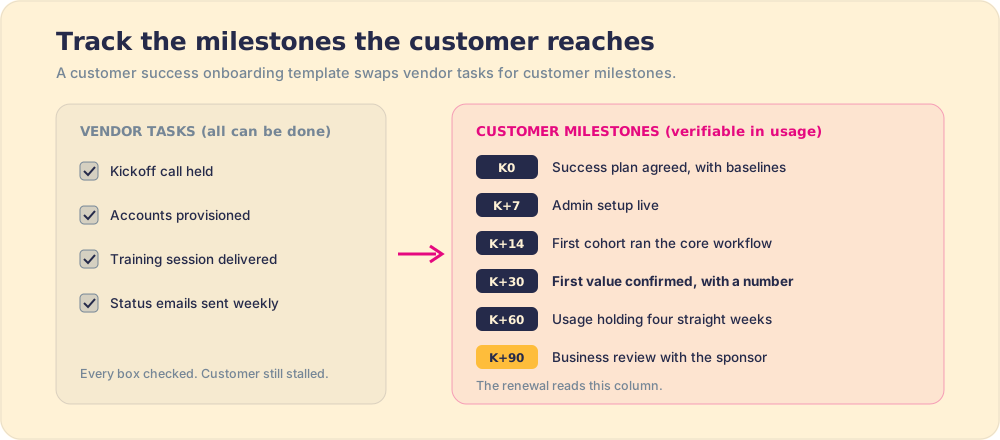
A customer success onboarding template is the same six-field structure pointed at a software customer instead of an agency deliverable. The rows change from work your team ships to milestones the customer reaches, each one verifiable in product usage. The agency template asks whether you delivered. The customer success version asks whether the customer is using what they bought in the way that predicts a renewal.
| Milestone | Owner | Due | Exit criteria | Client-visible |
|---|---|---|---|---|
| Success plan agreed | CSM | K0 | Two outcomes with baseline numbers, approved by the customer’s sponsor | Yes |
| Admin setup live | Onboarding specialist | K+7 | Customer admin finished setup; SSO and integrations connected | Yes |
| First cohort active | CSM | K+14 | The named first group of users has run the core workflow once | Yes |
| First value | CSM | K+30 | Customer confirms outcome one moved, with the number | Yes |
| Usage holding | CSM | K+60 | Weekly usage among licensed users holds for four straight weeks | No |
| First business review | CSM | K+90 | Review held with the sponsor; expansion or risk logged in the CRM | Yes |
The customer cares about this more than vendors tend to assume. In Wyzowl’s survey of 216 consumers, 86 percent said they would stay loyal to a business that invests in onboarding content that welcomes and educates them (Wyzowl, 2020). The survey is small and consumer-side, so read it as a direction rather than a forecast. Reichheld’s retention figures, later in this post, put a profit number on the same early window.
When the customer is buying software that has to be configured, migrated, and integrated before any of these milestones can happen, the implementation gates come first; the gate-by-gate version is the customer onboarding checklist for a software implementation. And the CSM’s work after K+90 is a separate discipline, customer enablement, where the habits formed in onboarding either hold or fade.
Why doesn’t a client onboarding template guarantee the onboarding happens?
Because a template is a map, and a map has never once driven the route. Someone still has to drive it, on the hundredth account as carefully as on the second, with the client in the passenger seat watching how you take the corners.
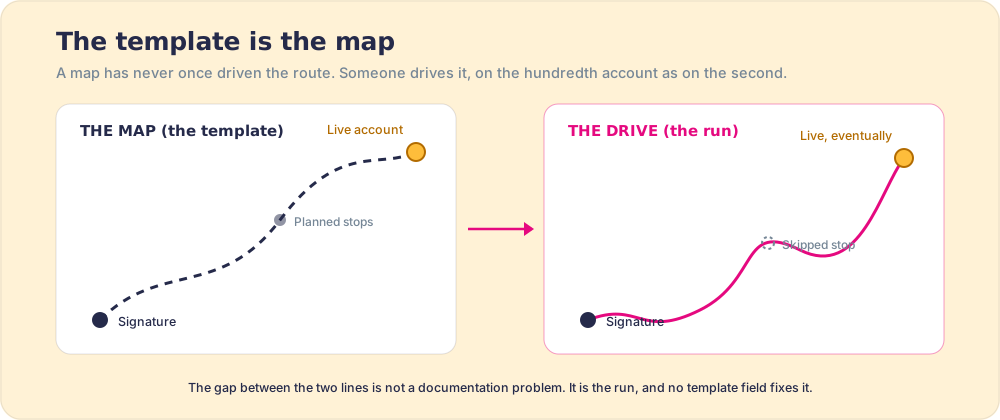
The numbers say the map is already common. Across the 198 leaders in the State of Sales Enablement, 89 percent had a defined process and 36 percent saw their teams follow it: a 53-point gap that is pure adherence. Write the finest customer onboarding template in your industry and you have moved yourself into the 89 percent. The engagement is decided in the 36.
The decay has a mechanism, and it is older than project software. Hermann Ebbinghaus measured in the 1880s how fast people forget what they are taught once: most of it within days, absent reinforcement (the forgetting curve). Walk the team through the template at an all-hands and by the third account the steps are half-remembered and improvised around. The template did not change. The running of it did. And the cost lands on the number that funds a services firm: Frederick Reichheld’s work at Bain found that a five-point gain in customer retention lifts profit 25 to 95 percent (Reichheld, Harvard Business Review), and onboarding is the stretch of the relationship where retention is set.
So the template needs companions. The one-page client onboarding checklist travels into the kickoff itself, and the wider client onboarding guide covers the full first-90-days arc this template runs inside. If you are evaluating tooling, our take on client onboarding software makes the longer case that the plan is the easy half. This is also the job we built Supered’s Action Plans for: the template becomes per-account steps delivered in the flow of work, inside the tools the team already uses, with exit criteria checked and adherence measured account by account instead of assumed.
A quick recap
- The six fields. Phase, step, one named owner, a due date relative to kickoff, an exit criterion, and a client-visible flag. K-dates make it copyable; exit criteria make it true.
- Exit criteria over checked boxes. A box records a claim; a criterion names a verifiable state. Checklists built on verifiable states cut surgical deaths from 1.5 to 0.8 percent.
- The map and the drive. A template is structure, and structure is the floor: 89 percent of teams have a defined process, 36 percent see it followed.
- The stakes. A five-point retention gain lifts profit 25 to 95 percent, and the first 90 days are where the retention curve gets bent.
What we recommend
Copy the template above this week; the structure costs you an afternoon, and it buys you the floor. Hold one line as non-negotiable from the first account: no step counts as done without its exit criterion met, in writing where the criterion says so. That habit separates a plan that reports progress from one that reports claims.
Then decide where the run will live. A spreadsheet holds the template and decays with attention. A project tool holds a copy per account and tells you what was marked complete. Neither puts the next step in front of the person who owes it, and the 53-point gap is what that absence costs, a system property rather than a discipline problem. Once you run more than a handful of onboardings at a time, put the steps where the work happens and measure whether each account followed them. The template is the map. Book a demo if what you are missing is the drive.
Frequently asked questions
What is a client onboarding template?+
What should a client onboarding template include?+
How long should client onboarding take?+
What is the difference between a client onboarding template and a checklist?+
What is a client onboarding script?+
What is a customer success onboarding template?+
Should the client see the onboarding plan?+
Your process, running itself.