Clearbit Salesforce Integration (2026): Two Pipes Still in the Wall, No Parts on the Shelf
Clearbit's Salesforce integration still runs for existing customers, through a legacy managed package or a four-hourly OAuth connector, but its AgentExchange listing returns not found and no one can buy it new. What it does, what it overwrites, and how to move off it.
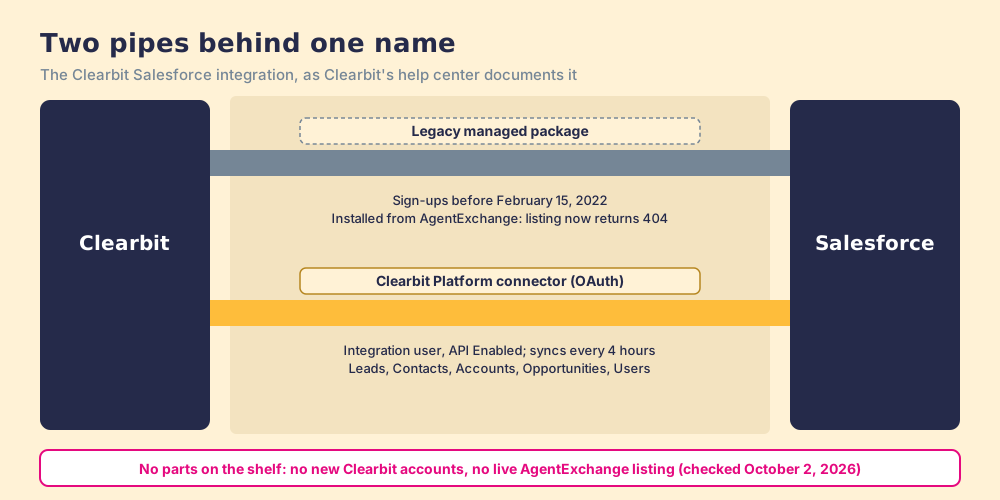
The Clearbit Salesforce integration enriches Salesforce Leads, Contacts, and Accounts with Clearbit data through a legacy managed package (sign-ups before February 15, 2022) or an OAuth connector on the Clearbit Platform, and in 2026 it serves existing customers only.
How to move off the Clearbit Salesforce integration
- 1
Find out which Clearbit integration you run
Look in Salesforce for a Clearbit Settings tab and installed package (the legacy managed package) or for a Clearbit integration user connected from Clearbit's Integrations tab (the Clearbit Platform connector). The two have different fields and different off switches.
- 2
Inventory the Clearbit fields
List every Salesforce field Clearbit writes on Leads, Contacts, and Accounts, including mapping groups, and every report, assignment rule, flow, and score that reads them.
- 3
Set every mapping to Conditionally Overwrite
In Clearbit's field mapping, move any field on Always Overwrite to Conditionally Overwrite so the four-hourly sync stops replacing values your team or your next tool writes.
- 4
Choose a replacement for each job
Split the fields by job: company firmographics, person details, and contact data (email and phone). Pick a source for each, test it on a sample of records in a sandbox, and map its fields.
- 5
Run both side by side for one cycle
Point the new source at empty fields or new fields first, compare a sample against Clearbit's values, then repoint rules and reports to the new fields.
- 6
Switch Clearbit off before the renewal date
Disconnect the Clearbit connector or uninstall the legacy package, deactivate the Clearbit integration user, and send the non-renewal notice before your contract's notice date.
Old houses have pipes in the walls from a plumber who retired years ago. Water still runs through them. No supplier stocks the fittings anymore, and the first leak sends you looking for a new plumber in a hurry.
The Clearbit Salesforce integration enriches Salesforce Leads, Contacts, and Accounts with Clearbit data through a legacy managed package (sign-ups before February 15, 2022) or an OAuth connector on the Clearbit Platform, and in 2026 it serves existing customers only. I read every Salesforce article in Clearbit’s help center and checked AgentExchange this morning. Both pipes still carry water for customers who have them. You cannot buy either one new, and one setting decides whether the pipe that runs every four hours writes over your team’s work. The short answer:
- Supered Prospector on Clay. For a Salesforce team whose reps need emails and phones for the person in front of them: Clay’s waterfall from the record, LinkedIn, or a company site, one click into Salesforce. $45 a rep a month, billed annually.
- Clay’s Salesforce integration, run by Ops. For bulk enrichment of records already in Salesforce, the closest match to what Clearbit’s connector did. Clay Growth from $495 a month.
- ZoomInfo’s native Salesforce app. For enterprise teams that want one large database inside Salesforce. $120 per user per year listed, on top of a ZoomInfo contract.
What is the Clearbit Salesforce integration, exactly?
Two different things share the name, and the difference matters the day you try to turn one off.
The first is a managed package, installed from what Salesforce now calls AgentExchange. Clearbit’s install article carries a deprecation notice: it is for customers “who signed up before Feb 15, 2022.” You install it in production “for All Users,” open the Clearbit Settings tab, and authenticate with Clearbit credentials; Professional edition orgs must also activate Clearbit’s remote sites (Clearbit help center, last updated January 12, 2024). Clearbit’s help center files twelve articles under “Legacy Salesforce Managed Package.”
The second is a connector on the Clearbit Platform, with no package at all. An admin creates an integration user with “API Enabled,” grants read and write access on the objects, opens Clearbit’s Integrations tab, picks Production or Sandbox, and signs in. From then on, “your Salesforce data is synced every 4 hours.” The connector syncs Leads, Contacts, Accounts, Opportunities, and Users, and enrichment lands on Leads, Contacts, and Accounts through field mapping (Clearbit help center, last updated October 25, 2023). Fourteen articles cover it.
Both articles apply to “customers on Standard Bundle, Enrichment, or Clearbit Platform plans.” Neither has been updated since January 2024.
There was a third, smaller fitting. Clearbit for Salesforce Lite, a Chrome extension that showed Clearbit data on Salesforce records, had 10,000 users when it left the Chrome Web Store on December 11, 2024, five years after its last update (chrome-stats archive, read October 2, 2026). The Clearbit Chrome extension page covers both Clearbit extensions.
Can you still install Clearbit for Salesforce?
Not as a new customer. Clearbit’s install article still sends you to an AppExchange listing. On October 2, 2026, that address returns a 404, while the same URL pattern for ZoomInfo’s Salesforce app loads normally. A search of AgentExchange’s public listing API for “clearbit” returned 659 loosely matching apps, none from Clearbit in the top 50. The listing’s review feed, still served by Salesforce for the old ID, holds 37 reviews averaging about 4.57 out of 5, the most recent from September 2, 2021.
The connector needs a Clearbit account, and you cannot open one. clearbit.com shows a customer login and no way to buy, its pricing address redirects to the homepage, and Clearbit’s own notice says “Free Clearbit accounts are not being created” (Clearbit help center). HubSpot bought Clearbit in December 2023 and built its enrichment into HubSpot; the Clearbit alternatives page has the dated sequence.
Existing customers are still served. A Clearbit staffer answered a HubSpot Community question about the APIs with “Clearbit is still supporting our current customers, business as usual” (HubSpot Community). Business as usual, for a contract you cannot buy again, means the water runs until the renewal date and not a day past it unless someone at HubSpot says otherwise.
Will the Clearbit Salesforce integration overwrite your data?
Clearbit’s two articles answer differently, and the field mapping decides which one is true in your org.
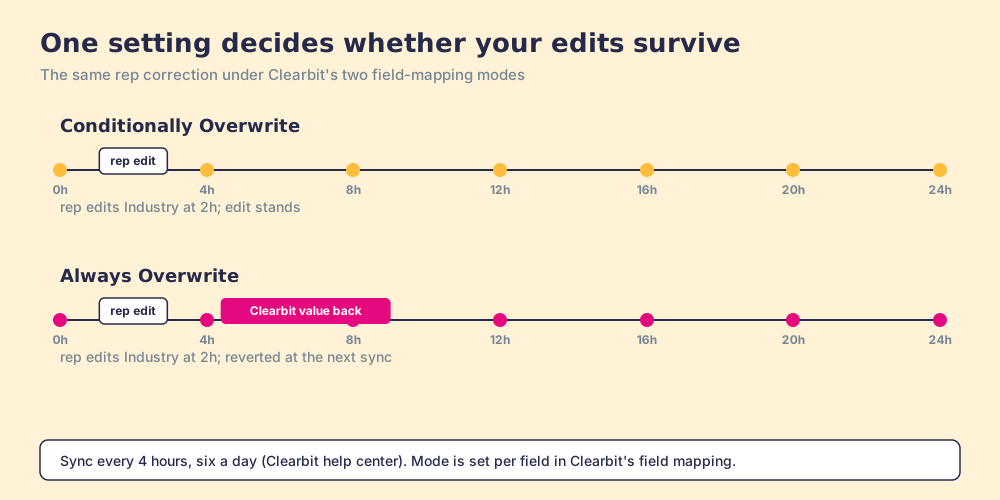
The setup article promises: “Clearbit will never overwrite any of your data.” The field-mapping article, updated the same day, offers two modes per field (Clearbit help center):
- Conditionally Overwrite. Updates a field only if it is blank, reads [[unknown]], or was filled by Clearbit before. A rep’s manual edit stands.
- Always Overwrite. “Clearbit will always overwrite the field with the latest data, no matter what was previously in the field.” Clearbit recommends it for checkbox fields, which never read as blank.
- Mapping Groups. Related fields, such as the parts of an address, that “act as a single entity during enrichment in order to prevent instances of mismatched or blank data.”
Now run the pipe forward. A sync every four hours is six a day. Suppose a field like Industry or Employee Range sits on Always Overwrite and your team corrects it by hand, or a new tool writes a fresher value. Within four hours, Clearbit puts its own value back. On a contract that will not be extended, with help articles last touched in 2023, that is data you are paying to have written over.
Does HubSpot’s Clearbit enrichment work in Salesforce?
Not by itself. HubSpot’s data enrichment article (last updated July 10, 2026) describes enrichment of HubSpot contact and company records, available on HubSpot Starter editions and up, with “Data enrichment does not consume HubSpot Credits,” and it names no Salesforce route (HubSpot knowledge base). A Salesforce-only team gets nothing from it. A team that runs HubSpot alongside Salesforce could map the enriched properties through its HubSpot-Salesforce sync, but that is a project to scope and test, and HubSpot’s enrichable contact fields carry no email or phone in any case.
So the summary for a Salesforce shop is short. The pipe you have works until renewal. The pipe HubSpot built runs to a different house.
Why trust this page?
I started RevPartners, a HubSpot partner that did only sales implementations, sold roughly twice as much Sales Hub as any other partner, and reached Elite tier in 13 months. Supered came out of that work and runs in Salesforce, HubSpot, and Pipedrive, with 4.9 out of 5 from 81 reviews on G2 and 5.0 from 122 on the HubSpot marketplace (both checked October 1, 2026). Disclosure: we make Supered Prospector, which ranks first below for Salesforce teams with Clay. Clearbit’s details come from its own help center, and AgentExchange data from Salesforce’s public pages and feeds, read October 2, 2026.
Which route into Salesforce replaces Clearbit?
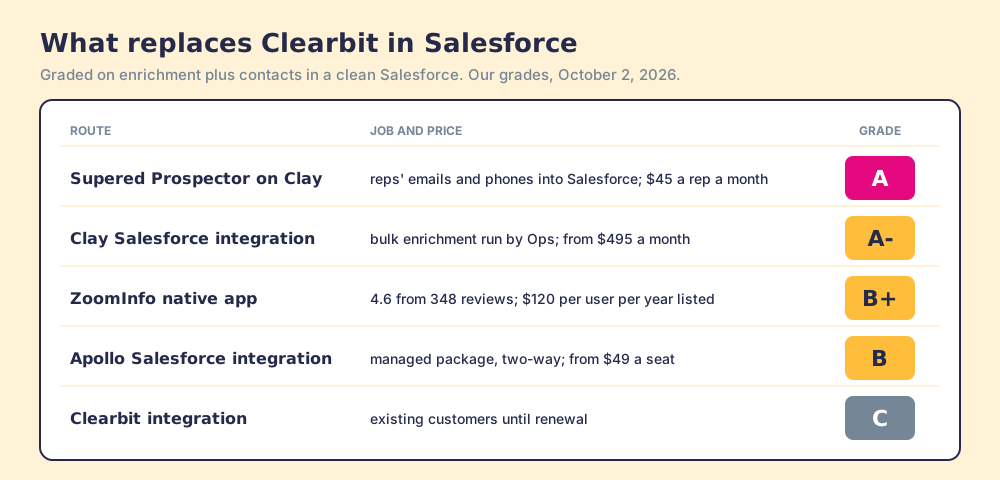
The lens is a Salesforce team of 10 to 50 reps that used Clearbit for enrichment and for finding contacts. Each route is graded in its own lane; the grades are ours.
| Rank | Route | Grade | Best fit | Salesforce integration | Setup effort | Pricing (plan that includes it) | Reason to choose it |
|---|---|---|---|---|---|---|---|
| 1 | Supered Prospector on Clay | A | Teams with Clay whose reps need emails and phones | One click into Salesforce from the record, LinkedIn, or a company site; mapping set once | Admin enables Clay inside Supered; live in under a week | $45 per rep per month, billed annually, plus your Clay plan | Clay’s waterfall across 200+ vendors where reps work |
| 2 | Clay’s Salesforce integration, run by Ops | A- | Bulk enrichment of existing records | Native in Clay, Growth and up | Ops builds each table | Clay Growth, $495 a month | Closest match to Clearbit’s connector, across many providers |
| 3 | ZoomInfo Salesforce Native Application | B+ | Enterprise teams on one large database | Managed package, 4.6 from 348 reviews | Sales-led contract | $120 per user per year listed, plus ZoomInfo | Bulk updates of “up to 100,000 records at once” |
| 4 | Apollo’s Salesforce integration | B | No Clay, outreach run inside Apollo | Managed package, two-way | A day, plus the first pull | From $49 per seat per month, annual | Data, sequences, and sync in one plan |
| ref | Clearbit Salesforce integration | C | Existing customers until renewal | Legacy package or 4-hour connector | Already installed | Private renewal quote | Stay only while the contract runs |
ZoomInfo’s figures are from its AgentExchange listing (latest version June 29, 2026), read October 2, 2026. Apollo’s Salesforce help center says “All existing Salesforce connections must upgrade to the Apollo managed package by December 31, 2026,” and most syncs “complete within 15-30 minutes.” The Clay Salesforce integration page walks through Clay’s side, and the Apollo Salesforce integration page covers Apollo’s.
How do you move off the Clearbit Salesforce integration?
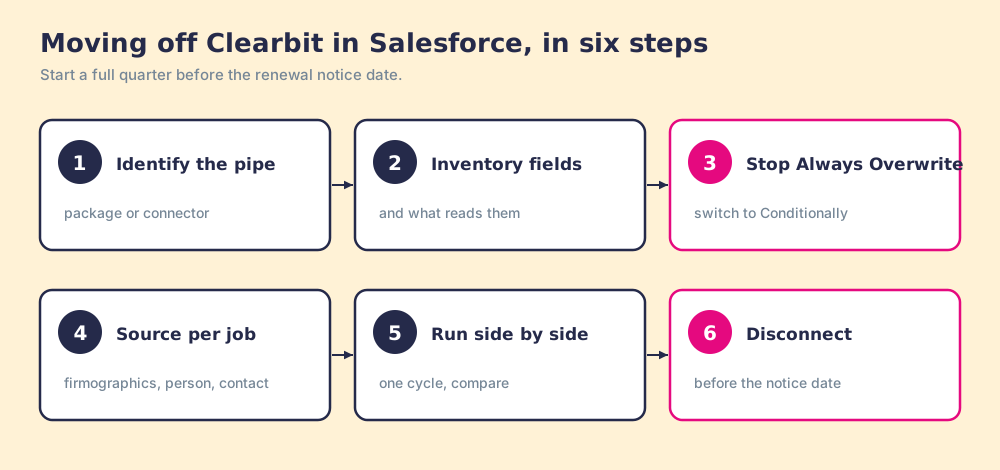
Six steps, best started a full quarter before the renewal notice date.
- Identify your pipe. A Clearbit Settings tab and an installed package mean the legacy managed package. A Clearbit integration user connected from Clearbit’s Integrations tab means the Platform connector.
- Inventory the Clearbit fields. Every field Clearbit writes on Leads, Contacts, and Accounts, every mapping group, and every rule, flow, score, and report that reads them.
- Switch Always Overwrite off. Move each mapping to Conditionally Overwrite so the four-hour sync stops undoing corrections during the switch.
- Choose a source per job. Company firmographics, person details, and contact data are three jobs; one tool rarely does all three best. Test each candidate on a sandbox sample.
- Run side by side for one cycle. Write the new source to new or empty fields, compare a sample against Clearbit’s values, then repoint rules and reports.
- Disconnect before the notice date. Disconnect the connector or uninstall the package, deactivate the integration user, and send the non-renewal notice in writing.
The plumbing image breaks at one point. A real pipe carries one thing. Clearbit’s connector carried three: company facts, person facts, and, for many teams, the emails and phones reps relied on. Step 4 exists because those three now come from different places.
Where does Supered Prospector fit?
For the contact job, inside Salesforce and beside it. A rep on a Salesforce account record who needs the missing champion, or a phone for the person who replied, needs a contact finder that writes to Salesforce cleanly. Supered does not bring its own database. It brings Clay’s waterfall, which is every database, routed. We chose Clay as our only data provider for that reason. Clay asks provider after provider across “200+ data and AI vendors” (clay.com, September 25, 2026), and Clay’s pricing page says an enrichment that “returns no result” is not charged.
- Start points. The Salesforce record itself, a LinkedIn profile, a Sales Navigator list, or a company’s website, inside the Supered Chrome extension, with no Clay login. Prospector works within LinkedIn’s terms and does not copy search results in bulk; the contact data comes from Clay’s waterfall on the customer’s Clay account.
- The ownership check. Before the add, the rep sees the matching Salesforce record and whether the person was already worked.
- The write. One click into Salesforce with field mapping set once by your admin, or a whole list pushed into a custom Clay workflow your GTM engineer built.
- The follow-through. Your process applies to the prospects reps work, and the manager sees how each lead ends (qualified, recycled, or disqualified, as your team defines it) and coaches from what converts.
Prospector costs $45 per rep per month, billed annually, from one user, on your own Clay account. The Prospector page shows it on a record.
Choose something else in three cases. If the job is bulk enrichment of a million existing records overnight, Clay run by Ops or ZoomInfo’s app fits better than a rep-side tool. If you have no Clay and want sequences in the same product, Apollo. And if your Salesforce users sell from phones in the field, Supered has no mobile product.
Which should you choose?
Start with the setting, then the calendar.
- This week. Check every Clearbit field mapping for Always Overwrite and switch it to Conditionally Overwrite.
- Company firmographics in bulk. Clay’s Salesforce integration run by Ops, or ZoomInfo’s native app for an enterprise database contract.
- Emails and phones for reps, with Clay. Supered Prospector, from the record or the page the rep is already on.
- Emails and phones without Clay, plus sequences. Apollo’s managed package.
- The Clearbit contract itself. Keep it until the renewal date, and send notice once the replacement has run one cycle.
My recommendation, from years of cleaning up Salesforce and HubSpot portals after tools left: treat the Clearbit Salesforce integration as plumbing with a known end date. Do not let a sync you are about to lose keep writing over the fields you will keep. Split the job in three, buy each part where it is strongest, and put the contact part where the rep already works. The Clearbit pricing page shows what the HubSpot side costs if your team runs both CRMs.
Frequently asked questions
Does Clearbit still integrate with Salesforce?+
How often does Clearbit sync with Salesforce?+
Will Clearbit overwrite my Salesforce data?+
Can I install Clearbit for Salesforce from AgentExchange?+
Does HubSpot's Clearbit enrichment work in Salesforce?+
What replaces the Clearbit Salesforce integration?+
Everything we have written on Clearbit
More on Clearbit
Looking past Clearbit? See Supered Prospector on your own Clay account- Clearbit Alternatives in 2026: HubSpot Kept Two Blades of the Pocketknife
- Clearbit Pricing in 2026: The Meter Moved Into HubSpot, and Half of It Was Switched Off
- Clearbit Review 2026: A 4.4-Star Product You Can No Longer Buy
- The Clearbit Chrome Extension in 2026: The Switch Is Still on the Wall, the Light Is Gone
- ZoomInfo vs Clearbit in 2026: The Restaurant That Moved Into the Hotel
Your Clay waterfall, where reps already work.