The Clearbit Chrome Extension in 2026: The Switch Is Still on the Wall, the Light Is Gone
Clearbit had two Chrome extensions, Connect and Clearbit for Salesforce Lite, and both are gone from the Chrome Web Store.
What each did, when it left, why mirror downloads are a bad idea, and which extension does the job now.
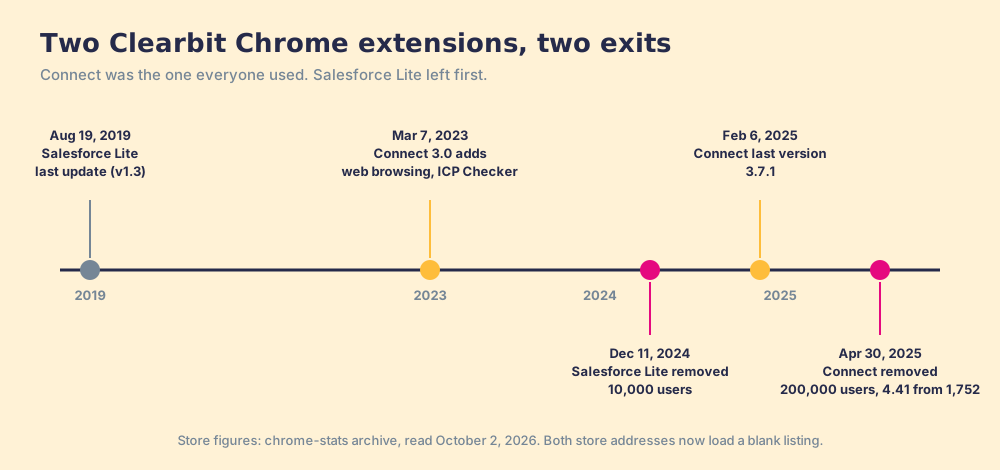
The Clearbit Chrome extension was Clearbit Connect, a free Gmail and web sidebar that found a person's verified work email and showed company details; Clearbit removed it on April 30, 2025, and its Chrome Web Store page now loads blank.
A builder can take the light fitting out of a ceiling and leave the switch on the wall. For months afterward, people walk into the room and flip it.
The Clearbit Chrome extension was Clearbit Connect, a free Gmail and web sidebar that found a person’s verified work email and showed company details; Clearbit removed it on April 30, 2025, and its Chrome Web Store page now loads blank. The search results are the switch on the wall: a download mirror at third, a how-to video at eighth, and a May 2026 blog post that says “The Chrome Web Store listing for Clearbit Connect still exists.” I checked the store itself this morning. The short answer:
- HubSpot Sales extension. For the sidebar half of Connect: CRM details, tracking, and templates in Gmail. Free with a HubSpot account; it does not find a stranger’s email.
- Supered Prospector on Clay. For the email-and-phone half, from LinkedIn, a company site, or the CRM record, inside the Supered Chrome extension. $45 a rep a month, billed annually.
- Hunter. For a Gmail-and-website email finder closest to Connect’s free habit. 50 free credits a month.
What was the Clearbit Chrome extension?
There were two Clearbit extension listings, and most pages mention one.
Clearbit Connect was the famous one, and the Clearbit Connect Chrome extension is what most people mean by the search. It began as a Clearbit Gmail extension, and Connect 3.0, announced March 7, 2023, “expanded to include web browsing, and now offers ICP Checker” (Clearbit release notes). A rep could open an email and see the sender’s title and company, or search a domain and get verified emails for the people there. Clearbit’s help center describes the meter plainly: “Every Connect user receives 10 free credits per month,” one per email revealed (Clearbit help center).
Clearbit for Salesforce Lite was the lesser-known sibling. It put Clearbit’s person and company data on Salesforce records from the browser. It had not been updated since August 19, 2019 when it left the store.
| Extension | What it did | Users at removal | Rating | Last version | Removed |
|---|---|---|---|---|---|
| Clearbit Connect | Email finder and company sidebar in Gmail and on the web | 200,000 | 4.41 from 1,752 | 3.7.1, February 6, 2025 | April 30, 2025 |
| Clearbit for Salesforce, Lite | Person and company data on Salesforce records | 10,000 | 4.42 from 31 | 1.3, August 19, 2019 | December 11, 2024 |
Store figures are from the archives at chrome-stats for Connect and Salesforce Lite, read October 2, 2026, since the store no longer shows either page.
Does the Clearbit Chrome extension still work?
No, and the store says so in its own way. When I load Connect’s Chrome Web Store address on October 2, 2026, the store redirects to a page titled “empty-title” with no Clearbit text on it; the same request for a live extension, Apollo’s, loads its full listing. The Salesforce Lite address does the same. Clearbit’s help article, last updated April 30, 2025, reads: “Existing free Clearbit Connect accounts were sunset April 30, 2025.” Its broader notice lists Connect among the “Free Clearbit Platform; Clearbit Weekly Visitor Report; Clearbit TAM Calculator; Clearbit Connect; and the Clearbit Free Slack Integration” switched off that day (Clearbit help center, last updated October 9, 2025).
The secondary pages disagree with the store and with each other. One 2026 post says “The Chrome Web Store listing for Clearbit Connect still exists” and that access “has been progressively gated to HubSpot accounts in 2026” (datalane.com, May 7, 2026). Another says “Clearbit Connect officially sunsets” in December 2024 (listplus.ai, April 10, 2026). Neither matches Clearbit’s own notice or the store. When the vendor’s help center and the store agree, trust them over a blog, including this one; the links are above so you can check.
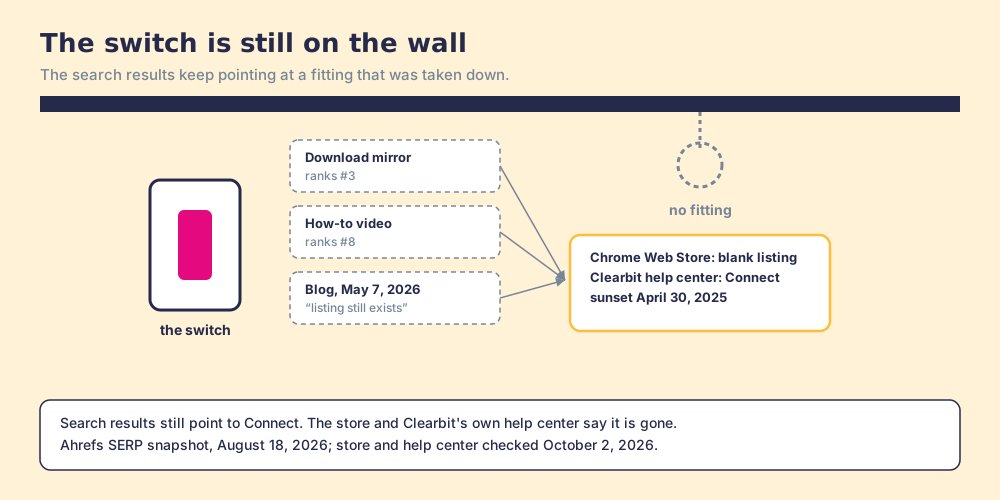
One warning, plainly. A download site ranks third for “clearbit chrome extension” and still offers the old package. Do not install it. The account system behind it is switched off, so it cannot work, and an extension built to read your Gmail carries broad permissions and no maintainer since February 2025. chrome-stats rated the Salesforce Lite extension high risk for exactly that reason, citing its webRequest, webRequestBlocking, and cookie permissions. A switch on the wall is harmless; one wired to something you cannot inspect is a risk.
What replaced Clearbit Connect in Gmail?
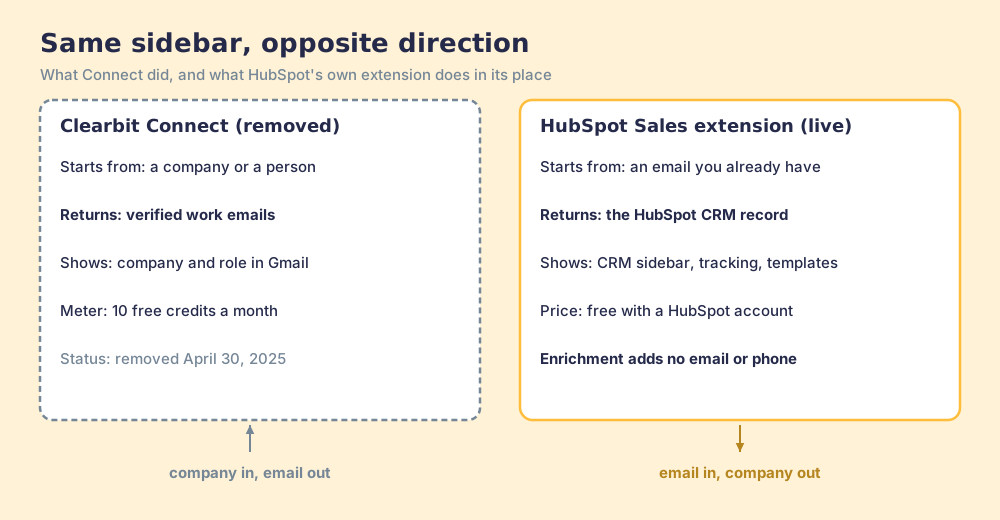
HubSpot replaced the sidebar and let the finder go. HubSpot’s own extension, HubSpot Sales, has 1,000,000 users and a 4.4 rating from 8.2K reviews, and was updated September 30, 2026 (Chrome Web Store, October 2, 2026). Its free features are “Email tracking,” “CRM for Gmail,” “Email templates & snippets,” “Meeting scheduler,” “CRM sidebar across the web,” “Add companies and contacts to HubSpot,” “Calling and emailing,” and its AI assistant, and it needs “a free HubSpot account.” It shows you what HubSpot knows. Nothing on the listing says it finds an email HubSpot does not already have.
HubSpot’s data enrichment fills the rest of the record the sidebar shows, and it has a rule that matters here: “Contacts must have a business email address” before they can be enriched, and the enrichable contact fields are job, seniority, name, LinkedIn URL, and location, with no email or phone among them (HubSpot knowledge base, July 20, 2026). Connect started from a company and handed you the email. HubSpot starts from the email and hands you the company.
Why trust this page?
I started RevPartners, a HubSpot partner that did only sales implementations, sold roughly twice as much Sales Hub as any other partner, and reached Elite tier in 13 months. Supered came out of that work; its Chrome extension carries Prospector, and we have built for Gmail, LinkedIn, and the CRM sidebar for years. Supered holds 4.9 out of 5 from 81 reviews on G2 and 5.0 from 122 on the HubSpot marketplace (both checked October 1, 2026). Disclosure: we make Prospector, which ranks first below for teams with Clay. Store figures for the other extensions are from Chrome Web Store listings read October 1 and 2, 2026.
Which extension does Clearbit Connect’s job now?
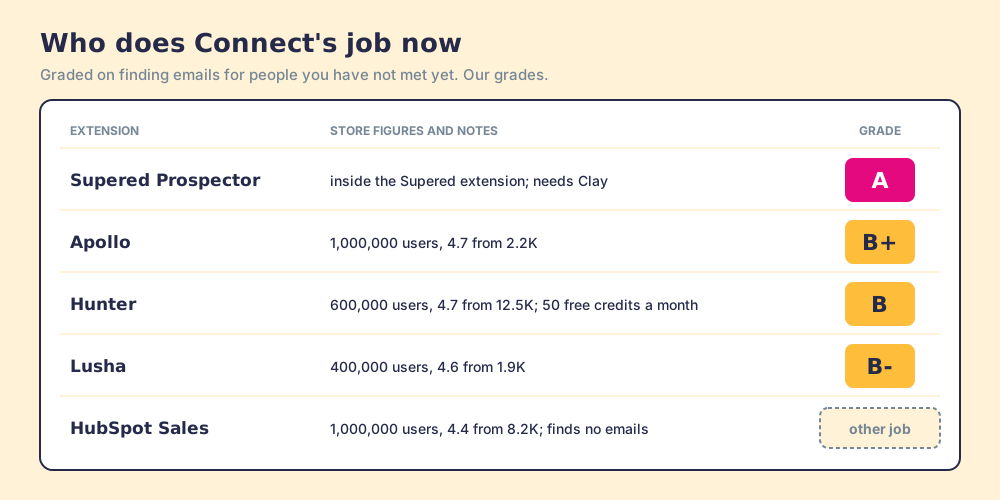
The lens is a sales team of 10 to 50 reps that used Connect to find emails for people they had not spoken to yet. Each option is graded in its own lane.
| Rank | Extension | Grade (in its lane) | Best fit | CRM integration | Setup effort | Pricing | Reason to choose it |
|---|---|---|---|---|---|---|---|
| 1 | Supered Prospector (inside the Supered extension) | A | Teams with Clay | One click to HubSpot, Salesforce or Pipedrive | Admin enables Clay in Supered; live in under a week | $45 per rep per month, annual, plus your Clay plan | Clay’s waterfall across 200+ vendors from the page the rep is on |
| 2 | Apollo | B+ | Teams without Clay that also want sequences | HubSpot and Salesforce | Self-serve | Free plan; Basic $49 per seat per month, annual | 1,000,000 users, 4.7 from 2.2K; one database plus outreach |
| 3 | Hunter | B | One rep finding emails on company websites and in Gmail | Integrations and CSV | Self-serve | 50 free credits a month | 600,000 users, 4.7 from 12.5K; closest to Connect’s free habit |
| 4 | Lusha | B- | A few reps working LinkedIn and Gmail | HubSpot, Salesforce and others | Self-serve | Free 40 credits a month; Pro from $52.45 a month, yearly | 400,000 users, 4.6 from 1.9K |
| ref | HubSpot Sales | A for the sidebar | HubSpot teams in Gmail | Native | A sign-in | Free with HubSpot | 1,000,000 users, 4.4 from 8.2K; no email finding |
Store counts for Apollo (updated September 29, 2026), Hunter (September 12), and Lusha (September 2) are from their Chrome Web Store listings, read October 1, 2026. Apollo meters 1 credit per email and 8 per phone; Lusha’s prices are its yearly-billing figures captured September 25, 2026. The LinkedIn Chrome extension guide compares the wider field of LinkedIn-side extensions.
Where does Supered Prospector fit?
Clearbit Connect looked like one database in a sidebar, but Clearbit’s own data came from “250+ public and private data sources,” in HubSpot’s words when it bought the company (HubSpot, November 1, 2023). The extension that keeps that idea is one that asks many sources. Supered does not bring its own database. It brings Clay’s waterfall, which is every database, routed. We chose Clay as our only data provider for that reason. Clay asks provider after provider across “200+ data and AI vendors” (clay.com, September 25, 2026), and an empty result costs nothing.
Prospector runs inside the Supered Chrome extension; it has no store listing of its own, so there is no install count to quote.
- Start points. A LinkedIn profile, a Sales Navigator list, a company’s website (with company research while the rep is on the site), or a HubSpot, Salesforce, or Pipedrive record. No Clay login. Prospector works within LinkedIn’s terms and does not copy search results in bulk; the contact data comes from Clay’s waterfall on the customer’s Clay account.
- The duplicate check. On a LinkedIn profile the rep sees the matching CRM record and whether the person was already worked.
- The handoff. One click to the CRM with field mapping set once, or a whole list pushed to a custom Clay workflow your GTM engineer built.
- The view upstairs. The manager sees which lists reps work and how each lead ends, qualified, recycled, or disqualified as your process defines it, and coaches from what converts.
Prospector costs $45 per rep per month, billed annually, from one user, on your own Clay account. The Prospector page shows it on a profile.
Choose something else in three cases. If your reps lived in Gmail and only needed the sender’s company and title, HubSpot Sales is free and does that. If you have no Clay, Apollo or Hunter is simpler to start. And if Connect’s appeal was that it cost nothing, Hunter’s free tier is the nearest match; Prospector has no free trial.
Which should you choose?
Take the switch off the wall first: uninstall any copy of Connect still in a browser, and do not reinstall one from a mirror. Then pick by the half of Connect you used.
- The sidebar half. HubSpot Sales, free with a HubSpot account, plus HubSpot data enrichment for the company and role fields.
- The finder half, with Clay. Supered Prospector, so the waterfall runs from the profile, the company site, or the CRM record.
- The finder half, without Clay. Apollo if you want sequences in the same tool, Hunter for a light email finder, Lusha for a few LinkedIn-first reps.
- The Salesforce Lite habit. Data on the Salesforce record now comes from a Salesforce-side integration; the Clearbit Salesforce integration page covers what still runs there.
My recommendation: the extension most Clearbit users miss is the finder, and the fair replacement for a free 10-lookup tool is either another free tool for one rep or a waterfall for a team. A team should buy the waterfall and put it where the rep already looks. The Clearbit review grades what is left of the rest of Clearbit, and the Clearbit alternatives page ranks the full field.
Frequently asked questions
Does the Clearbit Chrome extension still work?+
What did Clearbit Connect do?+
What replaced the Clearbit Chrome extension?+
Is it safe to install Clearbit Connect from a download site?+
Is there a free Clearbit Chrome extension alternative?+
Does Supered Prospector have its own Chrome extension?+
Everything we have written on Clearbit
More on Clearbit
Looking past Clearbit? See Supered Prospector on your own Clay account- Clearbit Alternatives in 2026: HubSpot Kept Two Blades of the Pocketknife
- Clearbit Pricing in 2026: The Meter Moved Into HubSpot, and Half of It Was Switched Off
- Clearbit Review 2026: A 4.4-Star Product You Can No Longer Buy
- Clearbit Salesforce Integration (2026): Two Pipes Still in the Wall, No Parts on the Shelf
- ZoomInfo vs Clearbit in 2026: The Restaurant That Moved Into the Hotel
Your Clay waterfall, where reps already work.