AI Sales Prospecting in 2026: What It Does Well, Where It Fails, and the Rules It Needs
AI now does most of the prep work in prospecting: research, list building, enrichment and first drafts. It still guesses with confidence, writes in a default voice and ignores your team's rules. A working setup with Clay, Claude and HubSpot, verified October 2026.
AI sales prospecting is the use of AI models and agents to do the work before a rep's first touch (account research, list building, contact enrichment and first-draft outreach) so the rep spends more of the day on the conversations only a person can have.
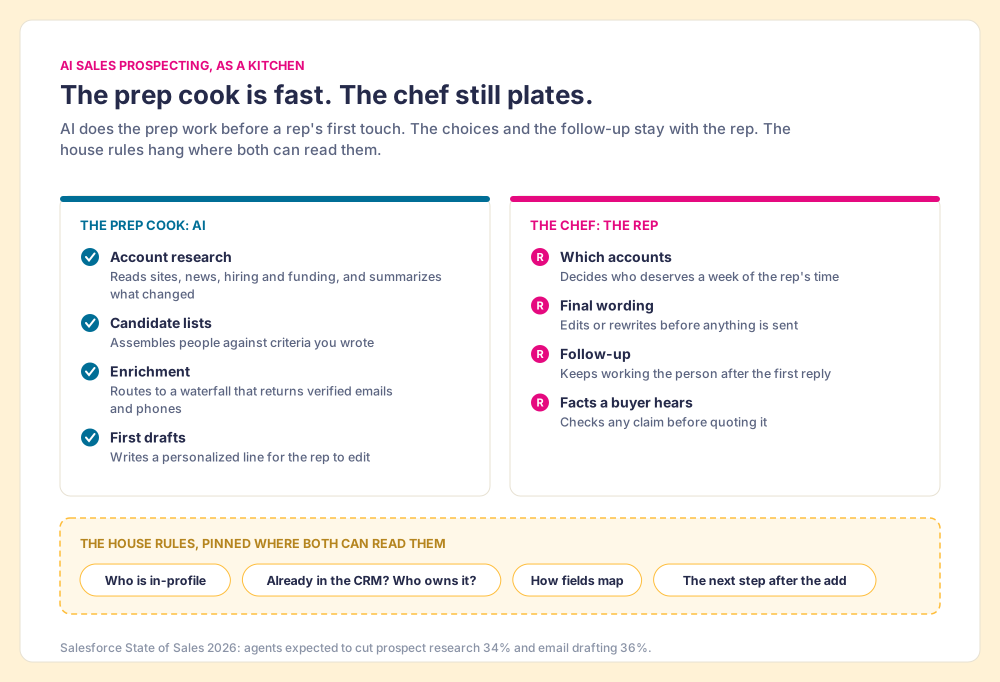
A good restaurant kitchen runs on two kinds of work. Before service, a prep cook chops, portions, and lines up every tray, and a fast one saves the chef hours. During service, the chef decides what goes on the plate and tastes it before it leaves the pass. AI sales prospecting, in October 2026, is the best prep cook a sales team has ever hired. It is still a poor chef, and most of the disappointment I hear about AI for sales prospecting comes from teams that handed it the knife and the menu at once.
The split:
- The prep work, which AI now does well. Account research, building candidate lists against criteria you wrote, finding verified emails and phones through a waterfall of vendors, and first drafts for a rep to edit.
- The service, which still needs a person. Choosing which accounts deserve a rep’s week, the final wording, and the follow-up after the first reply.
- The house rules, which no vendor ships for you. Who counts as in-profile, what happens when a person is already in your CRM, how fields map, and what the rep does next. AI follows whatever rules sit in front of it, and on a team with three tools those rules often differ by screen.
The third point is missing from Clay’s guide, which ranks second for this term today, and it decides whether AI makes your prospecting faster or makes your CRM messier. I ran RevPartners, a HubSpot partner that sold RevOps as a service, before we built Supered inside it, and the pattern I watched for years still holds with AI in the room: tools amplify whatever process they are dropped into. Below are the jobs AI does well, the ones it fumbles, three setups I verified on October 1 and 2, 2026, and how to keep one set of rules across all of them.
What does AI do well in sales prospecting today?
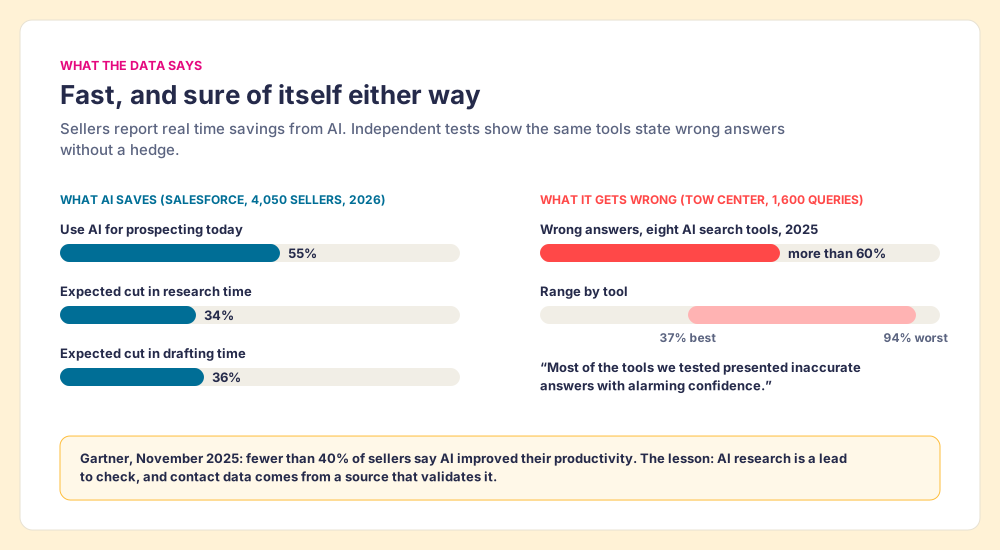
Start with the numbers sellers report. Salesforce’s State of Sales report, published February 3, 2026 from a survey of 4,050 sales professionals, found that 55% already use AI for prospecting and another 38% plan to. The same survey expects AI agents to cut prospect research time by 34% and email drafting time by 36% (Salesforce, State of Sales 2026). Those are the prep cook’s tasks, and the gains are real. Four jobs stand out.
- Account research. A model reads a company’s site, recent news, hiring pages and filings faster than any rep, and summarizes what changed. Clay’s connector in Claude’s directory lists “Rapid Account Research” that summarizes “hiring trends, technology stacks, and funding history” (Claude connector directory, Clay).
- List building. Given written criteria (industry, size, titles, signals), AI assembles a candidate list in minutes. Clay’s MCP lets a rep ask Claude, ChatGPT or Codex to “return up to 1,000 People Search results” (Clay MCP).
- Enrichment. Enrichment is mostly routing. Clay’s waterfall checks provider after provider, across what its homepage calls 200+ data and AI vendors, until one returns a verified email or phone (clay.com). The model decides what to ask for; the waterfall finds it.
- First drafts. A model writes a fair first line from a company’s news. Clay’s own guide to AI sales prospecting reports one campaign where an AI-written segment went out in 162 emails and drew 21 responses, against 473 emails and 12 responses without it (Clay blog). That is one company’s campaign, run by the vendor, so read it as a sign of what is possible.
Where does AI for sales prospecting still go wrong?
The failures are as consistent as the wins, and they cluster around judgment.
The first is confident wrongness. In March 2025 the Tow Center at Columbia Journalism Review ran 1,600 queries through eight AI search tools and found they “provided incorrect answers to more than 60 percent of queries,” with error rates from 37% for the best tool to 94% for the worst. The researchers’ sharper finding was tone: “Most of the tools we tested presented inaccurate answers with alarming confidence” (Columbia Journalism Review). In prospecting, that looks like a model stating a VP’s current title from a two-year-old page, or guessing an email from a naming pattern. A prep cook who mislabels the salt as sugar does more harm than one who works slowly. The fix is structural: research from a model is a lead to check, and contact data comes from a source that validates it, which is the job a waterfall does.
The second is the default voice. Salesforge, which sells cold-email infrastructure and so has a stake, tested HubSpot’s prospecting agent for 30 days and wrote that the “Default tone is bad” (Salesforge, May 2026). A HubSpot Community post from September 2026 landed in the same place from the user’s side: “Research plus a human edit is what gets replies” (HubSpot Community). Clay’s own guide agrees and warns against asking AI to write the whole email; its 5x example came from AI writing one personalized segment, not the message.
The third is reach. HubSpot’s agent finds “up to three contacts matching your personas per company” (HubSpot Knowledge Base). Gartner puts a typical B2B buying group at six to ten people (Gartner). An agent can open a door; finding the champion and the economic buyer by name is still somebody’s work.
The fourth is the one that does the slow damage: AI does not know your rules. It does not know that Acme belongs to Dana, that your team stopped selling to companies under 50 people in July, or that a contact already in the CRM gets a note, not a new record. Gartner’s own warning fits here. Its analysts reported in November 2025 that fewer than 40% of sellers say AI tools improved their productivity, and Melissa Hilbert, a VP analyst, put it plainly: “Beyond a certain point, more AI does not mean more productivity” (Gartner, November 18, 2025). Speed without rules mostly produces more of whatever the rules would have stopped.
How to use AI for sales prospecting: the working setup
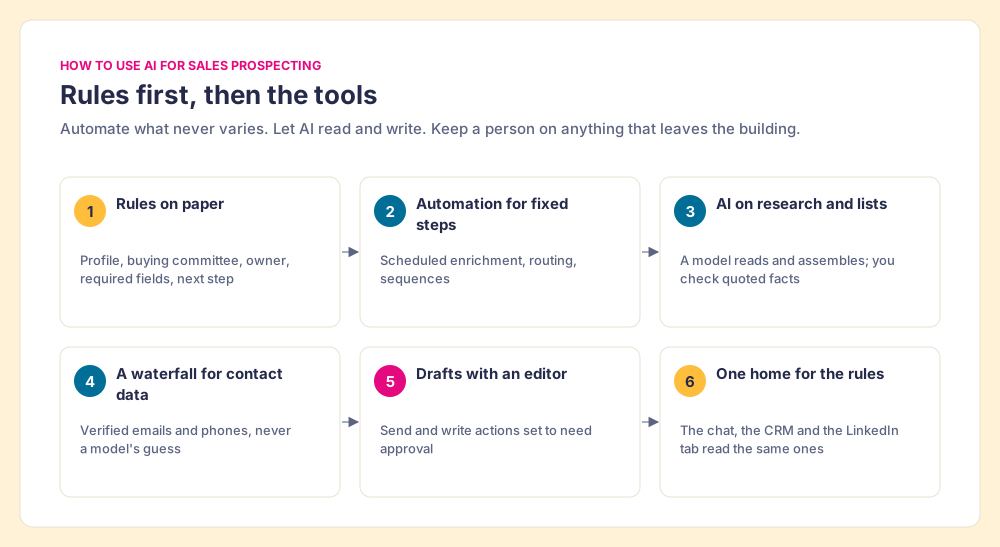
The setup I would give a 10 to 50 rep team follows, in the order I would build it. It splits the work the way the kitchen does: automate the steps that never vary, use AI for the ones that need reading and writing, and keep a person on anything that leaves the building.
- Rules on paper first. Write the five or six rules your best rep already follows: the ideal customer profile and the titles in a buying committee, what to do when a person is already in the CRM, who owns an account, which fields must be filled before a contact enters a sequence, and the next step after the add. Short is fine.
- Prospecting automation for the fixed steps. Scheduled enrichment, routing and sequences are automation, and they should run the same way every time. Clay’s Growth plan includes CRM auto-sync for this (Clay pricing).
- AI on research and candidate lists. Let a model read sites and assemble lists against the rules from step 1. Check any fact you plan to quote to a buyer.
- A waterfall for contact data. Emails and phones come from a validating source, never from a model’s guess. Clay’s waterfall asks provider after provider until one returns a verified result.
- Drafts with an editor. AI writes the personalized line; the rep writes or approves the rest. On Claude Team and Enterprise, an Owner can set any connector action to “Always allow,” “Needs approval” or “Blocked” (Anthropic support). Keep send and write actions on approval for the first month.
- One place the rules live. The rules from step 1 sit somewhere each tool can read them, so the chat, the CRM and the LinkedIn tab apply the same ones. The rest of this post is about that step.
Which AI sales prospecting tools did we verify?
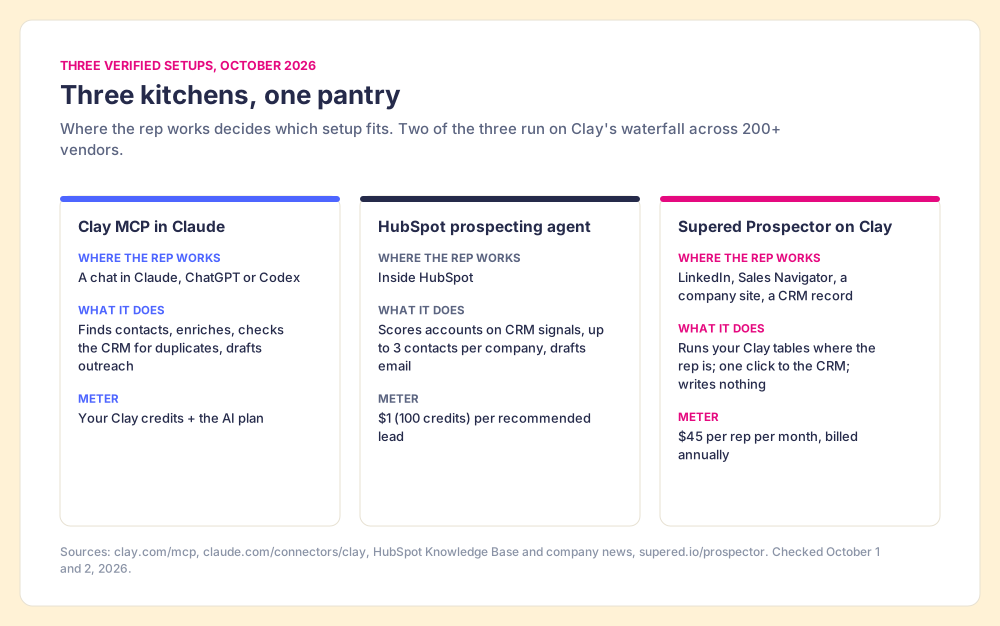
Three setups cover most of what mid-market teams run today. Each row below rests on the vendor’s own documentation, checked on October 1 and 2, 2026. Clay raised a $115 million Series D at a $7.1 billion valuation on September 9, 2026, and describes Clay MCP as giving reps “Ops-built workflows” from Claude and Codex (Clay, Series D); HubSpot remains independent and in June agreed to acquire Warmly, a person-level website intent company with its own AI agents (Warmly, June 30, 2026).
| Setup | Where the rep works | What AI does | What it does not do | Meter |
|---|---|---|---|---|
| Clay MCP or the Clay connector in Claude | A chat in Claude, ChatGPT or Codex | Finds contacts, enriches across 200+ vendors, checks the CRM for duplicates, drafts outreach | Run on the LinkedIn profile or CRM record the rep has open | Your Clay credits, plus the AI tool’s plan |
| HubSpot prospecting agent | Inside HubSpot | Scores accounts on CRM signals, picks up to 3 contacts per company, drafts email | Find people your CRM and connected databases do not hold | $1 (100 HubSpot Credits) per recommended lead |
| Supered Prospector on Clay | LinkedIn, Sales Navigator, a company site, or a HubSpot, Salesforce or Pipedrive record | Runs your Clay tables and waterfall where the rep is, then syncs to the CRM | Write outreach | $45 per rep per month, billed annually, plus your Clay credits |
The details behind each row:
- Clay in Claude. Clay’s MCP page lists three uses: find contacts, enrich leads, and prospect to sequencer, which means “Check against your CRM for duplicates, keep only net-new and validated contacts, then draft outreach and push straight to your sequencer and CRM.” It promises “Budget guardrails and admin controls.” Zach Matek, director of marketing ops at Saviynt, is quoted on that page: “Clay’s MCP helps us find and enrich ICP contacts across multiple providers and push them into Salesforce for SDR follow-up, all from inside Claude.” For an ops-minded rep who likes working in a chat, it is a strong setup. Claude inherits each user’s permissions from the connected tool, so “If someone can’t access a specific file, channel, or record in the source system, the connector can’t reach it from Claude either.”
- HubSpot’s prospecting agent. It watches engagement already in your CRM, picks contacts, and drafts outreach a rep can review or send automatically. Since April 14, 2026 it bills $1 per recommended lead (HubSpot). It is best on warm accounts; the full cost math by edition is in our HubSpot prospecting agent review.
- Prospector on Clay. Our product, so weigh my description accordingly. It brings the same Clay tables to the screen the rep already has open, and it does no writing. More on it below.
If your question is narrower, two sibling posts go deeper: AI SDR tools cover agents that run outbound end to end, and AI lead generation covers inbound capture and scoring. This post stays on the prep work before a rep’s first touch.
Why do the same prospecting rules need to hold on every screen?
On teams that adopt AI fast, I keep seeing the same scene. One rep builds a list in Claude through Clay’s MCP, which checks for duplicates the way Ops set it up. Another rep works from LinkedIn and adds contacts by hand, checking nothing. HubSpot’s agent drafts to its own personas. Same team, same week, three sets of rules. A month later the CRM holds two records for the same VP, a contact Dana has owned since spring got a cold email from a new hire, and the manager cannot say which list produced the two meetings that came in.
Think of a house with three doors. The front door has a good lock and a note about shoes. The side door has a different lock. The back door is open. The house rules are only as good as the door a guest happens to use. AI made it easy to add doors: a chat window, an agent inside the CRM, an extension on LinkedIn. It did not add a single house rule.
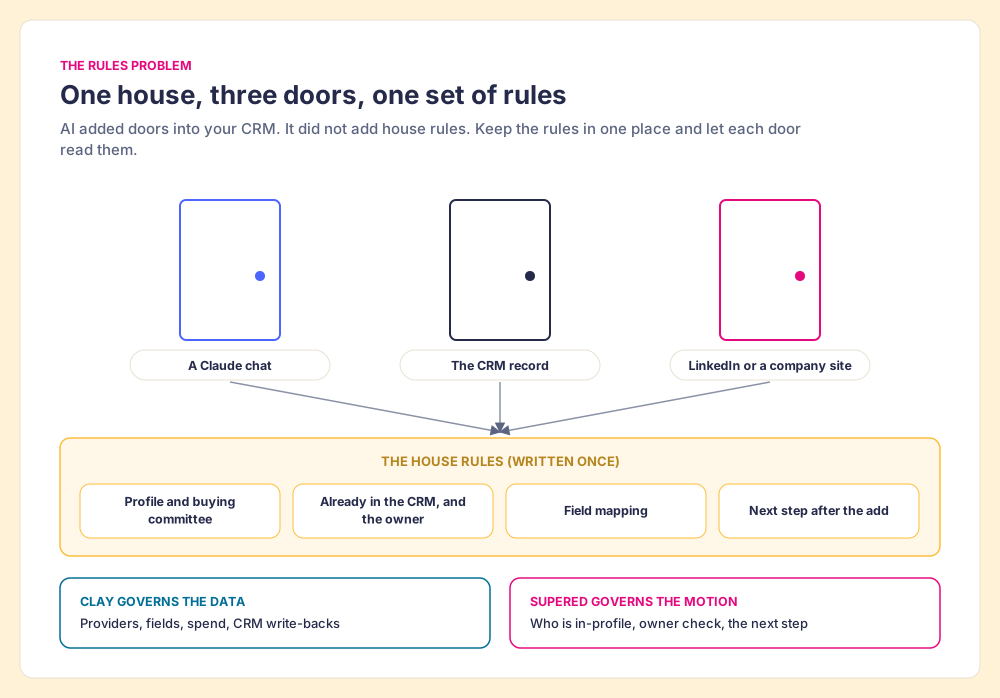
The fix is to keep the rules in one place and let each door read them. In practice there are two kinds of rule, and they live in two places:
- Data rules, in Clay. Which providers the waterfall asks, which fields come back, what spend is allowed, what writes back to the CRM. Clay’s MCP page calls this keeping “CRM write-backs, compliance logic, and enrichment spend” under central control. Your GTM engineer builds it once.
- Motion rules, in Supered. Who is in-profile for the buying committee, whether this person is already in the CRM or was worked before, and what the rep does after the add. Supered’s Process Rules apply to the prospects a rep works, in HubSpot, Salesforce or Pipedrive, and the same rules show up inside the CRM and in Claude when Supered is connected there (sales expectations).
Clay governs the data. Supered governs the motion. A model in any of the three doors is then working to your standard instead of its default. Of course this is only a picture: a rule written badly is followed badly on every door. It does mean you fix it once.
Prospector and Clay: rep-built lists where reps already work
Prospector is the door we built, for one job: a rep, on the page they already have open, builds their own list with the power of Clay. Clay is our only data provider because it is the waterfall across 200+ vendors; Supered does not bring its own database, it brings Clay’s, which is every database, routed. If you have Clay, you have Prospector.
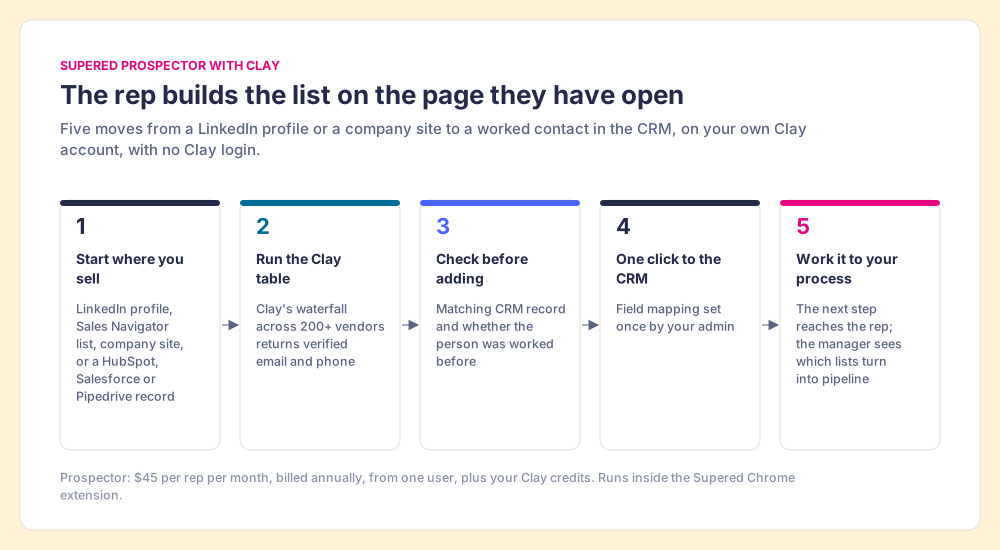
- Lists started where the rep sells. A LinkedIn profile, a Sales Navigator list, a company’s website, or a HubSpot, Salesforce or Pipedrive record. On a company site the rep gets company research; the buying-committee lookup takes the titles, departments and seniority your team sets.
- A check before the add. On a LinkedIn profile the rep sees the matching CRM record, and whether someone already worked this person, before adding a duplicate or stepping on a teammate.
- One click to the CRM. Field mapping is set once by your admin; reps never log into Clay, and it runs on your own Clay account and credits.
- Your process on the worked prospect. Once the contact is in the CRM, the next step in your process reaches the rep while they work, and the manager sees which lists get worked and which close, so coaching starts from what is converting.
On LinkedIn, our statement is plain: Prospector works within LinkedIn’s terms and does not copy search results in bulk; the contact data comes from Clay’s waterfall on the customer’s own Clay account. Ask the same question of any extension you consider, ours included. Prospector runs inside the Supered Chrome extension and costs $45 per rep per month, billed annually, from one user (Prospector). Clay’s plans and credits are priced by Clay.
Choose something else in three cases:
- No Clay account. Prospector runs only on Clay. Without it, HubSpot’s agent with a connected database, or a single prospecting database, is the shorter path.
- Drafting as the gap. Prospector writes nothing. If your reps have names and lack time to write, an assistant or the HubSpot agent in review mode fits better.
- Reps who live in a chat window. If your team already works in Claude all day, Clay’s MCP there is a fine door, provided the motion rules come with it.
What should a sales team do with AI for prospecting now?
The options, plainly:
- AI in the chat. Clay in Claude for reps and ops people who already work there. Fast research and lists, strong on data rules, weakest on the screen a rep has open while selling.
- AI in the CRM. HubSpot’s agent for warm accounts and first drafts, at $1 a recommended lead, with a human edit on every message.
- AI on the rep’s page. Prospector on Clay for teams whose reps build lists from LinkedIn, Sales Navigator and company sites, and whose managers want to see which lists turn into pipeline.
What I recommend: give AI all the prep work it does well, keep a person on the choices and the words, and write your prospecting rules down before you add a second door. You will probably run two of the three setups above, and that is fine, as long as both read the same rules. If you have Clay, start reps on the page they already work from, because a list a rep built is a list a rep works, and then let the chat and the CRM agent follow the same house rules.
For the method beneath all of this, from choosing accounts to the first call, read the sales prospecting guide. For the Clay side in depth, Clay prospecting shows how the builder’s tables reach the rep, and waterfall enrichment explains why asking many vendors finds more. And if your team is about to connect Claude to the CRM, Claude for sales covers the connectors, plans and approval settings that come first, and how sourcing works in Supered shows the whole loop.
Frequently asked questions
What is AI sales prospecting?+
How do you use AI for sales prospecting?+
What is AI bad at in sales prospecting?+
Is prospecting automation the same as AI sales prospecting?+
Can Claude do sales prospecting?+
Does Supered Prospector use AI to write outreach?+
Your process, running itself.