AI Content Workflow: Erin Wriggers' Pipeline and the Human MCP
Erin Wriggers has spent more than 10 years in the HubSpot world and built a multi-agent content pipeline in Claude. How it runs step by step, and her lessons on sign-off, not guessing, and reading before you send.
An AI content workflow is a repeatable sequence in which AI agents draft, review, revise, and optimize content against written standards before a person approves it; Erin Wriggers' version runs voice review, revision, SEO, a cover image, and a quality check before she signs off.
Erin Wriggers started with AI the moment ChatGPT came out. “Immediately,” she said. “Like immediately as soon as uh chat GPT came out, I was obsessed.” She had spent years in the HubSpot world by then, starting as a front-end developer and working up to technical director. Today she does solutions architecture consulting out of Denver and describes herself as a “big nerd.”
On our show she opened a Claude project, typed one line asking her article optimizer to improve a draft and send it for her approval, and let it run while she talked. Behind that line sits an AI content workflow she built herself: a chain of agents that review, revise, optimize, illustrate, and hand her a finished post to approve.
Ashley Freter hosted Erin on Show Me Your Prompt, and most of what Erin said came back to one question: where does the person go in a pipeline like this? Her answer has her approving the finished post, answering the agents when they get stuck, and reading anything that goes to a client.
How does Erin’s AI content workflow run?
The Claude project itself holds little context. It connects to a back end, an app Erin built, and the app does the heavy lifting. Her demo draft was a short article full of em dashes, which she had spent a long time trying to train out of Claude. “I have like browbeat Claude into not ever giving me an m dash,” she said.
Ashley confessed she does not know how to type one.
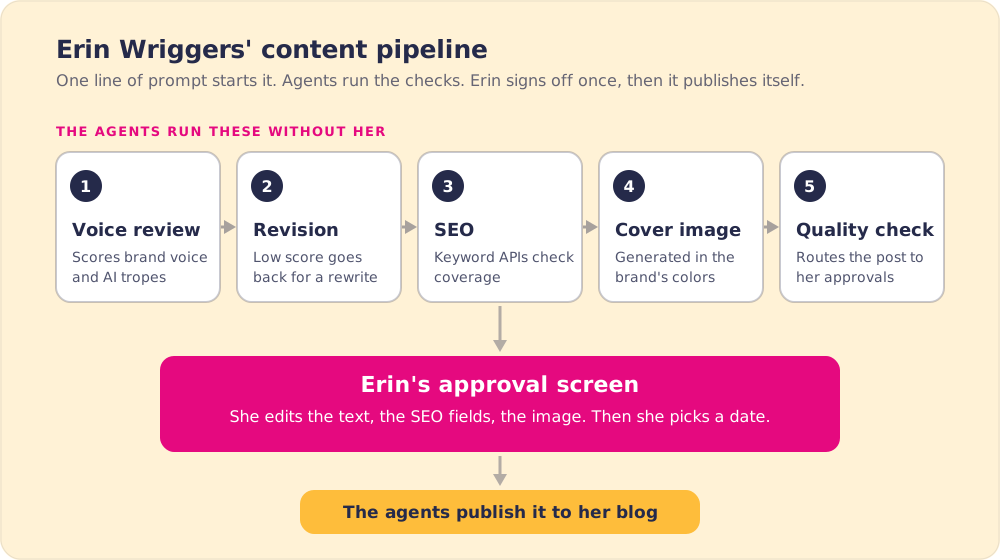
From there, the multi-agent pipeline runs in order:
- Voice review. Erin runs two brands through the system, and the agent picks the right brand voice based on where the article is headed. It scores the draft against that voice and against her list of anti-AI tropes. The demo draft scored low.
- Revision. A low score sends the draft back for a rewrite.
- SEO optimization. This step calls a couple of APIs to check keywords and make sure the article covers what it should.
- Cover image. A call to an OpenAI image model produces art in the brand’s colors. On screen, the colors matched her personal brand.
- Quality check. The finished post lands in her approvals, in an interface she built.
In the approval screen everything is editable: the rich text, the SEO fields, the image. She picks a date, approves, and the agents publish the post to her blog database on their own. She never presses a publish button.
Why does Erin keep one human step?
She designed the pipeline to bring her in only where she adds something. “It kind of surfaces things to me when I actually want to see things,” she said. “I don’t necessarily need to be involved in every single step. Like you can take it and run with it on like the voice review and the SEO stuff. Um, but I do want to like give that final blessing, that sign-off.”
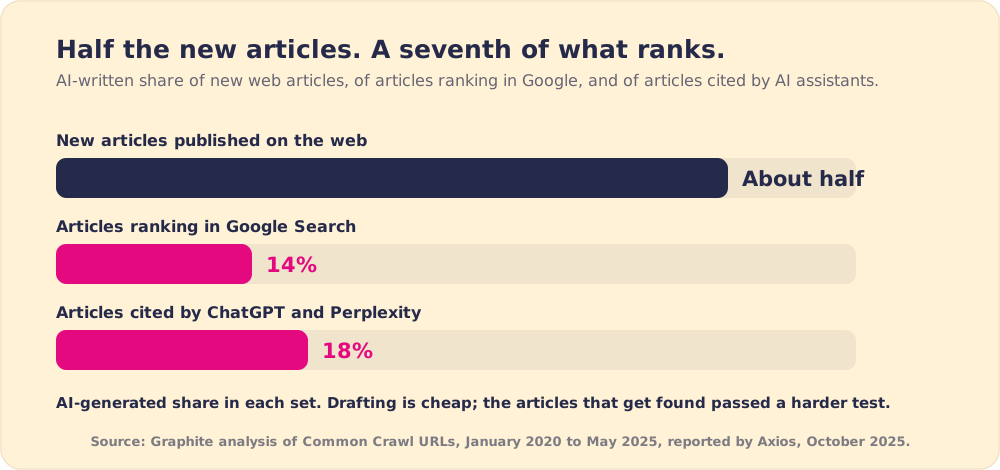
That one gate matters more as AI drafting gets cheaper. Graphite, an SEO firm, classified articles from Common Crawl and found AI-generated articles briefly outnumbered human-written ones in November 2024, then settled at roughly half. Yet only 14% of articles ranking in Google Search were AI-generated, and 18% of articles cited by ChatGPT and Perplexity (Axios, 2025).
Google’s position leaves room for Erin’s approach. Its guidance says it rewards “original, high-quality content” however it is made, and that using automation “with the primary purpose of manipulating ranking in search results is a violation of our spam policies” (Google Search Central, 2023). Erin reads and approves each post herself before it goes out, so a person has checked it before any reader or search engine sees it.
What does it mean to treat yourself as a human MCP?
Ashley asked whether Erin worries about being replaced. She does not, and her reason is practical. Because she uses AI so much, she knows where it falls short. “I know the things that make me fail. And typically those don’t overlap a ton.”
She wrote that division of labor into a file. Her Claude project has a claude.md that tells Claude how to code and a readme that explains the folder. It also has a soul.md, which she described as the terms of their partnership. One rule in it: “don’t ever guess. Like you have access to a ton of tools. I am one of them.” She tells Claude to treat her as its human MCP.
MCP, the Model Context Protocol, is Anthropic’s open standard “for connecting AI assistants to the systems where data lives” (Anthropic, 2024). An agent with MCP connections reaches for search, a database, or an API when it needs a fact. Erin put herself on that list. When Claude hits something only she knows, it asks her, the same way it would call any other tool.
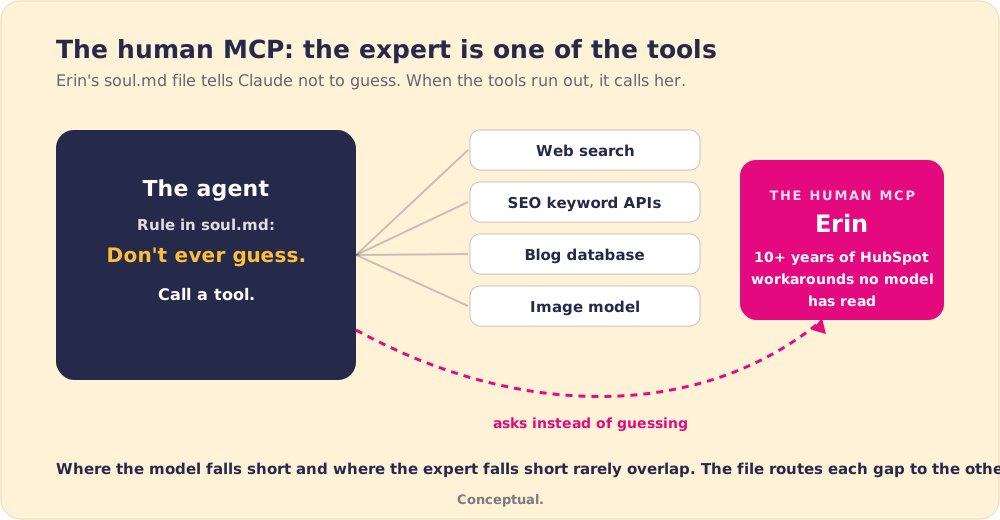
What she knows is the part AI cannot keep up with. “Pretty much anybody can code now um with AI,” she said. Knowing what to code, and what the infrastructure needs to be, still takes the domain expert. In her field that means HubSpot releases the model has not caught up on and “the workarounds that we found after 10 years of of doing this.”
Ashley added an image from another guest: Claude is the smartest kid in the class who is always studying in the library and misses the human-to-human part. Erin said it was the best description she had heard.
How does Erin start a conversation with Claude?
She brings her own thinking to the first message. She never opens with “How do I solve this problem?” Her version: “Hey, I have this problem. I’ve thought about this. I’ve thought about this. I want to pressure test this idea that I have.”
The point is to narrow the lane. A blank question sends the model “starting from scratch and searching Beyoncé’s whole internet,” as she put it. A problem with her reasoning attached keeps it inside the context that matters. “I know my lane and like I can guide Claude into his lane uh or her lane, Claudette.”
Anthropic’s own prompting guidance makes the same case in plainer words: “Think of Claude as a brilliant but new employee who lacks context on your norms and workflows. The more precisely you explain what you want, the better the result” (Anthropic).
Why does Erin read everything before a client sees it?
She has seen what happens when people skip that step. “One of the cringiest things I see is when somebody sends you something and then you still see” the closing paragraph where Claude offers to do the next thing. “You so obviously didn’t read this because Claude is talking to you in the message you just sent me. And now this is awkward.”
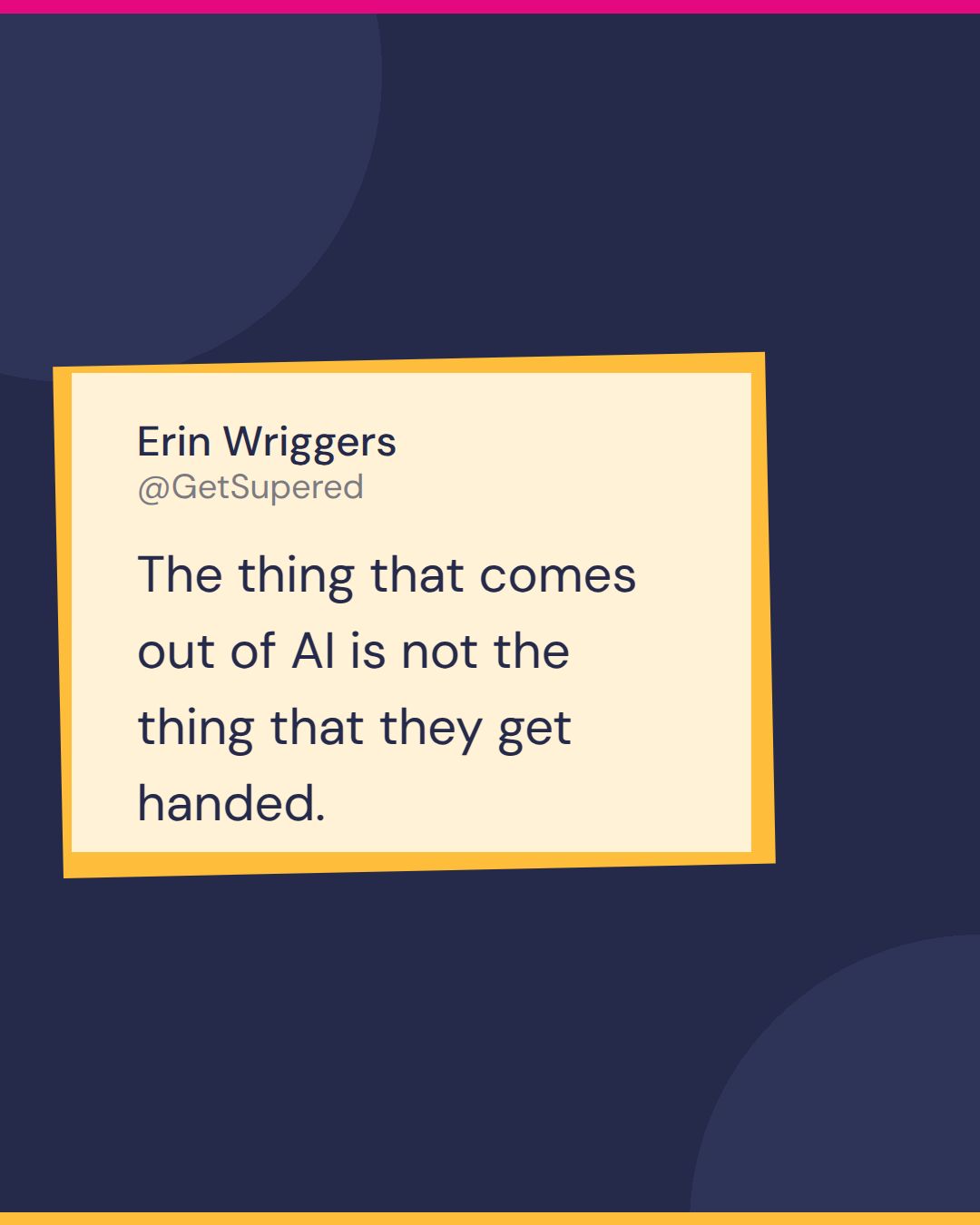
Her rule with clients is short: “yes, I’m using AI. No, I’m not sending it to you before I thoroughly review it.” She adds her own context and notes, so “the thing that comes out of AI is not the thing that they get handed.” Her shortest version of the idea: “AI makes things feel polished,” but “my expertise is what makes the solution actually bulletproof.”
When the sender skips the read, the person on the other end pays for it. Researchers from BetterUp Labs and Stanford call the result workslop, “content that appears polished but lacks real substance, offloading cognitive labor onto coworkers.” In their survey, 41% of workers had received it, and each instance took nearly two hours of rework (Harvard Business Review, 2025). Erin’s clients have been receptive to how she uses AI, she said, because she never sends out anything she would not have sent if she had written it herself.
Erin’s lessons on building an AI content workflow
- Agents on the checks. Voice review, revision, SEO, and the image run without her, against standards she wrote down.
- One sign-off. She keeps the final blessing, in an approval screen where she can edit anything before it publishes.
- A rule against guessing. Her soul.md makes her one of Claude’s tools, so the agent asks instead of inventing.
- Your thinking first. She brings the problem and her own reasoning to a chat and asks Claude to pressure-test it.
- A read before anything leaves. No AI output reaches a client unread.
- Curiosity. Her parting advice was to play with it: “I guarantee you my brain has not melted.”
Build the checks before the drafting
Erin’s pipeline points to a clear order for anyone building an AI content workflow. Write the voice down as rules a machine can score. Give an agent the job of scoring and sending weak drafts back. Tell the agents to ask a named expert when they do not know. Keep one human gate, and make it easy to use.
We would start with the voice rules and the gate, because the evidence is lopsided. AI now writes about half of new articles and a much smaller share of what ranks or gets cited, and unread AI output costs the person who receives it nearly two hours.
Erin spent most of her building on the checking steps, and let the drafting take care of itself.
Sales teams face the same trade with enablement material. In The State of Sales Enablement 2026, 64% of teams already use AI for content creation, while the top reason tools become shelfware is that reps do not see the value, at 55% (The State of Sales Enablement 2026). Supered works on the other end of that problem: it is the Behavior Layer that puts the process in front of reps inside HubSpot and Salesforce, in the flow of work, and shows whether it ran.
Our post on why sales enablement content is a liability until reps use it picks up from here, and our post on generative AI for sales covers why more output alone does not reach revenue. For sequencing AI behind a sales process, see our guide to AI sales enablement.
Frequently asked questions
What is an AI content workflow?+
What is a human MCP?+
Does Google penalize AI-generated content?+
Where should the human sit in an AI content workflow?+
How do you keep AI content from sounding like AI?+
Your process, running itself.
Turn the playbook into rep behavior.
More from Show Me Your Prompt

AI Upskilling: Lyron on the Kid in the Library
Lyron
AI Impact on Entry-Level Jobs: Nate Singer's Forecast and His Own AI Workflow
Nate Singer