Supered vs TangoDecide where the step gets missed.
Supered vs Tango depends on where your process breaks.
Tango turns a workflow into a polished step-by-step guide in minutes, and its Enterprise plan adds walkthroughs, Pins and browser automations; it is the better pick when the problem is writing the steps down and walking people through software. Supered is the better pick when the guides exist and reps skip the steps: your expectations become rules, checked against each open deal in HubSpot, Salesforce or Pipedrive, including the deals no rep opened today. Teams with both problems run both.
01TangoTeams that need SOPs and how-to guides written fast, in any web app. Free plan, Pro at $15 per user per month yearly for teams of 3 or more.
02SuperedSales leaders with 10+ reps on HubSpot, Salesforce or Pipedrive whose process is written down and still gets skipped. Public price, live in under a week.
03BothTango captures how the work is done across departments. Supered checks the sales steps on each open deal and links the Tango guide where it applies.
G2 on 3 October 2026: Tango 4.7 out of 5 from 515 reviews; Supered 4.9 out of 5 from 81 reviews.
Status check
Where does Tango stand in 2026?Guides first, with agents on the side.
Tango moved to tango.ai and announced Hybrid Automation in April 2025, a bet on AI that runs browser clicks for people (our Tango alternatives guide covers that turn). On 3 October 2026 its homepage leads with the original product again: "Tango turns any workflow into a polished step-by-step guide," with "1M+ users" and three menus, Documentation, Enablement and Automation (tango.ai).
Tango also sells into sales teams now. Its Agents for Sales page offers browser agents that create quotes, log customer updates to CRM properties, and "memorize your selling rules like MEDDPICC, SPICED, Sandler, and BANT to ensure only qualified opportunities progress through your pipeline," with "live guidance and error checks, so every input is accurate before saving" (Tango). HubSpot Ventures invested in April 2024, when Tango said more than 2,300 companies used it to document HubSpot (Tango).
That puts Tango closer to the sales process than a pure capture tool. The line between the two products sits in where each one looks: Tango works on the screen in front of the rep, and Supered reads the records in the CRM.
The decision table
Supered vs Tango at a glanceSeven lines that decide it.
Tango
Supered
Job it is built for
Capturing a workflow once and turning it into a step-by-step guide; on Enterprise, walkthroughs, Pins and browser automations on top.
Getting reps to follow your sales process: expectations as rules, checked against open records, cleared in the CRM or in Claude.
What it checks
The task a rep is doing in the browser right now: agents give "live guidance and error checks" before the rep saves.
Each open deal in the CRM against each rule, including deals no rep touched today, listed on a Process Board by rep.
CRM integration
Browser overlay with "No APIs" and "No new systems"; works on Salesforce, HubSpot and other web apps through the extension.
Native: HubSpot, Salesforce and Pipedrive connectors. Rules run against your CRM records.
Setup effort
G2 Ease of Setup 9.5. Install the extension and capture a first guide in minutes.
Live in under a week, sometimes in a day. G2 Ease of Setup 8.9.
Security
See Tango's own security or trust page.
SOC 2 Type II (audited, zero exceptions), GDPR compliant, and SSO. Reports in the Supered Trust Center at trust.supered.io.
Pricing
Free (5 shared workflows). Pro $15 per user per month yearly for 3+ users ($20 monthly), $22 for 1 to 2. Pins, Guide Me and Automations on Enterprise, custom with a platform fee.
Process Compliance $40 per user per month yearly ($45 monthly), 5-user minimum, includes Digital Adoption ($13.50 / $15).
Who reviews it on G2
55.3% small business, 34.4% mid-market, 10.2% enterprise.
72.6% small business, 27.4% mid-market.
Reason to pick it
Nothing is written down, or your experts spend days writing guides for software screens.
The guides exist, reps skip the steps, and you want to see who followed the process without opening each record.
How we graded: for the job most people typing "Supered vs Tango" are weighing, getting a sales team to follow the process inside the CRM. Weights: rules checked against CRM records (35%), guidance where reps already work (25%), a manager view of who followed it (20%), setup and price for a 10 to 50 rep team (20%). We also grade the opposite lane, capturing how work gets done, so you can flip the lens.
Tool
Lane
Grade
Rank
Why it ranks here
Supered
Sales process followed in the CRM
A
1
Built for this job: one definition of a good deal, followed in the CRM, in Claude or by an agent, a board per rep, a public price.
Tango
Sales process followed in the CRM
B-
2
Sales agents check inputs and selling rules while the rep works; we found no nightly check of every open deal or per-rep board.
Tango
Capturing how work gets done
A
1
4.7 from 515 G2 reviews, Ease of Setup 9.5, a guide from one run-through, a free plan.
Supered
Capturing how work gets done
C
2
Guides are recorded with the Sidekick extension, slower than Tango's capture and built for the sales process.
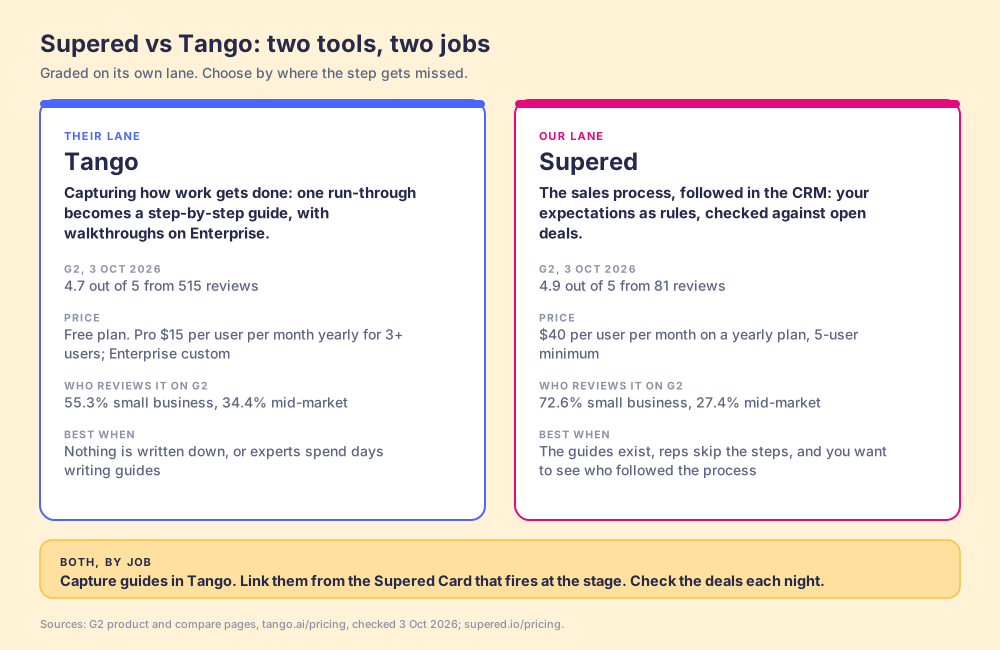
Two tools, two jobs. Tango: 4.7 from 515 G2 reviews, a free plan, Pro at $15 per user per month yearly for 3+ users, reviewers 55.3% small business and 34.4% mid-market. Supered: 4.9 from 81 reviews, $40 per user per month yearly with a 5-user minimum, reviewers 72.6% small business and 27.4% mid-market. All checked 3 October 2026.
Fair to them first
What is Tango best at?A clean guide from one run-through.
Tango does one thing faster than almost anything else on the market. Click through a task once and it hands back a step-by-step guide with annotated screenshots, ready to share by link or embed. Reviewers rate its ease of setup and ease of use 9.5 each, and the strengths they cite most are ease of use (243 mentions), time saved (115) and tutorial creation (107), on a 4.7 out of 5 from 515 reviews (G2). The free plan covers five shared workflows, and Pro costs $15 per user per month on a yearly plan for teams of three or more (Tango pricing).
On Enterprise, the guides move onto the screen. Guide Me walks people through each click, and Pins put "Tango guides, tips, and links to the exact spot employees will need them" (Tango). One customer, SEARHC, says it replaced a 60-slide training deck with a Tango and onboarded 1,400 employees. For teams whose problem is people who do not know how to do a task in Salesforce, Workday or Epic, that is a strong product.
Tango writes the recipe card and, on Enterprise, stands beside the cook while the dish is made. Checking each plate that left the kitchen last night, table by table, is a separate job, and it is the one Supered was built for.
Why buyers compare
Why do teams compare Tango with Supered?The guides are written and deals still skip steps.
Tango's reviews are warm, so the complaints are worth reading closely. The reason sales teams end up on this page usually sits below them.
Editing and upkeep.Editing limitations (39 mentions), limited customization (30) and screenshot quality (22) are the most cited cons on G2. A library of captured guides also needs someone to recapture them when the screen or the process changes.
Guidance that waits to be opened.On Free and Pro, a Tango guide lives behind a link or an embed. In The State of Sales Enablement 2026, teams whose guidance reaches reps in the flow of work hit quota at 49%, against 15% for teams whose guidance lives in separate docs.
Walkthroughs priced as Enterprise.Guide Me, Pins and Automations sit on the Enterprise plan, with custom pricing and a platform fee, so the in-app half of Tango is a separate buying decision from the $15 Pro seat.
Deals no rep opened.A browser check runs when a rep is on the screen. A close date that slipped last week, or a deal with no next step that no rep has touched, never triggers it. In the same research, 89% of teams had a defined sales process and 36% saw reps follow it.
Supered, for the sales job
What does Supered do that Tango does not?It checks every open deal.
Supered starts from your expectations instead of your screens. A close date that has passed, no amount after Discovery, no recap within a day of a meeting, an overdue task: each becomes a Process Rule. Rules group into a Process Ruleset, and a Process Board checks each open deal in HubSpot, Salesforce or Pipedrive against them every night and lists what is broken, rep by rep. Because Supered reads the records through native connectors, the stale deal in the back of the pipeline shows up the same as the one a rep opened this morning.
Supered has in-app guidance as well. Guides are step-by-step walkthroughs recorded with the Sidekick extension on any website, and Page Triggers surface the right Card or Guide on the page when its context appears, such as a deal stage in HubSpot. Capturing a guide in Supered is slower than in Tango; firing it at the right stage and checking the result afterwards is the part Supered is built for. A rep sees the open violations in a sidebar on the record, fixes the field there, and the violation clears.
The same rules work outside the CRM. Supered connects to Claude through MCP, so a rep can ask Claude to clear their board: Claude reads the rules, updates the fields, and saves recap emails as drafts for the rep to review (Supered for Claude). Managers see who followed the process, with streaks for reps who finish the day at zero. The full pattern is on sales expectations.
Process Compliance costs $40 per user per month on a yearly plan ($45 monthly), with a 5-user minimum, and includes Digital Adoption ($13.50 on its own). For 25 reps on yearly plans that is $12,000 a year, against $4,500 for 25 Tango Pro seats. The Tango seat buys capture and sharing; the walkthroughs and agents are on its custom Enterprise plan. Full plans are on Supered pricing.
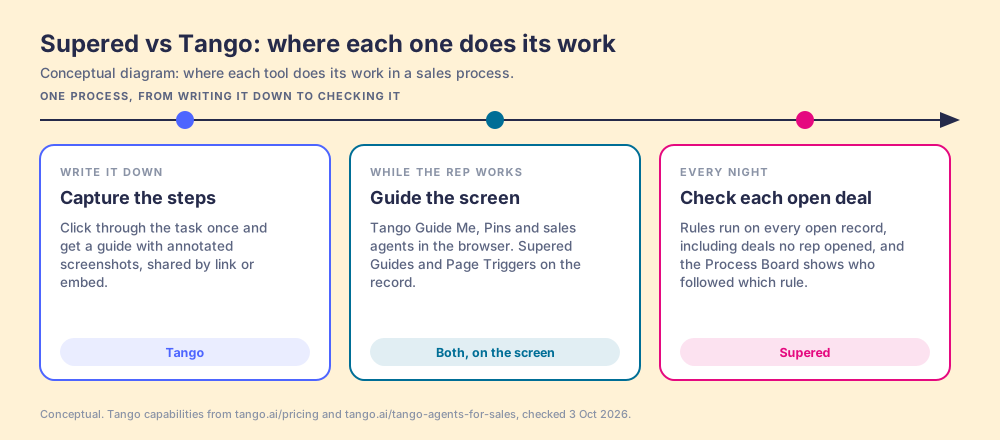
Conceptual. Tango writes the steps down and, on Enterprise, guides the rep on the screen. Supered fires guidance on the record too, then checks each open deal against your rules every night, including the ones no rep opened, and shows which rep followed which rule.
Choose something else when the job looks like this
Documentation across the company.Ops, finance, IT and support SOPs for Workday, Epic or any web tool are Tango's home turf, and it captures them faster than Supered.
Automating repetitive browser work.If the goal is a bot that fills forms and clicks through screens with a human approving, Tango's automations do that and Supered does not.
Field or mobile-first teams.Supered has no mobile product. It fits teams of 10 or more who work at a computer.
See your own process as rules.
A 30-minute demo: we take three expectations your reps skip, turn them into rules, and show the board for your pipeline.
Supered vs Tango: which should you choose?Decide by the gap, then by the price.
If your problem is getting how the work is done written down and in front of people, Tango is the best pick. We are the best pick if your problem is a sales team that has the guides and skips the steps, and managers who cannot see which deals broke the process.
Choose Tango for
A blank page. No SOPs and experts too busy to write them. One run-through becomes a guide.
Software training in any web app. Salesforce, Workday, Epic and the tools between them, with walkthroughs and Pins on Enterprise.
A small budget for writing. A free plan, and Pro at $15 per user per month yearly for 3+ users.
Choose Supered for
Expectations reps skip. Close dates, amounts, recaps and next steps checked on each open record, with a board per rep.
HubSpot, Salesforce or Pipedrive as home base. Native connectors, guidance on the record, and the same rules in Claude.
Inspection without the manager's evenings. The nightly check does the record review, so the one-on-one goes to coaching.
Both, by job. Capture guides in Tango for every department, link them from the Supered Card that fires at the stage where the step applies, and let the Process Board check each night whether the step happened.
Why trust this page
Why trust a comparison written by Supered?Weigh it, then check the sources.
We sell one of the two products on this page, so weigh what follows. Each competitor number links to its source and carries the date we checked it, 3 October 2026. If Tango ships a check of every open CRM deal against a team's rules, with a view by rep, this page changes.
Supered started inside RevPartners, the HubSpot partner Matt Bolian founded, which sold roughly twice as much Sales Hub as any other partner and reached HubSpot's Elite tier in 13 months. Supered is the #1 sales enablement app on the HubSpot marketplace and a HubSpot Premier Tech Partner, with 6,000+ installs. On G2 it holds 4.9 out of 5 from 81 reviews; on the HubSpot marketplace, 5.0 from 122 reviews (both checked 3 October 2026).
"It's super cool and goes above and beyond other platforms like Scribe when it comes to enforcing processes."
"Usually, a new sales process starts dying the moment you finish the slide deck. Supered keeps it alive by distributing updates to the whole team instantly whenever we change a rule."
Reviews quoted verbatim from our wall of love, which links each one to its source.
The questions
Supered vs Tango, asked plainly.
Is Supered a Tango alternative?
For sales teams whose guides already exist and whose problem is follow-through in the CRM, yes: your expectations become rules, checked against each open deal in HubSpot, Salesforce or Pipedrive. For fast documentation across every department, Tango is the stronger tool, and the closer alternatives are in our Tango alternatives guide.
Can Supered and Tango run together?
Yes. Capture guides in Tango, link them from the Supered Card that fires at the stage where the step applies, and let the Process Board check each night whether the step happened. Tango covers the how-to across the company; Supered covers the sales process on the deal record.
How much does Tango cost compared with Supered?
Tango has a free plan with five shared workflows. Pro is $15 per user per month on a yearly plan for teams of three or more ($20 monthly), or $22 for one or two users. Pins, Guide Me and Automations are on Enterprise, with custom pricing and a platform fee (checked 3 October 2026). Supered Process Compliance is $40 per user per month yearly, $45 monthly, with a 5-user minimum, and includes Digital Adoption.
Do Tango's sales agents do the same thing as Supered?
They overlap at one point. Tango's browser agents check a rep's inputs and selling rules while the rep is working on the screen, before a save. Supered reads the CRM records through native connectors and checks every open deal against your rules each night, including deals no rep opened, then shows the results by rep on a Process Board.
Does Supered have step-by-step guides like Tango?
Yes. Supered Guides are walkthroughs recorded with the Sidekick Chrome extension on any website, and Page Triggers surface the right Card or Guide on the page when its context appears. Capture is slower than Tango's, and it is built for the sales process rather than every department's SOPs.
How long does Supered take to set up?
Teams typically go live in under a week, sometimes in a day. The slow part is agreeing which expectations matter most, so start with the handful your reps skip most often and add rules from there.