Tango Alternatives: The Pivot Is the Reason You're Here
Tango's capture is well liked, and in April 2025 the company pointed itself at AI browser automation instead. The honest alternatives list depends on which Tango you were buying: the documenter or the automator.
Tango alternatives are the tools teams weigh against Tango's workflow capture and in-page guidance, and since Tango's April 2025 pivot toward AI browser automation, the right alternative depends on whether you wanted the documentation product or the automation direction.
When a restaurant you like changes chefs, the menu does not change that night. It changes over the next year, dish by dish, as the new kitchen cooks what it believes in. Software works the same way, except the chef announcement comes as a press release with the word “AI” in it. In April 2025, Tango (now living at tango.ai) announced Hybrid Automation: AI that performs roughly ninety percent of a workflow’s clicks itself, pausing for a human only at consequential decisions. It is a bold, coherent bet, backed by $23.7M from investors including HubSpot Ventures and Salesforce Ventures, and it means the company whose capture tool you liked is now, by its own declaration, an automation company that also does documentation.
That is the honest frame for a Tango alternatives page in 2026, whichever tango software review brought you here. Nothing broke. The capture still works and users still like it. But a company of roughly 69 people, per Latka, follows its pivot, and roadmaps are where your next two years of value live. So the question that sorts every alternative is simple: which Tango were you buying, the documenter or the automator?
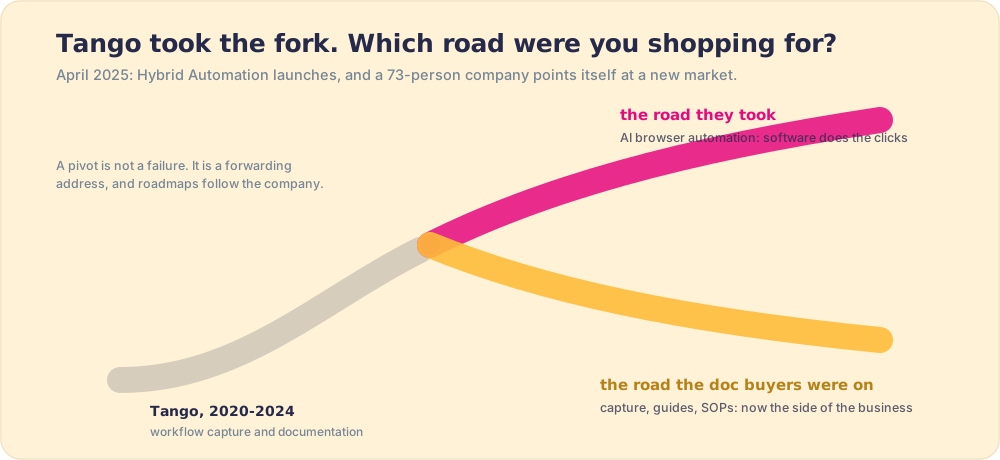
Why does the pivot change which Tango alternatives fit?
To answer that clearly, it helps to understand what Tango was solving before April 2025. The problem is as old as expertise itself: tacit knowledge, the kind that lives in a skilled person’s hands and never gets written down because the person runs it faster than they can narrate it. The organizational learning scholar Ikujiro Nonaka named this in The Knowledge-Creating Company (1995, with Hirotaka Takeuchi): tacit knowledge is the most valuable kind because it is the hardest to transfer, and conversion from tacit to explicit, making the invisible visible, is the real engine of organizational learning. What Tango, Scribe, and their category do is automate that conversion: watch the expert click through a process once and generate a clean step-by-step guide. A task that resisted documentation because the expert had automated it past conscious thought gets surfaced in about five minutes. That is a real and meaningful capability.
Now Tango wants to do the next step: not convert the tacit knowledge into a guide, but use AI to run the clicks the way the expert would. The documentation product becomes one output from a larger system whose job is execution, not capture. For buyers who wanted the capture, the product still exists. The question is who owns it in the engineering calendar of a company that has publicly committed its roadmap to automation.
This is why choosing among Tango alternatives requires a two-step clarity most comparison lists skip: what did you come for, and does the alternative do that job for a living?
Which Tango alternatives fit the documentation buyer?
You wanted clicks turned into clean guides, and you want a vendor whose whole business depends on doing that brilliantly for the next decade.
- Scribe, the obvious move. The capture leader, full stop: auto-generated step-by-step guides, the deepest template and sharing system, and the market’s confidence priced in (a $75M Series C at a $1.3 billion valuation in November 2025, over 6 million users as of May 2026, per TechCrunch). The migration is low-drama because the workflow is identical: perform the task, get the guide. Scribe also adds compliance posture Tango does not have: HIPAA support, Smart Blur PII redaction, and approval workflows for documentation governance, relevant wherever regulated data touches the workflow. The trade-offs that come with any library, decay and distance from the work, follow you there too, and we address them in Scribe alternatives with the same candor we are using on Tango here.
- Guidde, if your guides should talk. Auto-generated video walkthroughs with narration. The right complement when your audience watches rather than reads; the wrong system of record, since video is the costliest format to keep current when the process changes. Guidde is well funded for the bet (a $50M Series B in February 2026 led by PSG Equity, with monday.com joining, per PR Newswire), so the format is not going away; the open question is whether your system of record should be video.
- Trainual, when documentation is secretly onboarding. Procedures as curriculum: assigned, tested, tracked. Right shape for SMB ops teams building new-hire programs; bounded by the universal limit of training, which is that week-one knowledge and week-twenty behavior are different facts. Knowing a procedure in the first week and running it on the twentieth deal belong to different psychological categories.
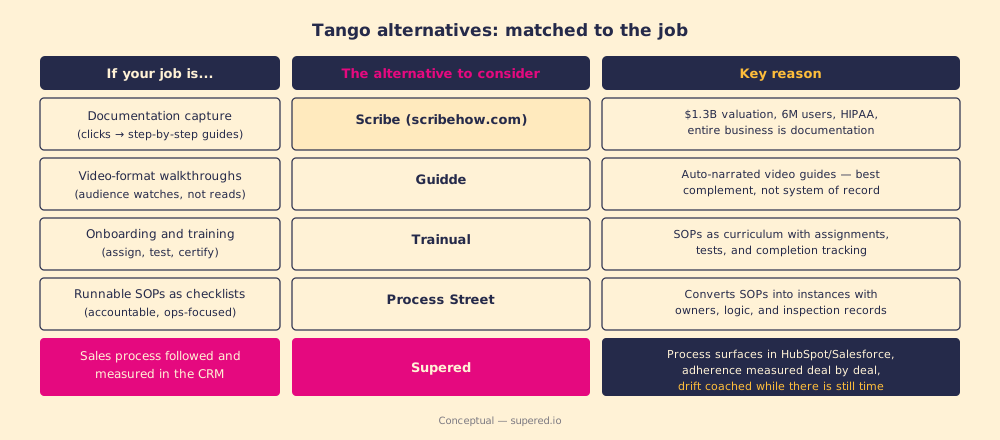
What if the automation direction is why you came?
Then you are not shopping for alternatives, you are early. Hybrid Automation is a genuine bet on where screen work goes, and if delegating the clicks themselves is what you want, staying with Tango is the more interesting position than any documentation tool. Judge it like an automation purchase, though, not a documentation one: ask about exception handling, auditability, and what happens when the underlying screens change, the same questions you would put to any RPA vendor.
Keep one principle in your pocket, because it has a thirty-five-year track record. In 1990 Michael Hammer opened the business-process-reengineering era with a warning whose title says it all: “Reengineering Work: Don’t Automate, Obliterate” (Hammer, Harvard Business Review, 1990). His point, proven repeatedly since, is that laying automation over a flawed process does not fix the process; it entombs the flaw and runs it faster, a pattern engineers came to call “paving the cowpath.” Automation amplifies the process you have. A workflow that was inconsistent when humans ran it does not become consistent because software runs the clicks; you have automated the inconsistency. So sequence any Hybrid Automation behind a process you have already made visible and inspected, or you are buying a faster way to do the wrong thing. The throughline between Hammer’s warning in 1990 and Tango’s bet in 2025 is the same: capture and automate the right process, not whichever one your clicks happened to follow last Tuesday.
What does the evidence say about the job documentation tools leave open?
Here is the part of the category neither the documenter nor the automator addresses, and it happens to be the part with quota attached. A guide tells a person how to do a task when they go looking. Automation does the task’s clicks for them. Neither answers the operating question a revenue leader is paid on: is the process being followed in the flow of work, and how would we know?
The gap is not theoretical. Hermann Ebbinghaus charted the forgetting curve in 1885: without reinforcement, people lose roughly 70% of new knowledge within 24 hours and approximately 90% within a week. A guide a rep consults once during training and then files in a documentation system has done almost nothing to change what they do on the thirtieth deal. Across 198 sales teams in The State of Sales Enablement, 89 percent had a defined, documented process and 36 percent saw it followed as designed. The teams that closed the gap did it with placement and measurement: process guidance reaching reps in the flow of work correlated with 49 percent quota attainment versus 15 percent when it lived in docs and destinations. Documentation tools, Tango included, were never built to see that gap, let alone close it. They report that a guide exists and was viewed. The pipeline question, did the right thing happen, deal by deal, requires standing where the deals are.
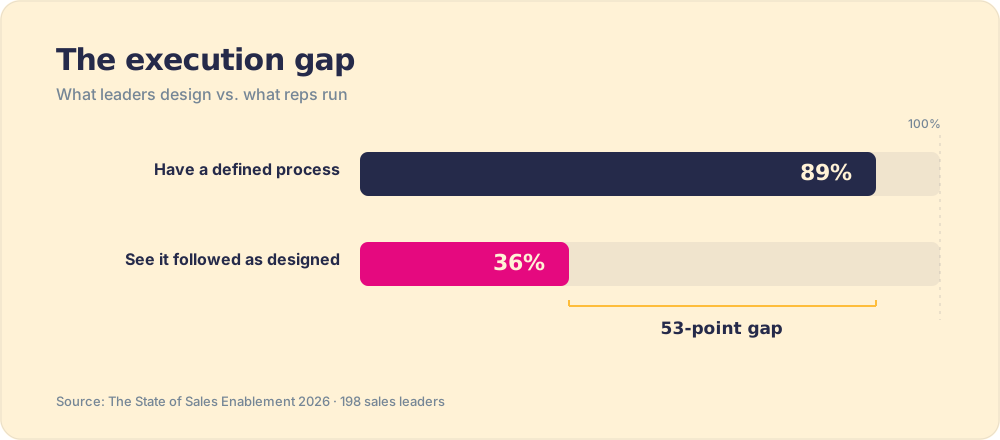
McKinsey’s research found that knowledge workers spend roughly 19% of the working week searching for and gathering information (McKinsey Global Institute, 2012). A better-organized, faster-generated library of guides reduces that cost. It does not move the second number, which is the one that decides whether the process you built and documented shapes what reps do while a deal is still open.
What standing-in-the-work requires
The job that moves the second number is different in kind from documentation, and understanding why is what keeps a manager from mistaking a library problem for a behavior problem. A document is a record of what should happen, kept in a place the rep can visit. A behavior layer is what happens when the process guidance reaches the rep at the moment they need it, inside the tool where the deal already lives, without any tab switching.
The distinction matters because of where decisions get made. Behavioral economist Daniel Kahneman’s work distinguishes between the deliberative System 2, the one that reads a guide and forms a plan, and the automatic System 1, the one that runs when the rep has a prospect on the phone and the CRM open and three other deals in the queue. Guidance that requires System 2 to fetch it from a separate destination loses to System 1 every time. The documentation is real; the cognitive load of finding it at the moment of pressure means it rarely changes the decision that matters. Process guidance in the flow of work, at the moment the rep is making the choice, reaches System 1.
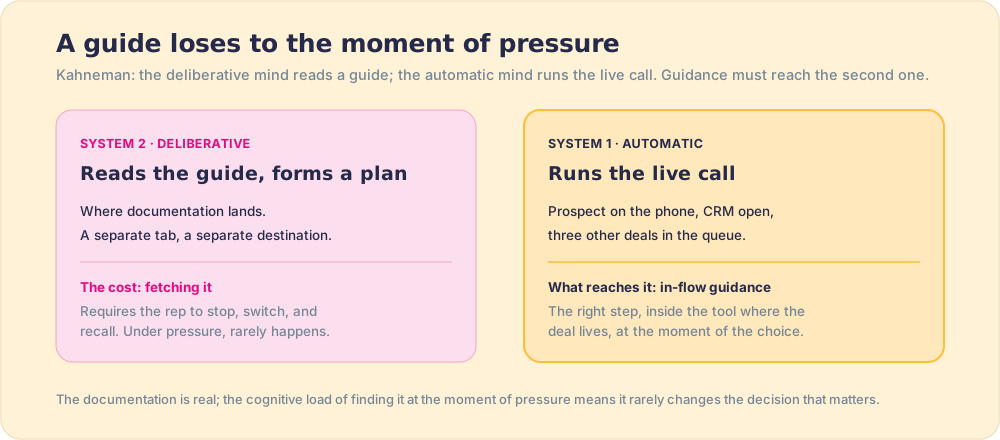
That standing-in-the-work job is what Supered does, for sales teams specifically: the documented process surfaces inside HubSpot or Salesforce at the stage where it applies, the moment the rep needs it, and adherence is measured deal by deal so a manager coaches drift the week it starts. It does not capture your IT department’s SOPs (pair it with Scribe for that) and it does not automate browser clicks. It makes the sales process you already wrote visible, followed, and inspectable, which is the difference between owning workflow documentation and running a workflow. The reasoning chain behind that distinction runs through where your sales process should live and the wider process documentation guide.
How do the Tango alternatives score across every job?
Feature lists flatter whoever wrote them. The fair way to compare Tango alternatives is by job coverage: which of the jobs that turn documented work into changed behavior does each tool actually do for a living? Five jobs decide that, and each tool tends to do one or two of them well.
| Tool | Auto-capture | Knowledge base | Stays current | In-flow delivery | Measures adherence |
|---|---|---|---|---|---|
| Scribe | Best in class | Library export | Manual upkeep | No | No |
| Tango (tango.ai) | Strong (legacy) | Basic | Manual upkeep | In-page guidance | No |
| Guidde | Video capture | Video library | Hardest to update | Embedded video | View counts only |
| Notion / Document360 | Weak (Document360 bought Floik, Jan 2026) | Best in class | Manual upkeep | No | No |
| Process Street | Weak | Procedures | Runs as checklists | In its own app | Checklist completion |
| Supered | Guides (partial) | Yes (Bases and Cards) | Measured and coached | Yes, in the CRM | Yes, deal by deal |
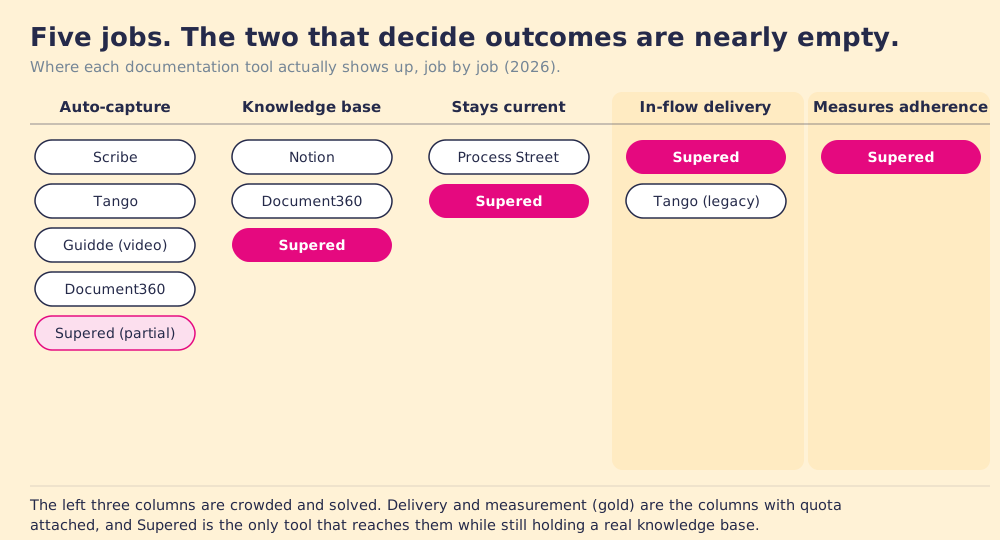
Read the table down the columns, not across the rows, and the shape jumps out. Auto-capture is a crowd. Knowledge base is a crowd. The two columns on the right, delivery into the flow of work and measurement of whether the process was followed, are nearly empty, and they are the only two with a number attached to them. Scribe and Notion are excellent at the solved jobs. Neither was built to stand where the deal lives.
Weighted for the jobs that move outcomes
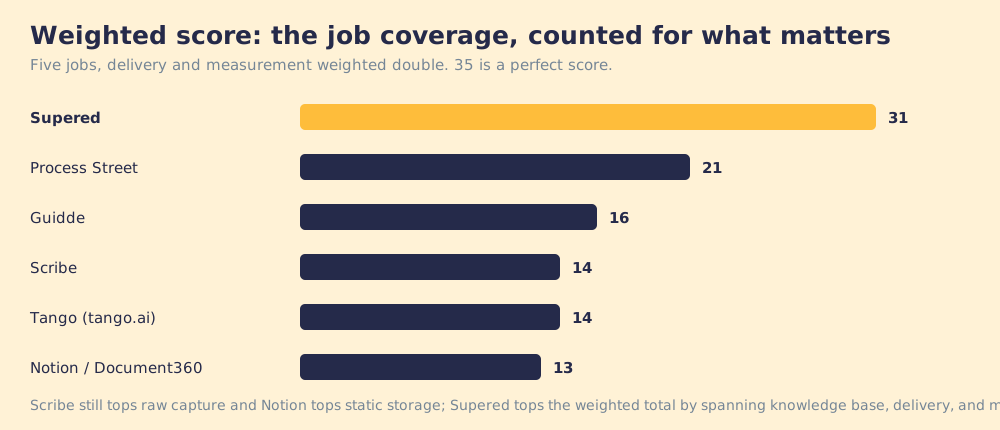
A raw checkmark count is its own kind of lie, because the jobs are not equal. If capture were all that mattered, Scribe wins outright and this page ends at the first row. But the default failure in the field is not undocumented work, it is documented-and-unfollowed work: 89 percent of teams had the process written down, 36 percent saw it followed. So weight the two decisive jobs double, score each tool 1 to 5, and add it up.
| Tool | Capture (×1) | KB (×1) | Current (×1) | Delivery (×2) | Measure (×2) | Weighted total |
|---|---|---|---|---|---|---|
| Scribe | 5 | 3 | 2 | 1 | 1 | 14 |
| Tango (tango.ai) | 4 | 2 | 2 | 2 | 1 | 14 |
| Guidde | 4 | 3 | 1 | 2 | 2 | 16 |
| Notion / Document360 | 2 | 5 | 2 | 1 | 1 | 13 |
| Process Street | 2 | 3 | 4 | 3 | 3 | 21 |
| Supered | 3 | 4 | 4 | 5 | 5 | 31 |
The weighting is stated on purpose so you can argue with it: delivery and measurement count double because they are the jobs that decide whether documentation changes anything. Score all five equally and the ranking flattens; score them for what a revenue leader is paid on and one row separates from the pack. Scribe still tops raw capture, and for a pure documentation factory it stays the right buy. Notion and Document360 still own the deepest static knowledge base. Supered tops the weighted total because it is the only tool that carries a real knowledge base, puts it in the flow of work, and measures whether the process was followed. For a sales team, that breadth is the value: one tool doing the documentation job and the behavior job, instead of a library plus a blind spot.
Can Supered double as a knowledge base?
Yes, and it is worth being precise about how, because calling Supered a “measurement tool” undersells it. Supered organizes content in Bases, and a Card is, in the product’s own words, a knowledge base article: instructions, links, embedded media, reference material. Guides add screen-recorded, step-by-step walkthroughs as a first-class content type beside the cards. The raw material of a documentation tool, the articles and the walkthroughs, lives here too.
The difference from Notion or Document360 is not that Supered stores less. It is where the knowledge goes. A Card Trigger watches for a keyword inside HubSpot or Salesforce and surfaces the right card in a sidebar the moment it appears on the page, with no tab to switch, and the analytics record whether that content was used. A knowledge base you can watch working, at the point of the decision, is a different asset from one that waits in a tab to be searched. It is the argument of this whole page made concrete: the same cards and guides, delivered where System 1 is deciding and inspected after the fact.
One caveat, because this page owes Supered the same candor it gave Tango. Supered’s capture is guide-building, not Scribe’s one-click auto-capture, and it is built for the sales process, not your IT department’s entire SOP catalog. For company-wide capture at that speed, pair Supered with Scribe and let each do its job. What Supered adds is the two columns no capture tool or wiki has: the knowledge delivered in the flow of work, and the proof it was followed.
The verdict
- Scribe. The move when you came to Tango for capture and want the vendor most committed to documentation as its entire business. Also the better option if HIPAA compliance or enterprise governance matters.
- Guidde. The move when the guides should be video, as a complement to a written system of record.
- Trainual. The move when the real job was onboarding and certified training for new hires.
- Tango, still. The move when the automation direction is what excites you; evaluate it as the RPA bet it now is, behind a process you have already made inspectable, with Hammer’s warning visible on the wall.
- Supered. The move when the workflow you care about is the sales process, and the standard you answer to is whether reps run it in the flow of work inside the CRM, with adherence visible continuously. It is also the most value in a single tool for a revenue team, because it does both jobs at once: it holds the knowledge base (Bases and Cards), delivers it in the flow of work, and measures whether the process was followed. Documentation is the precondition. The followed process is the lever, and how it works shows the lever in motion.
One closing note of respect for the company this page is about: pivots like Tango’s are how small companies survive platform shifts, and HubSpot Ventures’ backing suggests the bet is taken seriously by people who see a lot of bets. Read their direction as information, not indictment. Then buy the road you came in shopping for.
Frequently asked questions
What are the best Tango alternatives?+
What happened to Tango?+
Is Tango still good for documentation?+
What is the difference between Tango and Supered?+
Should I switch from Tango to Scribe?+
Can Supered be used as a knowledge base?+
Your process, running itself.