Pipeline Management Software, Graded: Dashboards Show the Pipeline, Rules Change It
Most pipeline management software shows you the pipeline: a board, a forecast, a red flag on a stale deal.
Far less of it moves the deal. Seven tools for HubSpot, Salesforce and Pipedrive teams, graded on whether the pipeline changes after you look at it.
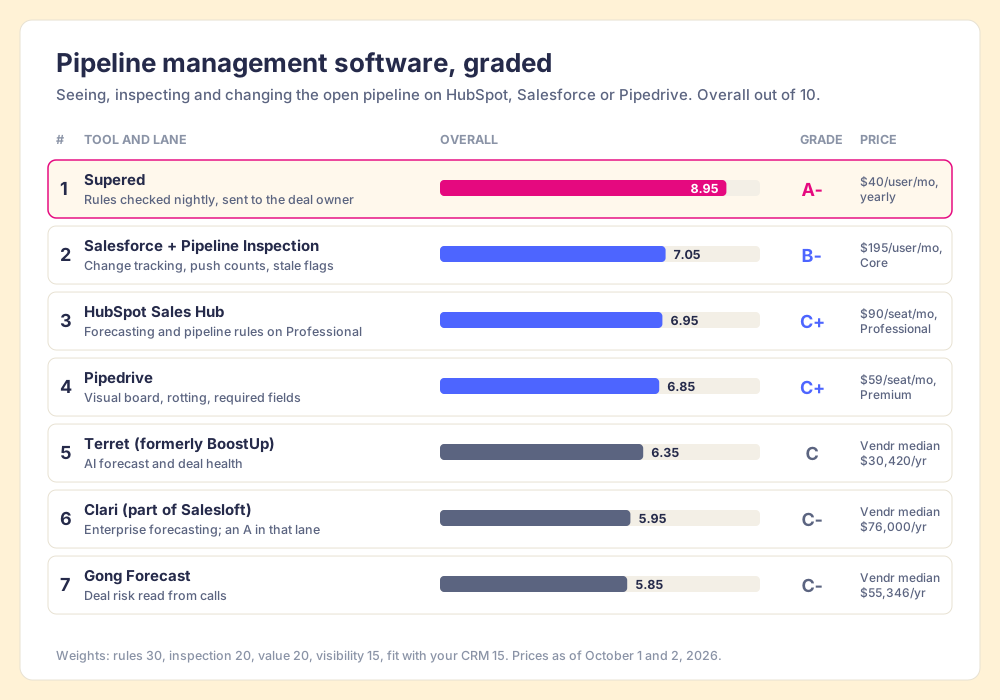
Pipeline management software is the set of tools a sales team uses to see open deals by stage, inspect which are at risk, and get each one fixed; boards and forecasts cover the first two jobs, and rules sent to each deal's owner cover the third.
Pipeline management software has a split personality. Search for it and you get a CRM board with colored columns, a forecasting tool with a confidence score, and, on a bad day, software for mortgage brokers. Nearly all of it shows you the pipeline. Much less of it changes the pipeline once you have looked. If you run HubSpot, Salesforce or Pipedrive, you already own a board, so the open question is what moves the deals that sit still on it. Three answers cover the common cases:
- Supered, for a pipeline that has to change. Your pipeline expectations become Process Rules checked against each open deal every night in HubSpot, Salesforce or Pipedrive; the owner sees what failed and fixes it in the CRM or in Claude. Rated 4.9 on G2 across 81 reviews (October 2, 2026).
- Your CRM’s own pipeline, set up properly. HubSpot Sales Hub Professional, Salesforce with Pipeline Inspection, or Pipedrive Premium. The board, the forecast and the stale-deal flags are already paid for.
- Clari, for forecast-led enterprise teams. The strongest forecasting and inspection tool on this page, now part of Salesloft, at a Vendr median of $76,000 a year.
Pipeline management software is the set of tools a sales team uses to see open deals by stage, inspect which are at risk, and get each one fixed; boards and forecasts cover the first two jobs, and rules sent to each deal’s owner cover the third. Seven tools are graded below on all three, with the weights printed so you can flip them.
Which pipeline management software should you pick? The decision table
Start here. Each row is one tool, the plan that includes its pipeline features, and the reason a team switches to it.
| Rank | Tool | Best fit | CRM integration | Setup effort | Pricing (plan with the feature) | Reason to switch | Grade |
|---|---|---|---|---|---|---|---|
| 1 | Supered | Teams whose deals sit with stale dates and empty fields | Native app in HubSpot, Salesforce and Pipedrive | Live in under a week | Process Compliance $40/user/mo paid yearly, $45 monthly, 5-user minimum | You can see the stuck deals and they stay stuck | A- |
| 2 | Salesforce Sales Cloud + Pipeline Inspection | Salesforce teams with an admin | Native | Days to weeks | Core $195/user/mo (new editions, September 2026) | You want change tracking and push counts in one view | B- |
| 3 | HubSpot Sales Hub | HubSpot teams that want forecasting and pipeline rules | Native | Hours to days | Professional $90/seat/mo billed annually + $1,500 onboarding | You are on Starter and need forecasting | C+ |
| 4 | Pipedrive | Small teams that want a board people use | Native | Days | Premium $59/seat/mo billed annually | You want required fields and forecasts cheaply | C+ |
| 5 | Terret (formerly BoostUp) | Mid-market teams that want AI forecasting below Clari’s price | API integration with Salesforce and HubSpot | Weeks | Not published; Vendr median $30,420/yr | You forecast in spreadsheets | C |
| 6 | Clari (part of Salesloft) | Enterprise teams with a forecast call to run | API integration | Weeks to months | Not published; Vendr median $76,000/yr | Leadership does not trust the number | C- |
| 7 | Gong (Gong Forecast) | Teams already on Gong for calls | API integration | Weeks | Not published; Vendr median $55,346/yr for Gong | You want deal risk read from conversations | C- |
Prices come from each vendor’s pricing page on October 1 or 2, 2026, except Clari, Gong and Terret, which do not publish price lists, so the Vendr purchase median stands in. In its own lane, forecasting, Clari earns an A. The grades come from the scorecard further down.
What is pipeline management, and what does the software do?
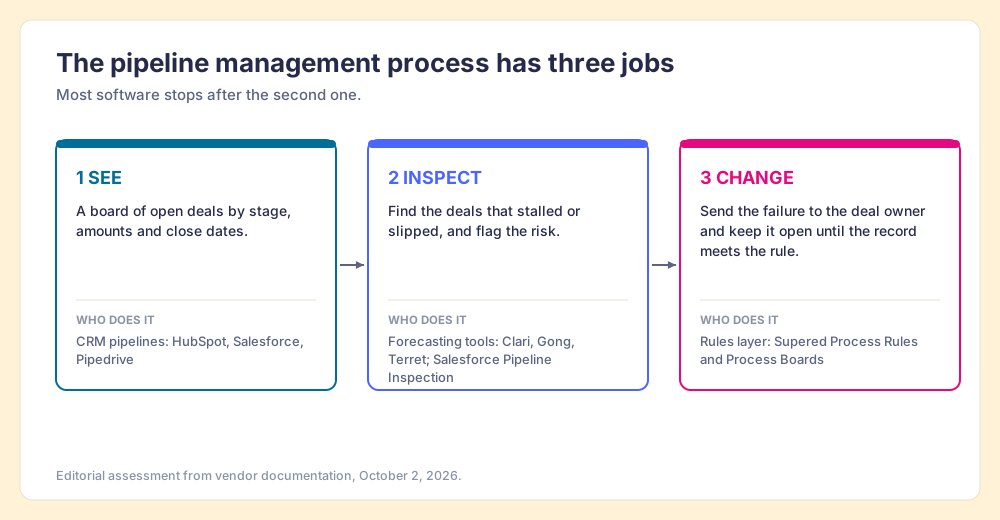
The plain pipeline management meaning is the work of keeping open deals moving toward a decision. It breaks into a pipeline management process with three steps, and each step asks something different of the software:
- Seeing. A board of open deals by stage, with amounts and close dates. The CRMs on this list all do it well.
- Inspecting. Finding the deals that have stalled or slipped: a close date pushed twice, a next step untouched for a week, a deal with no activity. Forecasting tools are built for this, and Salesforce and Pipedrive have native versions.
- Changing. Getting the person who owns the stalled deal to fix it, and knowing that they did. This step decides whether the pipeline next week looks different from the pipeline today.
The vendors ranking for this search, most of whom call their product sales pipeline management software, describe the first two steps. HubSpot’s page promises to “track stages, forecast revenue, and accelerate sales cycles” (HubSpot). Gong’s promises to “build forecasts you can trust” (Gong). Both are fair claims. Both describe looking.
Why does a dashboard leave the pipeline where it was?
A weather report and a thermostat both know it is cold. The weather report knows it better, in fact: it has satellites, a radar loop and a confident woman pointing at a map. It will tell you, to the degree, how cold tomorrow will be, and the house will be exactly that cold. The thermostat knows less. It has one number on the wall, the set point, and a single habit: when the room drifts below it, the furnace comes on, every time, until the room is back.
Forecasting tools are weather reports, and good ones. They tell you which deals are cold. A rule is a thermostat. It holds a set point for each deal (a close date in the future, an amount after Discovery, a next step on the calendar) and every time a deal drifts below it, it sends the work to someone who can turn the heat back on.
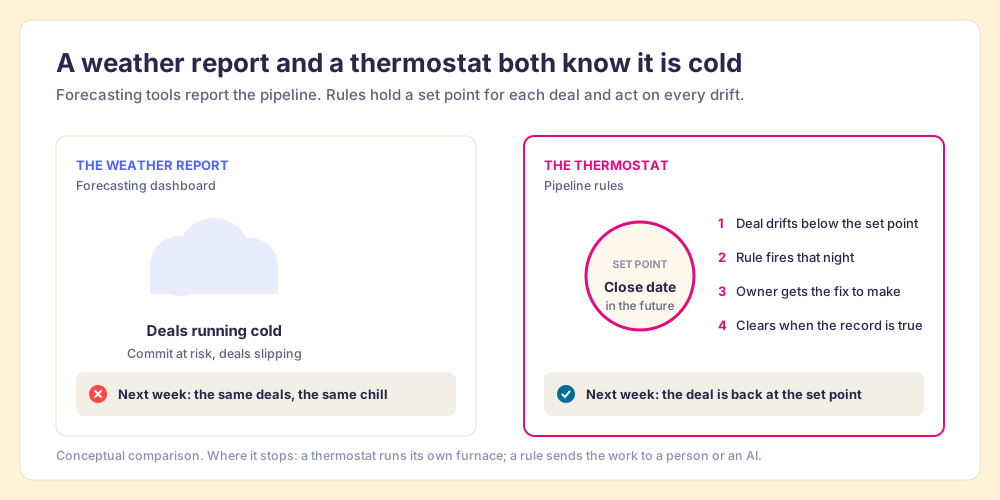
The comparison stops somewhere, and the place matters. A thermostat runs its own furnace. A pipeline rule cannot update a buyer’s budget; a person, or an AI working for that person, has to do the fixing. What the rule supplies is the habit: the check runs on each deal without anyone deciding to run it, and it lands on the person who can act.
The data on forecasts shows why the habit matters more than the report. Only 45 percent of sales leaders and sellers in Gartner’s State of Sales Operations survey had high confidence in their organization’s forecast accuracy, and only 47 percent said their data was high quality (Gartner, February 2020). Gartner’s Craig Riley traced the data problem to CRM adoption discipline, data governance and data quality measurement, and all three are habits a team keeps or drops. Xactly surveyed 400 finance, sales and RevOps leaders in 2024 and found that 4 in 5 had missed a quarterly sales forecast in the past year (Xactly, July 2024). A better model fed the same stale close dates produces a more confident wrong number.
Our own research says where the lever sits. In The State of Sales Enablement 2026, our survey of 198 sales leaders, teams that inspect deals against a defined process at the highest frequency hit quota at 6.3x the rate of the lowest band. The same survey found adherence falling from 47 percent where a manager has one to five reps to 23 percent at six to eight, and the top reason reps skip the process, at 29 percent, is that managers do not enforce it. Managers in that survey cite capacity more often than indifference. When inspection lives in the weekly pipeline call, a manager with eight reps cannot open every deal in it. The system runs out of hours, and the reps work inside it.
What happens to one stale deal in three different tools?
Take a single deal. The rep had a good discovery call, set the close date for the end of last month, and has not touched the record since a quick note two weeks ago. Three tools treat it three ways, according to their own documentation.
Pipedrive colors the deal’s tile red once it has gone idle longer than the period you set for its stage. The trigger is “the deal’s last updated time,” and adding a note or editing the deal resets it. The documentation adds that the feature “disregards the next activity date, so any deal with an activity scheduled far into the future can still go rotten” (Pipedrive Knowledge Base). So a rep who edits any field turns the tile white again, with the close date still in the past.
Salesforce Pipeline Inspection shows a red clock when the Next Step field has not been updated in a week or more, counts how many times the close date has been pushed from one month to the next, and highlights changes from the past seven days. It is included with Performance, Enterprise and Unlimited editions (Christine Marshall, Salesforce Ben, updated May 2026). The red clock waits in a list view until a manager opens it, usually before the weekly call.
A Supered Process Rule reads “close date is not in the past” and is checked against the deal every night. The deal lands on the owner’s Process Board as a violation, the rep sees it inside the CRM, and it clears only when the close date is true again. Editing another field does nothing. The manager sees the count by rep the next morning without opening the record.
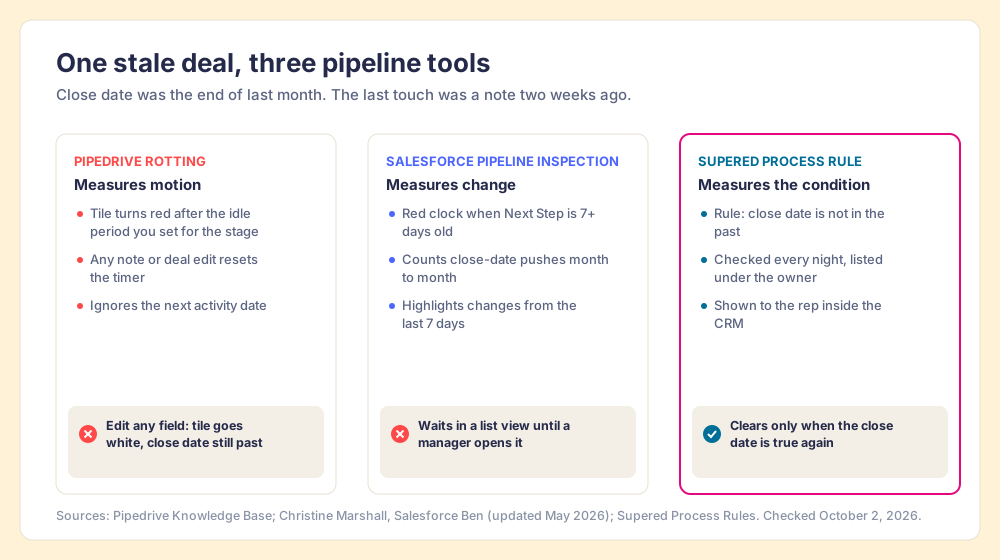
The difference is what each tool measures. A rotting timer measures motion: did anyone touch the record. Pipeline Inspection measures change and waits for a reader. A rule measures the condition the buyer’s position depends on, the close date, the decision maker, the next meeting. Activity matters (it is how you verify the work happened), and a deal should still not count as healthy on activity alone.
Why should you trust a vendor’s grades?
You should not, unless the vendor shows its work, and I am the vendor. Supered is my company. Before it, I founded RevPartners, a HubSpot partner that did only sales implementations, sold roughly twice as much Sales Hub as any other partner, and reached Elite tier in 13 months. RevPartners sold RevOps as a service, acting as a fractional CRO for clients, which put me inside a lot of other companies’ pipeline reviews and taught me how far a clean board can sit from a moving one.
Supered is the number one sales enablement app on the HubSpot marketplace, with more than 6,000 installs, 5.0 out of 5 from 122 reviews there, and 4.9 out of 5 from 81 reviews on G2 (October 2, 2026). The rules for this page: the weights are printed, ratings carry a source and date, and where another tool does a job better, the page says so.
How did we grade pipeline management software?
Five criteria, weighted for one job: managing the open pipeline of a team on HubSpot, Salesforce or Pipedrive so that stalled deals get fixed as well as found.
- Visibility, 15 percent. Boards, views and forecasts that show where deals stand.
- Inspection, 20 percent. Flags for stalled, slipped or risky deals without building a report.
- Rules that change the pipeline, 30 percent. Can you define what must be true of a deal, check it continuously, assign the failure to its owner, and see it cleared?
- Fit with your CRM, 15 percent. Does it work inside HubSpot, Salesforce or Pipedrive, or beside them? Native CRM tools score full marks for their own users.
- Value, 20 percent. What does the plan with the feature cost a 10-rep team?
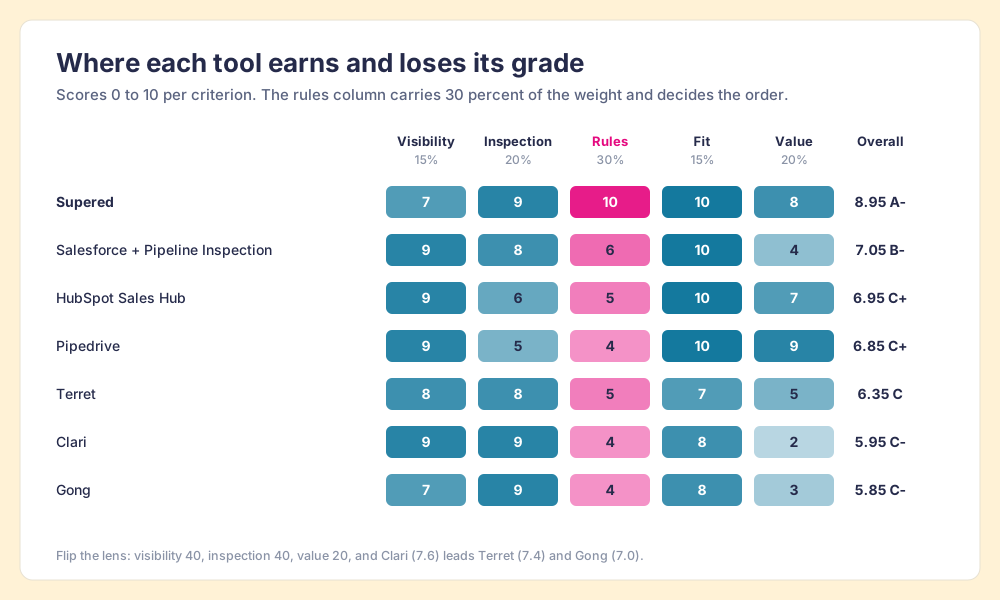
Each tool is scored 0 to 10 per criterion and weighted into an overall out of 10: 9.0 and up is an A, 8.5 an A-minus, 8.0 a B-plus, 7.5 a B, 7.0 a B-minus, 6.5 a C-plus, 6.0 a C, 5.5 a C-minus. The scores are editorial judgment checked against documentation, pricing pages and G2.
| # | Tool | Visibility | Inspection | Rules | Fit | Value | Overall | Grade |
|---|---|---|---|---|---|---|---|---|
| 1 | Supered | 7 | 9 | 10 | 10 | 8 | 8.95 | A- |
| 2 | Salesforce + Pipeline Inspection | 9 | 8 | 6 | 10 | 4 | 7.05 | B- |
| 3 | HubSpot Sales Hub | 9 | 6 | 5 | 10 | 7 | 6.95 | C+ |
| 4 | Pipedrive | 9 | 5 | 4 | 10 | 9 | 6.85 | C+ |
| 5 | Terret | 8 | 8 | 5 | 7 | 5 | 6.35 | C |
| 6 | Clari | 9 | 9 | 4 | 8 | 2 | 5.95 | C- |
| 7 | Gong | 7 | 9 | 4 | 8 | 3 | 5.85 | C- |
The 30 percent on rules is the lens of this page, and it decides the order. Flip it if your problem is the number you hand the board: weight visibility and inspection at 40 percent each and value at 20, drop rules and fit, and Clari leads the forecasting tools at 7.6, ahead of Terret at 7.4 and Gong at 7.0. Supered scores a 7 on visibility on purpose, because it uses your CRM’s board and adds no pipeline view of its own beyond the Process Board.
What does pipeline management software cost a 10-rep team?
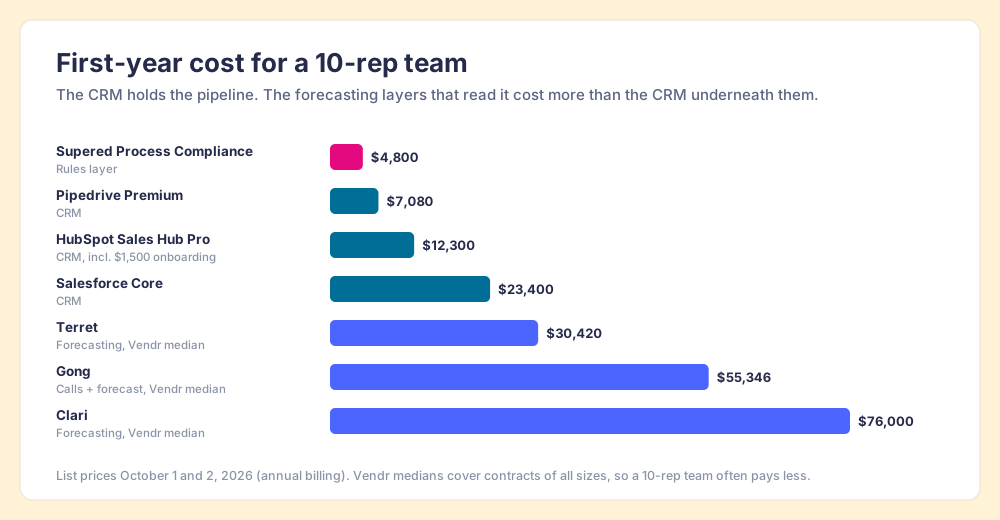
List prices put the tools in three bands, and the bands say something about the market. The CRMs, which hold the pipeline, are the cheap part. The forecasting tools that read the pipeline cost more than the CRM underneath them.
| Tool | What you pay for | First-year cost, 10 reps | Basis |
|---|---|---|---|
| Supered Process Compliance | Rules layer on your CRM | $4,800 | $40/user/mo paid yearly |
| Pipedrive Premium | The CRM | $7,080 | $59/seat/mo billed annually |
| HubSpot Sales Hub Professional | The CRM | $12,300 | $90/seat/mo billed annually + $1,500 onboarding |
| Salesforce Core | The CRM | $23,400 | $195/user/mo, new editions |
| Terret | Forecasting layer | $30,420 | Vendr median contract, all team sizes |
| Gong | Calls plus forecasting | $55,346 | Vendr median contract, all team sizes |
| Clari | Forecasting layer | $76,000 | Vendr median contract, all team sizes |
The Vendr medians cover contracts of every size, so a 10-rep team will often pay less than the median; the order of the bands holds anyway. A team on HubSpot Professional that adds Clari at the median is spending about six times as much to read its pipeline as to hold it.
Why is Supered first for pipeline management?
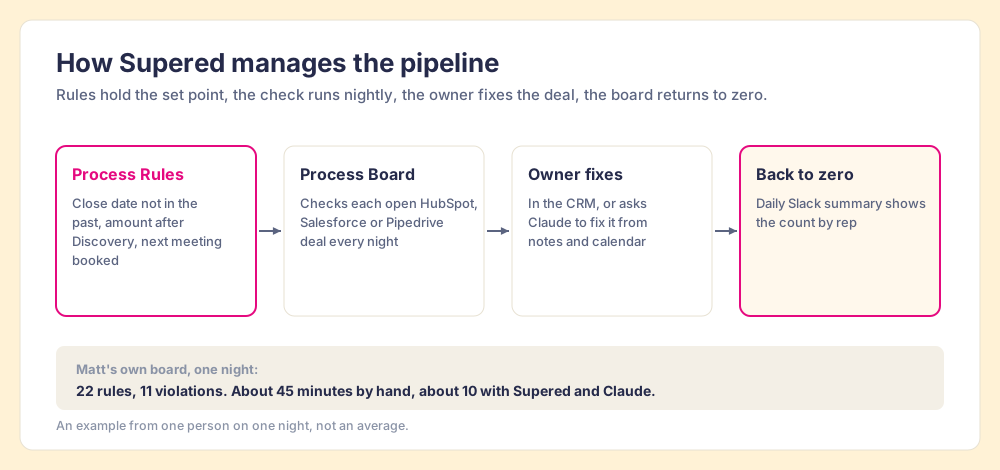
Supered is the thermostat. You write your pipeline expectations as Process Rules and group them in a Process Ruleset: close date not in the past, amount set once a deal passes Discovery, a next meeting on the calendar, a decision maker named before Proposal. A Process Board checks each open deal against each rule every night and lists the violations by owner. The rep sees the failed rule inside HubSpot, Salesforce or Pipedrive, fixes the field in place, and the violation clears once the deal meets the rule. A daily Slack summary shows managers each board’s count, and a streak counts the days a rep has held a board at zero.
My board has 22 rules on my own deals. One night it showed 11 violations, the usual suspects: past close dates, a missing amount, overdue tasks, a missing recap. With Supered, HubSpot and Gmail connected to Claude, one prompt asked it to fix the board and draft whatever needed an email. Claude read my rules from Supered first, updated HubSpot from my notes and calendar, and left the recap and pre-call emails in Gmail drafts for me to send. About 45 minutes by hand, about 10 that night. One person, one night, so treat it as an example. The sales expectations page walks through it.
The rules also reach AI. In our survey, 46 percent of teams already use AI for CRM admin and cleanup. An AI that cleans a pipeline without your rules cleans it to its own idea of tidy; one that reads your Process Ruleset first fixes what your team agreed matters. The CRM hygiene post lists the six rules I start teams with.
- Pricing. Process Compliance is $40 per user per month paid yearly ($45 monthly) with a 5-user minimum, and includes Digital Adoption (cards, guides, the browser extension). Free trial, no card. See Supered pricing.
- CRM coverage. HubSpot, Salesforce and Pipedrive, with the same rules and boards on each; the Supered for Pipedrive page covers that build.
- Setup. Implementation is included and takes under a week. The slow part is the team agreeing which six rules matter most.
- The knock. Supered does not forecast. It has no AI commit number and no roll-up for the board meeting. If that number is the problem, it is the wrong first purchase.
Choose something else if:
- A forecast problem. Leadership needs a defensible commit number and roll-ups by segment: Clari, or Terret on a smaller budget.
- Risk hidden in calls. You want deal risk read from what buyers say: Gong Forecast, especially if you already pay for Gong.
- Fewer than 10 users, or a field team. Supered fits teams of 10 or more who work at a computer, and it has no mobile app.
Which other pipeline management tools fit which teams?
Each option below with what it does best, who it fits, the tradeoff, and the price of the plan with the pipeline features.
Salesforce Sales Cloud with Pipeline Inspection (B-)
The best native inspection view on this list. Pipeline Inspection puts seven-day changes, close-date push counts, last activity and a stale-next-step clock in one grid, and validation rules can block a save until a field is filled. Salesforce announced Core, Advanced and Max editions on September 3, 2026, at $195, $395 and $550 per user per month, and existing customers keep legacy pricing (Salesforce Ben, September 2026). G2 lists the product as Agentforce Sales, at 4.4 out of 5 from 26,135 reviews (October 2, 2026).
- Best fit. Salesforce teams with an admin and a manager who opens the inspection view weekly.
- Tradeoff. The flags wait for a reader, and validation at save tends to produce “TBD” in required fields.
- Price. Core at $195 per user per month for new buyers.
HubSpot Sales Hub (C+)
The easiest pipeline to get reps to use. Professional adds default and custom forecasting and up to 100 pipelines; Starter has no forecasting (HubSpot pricing, checked October 2, 2026). Pipeline rules on Professional or Enterprise can stop reps from skipping stages (HubSpot Knowledge Base). Sales Hub holds 4.4 out of 5 from 14,347 G2 reviews (October 2, 2026).
- Best fit. HubSpot teams that have not yet set up forecasting, stage properties and pipeline rules.
- Tradeoff. Rules fire at the stage change, so a close date that slides into the past after the move never trips one.
- Price. Professional is $90 per seat per month billed annually ($100 monthly) plus a required $1,500 onboarding fee. Starter is $7 billed annually.
Pipedrive (C+)
A visual pipeline small teams keep up to date. Premium adds revenue forecasts and “required and pipeline-specific fields” (Pipedrive pricing, checked October 2, 2026). It holds 4.3 out of 5 from 5,040 G2 reviews (October 2, 2026).
- Best fit. Small teams who want a pipeline people use more than a process engine.
- Tradeoff. Rotting measures time since the last edit, so any edit resets it.
- Price. Lite $14, Growth $39, Premium $59, Ultimate $79 per seat per month billed annually.
Terret, formerly BoostUp (C)
BoostUp renamed itself Terret on September 9, 2025, and repositioned from forecasting into a set of AI revenue agents, including a Machine Forecast agent that “analyzes deal health and delivers accurate rollups” (Terret). It integrates with Salesforce and HubSpot and holds 4.4 out of 5 from 615 G2 reviews (October 2, 2026).
- Best fit. Mid-market teams that want AI forecasting and deal risk at roughly 40 percent of Clari’s median price.
- Tradeoff. A new name and a broad agent roadmap; check which agents are in the plan you buy.
- Price. Not published. Vendr puts the median contract at $30,420 a year (Vendr).
Clari, part of Salesloft (C- here, an A in forecasting)
The forecasting tool enterprise CROs bring to the board meeting. Clari and Salesloft merged in late 2025, and on September 2, 2026 Salesloft unveiled one brand, keeping the Clari Forecast name and folding the rest into the Salesloft platform, which serves more than 4,000 organizations (Salesloft via GlobeNewswire). Clari holds 4.6 out of 5 from 5,610 G2 reviews, with reviewers crediting it for adding “structure and consistency to forecasting” (G2, October 2, 2026). Our Clari alternatives post covers the cheaper options.
- Best fit. Enterprise teams with a weekly forecast call and a RevOps team to run the tool.
- Tradeoff. It shows risk to leaders; changing the deal still runs through the manager’s call.
- Price. Not published. Vendr’s median is $76,000 a year across 291 purchases (Vendr).
Gong Forecast (C- here, an A for call-based risk)
Gong ranks first for this search with its own page, which says it captures “99% of customer interactions automatically” and reads deal risk from conversations (Gong). If the warning sign you need is a buyer who stops replying or a competitor named on a call, nothing here reads it better. Gong holds 4.7 out of 5 from 6,679 G2 reviews (October 2, 2026). Our Gong alternatives post grades the field.
- Best fit. Teams already paying for Gong’s call recording.
- Tradeoff. The forecast is only as current as the CRM fields beside the calls, and the cost is high.
- Price. Not published. Vendr puts the median Gong contract at $55,346 a year (Vendr, October 2, 2026).
How do you choose pipeline management software for your team?
Two questions settle most of it. Which CRM do you run? And when you look at the pipeline, is the problem that you cannot see the risk, or that you can see it and it does not move?
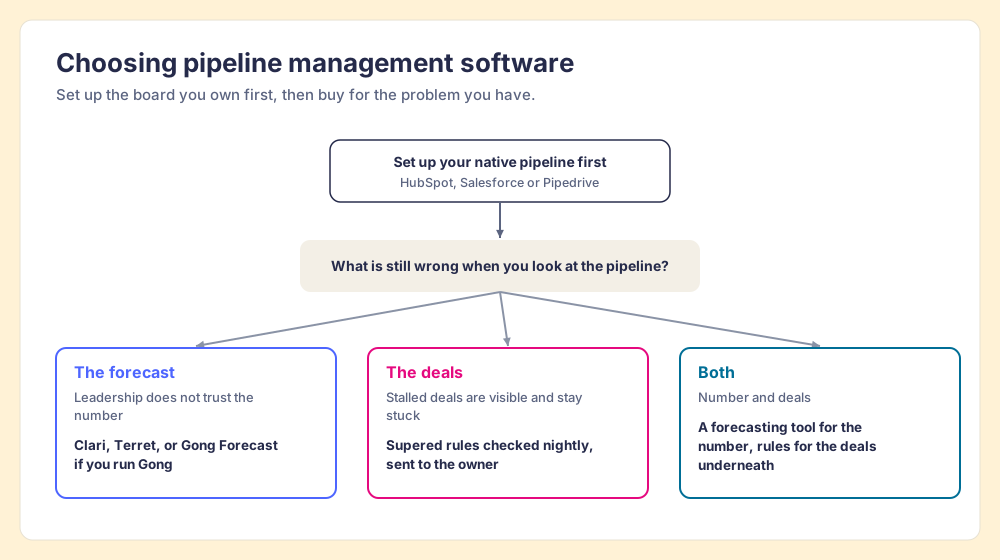
- No forecasting yet. Turn on what your CRM includes: HubSpot Professional forecasting, Salesforce Pipeline Inspection, Pipedrive Premium forecasts.
- A forecast leadership does not trust. A forecasting tool: Clari for enterprise, Terret for less, Gong Forecast if you run Gong.
- Stuck deals the team can already see. Rules checked against each open deal and assigned to the owner. If you searched for sales rep management software because you want to see which reps own those deals, a Process Board shows exactly that.
- Both problems. A forecasting tool for the number and a rules layer for the deals underneath it. They watch different things and rarely overlap.
What we recommend
The options are a better board, a better weather report, or a thermostat. If you run HubSpot, Salesforce or Pipedrive, you own the board, so set it up properly this week. Buy a forecasting tool when the number you report is the problem and you can afford the median contract. Buy rules when the pipeline review keeps finding the same stalled deals, because the forecasts in Gartner’s and Xactly’s data miss for want of current records, and the 6.3x inspection gap in our survey says the team that checks every deal wins more of them.
We built Supered for the third case, so weigh the recommendation knowing that, and check it against the scorecard. Start with six rules your team skips most and count the violations the first night turns up. For the method behind managing the pipeline, read our guide to sales pipeline management. For the meeting the rules feed, read how Crispy Barnett and I argue for keeping the pipeline review. For why a tidy board can still mislead, read pipeline hygiene. And if the gap you are fighting is the whole process as well as the pipeline, sales process management software grades that field.
Frequently asked questions
What is pipeline management software?+
What is the best pipeline management software for HubSpot, Salesforce or Pipedrive?+
What does pipeline management mean?+
How much does pipeline management software cost?+
Is a forecasting tool like Clari or Gong pipeline management software?+
Is sales rep management software the same as pipeline management software?+
Your process, running itself.