Sales Process Management Software for HubSpot and Salesforce Teams, Graded
Most pages ranking for sales process management software are CRMs describing themselves. On HubSpot or Salesforce you own the CRM already; what you lack is the layer that writes the process as rules and shows who follows it. Seven tools, graded.
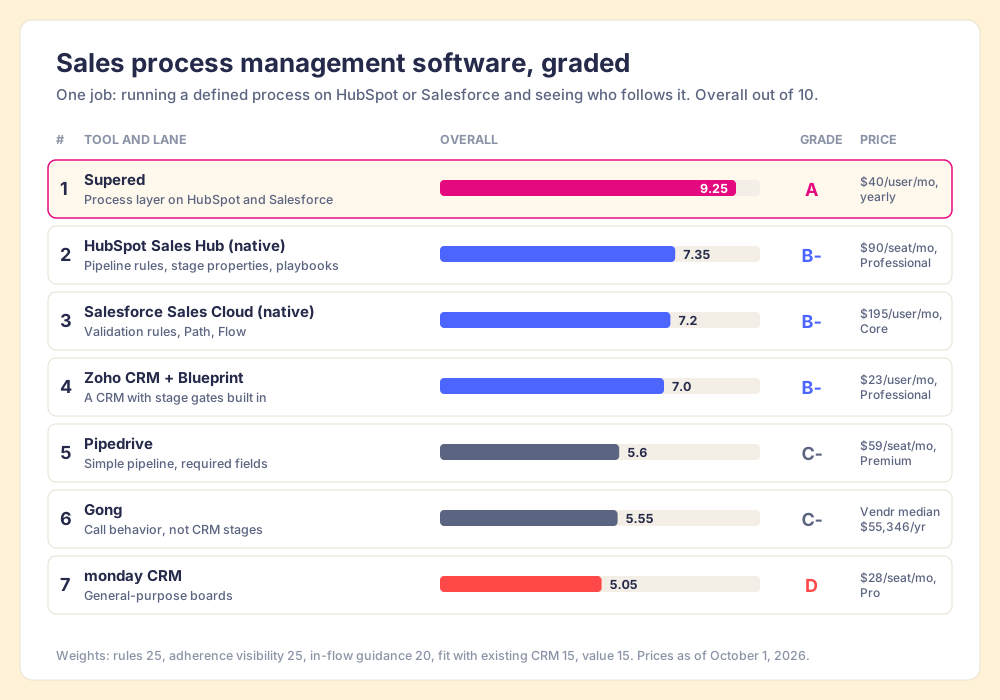
Sales process management software turns your sales process into checkable rules, puts the next step in front of reps while they work, and shows leaders which reps follow it; for a team already on HubSpot or Salesforce, that job belongs to a layer on the CRM rather than a new CRM.
Sales process management software is a strange search, because most of what ranks for it is a CRM describing itself. Zoho, Salesforce, monday and Pipedrive each make a reasonable case that their pipeline is your process. If you already run HubSpot or Salesforce, that case does not help you, since you already own a pipeline. What you lack is the part that writes the process down as rules, checks open deals against them, and shows you who follows them. For that buyer, three answers cover it:
- Supered, for teams on HubSpot or Salesforce. Your process becomes rules checked against every open deal each night, reps fix what fails inside the CRM or in Claude, and leaders see adherence by rep. Rated 4.9 on G2 across 81 reviews (October 1, 2026).
- Your CRM’s own gates, turned on first. HubSpot pipeline rules and conditional stage properties, or Salesforce Path with validation rules. Already paid for, and they stop the worst skips at the moment of a stage change.
- Zoho CRM with Blueprint, if you are choosing a CRM. The strongest built-in process engine at its price, from $23 per user per month.
Sales process management software turns your sales process into checkable rules, puts the next step in front of reps while they work, and shows leaders which reps follow it; for a team already on HubSpot or Salesforce, that job belongs to a layer on the CRM rather than a new CRM. Seven tools are graded below on that job, with the weights shown so you can flip them.
Which sales process management software should you pick? The decision table
Start here. Each row is one tool, the plan that includes the process feature, and the reason a team switches to it.
| Rank | Tool | Best fit | CRM integration | Setup effort | Pricing (plan with the feature) | Reason to switch | Grade |
|---|---|---|---|---|---|---|---|
| 1 | Supered | Teams on HubSpot or Salesforce who need reps to follow a defined process | Native app inside HubSpot and Salesforce | About 2 weeks to value | Process Compliance $40/user/mo paid yearly, $45 paid monthly, 5-user minimum | You wrote the process and cannot tell who runs it | A |
| 2 | HubSpot Sales Hub (native) | HubSpot teams blocking stage skips | Native | Hours | Professional $90/seat/mo billed annually + $1,500 onboarding | You have not turned on pipeline rules yet | B- |
| 3 | Salesforce Sales Cloud (native) | Salesforce teams with an admin | Native | Days to weeks of admin work | Core $195/user/mo (new editions, September 2026) | You need hard validation at save | B- |
| 4 | Zoho CRM + Blueprint | Teams choosing a CRM who want gates built in | Is the CRM (replaces HubSpot or Salesforce) | Weeks, it is a migration | Professional $23/user/mo billed annually | You are switching CRMs anyway | B- |
| 5 | Pipedrive | Small teams who want a simple visual pipeline | Is the CRM | Days | Premium $59/seat/mo billed annually | You want required fields per pipeline, cheaply | C- |
| 6 | Gong | Teams whose process gap lives inside calls | API integration with both CRMs | Weeks | Not published; Vendr median $55,346/yr | Calls are a black box | C- |
| 7 | monday CRM | Teams already on monday boards | Is the CRM | Days | Pro $28/seat/mo billed annually, 3-seat minimum | You run the company on monday | D |
Prices come from each vendor’s pricing page on October 1, 2026, except Gong, which does not publish a price list. The grades come from the scorecard further down, and every number behind them is on the page.
What is sales process management software, and why do CRMs claim the name?
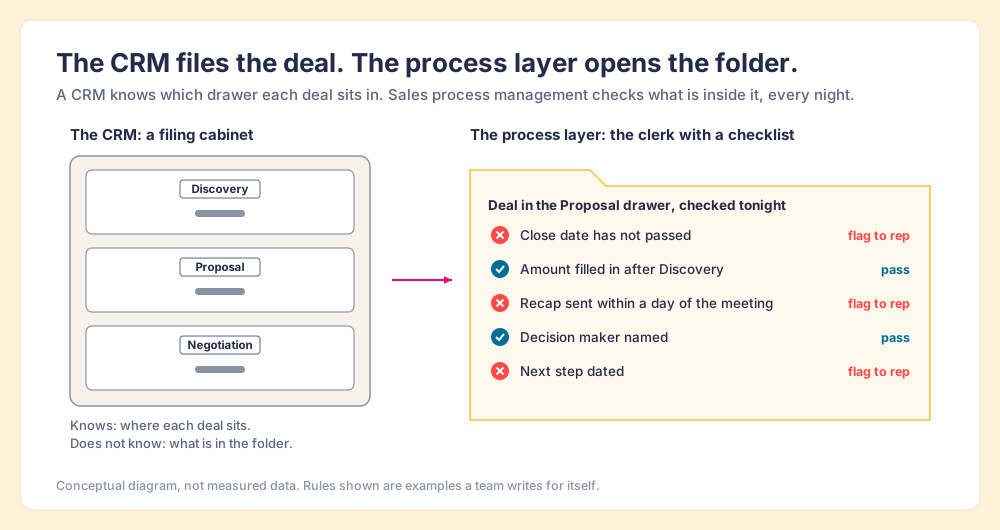
A CRM is a filing cabinet. It has drawers labeled Discovery, Proposal and Negotiation, and it will tell you, to the second, which drawer each folder sits in. That is useful. It is also all the cabinet knows. It cannot tell you whether the folder in the Proposal drawer holds a discovery call recap, a named decision maker, or a close date that has not already passed. The folder could be empty. The drawer label would read the same.
Zoho’s page, which ranks first for this term, defines sales management software as software that helps teams “track pipelines, manage leads, record activities” (Zoho). Each of those verbs describes the cabinet. Sales process management, as a buyer means it, is the clerk who opens each folder every night, checks it against a written list, and leaves a note on the ones that fail.
Sort the products that rank for this search by what they do, and three kinds of sales process software appear:
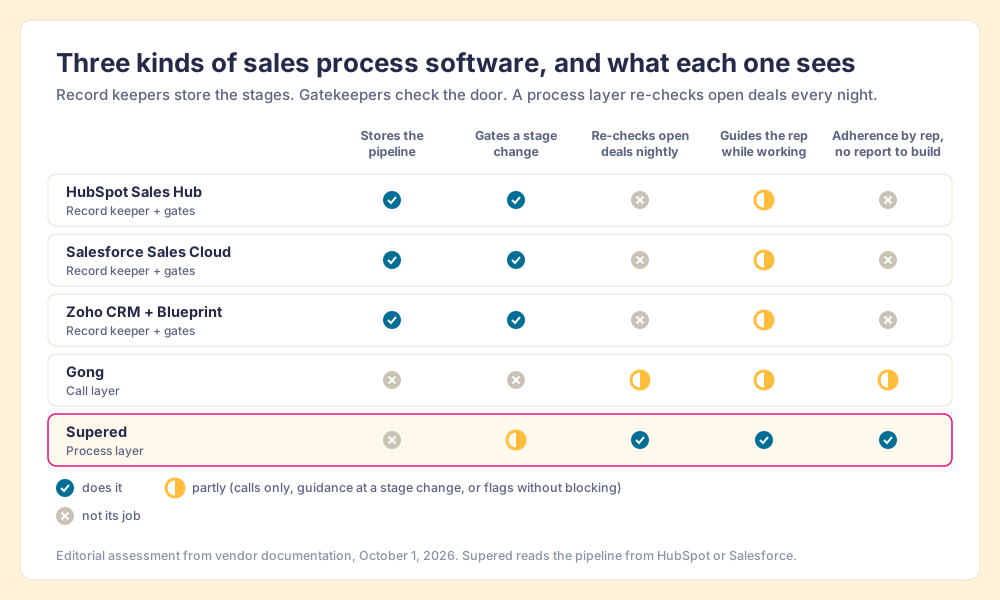
- Record keepers. CRMs with pipelines, stages and reports: HubSpot, Salesforce, Zoho, Pipedrive, monday CRM. They store the process as stage names and show you where deals sit.
- Gatekeepers. Features inside those CRMs that block a stage change until conditions are met: HubSpot pipeline rules and conditional stage properties, Salesforce validation rules, Zoho Blueprint. They check a deal at the door between stages.
- Process layers. Software that holds the process as rules, checks open deals against them on a schedule, puts the fix in front of the rep, and rolls adherence up by rep and stage. Supered is built for this. Gong does a version of it for what happens on calls.
A team on HubSpot or Salesforce already owns the first kind and most of the second. The search usually starts because the third is missing.
Why do teams on HubSpot or Salesforce go looking for more?
They go looking because the process is written, reps skip it, and the people who could check have run out of hours. In our survey of 198 sales leaders for The State of Sales Enablement 2026, 89 percent of teams had a defined sales process and 36 percent saw reps follow it as designed, a 53-point gap between the document and the deals.
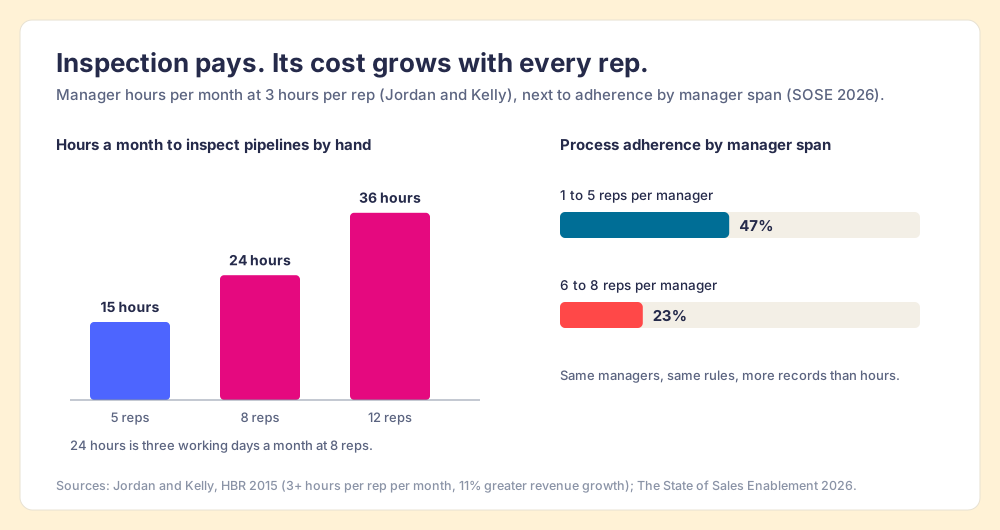
The usual fix is a manager reading records. That works, and it is expensive. Jason Jordan and Robert Kelly, surveying 62 B2B companies with Vantage Point Performance and the Sales Management Association, found that companies whose managers spent at least three hours per month managing each rep’s pipeline saw 11 percent greater revenue growth than those that spent less (Jordan and Kelly, HBR, January 2015). The same study found an 18 percent difference in revenue growth between companies with a formal sales process and those without one. Inspection pays. Do the arithmetic on it, though. Three hours a rep is 15 hours a month for a manager with five reps and 24 hours for a manager with eight.
Our survey shows where that arithmetic breaks. Process adherence was 47 percent on teams where a manager had one to five reps and 23 percent where a manager had six to eight. The top reason reps skip the process, at 29 percent, is that managers do not enforce it, and managers cite capacity more often than indifference.
The data does not help either. Validity surveyed 602 CRM users and administrators for its 2025 report, and 76 percent said less than half of their organization’s CRM data is accurate and complete (Validity via PR Newswire, July 2025). A dashboard built on that data reads the drawer labels and takes the folders on trust.
Reps are not the failure here. A rep with four deals open and a buyer waiting on a proposal will skip the field that nothing checks, and anyone in their seat would. The system decides what gets checked.
Why should you trust a vendor’s grades?
You should not, unless the vendor shows its work, and I am the vendor. Supered is my company. Before it, I founded RevPartners, a HubSpot partner that did only sales implementations, sold roughly twice as much Sales Hub as any other partner, and reached Elite tier in 13 months. Supered grew out of that work inside other companies’ HubSpot portals, which is where I learned how far a written process sits from the deals.
Supered is the number one sales enablement app on the HubSpot marketplace, with more than 6,000 installs, and it holds 4.9 out of 5 from 81 reviews on G2 (October 1, 2026). My stake in the outcome is also my qualification to grade it. Three rules keep this list usable: the weights are printed, every rating carries its source and date, and where another tool does a job better, the page names it.
How did we grade sales process management software?
Five criteria, weighted for one job: getting a team that already runs HubSpot or Salesforce to follow a defined sales process, and showing leaders who does.
- Rules definition, 25 percent. Can you write your process as checkable conditions, beyond stage names?
- Adherence visibility, 25 percent. Can a leader see, without building a report, which open deals break which rules, by rep?
- In-flow guidance, 20 percent. Does the rep see what to fix while working, in the CRM or wherever they work?
- Fit with the existing CRM, 15 percent. Does it work with HubSpot or Salesforce, or does it ask you to replace them?
- Value, 15 percent. What does the plan with the process feature cost a 10-rep team?
Each tool is scored 0 to 10 on each criterion, weighted into an overall out of 10. The overall sets the grade: 9.0 and up is an A, 8.5 an A-minus, 8.0 a B-plus, 7.5 a B, 7.0 a B-minus, 6.5 a C-plus, 6.0 a C, 5.5 a C-minus, below that a D. The scores are editorial judgment applied the same way to each tool, checked against public documentation, pricing pages, and G2.
The weighting tilts against standalone CRMs on purpose, through the fit criterion, because the reader of this page already owns one. Flip it if you are shopping for a CRM: drop fit and reweight the rest, and Zoho CRM with Blueprint climbs to a B-plus (8.0), the best built-in process engine on this list.
| # | Tool | Rules | Visibility | Guidance | Fit | Value | Overall | Grade |
|---|---|---|---|---|---|---|---|---|
| 1 | Supered | 9 | 10 | 9 | 10 | 8 | 9.25 | A |
| 2 | HubSpot Sales Hub (native) | 7 | 6 | 7 | 10 | 8 | 7.35 | B- |
| 3 | Salesforce Sales Cloud (native) | 9 | 6 | 6 | 10 | 5 | 7.2 | B- |
| 4 | Zoho CRM + Blueprint | 9 | 6 | 8 | 2 | 9 | 7.0 | B- |
| 5 | Pipedrive | 6 | 5 | 6 | 2 | 9 | 5.6 | C- |
| 6 | Gong | 4 | 7 | 5 | 8 | 4 | 5.55 | C- |
| 7 | monday CRM | 5 | 6 | 4 | 2 | 8 | 5.05 | D |
Read the columns as well as the overall. Salesforce scores a 9 on rules because a validation rule can encode almost anything an admin can write; it loses points on value at $195 a user. Gong scores a 7 on visibility and a 4 on rules because it sees calls and does not check CRM stage criteria. In its own lane, call behavior, Gong earns an A. In its lane, a CRM with gates built in, Zoho earns an A-minus.
Why is Supered first for teams already on HubSpot or Salesforce?
Supered does the clerk’s job for a HubSpot or Salesforce team. It holds your process as Process Rules grouped into a Process Ruleset: no close date in the past, an amount once a deal passes Discovery, a recap within a day of a meeting, a decision maker before Proposal. A Process Board checks each open deal against each rule and lists what is broken, rep by rep. The rep sees the violation inside HubSpot or Salesforce, fixes the field in place, and the violation clears on its own when the record no longer breaks the rule. Managers get a daily summary in Slack, and streaks count the days a rep has kept a board at zero.
I run 22 rules on my own deals. One night my board showed 11 violations: close dates in the past, no amount past Discovery, overdue tasks, a missing pre-call email, a missing recap, no decision maker. With Supered, HubSpot and Gmail connected to Claude, I asked it to fix the board and draft anything that needed an email. Claude read my rules from Supered, updated HubSpot from the context in my notes and calendar, and saved the recap and pre-call emails as Gmail drafts for me to send. By hand that takes me about 45 minutes. That night it took about 10. It is one person on one night, so read it as an example. The sales expectations page shows the full workflow.
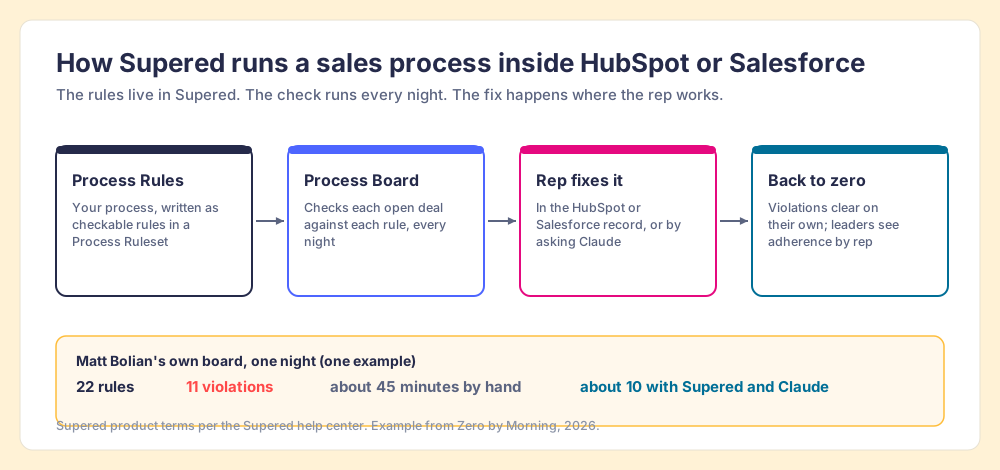
The same rules follow the rep wherever they work. In HubSpot and Salesforce they show up in the record. In Claude, or any LLM that connects over MCP, the model reads the rules before it touches a field, which matters because in our survey 46 percent of teams already use AI for CRM admin and cleanup. AI that cleans a CRM without your rules cleans it to its own idea of tidy. The CRM hygiene post walks through the six rules I start teams with.
- Pricing. Process Compliance is $40 per user per month paid yearly ($45 paid monthly) with a 5-user minimum, and includes Digital Adoption (cards, guides, the Chrome and Edge extension), which is $13.50 per user per month paid yearly on its own. Free trial, no card. See Supered pricing.
- Setup. Our pricing page puts typical time to value at about two weeks. The slow part, in our rollouts, is the team agreeing on which rules matter.
- The knock. Supered asks you to decide what your process is. A team that wants a prettier pipeline and nothing else is paying for a job it does not have.
Choose something else if:
- No HubSpot or Salesforce yet. Pick a CRM first. Zoho with Blueprint if you want gates built in, Pipedrive if you want simple.
- A process gap inside the calls. Gong scores what reps say on recorded calls, which Supered does not do.
- Fewer than 10 users, or a field team. Supered fits teams of 10 or more who work at a computer, and it has no mobile app.
Do the stage gates in HubSpot and Salesforce do the same job?
They do half of it, and you should turn that half on this week. A gate is a passport check at the border. It works well, once. It says nothing about what the traveler does for the next 40 days in the country.
HubSpot gives you two kinds of gate. You can require properties before a deal enters a stage, and pipeline rules on Sales Hub Professional or Enterprise can stop reps from skipping stages or moving deals backward (HubSpot Knowledge Base). Salesforce goes further through validation rules, which block a save until a condition is true, and Path, which shows key fields and guidance for each stage. Path itself does not enforce anything; Lucy Mazalon’s guide at Salesforce Ben recommends including required fields and fields used in validation rules in Path’s guidance so the two line up (Salesforce Ben).
Two limits follow from the design. First, a gate only fires when someone changes the stage, so a close date that slides into the past, a next step that goes stale, or a meeting that ends with no recap never trips it. Of the six violation types on my own board, four come from the calendar or a meeting ending, and none of them requires anyone to touch the stage field. Second, a gate that blocks the save teaches a rep to type “TBD” into the required field, and the gate counts that as a pass. The field is full and the folder is still empty.
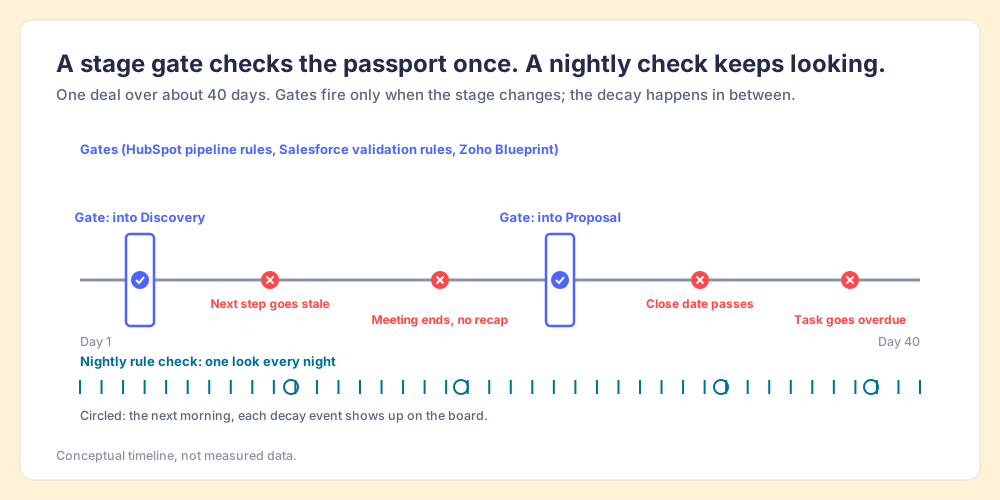
So turn the gates on, keep them few, and put the rest of your process somewhere that checks it every night.
Which other sales process management tools fit which teams?
Each option below with what it does best, who it fits, the tradeoff, and the price that includes the process feature.
HubSpot Sales Hub, native tools (B-)
The right first move for any HubSpot team, because you already pay for it. Professional adds pipeline rules, forecasting, up to 100 custom reports, and up to 5 playbooks, which put call guides and question lists inside the record (HubSpot pricing). It holds 4.4 out of 5 from 14,347 reviews on G2 (October 1, 2026), and reviewers there raise pricing that climbs with each tier.
- Best fit. HubSpot teams that have not configured pipeline rules or conditional stage properties yet.
- Tradeoff. Adherence lives in reports someone has to build and read, and nothing re-checks an open deal after it enters a stage.
- Price. Professional is $90 per seat per month billed annually ($100 monthly) plus a required $1,500 one-time onboarding fee. Starter is $7 billed annually and lacks pipeline rules and playbooks.
Salesforce Sales Cloud, native tools (B-)
The most powerful native toolkit on this list, if you have the admin to wield it. Validation rules, Flow automation and Path can encode nearly any stage criterion. Salesforce announced new Core, Advanced and Max editions on September 3, 2026, at $195, $395 and $550 per user per month, and said existing customers keep their legacy edition pricing (Salesforce Ben, September 2026). G2 now lists the product as Agentforce Sales, at 4.4 out of 5 from 27,564 reviews (G2, October 1, 2026), and reviewers name the learning curve as the main drawback.
- Best fit. Salesforce teams with an admin who can write and maintain validation rules.
- Tradeoff. Each rule is admin work, and hard blocks at save produce placeholder data.
- Price. Core at $195 per user per month for new buyers; Pro Suite at $100 for smaller teams.
Zoho CRM with Blueprint (B-, an A-minus in its own lane)
If you are picking a CRM and want the process built into it, start here. Blueprint maps each stage transition and requires the steps before a deal moves. A Zoho CRM reviewer on G2 described it this way: “A rep cannot move a deal from ‘Qualified’ to ‘Proposal’ until they have checked off specific requirements (like attaching a discovery document).” Zoho CRM holds 4.1 out of 5 from 2,951 G2 reviews (October 1, 2026).
- Best fit. Teams choosing or replacing a CRM who want gated stages at a low price.
- Tradeoff. It replaces HubSpot or Salesforce, and Blueprint is still a gate, so it checks at the transition and stops looking after.
- Price. Professional, the first edition with Blueprint, is $23 per user per month billed annually with 3 Blueprints per organization; Enterprise is $40 with 50 (Zoho edition comparison).
Pipedrive (C-)
A visual pipeline built for small sales teams. Premium adds required and pipeline-specific fields (Pipedrive pricing). Pipedrive has been majority-owned by Vista Equity Partners since 2020 (PR Newswire) and holds 4.3 out of 5 from 5,040 G2 reviews (October 1, 2026).
- Best fit. Small teams that want a pipeline people use, more than a process engine.
- Tradeoff. Another CRM to move to, with lighter process controls than Zoho or Salesforce.
- Price. Premium is $59 per seat per month billed annually.
Gong (C- here, an A in its own lane)
The best tool on this list for the part of the process that happens on calls. Gong, which calls itself a Revenue AI OS and bought RightBound in December 2025 for account and contact data (Gong), scores recorded conversations and shows which reps run discovery the way you want. It holds 4.7 out of 5 from 6,732 G2 reviews (October 1, 2026). Our Gong alternatives post grades the cheaper recorders.
- Best fit. Teams whose process gap lives inside the conversation.
- Tradeoff. It does not check CRM stage criteria between calls, and it costs far more than the rest of this list.
- Price. Not published. Vendr puts the median Gong contract at $55,346 a year across 1,144 purchases (Vendr).
monday CRM (D)
Flexible boards and automations for companies that already run their work on monday.com. It holds 4.5 out of 5 from 1,759 G2 reviews (October 1, 2026), the highest rating among the CRMs on this page.
- Best fit. Teams already living in monday boards who want sales in the same place.
- Tradeoff. You build the process yourself from general-purpose columns, and it replaces your CRM.
- Price. Pro is $28 per seat per month billed annually, with a 3-seat minimum (monday CRM pricing).
How do you choose a sales process management system for your team?
Answer two questions in order. Do you already run HubSpot or Salesforce? And where does your process break: in the record, or in the conversation?
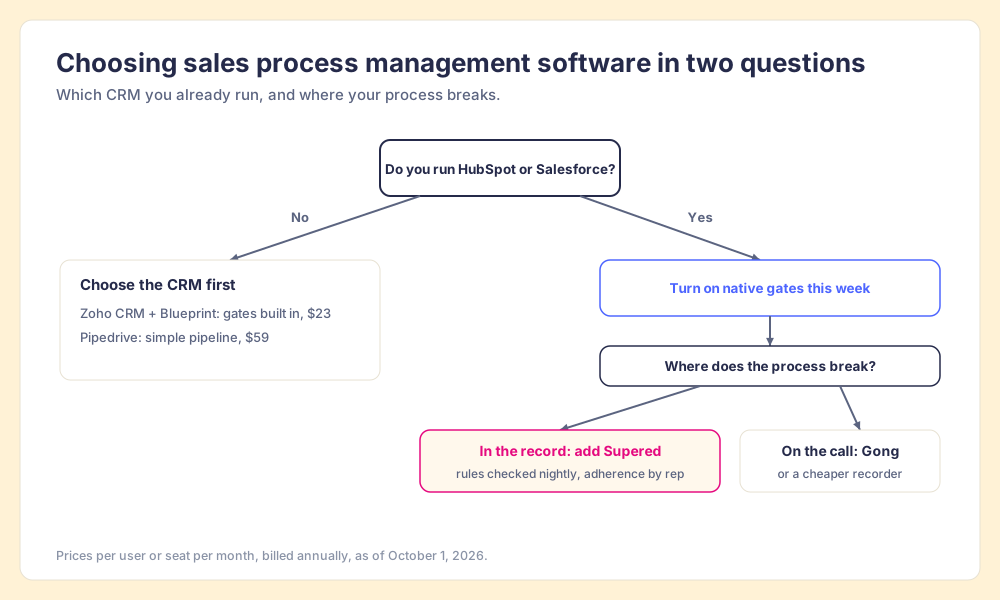
- No CRM yet. Choose the CRM first. Zoho CRM with Blueprint for gates at $23, Pipedrive for simplicity at $59.
- HubSpot or Salesforce, process breaks in the record. Turn on the native gates this week, then add a process layer that checks open deals every night and shows adherence by rep.
- HubSpot or Salesforce, process breaks on the call. Gong, or one of the cheaper recorders, for the conversation.
- Both. A call recorder for the conversation and a process layer for the record. They watch different behavior and rarely overlap.
What we recommend
If you run HubSpot or Salesforce, do not buy a new CRM to get a process. Turn on the gates you already own, keep them to the handful of stage changes that matter, and then answer the question the gates cannot: of the deals open right now, which ones break your process, and whose are they? That answer is the distance between the 89 percent of teams with a written process and the 36 percent who see it followed, and the manager-hours math says more managers will not close it.
We built Supered for that answer, so read the recommendation with that in mind and check it against the scorecard. Start small. Pick six rules your team skips most, put them on a board, and watch how many violations the first night turns up. If the number surprises you, the sales process adoption page shows how teams take it to zero, and the sales process adoption post explains why the gap opens in the first place. When the process is running, sales process optimization is where you tune it.
Frequently asked questions
What is sales process management software?+
What is the best sales process management software for HubSpot or Salesforce?+
Is a CRM the same as a sales process management system?+
How much does sales process management software cost?+
Can HubSpot enforce a sales process on its own?+
When is Gong the right sales process software instead?+
Your process, running itself.