Lead Scoring Software, Graded: Buy the Score Your Data Can Feed
Lead scoring software lists compare features and skip two things: how many conversions the AI needs before it learns your buyers, and whether reps work the leads it ranks. Six tools for HubSpot, Salesforce and Pipedrive teams, graded.
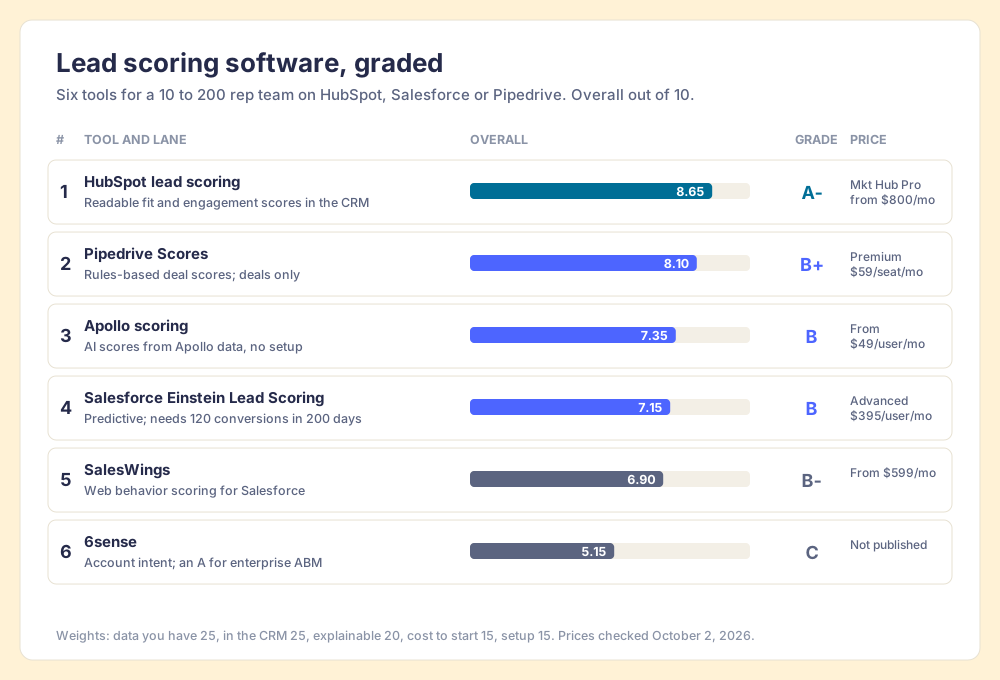
Lead scoring software ranks leads by how likely they are to buy, using fit rules (who the lead is), engagement rules (what the lead has done) or a predictive model trained on your past conversions, so reps know whom to call first.
A town that installs its first rain gauge in March cannot forecast April from it. Until the gauge has seen enough weather, the evening news reads the town a forecast built for the whole region, and the broadcast never says which one you got.
Lead scoring software ranks leads by how likely they are to buy, using fit rules (who the lead is), engagement rules (what the lead has done) or a predictive model trained on your past conversions, so reps know whom to call first. For a sales team on a mainstream CRM, the short list is:
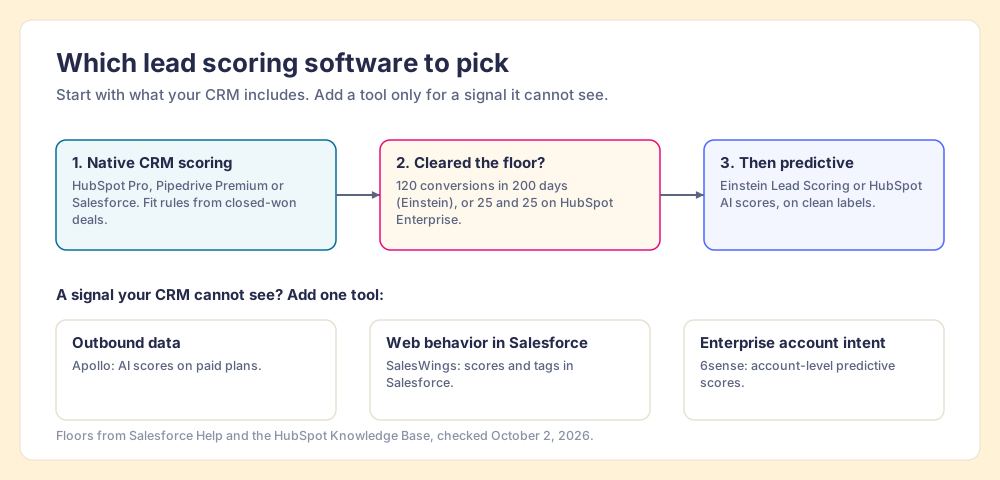
- HubSpot’s built-in scoring, for HubSpot teams. Fit, engagement and combined scores you can read line by line, on Marketing Hub or Sales Hub Professional.
- Pipedrive Scores, for Pipedrive teams. Rules-based deal scores on Premium at $59 per seat per month billed annually.
- Salesforce Einstein Lead Scoring, for Salesforce teams with volume. A predictive model, once you have at least 1,000 leads created in the last 200 days and 120 converted.
That last condition is missing from the two most-read roundups, Gumloop’s (March 2026) and ZoomInfo’s (June 2026), which compare features and never print a data minimum. Below Salesforce’s floor, Einstein “uses a global model,” which “uses anonymous data from many Salesforce customers” (Salesforce Help, checked October 2, 2026). The regional forecast, read to your town. So the grades below weigh the data each tool needs, and the closing sections cover what decides whether any score earns its price: whether reps work the leads it ranks.
Why trust this list of lead scoring tools?
We do not sell lead scoring software, so no tool on this list is ours, and none paid to be here. I built RevPartners, a HubSpot partner that ran RevOps for its clients, reached HubSpot’s Elite tier in 13 months and sold roughly twice as much Sales Hub as any other partner. Supered, the company we built next, sits in HubSpot, Salesforce and Pipedrive and holds 4.9 out of 5 from 81 G2 reviews and 5.0 from 122 HubSpot Marketplace reviews (checked October 1, 2026). Supered appears once below, in the section about what happens after the score, because that is the job it does.
Two tools on the most-read lists have changed hands. Gumloop’s March 2026 roundup still reviews MadKudu as a standalone product (Gumloop, March 17, 2026), but HG Insights announced its acquisition of MadKudu on August 11, 2025 (HG Insights via Yahoo Finance), and on October 2, 2026, madkudu.com redirected to hginsights.com. Breadcrumbs’ pricing page now redirects to a MadKudu demo page. We left both off the grades until the new owner publishes what the product is and costs.
How did we grade the lead scoring software?
The lens is a sales team of 10 to 200 reps on HubSpot, Salesforce or Pipedrive. Five weighted criteria:
- Works on the data you have (25). A rules engine works on day one. A predictive model needs a history of conversions, and a tool that needs more history than you own scores low here.
- Shows in the CRM reps use (25). A score that lives in another tab gets checked by marketing and ignored by sales.
- Explainable (20). A rep who can see why a lead scored 80 trusts it, and an admin who can see why can fix it.
- Cost to start (15). List price for the plan that includes the scoring feature.
- Setup effort (15). Hours for native rules, weeks for an intent platform.
Grades: A- from 8.5, B+ from 8.0, B from 7.0, B- from 6.5, C from 5.0. If your team has an enterprise budget and a data team, flip the weights toward signal depth and 6sense moves up the list. The lens is stated so you can flip it.
| Rank | Tool | Best fit | CRM integration | Setup effort | Pricing (plan with scoring, checked 2026-10-02) | Reason to pick it | Grade |
|---|---|---|---|---|---|---|---|
| 1 | HubSpot lead scoring | HubSpot teams | Native | Hours to days | Marketing Hub Pro from $800/mo (3 seats) + $3,000 onboarding; Sales Hub Pro $90/seat/mo + $1,500 onboarding | Readable fit and engagement scores, with decay | A- |
| 2 | Pipedrive Scores | Pipedrive teams | Native | Hours | Premium $59/seat/mo billed annually | Cheapest native scoring; deals only | B+ |
| 3 | Apollo scoring | Outbound teams buying Apollo data | Score built in Apollo | Hours | Paid plans from $49/user/mo billed annually | AI scores with no setup | B |
| 4 | Salesforce Einstein Lead Scoring | Salesforce teams with 120+ conversions in 200 days | Native | Days | Included in Advanced $395/user/mo and Max $550; add-on to Core $195 | Predictive model with the factors shown | B |
| 5 | SalesWings | Salesforce teams scoring web behavior | Salesforce app | Days to weeks | From $599/mo | Behavior tracking feeding Salesforce | B- |
| 6 | 6sense | Enterprise account-based teams | API integration | Weeks | Not published | Account intent data; an A in that lane | C |
How much data does predictive lead scoring software need?
Back to the rain gauge. A forecast is a model of the past, run forward. A model needs enough past to learn from, and the past it needs is counted in outcomes: rainy days for the weather, converted leads for you.
The vendors print their floors, if you know where to look:
- Salesforce Einstein Lead Scoring. At least 1,000 leads created in the last 200 days and at least 120 converted to an account and contact. Below that, the global model (Salesforce Help).
- HubSpot AI contact scores. Marketing Hub Enterprise only, and “a minimum sample size of 50 contacts, containing 25 converted and 25 non-converted, is required” (HubSpot Knowledge Base, updated September 2, 2026).
Why do floors like these exist? Statistics answered it in 1996. Peter Peduzzi and four colleagues at Yale and the VA ran a simulation on logistic regression, the workhorse behind many scoring models, and varied the number of outcome events per predictor variable. At 10 or more events per variable, “no major problems occurred.” Below 10, the coefficients “were biased in both positive and negative directions,” and “paradoxical associations (significance in the wrong direction) were increased” (Peduzzi et al., Journal of Clinical Epidemiology, 1996). Vendors do not publish what their models are made of, so treat the rule as a yardstick. By that yardstick, 120 conversions supports about 12 inputs, and 25 supports about two.
Now run your own numbers. Suppose your team converts 10 leads a month. Over 200 days, about six and a half months, that is roughly 66 conversions: a little over half of Salesforce’s 120. Your Einstein score would come from the global model, trained on other companies’ buyers. (The arithmetic is ours, applied to Salesforce’s published floor; Salesforce says nothing about your org.)
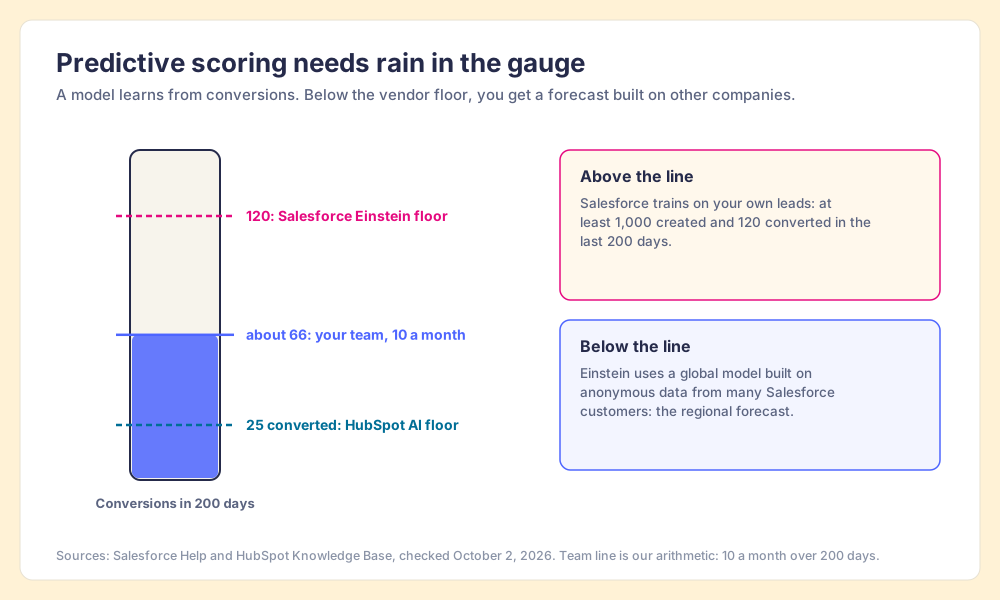
A global model is not useless, though: it knows that a VP who books a demo is a better bet than a student who downloads an ebook, and that is better than no score. It cannot know that your best customers are hospital department managers, because the global model never met your customers.
So for a team under the floor, the right lead scoring software is a rules engine you can read, built from the fit of the deals you closed last year. HubSpot coach Casey Hawkins now builds scores fit first for a related reason: buyers research in AI tools before they reach your site, so there is less engagement data to score (our HubSpot lead scoring post covers her setup).
Why does a lead scoring model learn from leads no rep called?
A model counts a lead as “converted” or “not converted.” It has no column for “never called.”
In a 2017 KDD paper, Himabindu Lakkaraju, Jon Kleinberg, Jure Leskovec, Jens Ludwig and Sendhil Mullainathan showed that when “the observed outcomes are themselves a consequence of the existing choices of the human decision-makers,” a model’s training data is shaped by those choices, and they named it the selective labels problem (KDD 2017). Their example comes from courts: you learn whether a defendant would have returned for trial only if the judge released them.
Leads work the same way. You learn whether a lead would have bought only if someone worked it. And plenty go unworked. Harvard Business Review’s audit of 2,241 companies found 23% never responded to an online lead at all (Oldroyd, McElheran and Elkington, HBR, 2011). Every one of those leads enters your history as “not converted.”
Follow that forward. Suppose reps skip leads from one segment, say smaller hospitals, because a manager once called them a waste of time. Those leads never convert, because no one calls. The model learns that smaller hospitals do not buy, scores them lower, and reps skip them with even more confidence. The score agrees with the habit and calls the agreement a prediction.
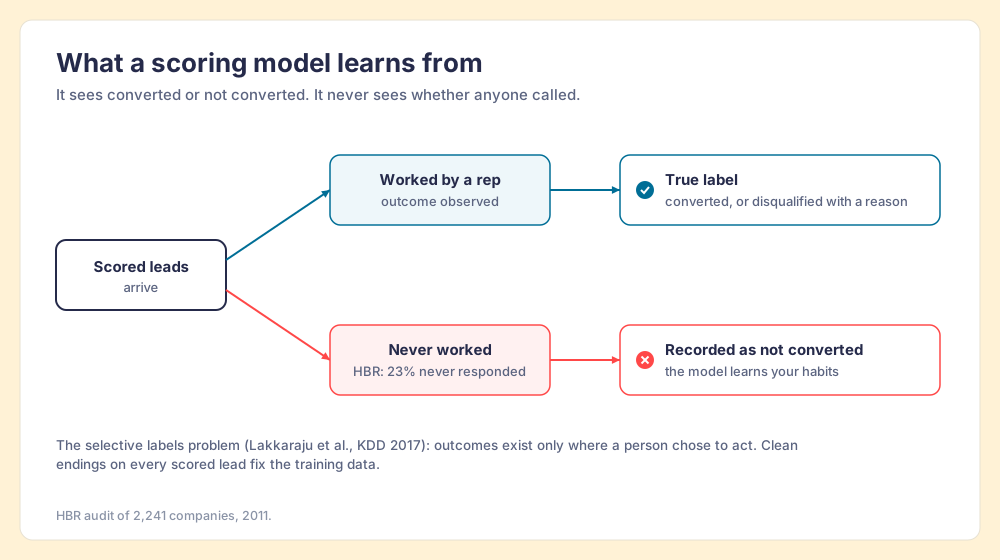
The fix is the same one that makes a score useful in the first place. Get every scored lead worked, and give every lead that does not convert a reason: recycled to marketing, or disqualified because of budget, fit or timing. Those reasons turn “not converted” into a label a model, or an admin rewriting rules, can trust.
The lead scoring software, tool by tool
G2 ratings were checked October 2, 2026, unless noted. None of these vendors announced a merger as of that date, apart from the MadKudu deal above.
1. HubSpot lead scoring (A-, 8.65)
HubSpot’s scoring tool builds fit, engagement and combined scores. Contacts need Marketing Hub Professional or Enterprise; companies are scored on Marketing Hub or Sales Hub Professional or Enterprise, and deals on Sales Hub Professional or Enterprise. Engagement points can decay every 1, 3, 6 or 12 months, so a webinar from last year stops counting (HubSpot Knowledge Base). AI contact scores are Enterprise only, with the 25-and-25 floor above.
- Strength. Each rule is visible, and the score lands on the record where reps work. Marketing Hub holds 4.4 out of 5 from 15,949 G2 reviews.
- Tradeoff. Contact scoring sits behind Marketing Hub Professional, which starts at $800 a month with three core seats plus a $3,000 onboarding fee. Sales Hub Professional, at $90 per seat per month billed annually plus $1,500 onboarding, scores companies and deals only (HubSpot pricing).
- Fit. HubSpot teams of any size. Start with fit rules and a low engagement bar.
2. Pipedrive Scores (B+, 8.10)
Pipedrive’s Scores feature is rules-based and plain about it. You pick criteria and give each one an impact: “Highly positive, adding 25 points,” “Slightly positive, adding 10 points,” or “Negative, subtracting 10 points.” The score recalculates when the record changes (Pipedrive Support, updated September 3, 2026).
- Strength. Cheapest native scoring on the list: Premium is $59 per seat per month billed annually (Pipedrive pricing). Pipedrive holds 4.3 out of 5 from 5,048 G2 reviews.
- Tradeoff. It scores deals only (“currently, you can only choose deals”), uses deal and activity fields, and allows one active score per pipeline. Gumloop’s roundup lists Pipedrive scoring at $79, which is Ultimate’s price today.
- Fit. Pipedrive teams that convert leads to deals early.
3. Apollo scoring (B, 7.35)
Apollo offers AI scores “generated by Apollo AI” with no setup, and custom scores built from filters and signals. AI scoring is on every paid plan; Basic allows 2 custom scores and Professional and Organization allow unlimited. Apollo scores people and companies separately and groups results as excellent, good, fair or not a fit (Apollo Knowledge Base, updated September 1, 2026).
- Strength. A score on day one, from Apollo’s own data. Paid plans start at $49 per user per month billed annually, and Apollo’s pricing page showed 4.7 from 9,690 G2 reviews (September 25, 2026).
- Tradeoff. The score is built inside Apollo, on Apollo’s view of the buyer, so your CRM history does not shape it.
- Fit. Outbound teams that already buy Apollo for data.
4. Salesforce Einstein Lead Scoring (B, 7.15)
Einstein Lead Scoring is the strongest predictive option here for a team that clears its floor. Salesforce describes it as analyzing your data to “predict which leads are most likely to convert” and showing “intuitive factors behind your predictions.” On the current price list, Lead Scoring is included in Advanced ($395 per user per month) and Max ($550), available for purchase on Core ($195), and absent from Starter Suite and Pro Suite (Salesforce pricing, checked October 2, 2026). Agentforce Sales, the former Sales Cloud, holds 4.4 out of 5 from 27,564 G2 reviews.
- Strength. A trained model inside the CRM, with the factors behind each score.
- Tradeoff. The data floor, and the price of the edition that includes it.
- Fit. Salesforce teams converting well over 120 leads every 200 days, with clean dispositions on the rest.
5. SalesWings (B-, 6.90)
SalesWings tracks web behavior and builds scores and tags that show up in Salesforce. Pricing starts at $599 a month, customized by use case, with a free pilot (SalesWings pricing). Its pricing page lists Salesforce, Braze, Segment and Zapier integrations; it does not mention HubSpot or Pipedrive.
- Strength. Reviewers praise the support and setup: 4.8 out of 5 from 34 G2 reviews. One wrote that “once you implement 20+ tags or scores, it starts to feel a bit cluttered” (G2).
- Tradeoff. A second system to own, and a monthly platform fee before the first lead is scored.
- Fit. Salesforce teams with heavy inbound web traffic.
6. 6sense (C, 5.15)
6sense scores companies from intent data: which companies are researching your category. Its Sales Intelligence pricing page lists “Predictive AI Model, Scores, & Dashboards” in two of its three bundles and publishes no prices (6sense pricing). 6sense Revenue Marketing holds 4.2 out of 5 from 1,561 G2 reviews, and reviewers say the “algorithms feel like a ‘black box’” (G2).
- Strength. Signal no CRM can see: research happening before anyone fills in a form. For an enterprise account-based team, this is an A.
- Tradeoff. Unpublished pricing, weeks of setup, and scores a rep cannot read.
- Fit. Enterprise teams selling to a named account list. Our B2B intent data guide covers the category.
How do you set up lead scoring rules in HubSpot?
A starting rule set for a B2B team, as an example to adapt. Build it from your own closed-won deals.
| Score | Rule | Points | Why |
|---|---|---|---|
| Fit | Industry matches your top three closed-won industries | +20 | Who bought before |
| Fit | Employee count inside your ICP band | +15 | Company size predicts deal size |
| Fit | Job title or seniority matches the buyers on closed-won deals | +15 | The person matters too |
| Fit | Free email domain or competitor domain | -25 | Removes noise |
| Engagement | Pricing or demo page viewed | +10 | Late-stage research |
| Engagement | Replied to a sales email | +15 | A conversation started |
| Engagement | Decay | Every 3 months | Old activity stops counting |
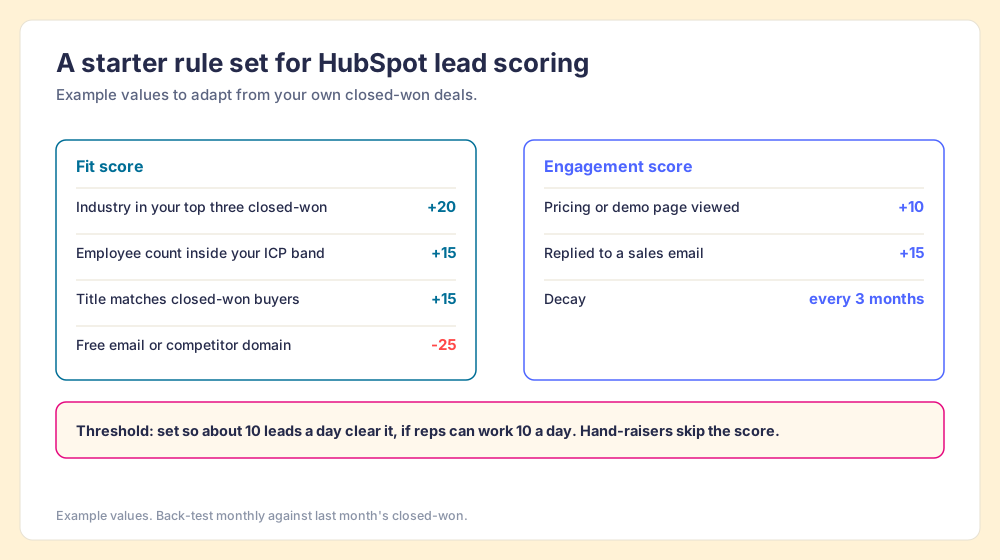
Three settings matter more than the points:
- A threshold sized to capacity. If reps can work 10 new leads a day, set the threshold so about 10 clear it. Casey Hawkins sizes HubSpot scores this way.
- A separate lane for hand-raisers. A demo request skips the score and goes to a rep. Our lead routing post covers the assignment rules.
- A monthly back-test. Pull last month’s closed-won and check how many scored above the threshold when they arrived. If fewer than half did, the rules are wrong; rewrite them. Our ICP guide helps with the fit side.
What should happen after the lead score?
An emergency room tags patients at the door: red, yellow, green. The tag is a fine piece of work. It treats no one. A hospital judges triage by what happens to the red tags next, and a triage nurse who tagged perfectly while the red patients waited in the hall would not keep the job.
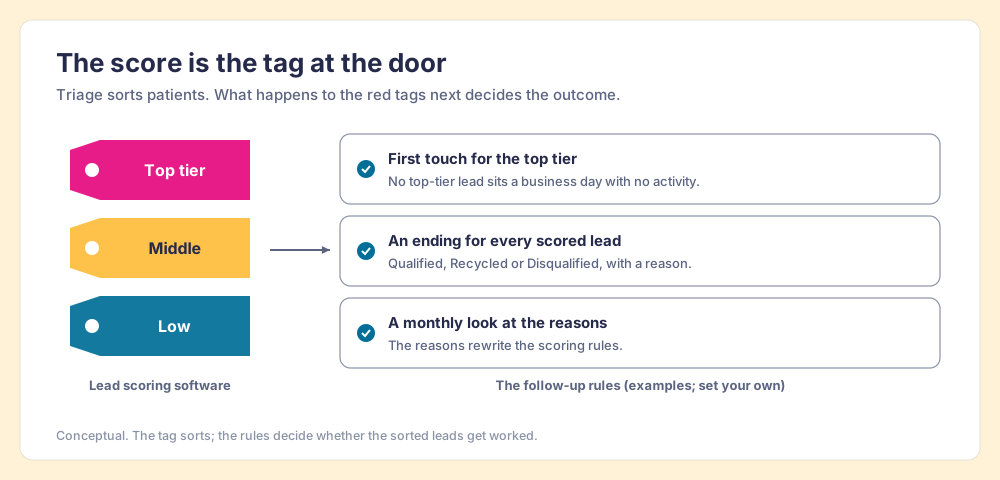
Lead scoring software stops at the tag. Three rules cover the rest:
- A first touch for the top tier. No lead above the threshold sits a full business day with no logged activity.
- An ending for every scored lead. Each one closes as Qualified, Recycled or Disqualified, with a reason. These are your clean labels.
- A monthly look at the reasons. If “wrong company size” leads the disqualification reasons, the fit rule for company size is wrong. The reasons rewrite the score.
These rules fail when they depend on a manager remembering to check. A rep with forty open leads is making sensible choices about the next hour, and a lead with no deadline loses. The fix is a check that runs on its own and shows the rep the broken rule where they work. In The State of Sales Enablement 2026, reps given guidance inside their workflow reached quota at 49%, against 15% for reps pointed at documents.
Supered does that checking, and it does not score leads. A Process Rule can read a score property like any other field, so “lead score is greater than 70 and last activity date is unknown and create date is more than 1 day ago” becomes a rule. Process Rules count in days, so this is a one-day rule; it cannot fire a five-minute alert (Supered Help Center). A Process Board checks open leads against your rules every night, and reps see the broken rule on the record in HubSpot, Salesforce or Pipedrive, or fix a stack of them in Claude with one prompt. Process Compliance is $40 per user per month paid yearly ($45 monthly), five-user minimum, on the pricing page. The sales expectations use case shows the board.
Outbound lists have the same problem, with less data. A lead a rep sources has no engagement history, so its score is fit alone, and on teams that run Clay the fit logic usually lives in a Clay table. Supered Prospector lets reps run that table from a LinkedIn profile, a company website or a CRM record, with the team’s waterfalls, tiers and tags intact, and never open Clay. Leaders see each list found, worked and closed, and each lead ends as Qualified, Recycled or Disqualified, which is the clean label a future model needs. It is $45 per user per month billed annually, from one user, on your own Clay account. The sourcing use case, our Clay Chrome extension guide and the page for sales leaders show how it works.
Choose something else when the score itself is the gap: if no one at your company can say which leads matter, fix the scoring rules first with the tools above. Supered helps after that.
What we recommend
The best lead scoring software is the one your data can feed. Buy that, then spend the effort on what follows the score.
- Native rules first. HubSpot, Pipedrive and Salesforce all score inside the CRM, and a rule you can read is worth more than a model trained on a regional average.
- Predictive after the floor. Move to Einstein or HubSpot’s AI score once you clear 120 conversions in 200 days, or 25 and 25 on Enterprise, and Peduzzi’s 10-events-per-variable yardstick says the model has enough to learn from.
- Clean labels before any model. With 23% of companies never answering a lead in HBR’s audit, a history full of unworked leads teaches a model your habits.
- A separate tool for a separate signal. Apollo for outbound data, SalesWings for web behavior in Salesforce, 6sense for enterprise account intent.
If you want the reasoning behind the fit side, MQL vs SQL and our lead qualification guide are the next two reads, and speed to lead covers the clock that starts the moment a lead clears the threshold.
Frequently asked questions
What is lead scoring software?+
What is the best lead scoring software for a small or mid-market sales team?+
How much data does predictive lead scoring need?+
Is rules-based or predictive lead scoring better?+
How much does lead scoring software cost?+
Does Supered score leads?+
Your Clay waterfall, where reps already work.