What Is an ICP? A Template You Can Type Into a Search Box
An ideal customer profile is only useful if it can build a list.
The definition, a usable ICP template, ICP vs buyer persona, how to build one from closed-won data, and how each line becomes a Sales Navigator or Clay filter.
An ICP, or ideal customer profile, is a description of the companies most likely to buy from you, stay, and grow, written in attributes a rep can search for: industry, size, region, tech stack, a recent trigger, and the roles that buy.
How to build an ICP from closed-won data
3 hr- 1
Pull two years of closed deals, won and lost
Export closed-won and closed-lost deals with the company, amount, sales cycle length, and, for the won deals, whether the customer renewed, expanded, shrank, or left.
- 2
Sort the won deals by what happened after the signature
Split the customers into won and grew, won and stayed, and won and left. Rank by gross margin or profit where finance can give it, and by renewal where it cannot, before you look at contract size.
- 3
Fill the same columns for every company
Add industry, headcount band, revenue band, headquarters region, CRM and key tools, the trigger that preceded the deal, and the titles on the buying side. Enrichment fills the firmographic and tech columns; the CRM and call notes fill the trigger and the roles.
- 4
Find the attributes that separate the groups
Look for the attributes that show up far more often among customers who grew than among lost deals and customers who left. Those become the ICP lines; the patterns among customers who left become the disqualifiers.
- 5
Write the template and test each line against a search box
Write the ICP in the template below. For each line, find the Sales Navigator filter, the Clay input, or the Prospector buying-committee parameter that expresses it. Lines with no filter move to the discovery questions your reps ask on the first call.
- 6
Rerun it twice a year
Repeat the exercise with the newest closed deals and compare. Lines that still separate winners stay; lines that stopped separating come out.
An ICP, or ideal customer profile, is a description of the companies most likely to buy from you, stay, and grow, written in attributes a rep can search for. If you typed “what is an ICP” into Google, you also learned that the acronym means intracranial pressure to a neurologist and a blockchain to a crypto investor. In sales it means something more practical, and the practical test is this: can a rep type each line of it into a search box?
An ICP written for a slide fails it. “Growth-minded mid-market companies that value innovation” sounds like a strategy, and no search tool on earth has a field for “values innovation.” The fix takes three moves:
- A profile built from the customers who grew. Closed-won deals that renewed and expanded, compared against the deals you lost, ranked by what each customer was worth after the signature.
- A template written in fields. Firmographics, tech stack, trigger, buying committee, disqualifiers, each line in a form Sales Navigator or Clay accepts.
- A split between search and discovery. Lines a filter can hold build the list. Lines no filter can hold become the questions your reps ask on the first call.
What is an ICP, in sales, marketing, and business?
An ICP is a description of a company, never of a person. Apollo’s definition is a good one: an ICP “defines the specific type of company most likely to buy your product, stay as a customer, and expand over time” (Apollo, March 5, 2026). The three verbs in that sentence (buy, stay, expand) matter more than the word “ideal,” and we will come back to them, because the usual way of writing an ICP honors only the first.
People who search “what is ICP in business” and “what is ICP in marketing” get the same object with a different job. Marketing uses the ICP to decide where to spend: which accounts see the ads, which conference gets the booth. Sales uses it to decide whom to call and in what order. The ICP meaning sales teams depend on is the narrowest of the three, because a rep has to turn it into a list of named accounts by this afternoon. An ICP in sales that cannot produce a list is a description of a market, and a market is too big to call.
What is the difference between an ICP and a buyer persona?
An ICP describes the house. A buyer persona describes who answers the door.
The house has an address, a size, a neighborhood, and a recent event (a renovation, a new owner) that you can see from the street. You can drive down a road and pick out the houses that match. The person who answers the door has a job title, worries, and a reason to talk to you or to close the door, and you learn most of that by knocking. Jonathan Costet at Gong puts it in one line: “ICPs are about companies, and personas are about people” (Gong, last modified March 4, 2026).
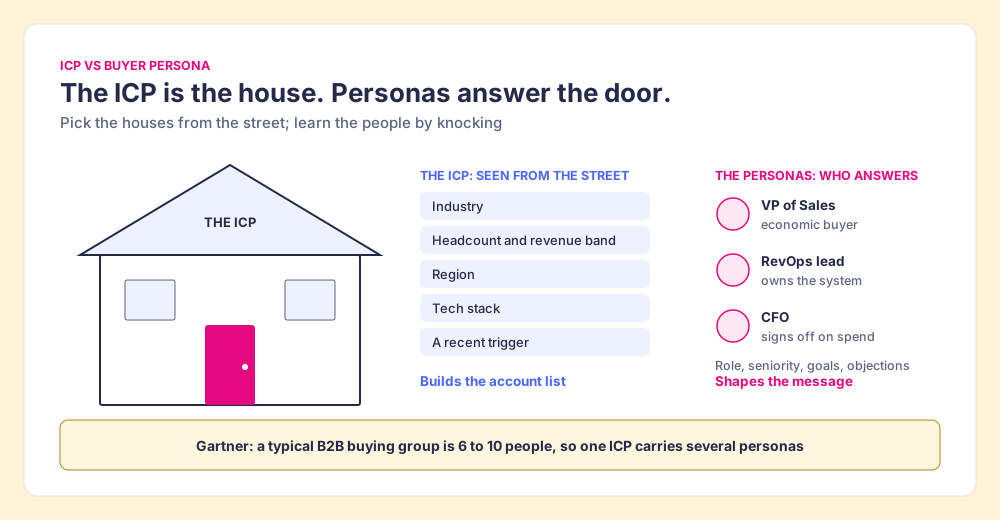
The distinction has a practical edge, because a single house holds a crowd. Gartner puts the typical B2B buying group at 6 to 10 people (Gartner). So one ICP carries several personas, and a list built from an ICP is a list of accounts first and people second.
LinkedIn built Sales Navigator around the same split, whether or not it says so. Its account filters (annual revenue, company headcount, headcount growth, headquarters location, industry) describe houses. Its Personas feature describes people: up to five saved personas, “by default, two,” each defined by function, seniority, job title, and geography (LinkedIn Help, checked October 2, 2026). A team that has written both halves can set them up in Navigator in an afternoon.
| ICP | Buyer persona | |
|---|---|---|
| Describes | A company | A person in that company |
| Built from | Closed-won and closed-lost deals, retention, profit | Interviews, call recordings, win/loss notes |
| Typical fields | Industry, headcount, revenue, region, tech stack, trigger, disqualifiers | Role, seniority, goals, objections, what they read |
| Used for | Choosing accounts and building the list | Choosing the person and writing the message |
| Sales Navigator home | Account filters, account lists | Personas, lead filters (function, seniority, title) |
How do you build an ICP from closed-won data?
Start with a finding from accounting. In 2001, Robert Kaplan and V.G. Narayanan of Harvard Business School described what happens when you rank customers by profit and add them up. The curve climbs past 100% of total profit, then bends back down. Their finding: the most profitable 20% of customers “generate between 150 percent and 300 percent of total profits,” the middle 60% to 70% roughly break even, and the least profitable 10% to 20% lose 50% to 200% of total profits (Kaplan and Narayanan, Journal of Cost Management, 2001, via Wikipedia). Accountants call the shape a whale curve, because that is what it looks like: a hump that rises above the waterline and dives back below it.
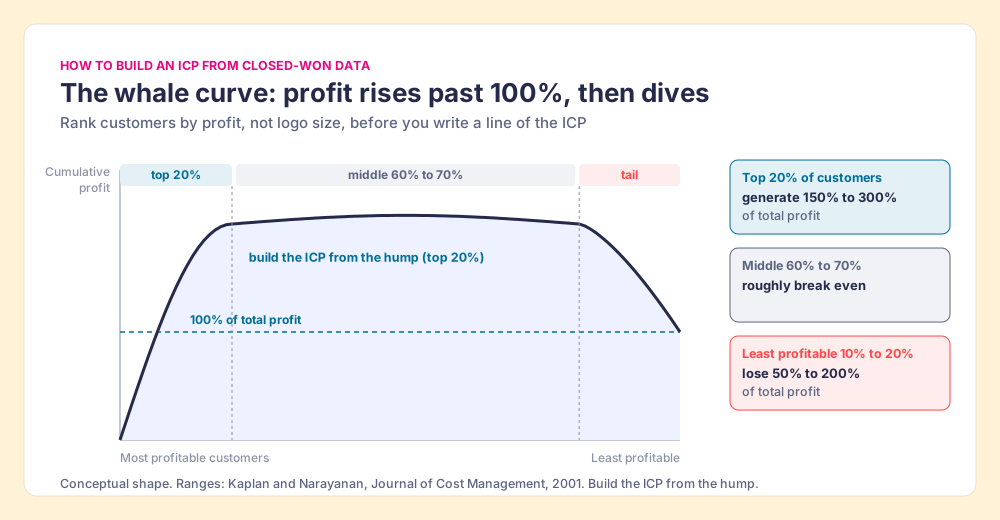
The whale changes how you read your own closed-won report. A list of your biggest logos mixes the hump with the tail, because a large customer can be the one that takes the most custom work, the most support hours, and the deepest discount. Daniel Maruny made the same point on LinkedIn: most early-stage companies “defined it by looking at their biggest customers. That is how you end up with a segment that pays well BUT costs more than it pays” (Daniel Maruny, LinkedIn). The whale curve is the accounting behind his warning.
So the closed-won analysis sorts by what happened after the signature, then compares against the deals you lost. The method we use has five parts, and the steps are ours, not a standard:
- Two years of closed deals. Won and lost, with company, amount, cycle length, and for the won deals, renewal and expansion status. Two years usually yields enough rows to compare; a young company with fewer than about 20 wins should treat the result as a hypothesis.
- Four groups. Won and grew, won and stayed, won and left, and lost. Rank the won groups by margin or profit where finance can give it, by renewal where it cannot.
- The same columns for every company. Industry, headcount band, revenue band, region, CRM and key tools, the trigger before the deal, and the titles on the buying side. Enrichment fills the company columns; the CRM and call notes fill the trigger and the roles.
- The attributes that separate. A line belongs in the ICP when it shows up far more often among the customers who grew than among the lost deals and the customers who left. An attribute common to all four groups describes your market and tells you nothing about who to call first.
- Disqualifiers from the leavers. The pattern in “won and left” is the most valuable output of the whole exercise. It becomes the list of accounts a rep should skip even when they look like a fit from the street.
At RevPartners, the HubSpot partner I started before Supered, we did only sales implementations and never sold marketing services. That “no” did as much work in our ICP as any “yes,” and it is why I weight the disqualifier line as heavily as the firmographics. A profile defines the guests you invite and, with equal force, the ones you do not.
The ICP template, line by line
The template we recommend has eight lines, shown with an example filled in for a hypothetical B2B software company selling to sales teams. The example values are illustrative, not data. The right-hand column is the test: where does this line go when a rep sits down to build a list?
| Line | What to write | Example (illustrative) | Where it goes |
|---|---|---|---|
| Segment | One sentence a rep can repeat | Mid-market B2B software companies scaling an outbound team | The list’s name |
| Firmographics | Industry, headcount band, revenue band, HQ region | Software; 50 to 500 employees; North America | Sales Navigator account filters; Clay Find Companies |
| Tech stack | Tools that make you easier to adopt or harder to displace | Runs HubSpot or Salesforce as the CRM | Clay technographics (Navigator has no tech-stack filter) |
| Trigger | The event in the last 90 days that makes now the time | New VP of Sales; SDR job posts; sales headcount growth | Navigator: Changed jobs, Job opportunities, Department headcount growth |
| Buying committee | The roles that buy, with function and seniority | VP Sales (economic buyer), RevOps lead (owner), Sales manager (user) | Navigator Personas and lead filters; Clay Find People; Prospector buying-committee parameters |
| Disqualifiers | What rules an account out even when it fits | Field sales teams; agencies; already a customer | Exclude filters; the CRM check before outreach |
| Discovery fit | What you can only learn by talking | Process maturity, budget timing, the pain in their words | First-call questions, never a filter |
| Evidence | The deals the profile rests on | Count of won-and-grew customers that match | The review, twice a year |
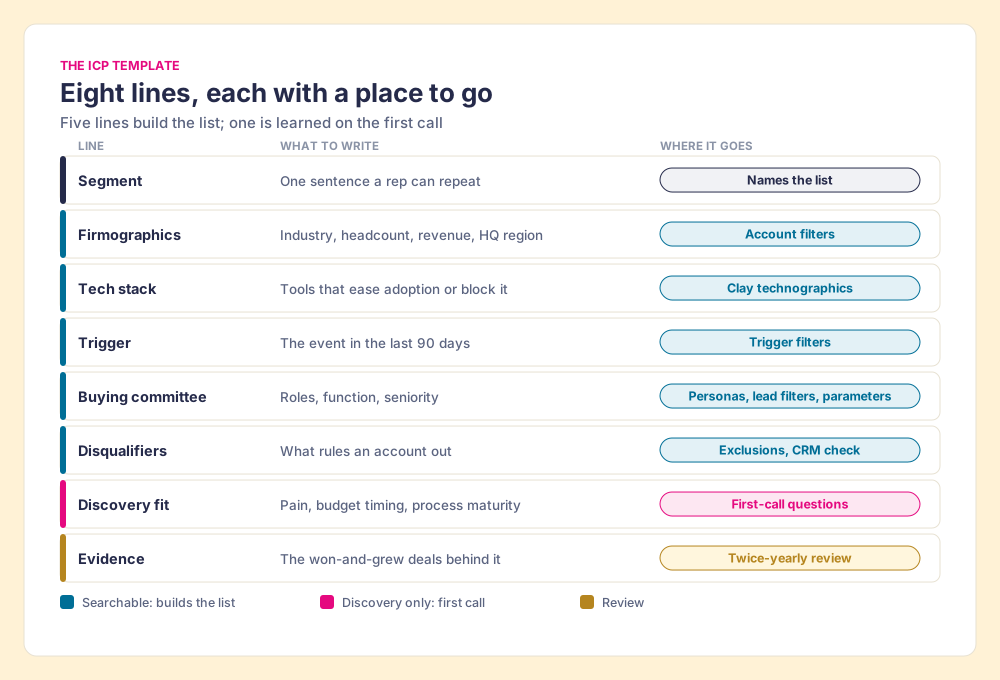
Two lines in that template do most of the work, and they are the two a slide version drops first. The trigger turns a static profile into a reason to call this month; without it, a long list of matching companies has no order. The disqualifiers turn a profile into a decision; without them, the list grows to include the tail of the whale.
How does an ICP become list-building filters?
A search filter is a sieve. Pour a market through it and the mesh holds what matches: the right industry, the right size, the new VP of Sales. Some qualities slip through any mesh, though, because they are qualities you can only learn by tasting: whether the team feels the pain, whether the budget opens this year, whether the VP believes a process can be written down. No filter holds those, and pretending one does is how teams end up with “values innovation” on a slide.
Dennis Teichmann pushed the other way on LinkedIn: “Your ICP definition is probably useless. It’s probably more or less a filter. A filter tells you who could buy. And that’s not a customer profile” (Dennis Teichmann, LinkedIn). He is right that a filter alone is too thin. Where we part ways is on the remedy. The profile needs both halves, and the useful act is sorting each line into the half it belongs to: the sieve for what a filter can hold, the tasting for the rest. Sorted that way, the sieve builds the list and the tasting becomes your lead qualification questions, and neither pretends to be the other.
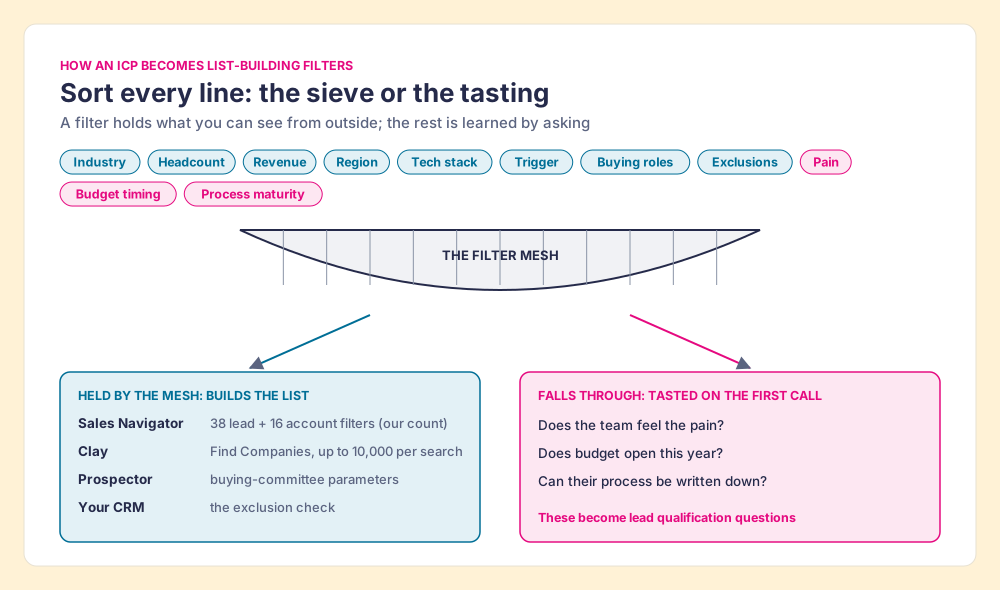
The searchable half then maps to three tools, each with a different strength.
Sales Navigator. LinkedIn’s help center lists 38 lead filters and 16 account filters, our count from its definitions page (LinkedIn Help, checked October 2, 2026). The firmographic lines go to account filters (industry, company headcount, annual revenue, headquarters location). The trigger line has more coverage than a slide-written ICP ever asks for: “Changed jobs” catches people in a new role “in the last 90 days,” and account filters for job opportunities, headcount growth, and department headcount growth catch a team that is hiring. The buying committee goes to Personas and to the lead filters for function, seniority level, and current job title. On Advanced and Advanced Plus you can upload a CSV of up to 1,000 accounts as an account list (LinkedIn Help), which is how a closed-won lookalike list gets into Navigator. The filter-by-filter detail is in the Sales Navigator search filters guide, and the setup order is in how to use LinkedIn Sales Navigator.
Clay. Clay’s Find Companies source takes industries (include or exclude), company size, annual revenue, funding amount, company type, keywords, location, and technographics by vendor and product, and returns up to 10,000 companies per search (Clay University, checked October 2, 2026). That last input fills the gap in Navigator: the tech-stack line of the template has a home here. Find People adds job title with match modes (“is similar to,” “contains,” “is exactly”), function, organizational level, and a limit of up to 100 people per company (Clay University, checked October 2, 2026). The worked examples are in Clay prospecting.
The CRM. The disqualifier line ends in your own CRM: existing customers, open deals, an owner on the team, a contact who opted out last year. A list is ready only after it has been checked against the CRM, which is step 5 of how to build a lead list.
The searchable lines produce accounts and people. They do not produce emails or phone numbers. Sales Navigator sells neither on any plan, and LinkedIn’s User Agreement bars tools that “scrape or copy” its pages, so the contact data comes from a separate step, such as a waterfall that asks provider after provider until one returns a verified email or phone. The mechanics are in waterfall enrichment.
Where does Supered Prospector fit?
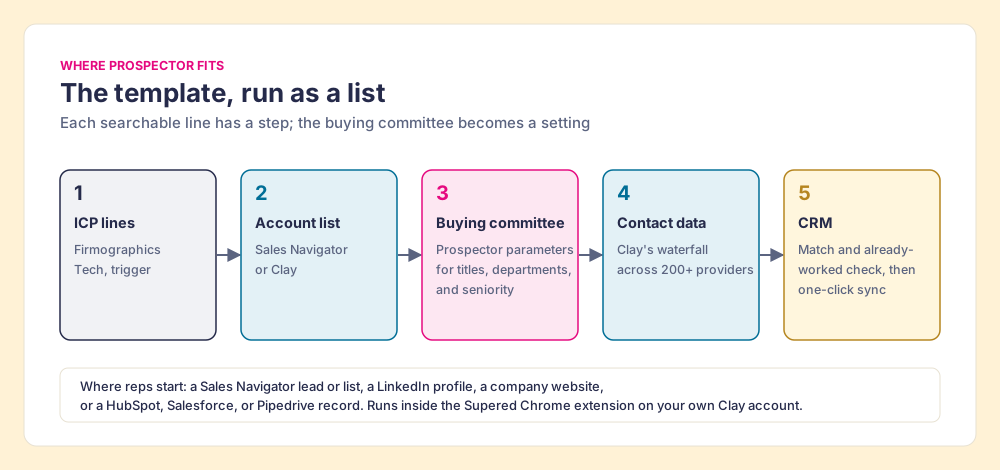
The template’s buying-committee line is where a written ICP usually stalls. A RevOps lead can write “VP Sales, RevOps lead, sales manager” in a doc; a rep on a company’s website still has to find those three people at that company, one search at a time. Supered Prospector turns that line into a setting. It runs inside the Supered Chrome extension, on your team’s own Clay account, and reps never need a Clay login.
- The buying committee as parameters. The team sets the titles, departments, and seniority that make up its buying committee once, and the lookup returns those people for whichever account the rep is on.
- The rep’s own starting point. A Sales Navigator lead or list, a LinkedIn profile, a company’s website (with company research on the site), or a HubSpot, Salesforce, or Pipedrive record.
- The disqualifier check. On a profile, the rep sees the matching CRM record and whether the person was already worked in the past.
- Clay’s waterfall in one click. The rep runs the team’s Clay table, a custom Clay workflow, or pushes a whole list into a Clay workflow; Clay’s waterfall across 200+ providers returns the verified email and phone.
- One click to the CRM. Ops sets the field mapping once; each person syncs to HubSpot, Salesforce, or Pipedrive in one click, and the team’s process applies to worked prospects, so a leader sees which ICP-built lists got worked and which closed.
Supered does not bring its own database. It brings Clay’s waterfall, which is every database, routed, and that is why we chose Clay as our only data provider. Clay governs the data. Supered governs the motion. Prospector is $45 per rep per month, billed annually, from one rep, on top of your Clay plan. The full rep loop is on the sourcing use case, and the product is on the Prospector page. Supered is rated 4.9 out of 5 from 81 reviews on G2 and 5.0 from 122 on the HubSpot marketplace (checked October 1, 2026).
Choose something else if:
- No Clay account. Prospector needs one. A single-database tool with its own search filters is the simpler start.
- An ICP still on a slide. Write the template first. Prospector can only look up the buying committee you define.
- AI-written outreach. Prospector does not draft or send emails; it hands the person to your CRM and sequencer.
What we recommend
An ICP is worth the meeting it took to write when a rep can build a list from it this afternoon. Three choices get you there, and the evidence above favors one of each:
- Source of the profile. Use the customers who grew, compared against the deals you lost and the customers who left, ranked by profit or renewal. The whale curve says the biggest logos are a mix of the hump and the tail, and the tail costs you more than it pays.
- Shape of the profile. Write it in the template’s eight lines, with a trigger and disqualifiers. A profile without a trigger has no order; one without disqualifiers has no edge.
- Use of the profile. Sort every line into the sieve or the tasting. The searchable lines become Sales Navigator and Clay filters and the buying-committee parameters; the rest become first-call questions. Rerun the analysis twice a year.
If your team has Clay, Prospector turns the buying-committee line from a sentence in a doc into a lookup reps run on the page they are already on. The next step after the profile is the list itself: how to build a lead list reps work picks up where this page stops, and the sales prospecting guide covers the whole motion after that.
Frequently asked questions
What does ICP stand for in sales?+
What is ICP in marketing?+
What is the difference between an ICP and a buyer persona?+
How many ICPs should a company have?+
How often should you update an ICP?+
Can I build an ICP without closed-won data?+
Your Clay waterfall, where reps already work.