FullEnrich Chrome Extension in 2026: The Drive-Through Window Closed
The FullEnrich Chrome extension left the Chrome Web Store on June 25, 2025.
What happened, what FullEnrich recommends instead, the four routes from a LinkedIn profile to its waterfall today, and how FullEnrich's waterfall differs from Clay's on your own account.
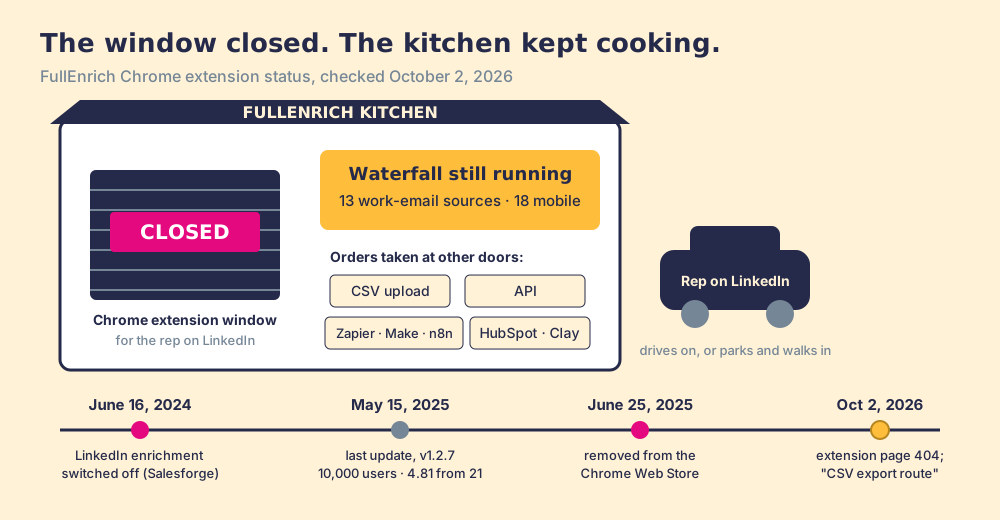
The FullEnrich Chrome extension was FullEnrich's LinkedIn add-on for verified emails and mobiles; it lost LinkedIn enrichment in June 2024, left the Chrome Web Store on June 25, 2025, and FullEnrich now takes lookups by CSV, API, integrations and Clay.
The FullEnrich Chrome extension is gone, and the data behind it is not. Anyone who searched for it in 2026 met a 404, an old listing marked discontinued, and a company that still sells the same waterfall through a CSV upload, an API, and a list of integrations. The short version of what to do instead:
- FullEnrich’s web app and API. The right route for list work: a file or a batch of LinkedIn URLs in, verified emails and mobiles back, from $29 a month with unlimited users.
- Supered Prospector on your Clay account. The right route for a sales team that already pays for Clay: Clay’s waterfall, FullEnrich as one step if you want it, run from the LinkedIn profile, at $45 per rep per month billed annually.
- Findymail or Prospeo. The non-Clay route for a rep who wants a button on the profile today; both still ship Chrome extensions.
The FullEnrich Chrome extension was FullEnrich’s LinkedIn add-on for verified emails and mobiles; it lost LinkedIn enrichment in June 2024, left the Chrome Web Store on June 25, 2025, and FullEnrich now takes lookups by CSV, API, integrations and Clay. Below: the timeline, the four routes that replaced the FullEnrich extension, and the one question a Clay team should settle before buying a second waterfall.
What happened to the FullEnrich Chrome extension?
A restaurant can close its drive-through window and keep cooking. The kitchen is the same, the menu is the same, the fries are as good as they were. What changes is who gets fed: the person willing to park and walk in gets dinner, and the person who only stops when the window is open drives on.
FullEnrich closed its window in two steps. On June 16, 2024, according to Salesforge, which sells a competing product and says so on the page, “FullEnrich discontinued the LinkedIn functionality of their Chrome extension” (Salesforge, March 1, 2026). FullEnrich’s own account, in a LinkedIn enrichment guide written by CEO Benjamin Douablin, is that its Sales Navigator integration “previously included a Chrome extension that ran this workflow without a CSV export step,” and that “LinkedIn discontinued access to third-party Chrome extensions for Sales Navigator in June 2024” (FullEnrich, LinkedIn enrichment guide, read October 2, 2026). The guide names the replacement plainly: “The current recommended workflow is the CSV export route.”
The listing lingered for another year. Chrome-Stats still keeps it, titled as discontinued and no longer supported, with 10,000 users, a 4.81 rating from 21 ratings, version 1.2.7, last updated May 15, 2025, and “removed from Chrome Web Store on 2025-06-25” (Chrome-Stats, checked October 2, 2026). Today fullenrich.com/chrome-extension returns a 404, and the integrations page lists an MCP server, Claude, OpenAI, Manus, OpenClaw, Zapier, Make, n8n, Clay, and HubSpot, with no extension anywhere (fullenrich.com/integrations).
Reviewers noticed. On G2, where FullEnrich held 4.8 out of 5 from 239 reviews on October 2, 2026, an account executive wrote in November 2025 that “FullEnrich lacks a native LinkedIn extension, which was removed” (G2, FullEnrich reviews). Searches for FullEnrich LinkedIn enrichment still land on that gap.
Why did FullEnrich drop LinkedIn enrichment?
An extension on LinkedIn does two jobs that are easy to blur. One job is reading the page: knowing whose profile is open, or collecting the names on a search result. The other is the lookup: taking a name and a company and asking providers for an email and a phone. The second job is a plain API call and lives happily anywhere. The first job is the one LinkedIn writes rules about.
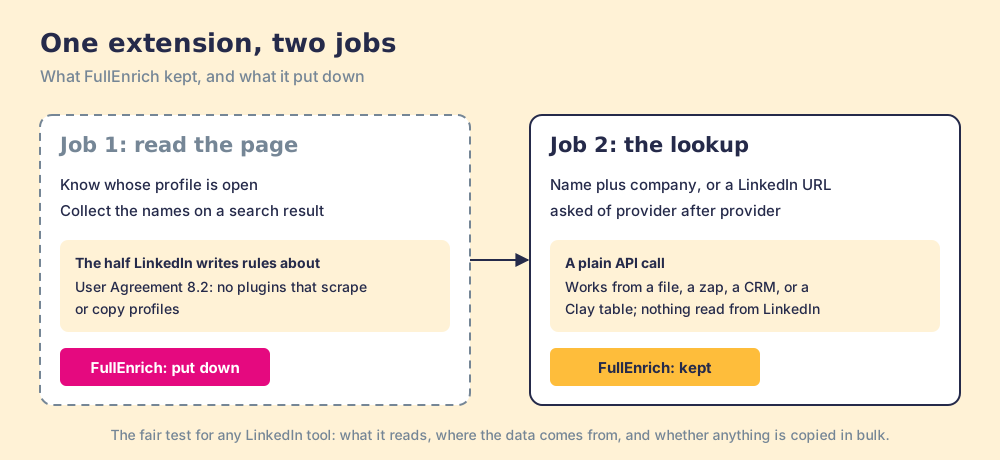
LinkedIn’s User Agreement, effective November 3, 2025, has members agree not to use “crawlers, browser plugins and add-ons or any other technology” to “scrape or copy the Services, including profiles and other data from the Services” (LinkedIn User Agreement, section 8.2). Its help page on prohibited software adds that members who use such tools “risk having their accounts restricted or shut down,” and that the tools themselves “may become non-operational without notice” (LinkedIn Help).
So FullEnrich kept the lookup and put down the page-reading half, a coherent choice for a company whose business is the waterfall. It moves one cost onto the rep. Sales Navigator has no export of its own: LinkedIn’s help center says it “currently doesn’t offer the option to export account and lead information from Sales Navigator into a CSV or XLS file.” A “CSV export route” that starts in Sales Navigator therefore starts with a list built somewhere else, by hand or by a third tool, before FullEnrich sees a single row. The Sales Navigator export page lays out what each of those tools does to the page.
This page does not rule on any vendor’s compliance, ours included. The fair test for any tool that touches LinkedIn is three questions: what does it read from the page, where does the contact data come from, and is anything copied in bulk.
How do you get FullEnrich data from LinkedIn today?
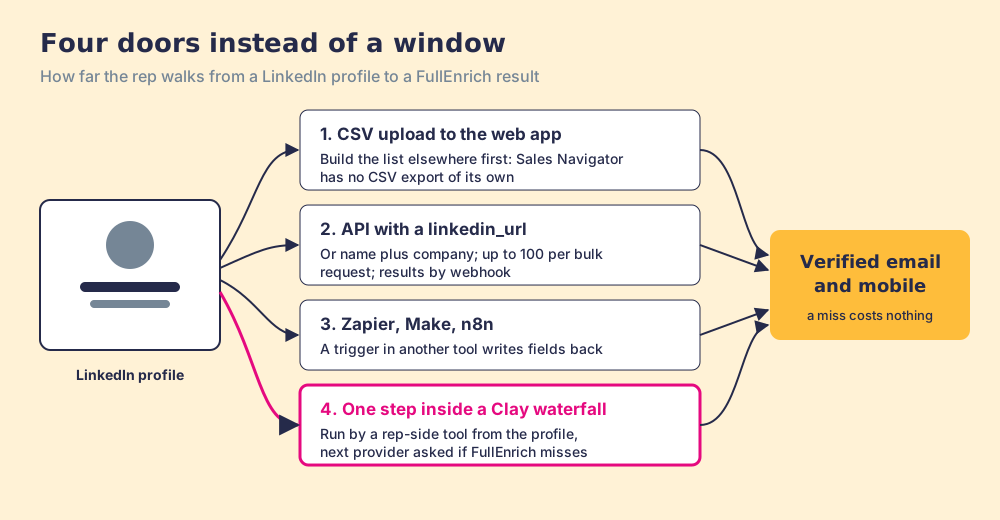
Four doors replaced the window. They differ in how far the rep walks.
| Route | What goes in | Who it suits | Walk for the rep |
|---|---|---|---|
| Web app, CSV upload | Names plus company, or LinkedIn URLs | Ops or a founder enriching a list | Build the list, upload, download |
| API | Up to 100 contacts per bulk request | Teams with an engineer | None, once built |
| Zapier, Make, n8n | A trigger in another tool | No-code teams, any CRM | None after setup |
| Inside Clay, one waterfall step | A row in the team’s Clay table | Teams with a GTM engineer | None, if a rep-side tool runs the table |
The API detail matters more than it looks. FullEnrich’s bulk endpoint accepts either “first_name + last_name & company (domain or company_name)” or a linkedin_url, enriches “up to 100 contacts in bulk,” and returns results by webhook (FullEnrich API docs). A LinkedIn URL is enough to start a lookup. The window closed; the kitchen still takes the order by name.
Two limits carry over to every route. HubSpot is FullEnrich’s only native CRM, so Salesforce and Pipedrive teams go through Zapier, Make, n8n, or the API. And the meter is the same whichever door you use: a work email costs 1 credit, a mobile 10, a lookup that finds nothing costs nothing, and Pro starts at $29 a month for 500 credits with unlimited users on every plan (fullenrich.com/pricing.md, checked October 2, 2026). The FullEnrich pricing page works that out tier by tier.
How is FullEnrich’s waterfall different from Clay’s?
FullEnrich is a waterfall, so “use Clay instead” is a lazy answer, and “FullEnrich is the same thing as Clay” is wrong. Both ask one provider after another until a verified answer comes back, and both refuse to charge for a miss. They differ on who holds the order slip.
At FullEnrich, FullEnrich holds it. Its pricing page counts 13 sources for work email and 18 for mobile, and its waterfall page says it routes each request “through 20+ data providers in an optimized sequence,” with “Regional specialists” prioritized by the contact’s location (fullenrich.com/waterfall-enrichment). FullEnrich signs the provider contracts, verifies the result, and bills its own credits. Its pricing file adds that “~30% of raw data is removed by verification before it ever reaches the user,” and that it runs “Real-time lookups, no stored contact database.” You get the dish. You do not see the recipe, and you cannot reorder the suppliers.
At Clay, on your own account, your GTM engineer holds the slip. Clay sells data from 200+ data and AI vendors under one contract (clay.com, checked October 2, 2026), and the engineer chooses which providers sit in the waterfall, in what order, and with what logic after the answer comes back: scoring, routing, CRM sync. Each provider runs on Clay credits or on the team’s own account with that provider. And FullEnrich is one of the suppliers on the list: Clay’s FullEnrich page shows it joined on November 30, 2024, with “Find mobile phone with FullEnrich” and “Find Work Email with FullEnrich,” each paid with “Clay Credits or Bring Your Own Account” (Clay, FullEnrich integration).
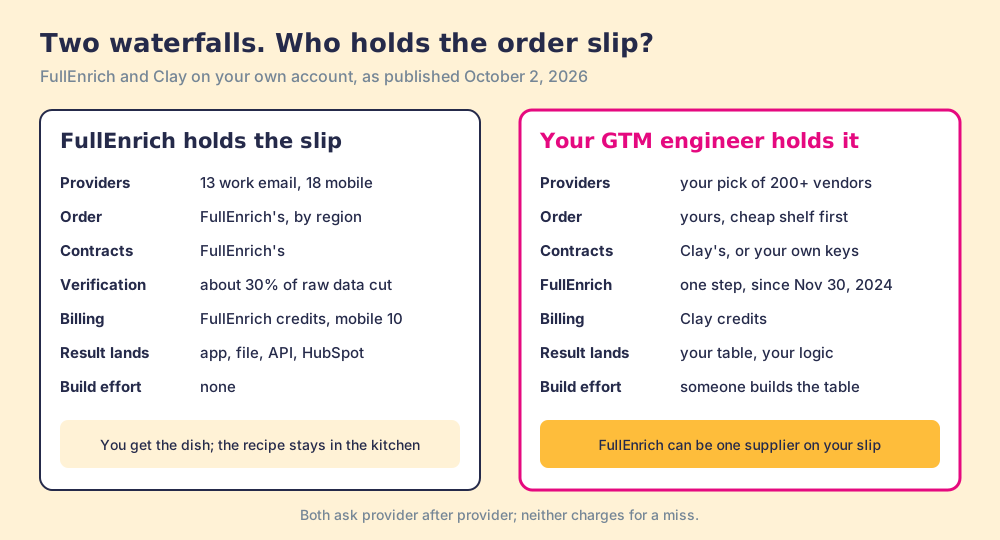
The drive-through comparison stops working at one point. A FullEnrich buyer gets a tuned order for no building effort, and FullEnrich’s integrations page is right that a homemade waterfall means “Multiple API documents,” “Different credit systems,” and “Setup in weeks.” A team with no one to hold the slip should let FullEnrich hold it. A team that already pays a GTM engineer to hold one has a different problem: it owns the better slip, and its reps still cannot reach the counter from the LinkedIn tab.
Why trust this page?
I started RevPartners, a HubSpot partner that did only sales implementations, sold roughly twice as much Sales Hub as any other partner, and reached Elite tier in 13 months. Supered came out of that work and is the #1 sales enablement app on the HubSpot marketplace, with 5.0 from 122 reviews there and 4.9 out of 5 from 81 reviews on G2 (checked October 1, 2026). That is also the disclosure: we make Supered Prospector, and it sits first below for teams that have Clay. The scores reuse the weights on the FullEnrich alternatives page, so you can flip them.
What should replace the FullEnrich Chrome extension?
The lens is a team of ten to fifty reps that wants verified emails and mobiles where reps work, and a leader who can see which lists turn into pipeline. Coverage is weighted x3, rep-side delivery x2, price structure x2, what the leader sees x2, bundled outreach x1, for 50 points.
| Rank | Option | Grade | Score | Best fit | CRM integration | Setup effort | Pricing | Reason to choose it |
|---|---|---|---|---|---|---|---|---|
| ref | FullEnrich web app and API | B | 27 | List work with no Clay and no GTM engineer | HubSpot native; others via Zapier, Make, API | Minutes | Pro from $29 a month, unlimited users | A tuned waterfall you do not have to build |
| 1 | Supered Prospector | A | 44 | Teams that already pay for Clay | Native (HubSpot, Salesforce, Pipedrive) | Under a week on an existing Clay account | $45 per rep per month billed annually, plus your Clay plan | Clay’s waterfall from the profile, FullEnrich as a step if you choose |
| 2 | Findymail | B+ | 29 | A finder with a Chrome extension and a bounce refund | Native (HubSpot, Salesforce, Pipedrive, Clay) | Minutes | Starter $99 a month for the team | Extension on the profile, mobiles at 10 credits |
| 3 | Prospeo | B+ | 29 | An email and mobile finder for outbound volume | HubSpot and Salesforce from Growth | Minutes | $37 a user a month billed yearly | Extension on the profile, cheaper credits |
FullEnrich’s 27 is coverage 4, rep-side 2, price 4, leader view 1, outreach 1; the rep-side 2 is the closed window. Prospector’s coverage score is Clay’s waterfall, credited to Clay, and its outreach score is the lowest possible, since it has no sequencer or dialer. Corporate status, checked October 2, 2026: FullEnrich is independent after a €1.9 million seed round in February 2025 (EU-Startups), and a news search found no later round or acquisition.
Where does Supered Prospector fit?
Prospector puts the window back, on the team’s own kitchen. It brings no database of its own; it brings Clay’s waterfall, which is every database, routed, and it runs inside the Supered Chrome extension on the team’s own Clay account. We chose Clay as our only data provider for that reason. Reps never open Clay.
- Lookups from the page the rep is on. A LinkedIn profile, a company website with company research alongside, or a HubSpot, Salesforce, or Pipedrive record. In Sales Navigator, reps add leads to a prospect list and push the list to a Clay table.
- The GTM engineer’s order, FullEnrich included if it earns a place. The table runs the waterfall your engineer built; a buying-committee lookup returns the titles, departments, and seniority the team chose.
- Context before the first touch. The rep sees the matching CRM record and whether the prospect was already worked in the past, before stepping on a teammate.
- One click to the CRM. Field mapping is set once; the contact lands in HubSpot, Salesforce, or Pipedrive.
- Found, worked, closed. The leader sees who is working their list, and every lead ends the way the process says: qualified, recycled, or disqualified.
On LinkedIn, our statement is plain: Prospector works within LinkedIn’s terms and does not copy search results in bulk; the contact data comes from Clay’s waterfall on the customer’s Clay account.
For ten reps, Clay Growth at $495 a month ($5,940 a year, 72,000 data credits) plus Prospector at $45 per rep per month billed annually comes to $11,340 a year (Prospector). FullEnrich’s own calculator puts ten people finding 20 mobiles and 100 work emails a week at $720 a month. The bills buy different things; compare them on your own volume.
Choose something else if you do not have Clay. Prospector runs on the customer’s Clay account and does nothing without one, and somebody has to build the table; Clay’s own copy says “GTM engineers build on Clay.” Choose something else, too, if your enrichment is a monthly list job run by one person, because FullEnrich’s web app does that well. The sourcing use case shows the setup when Clay is already in place.
Which should you choose?
Two questions decide it: do you pay for Clay, and does the rep need the number on the profile or in a list.
- FullEnrich’s web app. The pick for list work with no Clay and no builder. Buy on annual billing if the volume is steady, and size by mobiles, which cost ten times an email.
- FullEnrich’s API or a Zapier flow. The pick when a system, not a rep, should trigger the lookup, and the CRM is something other than HubSpot.
- Findymail or Prospeo. The pick when one rep wants a button on the LinkedIn profile today and a single finder covers your market.
- Supered Prospector. The pick when the team already pays for Clay: the engineer’s waterfall, FullEnrich inside it if you like, in every rep’s hand on the profile and the CRM record.
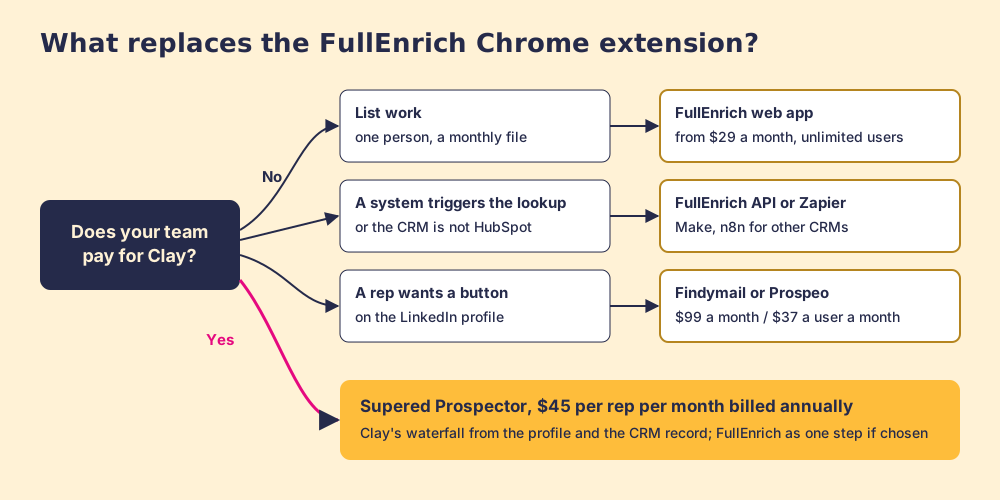
What we recommend: stop looking for the window. FullEnrich made a reasoned call to keep the kitchen and close the drive-through, and no setting will reopen it. If you have no Clay, use FullEnrich for what it does best, the list, and give reps a lighter finder for the profile. If you have Clay, you already own a kitchen with a longer menu and your own order slip; put a window on it where the rep is parked, and follow each list from the profile to closed. The Clay Chrome extension page covers that side in full, and a Prospector demo on your own Clay account shows FullEnrich running as one step from a LinkedIn profile.
Frequently asked questions
Does FullEnrich still have a Chrome extension?+
Why did FullEnrich remove its Chrome extension?+
How do I enrich LinkedIn profiles with FullEnrich without the extension?+
Is FullEnrich's waterfall the same as Clay's?+
What is the best replacement for the FullEnrich Chrome extension?+
Does FullEnrich work with Salesforce or Pipedrive?+
Everything we have written on FullEnrich
More on FullEnrich
Looking past FullEnrich? See Supered Prospector on your own Clay accountYour Clay waterfall, where reps already work.