What Is a Prospect? Prospect vs Lead, and How Your CRM Should Label Each
A prospect is someone who fits who you sell to before they show interest.
Why the top definitions put prospect and lead in opposite orders, why no major CRM ships a prospect stage, and how to label each.
A prospect is a person or company that fits the profile of who you sell to, picked out by your team as worth pursuing, before you know whether they want to buy.
A prospect is a person or company that fits the profile of who you sell to, picked out by your team as worth pursuing, before you know whether they want to buy. Merriam-Webster’s sales sense is shorter: “a potential buyer or customer.” Three words cause most of the confusion around what is a prospect:
- A prospect. Fits your customer profile; interest unknown. You chose them.
- A lead. Showed interest, with a form, a reply, a demo request; fit unknown. They chose you.
- A contact. A person saved in your CRM. A record type, with no judgment attached.
The pages that rank for this question put prospect and lead in opposite orders. Salesforce’s own blog says a prospect is “a lead who has been qualified.” Close says a prospect fits your profile “but whom you haven’t engaged with yet,” and becomes a lead later. And HubSpot, Salesforce, and Pipedrive ship no default stage or object called prospect. Both camps are right, because the two words measure two different things, and the CRM only has room for one of them.
What is a prospect, and where does the word come from?
The word was a view before it was a person. It comes from the Latin prospectus, “distant view, look out,” and for three centuries meant a scenic view or an expectation. Then the mining camps borrowed it. By 1832 a prospect was a “spot giving prospects of ore,” and by 1841 to prospect meant to “examine land with a view to a mining claim.” The sense of a “person or thing considered promising” is younger, from 1922 (Etymonline, read October 2, 2026). Merriam-Webster still lists the mining sense, “a place showing signs of containing a mineral deposit,” one line above the buyer (Merriam-Webster).
The old miner’s sense is the most useful definition sales has. A prospector walked a creek bed and staked a claim where the surface showed color: quartz veins, the right kind of gravel, a flake in the pan. The signs were real and visible from the surface. Whether the gold was there was a separate question, and only digging answered it.
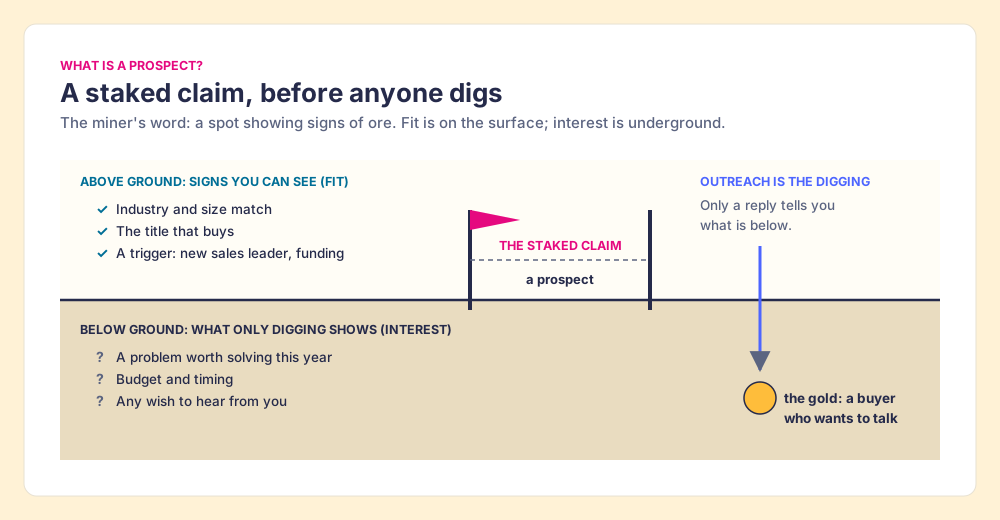
A sales prospect is the same staked claim. You can see from the surface that the account is the right industry and size, that the person holds the title that buys, that something recently changed (a new VP of Sales, a funding round, a hiring spree). You cannot see from the surface whether they have a problem this quarter, a budget, or any wish to hear from you. Prospecting is the digging. The picture stops being true in one place. A miner’s claim never wrote back, and a prospect can, by raising a hand before you ever arrive. The word lead lives behind that second door.
Prospect vs lead: which comes first?
The pages a searcher meets describe the two words like this (read October 2, 2026):
| Source | Lead | Prospect | Order |
|---|---|---|---|
| Salesforce blog (modified May 5, 2026) | “expressed interest in a specific product or service" | "a lead who has been qualified as being more likely to convert” | Lead, then prospect |
| Cognism | ”someone who’s shown interest in your product or service" | "a lead that’s been qualified by your sales team” | Lead, then prospect |
| Leadfeeder | ”basic interest in a company’s products or services" | "a lead who has been partially qualified” | Lead, then prospect |
| Close | ”engaged with you somehow, but you don’t know how interested they are” | matches your ideal customer profile “but whom you haven’t engaged with yet” | Prospect, then lead |
| Revenue.io (Nov 15, 2023) | “A potential buyer or inquiry your team may investigate" | "A person or account considered a potential fit for outreach” | Side by side |
Three of five say lead first. One says prospect first. Read the definitions instead of the arrows and the quarrel dissolves. All five lead definitions are about interest, because the person did something toward you. All five prospect definitions are about fit, because you judged that the person matches who you sell to. The Salesforce and Cognism camp writes from the inbound door, where interest arrives first and the team checks fit second, so “prospect” names the lead that passed the check. Close writes from the outbound door, where the rep judges fit first and interest arrives with the reply. Both are describing the same two questions, asked in opposite order.
So the cleaner model is a grid with two axes, fit and interest:
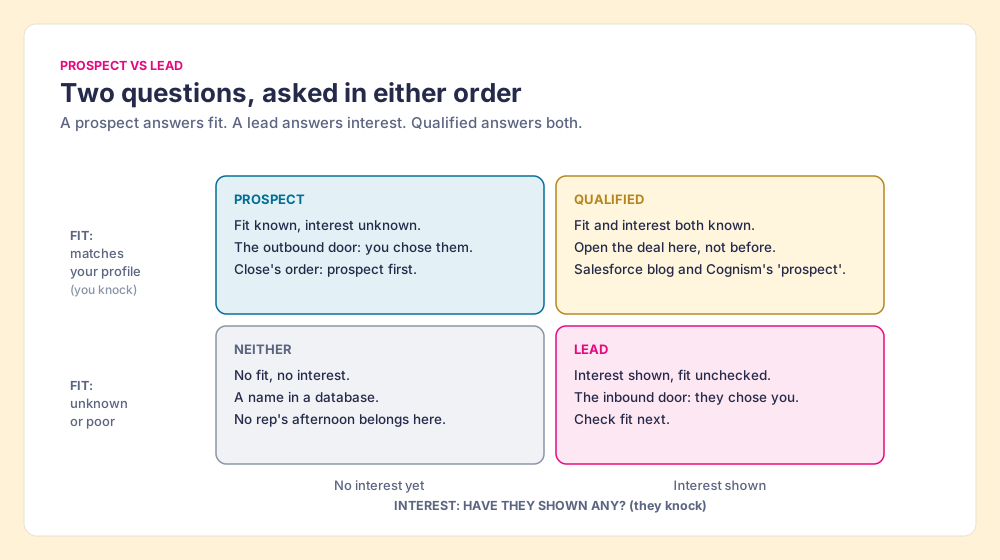
- Prospect. Fit known, interest unknown. The outbound door: you knocked first.
- Lead. Interest shown, fit unknown. The inbound door: they knocked first.
- Qualified. Fit and interest both known. The moment to open a deal or opportunity, and the corner both camps call a qualified prospect or a qualified lead.
- Neither. No fit, no interest. A name in a database, and no rep’s afternoon belongs to it.
The grid also answers the people who search “whats a prospect” after a manager used the word loosely. In daily speech “prospect” often means any potential buyer at all, Merriam-Webster’s sense, and the loose use is fine in conversation. The precision matters at one place only: the moment a person gets written into the CRM, where somebody has to pick a field.
What is the difference between a prospect, a lead, a contact, and an opportunity?
The lead meaning in sales is interest; the prospect meaning is fit. The other two words on the list belong to a different family, because they are names of database records, and records carry no judgment until you give them one.
- Contact. A stored person. Revenue.io’s definition is plain: “A stored person record, often associated with an account.” A contact can be a prospect, a lead, a customer, or your former intern.
- Opportunity or deal. A potential sale with an owner, an amount, a stage, and a close date. In Revenue.io’s words, “A potential deal tracked with its owner, stage, value, and next steps.”
- Account or company. The organization the people work for. In B2B the real prospect is often the account, because Gartner finds a typical buying group for a complex B2B solution involves six to ten decision makers (Gartner). One staked claim can hold six to ten people worth finding, a point the B2B buying committee guide takes further.
The mix-up between these words is expensive in one specific way. When a rep opens a deal for a person who has only fit, the pipeline grows by an amount the buyer has never discussed. The Bridge Group’s 2025 SDR report, 351 B2B companies, found the median SDR holds 10 meetings a month and converts 6 of them to a first-stage opportunity (Bridge Group, February 6, 2025). Even after a meeting, 4 in 10 prospects do not become a deal. A prospect who has never replied is further back still. The report itself warns that its pipeline figures “represent raw pipeline generated, not forecast or closed-won revenue.”
How should your CRM label a prospect?
Open the three CRMs Supered runs in and search their default settings for the word prospect. It is not there as a stage or an object in any of them.
- HubSpot. The default lifecycle stages are Subscriber, Lead, Marketing Qualified Lead, Sales Qualified Lead, Opportunity, Customer, Evangelist, and Other. HubSpot defines a Lead as a contact “that has converted on your website or through some other interaction with your organization beyond a subscription sign up” (HubSpot). That is an interest definition. A person a rep picked for fit, who has never interacted, has no stage in that list that describes them. HubSpot’s newer Leads object has a default pipeline of New, Attempting, Connected, Qualified, and Disqualified (HubSpot), which tracks the digging well.
- Salesforce. A Lead is its own object. “When you convert a lead, Salesforce creates an account, contact, and optionally an opportunity” (Salesforce Help). The word prospect shows up in a riskier place: the first default opportunity stage is Prospecting, ahead of Qualification and Needs Analysis (Weflow, listing Salesforce’s out-of-the-box stages). A stage with that name invites reps to open deals on claims still undug.
- Pipedrive. Two words only. “A lead represents a potential sales opportunity linked to a contact or organization that has yet to be qualified,” and deals are “qualified sales opportunities” (Pipedrive). Its advice on converting: “A lead should be converted to a deal when you are confident that lead could result in a sale” (Pipedrive).
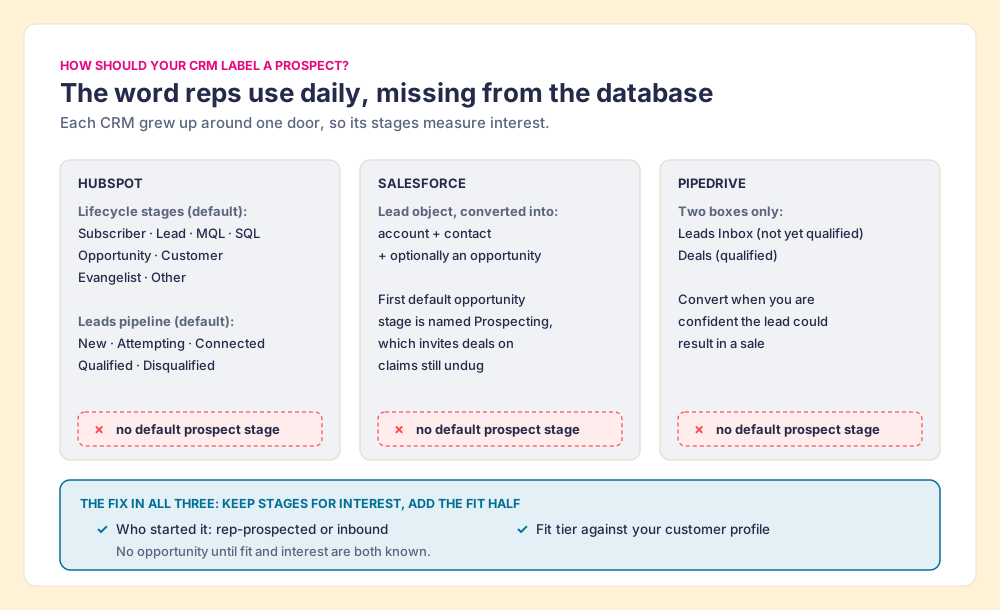
None of the three is broken. Each CRM grew up around one door. HubSpot’s lifecycle was built for inbound marketing, so its stages count interest. Salesforce’s Lead object came from the era when marketing handed names to sales. Pipedrive keeps it to two boxes on purpose. What none of them records by default is the thing the word prospect means: a rep looked at this person, judged the fit, and chose to dig.
The fix is small, and it works in all three. Keep the stage fields measuring interest, as they were designed to, and add the fit half yourself:
| Label | HubSpot | Salesforce | Pipedrive |
|---|---|---|---|
| Prospect (fit, no interest yet) | Contact plus a Leads record in New or Attempting | Lead, status open, not converted | Lead in the Leads Inbox |
| Lead (interest, fit unchecked) | Lifecycle Lead, or a Leads record created from the inbound action | Lead from the web form or campaign | Lead in the Leads Inbox |
| Qualified (both) | Leads record Qualified, then a deal | Convert: account, contact, and an opportunity | Convert the lead to a deal |
| Field to add | Who started it: rep-prospected or inbound | Same, alongside Lead Source | Same, as a lead field |
| Field to add | Fit tier against your ideal customer profile | Same | Same |
Two fields carry the whole grid. The origin field says which door the person came through, so the rep and marketing do not argue later about who sourced them. The fit field records the claim a rep staked. With both in place, the reports finally separate the inbound leads still waiting on a fit check from the prospects a rep chose, and a manager can see which of the two turns into deals. One more rule saves the most pipeline: no opportunity until the qualified corner. In Salesforce that means treating Prospecting as a stage for a deal that already has interest, or renaming it.
What is lead prospecting, and how does a prospect become a lead?
Lead prospecting is the work of turning fit into interest: finding people who match your profile, getting a way to reach them, and starting a conversation. It is the digging, and it has a fixed order.
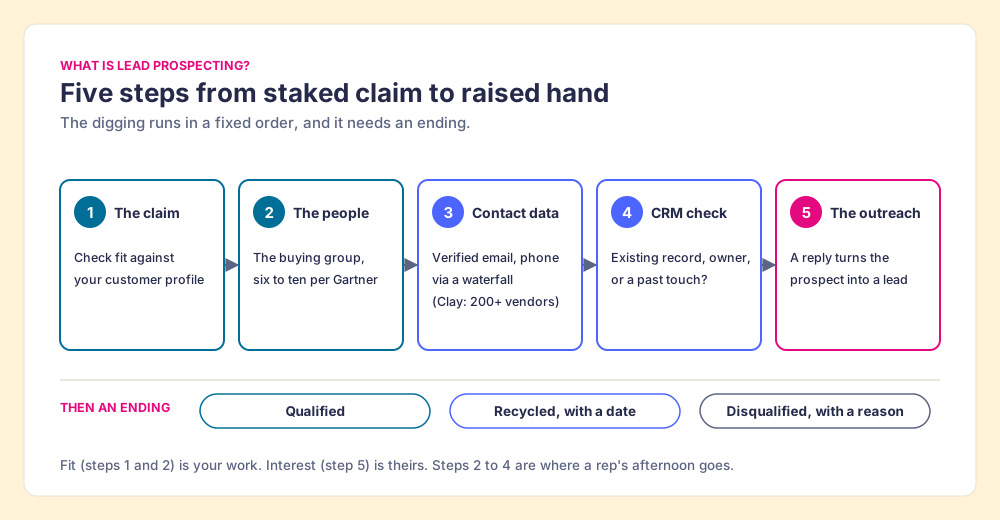
- The claim. Check fit against your ideal customer profile before anyone writes an email. How to build a lead list covers writing the profile from closed-won deals.
- The people. Find the buying group at the account, usually on LinkedIn or in Sales Navigator, where the 19 daily LinkedIn touches in the Bridge Group median already happen.
- The contact data. A verified email and phone. One database that misses leaves the rep stuck; a waterfall asks provider after provider. Clay’s “signature data waterfalls check multiple providers to return the most verified emails (lower bounce rate) and phone numbers (higher connect rate)” (Clay), across what Clay’s homepage calls 200+ data and AI vendors (read September 25, 2026). The mechanics are in waterfall enrichment.
- The CRM check. Is this person already a contact, owned by a teammate, or touched last spring? A second claim on the same creek starts a fight.
- The outreach. The Bridge Group median SDR logs 112 activities a day: 44 phone, 41 email, 19 LinkedIn, and 8 text or other. Eighty-five of those 112 need the number or the address from step three. The reply, when it comes, is the moment a prospect becomes a lead.
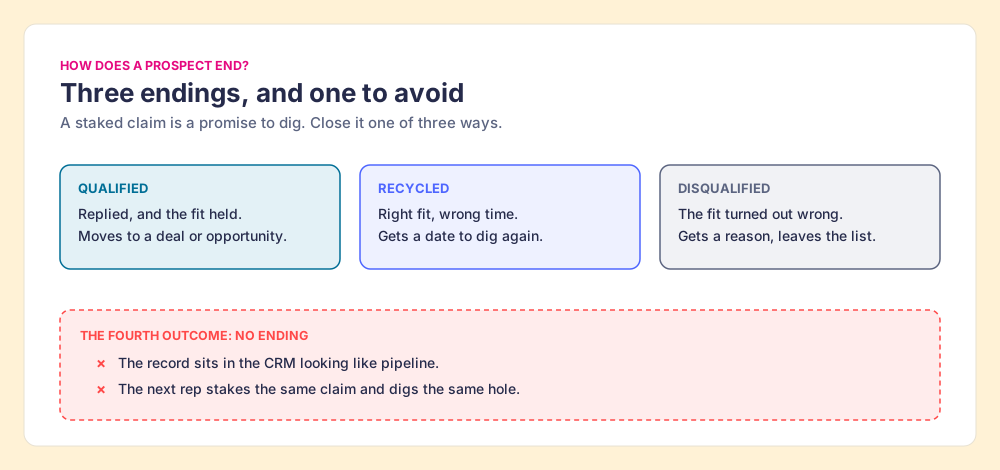
Then the claim needs an ending. A prospect who replied and fits moves to qualified. A prospect who is right but not now gets recycled with a date. A prospect who turned out wrong gets disqualified with a reason. A prospect with no ending sits in the CRM looking like pipeline, and the next rep digs the same hole. The sales prospecting process walks the full motion after the first reply.
Where does Supered Prospector fit?
Steps two through four are where a rep’s afternoon goes. Clay plus Supered is the best way for a sales team to prospect: GTM engineers build in Clay, reps never open Clay. Supered Prospector runs inside the Supered Chrome extension, on your team’s own Clay account, and puts those steps one click from the person the rep is looking at.
- The claim staked where the rep sees the signs. A Sales Navigator lead or saved list, a LinkedIn profile, a company’s website, or a HubSpot, Salesforce, or Pipedrive record.
- The CRM check before the push. On a LinkedIn profile, the rep sees the matching CRM record and whether the person was prospected or worked before, so no two reps dig the same claim.
- The team’s table as a button. The rep picks a flow the GTM engineer built (person enrichment, buying committee); Clay’s waterfall fills the verified email and phone, and the person lands in the CRM or a sequence in one click.
- Found, worked, closed. Leaders see which prospects were found, who is working their list, and how each one ended: Qualified, Recycled, or Disqualified. Those are the three endings this post argues a prospect needs.
Prospector works within LinkedIn’s terms and does not copy search results in bulk; the contact data comes from Clay’s waterfall on the customer’s Clay account. It costs $45 per rep per month, billed annually, from one rep, plus your Clay plan. Reps who want the day-to-day view can start with Prospector for reps; the full rep loop is on the sourcing use case, and other ways reps reach Clay from the browser are in the Clay Chrome extension guide.
Choose something else if:
- No Clay account. Prospector runs on Clay. Apollo or Lusha is the simpler start without it.
- Inbound only. If every name arrives through a form, your work is lead qualification, covered in the lead qualification guide, and a prospecting tool adds little.
- AI-written outreach. Prospector does not draft or send emails; it hands the person to your CRM and sequencer.
Why trust this definition?
Before Supered I started RevPartners, a HubSpot partner that did only sales implementations and reached HubSpot’s Elite tier in 13 months. Lifecycle stages and lead objects were the first argument in nearly every implementation, usually between a marketing team counting interest and a sales team counting fit. Supered is the #1 sales enablement app on the HubSpot marketplace, rated 5.0 from 122 reviews there and 4.9 out of 5 from 81 reviews on G2 (checked October 1, 2026). The disclosure: we make Prospector, and it appears above as one way to do the digging.
What we recommend
The vendors’ definitions disagree because they each describe one door, and the CRMs have no prospect field because each grew up around one door too. The repair is to stop arguing about the order and record both questions.
- The two-axis vocabulary. Prospect means fit with interest unknown; lead means interest with fit unknown; qualified means both. Write the three sentences into your sales process document and use them in pipeline reviews.
- The two added fields. Who started it, and fit tier, on the record in HubSpot, Salesforce, or Pipedrive.
- No deal before the qualified corner. Fit alone does not earn an opportunity, and the Bridge Group’s 6 of 10 says even a meeting does not guarantee one.
- Three endings for a prospect. Qualified, recycled with a date, or disqualified with a reason, so no claim sits staked and undug.
A prospect is a promise the surface makes. The list is where the digging starts, and how to build a lead list reps work is the next step; the sales prospecting guide covers the whole motion from there.
Frequently asked questions
Is a prospect the same as a lead?+
Which comes first, a prospect or a lead?+
What is a qualified prospect?+
Is a prospect a customer?+
How do I mark a prospect in HubSpot, Salesforce, or Pipedrive?+
Does Supered Prospector need Clay?+
Your Clay waterfall, where reps already work.