Scribe Pricing in 2026: Cheap Seats, a Five-Seat Floor, and the Doors That Cost Extra
A clear-eyed look at Scribe pricing in 2026: the free Basic tier, the two Pro plans and their seat math, the Enterprise gates, and the one cost no pricing page shows.
Scribe pricing in 2026 runs four tiers: a free Basic plan, Pro Personal at 25 dollars a seat per month billed annually, Pro Team at 13 dollars a seat with a five-seat minimum, and a quote-based Enterprise tier with verified contracts around a median of 8,640 dollars a year.
Scribe is the rare software vendor whose pricing page you can read in one sitting. Four tiers, two public numbers, one quote. The company can afford the simplicity: it raised a $75 million Series C at a $1.3 billion valuation in November 2025 (TechCrunch), and it got there by selling a product whose per-seat cost is small enough that a manager can expense it without a meeting. The sticker is the least interesting part of the Scribe cost story. The story lives in the doors: where they stand, and what happens after you have paid to walk through all of them.
Scribe pricing in 2026 runs four tiers: a free Basic plan, Pro Personal at 25 dollars a seat per month billed annually, Pro Team at 13 dollars a seat with a five-seat minimum, and a quote-based Enterprise tier with verified contracts around a median of 8,640 dollars a year (scribe.com/pricing, July 2026; Vendr, 18 transactions). The checkout still runs through scribehow.com, which is why searches for scribehow pricing and Scribe pricing land on the same page. Hold the numbers; the shape of the ladder matters more than any single rung.
How much does Scribe cost in 2026?
The list, verified against the live pricing page in July 2026:
| Tier | Price (annual billing) | Price (monthly billing) | Minimum | The gate it opens |
|---|---|---|---|---|
| Basic | Free | Free | 1 seat | Web capture, share by link |
| Pro Personal | $25/seat/month | $35/seat/month | 1 seat | Desktop capture, exports, your branding |
| Pro Team | $13/seat/month | $17/seat/month | 5 seats | Comments, team collaboration |
| Enterprise | Quote only (Vendr median ~$8,640/yr) | Quote only | Custom | SSO, roles, auto-redaction, full history |
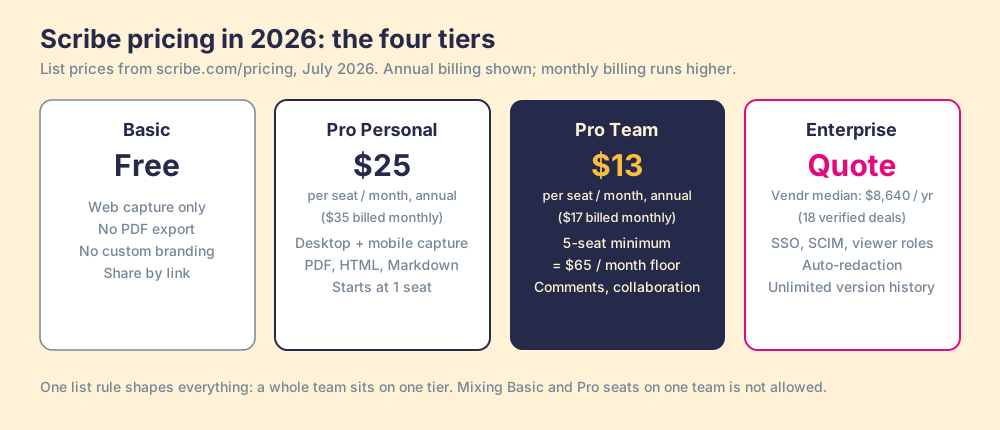
Three details in the fine print carry more weight than the prices:
- The annual discount. The toggle cuts Pro Personal from $35 to $25 and Pro Team from $17 to $13. That is a 24 to 29 percent haircut for a 12-month commitment, steeper than the “save 20%” banner suggests, and it makes monthly billing hard to justify past the first exploratory month.
- The five-seat floor. Pro Team starts at 5 seats. A three-person consultancy buys five seats or pays the $25 Personal rate per head, so the plan built for small teams has a $780-a-year entry fee at list price.
- The one-tier rule. Scribe’s own FAQ says a team cannot mix Basic and Pro seats; all plans sit at the team level. The day one person needs PDF export, the whole team upgrades, or you split the org into separate Scribe teams and lose shared workspaces.
Is Scribe free, and what does the free plan hold back?
Yes. Basic is a genuine free tier, and for a solo operator documenting web-app workflows it may be all you need: automatic capture through the Chrome and Edge extensions, editable steps, share by link, even video sharing.
What it holds back is precisely the set of things a business eventually needs. No desktop capture, so anything in Excel, your ERP, or a local app is invisible to it. No PDF, HTML, Markdown, or Word export, so the guides live inside Scribe or as public links, full stop. No custom branding, so a client-facing guide advertises Scribe rather than your firm, and no screenshot redaction, so a guide captured over real customer data ships with that data in it. The free plan is a working demo of the capture engine with the distribution and safety features removed. That is fair design. It is also why “is Scribe free” has a yes answer that lasts about as long as your first client deliverable.
What does Scribe pricing come to for a 20 to 50 person team?
Run the arithmetic for the mid-market ops or services team this tool is aimed at, at list price:
- A 20-seat team. $13 x 20 x 12 = $3,120 a year on annual billing, or $4,080 on monthly.
- A 50-seat team. $7,800 a year annual, $10,200 monthly.
- The Enterprise midpoint. Vendr’s median of roughly $8,640 a year sits right on top of the 50-seat Pro Team price, which tells you where the sales team draws the upgrade line.
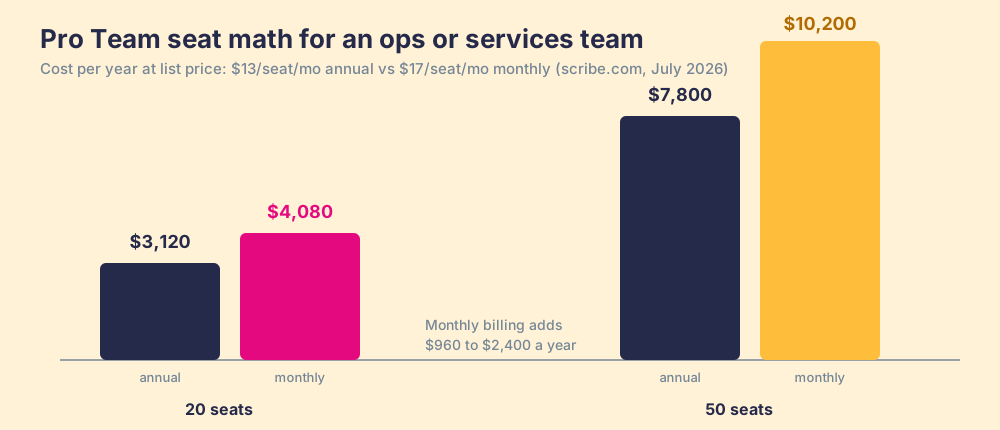
Those are modest numbers for B2B software, and they are the reason Scribe spread to over 6 million users and 94 percent of the Fortune 500 (company figures reported at the Series C, November 2025). But notice who needs a seat. Creators do. Editors do. On the Pro plans, viewers reading a public link do not, which keeps the count down, right up until you need viewing restricted to logged-in employees. Authenticated viewers, and the Creator, Viewer, and Admin roles that manage them, are Enterprise features. Locked-down reading is where the seat math stops being the price.
Which hidden costs sit outside the pricing page?
Picture the product as a hallway of doors. The hallway is free to enter. The first door has a small toll, and so does the next, and none of them is offensive on its own. The design works because the doors stand exactly where a growing team has to walk: the day you need a PDF for a client, a fifth teammate, a viewer role for the auditor, last month’s version of a guide. You never hit a wall. You hit a door, and the toll is always easier than turning around.
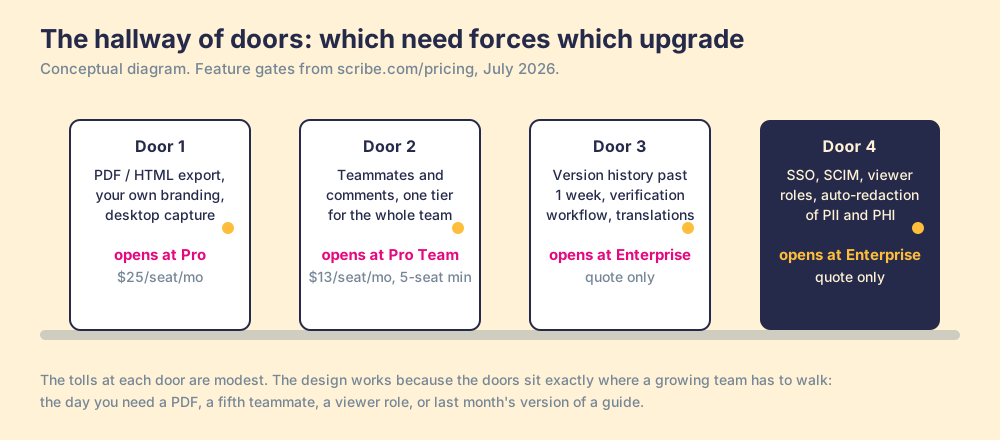
Two of those doors deserve a closer look before you sign:
- Version history of one week on Pro. The feature grid gives Pro plans seven days of version history; unlimited history is Enterprise-only. A process library is a living record, and a filing cabinet that empties itself every seven days is a strange place to keep one. The first time a well-meaning edit breaks a guide and the good version is eight days gone, this line item becomes visible.
- Export as the exit ramp. Your library lives in Scribe. PDF, HTML, Markdown, and Word export exist from Pro up, so leaving with your documents is possible but manual, guide by guide, and everything you export goes static the moment it lands. The switching cost never appears in a contract. It is gravitational, and it grows with each of the hundreds of guides the capture engine makes it so easy to produce. We walked through where that library boundary sits in our review of Scribe alternatives.
Who should pay for Scribe, and who should not?
Scribe’s capture is the best in the category, and this page says so without a wink. Perform a task once and a clean, screenshotted, step-by-step guide falls out. Tango is the nearest rival and has pivoted its energy toward AI browser automation, a shift we traced in Tango vs Scribe. If your bottleneck is producing documentation, buy Scribe, take the annual price, and do not overthink it. A documentation-heavy services firm, an IT team fielding a stream of “how do I” tickets, a consultancy shipping branded SOPs to clients: for that work, $13 to $25 a seat is a fair toll and the wider field of process documentation software mostly confirms it.
The teams who should hold their wallet are the ones whose real complaint sits downstream of writing, and the mechanism behind that complaint is the one cost no tier removes. Scribe is a photocopier in the basement: fast, tireless, and priced so reasonably that the pile of output grows without anyone deciding it should. The bill for the copier was always the small number. A copy earns its keep only when someone reads it at the moment the work happens, and no copier has ever made that occur. The State of Sales Enablement measured the gap on sales teams: 89 percent had a defined process, 36 percent saw it followed. The 53 points between those numbers is documentation spend returning nothing, and it does not shrink when the documents get prettier or cheaper.
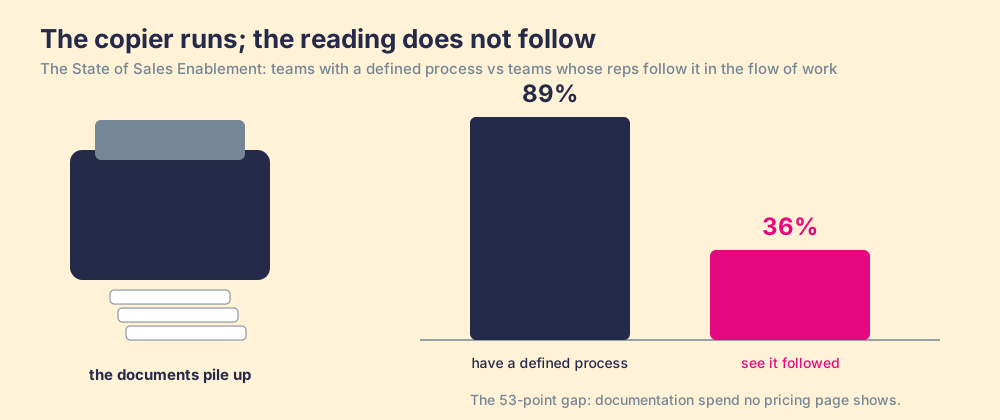
For revenue teams specifically, that gap has a different fix than more or better documents. The guide has to reach the rep inside the CRM, at the stage where it applies, and someone has to be able to see whether it was followed, deal by deal. That is the job Supered was built for, and it is a different job than capture, which is why we tell readers of our own alternatives page to keep Scribe for company-wide documentation and solve following separately.
What we recommend
- Solo consultants and one-person ops. Pro Personal at $25 a seat, billed annually. You get the exports and branding that make guides client-ready, and the free plan’s limits will find you within a month anyway.
- Teams of 3 to 50 producing documentation weekly. Pro Team, annual. At $3,120 to $7,800 a year for 20 to 50 seats it is among the cheapest line items in your stack, and the capture quality earns it. Swallow the five-seat floor.
- Regulated or SSO-mandated orgs. Enterprise, and negotiate knowing Vendr’s median sits near $8,640 a year. Auto-redaction and viewer roles are not optional in that world, so the quote is the real price of entry.
- Revenue teams whose docs go unread. Pause before adding seats. The invoice you are staring at is the small one; the 89-versus-36 gap is the large one, and it is a behavior problem the copier cannot reach. Fix delivery and measurement in the flow of work first, then decide how much capture you still need.
The verdict, stated the way we would to a friend: choose Scribe when the pain is writing, because the capture is the category’s best and the toll is small. Choose a business logic layer when the pain is following, because a fuller shelf has never once closed that gap. And if the second problem is yours, book a demo and we will show you what a followed process looks like, deal by deal.
Frequently asked questions
Is Scribe free?+
How much does Scribe cost in 2026?+
What is the difference between Scribe Pro Personal and Pro Team?+
How much does Scribe Enterprise cost?+
Is Scribe worth the price?+
Your process, running itself.