HubSpot User Adoption: Lizzy's Five-Tool Stack
Lizzy trains every Axon Garside client on HubSpot. Her five tools, counted down from Screen Studio to HubSpot, and the adoption lessons she draws from each one, including the day her own board flagged her own missed SLA.
HubSpot user adoption is how fully a team uses HubSpot to run its agreed process day to day, and Lizzy's job at Axon Garside is to get clients there as quickly as possible.
When Lizzy meets someone new and tells them she is a user adoption manager, they look at her blankly. She has learned to explain it in one line: “my job is to help people get the best out of their system and to help them get to grips with their system as quickly as possible.” She does that job at Axon Garside, a HubSpot partner in Manchester, where she delivers all of the firm’s client training and calls herself “a self-professed HubSpot nerd.” Our episode title gave her another one: HubSpot’s queen of user adoption.
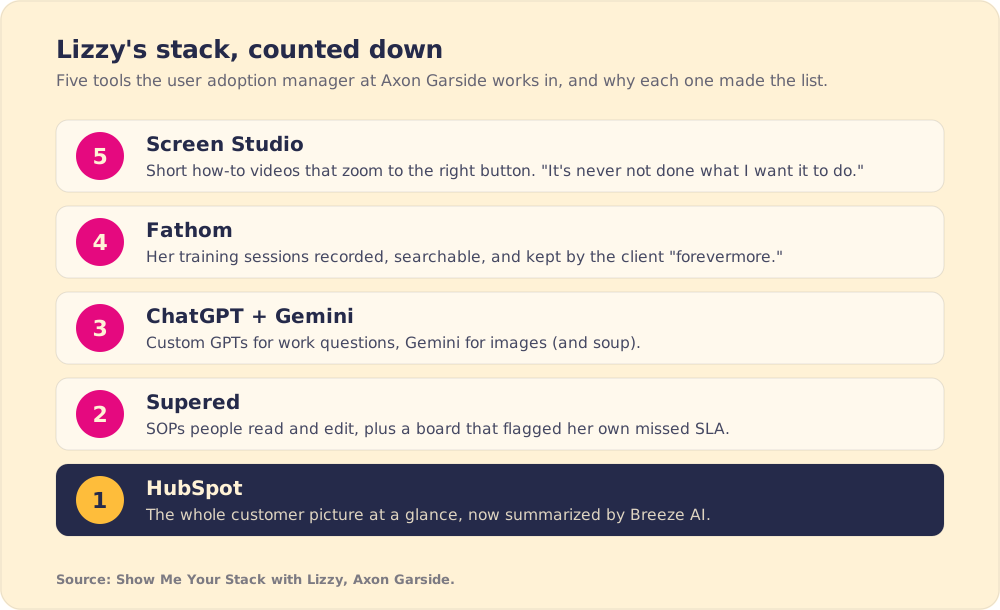
On Show Me Your Stack she counted down the five tools she works in every day, from a Mac screen recorder to the CRM itself, and told me why she keeps each one. Her reasons say a lot about HubSpot user adoption. She keeps tools that never let her down, she puts procedures where her team already works, and she found out where her own team slipped, herself included, only when a board showed her.
Why does Lizzy record tutorials in Screen Studio instead of Loom?
Number five is “quite a niche little piece of software,” in her words, and Mac only. Screen Studio records a window, a tab or the whole screen, along with the microphone and system sound. Lizzy uses it for “little shareable high-quality videos,” internal and client-facing, “cuz sometimes it’s easier to say, ‘I’ll send you a quick video of how to do XYZ.’” The screen segments of her LinkedIn videos come from it too.
I use Loom, so I asked her why she doesn’t. Her answer was editing and polish: you can set the camera size and position, and the automatic zoom follows the cursor, “really really smooth.” She had tried other recorders and found some “a bit sort of clunkier.” Then the line that decided it: “Screen Studio, it’s never not done what I want it to do.”
The zoom helps her clients learn. Richard Mayer’s research on multimedia learning includes a signaling principle: people learn more when instruction points them to the part of the screen that matters. When Screen Studio pushes in on the dropdown a client needs, the client knows where to look.
Lizzy sends short videos all day, so the recorder she picks has to work every time. Screen Studio has, and that is why it stays.
What makes an AI notetaker worth keeping?
Number four is Fathom, and the whole Axon Garside team uses it. Clients who join a call with the firm will always find someone’s Fathom notetaker in the room. Lizzy admits she has “not been entirely faithful to Fathom,” yet it keeps its place because “it’s incredibly reliable. It just does exactly what it says on the tin.” It records the video and a full transcript and pulls out the action items.
She has compared it head to head. Clients bring their own notetakers, she has been sent their transcripts from the same meeting, and “you compare the two and it’s like night and day.” The summary email is where most tools lose her: “some of them are just absolute garbage, you know, it’s just this big block of text, and you’re like, well, that’s not usable.” I agreed with her. We use AskElephant at Supered, and I still think Fathom writes the best recap emails out of the box.
The adoption lesson sits in how she uses the recordings. She records all of her training sessions, and the client keeps the link: “they’ve got the video forevermore.” Weeks later, a client can search the transcript for “invoicing” and jump to the minute where she explained it. When Jaap Murre and Joeri Dros replicated Hermann Ebbinghaus’s forgetting experiment in 2015, they found the same steep early loss he recorded in the 1880s, with much of new material gone within a day (Murre and Dros, PLOS ONE, 2015). Lizzy’s clients will forget most of a training session. With the recording, they can find the part they forgot.
Sales teams lean on the same kind of tool. In The State of Sales Enablement 2026, call analysis and summaries was the most common use of AI on sales teams, at 73% (The State of Sales Enablement 2026).
Why does Lizzy pay for two AI assistants?
“I’m slightly cheating,” she said, and named ChatGPT and Gemini together at number three, both on paid plans, each for a different job.
ChatGPT wins at work because of custom GPTs. When her colleague Jack went to INBOUND, he loaded all of his conference notes into a custom GPT, and “I spent ages quizzing that thing.” Gemini wins on images. Over Christmas she posted a photo to the company WhatsApp of herself in a Christmas jumper with her pet lizard on the desk, and her colleague Jay had Gemini put a Christmas jumper on the lizard. At home Gemini is her cook: leftover vegetables, some lentils, whatever herbs are in the fridge, and a full recipe back. “I’ve had some of the best soups I’ve ever made.”
Her point is that no single model is best at everything, so she picks by task. The research agrees. In a 2023 field experiment with 758 Boston Consulting Group consultants, those given GPT-4 completed 12.2% more tasks and finished 25.1% faster on work inside the AI’s capabilities. On a task outside them, the AI users were 19 percentage points less likely to reach a correct answer (Dell’Acqua et al., Harvard Business School, 2023). The authors called the edge of what AI does well a jagged frontier. Lizzy handles it by giving each assistant only the jobs it has done well for her.
What happens when SOPs live where the work happens?
Number two is Supered, which is our company, so weigh this part with that in mind. “I promise I’m not saying this because I’m on your podcast,” Lizzy said. I told her most guests put it at number six because they feel bad leaving it out.
She had not used it before joining Axon Garside. She started with client-facing guides and documentation. The bigger change came when the team moved its own standard operating procedures into it. “And people actually look at them,” she said, then made the case against the old arrangement: “if you put things on a drive somewhere, you know, tell me one person who goes and reads those.”
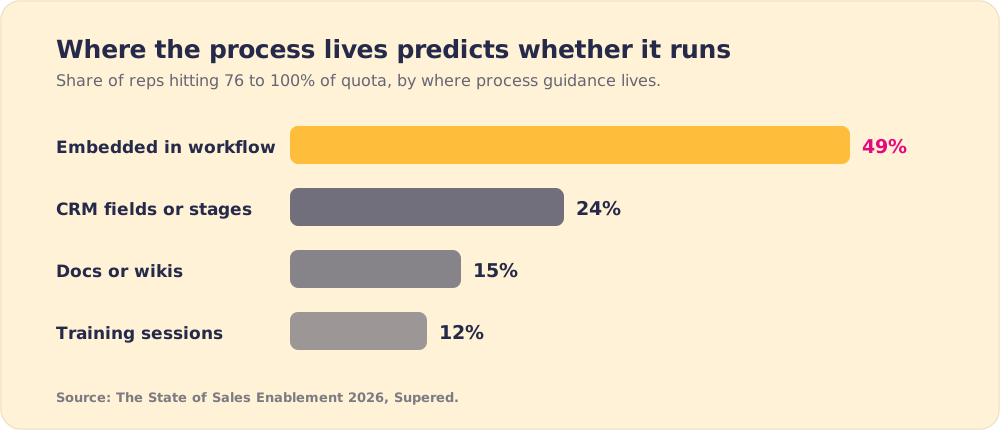
Reading led to editing. When the procedure appears next to the work, someone notices a step the team no longer does and asks for a change. She calls the result “real living documentation.” The State of Sales Enablement 2026 measured the same pattern at team level: 49% of reps hit 76 to 100% of quota when process guidance was embedded in the workflow, 24% with guidance in CRM fields or stages, 15% with docs or wikis and 12% with training sessions.
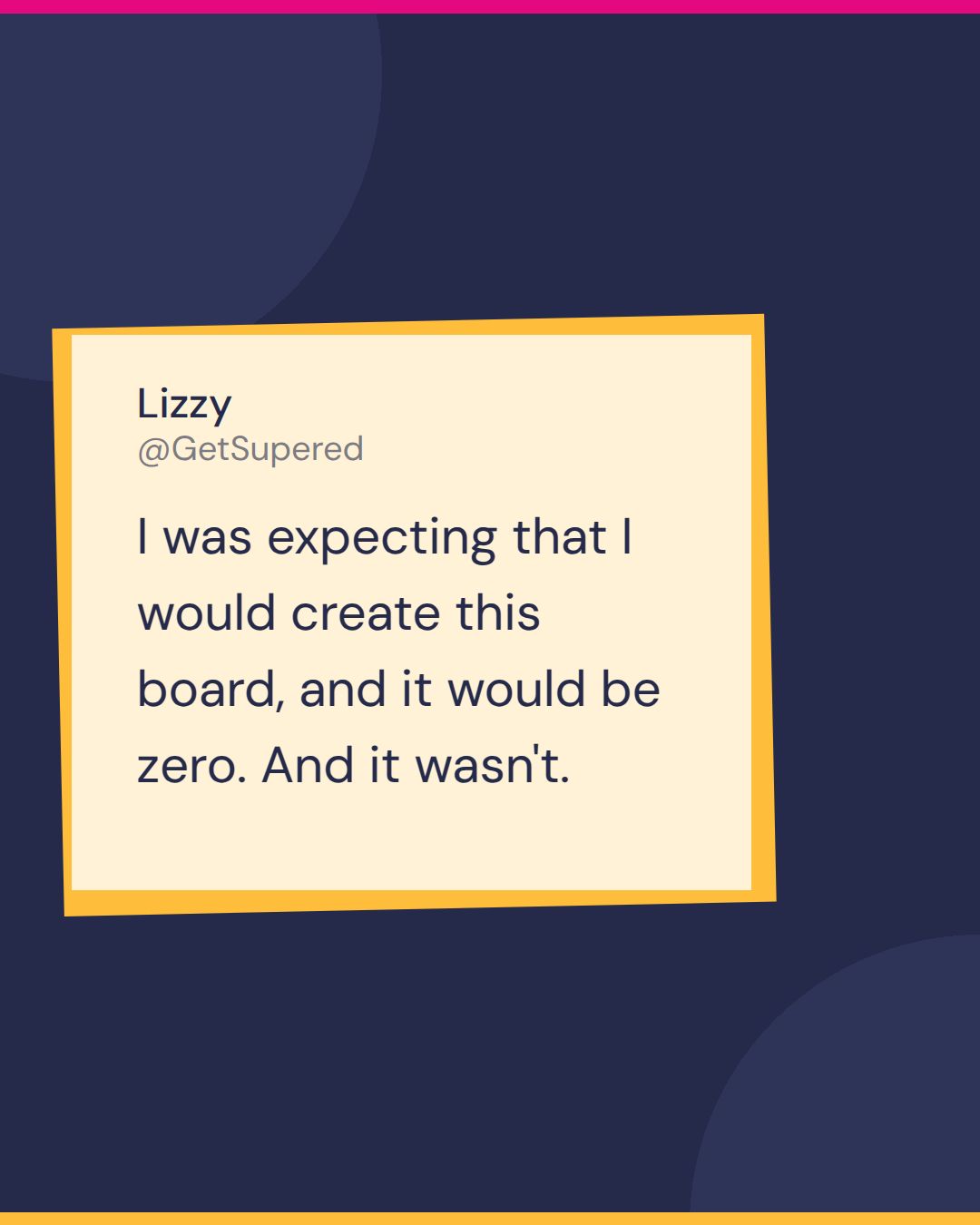
Then she told a story against herself. She built a process board to flag support tickets that missed their service-level agreement. “I sort of pride myself on like really good customer service, and I was expecting that I would create this board, and it would be zero. And it wasn’t.” One of the flagged tickets was hers. “What? I missed my own SLA that I’ve created.”
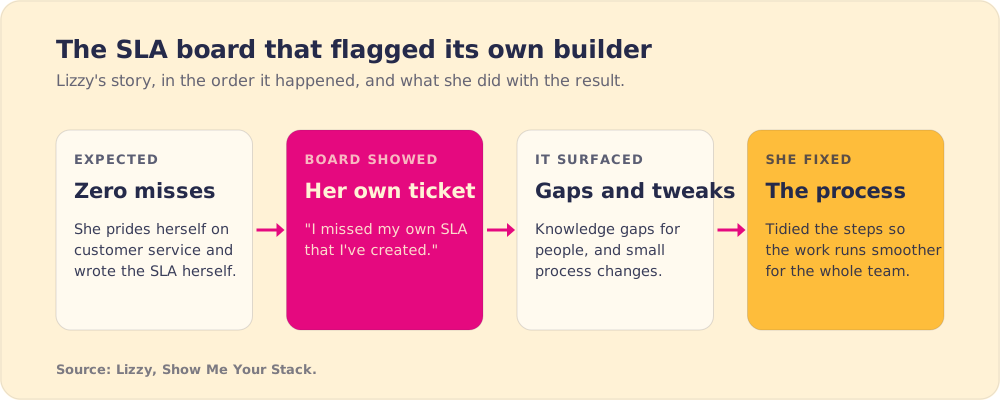
She wrote the SLA and trains clients on this discipline, and she still did not see the miss until the board showed it. Medicine has measured the same blind spot. In a 2006 study, researchers watched 71 healthcare workers across 1,284 hand hygiene opportunities and found that what they did bore no relation to what they reported doing (Jenner et al., Journal of Hospital Infection, 2006). Other teams can copy what Lizzy did next. The board “highlighted a couple of little gaps of knowledge for people” and “a couple of little sort of process tweaks that needed to be made.” She fixed the process and filled the gaps, including her own.
Why does a CRM still top the stack in the age of AI?
Number one is HubSpot, and she got ahead of the obvious objection: “I’m not just saying this because I’m a HubSpot partner.” Her reason is the full picture. Marketing, sales and service all sit in one place, and “you can see the full customer picture end-to-end at a glance.”
What moved it further up for her is Breeze, HubSpot’s built-in AI. She described the old way a salesperson checked on a client’s support history: open the company record, cross to tickets, filter, and try to work out whether anything was urgent. Now a summary at the top of the record surfaces the recent, pertinent items. Ask it to help you prepare for a meeting and, within seconds, it might tell you the contact is unhappy and link you to the ticket. In her words, HubSpot has gone from “just a CRM” to “something a lot more powerful that actually gives you sort of at your fingertips proper insights into your business.”
The same pace creates her hardest problem. “One of the sort of blessings and curses of HubSpot, if you like, is that it is always constantly evolving.” She spends real effort keeping up with releases and asking which client each one helps. When a client asks whether HubSpot can do something it cannot, her answer is “never say never,” and she sends them to the HubSpot Community to post or upvote the idea.
Her lesson is that adoption work does not end at go-live, because the portal keeps changing under the team. It also pays when done well. When Avison Young consolidated four CRM instances onto HubSpot, adoption among its 1,600 North American brokers rose from 23% to 90% in four months (HubSpot case study, Avison Young). I added my own view: in the AI era, the company that owns the customer data and its context is the one the AI gets built around, and that favors the CRM.
Lizzy’s one to watch: Happily for events
Her emerging pick bolts into HubSpot. Happily is an event management tool, and she thinks the label undersells it. It tracks sign-ups, attendees, no-shows and even event costs, so a deal that closes a year after a trade show can still be traced back to it. It needs an Enterprise HubSpot subscription, because it runs on custom objects. Her candid read on the gap it fills: “as much as I love HubSpot, it doesn’t do that event management piece like very well.”
Key points from Lizzy’s stack
- Reliability as the first test. Screen Studio has “never not done what I want it to do,” and Fathom “does exactly what it says on the tin.”
- Training that survives the session. Recorded, searchable sessions let a client find the minute they forgot, which matters because much of new material fades within a day.
- A model matched to the job. ChatGPT for custom GPTs, Gemini for images. The BCG study found AI users did worse on a task outside the model’s strengths.
- Guidance inside the tool. Axon Garside’s SOPs started getting read, and then corrected, once they moved out of the drive and into the tools the team works in.
- A board that names the misses. Lizzy wrote the SLA and still missed it, and she only found out because the board listed the ticket.
- A portal that never stops moving. HubSpot ships changes constantly, so Lizzy keeps checking which release helps which client long after go-live.
What should a team take from Lizzy’s approach to HubSpot user adoption?
Do what Lizzy does after go-live. Record the training so people can come back to it, put the procedures inside the tool where they get read and fixed, and build a board that shows each missed step to the person who can act on it. More refresher sessions build knowledge that fades, and login counts say little about whether the process runs. Lizzy’s team started reading its SOPs when they moved into the daily tools, and the SLA board found a miss she had no idea she had made.
Pick one process, a ticket SLA or a stage exit, and build the board that would show its misses. Expect it to find some, possibly your own. Axon Garside publishes its method as a HubSpot user adoption solution, and its profile sits in our partner directory. For the wider pattern, read our guides to CRM adoption and sales process adoption.
Frequently asked questions
What does a HubSpot user adoption manager do?+
What tools does a HubSpot user adoption manager use?+
Where should HubSpot SOPs live?+
How do you measure HubSpot user adoption?+
Why does HubSpot adoption slip after training?+
Your process, running itself.
Turn the playbook into rep behavior.
More from Show Me Your Stack

Christian Palmer's Sales Enablement Tech Stack, From Loom to NotebookLM
Christian Palmer
GTM Tools: Michael's Top Five for a One-Person Go-to-Market Team
Michael