AI Knowledge Base for Sales Teams: Build One Reps and Claude Both Read
An AI knowledge base answers questions from your own documents. A support desk ships the answer to a customer; a sales team needs the next action to change. What an AI knowledge base is, how to create one, why its answers go unused, and where it should live.
An AI knowledge base is a store of company knowledge that a language model searches and answers from, so a person asks a question in plain words and gets a written answer drawn from your own documents instead of a list of links.
Ask an AI knowledge base what discount a rep can offer on a two-year deal and you get a lovely answer. It arrives in four lines, cites the pricing policy, and names the approval threshold. The rep reads it, says thanks, clicks back to HubSpot, and sends the proposal with the discount they had already typed. Correct answer, same proposal.
An AI knowledge base is a store of company knowledge that a language model searches and answers from, so a person asks a question in plain words and gets a written answer drawn from your own documents instead of a list of links. The pages ranking for the term today, from Zendesk, Fin, Decagon and Slack, mostly frame it as a support tool, judged by how many questions it resolves. That measure fits a help center, where a resolved question closes the ticket. On a sales team a reply is only an input. What counts is whether the next email, field or call changes because of it, and that depends less on how smart the knowledge base is than on where its answer lands.
What is an AI knowledge base, and how does it work?
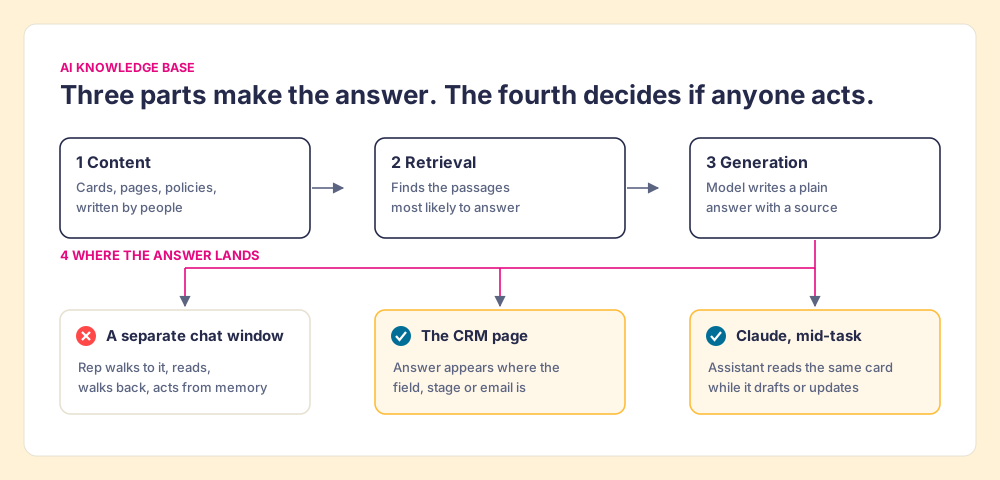
Strip away the vendor language and an AI knowledge base has three working parts and one that decides whether it matters.
- The content. Cards, pages, policies, call notes and battlecards, written by people. The model writes nothing true that is not already in here.
- The retrieval. When a question comes in, the system finds the passages most likely to answer it. It supplies the “retrieval” in retrieval-augmented generation, the method Patrick Lewis and colleagues at Facebook AI Research described in 2020: pair a language model with a searchable index so it answers from documents instead of from memory alone (Lewis et al., 2020).
- The generation. The model writes a plain-language answer from those passages, usually with a link back to the source.
- The landing spot. Where the answer shows up: a chat panel, a Slack thread, a page inside the CRM, or Claude’s context while it drafts an email. The top-ranking guides spend a line on it, if that. For a sales team it decides the outcome.
Vendors put their money and marketing into the first three parts. Search was the old problem. McKinsey estimated in 2012 that interaction workers spent nearly 20% of the workweek “looking for internal information or tracking down colleagues who can help” (McKinsey Global Institute, The social economy). An AI knowledge base takes a big bite out of that number. The answer that used to take a Slack thread and an afternoon now takes a sentence. For practical purposes, finding knowledge is solved.
Where do AI knowledge bases go wrong?
An AI knowledge base is a student sitting an open-book exam. The student is quick and articulate and can find a page faster than you can. The grade still depends on the book. If chapter six describes last year’s pricing, the student will quote last year’s pricing fluently, with a page number, and you will believe it because of the page number.
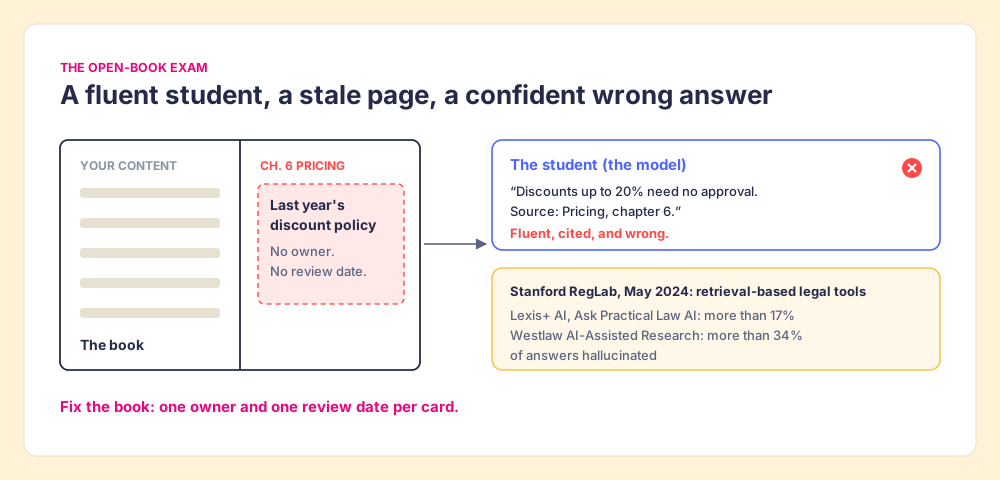
Retrieval narrows the problem without closing it. In May 2024, Stanford’s RegLab and Human-Centered AI institute tested legal research tools that vendors marketed as built on retrieval over trusted sources. Across more than 200 legal questions, Lexis+ AI and Ask Practical Law AI produced hallucinated answers more than 17% of the time, and Westlaw AI-Assisted Research more than 34% of the time. The authors’ conclusion: “even RAG systems are not hallucination-free” (Stanford HAI, May 23, 2024). Those tools sit on top of some of the best-maintained content on earth. Your pricing folder is not that.
Guru, which sells knowledge bases for a living, puts the problem in its homepage headline, which warns against running your business on “confidently wrong AI” (the page draws the o in wrong as a stop sign). Its answer is verification, with owners who confirm cards on a schedule and Knowledge Agents that flag stale ones (Guru). Owners and review dates are the right fix for the book. The comparison stops working at the classroom door, though. A student who scores 100 on the open-book exam has proved they can find the answer. The exam never checks whether they use it on the job.
How is an AI knowledge base for sales different from a support one?
On a support desk, the reply is the deliverable. The customer asks how to reset a password, the AI knowledge base answers, the ticket closes. Resolution is the right measure because nothing has to happen after the answer except a satisfied customer going back to work.
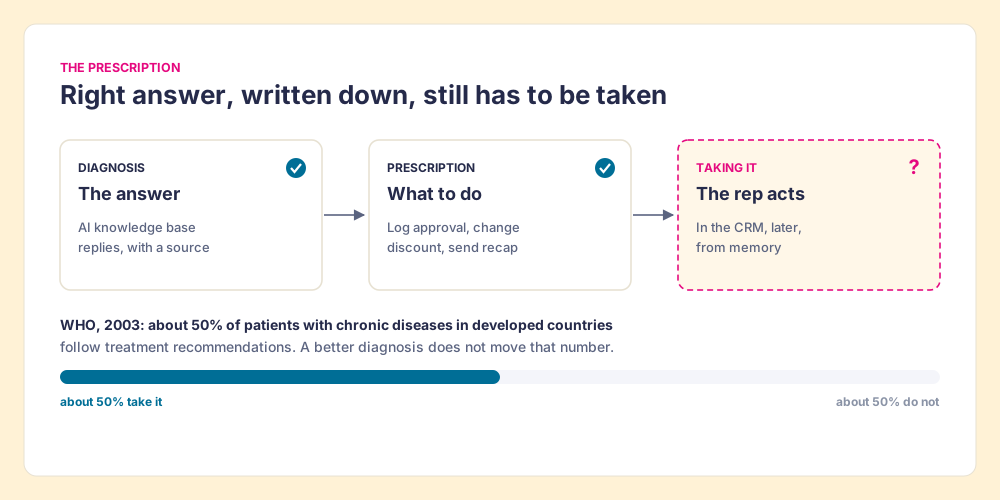
A sales answer is a prescription. The rep asks how to handle a security review, or which case study fits a 40-person HubSpot team, or what has to be true before a deal moves to Proposal. The answer tells them what to do. Then they have to do it, in a different window, while the buyer waits and four other deals ask for attention.
Medicine has measured this gap for decades. The World Health Organization estimated in 2003 that only about 50% of patients with chronic diseases in developed countries follow their treatment recommendations (WHO, Adherence to long-term therapies). The diagnosis was right. The prescription was right. Half the time the pills stayed in the bottle, and no amount of better diagnosis would have moved that number.
Reps have even less room for the second step than patients do. In Salesforce’s State of Sales survey of 5,500 sales professionals, reps said they spend 70% of their time on non-selling tasks (Salesforce, July 25, 2024). A rep who opens a chat window to ask a question has spent a slice of the remaining 30% before acting on anything. A sales AI knowledge base gets measured on the act, and the act happens somewhere else.
Why do knowledge base answers go unused?
Because the answer and the work live on different screens, and memory carries the gap badly. The State of Sales Enablement 2026, our survey of 198 sales and enablement respondents, asked where process guidance lives and compared quota attainment. Teams with guidance embedded in the workflow reported 49% attainment. Teams that kept it in CRM fields or stages reported 24%. Teams that kept it in docs or wikis reported 15% (The State of Sales Enablement 2026).
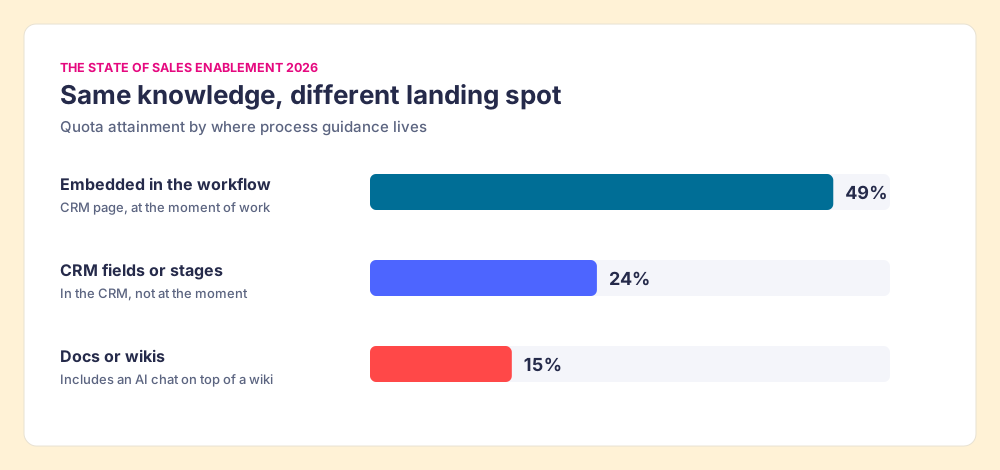
Put an AI chat on top of a wiki and the wiki gets a better front desk. The rep still walks to it. In the survey’s terms, a knowledge base reached through a separate window is still a doc or a wiki, however fluent its answers. The same survey found 89% of teams have a defined sales process and 36% see reps follow it. That 53-point gap opens with the answers already written down, and many teams can now retrieve them in seconds.
Two more things widen the gap. Hermann Ebbinghaus showed in the 1880s that people lose roughly 70% of new information within a day without reinforcement (forgetting curve), so the answer a rep read at the start of the call is fuzzy by the follow-up. And a knowledge base cannot tell you whether anyone used it. It logs questions asked. It does not log the proposal that went out with the wrong discount. A manager reading the knowledge base dashboard sees healthy question volume and a team that looks well informed.
How do you create a knowledge base reps and Claude can both read?
In 2026 a knowledge base has a second reader. Reps increasingly ask Claude, ChatGPT or Copilot to draft the follow-up, prep the call or update the record, and those assistants answer from whatever they can reach. If your knowledge base sits behind a login the assistant cannot use, Claude writes the recap from general knowledge of how sales works, and your pricing policy never enters the draft. So when you create a knowledge base now, you are writing for two readers, and the second one reads everything you connect it to and nothing you do not.
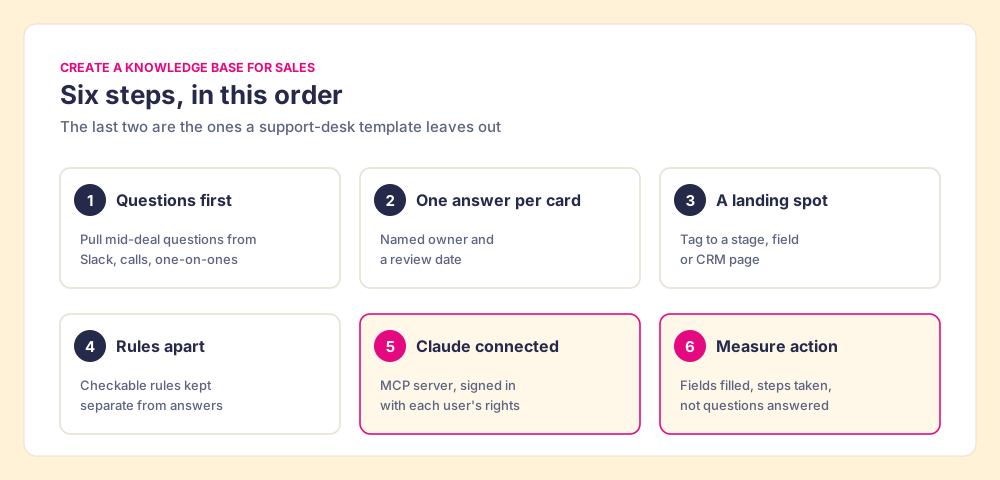
The knowledge base builder you choose matters less than the order you build in:
- Questions first. Pull the questions reps ask in the middle of deals from Slack threads, call recordings and manager one-on-ones. A knowledge base organized by the org chart answers questions reps rarely ask at the moment of need.
- One answer per card. Short, atomic entries with a named owner and a review date. A model retrieves a paragraph about discount approval more reliably than it digs that paragraph out of a 30-page pricing doc, and an owner keeps the open book current.
- A landing spot for each answer. Tag each card to the moment it is needed: a deal stage, a CRM field, a page in HubSpot or Salesforce. If you cannot name where the rep will be when the question arises, the card belongs in reference, not in the flow of work.
- Rules kept apart from answers. “Discounts over 15% need VP approval” is an answer. “No deal moves to Proposal with a discount over 15% and no approval note” is a rule, because something can check it. Keep rules in a form a system can test against every open deal.
- An MCP connection with each user’s permissions. Connect the base to Claude through a Model Context Protocol server, signed in per user, so the assistant sees what that rep sees and the draft cites your policy instead of a guess.
- A measure of action. Count the fields filled, approvals logged and steps taken that each card was supposed to produce. Questions answered is a support metric.
If you want a page structure to start from, our knowledge base template has one. For the broader question of what belongs in an internal knowledge base and who owns it, start there.
Where do Guru, Notion and Confluence fit?
All three are good knowledge bases, and in 2026 all three can be read by Claude. If your problem is one source of truth for the whole company, across support, product, HR and sales, one of them is probably the right pick. The comparison below was checked on October 1 and 2, 2026.
| Tool | AI layer | Claude access | Price (checked 2026-10-01/02) | Where the rep reads the answer | G2 (2026-10-01) |
|---|---|---|---|---|---|
| Guru | Knowledge Agents, AI search, card verification | MCP server | No public price; quote only. Vendr median $39,521/yr on 168 purchases | Guru app, Slack, browser extension | 4.7 from 2,323 reviews |
| Notion | Notion Agent, Enterprise Search (beta), AI Meeting Notes | Hosted Notion MCP, OAuth | Business $20/member/mo on yearly billing (full AI); Free and Plus get trial AI | Notion pages and Notion AI chat | 4.6 from 13,862 reviews |
| Confluence | Rovo search, chat and agents | Atlassian Rovo MCP server, OAuth 2.1 | Standard $5.42/user/mo, Premium $10.44; Rovo credits 25, 70 or 150 per user/mo by plan | Confluence pages and Rovo chat | 4.1 from 4,369 reviews |
| Supered | Supered Assistant; cards, guides, Process Rules | Supered MCP server, OAuth | Digital Adoption $13.50/user/mo yearly; Process Compliance $40 (5-user minimum) | On the HubSpot, Salesforce or Pipedrive page, via card triggers | 4.9 from 81 reviews |
Sources: Guru and Vendr; Notion pricing and Notion MCP; Confluence pricing, Rovo pricing and the Atlassian MCP server; G2 product review pages.
Guru is the most serious about the open-book problem: verification is its core, and its 2026 work pushes verified cards into Slack, agents and MCP clients. Notion is the cheapest way to give a whole company one writable home with an agent attached, and its hosted MCP server reads and updates pages a user can access. Confluence wins wherever engineering already lives in Jira, because Rovo comes with the paid plans and reads both.
The table’s fifth column is where they part ways with a sales team’s job. In each of the first three, the rep reads the answer in the knowledge base’s own surface or in a chat. That lands in the docs-or-wikis row of the chart above. If your problem is knowing, any of them works. If your problem is reps doing, the answer has to be on the CRM page where the doing happens.
What does an AI knowledge base look like when it lives where reps work?
I spent years at RevPartners, the HubSpot partner I founded, running sales implementations and RevOps for clients, and Supered grew out of that work. It handles the four parts like this.
The content lives as cards in Bases. A card trigger embeds a card in the CRM wherever matching text appears on the page, so the card on qualification shows up next to the “Decision Maker Bought-In” stage in a HubSpot or Salesforce deal, through the Sidekick extension, without the rep asking (Supered help center, card triggers). The answer lands at the moment of the work.
The second reader gets the same content. The Supered MCP server connects the workspace to Claude and other MCP clients with each user’s own sign-in, so Claude “only sees what you’re authorized to see,” searches the same cards while it drafts the follow-up, and creates Process Rules when you describe one in plain English. It cannot delete content, and any create or update needs confirmation (Supered MCP Server). The card the rep sees in HubSpot and the card Claude cites in the draft are one card.
The rules sit beside the answers and get checked. Process Rules test open deals against what done looks like, and a Process Board shows which deals break them, so the measure of action from the build list exists without a manager reading call notes. I run my own deals this way: one board, 22 rules, and one night I cleared 11 violations with a single Claude prompt in about 10 minutes, against about 45 by hand. Those are my own deals, one night, not a study, and the sales expectations use case shows the full setup.
Choose something else if you need one wiki for the entire company and sales is a small slice of its readers, or if your team sells from phones in the field: Supered has no mobile product and fits teams of 10 or more who work at a computer. Digital Adoption, which covers cards, guides and triggers, is $13.50 per user per month paid yearly; Process Compliance adds the rules and boards at $40 per user per month paid yearly, with a five-user minimum (pricing). On G2 we hold 4.9 from 81 reviews (checked October 1, 2026).
What should a sales team do first?
A sales leader has a few real options. You can add an AI layer to the wiki you already have, which is cheap and makes answers faster to find. You can buy a company-wide AI knowledge base such as Guru, Notion or Confluence, which is the right call when the knowledge problem spans every department. Or you can build the sales slice of your knowledge where the work happens: answers on the CRM page, rules that get checked, and an MCP connection so Claude reads both.
For the sales team, build where the work happens, even if the rest of the company runs Guru, Notion or Confluence. The evidence points one way. Retrieval made answers cheap, and the Stanford results show it did not make them right without owners. The WHO numbers show a correct prescription still gets skipped half the time. And The State of Sales Enablement shows the landing spot moves quota attainment from 15% to 49%. A sales AI knowledge base pays off when the answer reaches the rep in the CRM, reaches Claude in the draft, and leaves a record of whether anyone acted.
If you are deciding how to wire Claude into this, read Claude for sales next. It covers the connectors, the plan requirements, and why the rules have to live outside the chat. For the in-CRM side, our sales knowledge base guide goes deeper on what reps need at each stage.
Frequently asked questions
What is an AI knowledge base?+
How do you create a knowledge base with AI?+
What is the best AI knowledge base for a sales team?+
Can Claude read my company knowledge base?+
Why do AI knowledge base answers get ignored?+
Your process, running itself.