The Prospeo Chrome Extension in 2026: A New Listing, a Side Panel, and a Front Desk That Checks the Register
The Prospeo Chrome extension was relisted in July 2026 as a side panel that matches the page you are on against Prospeo's own database. What changed, where it works, what each reveal costs, how to install it, why it shows different data, and the alternatives.
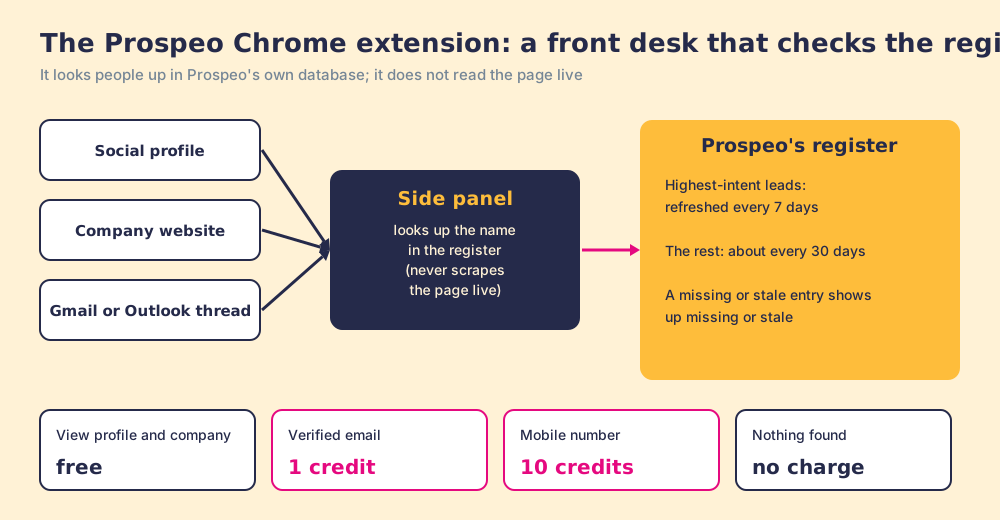
The Prospeo Chrome extension is Prospeo's free side-panel add-on for Chrome and Chromium browsers that matches the profile, company website or email thread you are viewing against Prospeo's own database and reveals verified emails for 1 credit and mobiles for 10.
If you installed the Prospeo extension before this summer, the one in your browser is not the one Prospeo supports today. The listing that carried 30,000 users went dark on June 29, 2026, and a new one appeared on July 6 with a new ID, a side panel, and a different relationship with the pages you visit. The quick version, checked October 2, 2026:
- Prospeo’s extension. The right buy for one or two reps who want verified emails and mobiles from company sites, profiles, and their inbox on a posted price, from a Free plan of 100 credits a month.
- Supered Prospector. The right buy for a team that already pays for Clay: one extension, Clay’s waterfall across 200+ vendors behind it, Prospeo included as a step if you want it, at $45 per rep per month billed annually.
- Lusha or Apollo. The non-Clay alternatives: Lusha for a cheaper phone per credit, Apollo when the dialer and sequences belong in the same plan.
The Prospeo Chrome extension is Prospeo’s free side-panel add-on for Chrome and Chromium browsers that matches the profile, company website or email thread you are viewing against Prospeo’s own database and reveals verified emails for 1 credit and mobiles for 10. Its current Chrome Web Store listing, “Prospeo Contact Finder,” showed 10,000 users and 4.9 out of 5 from 335 ratings on October 2, 2026, version 3.0.1, published by Defastra Tech Inc. of Toronto (Chrome Web Store).
What does the Prospeo Chrome extension do?
A good hotel front desk never studies your face. You give a name or a room number, the clerk looks it up in the register, and whatever the register says is what you get: the booking, the bill, the wake-up call. If you changed your name last month and the register has not caught up, the clerk will cheerfully address you by the old one.
The Prospeo extension is that front desk. Prospeo’s troubleshooting guide says it plainly: the extension “pulls from Prospeo’s own database, not from the profile you’re browsing. Prospeo never scrapes social profiles in real time and relies only on its own data sources” (Prospeo, troubleshooting the browser extension, updated July 17, 2026). You open the side panel on a page, the extension identifies who or what the page is about, and it reads Prospeo’s register.
Prospeo’s usage guide lists three places the desk opens (Prospeo, how to use the browser extension):
- A social profile. The Prospect tab shows the person’s name, title, company and location, with Reveal email, Reveal mobile, Add to list, and Push to Integration. Below sit the company’s details, buying intent, technologies, funding rounds, and an All Employees tab you can filter by title, seniority, or department.
- A company website. The same company view, employees included, on the company’s own site.
- Gmail and Outlook. When you open a thread, the extension checks whether it can match the participants and shows a “Ready to enrich” prompt if it can.
Two rules sit under every reveal. “Pushing a lead to an integration or adding them to a list will automatically reveal their emails,” at 1 credit per email found. And “if no valid contact data is found, no credit is spent,” per the store listing.
Why did the Prospeo extension change in 2026?
The record is in the Chrome Web Store’s own pages and one third-party tracker. The listing Prospeo used since 2023 now shows “Item not available.” Chrome-stats, which archives store listings, records it as “removed from Chrome Web Store on 2026-06-29 due to Chrome Web Store policy violation,” at version 2.0.13, with 30,000 users and a 4.73 rating from 221 reviews before removal (chrome-stats). A new listing was created on July 6, 2026, and Prospeo’s install guide and troubleshooting page link only to it, adding: “We recently launched a new version with significant improvements, so removing your old one and reinstalling can fix a lot of issues.”
We found no public statement from Prospeo on why the old listing came down, and we will not guess. What we can show is what each version asked Chrome for, because an extension declares its reach in a file called a manifest, and the store publishes it.
| Version | Store status | Users and rating | Access to linkedin.com | How it shows up |
|---|---|---|---|---|
| 2.0.13 (old listing) | Removed June 29, 2026 | 30,000; 4.73 from 221 | Host permission for linkedin.com, plus the scripting permission | Script on every site, plus Gmail and Outlook |
| 3.0.1 (current listing) | Live, updated July 2026 | 10,000; 4.9 from 335 | linkedin.com excluded from where its script runs; host permission only for prospeo.io | Chrome side panel |
Old-version permissions come from chrome-stats’ archive; the current manifest comes from the live store page, both read October 2, 2026. The new listing also states that the developer “will not collect or use your data” beyond its approved uses.
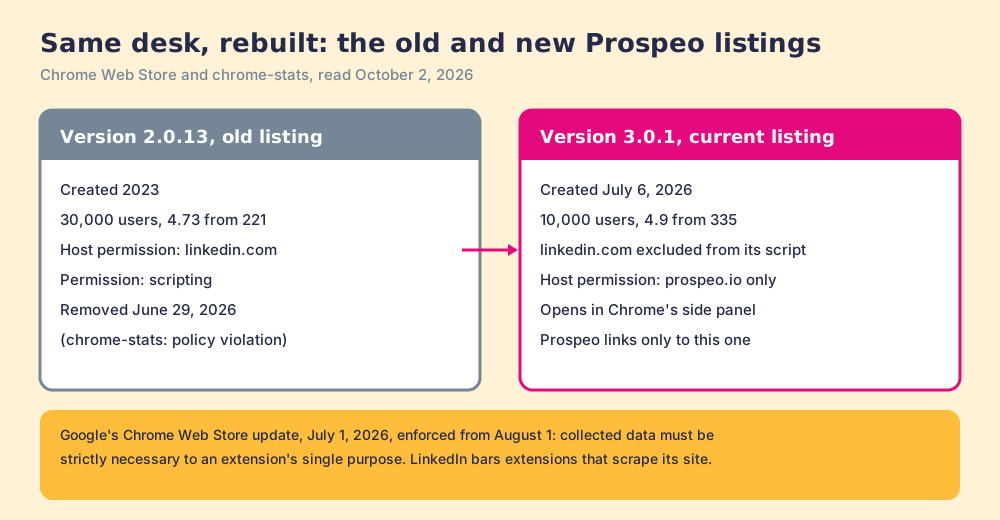
Two outside rules frame the change, and both apply to every extension in this category, ours included. LinkedIn’s Help Center says it does not permit “browser plug-ins, or browser extensions that scrape, modify the appearance of, or automate activity on LinkedIn’s website” (LinkedIn Help). And on July 1, 2026, Google announced that “any user data collected by an extension must now be strictly necessary to the extension’s disclosed single purpose,” with enforcement from August 1 (Chrome for Developers). A rep should not have to read manifests to stay safe, which is why the question belongs on the buyer’s list: ask any vendor, us included, what its extension reads from the page.
For a team rolling Prospeo out, the practical step is short. Remove the old extension if it is still installed, install the new listing, and log in to Prospeo in the same browser.
How much does the Prospeo extension cost?
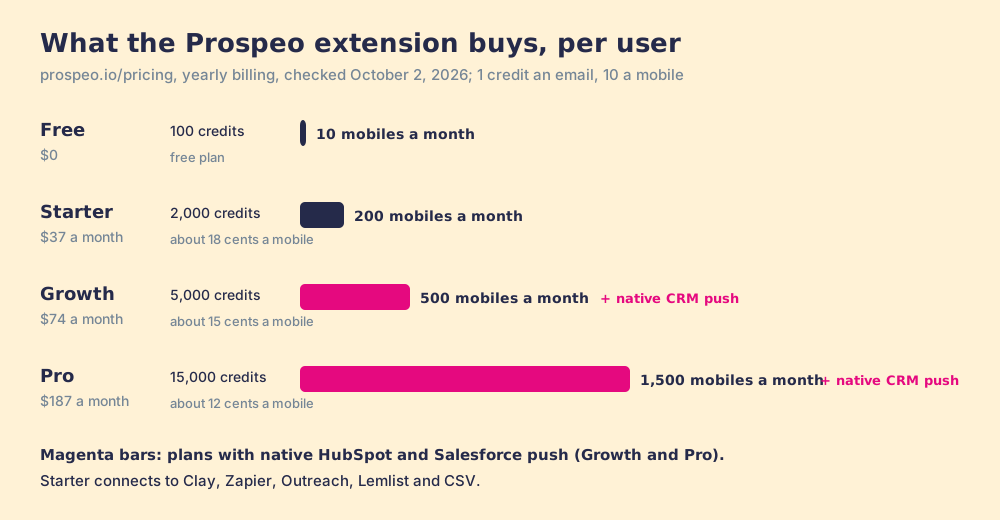
The extension is on every plan, Free included. What changes is the number of credits behind it. Prices from prospeo.io/pricing, October 2, 2026, all per user:
| Plan | Monthly billing | Yearly billing | Credits | Mobiles at most (10 credits each) | CRM push |
|---|---|---|---|---|---|
| Free | $0 | $0 | 100 a month | 10 a month | None |
| Starter | $49 a month | $37 a month ($441 a year) | 2,000 a month | 200 a month | Clay, Zapier, Outreach, Lemlist, CSV |
| Growth | $99 a month | $74 a month ($888 a year) | 5,000 a month | 500 a month | Adds native HubSpot and Salesforce |
| Pro | $249 a month | $187 a month ($2,241 a year) | 15,000 a month | 1,500 a month | Same as Growth |
The CRM column matters for an extension built around Push to Integration. “Every plan connects to Clay, Zapier, Outreach, Lemlist, and CSV export. Growth and Pro also offer native HubSpot and Salesforce sync,” Prospeo’s pricing FAQ says, and its usage guide adds that “companies can only be pushed to a CRM.” A team that wants the side panel to drop contacts straight into HubSpot is buying Growth at $74 a user a month, not Starter at $37. The Prospeo pricing page works the cost per credit used and the rollover rules in full.
How do you install the Prospeo Chrome extension?
Prospeo’s install guide, updated July 17, 2026 (Prospeo, install the extension):
- Search the Chrome Web Store for “Prospeo Contact Finder,” or follow Prospeo’s link to the new listing.
- Click Add to Chrome, then Add extension.
- Log in at prospeo.io in the same browser, then refresh the page.
- Open any page, click the Prospeo logo on the right edge to open the side panel, then use the pin icon at the top of the panel to keep it handy.
It runs on Chrome and “any Chromium-based browser (e.g., Brave, Edge, Opera, etc.).” Free-plan accounts can be blocked for “multi-accounting, another email on the same domain, or use of a VPN,” and a paid plan lifts the block.
Why does the extension show different data than the page?
Back at the front desk, a guest who changed jobs last month gets greeted by last month’s employer. Prospeo calls the same thing “expected behavior, not a bug”: “some details may differ from what’s on the page, or a profile may not be in our database yet.” Prospeo’s data page says its highest-intent leads refresh every 7 days and the broader dataset “every ~30 days” (prospeo.io/our-data).
The reviews line up with that design. Prospeo held 4.6 out of 5 from 854 reviews on G2 on October 2, 2026 (G2). A founder wrote in September 2026 that “Prospeo has a relatively smaller database compared with other providers in this space,” and another reported “occasional company-resolution mismatches.” Both are register problems: a name the register lacks, or two guests with similar names.
There is a fair case for the design. A desk that only reads its register cannot be blamed for what a page says, and it charges nothing when the register is empty. The cost is coverage: one register, one set of gaps.
Why trust this page?
I started RevPartners, a HubSpot partner that did only sales implementations, sold roughly twice as much Sales Hub as any other partner, and reached Elite tier in 13 months. Supered came out of that work and is the #1 sales enablement app on the HubSpot marketplace, with 5.0 from 122 reviews there and 4.9 out of 5 from 81 reviews on G2 (both checked October 1, 2026). That is also the disclosure: we make Supered Prospector, and it sits first among the alternatives below for teams that have Clay. The grading shows its weights so you can flip them.
How does the Prospeo extension compare with the alternatives?
The lens is a team of ten to fifty reps that wants contact data reps will use where they already work, and a leader who can see which lists turn into pipeline. Each criterion is scored 1 to 5 and weighted: coverage of the contact you need (x3), rep-side delivery (x2), price structure (x2), what the leader sees after the export (x2), bundled outreach (x1), out of 50. The scores match the Prospeo pricing page and the Lusha Chrome extension page.
| Rank | Tool | Grade | Score | Best fit | CRM integration | Setup effort | Pricing (plan with the extension) | Reason to switch from Prospeo |
|---|---|---|---|---|---|---|---|---|
| ref | Prospeo extension | B+ | 29 | One or two reps wanting cheap verified emails and mobiles | Native HubSpot and Salesforce from Growth | Minutes | Free to $187 a user a month billed yearly | Stay if one register’s coverage is enough |
| 1 | Supered Prospector | A | 44 | Teams that already pay for Clay | Native (HubSpot, Salesforce, Pipedrive) | Under a week on an existing Clay account | $45 per rep per month, billed annually, plus your Clay plan | 200+ vendors per lookup, Prospeo optional, lists followed to closed |
| 2 | Apollo | A- | 36 | Teams wanting data, a dialer, and sequences in one seat | Native (HubSpot, Salesforce) | A day | $49 per seat per month, billed annually | Phones at 8 credits on a 30,000-credit seat, outreach included |
| 3 | Lusha extension | B+ | 29 | A few reps revealing from LinkedIn on a posted price | Native (Salesforce, HubSpot, Pipedrive) | Minutes | Free to $3,599.10 a year (Premium, 5 seats) | A phone at 5 credits, 400,000 users |
Prospeo’s 29 is coverage 4, rep-side delivery 4, price 3, what the leader sees 1, outreach 1. Coverage earns its 4 on verified mobiles in the same credit. Price drops to 3 because the native CRM push waits for Growth. Prospector’s coverage score is Clay’s waterfall, credited to Clay, and its outreach score is low on purpose: it has no dialer and sends no email.
Corporate status, checked October 2, 2026: Prospeo is independent, with no acquisition or funding announcement found; its extension is published by Defastra Tech Inc. of Toronto.
Where does Supered Prospector fit?
A front desk with one register is fine until the register lacks the guest. A concierge desk works differently: when its own book has no answer, it calls the next hotel, then the next. Clay’s waterfall is that concierge. A GTM engineer writes the order once, ask this provider, then that one, stop at the first verified email or phone, across 200+ data and AI vendors (Clay, rep prospecting), and “If an enrichment returns no result, you’re not charged Data Credits or Actions” (Clay pricing).
Prospeo can be one of the hotels the concierge calls. Clay’s Prospeo integration, joined September 1, 2023, offers Find Work Email, Find Mobile Number, Find people at company, and more, each on “Clay Credits or Bring Your Own Account” (Clay, Prospeo integration).
Prospector puts the concierge at the rep’s elbow. Clay plus Supered is the best way for a sales team to prospect: GTM engineers build in Clay, reps never open Clay. Prospector runs inside the Supered Chrome extension, on the team’s own Clay account. Supered does not bring its own database. It brings Clay’s waterfall, which is every database, routed, and that is why we chose Clay as our only data provider.
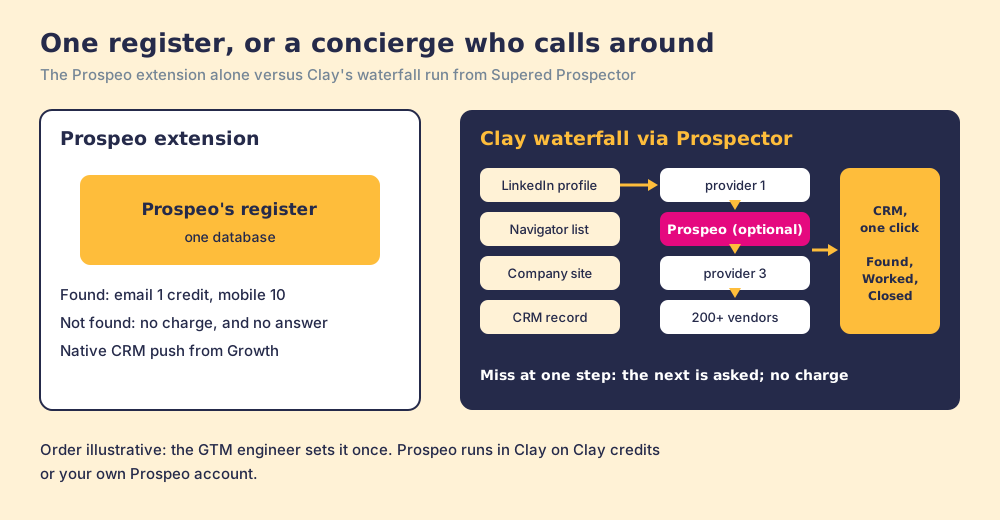
What each person gets:
- The GTM engineer. Build flows once, each a Clay table or function with a destination, and reps pick them from a Push menu. Your waterfalls, tiers, tags, and sequence variables stay yours.
- The rep. The table as a button on a LinkedIn profile, a company website, or a HubSpot, Salesforce, or Pipedrive record. Sales Navigator leads go onto a prospect list, and the list goes to a Clay table. Before pushing, the rep sees who owns the record and whether it was prospected before.
- The leader. Found, Worked, Closed: which lists reps found, who is working theirs, and how each lead ended the way your process says, Qualified, Recycled, or Disqualified.
Prospector works within LinkedIn’s terms and does not copy search results in bulk; the contact data comes from Clay’s waterfall on the customer’s Clay account.
The arithmetic. Clay Growth lists at $495 a month, $5,940 a year (Clay pricing). Prospector is $45 per rep per month billed annually, from one rep (Prospector). Ten reps come to $11,340 a year. Ten reps on Prospeo Growth, the plan with the native CRM push, come to $8,880 a year; on Starter, $4,410. Prospeo is cheaper per head. What the extra buys is every provider behind each lookup, a rep who starts at the CRM record or the Navigator list, and lists you can follow to closed.
Choose something else if you do not have Clay. Prospector runs on the customer’s Clay account and does nothing without one, and someone has to build the waterfall; Clay’s homepage says “GTM engineers build on Clay.” Choose something else, too, if you are one rep revealing a handful of emails a week, because Prospeo’s Free plan and $37 Starter are hard to undercut for that job. The sourcing use case shows the Prospector setup, and the LinkedIn Chrome extension roundup sorts the whole category by job.
Which should you choose?
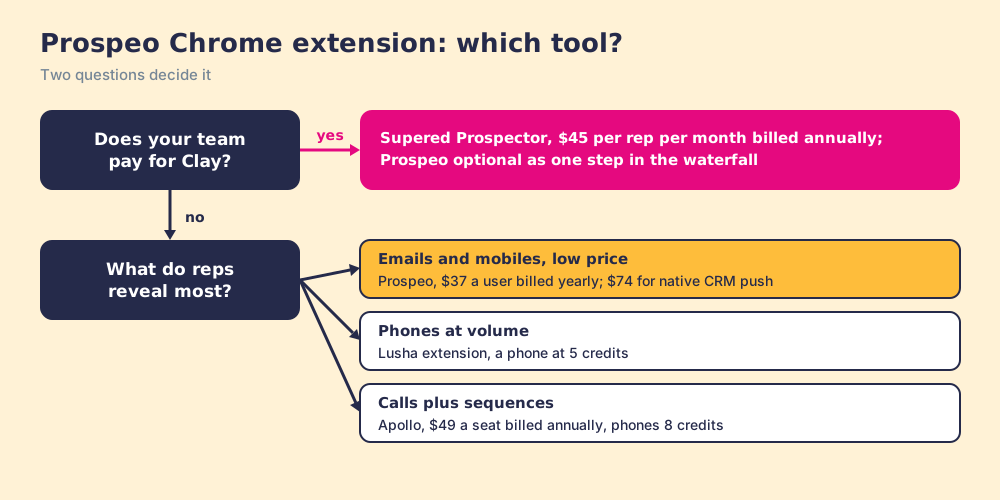
Two questions decide it: does your team pay for Clay, and what do your reps reveal most.
- Prospeo’s extension, kept. The pick for one or two reps who want verified emails and mobiles from company sites, profiles, and the inbox at a low posted price. Reinstall the new listing, and buy Growth if contacts must land in HubSpot or Salesforce natively.
- Lusha’s extension. The pick when phones are most of the meter: a phone costs 5 credits against Prospeo’s 10.
- Apollo. The pick when the reps call at volume and want the dialer and sequences in the same seat.
- Supered Prospector. The pick when the team already pays for Clay and wants every source behind each lookup, Prospeo kept only if it earns a step, and a view of which lists got worked and closed.
What we recommend: if you keep Prospeo, treat the July relaunch as a fresh rollout. Remove the old extension, install the new listing, and teach reps that the panel reads Prospeo’s register, so a title that disagrees with the page is a stale entry, not a broken tool. If your team has Clay, stop relying on one register. Put the concierge at the rep’s elbow, pay nothing for the calls that come back empty, and watch each list move from found to closed. For the next question on the same vendor, the Prospeo pricing page prices every credit, and a Prospector demo on your own Clay account shows the concierge work from a LinkedIn profile.
Frequently asked questions
Is the Prospeo Chrome extension free?+
Does the Prospeo extension work on LinkedIn?+
Why was the old Prospeo extension removed?+
Why does the Prospeo extension show different details than the profile?+
Which browsers does the Prospeo extension support?+
What is the best alternative to the Prospeo Chrome extension?+
Everything we have written on Prospeo
More on Prospeo
Looking past Prospeo? See Supered Prospector on your own Clay accountYour Clay waterfall, where reps already work.