In-App Training: Teach at the Turn, Then Check the Record
In-app training is usually sold as product tours. In a CRM the clicks are the easy part. Training research says the lesson sticks when it fires on the work situation and gets checked against the record. Formats, triggers, measurement and the tool options.
In-app training is guidance delivered inside the software a person is already using, at the moment they need it, through tooltips, walkthroughs, checklists or contextual cards, so they learn a task while doing it instead of before it.
Somewhere in a sales team’s shared drive sits the recording of the CRM training from onboarding week. It runs fifty minutes. It covers the deal stages, the required fields, and what has to be true before a deal moves past Decision Maker Bought-In. The new rep sat through it, nodded in the right places, and passed the quiz. Six weeks later, with a buyer on the phone and the stage dropdown open, the rep picks the stage that feels right. The fifty minutes are in the drive. The buyer is on the line.
In-app training is guidance delivered inside the software a person is already using, at the moment they need it, through tooltips, walkthroughs, checklists or contextual cards, so they learn a task while doing it instead of before it. The pages that rank for the term come from Intellum, Appcues, Chameleon, WalkMe and Whatfix, and they treat it as product education: show users where the buttons are. In a CRM the buttons are the easy part. The hard part is the process. Two findings from the training research decide which in-app training is worth building there. What happens around the job after training predicts whether people use it more than what happens in the session does, and plans of the form “when this happens, I will do that” raise the use of trained skills. Put those together and you get a design rule the product-tour pages skip: in a CRM, in-app training should fire on the work situation and be checked against the record.
What is in-app training?
The definitions in the field agree on the core. Intellum calls it “content and guidance layered directly on top of your product’s user interface” (Intellum, September 12, 2024). Appcues says “any interactive, real-time guidance you add to software that allows users to learn features and workflows as they use the product” (Appcues). Salesforce’s own Trailhead module on the subject makes the case in one line: users “see contextual, relevant help in their flow of work, reducing the need for context switching” (Trailhead, Add Learning as Users Work).
The formats are a short, stable list. Each one teaches a different kind of thing, and that difference matters more than the vendor you pick:
- Tooltips and hotspots. A small note anchored to one field or button. They teach a single fact: what this field means, which value to pick.
- App walkthroughs and product tours. A numbered sequence that moves the user from click to click. They teach where things are and the order of a procedure. Software walkthroughs are usually set to play on first login or on a page visit.
- Guided workflows. A walkthrough that waits for the user to complete each step before moving on. They teach long or rare procedures where order matters, such as building a quote.
- Checklists. A visible list of tasks with progress. They teach the shape of a goal, such as a rep’s first-week setup.
- Contextual cards. A short piece of guidance that appears when a word, stage or record type shows up on screen. They teach judgment at the point of use: what “bought-in” means and what proof to ask for.
Most of this list was designed for a software company teaching its own customers a new feature. A CRM is a different job. Reps learn where the buttons are within their first week. What they have to learn, over and over, is your process, and the process lives in the situations the interface presents: this stage, this missing field, this kind of buyer.
Why does classroom CRM training fade?
Because people forget, and because the session ends where the work begins. Hermann Ebbinghaus measured the first part in 1885, and his forgetting curve has held up since: without reinforcement, about 70% of new information is gone within a day (Forgetting curve, Wikipedia).
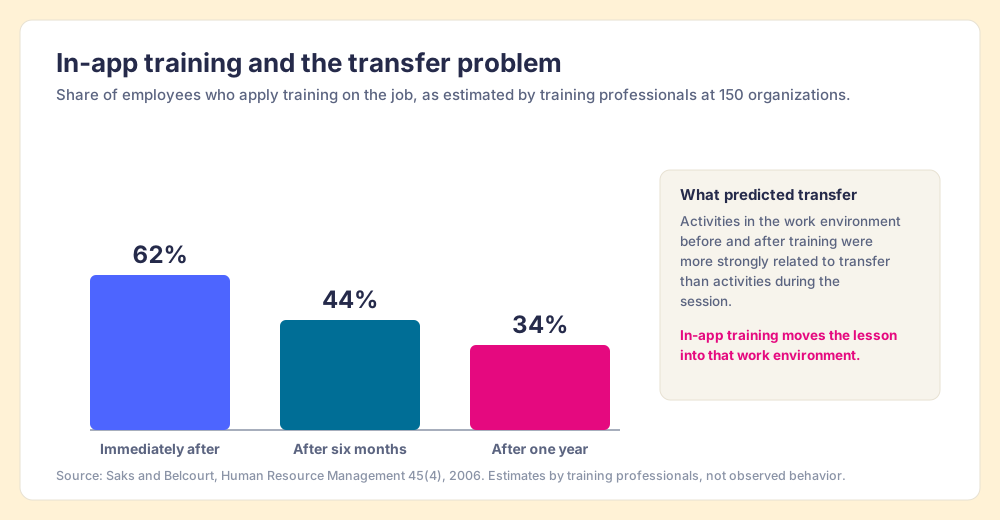
The second part is less famous and more useful. Alan Saks and Monica Belcourt asked training professionals at 150 organizations how many employees apply training on the job. Their estimates: 62% immediately after training, 44% after six months, 34% after a year (Saks and Belcourt, Human Resource Management, 2006). Then they looked at what predicted the difference. Training activities before, during and after the session all related to transfer, but “activities in the work environment before and after training were more strongly related to transfer than activities during training.” The session is the smallest lever. The room the rep goes back to is the larger one.
A small correction belongs here, because the field repeats a number that has no floor under it. You will see the claim that only 10% of training ever transfers to the job. J. Kevin Ford, Stephen Yelon and Abigail Billington traced it and found the belief had spread “despite the lack of empirical, behavioral evidence” (Ford, Yelon and Billington, Performance Improvement Quarterly, 2011). Their fix is the one this post builds on: describe “observable indicators of use” and set “quantitative standards of successful transfer.” Do that in a CRM and the indicators are sitting in the records already.
So the classroom is not useless, and 34% after a year is a real, sobering estimate rather than a myth. The work is to move the lesson out of the session and into the room the rep goes back to. In-app training is that move, made in software.
How does in-app training work in a CRM?
A sat-nav is a good teacher for one reason: it speaks at the turn. Suppose instead it read you the whole route in the driveway, all fourteen turns, then went silent. You would remember the first two. By the motorway exit you would be guessing, and you would blame yourself for a poor memory rather than the device for poor timing.
A ten-step walkthrough that plays when a rep first opens the deal record is the driveway readout. It is accurate, it is complete, and it arrives before any of its steps are needed. The rep clicks Next ten times to make it go away. The lesson that would help (“before you move a deal to Decision Maker Bought-In, confirm the economic buyer has seen pricing”) is needed three weeks later, on one particular deal, when the stage dropdown is open.
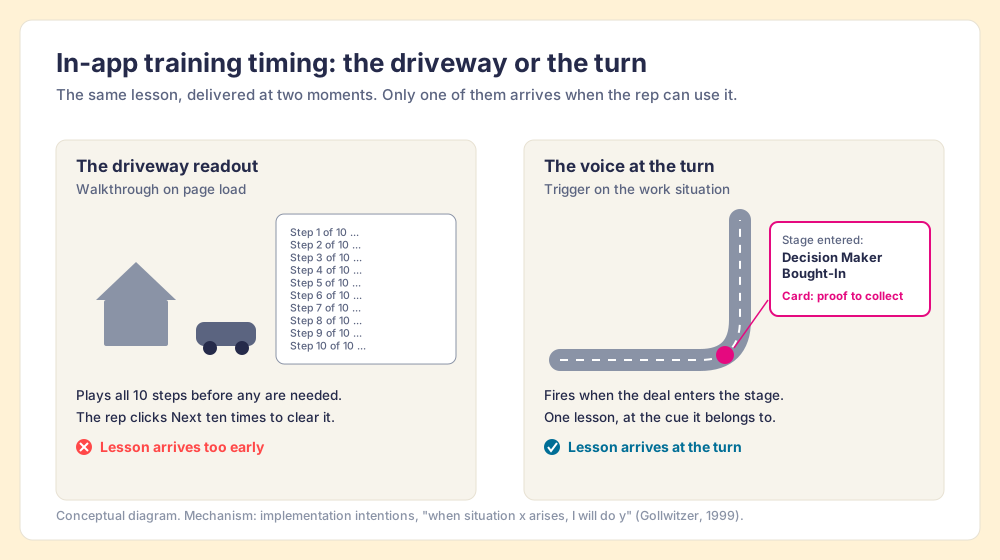
The picture has a mechanism behind it. Peter Gollwitzer named them implementation intentions: plans of the form “Whenever situation x arises, I will initiate the goal-directed response y!” (Gollwitzer, American Psychologist, 1999). His meta-analysis of 94 studies with Paschal Sheeran found a medium-to-large effect on goal attainment, d = 0.65 (Gollwitzer and Sheeran, 2006). The plan works because it hands the decision to the situation: the cue shows up, and the response comes with it.
Training researchers tested the idea directly. Friedman and Ronen ran two experiments in which trainees formed implementation intentions at the end of a course. In the first (N = 37), those trainees “implemented active listening skills sooner, and to a greater degree” than the control group; in the second, run in the field (n = 28), they “received a higher performance score for implementing the trained behavior” (Friedman and Ronen, European Journal of Social Psychology, 2015). The samples are small. The direction matches Gollwitzer’s larger body of work.
Now carry that into the CRM. An implementation intention lives in a person’s head and has to survive a busy day. A trigger lives in the software and does not forget. “When a deal enters Decision Maker Bought-In, show the card that says what proof to collect” is an implementation intention the CRM holds for the rep. Here the sat-nav picture reaches its edge: a sat-nav knows where you are from the map, while a CRM only knows what its records and screens say. So the trigger has to key off something visible: a stage name, a field, a record type, a page.
Three rules follow, and they separate in-app training that sticks from in-app training reps dismiss:
- A trigger tied to the work situation. Fire on the stage, the empty field or the record type, the cue the rep is facing, rather than only on the first visit to a page.
- One lesson per trigger. A card that answers the question this situation raises. Fourteen turns belong to fourteen cues.
- A check on the record afterward. The lesson succeeded if the deal past the stage carries what the stage requires. Anything less is a guess.
Which in-app training format fits which job?
Match the format to what you are teaching. The clicks of the CRM are a solved problem after week one; the stage criteria, the qualification rules and the handoffs are taught for as long as the rep sells.
| Job you are teaching | Best format | What fires it | What proves it worked |
|---|---|---|---|
| What a field means, which value to pick | Tooltip or hotspot | The field on screen | Field filled with a valid value |
| A rare multi-step procedure (quote, renewal, handoff) | Guided workflow or app walkthrough | The rep starts the task | Task completed with the right objects created |
| A new rep’s first-week setup | Checklist | First logins | Checklist items done in the CRM, not ticked by hand |
| Stage criteria, qualification, objection answers | Contextual card | The stage, record type or term on screen | Records past the stage meet its criteria |
| The standard itself, every day | Process rule and board | The record falls out of the standard | Share of records in standard, by rep |
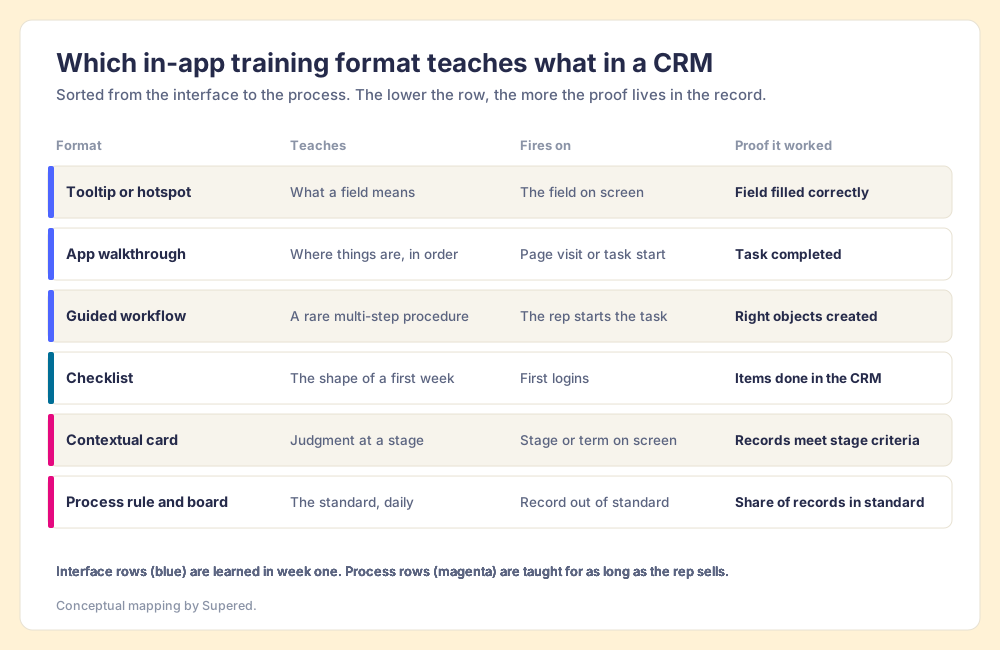
Two patterns show up when teams get this wrong. They build ten walkthroughs for the interface and none for the process, because walkthroughs are what the tool demo showed. Or they write the process into a long card that fires on every deal page, which turns a cue into wallpaper. The table above is the corrective: the more a lesson is about judgment, the narrower its trigger should be.
Does in-app training improve sales results?
The best evidence we have is our own survey, and it points one way. In The State of Sales Enablement 2026, quota attainment was 49% when guidance is embedded in the workflow, 24% when it lives in CRM fields or stages, and 15% when it sits in docs or wikis (The State of Sales Enablement 2026). The same survey of 198 sales leaders found 89% have a defined process and 36% see reps run it.
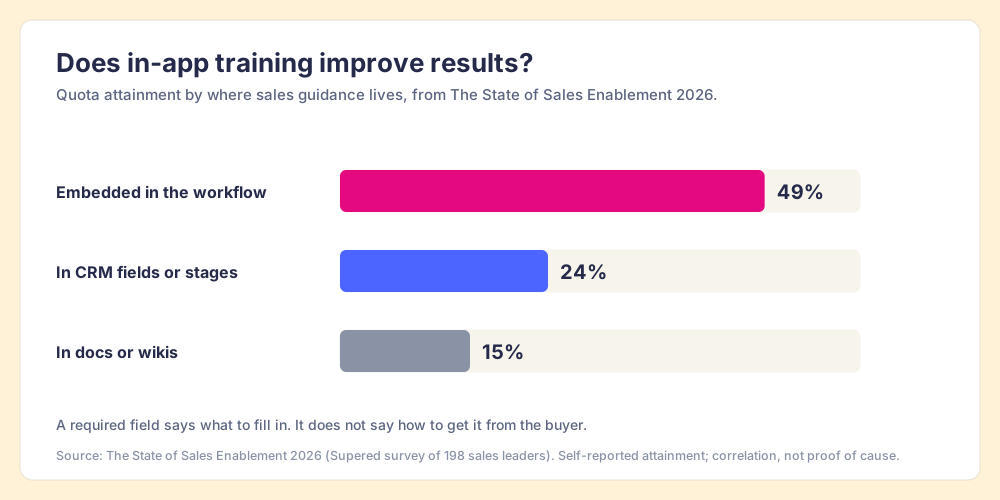
Read it with care. It is a survey, attainment is self-reported, and teams that embed guidance probably differ in other ways too. What makes it worth acting on is that it agrees with the transfer research above, which was run by different people for different reasons: support at the point of work predicts use, and use predicts results. The middle bar deserves a second look. Writing the process into stages and required fields helps, and it still leaves most of the gap, because a required field tells the rep what to fill in and nothing about how to get it from the buyer.
How do you measure in-app training?
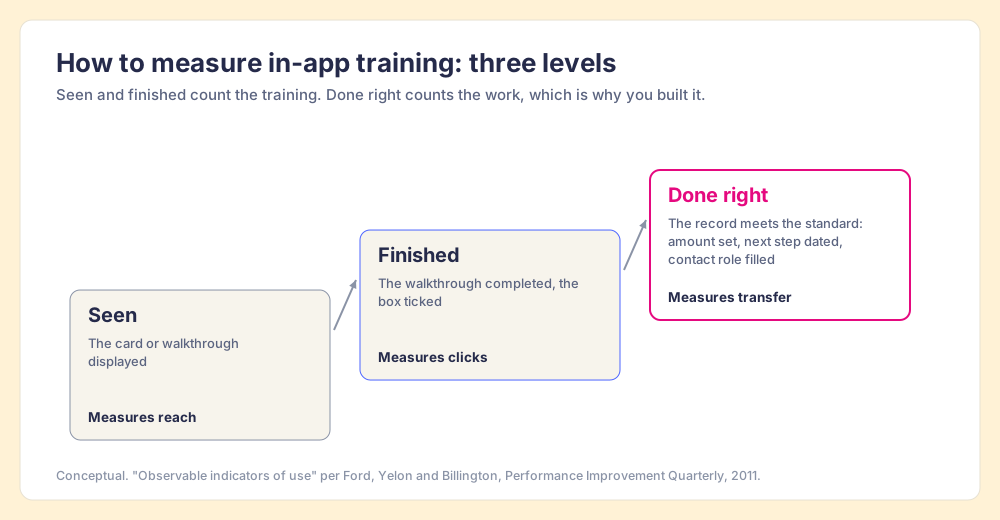
Measure it on three levels, and trust only the last one.
- Seen. The card or walkthrough displayed. A count of exposure, useful for spotting guidance that never reaches a rep.
- Finished. The walkthrough completed or the checklist ticked. A count of clicks; reps who want a tour to go away also finish it.
- Done right. The work the lesson teaches shows up correctly in the record. The only level that tells you the training transferred.
Intellum’s piece makes the same point in its own words, telling readers to “connect in-app guidance to whether users actually completed the supported action.” We agree and would push one step further for CRMs. In most software, finding out whether a user completed the action means event tracking and a product analytics tool. In a CRM, the action leaves a record behind. The deal past Discovery either has an amount or it does not. The stage either has a dated next step or it does not. Ford, Yelon and Billington asked trainers to define “observable indicators of use”; a sales team’s indicators are its deal records, readable by rep every morning.
In-app training meets inspection at the record. You can only expect what you inspect, and teams that inspect deals against a defined process at the highest frequency hit quota at 6.3x the rate of the lowest band (The State of Sales Enablement 2026). The point of reading the record is not to catch reps out. When a rule fails on a third of the deals at one stage, the lesson for that stage is unclear or arrives at the wrong time, and the fix goes into the system, not into a sterner email.
What are the options for in-app training in a CRM?
There are four realistic routes, and each fits a different team.
- Native CRM guidance. Salesforce In-App Guidance gives you prompts and walkthroughs inside Lightning Experience at no extra cost, with limits: 3 active walkthroughs without the Enablement add-on license and 10 steps per walkthrough (Salesforce Help). Salesforce Path adds up to five key fields and 1,000 characters of guidance per stage. For a few flows, start here.
- Enterprise digital adoption platforms. WalkMe (owned by SAP since the acquisition closed September 12, 2024) and Whatfix (independent; it raised a $125 million Series E in September 2024, per Crunchbase News) cover many applications at once, with deep analytics. Vendr lists a WalkMe median of $39,000 a year across 45 deals. They fit large companies rolling out ERP, HR and CRM together. Our WalkMe pricing breakdown has the detail.
- Product adoption tools. Appcues, Pendo and Userpilot are built for software companies teaching their own customers, with in-product tours and feature analytics. If your users are customers rather than your own reps, look there; our Pendo pricing and Userpilot alternatives pages compare them.
- Sales-specific in-CRM guidance. Tools that live in the CRM your reps use and key their guidance off sales objects: stages, deal fields, record types. Supered was built for this job.
What we recommend
If your reps already know the CRM’s buttons and the gap is the process, build in-app training around situations, and judge it by the record. Start with the three stages where deals most often stall or slip back, write one short card for each stage’s exit criteria, trigger it on the stage name, and check weekly what share of deals past that stage meet the criteria. Add walkthroughs for the rare procedures that reps forget between uses. Skip the first-login tour.
Supered started inside RevPartners, the HubSpot partner I founded, which did only sales implementations and reached HubSpot’s Elite tier in 13 months, and it is built on this pattern. On the Digital Adoption plan ($13.50 per user per month paid yearly, $15 monthly, per our pricing page), you write cards and record guides with the Supered Chrome extension, and card triggers embed a card wherever a chosen word or phrase appears on the page. The help center’s own example is a trigger for the deal stage “Decision Maker Bought-In” (Supered Help, Cards Triggers). Process Compliance ($40 per user per month paid yearly, 5-user minimum, includes Digital Adoption) adds Process Rules and Process Boards, which check the record against the standard and show managers, rep by rep, who is in it. It runs on HubSpot, Salesforce and Pipedrive, and it holds 4.9 stars from 81 reviews on G2 (checked October 1, 2026).
Choose something else if your main audience is customers learning your product (a product adoption tool fits better), if you need one guidance layer across ERP, HR and CRM at enterprise scale (WalkMe or Whatfix), or if you run Salesforce and need fewer than four walkthroughs (In-App Guidance is already in the box).
The onboarding and ramp use case shows the pattern on a new rep’s first ninety days, and our piece on CRM adoption covers why reps skip the CRM in the first place. When you want to see a stage card fire on your own pipeline, book a demo.
Frequently asked questions
What is in-app training?+
What is the difference between in-app training and a product tour?+
Does in-app training work better than classroom training?+
How do you measure in-app training?+
Does Salesforce have built-in in-app training?+
What are guided workflows?+
Your process, running itself.