HubSpot Migration Services: The Three Roads, Priced Honestly
Most lists of HubSpot migration services are vendor roundups. This is the decision: DIY, self-serve tools, or partner-led, what each road costs, where each breaks, and the one mistake all three roads let you make.
HubSpot migration services are the tools and firms that move CRM data and assets into or between HubSpot portals, and they sort into three roads: native do-it-yourself imports, self-serve migration apps, and partner-led migrations that pair the move with process redesign.
A disclosure before anything else: we are in this market, so read accordingly. Supered’s Package Builder lifts and shifts 75+ HubSpot asset types between portals, workflows, pipelines, properties, dashboards, reports, lists, sequences, playbooks, custom objects, lead scoring models, permission sets, plus the process layer that tells reps what to run at each stage, which makes it, by asset coverage, the most complete lift-and-shift tool in the HubSpot ecosystem. It also moves zero records, which is why this page will still recommend other tools by name. A portal is three layers, and no single tool lifts all of them.
Hold that three-layer picture, because it sorts the whole confusing market. The records (contacts, deals, history, associations) are layer one. The configuration (the 75+ packageable asset types that make the portal operate) is layer two. The process (what the team actually does in it) is layer three. A migration that moves layer one alone hands you an empty machine full of data; most vendor lists only compare layer-one tools, which is why they all read alike.
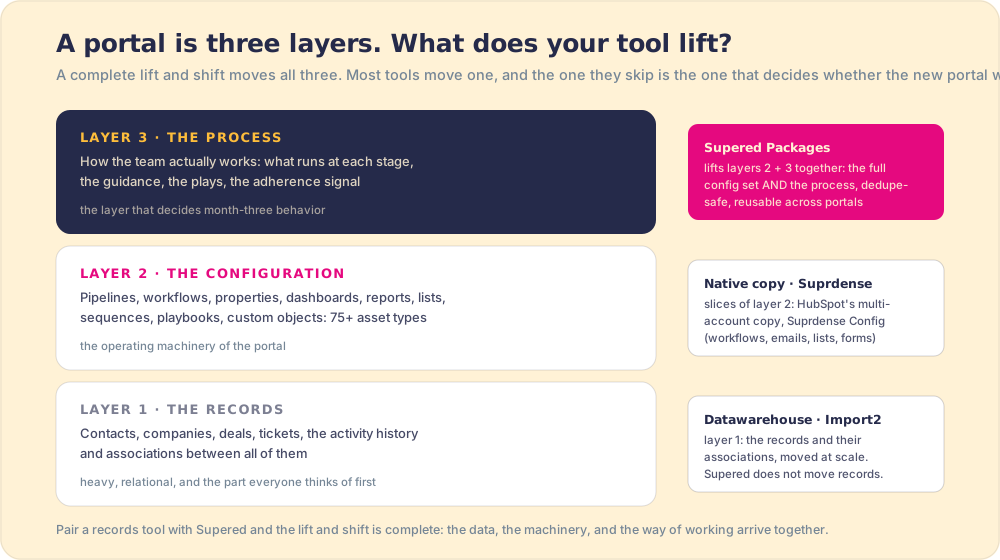
With the layers named, the services sort into three roads: do-it-yourself with HubSpot’s native tools, the self-serve tool road, and the partner-led road. Different prices, different failure modes, and one shared trap at the end.
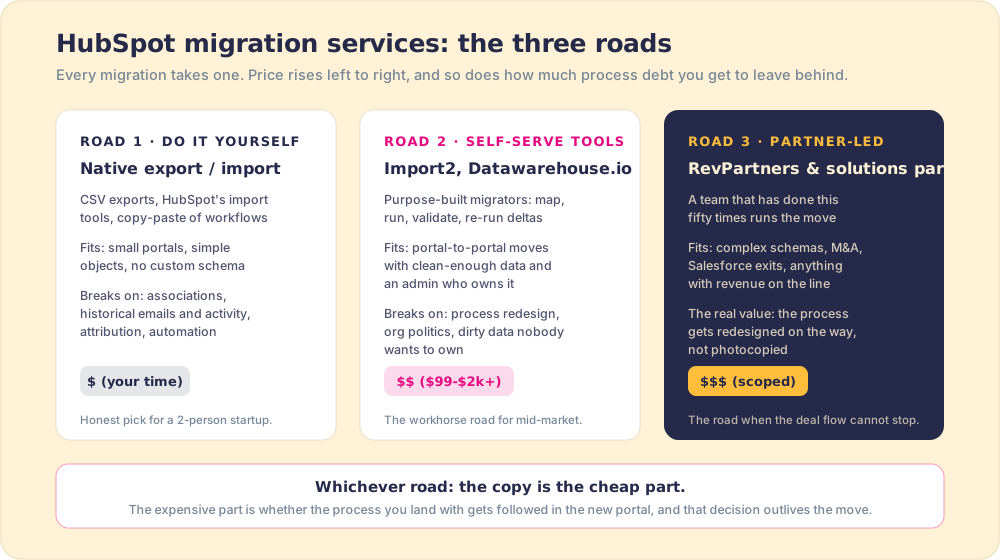
Which HubSpot migration services fit which team?
- Road 1: native DIY. HubSpot’s own import tools and CSV exports, plus elbow grease. Genuinely the right call for small, simple portals: standard objects, no custom schema, little automation worth preserving. Where it breaks, and breaks late, is everything relational: associations between records, historical emails and call logs, attribution data, and workflows, none of which ride in a CSV. Anyone who has rebuilt association labels by hand after a botched import took this road one portal too far.
- Road 2: self-serve migration tools, sorted by layer. For the records layer, Import2 is the long-standing generalist, a near-TurboTax experience for CRM moves priced from roughly $99 to around $1,800, and Datawarehouse.io is the HubSpot-to-HubSpot records specialist: certified Portal Migrator and Portal Toolkit apps, plus a Portal Sync product (2025) for keeping two live portals aligned through a slow cutover. For configuration slices, HubSpot’s own multi-account copy moves CMS assets and Suprdense’s Config deploys workflows, emails, lists, and forms across portals. For the configuration and process layers together, Supered’s Package Builder packages 75+ HubSpot asset types plus the process content itself, resolves each asset’s dependencies so it arrives able to function, and installs them in any portal, dedupe-safe (same-name assets are skipped, never duplicated) and reusable: build the package once, deploy it again wherever you need it. This road fits teams with an admin who owns the move; its failure mode is faithful execution of mistakes you did not know you were making, on every layer.
- Road 3: partner-led. A firm that has run this move fifty times runs yours. RevPartners is the most visible RevOps-native example (HubSpot Elite tier, known for running source and destination CRMs in parallel through cutover so the pipeline never goes dark), and HubSpot’s own professional services sit on this road too. You pay scoped project pricing, typically five figures once complexity is real, and the honest reason to pay it is not the data copy, which the Road 2 tools do for hundreds of dollars. It is that a good partner redesigns the process while the furniture is in the air.
That phrase deserves its own section, because it is the part every roundup skips.
What is the real product of a HubSpot migration?
From the week-after vantage point, the data copy is the cheap part of a hubspot data migration, and it collects all the attention. The expensive part rides along invisibly. A portal is more than its records: it is a fossil record of every process decision your team made, including the abandoned ones. The 214 contact properties of which reps fill 40. The workflows nobody dares turn off. The pipeline stages that mean different things to different reps, which is how 89 percent of teams end up with a defined process while only 36 percent see it followed (The State of Sales Enablement, 198 sales leaders).
Migration is the one day all of that is in your hands at once. Moving day is the only day every box you own is touched, which makes it the cheapest possible day to not move the junk drawer. Pay to relocate it as-is and you get the old behavior at the new address, with fresh login screens.
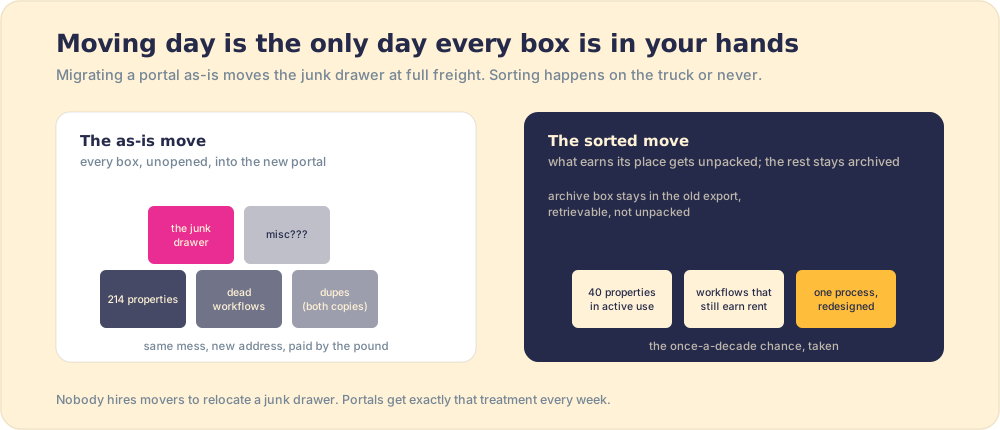
So the buying question on every road is the same: who makes the keep-or-kill decisions, and who lifts the kept process into the new portal so reps run it from day one? On Road 1 the answer is you, late at night, by hand. On Road 2 it is you with machinery, and the machinery now reaches all three layers if you stack the right tools. On Road 3 it should be the partner, and “walk me through how you decide what not to migrate, and how you ship the process layer” is the single best interview question for one. The good firms light up at it; the best ones answer with a package library they have installed fifty times. The body shops quote you a price per record.
What should you check before any migration starts?
The short version of the diligence, whichever road (the full version is in the HubSpot migration checklist):
- The keep-or-kill audit. Properties by fill rate, workflows by last-fired date, pipelines by stage conversion. Anything below the line gets archived in the export, not moved. Archives are retrievable; clutter is forever.
- The association map. Which objects connect to which, including custom objects, and what of it each tool or partner will preserve. This is where DIY moves die and where the self-serve tools earn their fee.
- The history decision. Emails, calls, and activity timelines: what must be searchable in the new portal versus retrievable in an archive. All-of-it is a default, not a decision, and it is usually the wrong one.
- The process blueprint. The stages, required fields, and handoffs reps will run on day one, designed before the move, not discovered after. If you are consolidating two companies’ portals, this doubles in importance, and merging HubSpot portals covers that case.
- The rehearsal. A staged run in a sandbox before production, with the gotchas that surprise everyone covered in sandbox to production.
The verdict
- Native DIY. The pick for small portals with standard objects and nothing relational worth preserving. Budget your weekends honestly.
- Import2. The pick for cross-CRM moves (Pipedrive, Zoho, Salesforce into HubSpot) where the job is a faithful structured copy and you own the decisions.
- Datawarehouse.io. The pick for hubspot to hubspot migration specifically: portal consolidation, agency handoffs, and slow cutovers needing two portals in sync. Purpose-built, certified, priced like a utility.
- Supered. Ours, and the most complete single lift in the ecosystem by layer count: the full configuration set plus the process layer, packaged, dedupe-safe, and reusable across portals. It moves no records, on purpose, so pair it with Datawarehouse.io or Import2 and the whole portal travels: data, machinery, and way of working together.
- A partner. The pick when revenue cannot stop, the schema is complex, or the honest answer to “who decides what not to move” is nobody on staff. The interview question above sorts the field, and the firms who productize their migrations as Supered packages, building the portal once and installing it per client, are the ones whose work we keep meeting in good shape: our partner program is where those firms live, and if you are a RevOps consultancy that runs these moves, that page is also for you.
And on every road, take the once-a-decade chance, because here is the deeper point the layer picture makes plain: the migration will be judged by what reps do in the new portal in month three, and that is decided by whether layer three made the trip. Records arrive fine; they always do. The way of working is the cargo that historically got left on the old dock, because until recently no tool could carry it. Now one can: the process ships as part of the lift, installed alongside the pipelines and workflows it runs on, reaching reps in the flow of work from the first morning, with adherence visible while there is still time to coach. That is the job we built Supered around, and the full migration playbook lives in the HubSpot implementation guide, with the tool-by-tool pricing in copy HubSpot assets and the strategy frame in lift and shift, applied to HubSpot.
Frequently asked questions
What are HubSpot migration services?+
How much does a HubSpot migration cost?+
Who are the best HubSpot migration partners?+
Can I migrate HubSpot to HubSpot myself?+
What is the biggest HubSpot migration mistake?+
Your process, running itself.