Copy HubSpot Assets Between Portals: Every Tool, Named and Priced
The existing comparison guides hedge with the word 'varies' and name no vendors. This one names every tool, prints every published price, and tells you which layer of the portal each one actually carries.
To copy HubSpot assets between portals you need a third-party layer, since HubSpot only clones in-portal and promotes only new sandbox assets; the tools split by what they carry: records, asset slices, implementations, or 75+ asset types plus the process layer.
There is a comparison guide for this topic already, and credit where due: JetStack’s tools-for-copying-HubSpot-assets review (February 2026) is honest about its own product’s limits, accurate about HubSpot’s native gaps, and right that dependency handling is the make-or-break criterion. We are about to compete with it, so we want its virtues on the record first.
Here is where it stops short, and why this page exists. Its comparison matrix answers with the word “varies” thirteen times. It reviews five categories of tools and names exactly one vendor: itself. And its pricing column for that one vendor reads “varies” too. A buyer leaves knowing the shape of the market and none of the names or numbers, which is the part a buyer came for. So this is the version with the names and the numbers, every vendor including the ones who beat us at their layer, every published price including ours, and a flag wherever a vendor publishes nothing. We will also answer, on the record, the evaluation question JetStack’s guide rightly says should sort the field: what happens when a referenced property does not exist in the target?
What can HubSpot do natively, and where does it stop?
Three native features get mistaken for cross-portal copying, and knowing their exact edges saves a wasted afternoon:
- In-portal clone. One click, faithful, and strictly within the same portal. The clone references the same lists, forms, and properties, which is precisely what you do not want across portals.
- Sandbox deploy. Enterprise-only, and it carries newly created sandbox assets up to the paired production portal only. Edits to existing assets do not travel, and two production portals cannot use it at all. The full rules are in sandbox to production.
- Multi-account copy. Real, and narrow: a handful of CMS asset types (templates, themes, modules) between connected accounts. Workflows, forms, pipelines, and properties are not invited.
The gap is not an oversight so much as a boundary: HubSpot builds for life inside one portal, and the moment your business spans two, an acquisition, an agency book of clients, a regional split, you are in third-party territory. Which is where the naming and pricing should start.
Which tools copy HubSpot assets, and what does each carry?
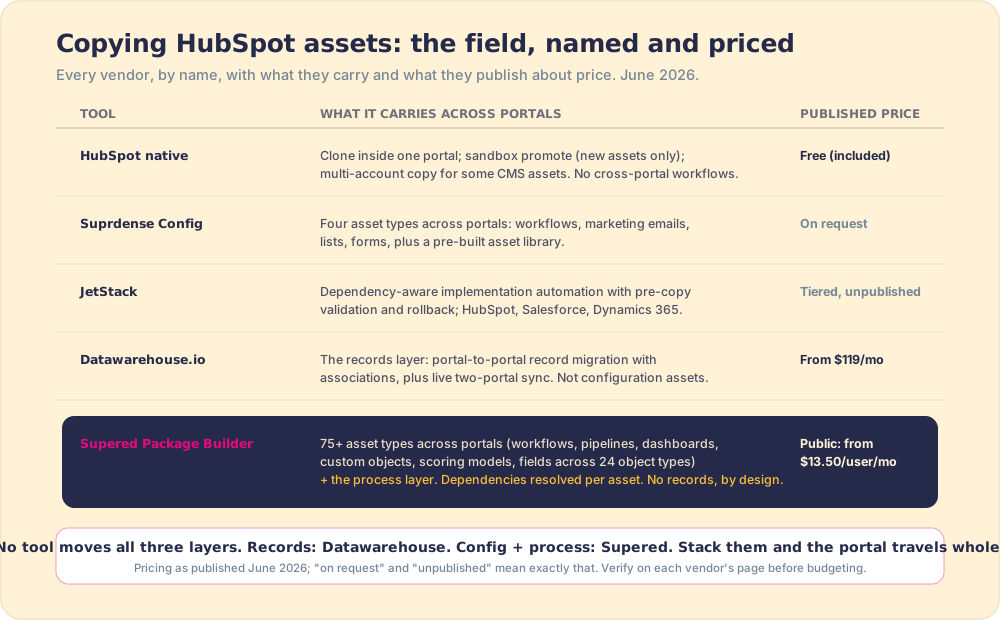
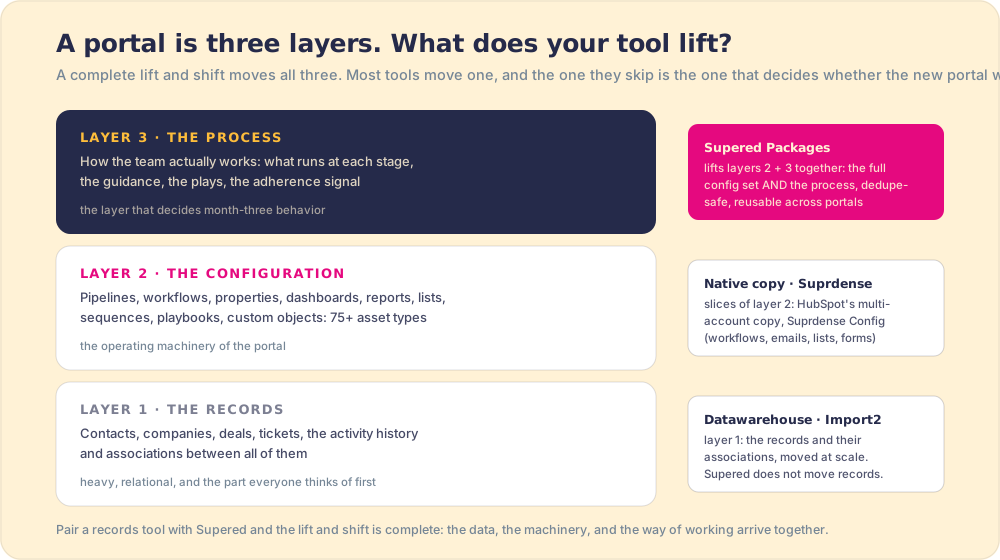
A portal is three layers (records, configuration, process), and every tool in this market carries a different slice, which is why feature-count comparisons mislead. Whether you need to copy workflows between hubspot portals or move a whole hubspot asset migration, sort by what travels:
- Datawarehouse.io, for the records layer. The hubspot to hubspot migration records specialist: certified Portal Migrator and Portal Toolkit apps, association-aware, with a Portal Sync product for keeping two live portals aligned through a slow cutover. From $119/month, published. It does not carry workflows or configuration; it was never trying to.
- Suprdense Config, for an asset slice. Imports workflows, marketing emails, lists, and forms into a library and deploys them across portals, with pre-built assets included. A clean answer when those four types are your whole problem. Pricing on request.
- JetStack, for implementation automation. The strongest pure-engineering story in the field: dependency-aware copying, pre-copy validation reports, rollback, multi-portal operations, and a platform spread beyond HubSpot (Salesforce, Dynamics 365). If your job is running implementations as a production line across many portals and platforms, they built for exactly that. Tiered pricing, unpublished.
- The HubSpot API, for teams who would rather build. Everything above is possible by hand; JetStack’s own estimate for a production-grade version is 80 to 160 developer hours plus permanent maintenance against API changes, and our experience says believe them.
- Supered’s Package Builder, for configuration and process together. Ours, so verify everything we say, ideally against our own help docs, which document the behavior asset type by asset type. The widest single carry in the ecosystem: 75+ HubSpot asset types, workflows, deal and ticket pipelines, dashboards, reports, sequences, custom objects, lead scoring models, permission sets, quote templates, plus every field and field group across 24 object types, and, the part no other tool on this page touches, the process layer itself: the cards, triggers, and action plans that tell reps what to run at each stage. Dependency resolution is built in across the catalog, not bolted onto workflows: add an email and its campaign, custom properties, files, lists, and templates ride along; add a dashboard and its reports come with it; add a custom object and everything it needs to function is bundled; add a sequence and every email template inside it is included (the per-type behavior is public). Pipelines install intelligently: missing stages are created inside an existing pipeline rather than duplicating it, stage properties attached. Installs are dedupe-safe (same-name assets are skipped, never duplicated), and integrity is enforced by refusal: if a dependency cannot be resolved, the install errors rather than shipping an asset that cannot function in the destination. Honest limits, also documented: no records (pair with Datawarehouse.io), datasets unsupported, complex design templates route through HubSpot’s native copy, and installed HubSpot resources are removed through HubSpot’s UI, not ours.
What happens when a referenced property does not exist in the target?
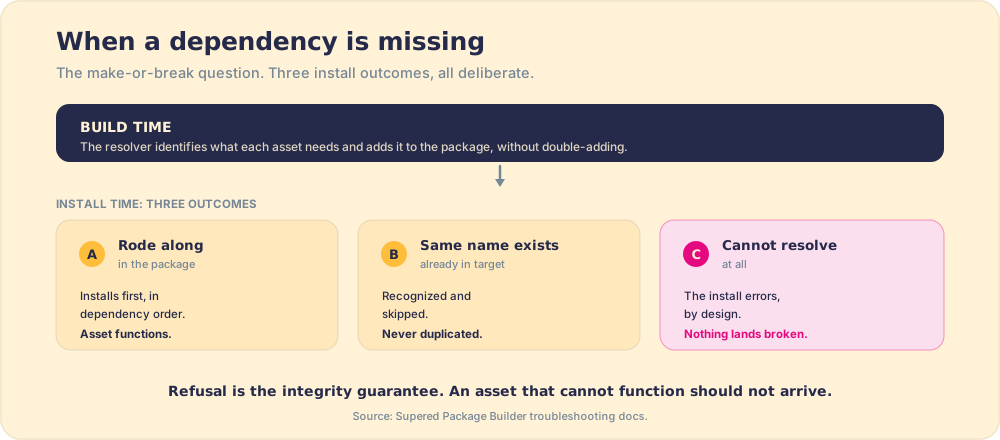
JetStack’s guide names this as the make-or-break evaluation question, and it is the right question, so here is our answer with the documentation to check it against. At package-build time, Supered’s dependency resolver identifies what each asset needs and adds it to the package, without double-adding anything already included. At install time, three things can happen, all deliberate: if the dependency rode along in the package, it installs first, in dependency order. If an asset with the same name already exists in the target, it is recognized and skipped, never duplicated, and pipelines go further, merging missing stages into the existing pipeline with their stage properties attached. And if a dependency genuinely cannot be resolved, the install errors by design, because an asset that cannot function in the destination should not arrive there (troubleshooting docs). Refusal is the integrity guarantee: nothing lands broken.
Ask every vendor on this page the same question, and ask for the documentation, not the demo. The ones with a real answer have it written down. The full anatomy of the problem, what every asset type depends on and why copies break in layers, is in HubSpot workflow dependencies.
What about the pricing everyone hedges on?
The published numbers, plainly, because a comparison that will not print prices is a brochure. HubSpot native: free, within its boundaries. Datawarehouse.io: from $119/month. Supered: $13.50 per user per month for Digital Adoption billed yearly ($15 monthly), $40 per user per month for Process Compliance billed yearly ($45 monthly, 5-user minimum), on the public pricing page. Custom API builds: $10,000-$40,000 of development by JetStack’s estimate. Suprdense: on request. JetStack: tiered and unpublished.
We will make the editorial point once, because it is a real evaluation criterion and not a cheap shot: in a market this small, a vendor’s pricing page is a preview of the negotiation. Published per-user pricing means the agency quoting a client knows the cost before the discovery call. “On request” means a sales cycle before you can budget. Neither is wrong, and you should know which one you are walking into. For the firms running this weekly, there is also a structural option: the Supered partner program includes the Package Builder, which turns a portal build into reusable IP, build the package once, install it per client, rather than a per-project line item.
Which tool for which job?
- One simple workflow, once. Rebuild it by hand from screenshots. Twenty minutes beats any tool setup, and JetStack’s guide says the same, to their credit.
- Records moving between portals. Datawarehouse.io, with the full migration playbook around it.
- The four-type asset slice, repeatedly. Suprdense Config does that job cleanly.
- Multi-platform implementation factories. JetStack, especially if Salesforce and Dynamics portals sit next to your HubSpot ones.
- The whole operating layer of a portal, config and process together. Supered: package the build with its dependencies resolved per asset, install it dedupe-safe, and the new portal opens with the pipelines, workflows, dashboards, AND the day-one motion reps are supposed to run, in the flow of work with adherence visible. That last clause is the layer distinction this whole field hides: every other tool stops when the assets arrive, and arrival was never the point. Across 198 sales teams in The State of Sales Enablement, 89 percent had a defined process and 36 percent saw it followed; copying assets reproduces the 89, and only the process layer moves the 36.
The verdict
Stack by layer and the decision is short. Records: Datawarehouse.io, no debate from us. A four-type slice: Suprdense. Cross-platform implementation tooling: JetStack, whose comparison guide you should read alongside this one, ideally noticing which page told you what things cost. And for the configuration plus the process, the 75+ asset types and the motion your team runs on them, Supered carries the most of any tool in the HubSpot ecosystem, at pricing you did not have to book a call to learn.
The wider context, sandbox rules, merge treaties, the four-phase checklist, lives in the HubSpot implementation guide, and what the lift-and-shift framing itself gets right and wrong is in lift and shift, applied to HubSpot.
Frequently asked questions
How do you copy HubSpot assets to another portal?+
Can you copy workflows between HubSpot portals?+
What is the best tool for copying HubSpot assets?+
How much does it cost to copy HubSpot assets between portals?+
Does Supered copy HubSpot records?+
Your process, running itself.