CRM Onboarding: Teach Each Skill on the Screen Where the CRM Asks for It
Most CRM onboarding teaches everything on day one, then the CRM asks for each skill weeks later. A six-step CRM onboarding process for HubSpot, Salesforce and Pipedrive, with the native limits of each and the forgetting data behind the timing.
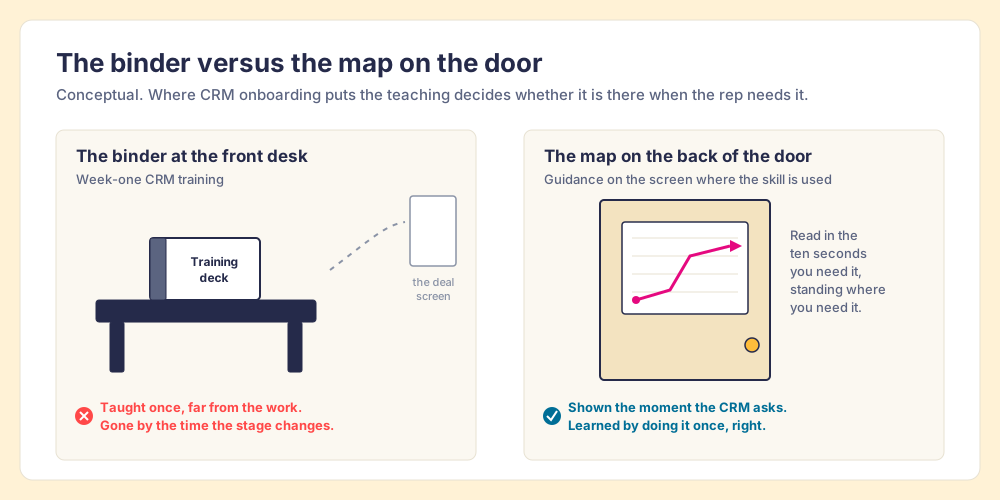
CRM onboarding is the process of getting a new user from first login to running your sales process inside the CRM without help, and it is finished on the day their records pass your rules without a reminder.
A hotel puts the fire-escape map on the back of the room door. It could print the same map in the guest binder at the front desk, and some hotels do that too, but the map on the door hangs at eye level in the one spot where a guest stands when the alarm goes off. CRM onboarding is mostly built like the binder. CRM onboarding is the process of getting a new user from first login to running your sales process inside the CRM without help, and it is finished on the day their records pass your rules without a reminder.
That definition moves the end point of onboarding, and the plan changes with it. My position, after a lot of HubSpot Sales Hub go-lives: the training day is the least important day of CRM onboarding. The CRM asks for most skills weeks after the training ends, and the evidence on forgetting says much of the training will have faded by then. Teach each skill on the screen where the CRM first asks for it, then check the records.
What is CRM onboarding, and what is it not?
Three different things travel under the name, and the search results mix them up.
- Rep onboarding into the CRM. A new hire, or a whole team after a migration, learning to run the sales process inside HubSpot, Salesforce or Pipedrive. This post is about that.
- Customer onboarding managed in a CRM. Moving a new customer through kickoff and setup, tracked as tasks or tickets. monday.com’s ranking page is about this meaning.
- CRM data onboarding. Matching first-party CRM records to ad platforms, the ad-tech meaning The Trade Desk uses.
It also differs from CRM adoption, which I wrote about separately. CRM adoption is the long-run question of whether reps use the system as part of selling. CRM onboarding is the first few weeks, where you decide what a new user learns, where, and in what order. Get onboarding wrong and you spend the next year fighting an adoption problem you created in week one.
The vendor guides that rank for this term are good on project mechanics. Pipedrive’s guide puts training after go-live (“Once your new CRM is live, it’s time to get everyone on board”) and recommends hands-on workshops. Lark’s guide tells teams to track behavior, such as record updates and activity logging, over logins. Both are right. Neither one asks the timing question: how much of the workshop is still in the rep’s head on the day the CRM first needs it?
Why does week-one CRM training fade before reps need it?
Because forgetting starts the minute the session ends, and the CRM asks for most skills weeks later.
The oldest evidence is Hermann Ebbinghaus’s forgetting curve from the 1880s. In 2015, Jaap Murre and Joeri Dros at the University of Amsterdam replicated it: one subject spent 70 hours learning and relearning lists, and the savings (how much faster the list came back on relearning) fell from 57.1% after 20 minutes to 47.2% after an hour, 41.0% after a day, and 4.1% after 31 days (Murre and Dros, PLOS ONE, 2015).
That curve is for nonsense syllables, and work skills hold up better, so the fair correction comes from the workplace. When Alan Saks and Monica Belcourt surveyed training professionals at 150 organizations, they reported that 62% of employees applied training on the job immediately, 44% after six months, and 34% after one year (Saks and Belcourt, Human Resource Management, 2006). The decline is slower than the lab curve and runs the same way.
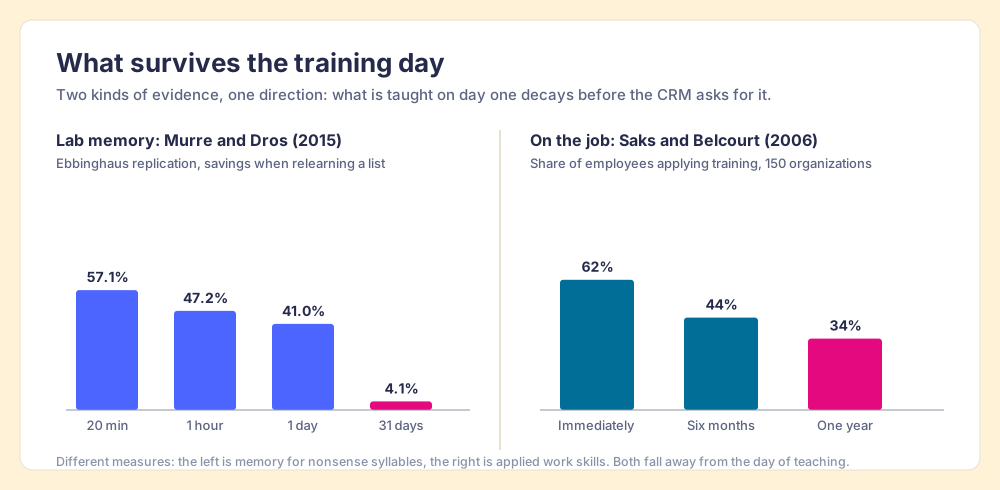
Lay the CRM’s calendar over that decay. The rep logs in on day one. Their first discovery call might come in week two. Their first stage move, the moment the CRM wants an amount and a close date, might be week four. Their first closed-lost deal, with its required reason, could be week six. Their first month-end forecast, later still. The workshop taught all of it on day one, and the CRM asks for it one piece at a time across two months.
A second number explains why companies keep stacking it on day one anyway. Josh Bersin’s research across more than 700 organizations found that “the average employee only has 24 minutes a week for ‘formal learning’” (Bersin, Learning in the Flow of Work, 2018). The training day is the one block of time the team controls, so everything gets packed into it, which is rational and badly timed.
Which CRM skills does a new rep need, and when?
The CRM skills a new rep needs are easy to list. The useful part is listing them in the order the work asks for them.
- Day-one skills. Logging in, syncing the inbox and calendar, and searching for a record before creating one, so the CRM does not fill with duplicates in the first week.
- First-meeting skills. Logging the meeting and its notes, creating the deal, and associating the right contacts and company.
- First-stage-move skills. Filling the fields your stage requires, usually an amount and a close date, plus whatever your team has decided a stage means.
- First-pipeline-review skills. A next step and a dated task on each open deal, because the manager’s review runs on them.
- First-lost-deal skills. A closed-lost reason chosen with care, since it feeds every loss report you will run.
- First-month-end skills. A forecast category and a close date that matches the next real meeting on the calendar.
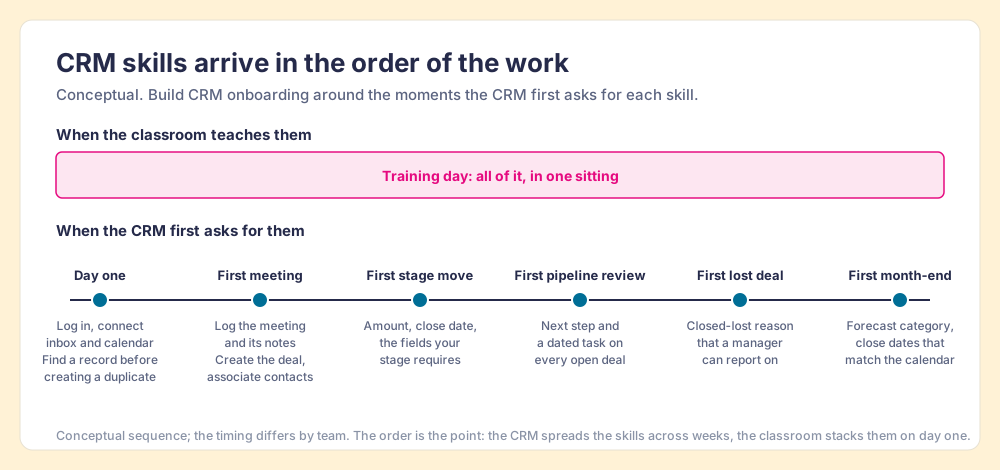
The order exposes a problem. The skills that hurt most when skipped (stage fields, close dates, loss reasons) arrive last, deepest into the forgetting curve. It also hands you the fix, because each skill has a specific screen and a specific trigger. When a rep moves a deal to Proposal, the moment has arrived, and the deal record is where the teaching belongs.
What is the right CRM onboarding process, step by step?
The CRM onboarding process I would run for a new rep on HubSpot, Salesforce or Pipedrive has six steps. The steps are the same on all three; the tools in step four differ, and the next section covers them.
- The record standard, written down. Before anyone trains anyone, write what a correct deal holds at each stage: which fields, which activities, which buyer facts. If you cannot write it, you cannot teach it or check it. You already hold this standard in your head, as the list of things that annoy you in pipeline review.
- A skill map tied to first use. List each CRM skill from the section above and name the screen where it first comes up. This is a spreadsheet, and it takes an afternoon.
- Day-one setup. Access, permissions, inbox and calendar sync, the right pipeline view, and one practice deal in a sandbox or a test record. Keep the live session short and spend it on the day-one skills only.
- Guidance on the screen where the skill is used. A short card or a click-by-click walkthrough pinned to the deal record, the stage change or the closed-lost form, so the rep sees it the first time the CRM asks. A GPS speaks up at the turn, which is why drivers follow it.
- A 30-day checklist inside the CRM. Tasks with due dates that walk the rep through their first real meeting, first stage move and first forecast, so the sequence lives where they work instead of in an email from HR.
- Inspection of the records, then coaching. From week two, check the new rep’s deals against the record standard. When one rep misses a field, coach that rep. When three reps miss the same field, the guidance in step four is unclear, so rewrite it before you talk to anyone.
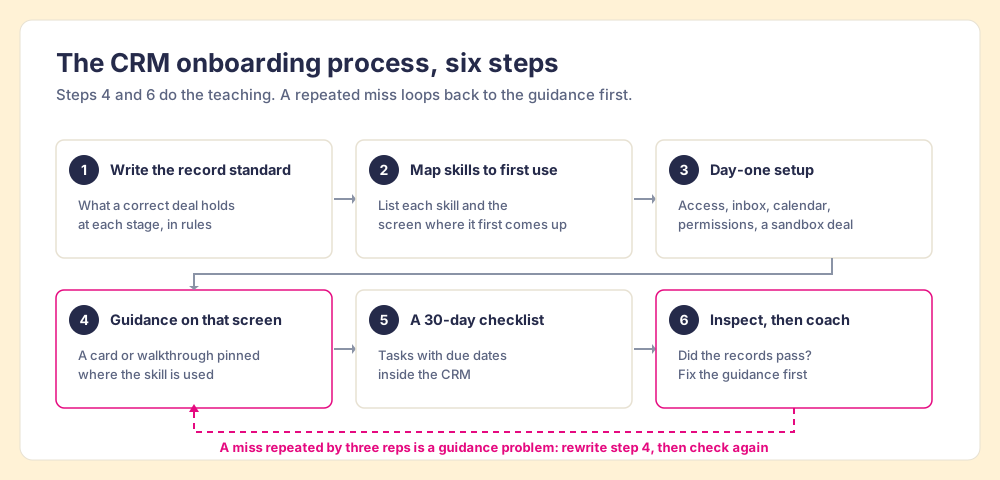
The last step is the one that tells you whether the rest worked, because a finished course measures what you put in and a record that passes your rules measures what the rep does. When reps miss a step, the cause is usually that the right action was hard to find at the moment it mattered, which is a problem with the system, and you fix it in the system. If you want the full argument for checking records every night instead of every quarter, it is in CRM hygiene as a nightly check.
What do HubSpot, Salesforce and Pipedrive give you natively for CRM onboarding?
The ranking pages skip this comparison, because each one is written by a vendor about its own product. All three CRMs can put some guidance on the record. None is built to teach your whole process there.
| CRM | Guidance on the record | Required data at a stage | Catch for onboarding |
|---|---|---|---|
| HubSpot | Playbooks in the record sidebar on Sales Hub and Service Hub Professional or Enterprise; Sales Hub Professional allows up to 5 playbooks | Required properties per stage through conditional stage logic | Playbooks need paid seats on Professional or Enterprise; HubSpot Academy teaches the default CRM |
| Salesforce | In-App Guidance: 3 active walkthroughs in Lightning Experience without the Enablement add-on, 10 steps per walkthrough | Path: up to 5 key fields and up to 1,000 characters of guidance per step | Three walkthroughs cover a handful of screens; Trailhead teaches the default org |
| Pipedrive | Important fields flag missing data in the deal view | Required fields, which the pricing page lists from the Premium plan up | Required fields do not stop a deal that changes through import, bulk edit, API, automations or integrations; we found no admin-built walkthrough feature |
Sources, checked 2026-10-01 and 2026-10-02: HubSpot playbooks and HubSpot Sales Hub pricing; Salesforce In-App Guidance limits and Salesforce Path on Trailhead; Pipedrive required fields, Pipedrive important fields and Pipedrive pricing.
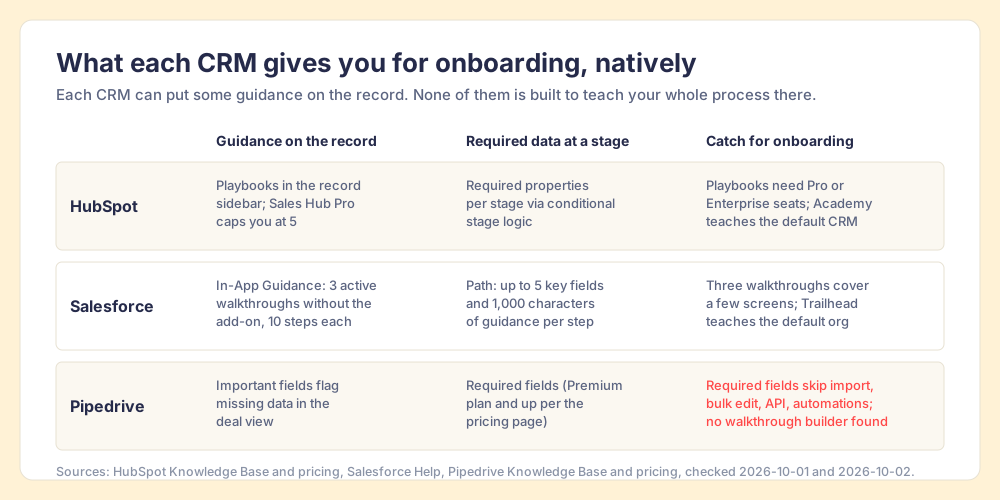
Read the table as a starting kit. If your onboarding covers three screens in Salesforce, the free In-App Guidance tier may be all you need. If your HubSpot team runs one sales process, five playbooks go a long way. The limits start to bite when the skill map from the last section runs long, spread across the deal, the contact, the inbox and LinkedIn, and the native tools reach only some of those screens.
In The State of Sales Enablement 2026, our survey of 198 sales and enablement respondents, quota attainment was 49% where guidance was embedded in the workflow, 24% where it lived in CRM fields or stages, and 15% where it lived in docs or wikis (The State of Sales Enablement). That is a correlation from a survey, not a controlled trial. Still, required fields and stage rules, the native layer in the table above, sit in the middle row.
How is custom CRM onboarding different?
Custom CRM onboarding is harder, because the vendor’s courses stop at the vendor’s defaults. HubSpot Academy, Salesforce Trailhead and Pipedrive Learn are good at teaching what a deal object is and where the buttons sit. They cannot teach your stage names, your rule that a deal past Discovery needs an amount, or the custom property your finance team reads at month-end.
So the more you customized the CRM, the larger the share of onboarding that has to live inside your own instance. A team on a near-default Pipedrive can lean on Pipedrive Learn for most of it. A Salesforce org with custom objects and years of validation rules cannot, and the onboarding plan should say so plainly: vendor course for the buttons, your own guidance for everything you built. The same applies after a migration, when a team that knew the old CRM well is suddenly a room full of new users. Their sales skills came with them and their CRM skills stayed behind.
How do you know CRM onboarding worked?
Check the records. Three measures, each tied to the record standard from step one:
- First-pass rate on the record standard. The share of a new rep’s deals that meet the standard the first time, without a manager’s reminder. Use it as the onboarding score.
- Time to a clean board. The number of days until a new rep’s open deals stop failing your rules. Watch it fall as the guidance improves.
- Repeat misses across reps. The same rule failing for several new reps points at the guidance in step four, which is cheaper to fix than coaching each rep in turn.
Logins and course completions confirm attendance, and only the records show whether the rep learned the work.
Where does Supered fit in CRM onboarding?
Supered started inside RevPartners, the HubSpot partner I founded, which sold roughly twice as much Sales Hub as any other partner. A lot of go-lives later, we built the tool for step four and step five of the process above, and it runs inside HubSpot, Salesforce and Pipedrive.
- Cards. Short answers with text, video or tables, shown inside the CRM or on any web page, searchable from the Sidekick sidebar.
- Step-by-step guides. Click-by-click walkthroughs on any cloud app, including the deal record, Gmail and LinkedIn.
- Page triggers. A card or guide pinned to a specific screen or URL, so the guidance appears where the skill is first used.
- Action plans. The 30-day checklist, with phases, tasks, due dates and knowledge checks, inside the CRM.
Those four sit in the Digital Adoption plan at $13.50 per user per month paid yearly, or $15 paid monthly (Supered pricing, checked 2026-10-02). Step six, checking each rep’s records against your rules every night, is Process Compliance at $40 per user per month paid yearly with a five-user minimum, which includes Digital Adoption. One G2 reviewer, Brendan T., described the effect as enablement that, “instead of a one-time training session that everyone forgets, it teaches them as they get it wrong.”
Choose something else if your team works mostly from phones in the field, because Supered has no mobile product and fits teams of 10 or more who work at a computer. Choose the native tools if your onboarding fits in three Salesforce walkthroughs or five HubSpot playbooks. And if you need a full digital adoption platform across dozens of internal apps with an enterprise budget, see what WalkMe costs before you decide; Vendr’s median WalkMe contract was $39,000 a year when we checked on 2026-10-01.
What we recommend
Keep the training day, and shrink it to the day-one skills: login, sync, search before you create, one practice deal. Move everything else out of the classroom and onto the screen where the CRM first asks for it, in the order the work asks for it. Then judge the onboarding by the records, and when several reps miss the same rule, fix the guidance before you coach anyone.
The case rests on evidence you can check. The forgetting data, from the lab and from 150 organizations, says what you teach on day one decays before week six. The CRM’s own calendar says week six is when the expensive skills arrive. And our survey found the highest quota attainment where guidance sat in the workflow. If you want to see the use case end to end, start with rep onboarding and ramp. If your team already finished onboarding and the board still looks thin, the longer fight is CRM adoption, and the system that keeps it going is sales process adoption.
Frequently asked questions
What is CRM onboarding?+
What are the steps in a CRM onboarding process?+
How long does CRM onboarding take for a new rep?+
What CRM skills does a new sales rep need?+
How is custom CRM onboarding different from standard CRM training?+
Your process, running itself.