CRM Data Migration: Why Moving Records Is Not Moving the Business
A CRM data migration is technically solvable: export, map, clean, import, validate. The part that trips teams is the entropy that accumulates before the migration and reasserts after. Here is how to stop it.
A CRM data migration is the process of exporting records from a source system, cleaning them to match the target schema, and importing them into a new CRM with associations and history intact, while designing the behavior change that makes the new system productive.
A CRM data migration is one of the most technically solvable problems in RevOps. Export the records, clean them, map the fields, import to the new system, validate, go live. The tools are mature, the process is documented, and experienced teams run them in weeks. The technical part works.
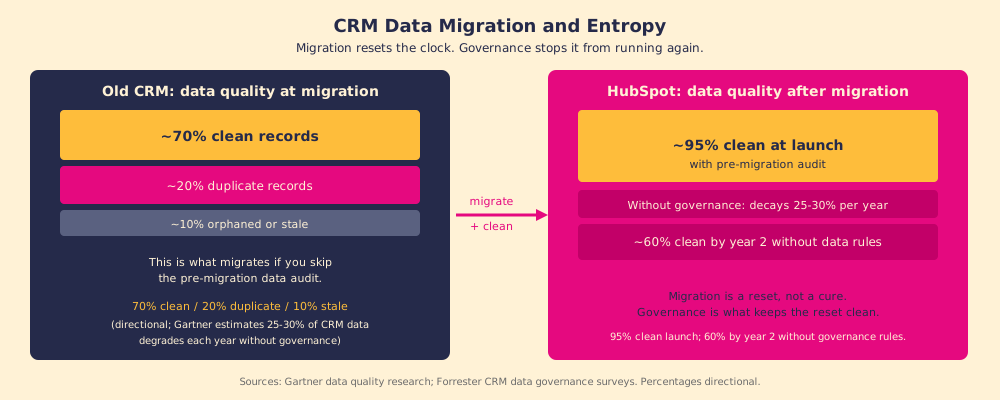
What tends not to work is everything that happens to the data in the years before the migration and the months after. Gartner estimates that CRM data degrades at roughly 25 to 30 percent per year without active governance: contacts go stale, duplicates accumulate, associations orphan, fields that were clean at the last import collect inconsistencies (Gartner, CRM data quality research). A migration does not solve that problem. It resets it. And without governance after go-live, the decay starts again.
A CRM data migration is the process of exporting records from a source system, cleaning them to match the target schema, and importing them into a new CRM with associations and history intact, while designing the behavior change that makes the new system productive. Both halves matter. The technical transfer is necessary but not sufficient. The behavioral design is what makes the migration pay off.
Why does a CRM data migration fail even when the import succeeds?
Think of a CRM data migration as moving the contents of a library to a new building. The books arrive correctly sorted, shelved in order, with the catalog updated. And then, six months later, the same person who put books back in the wrong place in the old building is putting them back in the wrong place in the new one. The shelving system changed. The shelving habit did not.
What migrates with the records is the behavior of the team that created them. If reps were skipping the company association field in the old system, they will skip it in the new one. If managers were accepting closed stages without the required next steps logged, they will accept them in HubSpot too. The migration moved the library. The habits came along for free.
Forrester’s CRM research puts the failure rate at 47%, with inadequate process change and poor adoption support as the top two causes (Forrester, CRM failure analysis). These are not technical failures. They are behavioral failures that the technical migration left untouched.
What does a CRM migration checklist in practice need to include?
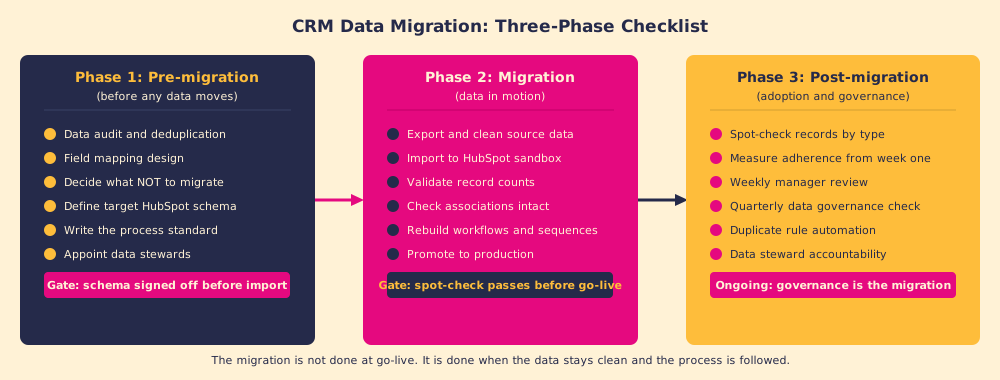
Most CRM migration checklists stop at the technical import. A complete crm migration checklist has three phases, and the third one is where the investment is protected or lost.
Phase 1: Pre-migration. The work that happens before a record moves is what decides whether the migration succeeds. This is where most migrations under-invest.
- Data audit and deduplication. Count the records in the source system by type, identify duplicates (most mid-market CRMs have 15 to 25% duplicate contact rates in practice), and decide which duplicate wins before import. Migrating duplicates into the new system doubles the cleanup cost.
- Field mapping design. Map each field in the source system to a field in the target schema. Decide what happens when there is no target equivalent: create a custom property, discard the data, or transform it. Unmapped fields become question marks in the new system.
- Decide what not to migrate. Contacts inactive for three or more years, deals closed without required data, companies that are known to be defunct. Migrating noise is a choice that makes the new system harder to use from day one.
- Write the process standard. Define what a well-run deal looks like in the new CRM before go-live. Which fields are required at which stage? What triggers stage advancement? This is the CRM migration strategy that separates migrations which pay off from ones that move data and nothing else.
Phase 2: Migration. The technical work, done once Phase 1 is complete.
- Export and validate. Export from source system, clean and transform to target schema, import to sandbox, validate record counts and associations, rebuild workflows and sequences, and promote to production only after validation passes.
Phase 3: Post-migration. The phase that protects the investment in the other two.
- Governance from week one. Spot-check records by type in the first week. Measure process adherence from day one. Schedule quarterly data governance reviews. Automate duplicate detection and assign data stewards who own record quality for defined segments.
How does the data migration connect to behavior change?
The data migration is a forcing function for the behavior change. A well-run crm data migration process exposes three things that had been invisible:
- Which process standards are not defined. When you try to map fields from the old system, you discover that the old system captured things no one ever decided to capture, and missed things everyone assumed it had. The field mapping exercise is the first time many teams write down what a well-run deal in practice requires.
- Which habits produce bad data. Duplicate records, missing associations, and stage-skipping are not random. They follow patterns tied to specific rep behaviors, incentive structures, or missing process guidance. The pre-migration audit makes those patterns visible for the first time.
- Which governance decisions were never made. Who owns a contact when a rep leaves? What happens to a deal when a company merges? These are governance questions the old system never forced anyone to answer because the system was too messy to make them obvious. The migration, done right, answers them before go-live.
This is the opportunity most CRM data migration guides miss. The migration is not an IT project with a business outcome. It is a business re-design project that happens to involve moving data. The records are the pretext for the conversation about how the team should work.
How do you keep a CRM migration clean after go-live?
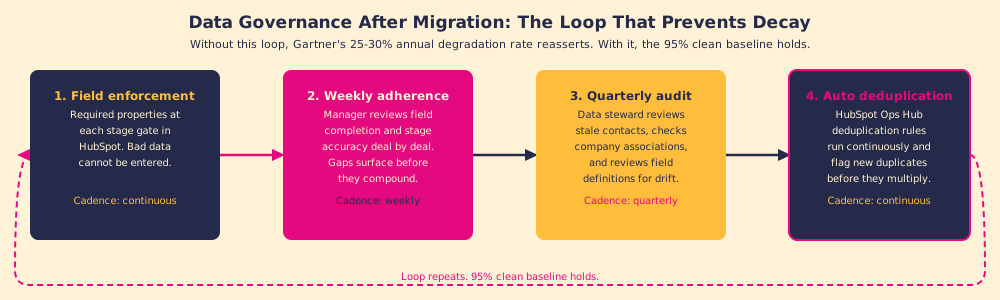
A CRM that is clean at launch and dirty six months later is a migration that succeeded technically and failed strategically. The data governance that prevents decay is not a one-time project; it is a set of ongoing practices:
- Duplicate detection automation. HubSpot’s Operations Hub includes deduplication tools; configure them before go-live, not after the first review shows 200 duplicates. Automated rules catch what manual review cannot sustain.
- Data steward assignment. Assign a named person, not a committee, to own data quality for each record type. A contact data steward reviews the records monthly, merges duplicates, and owns the standard. A deal data steward spot-checks stage adherence. Governance without ownership is aspiration.
- Required field enforcement at the stage level. Deal stages should enforce field completion. HubSpot allows required properties at each lifecycle stage transition; use them so that bad data cannot be entered, not so that it has to be cleaned later.
- Adherence measurement as a standard report. The crm migration strategy that holds is not the one with the best import script. It is the one that measures whether the team is following the process in the new system and reviews that measurement in the weekly pipeline call.
What we recommend
Run the pre-migration data audit before any record moves. Decide what not to migrate. Map the fields to the process you intend to run, not the process that happened to exist in the old system. And treat Phase 3, the governance and adoption work after go-live, as the migration itself rather than a cleanup task.
A well-executed data migration to CRM is table stakes. The technical import is the easy part. The hard part is that Gartner’s 25 to 30 percent annual data degradation rate will reassert itself inside the new system the moment the team resumes old habits. The only counter is a process that reaches reps in the flow of work and measurement that keeps it honest.
For the adoption work that follows the data migration, CRM adoption is the right next read. For the full HubSpot-specific migration methodology, HubSpot migration covers the behavioral track in detail. For a migration from Salesforce specifically, the object-model differences add technical complexity worth reading separately, covered in HubSpot implementation.
Frequently asked questions
What is a CRM data migration?+
How long does a CRM data migration take?+
What are the most common CRM data migration mistakes?+
What is a CRM migration checklist?+
Your process, running itself.