Software Onboarding Runs on Two Clocks: Why Employees Drift Back to the Old Tool
Software onboarding for employees is planned around launch week, but the habit takes a median of 66 days to form. A CRM case for the software implementation process: what to train, where to put the cues, and what to measure.
Software onboarding is the work of getting people to use a new tool as part of their daily job, and for employees it is finished when the new way of working is automatic, which habit research puts at a median of 66 days, long after launch-week training has ended.
Suppose a new CRM goes live at the start of the month. Four days later the training sessions are done, the slide deck sits in a shared drive, and the project lead sends a cheerful note about adoption. Three weeks after that, a sales manager finds the pipeline in a spreadsheet again. No rep decided to rebel. The spreadsheet is where the deals have always lived, and when a rep has a call to log with the buyer waiting, their hands go to the old place.
Software onboarding is the work of getting people to use a new tool as part of their daily job, and for employees it is finished when the new way of working is automatic, which habit research puts at a median of 66 days, long after launch-week training has ended. The gap between those two clocks, the training clock measured in days and the habit clock measured in months, is where a rollout like this one comes apart. The pages ranking for the term today are mostly lists of HR onboarding software and product-tour tools. They answer a different question. This one is about your own team and a new system at work, with a CRM as the worked example.
What does software onboarding mean?
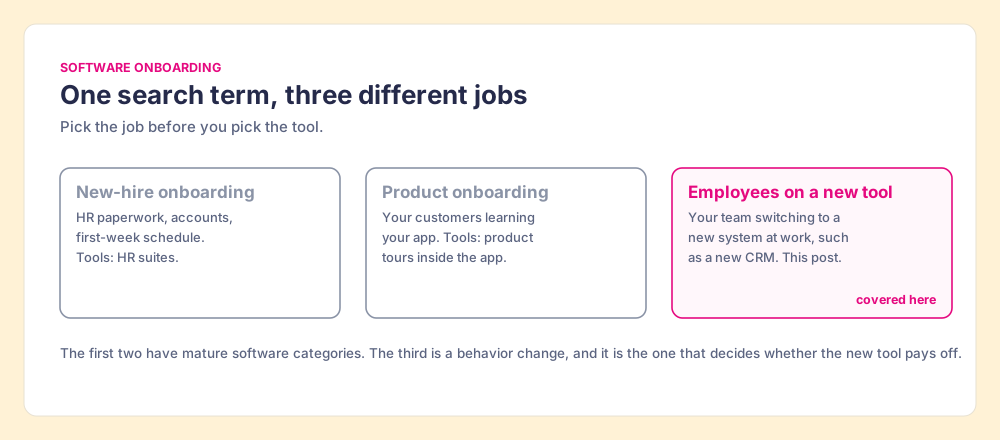
The search term carries three jobs, and the tools for each are different enough that picking the wrong one wastes a budget.
- New-hire onboarding. HR work: contracts, accounts, equipment and a first-week schedule for a person joining the company. BambooHR and the other HR suites own this.
- Product onboarding. Your customers learning your app. Product teams use in-app tours to get a new user to their first success.
- Employee software onboarding. Your existing team switching to a new system at work: a new CRM, a new quoting tool, a new support desk. The people already know their jobs. What changes is where and how they do them.
The third job is the hard one, and it is getting harder. Gartner’s 2023 survey of 4,861 digital workers found the average desk worker now uses 11 applications to do their job, up from 6 in 2019, and 47% struggle to find the information they need to do it well (Gartner, May 2023). Sales teams sit at the sharp end of that. Salesforce’s survey of 7,775 sales professionals found reps spend 28% of their week selling, use an average of 10 tools to close deals, and nearly 70% feel overwhelmed by the number of tools (Salesforce, December 2022). A new CRM lands on people who are already short of attention.
Why does software onboarding fail after launch week?
Start with what the launch plan assumes. It assumes that once people know how to use the tool, they will use it. Training transfers the knowledge; the habit follows.
The research on habits says the second half of that sentence takes a long time. In 2010 Phillippa Lally and colleagues at University College London asked 96 volunteers to repeat one new daily behavior in the same context, such as eating a piece of fruit with lunch or going for a run before dinner, and tracked how automatic it felt. Among the 82 with enough data, the time to reach near-automaticity ranged from 18 to 254 days, with a median of 66 (Lally et al., European Journal of Social Psychology, 2010). That was for one simple behavior with a clear cue. A CRM rollout asks a rep to change several behaviors at once, each one competing with a habit the old system built over years.
The knowledge half fades on its own schedule. Ebbinghaus’s forgetting curve, replicated many times since the 1880s, shows people lose roughly 70% of new information within a day when nothing reinforces it (Forgetting curve). Put the two clocks side by side and the shape of the failure is plain. Training ends in days. Memory of the training starts fading the same day. The habit needs about two months. In between sits a stretch where the old tool is faster, familiar and still open in another tab.
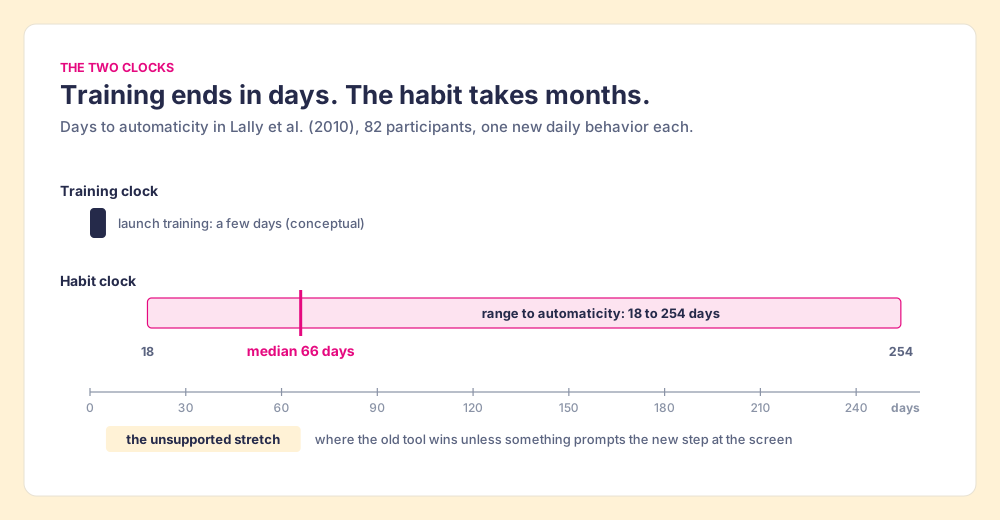
The reps in that stretch are not lazy. They are doing what people do under time pressure, which is reach for the path they already know. The failure belongs to the system that left them alone in the stretch, and the fix belongs there too. We have argued the same about CRM adoption: when the right action costs more effort than the wrong one, people choose the wrong one, and more training does not change the price.
What does a desire path teach about onboarding to new software?
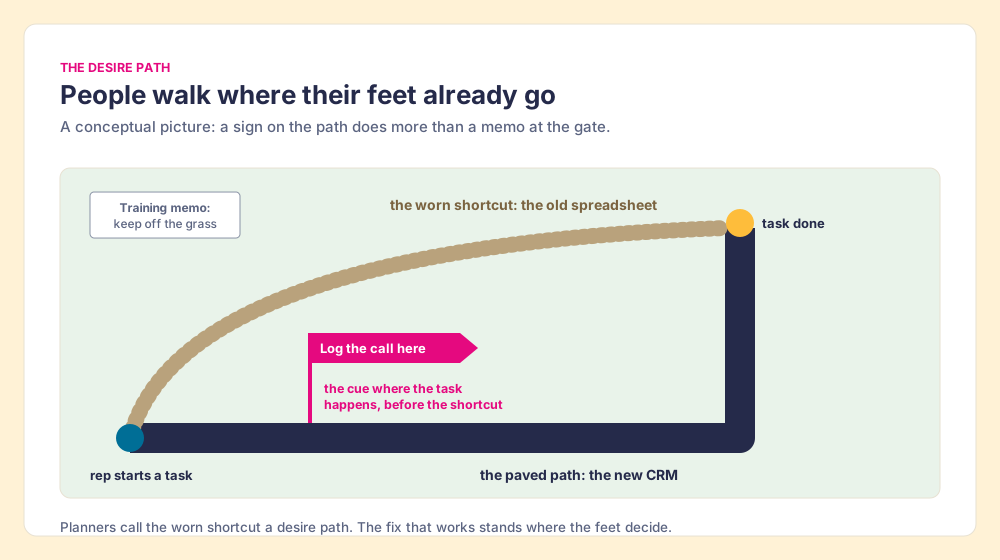
Walk through any city park and you will find them: bare dirt lines cutting across the grass where people refused the paved walkway. Planners call them desire paths. The pavement went where the designer thought people should walk; the dirt went where their feet decided to go.
A new CRM is the pavement. The old spreadsheet, the notes app, the inbox folder labeled “deals” are the dirt path, worn smooth by years of use. The usual onboarding response is the parks-department response, a memo at the entrance: keep off the grass. A memo works for about as long as people remember it, which the forgetting curve suggests is not long.
The fixes that work in parks share a feature. They act at the spot where the walker decides. Some planners pave the dirt path. Others put a sign or a hedge at the corner where the shortcut begins. Either way, the intervention lives at the fork, at the moment of choice, an hour after anyone read the memo at the gate.
Parks are also a warning, because sometimes the desire path is right and the pavement is wrong. If reps keep a side spreadsheet because the CRM makes a common task take eleven clicks, fix the CRM configuration first; a sign will not save a bad path. Treat the dirt paths as a map of where your setup is failing people before you treat them as defiance.
Behavioral science has a name for the sign at the corner. Peter Gollwitzer’s work on implementation intentions shows that plans written in the form “Whenever situation x arises, I will initiate the goal-directed response y!” close much of the gap between intending and doing; a meta-analysis of 94 studies found a medium-to-large effect, d = 0.65 (Gollwitzer and Sheeran, 2006). A cue tied to a specific screen is an implementation intention built into the software: when you are on this page, do this step. Lally’s study adds a reassuring detail. Missing a single day did not materially set back habit formation. The cue does not need to be perfect. It needs to be there, in the same place, most of the time.
How does the software implementation process differ from onboarding?
The two get blurred in project plans, and the blur explains a lot of failed rollouts.
- The software implementation process. The system side: requirements, configuration, data migration, integrations, permissions, testing and go-live. It has a project manager, a budget line and an end date.
- Software onboarding. The people side: what each person does differently, how they learn it, what reminds them at the moment of work, and how anyone knows it stuck. It starts at go-live and runs until the new behavior is automatic.
Implementation is a construction job, and onboarding covers the two months after the family moves into the new house, when they keep reaching for the light switch on the wrong side of the door. I founded RevPartners, a HubSpot partner that did only Sales Hub implementations, and Supered began inside it. A statement of work that ends at go-live does not cover those two months. Name an owner for them anyway, because that is when the habit forms or fails.
The cost of skipping that phase shows up even inside software companies. Pendo’s analysis of usage data across 615 of its customers’ products found 80% of features in the average product are rarely or never used (Pendo, 2019 Feature Adoption Report). Building a capability and getting people to use it are different jobs, and the second does not happen as a side effect of the first.
What changes in a custom CRM transition?
A custom CRM transition, moving off a homegrown system or a heavily customized database onto HubSpot, Salesforce or Pipedrive, carries an extra weight. The old system was shaped around the team for years. It had their field names, their shortcuts, their workarounds. The reps who have been there longest are the most fluent in it, which makes them the slowest to switch and the most influential when they don’t.
- The vocabulary gap. The old system called it a “pursuit”; the new one calls it a deal. Put a short glossary card where the new term appears on screen instead of in the training deck.
- The muscle-memory gap. Tasks the old system did in one click may take three in the new one. Find those tasks first, because they are where the desire paths will form.
- The parallel-system trap. As long as the old system accepts new records, it wins on familiarity. Set a date when it goes read-only and say so before launch.
- The veteran effect. Your most experienced reps carry the old habits deepest. Recruit two of them to test the new workflows before go-live and fix what they trip on.
How do you onboard employees to new software, step by step?
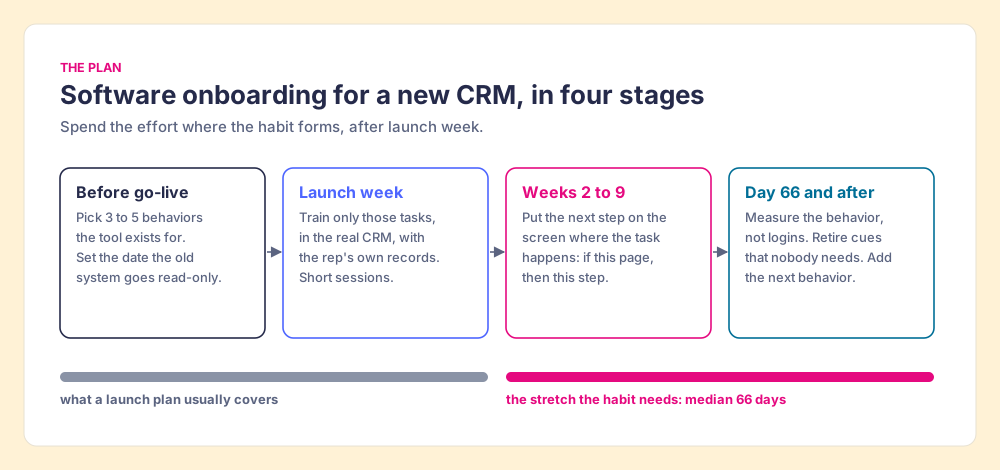
The plan we would run for a new CRM is built around the habit clock rather than the training calendar.
- Before go-live: choose three to five behaviors. List what the CRM was bought to change, such as every deal with a next step and a date, every call logged on the record, required fields filled when a stage moves. Fewer is better; each one is a habit with its own clock.
- Before go-live: set the read-only date. Announce the day the old system stops taking new entries. A parallel system with no end date is a desire path with a permit.
- Launch week: train only the chosen behaviors, in the real system. Use each rep’s own records; a sandbox full of fake companies teaches the clicks and none of the decisions. Keep sessions short, since the forgetting curve punishes long ones.
- Weeks two to nine: put the next step at the screen where the task happens. When a rep opens a deal in a given stage, the guide for that stage is on that page. When they log a call, the card showing what a good call note contains sits beside the field. The habit forms in these weeks, so most of the effort belongs here.
- Day 66 and after: measure, prune and add. Check whether the behaviors show up in the records. Retire cues people no longer need, because a cue that stays forever turns into wallpaper. Then add the next behavior and start its clock.
Our survey for The State of Sales Enablement 2026 found teams with guidance embedded in the workflow reported 49% quota attainment, against 15% when guidance lived in docs or wikis. Same knowledge in both groups. The difference was whether it sat at hand when the work happened.
How do you measure whether software onboarding worked?
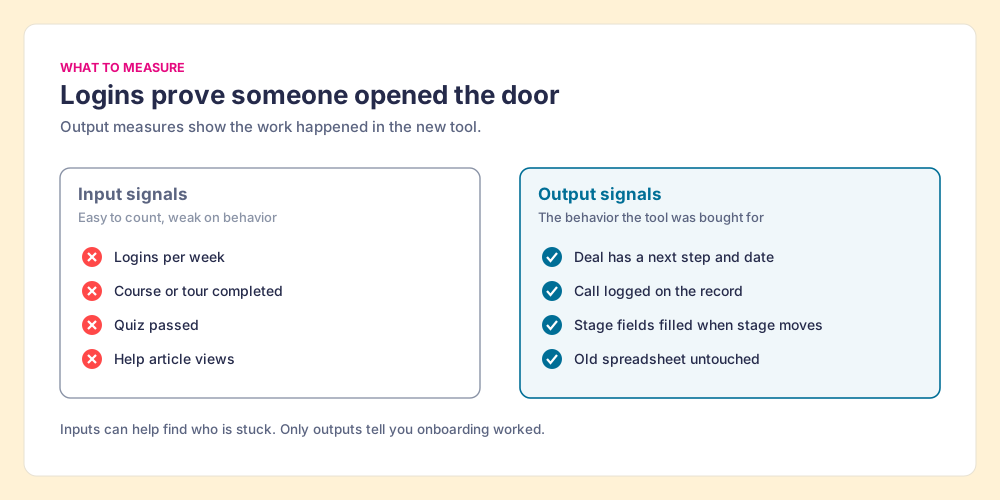
Most onboarding dashboards count what is easy to count: logins, completed courses, tour views. Those are input signals. They show someone opened the door. They say nothing about whether the work moved into the new tool.
The better measures are the behaviors you chose in step one, read straight from the records:
- Next-step coverage. The share of open deals with a next step and a date.
- Activity on the record. Calls and meetings logged when they happened instead of rebuilt from memory at the end of the week.
- Stage hygiene. Required fields filled at the moment a deal changes stage.
- Old-system silence. New entries in the retired spreadsheet or database, which should fall to zero.
Inspecting these per rep is how a manager finds who is stuck early, while it is still a five-minute fix. The SOSE data on inspection is blunt: teams that inspect deals against a defined process at the highest frequency hit quota at 6.3x the rate of the lowest band. Inspection in the habit window is the onboarding team finding the dirt paths while they are still faint.
For a deeper list of adoption numbers worth tracking, see user adoption metrics.
Where does Supered fit in software onboarding?
Supered is one way to put the sign at the corner for sales teams. Its Digital Adoption plan places step-by-step guides, knowledge cards and onboarding action plans on the HubSpot, Salesforce or Pipedrive page where the task happens, triggered by the URL or screen, with knowledge checks inside the onboarding plan and an AI assistant reps can ask while they work. It costs $13.50 per user per month paid yearly ($15 paid monthly), from one user (pricing). The Process Compliance plan adds the measurement half: process rules that check each record against the behaviors you chose, and process boards that show which reps are following them. It is $40 per user per month paid yearly, with a five-user minimum, and includes everything in Digital Adoption. See how teams use it for onboarding and ramp.
Choose something else if you are rolling out software outside the browser, if your team works mostly on mobile or in the field (Supered has no mobile product), or if the job is guiding thousands of employees through ERP and HR systems across a large enterprise. That last job is what WalkMe, owned by SAP since 2024, and Whatfix are built for; our breakdown of WalkMe pricing and the wider digital adoption platform guide cover that ground. For HR new-hire onboarding, an HR suite is the right tool.
What we recommend
Plan software onboarding around the habit clock. Choose a few behaviors, set a firm date for the old system, keep training short and inside the real tool, then run two months of cues at the screen where each task happens, measured by what shows up in the records. A heavier training program, the usual alternative, spends more money on the clock that runs out first.
The evidence is lopsided. Training fades in days on Ebbinghaus’s curve, while Lally’s volunteers needed a median of 66 days to make one behavior automatic. Gollwitzer’s meta-analysis found that a cue tied to a specific situation closes much of the gap between intending and doing. In our own survey, guidance in the workflow came with 49% quota attainment and guidance in a wiki with 15%. Spend less on launch week and more on the eight weeks after it.
If the CRM itself is the new tool, the next read is why CRM adoption fails and how to fix the friction behind it, which goes deeper on the friction side. If you want to see guidance sitting on the CRM page while a rep works, book a demo.
Frequently asked questions
What is software onboarding?+
How long does software onboarding take?+
What is the difference between software implementation and software onboarding?+
How do you onboard employees to a new CRM?+
How do you measure software onboarding success?+
What tools help with software onboarding for employees?+
Your process, running itself.