Salesforce to HubSpot: What the Migration Guide Cannot Tell You
Moving from Salesforce to HubSpot is technically tractable. The object mapping is documented, the savings are real, and the UI is genuinely simpler. What migration guides omit is the part that decides whether the switch pays off.
A Salesforce to HubSpot migration is the process of moving contacts, accounts, opportunities, and activities from Salesforce into HubSpot's equivalent objects, rebuilding automations, and redesigning the team's sales process to run inside HubSpot rather than Salesforce.
The case for migrating from Salesforce to HubSpot is usually made in a spreadsheet. The platform savings for a mid-market team of 20 reps can run $70,000 to $91,000 per year against a comparable stack. The UI is cleaner. Rep adoption is better. The decision looks straightforward on paper.
What the spreadsheet does not capture is the gravitational pull of an existing system. A team that has used Salesforce for three years has not adopted a CRM. It has built habits, workarounds, shortcuts, and custom logic that live partly in the platform and mostly in the people. Moving the platform moves the data. The habits come separately.
A Salesforce to HubSpot migration is the process of moving contacts, accounts, opportunities, and activities from Salesforce into HubSpot’s equivalent objects, rebuilding automations, and redesigning the team’s sales process to run inside HubSpot rather than Salesforce. The technical part is tractable. The behavioral part is where migrations between major CRMs tend to disappoint.
What does the Salesforce to HubSpot object mapping look like?
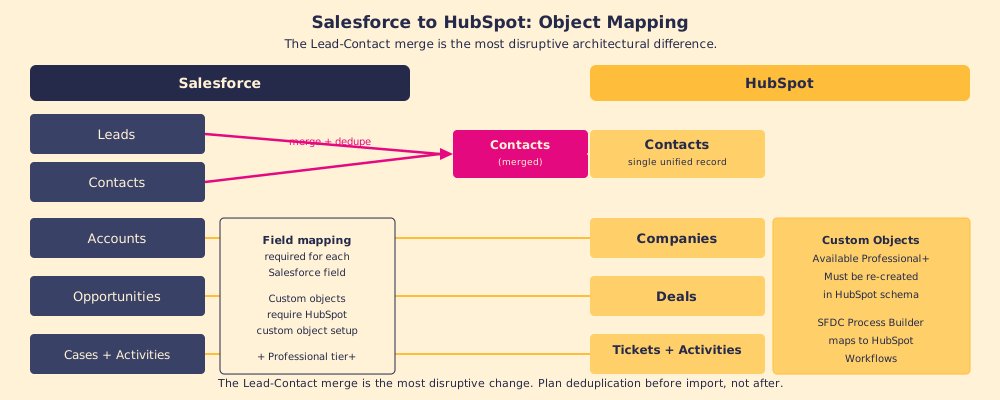
Both CRMs store data in objects, but Salesforce and HubSpot organize them differently. Before any data moves, the mapping must be designed, because the most significant architectural difference between the two systems is not a minor field mismatch. It is a conceptual one.
Salesforce has a Lead object and a Contact object, and they are separate records with separate owners and separate histories. HubSpot has no Lead object. All records are Contacts from the start. A Salesforce-to-HubSpot migration requires collapsing Leads and Contacts into a single unified Contact record in HubSpot, which means running deduplication before the import, not after. Migrating Leads and Contacts separately and then merging them in HubSpot produces chaos. Deduplicating first and importing Contacts only produces a clean database.
The other objects are more straightforward:
- Salesforce Accounts become HubSpot Companies. The mapping is direct; field-by-field configuration is required.
- Salesforce Opportunities become HubSpot Deals. Stage names must be remapped; HubSpot’s pipeline structure is more opinionated about stage progression than Salesforce’s.
- Salesforce Activities (Tasks and Events) become HubSpot Activities. Log types and association rules differ.
- Salesforce Custom Objects require HubSpot custom object setup, available at Professional tier and above. This is the most technically demanding part of migrations involving complex Salesforce implementations.
Does the financial case for a salesforce to hubspot migration hold up?
It does for most mid-market teams, with one caveat. The comparison is not Salesforce versus HubSpot. It is the Salesforce stack versus the HubSpot stack, because neither platform is a standalone tool for a full revenue team.
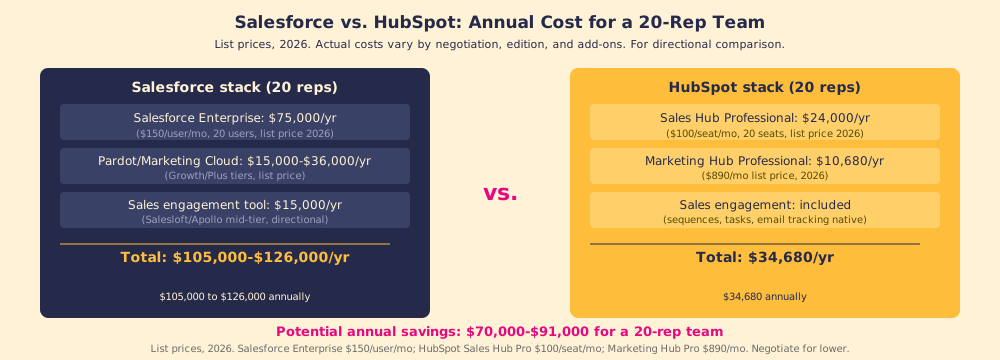
A typical Salesforce stack for 20 reps: Salesforce Enterprise at $150 per user per month ($75,000 per year at list price, 2026), Pardot or Account Engagement (the current Salesforce name) or Marketing Cloud at $15,000 to $36,000 per year, and a sales engagement tool at $15,000 per year. That is $105,000 to $126,000 annually at list.
A comparable HubSpot stack for 20 reps: Sales Hub Professional at $100 per seat per month ($24,000 per year), Marketing Hub Professional at $890 per month ($10,680 per year). Sales engagement (sequences, email tracking, tasks) is native to Sales Hub. Total: approximately $34,680 per year.
The potential saving is $70,000 to $91,000 per year for a 20-rep team, before negotiation on either side.
The caveat: the financial case assumes the HubSpot migration increases rep adoption relative to Salesforce. Research from migration providers reports that teams moving from Salesforce to HubSpot see CRM adoption increase from approximately 60% to 85% or above, attributed to HubSpot’s simpler UI and lower friction per action. If the adoption rate stays the same in the new system (a risk when behavioral onboarding is skipped), the $70,000 saving funds a better-looking tool with the same utilization problem.
Why do salesforce to hubspot migrations fall short of expectations?
The most common reason: teams planning to migrate Salesforce to HubSpot treat the project as a data move, not a behavior change. The migration plan covers the data. Move the records, rebuild the workflows, train on the new UI, go live. The records land in HubSpot, the reps open the new portal, and the process they run inside it is the same one they ran in Salesforce, with the same skipped fields, the same stage-skipping, and the same reliance on memory and instinct over documented standards.
There is a structural reason for this. Conway’s Law, originally stated by programmer Melvin Conway in 1967 about software architecture, holds that organizations produce systems that mirror their communication structure (Conway’s Law, 1967). Applied to CRM migrations: the way a team communicates about and runs its sales process gets embedded in the tool it uses. Moving the tool does not move the communication structure. The team migrates its habits into HubSpot and reproduces the same process gaps it had in Salesforce, in a cleaner interface.
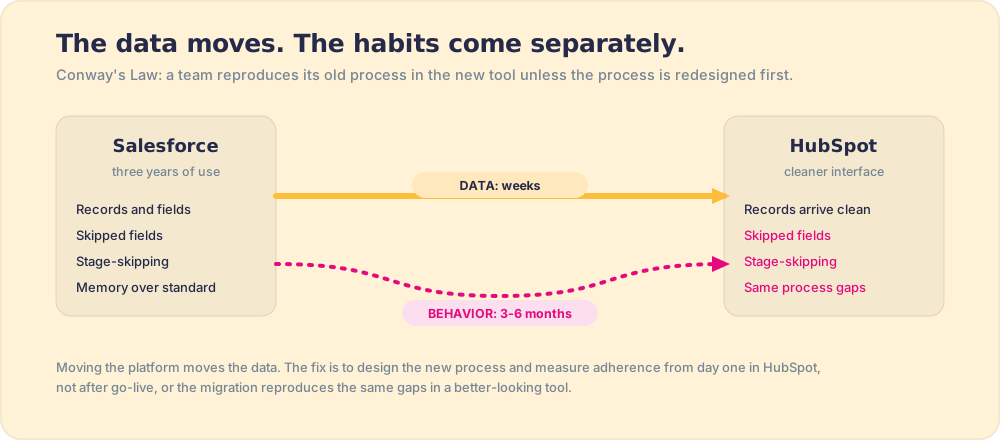
The fix is not a better migration script. It is designing the new process before the data moves, and measuring adherence to that new process from day one in HubSpot. Knowing that 30% of deals are advancing past stage three in HubSpot without a mutual next step logged tells you whether the migration is producing the behavior change the financial case assumed. Without that measurement, the migration appears successful because the portal is populated, and the real outcome, whether reps are working differently, stays invisible.
Who should switch from Salesforce to HubSpot?
A salesforce hubspot comparison grounded in what each platform does best, not which brand has the larger marketing budget.
HubSpot is the better choice when: the team is under 100 reps, the primary pain is adoption and usability rather than configurability, the Salesforce implementation has accumulated debt (unused fields, broken workflows, shadow spreadsheets), and the CFO wants a lower total cost of ownership with fewer admin headcount.
Salesforce is the better choice when: the team has complex territory management requirements that HubSpot’s model cannot handle cleanly, the implementation has deep custom object usage across multiple business units, or the company is already running Salesforce Service Cloud and CPQ and the integration cost of switching sales would outweigh the savings.
The companies where the switch underdelivers are usually the ones where the migration was sold as a cost reduction and implemented without a behavioral onboarding plan. The cost reduction is real. The adoption improvement is not automatic; it requires the same design work that a greenfield HubSpot setup requires.
What we recommend
If you are moving from Salesforce to HubSpot, run the Lead-Contact deduplication before the import, not after. Design the process stages based on buyer position, not seller activity, before you rebuild the pipeline. And build the adherence measurement into the go-live plan, not the post-go-live review.
For the full migration methodology, HubSpot migration covers the iceberg model in depth. For the data-side of the migration, CRM adoption explains the behavioral layer that follows. And for a complete implementation reference, HubSpot implementation is the right starting point for teams building from scratch or rebuilding after a migration.
Frequently asked questions
What is the main difference between Salesforce and HubSpot?+
How do Salesforce objects map to HubSpot?+
How much does a Salesforce to HubSpot migration cost?+
How long does a Salesforce to HubSpot migration take?+
Your process, running itself.