The HubSpot Migration Checklist With a Fourth Phase
Every migration checklist covers the audit, the design, and the move. The migrations that fail, fail in the phase the checklists skip: the week after. All four phases, line by line.
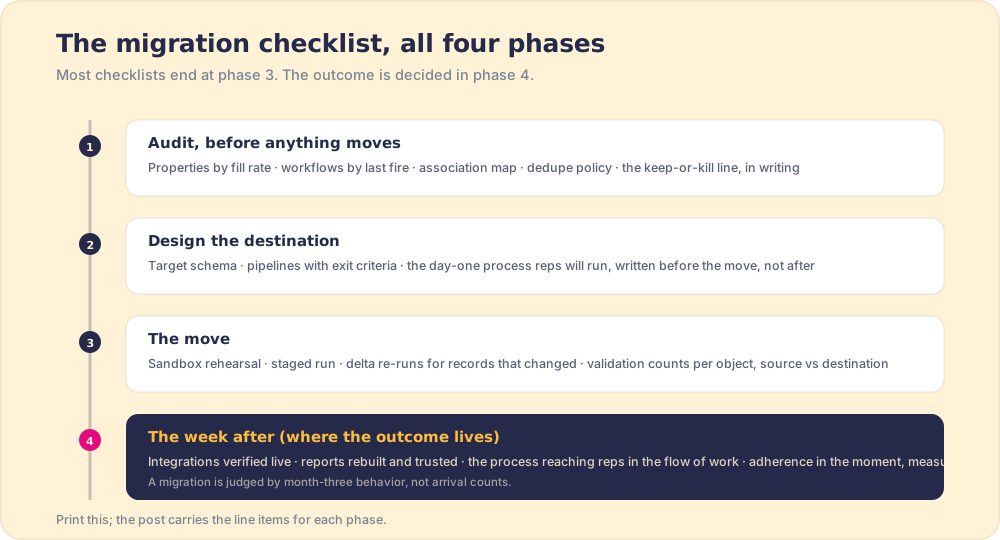
A HubSpot migration checklist covers four phases: the audit before anything moves, the destination design (schema, pipelines, day-one process), the move itself (rehearsal, staged runs, validation), and the week after, where integrations go live and adoption is measured.
How to run a HubSpot migration, phase by phase
- 1
Audit the source portal
Inventory properties by fill rate, workflows by last-fired date, and pipelines by stage conversion. Draw the keep-or-kill line in writing, map every association that must survive, and set the dedupe policy: match keys, survivorship rules, conflict owner.
- 2
Design the destination
Define the target schema, pipelines with stage exit criteria, and the day-one process reps will run, before any record moves. The destination is a design decision, not a photocopy of the source.
- 3
Rehearse in a sandbox
Stage the new configuration in a HubSpot sandbox, knowing the valve rules: new assets deploy up, edits to synced assets do not, and integrations are absent from rehearsal entirely.
- 4
Run the staged migration
Move in order: schema, then records with associations, then rebuilt automation staged off. Re-run deltas for records that changed mid-project, and validate with per-object counts, source versus destination, plus spot-checks on known monster records.
- 5
Cut over with automation gated
Turn on rebuilt workflows behind enrollment filters, verify every integration live with a handful of records first, and rebuild the reports leadership actually reads before retiring the old portal's access.
- 6
Measure the week after
Deliver the day-one process to reps in the flow of work and measure adherence in the flow of work from the first morning. The migration is judged by month-three behavior, not arrival counts, so instrument the behavior now.
Checklists earn their keep in exactly one situation: work that is too important to trust to memory and too routine to think through fresh every time. Migrations qualify twice over, and the publishing industry agrees: every vendor ships a crm migration checklist, and they all contain the same competent three phases of hubspot migration best practices: audit, design, move. Use any of them and your records will arrive.
Then comes the morning after cutover, which no vendor checklist covers, because no vendor is accountable for it. The reports leadership trusts have not been rebuilt. The integrations were never rehearsed (the sandbox does not hold them). And the reps, the people the portal exists for, open the new system and do what people under quota always do with unfamiliar systems: improvise from old habits. The data migrated; the team did not. Here is the checklist with the fourth phase attached, since the fourth phase is where the outcome lives.
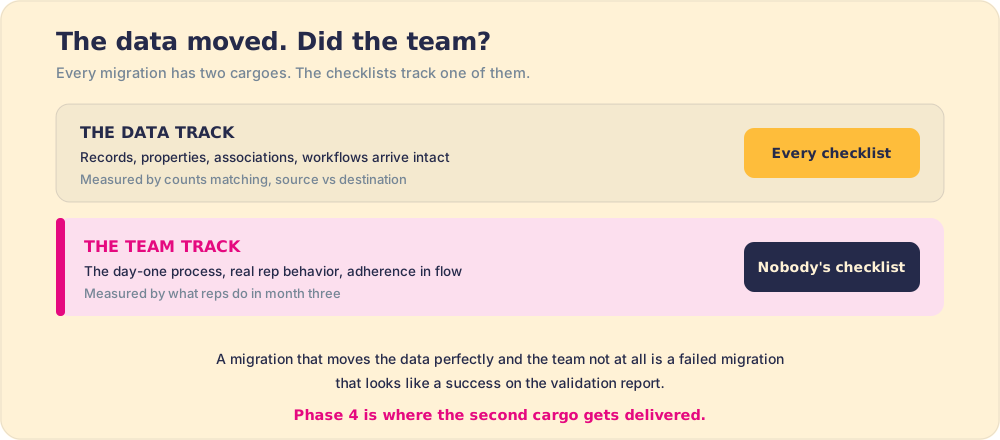
It helps to see why this is the predictable failure rather than bad luck. A migration moves two cargoes, not one. The first is the data, and every vendor checklist tracks it obsessively, because data is countable and a missing record is an obvious, embarrassable failure. The second cargo is the team: the process the reps are meant to run, and whether they actually run it in the new portal. Nobody’s checklist tracks that, because behavior is harder to count and the failure is slow, surfacing in March rather than on cutover weekend. So the standard checklist optimizes hard for the cargo that is easy to measure and ignores the one that decides the project. The result is the migration that passes every validation report and still leaves the team worse off, working around a clean new portal the way they worked around the old one.
Phase 1 of the HubSpot migration checklist: the audit
- Properties by fill rate. Export the property list with fill percentages. The 214-property portal where reps use 40 is the norm, not the horror story, and migration day is the cheapest moment you will ever have to retire the dead 174. Archive, do not move.
- Workflows by last-fired date. Anything silent for months is a candidate for the archive, and anything nobody can explain is a candidate for an honest conversation before it fires in a portal with new data shapes.
- The association map. Which objects relate to which, custom objects included, and which of those relationships your tool or partner preserves. Records arriving without their relationships is the classic silent failure: counts match, meaning is gone.
- The dedupe policy, in writing. Match keys, survivorship rules per field, and a named owner for conflicts. Set it now, because in-transit is the cheapest place duplicates ever get collapsed, a point covered tool-by-tool in HubSpot migration services.
- The keep-or-kill line, signed. One document stating what moves and what gets archived, with sign-off. This single artifact prevents the week-five relitigation that schedules die of.
Phase 2: what does the destination look like before the move?
The source portal is evidence, not a blueprint. Design the destination as though you were lucky enough to start clean, because for one week you are: target schema with single agreed definitions, pipelines whose stages carry exit criteria (a stage should reflect the buyer’s position, not the seller’s optimism), and, the piece that pays the longest dividends, the day-one process reps will run, written before the move. If you are consolidating two portals, this phase doubles as the schema treaty between teams, and merging HubSpot portals covers that negotiation in full.
The reason a redesign beats a photocopy is path dependence, the same force that keeps bad processes alive everywhere. Every property in the source portal exists because someone, at some point, had a reason, and that reason is usually long dead. Copy the schema over and you import not just the fields but the dead reasons attached to them, and they become precedent in the new portal the instant they land. A migration is the rare window where you can break path dependence cheaply, because nothing in the destination has any history yet. Spend that window photocopying and you have paid full price for a clean start and bought yourself the old portal in new paint. This is the single most expensive mistake on any crm migration checklist, and it is invisible at cutover, because a photocopied portal validates perfectly. It only hurts later, when reps inherit the same clutter that taught them the old habits.
Phase 3: what does a clean move look like?
- Rehearsal under the real rules. Stage in a sandbox knowing the valve: assets created there deploy up, edits to synced-down assets do not, and integrations are absent entirely, per HubSpot’s own deployment documentation. The full set of gotchas is in sandbox to production.
- Ordered, staged movement. Schema and configuration first, then records with associations, then automation staged off until cutover. The configuration leg is packageable now: 75+ HubSpot asset types plus the process layer travel as Supered packages, dedupe-safe, which is also how the redesigned phase-2 blueprint ships instead of being hand-built in the destination.
- Delta re-runs. Live portals keep living mid-project; re-run the records that changed since the first pass rather than freezing the business.
- Validation by counts and monsters. Per-object totals and association counts, source versus destination, plus hand-checks on your known weird records. Monsters intact means the herd arrived.
Phase 4: what happens the week after cutover?
The phase the vendor checklists skip, and the one that determines whether anyone calls this migration a success in March:
- Integrations verified live, gated. A handful of records through each connection before the floodgates, on a low-traffic afternoon, rollback noted.
- Reports rebuilt before trust expires. Leadership’s daily views, recreated and reconciled against the old portal’s numbers, before someone makes a decision on a half-wired dashboard.
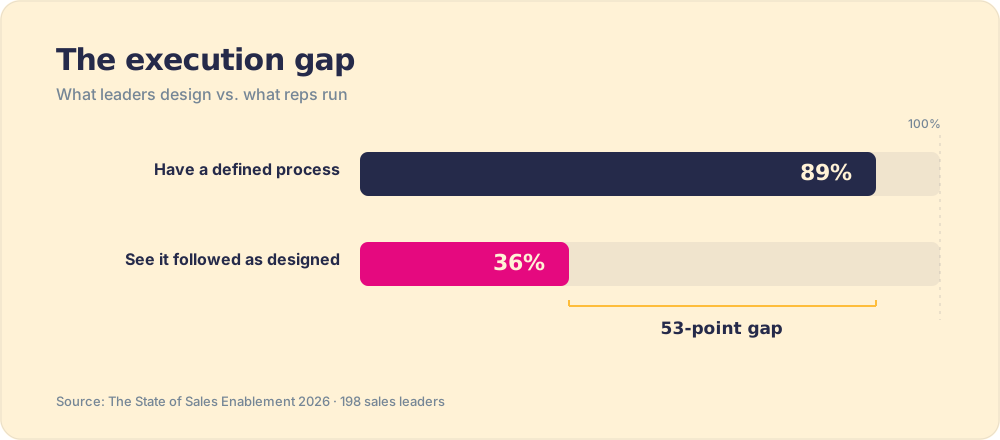
- The process delivered where reps work. Not a training deck about the new portal; the documented motion surfacing inside the portal at the stage where each step applies, from the first morning. The gap this prevents is the standing one in our field research: 89 percent of teams have a defined process, 36 percent see it followed (The State of Sales Enablement), and a team mid-migration starts the week below that baseline with full confidence in deprecated habits.
- Adherence measured from day one. You can only expect what you inspect, and the week after cutover is when drift is cheapest to coach. Placement plus measurement is the largest effect in the survey: 49 percent quota attainment when process guidance reaches reps in the flow of work versus 15 percent when it lives in docs. Wiring that layer inside HubSpot is Supered’s whole job, and it is the line item that turns a data migration into a team migration.
The reason the week after cutover matters so much more than the weeks before is that behavior hardens fast. A new portal is a fresh-poured surface, and whatever habits set in the first days are the habits you live with for quarters. A rep who improvises around the new system on day three has not made a one-time choice; they have started wearing a groove. Coach the drift in week one and it is a five-minute correction. Discover it at the quarterly review and it is a hardened habit across the whole team, plus a quarter of bad data, plus a forecast built on it. The cost of catching non-adherence rises by the day, which is exactly why every published HubSpot migration plan that ends at cutover ends one phase too soon. The expensive failures all happen after the checklist says you are done.
The recommendation
Run all four phases, and weight your effort backward from the way migrations are remembered: nobody recalls the record counts, everybody recalls whether the new portal made the team better. So audit ruthlessly, design rather than photocopy, move with rehearsal and validation, and spend the saved energy on the week after, where the process meets the reps and the measuring starts. If the project is bigger than the team can own, the three roads of help, tools to partners, are priced honestly in HubSpot migration services, and the full playbook lives in the HubSpot implementation guide.
Frequently asked questions
What should a HubSpot migration checklist include?+
What data should you not migrate to HubSpot?+
How do you validate a HubSpot migration?+
What are HubSpot migration best practices?+
How long does a HubSpot migration take?+
Your process, running itself.