Marketo to HubSpot: What the Platform Audit Always Finds
Adobe Marketo Engage remains a capable B2B marketing automation platform in 2026. Teams leave it for HubSpot because of cost, complexity, and the overhead of integrating a separate CRM. Here is what the transition actually requires.
A Marketo to HubSpot migration is the project of moving Adobe Marketo Engage programs, lead databases, and marketing automation logic into HubSpot Marketing Hub, typically combined with consolidating onto HubSpot CRM to replace a separate sales CRM and simplify the martech stack.
Adobe Marketo Engage is not a fading product. As of June 2026, it is an active marketing automation platform within Adobe Experience Cloud, with ongoing releases, AI-driven content tools, and deep B2B account-based marketing capabilities. Teams that use it for complex, enterprise-scale marketing operations and have the dedicated MOps resources to run it often find it worth keeping.
Teams that leave it for HubSpot are usually not leaving because Marketo stopped working. They leave because the Marketo plus Salesforce stack costs more than the HubSpot all-in-one alternative, requires more integration maintenance, and asks more of a mid-market team’s limited MOps bandwidth than the business can justify. The switch is an efficiency decision, not a capability verdict.
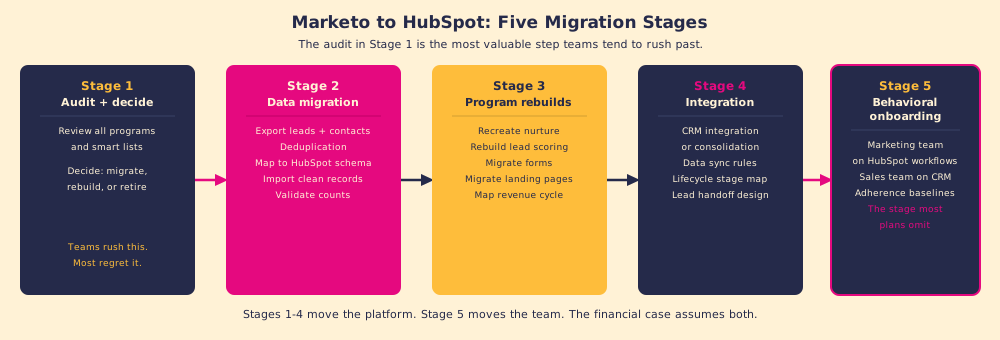
A Marketo to HubSpot migration is the project of moving Adobe Marketo Engage programs, lead databases, and marketing automation logic into HubSpot Marketing Hub, typically combined with consolidating onto HubSpot CRM to replace a separate sales CRM and simplify the martech stack. The technical work is tractable. The part most teams miss is the program audit that should happen before any data moves.
Why is the Marketo program audit the most important step?
Marketo implementations accumulate debt. A team that has used Marketo for three years will have programs from campaigns that ended, smart lists nobody remembers building, email templates that reference products no longer sold, and a Revenue Cycle Modeler configured by someone who left the company. Migrating this debt into HubSpot moves the problem without solving it.
Think of it like a house move. When you pack in a hurry and move everything, the new house is full of boxes you will never unpack, and the clutter you wanted to leave behind has a new address. When you audit before you pack, you migrate only what you will use, and the new space starts clean.
The program audit is the step most teams rush past in a marketo to hubspot migration because the pressure to go live is real. It is also the step that determines the quality of the entire migration. The audit should answer:
- What programs are active and producing results? These migrate.
- What programs are inactive but conceptually sound? These get rebuilt in HubSpot from scratch, using HubSpot’s native workflows rather than a literal port of the Marketo logic.
- What programs are legacy, broken, or irrelevant? These get retired. Migrating them adds complexity to the new system with no return.
What does the financial case for a marketo to hubspot migration look like?
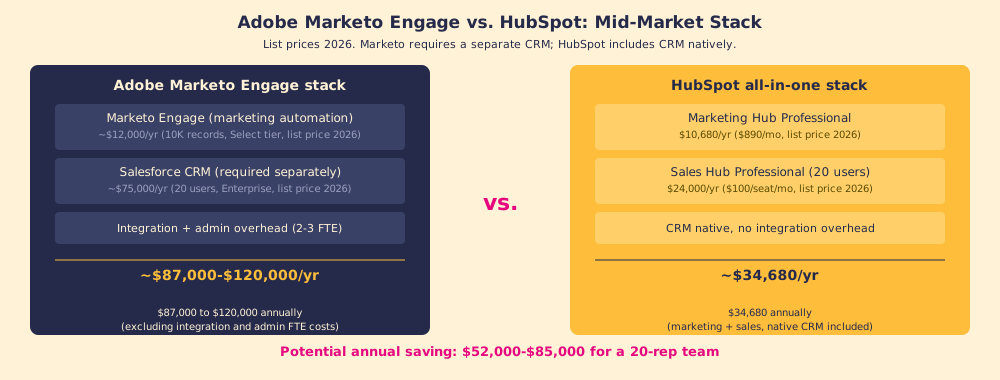
The platform cost comparison for a mid-market team is usually what starts the conversation. Adobe Marketo Engage pricing is contact-based and tiered; at the Select level for 10,000 to 50,000 contacts, list pricing in 2026 runs approximately $1,000 to $2,000 per month. That is $12,000 to $24,000 per year for marketing automation, not including the Salesforce CRM that Marketo requires for sales activity.
Adding Salesforce Enterprise at $150 per user per month for 20 sales users brings the combined stack to $87,000 to $120,000 per year at list price.
A comparable HubSpot stack: Marketing Hub Professional at $890 per month ($10,680 per year) and Sales Hub Professional at $100 per seat per month ($24,000 per year for 20 users), for a total of approximately $34,680 per year. HubSpot CRM is included. No separate integration required.
The potential annual saving is $52,000 to $85,000 for a 20-user team, before negotiation on either platform.
The caveat that most cost analyses omit: the saving assumes that the team’s adoption of HubSpot matches or exceeds their adoption of Marketo and Salesforce. Research from migration practices reports that teams who migrate Marketo to HubSpot and run the behavioral onboarding correctly see meaningful improvements in marketing-to-sales alignment because the two functions now share a single data model without a sync layer between them. Teams who skip the behavioral onboarding see the platform cost go down and the adoption rate follow.
How does Marketo program logic translate to HubSpot?
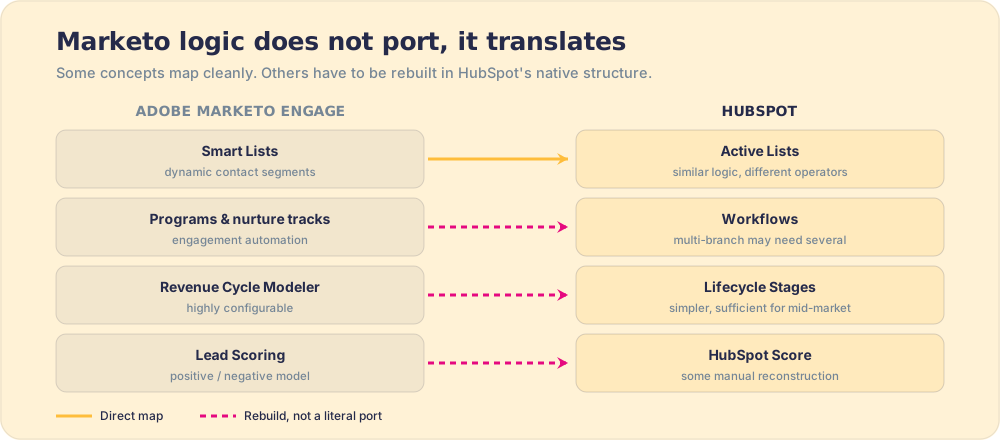
Marketo and HubSpot are not architecturally identical, and some Marketo concepts require translation rather than direct migration:
- Smart Lists become Active Lists. HubSpot’s Active Lists are dynamically updated contact segments, the functional equivalent of Marketo Smart Lists. The filter logic is similar; the field names and operators differ.
- Programs become Workflows. Marketo’s engagement programs and nurture tracks become HubSpot Workflows. Complex multi-branch programs may require multiple workflows in HubSpot. The translation is usually straightforward but requires mapping each Marketo trigger to the HubSpot equivalent.
- Revenue Cycle Modeler becomes Lifecycle Stages. Marketo’s Revenue Cycle Modeler is more configurable than HubSpot’s built-in Lifecycle Stage property, but HubSpot’s model is sufficient for most mid-market teams. For teams that need more granularity, HubSpot’s contact properties and workflow automations can replicate most RCM logic.
- Lead Scoring becomes HubSpot Score. Marketo’s positive and negative scoring model translates to HubSpot’s scoring system with some manual reconstruction. Predictive lead scoring, available at Enterprise tier, is more automated but requires a larger contact database to model accurately.
The lead handoff design deserves particular attention. When teams use Marketo plus Salesforce, the MQL-to-SQL handoff crosses a system boundary and an integration. In HubSpot, marketing and sales live in the same database. The handoff is a lifecycle stage transition, not a record transfer. Teams often discover that the old handoff process had gaps or delays that the integration made invisible, and the marketo hubspot migration makes them visible for the first time.
HubSpot’s official migration resources document the technical mapping in detail. The HubSpot migration hub covers field-level translation and program type equivalents for teams working through the rebuild phase.
Who should replace Marketo with HubSpot?
Teams that benefit from the switch: mid-market B2B companies with fewer than 100,000 contacts, limited dedicated MOps resources, a sales team already on or considering HubSpot CRM, and a primary pain point of complexity and cost rather than capability ceiling. For these teams, HubSpot’s simpler model and all-in-one native integration removes the friction that was slowing the marketing-to-sales handoff.
Teams that benefit less: large enterprise marketing operations with extensive Marketo customization (multiple workspaces, complex multi-touch attribution, deep Revenue Cycle Modeler logic), dedicated MOps and Salesforce admin teams already in place, and a primary need for the configurability Marketo’s architecture provides. Adobe Marketo Engage’s B2B account-based marketing features and AI-driven content suggestions in 2026 remain competitive for this segment. The switching cost of migrating a deeply customized Marketo instance can outweigh the platform savings.
What we recommend
Start the adobe marketo to hubspot migration with the program audit, not the data export. The audit determines what is worth migrating, what should be rebuilt from scratch in HubSpot’s native structure, and what should be retired. Teams that skip the audit migrate technical debt along with their programs and spend the first three months in the new platform cleaning up what they should have cleaned before they moved.
Run the behavioral onboarding for both marketing and sales in parallel with the technical migration. The financial case for the switch to HubSpot assumes that the team uses HubSpot; the adoption work is what validates that assumption.
For the data migration methodology, CRM data migration covers the technical discipline. For teams rebuilding their go-to-market process alongside the platform switch, HubSpot implementation is the right reference. For the adoption framework that makes the new platform stick, CRM adoption has the mechanism.
Frequently asked questions
What is involved in a Marketo to HubSpot migration?+
What is the difference between Adobe Marketo Engage and HubSpot Marketing Hub?+
How much does it cost to migrate from Marketo to HubSpot?+
How does Marketo lead scoring translate to HubSpot?+
Your process, running itself.