HubSpot Migration: Why the Data Is the Easy Part
A HubSpot migration is treated as a data-moving project, but the records arrive intact and the migration still fails.
Here is why adoption, not data, decides the outcome, and what to do about it.
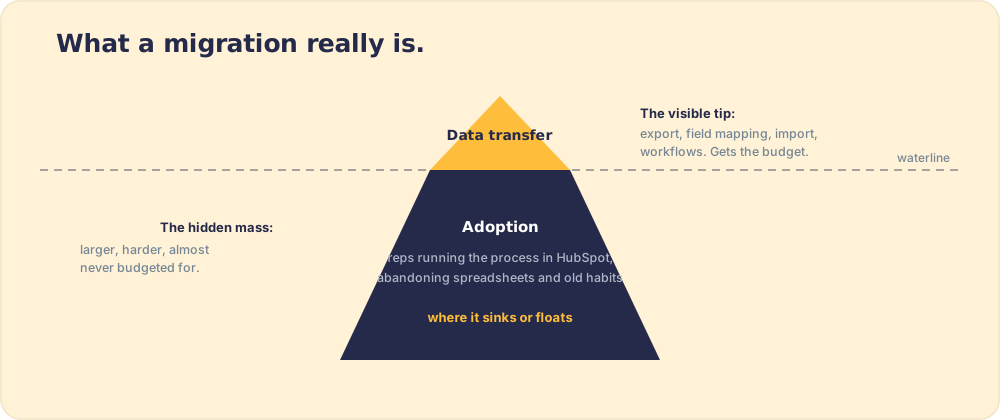
A HubSpot migration is the project of moving a team's CRM data, processes, and daily work into HubSpot, and while the technical data transfer is the visible task, the migration succeeds or fails on whether reps adopt the new system and run their process inside it.
A HubSpot migration is sold to the budget committee as a data project: move the records from the old CRM, rebuild the workflows, validate the imports, done. The records do move, usually cleanly. And then, three months later, the best closer on the team is still running deals out of a spreadsheet and the migration that succeeded on paper has failed in practice. The data was the easy part. The hard part never appeared on the project plan.
A HubSpot migration is the project of moving a team’s CRM data, processes, and daily work into HubSpot, and while the technical data transfer is the visible task, the migration succeeds or fails on whether reps adopt the new system and run their process inside it. Hold on to that split between the data and the adoption. The second one is where migrations disappoint.
What does a HubSpot migration involve?
Two layers, and a clean hubspot migration plan budgets for both rather than only the first:
- The technical layer. Export records from the old system, map fields to HubSpot’s schema, import contacts, companies, and deals, rebuild workflows, reports, and integrations, then validate that nothing dropped. This is real work, and it is the part vendors quote and project plans track.
- The behavioral layer. Get reps to work inside HubSpot every day, run their process there, log the new fields, and abandon the spreadsheets and side-channels they used before. This part decides whether the migration delivers, and it is the part the project plan leaves off.
The imbalance is the problem. A team will spend weeks getting the technical migration right (and they should, a botched data move is its own disaster) while treating adoption as something that happens on its own once the data arrives. It does not. The records landing in HubSpot is where the hard work starts, because a CRM is only as good as the behavior that runs inside it, a point we make at length in CRM adoption.
Why do HubSpot migrations fail even when the data transfers cleanly?
Because a migration is a behavior change wearing a data-project costume, and behavior does not transfer the way records do. You can move a contact list in an afternoon. You cannot move a habit in an afternoon, and the old way of working has the gravity of habit behind it.
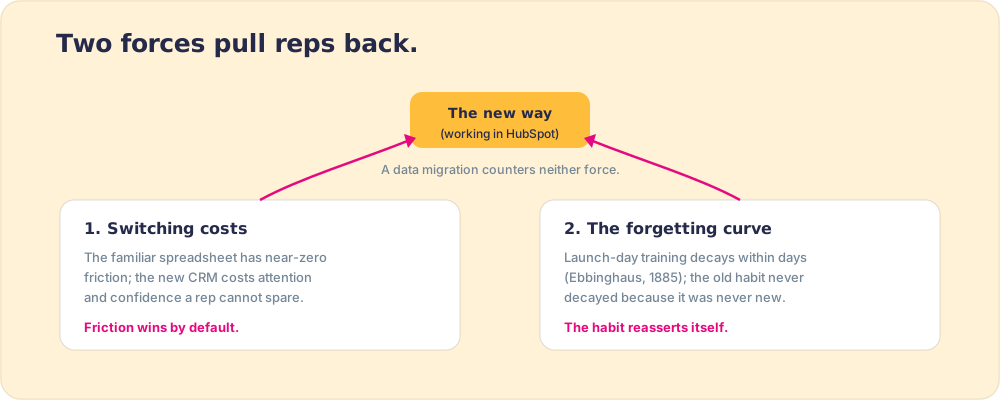
Economists call that gravity switching costs, the friction, real and perceived, of moving from a familiar tool to a new one. It keeps people on the old way even when the new one is plainly better (switching costs in economics). For a rep mid-quarter, the spreadsheet they know cold has near-zero switching cost; the new CRM, however superior, costs them attention and confidence they cannot spare under pressure. So they revert. HubSpot was never the problem. The switching cost of doing the work the new way was never paid down, and unpaid friction wins by default.
There is a second mechanism stacked on the first. New behavior decays without reinforcement, the forgetting curve that Hermann Ebbinghaus measured in 1885, where most of what is learned is lost within days unless it is prompted again (Ebbinghaus forgetting curve). The launch-day training shows reps how to use HubSpot once. By the second week, under deal pressure, the training has decayed and the old habit, never decayed because it was never new, reasserts itself. Two forces, switching cost and forgetting, both pull toward reversion, and a data migration addresses neither.
A third force explains the resistance that switching costs alone cannot. When reps migrate to HubSpot, they leave more than a tool behind. They leave a system they built. The spreadsheet, the naming convention, the personal pipeline view stitched together over two years are an artifact of their own labor, and people value what they made far above its market worth, an overvaluation the behavioral economists Michael Norton, Daniel Mochon, and Dan Ariely measured and named the IKEA effect (Norton, Mochon and Ariely, Journal of Consumer Psychology 2012). The rep’s resistance has little to do with HubSpot. The new system asks them to abandon something they are proud of having made, and that loss is felt as a cost the project plan never priced. You can move a contact list against that resistance. You cannot move a habit that a rep half-believes is better than yours, unless the new way proves itself easier in the rep’s own hands, deal by deal.
What does the adoption curve of a migration look like?
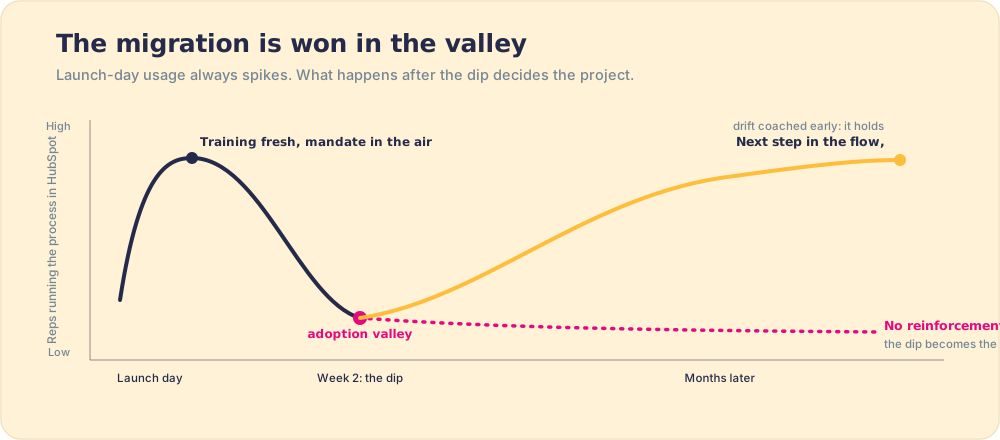
Plot the months after go-live as a curve, because its shape is where the project is won or lost. On launch day, with training fresh and a mandate in the air, usage spikes. The whole team logs in. The dashboard lights up, and the steering committee declares the migration a success and moves on. Then the curve dips, and the project plan has no line for the dip. Two weeks in, the training has decayed, the first quarter-end crunch hits, and reps under pressure reach for the spreadsheet that has zero switching cost and the comfort of being their own. Adoption sags into a valley. What happens next splits migrations into two outcomes.
In the teams that fail, nothing intervenes in the valley. There is no prompt in the flow of work, no one inspecting whether reps run the process in HubSpot, no early correction. The dip becomes the floor. Six months later the CRM holds clean data that describes deals being run somewhere else, which is the most expensive kind of empty database. In the teams that succeed, something catches the rep in the valley: the next right step appears inside HubSpot at the moment of the work, a manager sees the drift the week it starts and coaches it, and the new way slowly becomes cheaper than the old one in the rep’s actual hands. The curve climbs back, and this time it holds, because the behavior was reinforced where it happens rather than taught once and abandoned.
How do you make a HubSpot migration stick?
You pay down the switching cost and you reinforce the new behavior in the flow of work, rather than assuming a one-time training did both. Concretely, that means the right action has to be easier and more visible inside HubSpot than the old workaround, from day one, and someone has to inspect whether reps are doing it, because you can only expect what you inspect.
The technical and behavioral layers finally meet here. A well-run hubspot migration process does not end at validated imports; it makes the next right step reach the rep inside HubSpot, the moment they need it, so the new way costs less attention than the old workaround, and it measures adherence so reversion is caught while it can still be coached, not discovered at quarter close. A CRM that holds data and a CRM the team runs on differ by exactly that step. The same logic governs any crm migration, which is why we treat the move as a behavior project with a data component, never the reverse, in HubSpot migration services.
What we recommend
Treat the HubSpot migration as a behavior change with a data component. A data move with a training afterthought is how the valley becomes the floor. Do the technical migration carefully, because broken data is its own failure. But budget at least as much for adoption: make the new way easier than the old workaround inside HubSpot, reinforce the behavior in the flow of work so it survives the forgetting curve, and inspect adherence so reversion is caught early.
The recommendation rests on mechanism. Switching costs and the forgetting curve both pull reps back to the spreadsheet, and a data migration counters neither. The teams whose migrations stick are the ones that paid down the switching cost and reinforced the behavior, turning a populated CRM into an adopted one. The data was always the easy part; the adoption is the whole return on the project.
From here: the adoption discipline in full in CRM adoption, the lift-and-shift approach in HubSpot lift and shift, the migration checklist in HubSpot migration checklist, and partner-led moves in HubSpot migration services.
Frequently asked questions
What is involved in a HubSpot migration?+
How long does a HubSpot migration take?+
Why do HubSpot migrations fail even when the data transfers correctly?+
How do you make a HubSpot migration stick?+
What 2026 sales teams actually run.
The State of Sales Enablement, free.
Downloading now. Get the PDF again.
Ready to see it on your own deals? Book a demo
Supered Launch Week runs Nov 2 to 6, then Demo Day goes live Tue Nov 10, 11 AM ET.Register free