Knowledge Base Best Practices: The One That Decides ROI
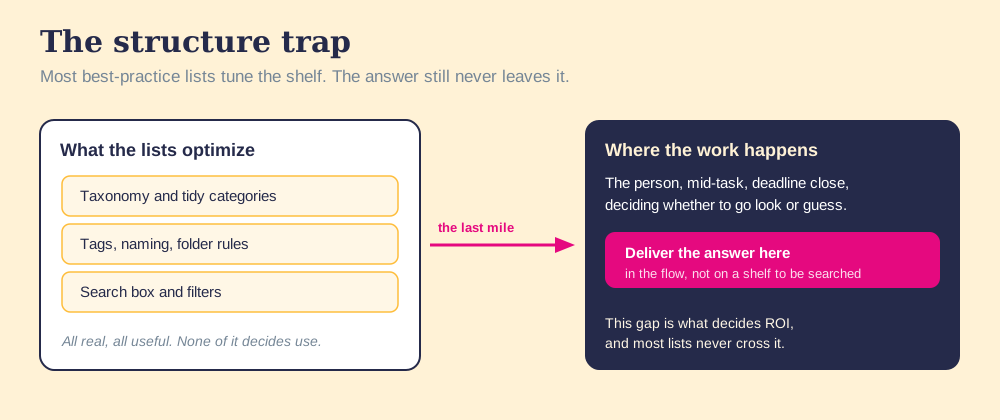
Most knowledge base best-practice lists tune taxonomy and search. The practice that decides ROI is the one they bury: deliver the answer in the work.
Knowledge base best practices are the design choices that get a store of answers used: delivering each answer in the flow of the work, keeping it true with named owners, and measuring whether it changed what someone did.
Walk into any company a few years old and you will find a knowledge base, and near it, the abandoned graveyard of the last one. Someone built the first, it sprawled, trust drained out of it, and a tidier replacement went up beside it. The tooling changed. The taxonomy got stricter. A year on, the new one has drifted into the same fog, and the search for best practices begins again, usually landing on a list about naming conventions and tags.
That list tunes the part that already works. Knowledge base best practices are the design choices that get a store of answers used: delivering each answer in the flow of the work, keeping it true with named owners, and measuring whether it changed what someone did. Structure helps. It is the floor. But the practice that decides whether the base pays back the work sits near the bottom of the usual lists, and it is the only one that touches the part that was never solved.
The split, as plainly as I can put it: storing knowledge is easy now. Finding it is close to free. What remains unsolved is use, the afternoon someone needs the answer and either gets it or guesses. A best-practice list that spends its whole budget on taxonomy is like a man reorganizing his toolbox into perfect labeled drawers, then leaving it in the garage while he works on the roof. The tools are findable. They are also nowhere near his hands.
Why do structure-first knowledge base lists underperform?
Because they tune the two things that already work. Search the field and you will find the same advice repeated by every wiki vendor and every help-center playbook: build a clear taxonomy, name articles consistently, tag for retrieval, tune the search box. Sound advice, all of it. None of it is wrong.
It is aimed at storing and finding, and those were solved a decade ago. The fault sits one step later, where two decays run together unseen. The content ages, because most answers go in with no owner and no review date, so the moment a process changes the page turns wrong and stays up, sitting indistinguishable from the pages still true. And the habit of checking fades, because after the launch buzz dies down, consulting the base means leaving the work to go look, and under a deadline that detour loses to a guess.
You might say better search fixes the second decay. Make retrieval instant and people will use it. Fair, and it is the most reasonable objection. But it grants the premise the whole list rests on, that the bottleneck is finding. It is not. Even a perfect search still asks the person to stop, switch context, type a query, and read, while the buyer waits and the quarter runs short. The detour is the cost, and a faster shelf is still a shelf you have to walk to.
The numbers say the detour is expensive. The McKinsey Global Institute estimated that employees spend close to a fifth of the workweek searching and gathering information (McKinsey Global Institute). The base was supposed to end that hunt. When it sits one detour off the road, the hunt continues, and the base watches it from the shelf.
The shelf was never the bottleneck.
The same pattern runs across the internal knowledge base as a whole, and you can see it in concrete cases. The best knowledge base examples are not the ones with the cleanest folder trees. They are the ones where the answer shows up where the person already is.
Which knowledge base best practices decide ROI?
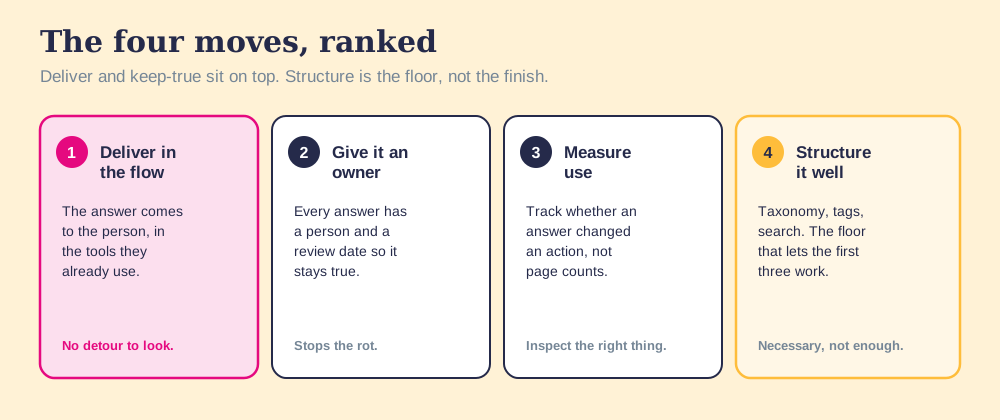
So the list below is ranked by what changes use rather than by what is easy to write about. Each lead is the move; the rest is why it works.
- Delivery in the flow of the work. The answer comes to the person, surfaced inside the tools they already have open, so consulting it costs no detour and the habit never has to fight friction. It crosses the last mile, and it decides whether anything else matters.
- An owner and a review date on every answer. Each entry gets a named person responsible and a date it gets checked, so a changed process updates the page instead of orphaning it. Ownership is the only thing that stops the content from rotting into a store you cannot trust.
- Measurement of use, not storage. Track whether the answer reached someone and changed an action, never how many pages exist or got opened. You can only improve what you inspect, and page counts inspect the wrong thing.
- Curation down to what gets reached for. Cut the base to the answers people need, so the store stays small enough to trust. A smaller true base beats an exhaustive one the team has stopped believing.
- Structure that holds the first four up. Taxonomy, naming, tags, and search are the floor. They are necessary and worth doing well, and they are nowhere near enough on their own. The specific rules are in the organizing section below.
Notice the inversion from the usual advice. The standard list opens with structure and, if it mentions delivery and measurement at all, drops them in a footnote. The order is backwards. Structure is the foundation a building needs, but no one rents a building for its foundation. They rent it for the rooms they will live in, and delivery, ownership, and measured use are the rooms.
What are the best practices for organizing a knowledge base?
Organize around the question the reader is holding, keep the tree shallow, and give each fact exactly one home. Structure is the floor in the ranking above, and a floor still has to be level. These are the rules we hold a base to:
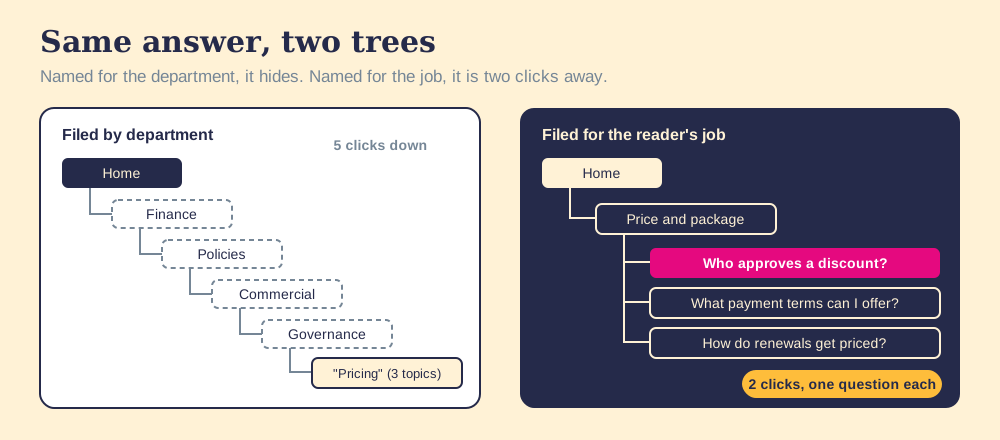
- One question per article. An article titled “Pricing” that covers discounts, payment terms, and renewals answers three questions badly. Split it into three articles, each titled as the question a rep would ask.
- Categories named for the reader’s job. “Win a deal” and “Price and package” beat “Sales Team” and “Finance Policies,” because people look for the task in front of them, not the department that wrote the answer.
- Five to nine top categories, two levels deep. A home page that reads at a glance, and any article two clicks away. Each extra level is one more place for a person under deadline to give up and ask a colleague instead.
- One home per fact. The discount rule lives in one article, and every other page links to it. A fact written in three places will be right in one of them after the next policy change.
- A short, controlled tag list. Tags that search can use, owned like categories. A tag cloud with two hundred entries means everything and finds nothing.
For a ready-made category map and an article skeleton built on these rules, copy our knowledge base template.
What are knowledge base design best practices?
Design the article for a reader who will skim it, because that reader is the normal case. Jakob Nielsen’s analysis of web reading found users have time to read at most 28 percent of the words on an average page, and 20 percent is more likely (Nielsen Norman Group). An article that hides its answer in the unread 72 percent fails the reader it was written for. In practice:
- The answer in the first two lines. The reader who stops after the first sentence should leave with the right answer.
- Numbered steps for anything procedural. Numbers let a reader keep their place while switching between the article and the screen they are working in.
- One screenshot per step that involves a screen. Placed beside the step it explains, and retaken when the interface changes, because a screenshot of an old screen teaches the wrong click.
- A visible last-reviewed date and owner. Printed at the top of the article, so a reader can judge in a second whether to trust it.
- Search at the top of every page. Readers arrive mid-task from a link, not from the home page, so the way out has to be where they land.
Good design makes the shelf pleasant to visit. It does not move the shelf any closer to the work, which is why delivery still sits first in the ranking.
How do you keep a knowledge base up to date?
Tie reviews to events as well as the calendar, and let the people using an article repair it while they use it. A knowledge base falls behind for a structural reason: the process changes in one place, a pricing meeting, a product release, a new approval rule, and nothing connects that change to the articles that describe it. The team plays catch-up because the base hears about changes last.
Four habits close that gap:
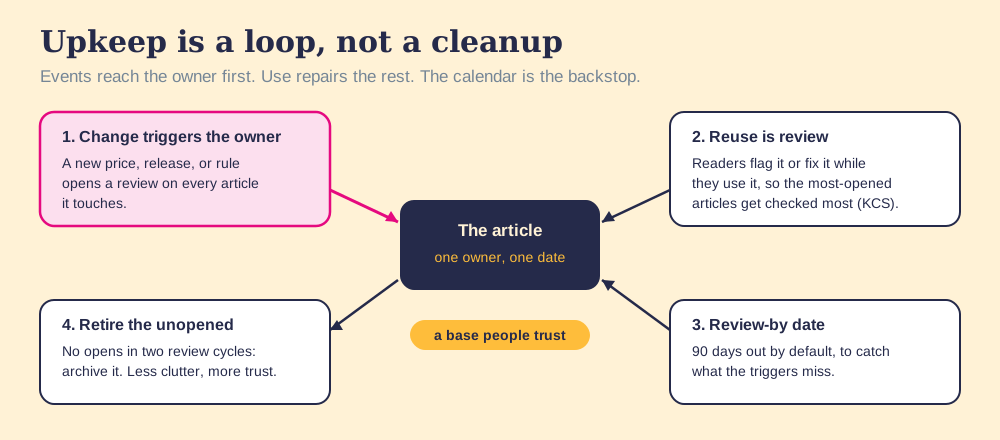
- An event trigger for every owner. When a process, price, or product changes, the change itself opens a review for the owner of each affected article. A release note that does not name the articles it breaks leaves them wrong until someone trips.
- Review on reuse. The KCS method builds upkeep into use rather than into a separate editing cycle: “We are constantly improving the articles that are being used” (KCS v6, Reuse is Review). The articles people open most get checked most, which is the right order.
- Flag it or fix it. Anyone who finds an error corrects it if they have the authority, or flags it for the owner if they do not (KCS v6, Flag It or Fix It). A flag with a name on it gets fixed. A complaint in a team channel gets a thumbs-up emoji.
- A review-by date and a retirement rule. Each article carries a date, 90 days out by default, as the backstop for changes the triggers miss. Articles with no opens in two review cycles get archived, which is how a base stops getting cluttered.
AI helps most at the detection end of this loop. A model can compare a new pricing sheet against every article that mentions price and draft the edits in minutes. The approval should stay with the named owner, because an AI that rewrites the base unreviewed spreads one wrong reading of the change across every article at once. Automate the noticing and the drafting; keep a person on the publish button.
Why is measuring use the practice teams skip most?
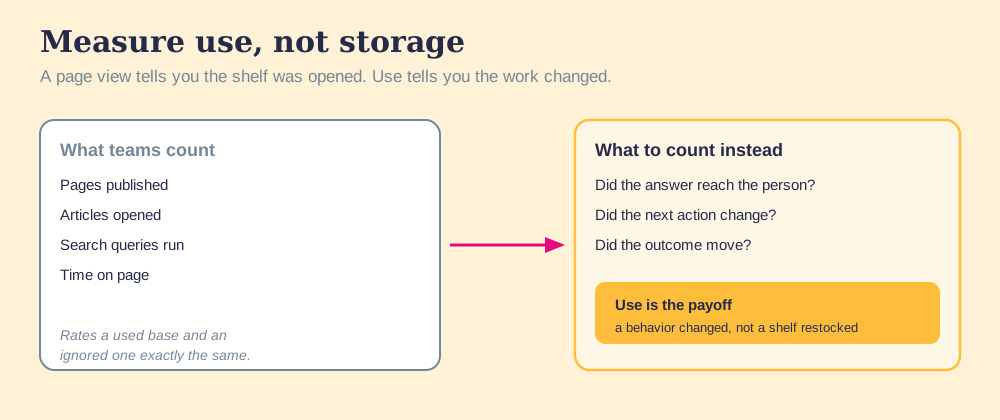
Because counting storage feels like measurement and asks nothing hard of you. Pages published, articles opened, time on page, queries run: every one of these is a number a dashboard hands over for free. And every one of them rates a used base and an abandoned one exactly the same, because a page view tells you a shelf was opened, never that the work changed.
Think of it the way a doctor thinks about vitals. Counting how many patients walked through the door is real data, and it is no measure at all of whether anyone got better. The knowledge base lives in the same trap. A library can log a thousand opened books and still send every reader away with the wrong edition. The count climbs; the outcome does not move.
What you want instead is behavioral, and it is harder to fake. Did the answer reach the person at the moment they needed it. Did the next action change. Did the outcome move. Those questions cost more to answer than a page-view chart, which is why teams skip them, and they are the only ones that tell a working base from a decorative one.
When the answer fails to arrive, people are not being lazy. The system put the answer one detour away, and the detour won. A design fault has a design fix. Make the right action the easy one, in the moment, and the habit takes care of itself. The same lesson runs through knowledge sharing: the bottleneck is rarely the willingness to share and almost always the friction of reaching the answer when it counts.
The proof that delivery is the lever, not a nicety, is in the outcome data. Our State of Sales Enablement found that teams whose guidance reaches them in the flow of the work hit quota at 49 percent, against 15 percent for teams whose knowledge sits in a separate destination (The State of Sales Enablement). Same content. Same people. The difference was whether the answer met them where they stood or waited on a shelf. A base measured on page counts would have rated both teams the same. A base measured on use can tell them apart, and so can the quarter.
What we recommend
Run the practices in the order they pay, which is close to the reverse of the order most lists present them. This month, pick the ten articles your team opens most and wire each one to the moment it is needed, the deal stage, the ticket type, the form. Next, put a named owner and a 90-day review-by date on every article that survives a cut, and connect your release notes and pricing changes to those owners. Then measure whether the delivered answers changed what people did. Reorganize the folders last, using the rules above, once you know which articles earn a place in them.
The evidence behind that order is the same evidence that runs through this whole page. People lose about a fifth of the week to searching, so a better shelf recovers little. Articles rot the moment a process changes unless an event reaches their owner. And guidance delivered in the flow lands at 49 percent quota attainment against 15 percent for knowledge kept in a separate tool. Taxonomy appears nowhere in that chain of cause.
For the copyable article skeleton, category map, and review tracker, take our knowledge base template. For filled-in articles and public bases worth studying, see knowledge base examples. For the full build, read the internal knowledge base, and for the team side, knowledge sharing and the sales knowledge base.
Frequently asked questions
What are knowledge base best practices?+
Why do structure-first knowledge base lists underperform?+
How do you measure whether a knowledge base is working?+
Should you build a knowledge base for completeness or for use?+
How do you keep a knowledge base up to date?+
What are knowledge base organization best practices?+
Is a knowledge base good for SEO?+
Where should knowledge base answers be delivered?+
Your process, running itself.