Scratchpad alternatives: what to use instead, and why the category matters
Scratchpad is excellent at reducing CRM friction for Salesforce teams.
But friction-reduction and behavior-change are two different jobs. Here is what each alternative solves, and how to pick the right one.
Scratchpad alternatives are tools that replace or extend Scratchpad's core job of reducing Salesforce data-entry friction, and the choice between them turns on one question: is your binding constraint logging speed, or whether reps run the process at all?
A sales rep who hates updating Salesforce is a person who has been asked to do a genuinely unpleasant thing. The native UI is slow, the fields multiply, and the whole ritual feels like paperwork stapled to the end of a conversation that already ended. Scratchpad was built to fix that, and by the reviews, it does. A 4.8 out of 5 on G2 from over 1,494 reviews as of 2026 is not a coincidence; it is the sound of reps finally not dreading the CRM update.
Scratchpad alternatives are tools that replace or extend Scratchpad’s core job of reducing Salesforce data-entry friction, and the choice between them turns on one question: is your binding constraint logging speed, or whether reps run the process at all?
That distinction matters more than any feature table, because the alternatives split cleanly along it. Some solve the same logging problem Scratchpad does. Others solve a different problem entirely. Buying the wrong one and discovering the gap six months later is how RevOps teams end up with two overlapping tools and the same adherence problem they started with.
What does Scratchpad solve, and where does it stop?
Scratchpad is a Salesforce productivity layer. Reps get a spreadsheet-like view of their pipeline, AI agents that auto-populate CRM fields from calls and notes, hygiene monitoring for managers, and Slack alerts when deal data goes stale. The founding insight, that a rep who can see their whole pipeline in a fast grid will update it, is correct. Faster data entry produces more complete CRM data, and more complete CRM data produces more accurate forecasts.
Think of Scratchpad as a well-designed pencil sharpener for the Salesforce CRM. It makes the act of writing faster and less annoying. Managers get cleaner pencil marks. The ledger stays up to date. What a pencil sharpener cannot do is tell you what to write.
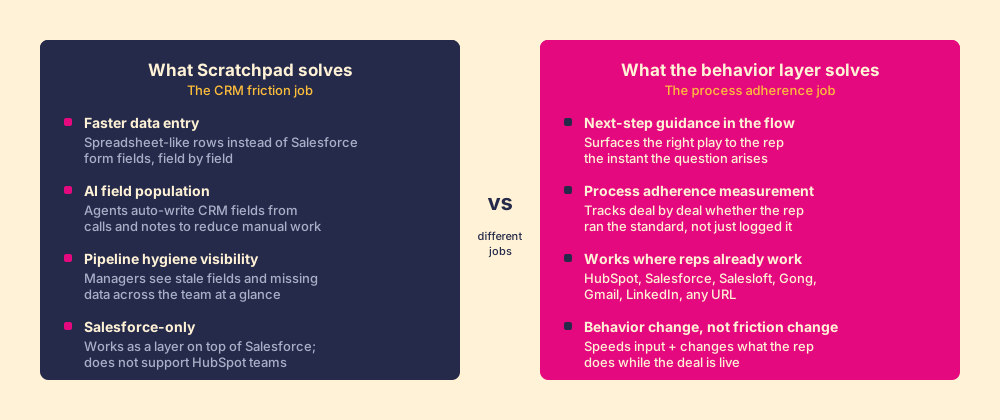
There is a structural reason Scratchpad lands so well on the logging job and leaves the process job untouched. Jeffrey Pfeffer and Robert Sutton documented it in their Stanford research published as The Knowing-Doing Gap: organizations consistently produce more knowledge than they convert into action, and the gap is not caused by ignorance. Reps know the stage exit criteria. They know the discovery questions. The constraint is not information access; it is whether the right prompt reaches them in the moment they are deciding what to do next. A faster logging interface does not close that gap, because the gap was never about logging speed.
Two pieces of context about the competitive field before naming alternatives:
Dooly shut down on June 30, 2025. Dooly was the closest head-to-head Scratchpad Salesforce productivity competitor, a note-taking and deal-workspace layer that Mediafly acquired and then shuttered less than a year later. If you are looking at Dooly in any roundup from before mid-2025, it is gone. Scratchpad inherited a large share of Dooly’s former customers precisely because it was the natural landing spot.
Scratchpad is Salesforce-only. The Scratchpad CRM integration is built around Salesforce and does not support HubSpot. If your team runs HubSpot, the Scratchpad conversation ends here and you need a different category of tool.
Which scratchpad alternatives are worth evaluating?
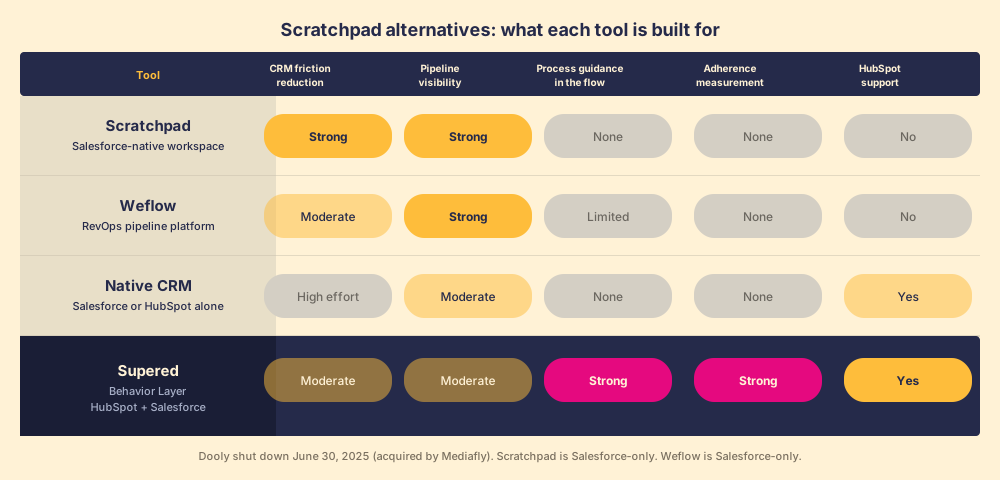
Weflow. Among Scratchpad competitors, Weflow is the closest direct replacement: a Salesforce productivity layer focused on pipeline visibility, forecasting, and bulk field editing. Weflow leans harder into revenue intelligence and forecast accuracy than Scratchpad does, with analytics designed more for RevOps leaders than for individual reps. If your primary complaint about Scratchpad is forecasting depth rather than data-entry speed, Weflow is worth a look. Growth tier runs around $74 per user per month billed annually. Weflow is Salesforce-only.
Native Salesforce. This is always an alternative, and it is worth naming honestly. For teams with a dedicated Salesforce admin and a strong playbook built into custom fields and validation rules, native Salesforce can be made to work. The cost is time: building it, training to it, and maintaining it as the process evolves. The 63% CRM initiative failure rate that Merkle Group research documented comes largely from teams that chose the native path and found that “available in the CRM” and “used by reps in the CRM” are not the same thing.
HubSpot native. For teams on HubSpot, there is no direct Scratchpad equivalent in the market today. HubSpot’s pipeline view is more usable out of the box than Salesforce’s, which is part of why the category of Salesforce-specific productivity layers exists in the first place and why no equivalent category has formed around HubSpot. The friction problem is smaller. The behavior problem is the same.
Supered. Different job. Supered is not a Scratchpad replacement in the friction-reduction sense; it is the tool for a different problem: whether reps run the process while the work is in motion, across HubSpot and Salesforce. It sits inside the CRM and surfaces the right guidance at the right moment, and then measures whether it was followed deal by deal. If your pipeline forecasting problem is caused by reps skipping stages or missing standard plays rather than by slow data entry, this is the tool that addresses the cause.
What is the right question to ask before choosing?
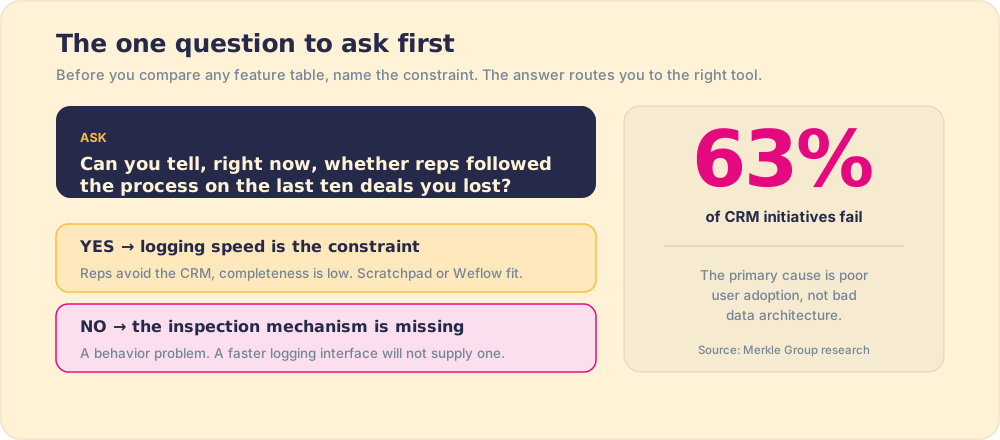
There is a useful diagnostic here, and Pfeffer and Sutton’s research points directly to it. Ask this: can you tell, right now, whether your reps followed the process on the last ten deals you lost? If the answer is no, the problem is not logging friction. The problem is that your inspection mechanism is missing, and a faster logging interface will not supply one.
- Logging speed is the problem if reps are actively avoiding the CRM, field completeness is below 60%, and managers are complaining that the data is stale by the time it arrives. Scratchpad or Weflow address this.
- Behavior and adherence are the problem if reps know the process, data completeness is reasonable, and the inconsistency is in what they do on deals, not in what they record after them. A behavior layer addresses this.
- Both are the problem sometimes, and the tools are not exclusive. A rep who logs faster and runs the standard play is worth more than a rep who does only one of those things. The question is which constraint to address first.
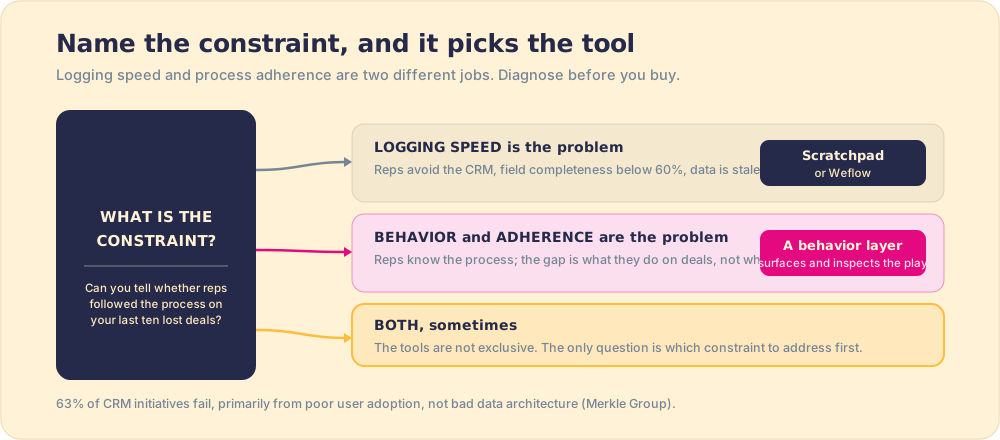
The Merkle Group finding is worth sitting with: 63% of CRM initiatives fail, and the primary cause is poor user adoption, not bad data architecture. Teams spend money on better pipelines and faster interfaces and still end up with reps who treat the CRM as a tax. That is a behavior problem, and the research from Pfeffer and Sutton gives it a name: knowing that you should update the CRM and doing it in the flow of work are two different cognitive events, and the gap between them is not closed by making the update button easier to reach.
Does Scratchpad address process adherence, or only CRM hygiene?
Scratchpad has added AI agents and hygiene monitoring features that move in the direction of process adherence. The hygiene monitoring gives managers visibility into missing fields and stale records. AI agents auto-populate fields. These are genuine improvements to the logging problem. They are not the same as surfacing the next right action to the rep the instant they open a deal record, or measuring whether the rep ran the standard play rather than a self-directed one.
The honest line is this: Scratchpad makes it easier for reps to record what they did. A behavior layer makes it harder for reps to not run the process in the first place, by surfacing the expectation at the moment of work and measuring adherence afterward. Both are valuable. They solve sequentially: first the logging problem (so data is trustworthy), then the behavior problem (so the data reflects a run process, not an ad hoc one).
Scratchpad’s own positioning reflects this. Their product page for AI forecasting leads with pipeline accuracy and hygiene, not with process compliance or adherence measurement. That is the right job for the tool. The problem arises when teams buy it expecting behavior change and get faster forms.
What we recommend
Scratchpad solves a real problem and solves it well. If your Salesforce reps are actively avoiding the CRM because the interface is painful, and your data completeness is suffering for it, Scratchpad is the right tool. The 4.8 out of 5 from over 1,494 G2 reviews is honest signal. Weflow is the closest alternative if you want more forecasting depth alongside the pipeline view. Native Salesforce works if you have the admin resources to build it right and the discipline to maintain it.
Choose Scratchpad or Weflow if your problem is logging friction, you are on Salesforce, and the pain is data completeness and pipeline visibility.
Choose Supered if your problem is whether reps are running the right plays while the deal is live, you need HubSpot support alongside Salesforce, and the gap you are trying to close is behavioral rather than administrative.
Neither Scratchpad nor Weflow supports HubSpot teams. If you run HubSpot, those options are not available to you regardless of the use case.
The pencil-sharpener analogy is worth returning to at the close. A sharpener is a good investment if the pencil is the constraint. A sharper pencil in a hand writing the wrong thing is still the wrong thing. Before buying any tool in this category, name the constraint precisely: slow logging, or a process that reps are not running while the deals are live. The tools that address those two constraints are built differently, and only one of them will move the number you care about.
From here: the mechanics of CRM adoption, the process problem underneath it in sales process adoption, the knowing-doing gap in our post on the knowing-doing gap, and the case for measuring the behavior in what is sales enablement.
Frequently asked questions
What are the best scratchpad alternatives in 2026?+
What does Scratchpad do?+
Is Scratchpad worth it for HubSpot teams?+
What is the difference between CRM friction reduction and behavior change?+
Your process, running itself.