Salesforce Productivity Tools: The Category Every List Omits
Every roundup of Salesforce productivity tools covers the same three categories and leaves out the one that decides whether the process actually runs. Here is what they miss and why it is the only category tied to quota outcomes.
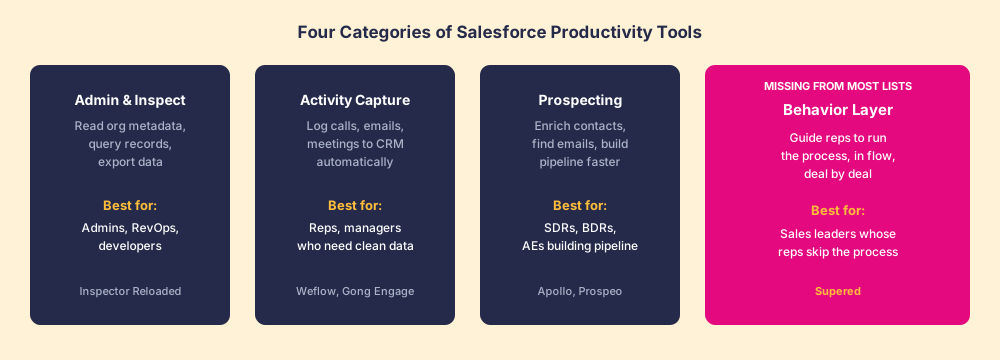
Salesforce productivity tools fall into four categories: admin and inspection tools, activity capture and logging tools, prospecting and enrichment tools, and the behavior layer that ensures reps actually run the sales process.
Most roundups of salesforce productivity tools, including lists claiming to name the best salesforce productivity tools, cover the same territory: here is a tool that reads your org schema, here is one that logs your emails, here is one that finds contact data. They are all real tools for real jobs. But nearly every list stops there. The category they omit is the one whose job is deciding whether the sales process runs, deal by deal, and it is the only category our field data ties directly to quota outcomes.
The three well-known categories are worth understanding first, because they are each genuinely useful for something specific, and a team that is missing one of them has a different problem than a team that has all three and still watches reps skip the process.
What do the well-known salesforce productivity tools actually do?
The admin and inspection category exists because Salesforce’s native interface is not built for the people who manage the org. A RevOps lead who wants to query a custom object, inspect field-level security, or export a slice of records would normally need to write SOQL in the developer console or submit a support request. Salesforce Inspector Reloaded, the open-source browser extension with a following in the tens of thousands, solves that entirely. It puts the org’s data layer inside a panel the admin can reach from any page. The job it does is reading and editing the org faster. Nothing more, and nothing more is needed from it.
The activity capture category is a response to a well-documented failure in CRM adoption: reps do not log their calls and emails because it is tedious. Salesforce’s 7th edition State of Sales (released February 2026) found that reps spend 60 percent of their time on tasks other than selling, and “manually entering customer notes into the CRM” made the list. Tools in this category, whether the native Salesforce email integration or products like Weflow and Gong Engage, capture activity automatically and write it back to the record. The job is keeping the CRM clean without burning the rep’s selling time. If your Salesforce data is a graveyard of stale contact records and empty activity logs, this is the category you are missing.
The prospecting and enrichment category is targeted at teams running outbound, or at teams that need to build pipeline from inside the accounts that are already in Salesforce. Tools like Apollo and Prospeo surface contact information, company firmographics, and buying signals from within the browser. They push enriched data back into Salesforce records so the rep does not have to switch between four tabs to build a cadence. The job is pipeline velocity. It is useful for the rep whose constraint is not knowing who to call next.
These are three genuine jobs, and each category has clear winners. The problem is that solving all three still leaves the most important variable untouched.
Why is salesforce productivity a process problem, not a task problem?
Suppose you have deployed the best tool in each of the first three categories. Admins can navigate the org in seconds. Emails log themselves. SDRs build lists at a pace they could not manage before. The CRM is cleaner than it has been in years.
Now ask a harder question: are the reps running the deal the way you designed it?
Are they completing discovery before moving to Stage 3? Are they confirming economic buyer access before forecast commit? Are they sending the mutual action plan when the opportunity reaches evaluation? In most organizations, the answer to these questions is a guess, and usually an optimistic one.
In our survey of 198 sales leaders for The State of Sales Enablement, 89 percent of teams reported having a defined sales process. Only 36 percent saw it followed consistently. That gap, 89 percent saying they have a process and 36 percent seeing it run, is not a knowledge problem. Reps know the process exists. They know the stages. The problem is that nothing in the flow of work guides them to the next step at the moment they are looking at the deal record. The playbook is in a document somewhere. The process stage is a dropdown. The rep decides, on their own judgment, what to do next.
That is not a task-efficiency failure. It is a system-design failure.
The teams that had guidance in the flow of work, process instructions surfaced at the deal record as the rep was working, split quota attainment from 15 percent to 49 percent in the same survey. That is not a marginal difference. It is the kind of gap that changes whether a sales leader keeps their job.
What is the behavior layer, and how does it differ from the other categories?
Think of a surgical checklist. The surgeon knows how to perform the operation. The scrub team knows the protocol. The checklist is not there because anyone lacks knowledge. It is there because a demanding task, under pressure, in the moment, reliably produces omissions when the checklist is absent. Atul Gawande’s research, documented in The Checklist Manifesto, found that surgical teams using checklists reduced major complications by 36 percent across eight hospitals in eight countries. The checklist does not teach; it guides.
The behavior layer is the sales equivalent. It is not content delivery. It is not a repository of battle cards the rep can search before the call. It is guidance surfaced at the deal, at the moment the rep is looking at it, telling them the next required step, surfacing the context they need, and capturing the output as a byproduct of the work rather than as a separate logging task.
The distinction from the other three categories is the job description.
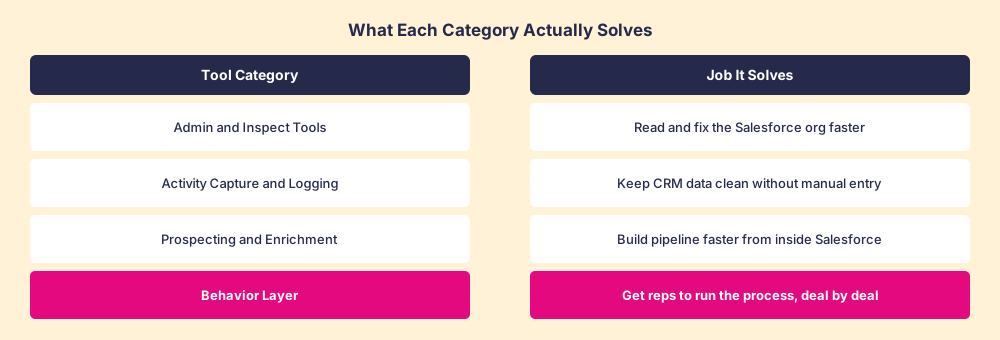
- Admin tools make the org faster to navigate.
- Activity capture tools make data entry automatic.
- Prospecting tools make pipeline-building faster.
- The behavior layer makes the process run.
Only one of those jobs determines whether your sales motion produces consistent results. A team with clean CRM data and a well-navigated org, but reps running the deal on personal intuition rather than a shared process, is a team whose forecast is a guess.
The way most sales leaders discover this gap is through a quarter close that came in short despite a pipeline that looked fine on paper. The pipeline showed activity. It showed stage progression. It did not show whether any of those stages were earned by the criteria that make a stage meaningful.
For deeper context on the connection between the Salesforce interface and the process layer, our guide to Salesforce Chrome extensions covers how browser-layer tools interact with CRM records, and our breakdown of the best Salesforce Chrome extensions by job is the companion roundup for teams evaluating tools in the first three categories.
Which category should you prioritize?
The answer depends on which problem you have, and it is worth naming them precisely, because the symptoms overlap in ways that send teams to the wrong tool.
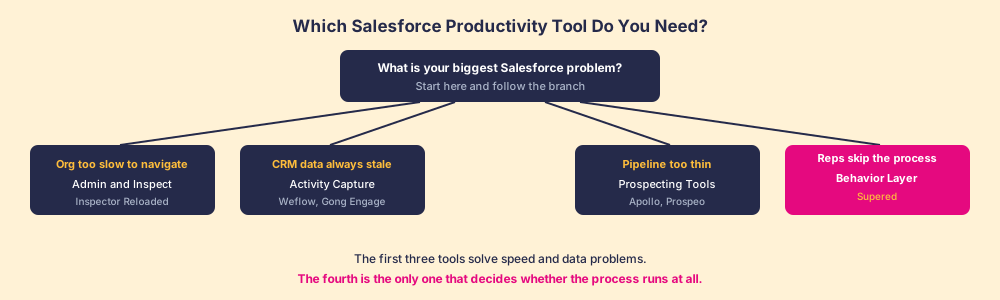
- The org is slow and painful to manage. RevOps and admins spend half their day in developer tools doing things that should take seconds. This is the admin and inspection category. Salesforce Inspector Reloaded is the starting point. It is free, actively maintained, and used by technical Salesforce users at tens of thousands of companies.
- The CRM data is consistently stale. Activity logs are empty, contact records have no recent touches, and managers cannot tell from the pipeline what the last rep interaction was. This is the activity capture category. The native Salesforce email integrations are free and cover the basics. Weflow, Gong Engage, and similar tools cover broader capture across calls, meetings, and email for teams that need more.
- Pipeline is too thin and outbound is slow. Reps are spending too much time finding contacts and building sequences rather than having conversations. This is the prospecting category. Apollo and Prospeo both operate inside the browser and push enriched data to Salesforce records. The job is giving the rep more qualified conversations per week.
- Reps are not following the process. The playbook exists. Training happened. Stage definitions are documented. And yet opportunities consistently show up at forecast with missing steps, skipped criteria, and a pipeline that does not reflect what the buyer has committed to. This is the behavior layer, and no tool in the first three categories addresses it. Supered is the behavior layer that rides alongside Salesforce: it surfaces the next step of your process at the deal, delivers the playbook in the flow of work, captures the CRM update as a byproduct of the working motion, and makes adherence visible deal by deal without requiring manual inspection by the manager.
Most teams need more than one. A team running outbound at scale and struggling with process adherence might run a prospecting tool and a behavior layer together. The discipline is to match the tool to the job rather than buy the tool with the longest feature list.
The category most lists omit is the one that decides the revenue outcome
Admin tools, activity capture, and prospecting tools are each solving for the efficiency of a task. They make existing work faster, cleaner, or less manual. They produce measurable gains in the specific task each one addresses.
The behavior layer is solving for something different. It is not about doing a task more efficiently. It is about whether the process is followed at all, consistently, across every rep, every deal, and every stage.
That is the variable that decides whether the number is repeatable.
A team that can navigate their Salesforce org quickly, log activity automatically, and build outbound pipeline efficiently, but cannot tell whether the process is running, has a productivity advantage and a predictability problem.
The sales process and CRM adoption challenges almost always sit at the behavior layer. The tools that address them are the ones most lists leave for the end, or leave out entirely. Start with the job you have. If the job is getting the process to run, the behavior layer is the category you need.
Supered is purpose-built for that job. Where admin tools read the org, activity capture cleans the data, and prospecting tools fill the top of funnel, Supered makes the process itself run: the next required step surfaces at the deal record, the CRM update happens as a byproduct of the work, and the manager can see adherence by rep and by stage without a separate inspection meeting.
If you want to see what the behavior layer looks like in practice inside a Salesforce environment, see how it works or book a demo to walk through it with your specific sales motion.
Frequently asked questions
What are salesforce productivity tools?+
Which salesforce productivity tools actually improve quota attainment?+
What is the best free Salesforce productivity tool?+
How is the behavior layer different from a sales enablement platform?+
Do Salesforce productivity tools replace the CRM?+
How many Salesforce productivity tools should a sales team run?+
Your process, running itself.