Sales Productivity Tools: Time Given Back Is Only Worth Where It Goes
Sales productivity tools promise to give reps time back.
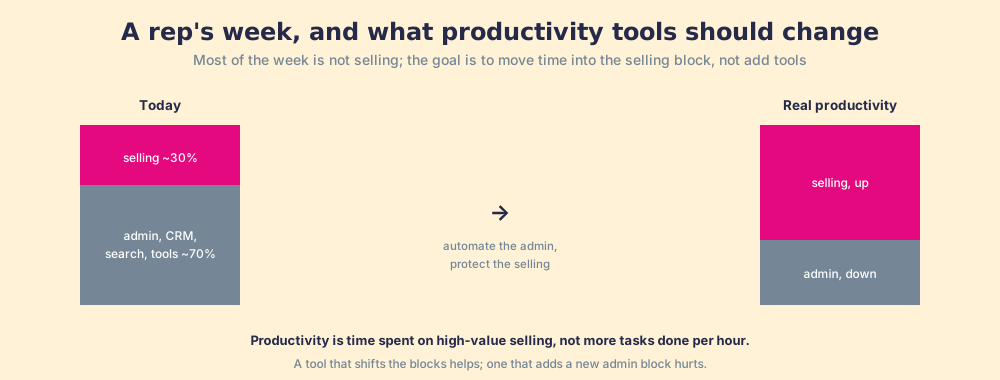
But productivity is not tasks done per hour; it is time spent on high-value selling. A tool that frees an hour and fills it with more admin produces nothing.
Sales productivity tools are software meant to give reps more selling capacity, and they only raise productivity if the time they free is spent on high-value selling, because productivity is time on the right behavior, not tasks completed per hour.
Most sales productivity tools make the same promise: give reps their time back. And many of them deliver, automating the data entry, the scheduling, the note-taking that eats a rep’s week. Then productivity does not improve, and the reason is that the promise was only half of the equation. Time given back is worth exactly what it gets spent on. Free a rep an hour and they spend it on more low-value activity, or on managing the same tool that freed it, and you have produced nothing. Worse, each tool you add carries its own overhead, and past a point the stack’s cumulative tax outruns the time any single tool saves. Sales productivity is not tasks done per hour. It is time on the behavior that wins, and a tool only helps if it moves time there.
Sales productivity tools are software meant to give reps more selling capacity, and they only raise productivity if the time they free is spent on high-value selling, because productivity is time on the right behavior, not tasks completed per hour. Measure where the time goes, and the tool’s real value appears.
Why does giving reps time back not raise productivity on its own?
Because the time is only valuable if it is redirected into selling, and nothing about freeing it guarantees that. A rep’s week is mostly not selling. Salesforce’s State of Sales research has repeatedly found reps spending roughly 70 percent of their time on tasks other than selling: admin, CRM updates, hunting for content, and switching between tools (Salesforce, State of Sales). A productivity tool that automates some of that admin creates an empty hour, and the hour does nothing until it is deliberately filled with high-value selling. If it instead refills with more of the same low-value activity, or with maintaining the new tool, the rep is busier and no more productive, because productivity was never about the volume of tasks. It was about time on the behavior that advances deals, the sales effectiveness point applied to the calendar.
The freed hour leaks for a reason with a name. Work expands to fill the time available for its completion, the observation the historian C. Northcote Parkinson made in 1955 (Parkinson’s Law, The Economist, 1955). Free a rep from an hour of data entry and, with no plan for that hour, the remaining admin swells to absorb it. The CRM gets tidied more elaborately, the inbox gets triaged again, the dashboard gets stared at. The saved hour vanishes into work that was already there without ever touching a live deal. So “we bought tools to give reps time back” rarely shows up in the number. The time came back and went straight into more of the work it was supposed to replace, because no one decided in advance where it would go.
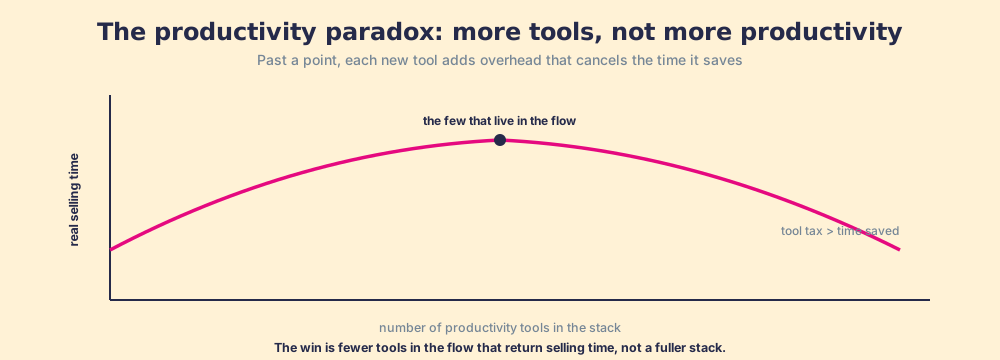
The instinct to buy productivity tools by the dozen backfires for the same reason. Each tool added outside the flow of work carries overhead: a login, a tab, a place to update, a context switch. Add enough and the cumulative tax on the rep’s attention grows faster than any one tool’s saving, so real selling time falls even as the stack grows. Economists call the broader pattern the productivity paradox, the long-observed gap between technology added and productivity gained (on the productivity paradox). A sales floor buried in tools is that paradox in miniature: more software, more busywork, no more selling.
What are the main types of sales productivity tools?
Seven types cover nearly every sales stack in 2026, and they differ less in what they promise than in how much admin they remove against how much overhead they add. The category label tells you little. What tells you a lot is whether the tool writes to the CRM for the rep or asks the rep to come and write to it.
| Tool type | The admin it removes | Examples (status, Oct 2026) | Overhead risk | Net selling time |
|---|---|---|---|---|
| CRM-native AI | Drafting follow-ups, summarizing records, filling fields | HubSpot Breeze, Salesforce Agentforce | Low: lives where the deal lives | High, if reps already work in the CRM |
| Call recording and notes | Typing call notes, logging calls | Gong (independent) | Low when notes write back to the CRM | High |
| Sales engagement and sequencing | Manual follow-up, task lists | Outreach; Salesloft (merged with Clari, closed December 2025) | Medium: a second place to work deals | Positive for high-volume outbound, flat for AEs |
| Scheduling | Back-and-forth emails to book a time | HubSpot’s meetings tool, Calendly | Low | Positive, small |
| Data and enrichment | Hunting for emails, phones, firmographics | Apollo, Clay | Medium: credits and a separate table to manage | Positive when enrichment runs on record creation |
| Content and enablement platforms | Searching for the right deck or case study | Seismic (completed its merger with Highspot, August 2026) | Medium to high: a library is a destination | Depends on in-workflow delivery |
| In-flow guidance and inspection | Remembering the next step, chasing missing fields | Supered (our product), digital adoption tools | Low: surfaces inside the CRM | High, and it measures whether the time went to selling |
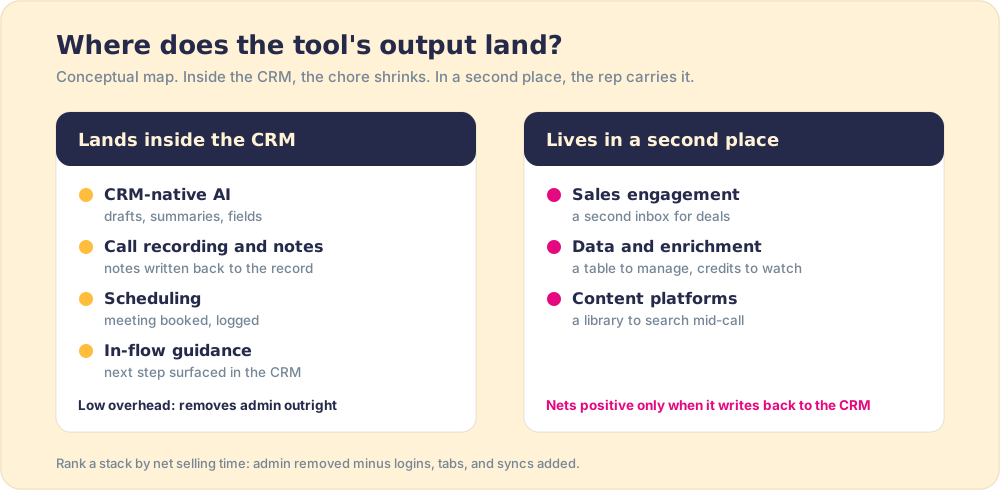
Two patterns fall out of the table. First, the highest-netting types are the ones whose output lands in the CRM without a rep touching it, which is why call-note tools and CRM-native AI keep showing up at the top of rep surveys. In our State of Sales Enablement 2026, call analysis and summaries were the most common use of AI on sales teams, cited by 73% of respondents, with CRM admin and cleanup at 46% (State of Sales Enablement 2026). Teams are already pointing software at the biggest admin block. Second, the types with the most overhead risk are the ones that become a second place to work: a sequencing tool for an AE who lives in the CRM, or a content library a rep has to search mid-call. Neither is a bad product. Each is a destination, and a destination charges rent in attention.
Which sales productivity tools reduce admin work the most?
The ones that write to the CRM for the rep. CRM updates and logging are the largest single block of non-selling work, so a tool that turns a recorded call into notes and field updates, or fills contact fields the moment a record is created, removes admin outright. A tool that saves time on one task but needs its own daily sync has moved the admin, not removed it.
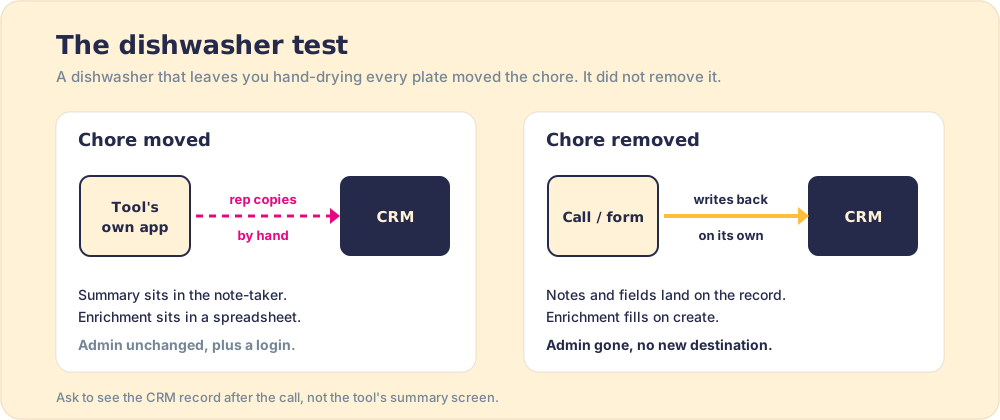
Think of a household that buys a dishwasher and then hand-dries every plate because the rack does not fit the cupboard. The machine works. The chore did not shrink, it moved to the other side of the kitchen. Sales tools do this constantly: the note-taker that writes a lovely summary into its own app, which a rep then copies into HubSpot; the enrichment tool whose results live in a spreadsheet someone has to import. The test is where the plate ends up. If the output lands in the system of record without a human carrying it, the chore is gone.
To pick a tool that cuts admin, run five checks before the demo is over:
- Write-back. Does the output land in CRM fields and activity, or in the tool’s own interface? Ask to see the record after the call, not the tool’s summary screen.
- Rep touches. Count the clicks a rep needs per deal per week to keep the tool useful. Above a handful, the tool has its own admin.
- Login count. A new login is a new destination. Tools that run inside the CRM or the inbox add none.
- Duplication. If HubSpot or Salesforce already ships the feature natively, the add-on has to beat it by enough to pay for a second surface.
- Measurement. Can you see, deal by deal, whether the freed time went into selling activity? If the tool reports only tasks automated, it reports the wrong half.
Why do sales productivity tools become shelfware?
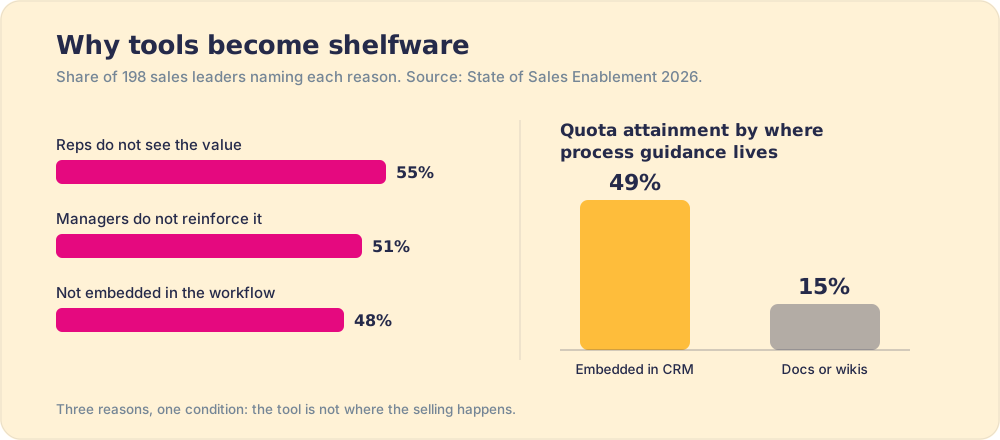
Because they live outside the moment of selling. When we asked 198 sales leaders for the State of Sales Enablement 2026 why tools become shelfware, the top three answers were reps not seeing the value (55%), managers not reinforcing the tool (51%), and the tool not being embedded in the workflow (48%) (State of Sales Enablement 2026). Read together, those are one condition described three ways. A rep sees no value in a tool that is not there when the question arises. A manager does not reinforce a tool they cannot see being used. And a tool outside the workflow asks the rep to leave the deal to use it.
The same survey shows what the alternative is worth. Teams whose process guidance is embedded inside the CRM hit quota at 49%, against 15% for teams whose process lives in docs or wikis. Same content, different location, and the location decides whether reps use it. None of this is rep laziness. A rep juggling three live deals will take the path that keeps them in the deal, and a tool that requires a detour loses to the path every time. That is a design problem in the stack, and it has a design fix.
How do you tell the best sales productivity tools from the rest?
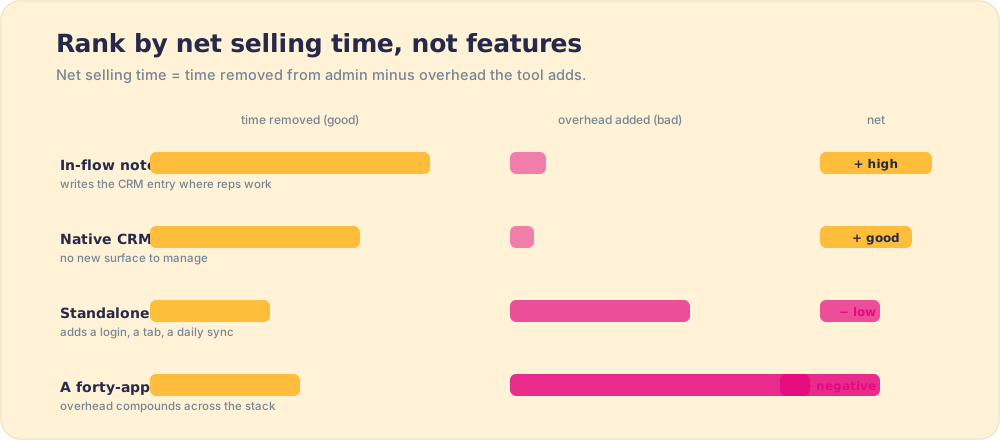
The phrase “best sales productivity tools” usually returns a list of thirty-five or forty apps, which is the instinct that builds the wrong stack. A ranking by feature count or category coverage measures what hurts you (more surfaces) as if it were what helps you (more selling time). The useful ranking runs the other way. The best sales productivity software removes the most non-selling work while adding the least overhead of its own, and a forty-app list rewards the numerator and ignores the denominator entirely.
So when you read a roundup of tools to improve sales productivity, re-sort it by net selling time, not by features. A note-taker that captures the call and writes the CRM entry inside the tools the rep already uses returns real time at near-zero overhead, so it nets high. A standalone app that does one clever trick but adds a login, a tab, and a daily sync nets low or negative, however impressive the trick. The net selling time, time removed from admin minus time added in overhead and maintenance, is the only number worth ranking on.
Run a stack through that lens and the inverted U of the productivity paradox becomes a decision rule:
- Admin automation in the flow. Keep it. It removes non-selling work without adding overhead, so it nets selling time back.
- A new surface or a duplicate. Cut it. Its overhead eats the time it saves, pushing you down the wrong side of the curve.
- Freed time with no destination. Plan it. Decide in advance where the saved hours go, because an unfilled hour produces nothing on its own.
How do you improve sales productivity with the tools you already own?
Start with a time audit, not a purchase. Most of the gain sits in the stack you already pay for, because CRM-native features ship every release and go unused while the team shops for an add-on that duplicates them. A four-week sequence works for a team of any size:
- Week one, the audit. Have three reps log a normal week in half-hour blocks. Sort the blocks into selling and non-selling, and name the three biggest non-selling blocks. CRM updates almost always make the list.
- Week two, the cut. For each tool in the stack, write down the admin it removes and the overhead it adds. Retire anything that nets negative, and switch on the native CRM features (call logging, meeting links, AI summaries) that cover the same job.
- Week three, the destination. Decide where the freed time goes, in writing: more first meetings, multi-threading into the buying group, prep before discovery. Without a named destination, Parkinson’s Law takes the hour.
- Week four, the inspection. Check whether the selling activity actually rose. If the reps freed four hours and booked no more meetings, the time leaked, and the fix is the destination, not another tool.
The broader levers, territory, coaching, and process, are in our guide to sales productivity. The tools are one lever among several, and the cheapest one to get wrong.
How should you build a sales productivity stack?
Keep it small, in the flow, and pointed at selling time. Resist the urge to add a tool for every minor task, because the overhead compounds and the stack slides down the wrong side of the productivity curve. Choose a few tools that automate genuine admin, that live where reps already work so they add no tax of their own, and pair them with a deliberate plan for the time they free, the same logic as automating admin in sales automation. Then measure selling time gained, not tasks automated or tools owned. A rep with two tools that steadily return real selling hours is more productive than a rep with ten tools and a calendar full of tool maintenance.
The last piece is the one stacks usually lack: a way to see whether the freed time reached the deal. Supered surfaces the next step of your process inside HubSpot and Salesforce while the rep works, and records deal by deal whether it ran, so the time a note-taker or an AI assistant hands back has somewhere specific to go and you can see that it went there.
What we recommend
Judge sales productivity tools by the selling time they net, not the tasks they automate, because time given back is worth only where it is spent. A tool that frees an hour the rep refills with low-value activity, or that adds its own login-and-update overhead, raises busyness and not productivity, and a stack large enough tips into the productivity paradox, where more software produces less real selling. Our survey data says the same from the other side: tools fail when they sit outside the workflow (48%) and succeed when guidance lives inside the CRM (49% quota attainment against 15%). So keep the stack small, prefer tools whose output lands in the CRM without a rep carrying it, switch on the native features you already pay for before buying an add-on, and name where the freed time goes before the tool goes live. Buy fewer tools, put them where reps work, and spend the hours they return on selling.
From here: automating the admin in sales automation, the effectiveness it serves in sales effectiveness, the stack discipline in sales enablement tools, and the adherence underneath in sales process adoption.
Frequently asked questions
What are sales productivity tools?+
What are the main types of sales productivity tools?+
Which sales productivity tools reduce admin work the most?+
Do sales productivity tools actually improve productivity?+
Why do sales productivity tools become shelfware?+
How do you choose sales productivity tools?+
Your process, running itself.