Sales Enablement Tools: More of Them Is Not More Enablement
The sales enablement tool stack keeps growing, and adoption keeps falling.
A tool only enables if reps use it, and tools that sit outside the flow of work get abandoned. The fix is fewer tools, in the flow.
Sales enablement tools are the software a team uses to make reps more effective, and they enable only when reps use them in the flow of work, so a sprawling stack of tools that sit outside the CRM tends to become shelfware that changes no behavior.
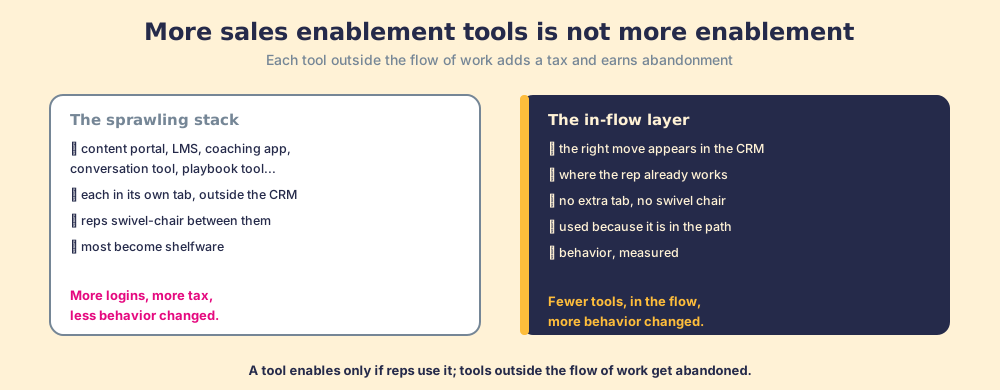
Count the enablement tabs a rep is asked to keep open: a content portal, a learning platform, a coaching app, a conversation-intelligence tool, a playbook system. Each was bought to close a gap, and each lives in its own tab. A tool added outside the flow of work charges the rep in attention, and reps avoid the charge by ignoring the tool. The growing stack assumes that more tools means more enablement. The arithmetic runs the other way. A tool enables only if reps use it, a tool outside the rep’s daily work mostly goes unused, and so the bigger the stack, the more of it is shelfware.
Sales enablement tools are the software a team uses to make reps more effective, and they enable only when reps use them in the flow of work, so a sprawling stack of sales enablement technology that sits outside the CRM tends to become shelfware that changes no behavior. Count what reps use, not what you own, and the stack looks different.
Why does a bigger tool stack not produce more enablement?
Because each tool outside the flow of work adds friction, and friction drives the abandonment that makes the tool worthless. A rep lives in the CRM and the inbox. Any enablement tool that requires leaving those to open a separate app, log in, and find what they need is a detour, and reps cope with a stack of detours the only way they can: by skipping most of them. The tool that looked great in the demo joins the pile of unopened software. Its features were fine. Its address was wrong. A capable tool outside the flow gets abandoned, and an abandoned tool changes nothing reps do, which is the one thing enablement exists to change.
Our post on sales process adoption makes the longer case that friction decides adoption more than feature quality does. BJ Fogg’s behavior model names it the ability axis: the harder a behavior is to do, the more motivation it takes before anyone does it (Fogg, on the behavior model). Each tool you add outside the rep’s path makes the behavior harder, so adoption of each one drops. The stack grows, the switching tax rises, and the share of the stack that changes behavior falls. A team can own a dozen enablement tools and enable almost nothing, because a tool does nothing until someone uses it.
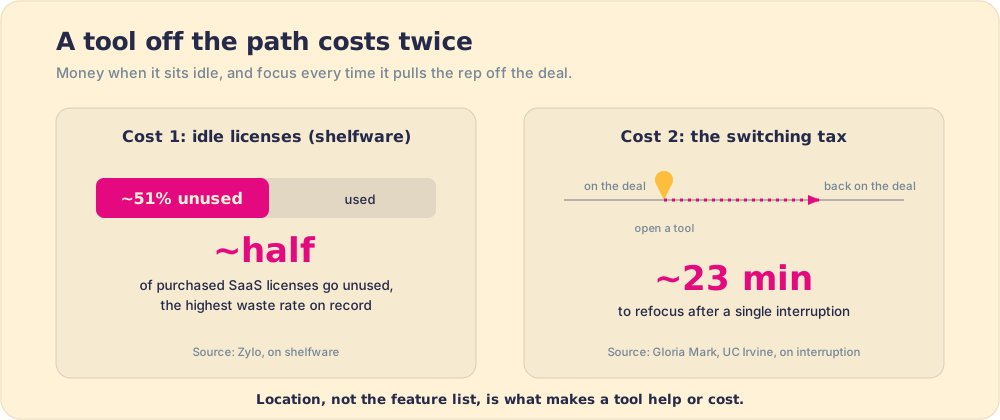
Shelfware is one of the most measured facts in software. Across enterprises, Zylo’s 2026 SaaS Management Index found that 53 percent of SaaS licenses go unused or are not used often enough to justify the spend, and that the average organization wastes $19.8 million a year on unused licenses (Zylo, on shelfware). Enablement tools are especially exposed, because a central team buys them and reps the buyer never watches work decide whether to use them. The purchase order is signed by someone who will never log in.
The switching itself carries a second cost, and it is larger. The interruption researcher Gloria Mark, at UC Irvine, has measured what it costs a knowledge worker to break focus: after an interruption it takes on average about 23 minutes to return to the original task (Mark, on interruption and refocus). A rep who has to leave the deal they are working, open a separate enablement app, hunt for the right asset, and come back has not merely spent the two minutes the detour appears to cost. They have paid the re-entry tax on the way back, every time. Multiply that across a stack of tools and a day of selling, and the “small” friction of one more tab drains hours that were supposed to go to selling, every day. So a tool’s location decides whether it helps, more than its feature list does. A capable tool that lives off the rep’s path does more than go unused. It taxes the work even when it is ignored, because deciding to ignore it is itself an interruption.
What separates a tool that enables from one that does not?
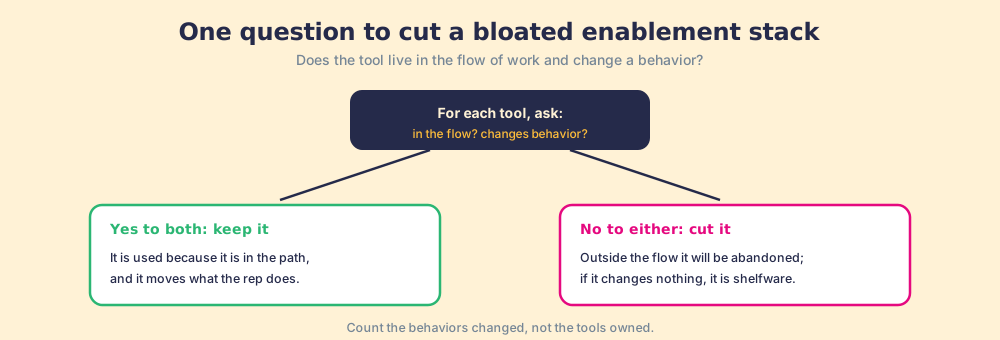
Two tests sort a stack. The first is location. A sales enablement tool helps only if reps use it, and reps use what is in their path, so ask whether the tool shows up inside the CRM and inbox where the rep already works or demands a detour. The second is behavior. Ask whether using the tool changes what the rep does, or only stores, serves, or reports. A tool can pass the first test and fail the second (a slick app reps open that changes nothing) or pass the second and fail the first (a powerful capability reps never reach). It enables only if it passes both, which is the sales enablement output stated as a buying criterion.
Run every tool in your stack through that pair of questions and the stack shrinks.
- Tools in the flow that change behavior. Keep these. Reps use them because they sit in the path, and they move what the rep does.
- Tools outside the flow, or tools that change nothing. Cut these. A detour gets abandoned, and a tool that changes no behavior is shelfware. Either way it enables no one.
- Behaviors changed, as the count that matters. Measure how many behaviors your stack changes. The number of tools it contains tells you only what you spent.
How should you build a sales enablement tool stack?
Build it small, in the flow, and around behavior. Resist adding a tool for each gap, because each tool outside the flow lowers adoption of the whole stack. A ranked sales enablement tools list, the kind that promises the best sales enablement tools of the year, makes a poor shopping aid for the same reason. It sorts by features and category, and the only question that predicts whether a tool enables anyone is whether it lives in the rep’s path and moves a behavior. The top tool on a list does nothing for a rep who never opens it.
Consolidate toward fewer tools that live where reps already work, the CRM and inbox, and that move a measurable behavior instead of storing content or producing reports that sit unread. Before buying anything, ask the two questions: is it in the flow, and does it change behavior? Before keeping anything, check whether reps use it. Aim for a stack reps use, and let completeness go. A team with three tools reps run every day is better enabled than a team with twelve tools reps ignore, because behavior only changes through the tools reps touch.
What we recommend
Judge your enablement by what reps do, and stop judging it by the size of the tool stack. Past a point, more tools means less enablement. Each tool you add outside the flow of work adds a switching tax reps avoid by ignoring it, so the bigger the stack, the larger the share of it that becomes shelfware changing no behavior. The fix is to judge tools on two questions, does it live in the flow of work, and does it change a behavior, and to keep only the ones that pass both. Consolidate toward fewer tools that sit where reps already work and move what reps do, and judge your stack by the behaviors it changes, not the logins it requires. A drawer full of enablement tools reps never open enables no one. The few tools they use in the flow of work are the only ones that ever did.
From here: the adoption mechanics in sales process adoption, the definition that grounds it in what is sales enablement, the platform choice in sales enablement platform, and the wider category in sales enablement software.
Frequently asked questions
What are sales enablement tools?+
Do more sales enablement tools improve performance?+
Why do sales enablement tools go unused?+
How do you choose sales enablement tools?+
Your process, running itself.