Salesforce Automation Tools: What They Do and What They Cannot
Sales force automation vs Salesforce automation, every Salesforce automation tool from Flow to Agentforce with examples, where each one fits, and the one job none of them can do.
Salesforce automation tools are the built-in features that move records, enforce rules, and trigger actions inside the CRM without a human doing them manually, and they are excellent at every job that does not require a rep to make a decision.
Salesforce automation is a category where admins can name every tool and still argue about which one a given job belongs to. Flow, validation rules, approval processes, assignment rules: they all live under the “automation” heading and they do meaningfully different jobs. Getting them right is a week of admin work. Getting the category right, meaning understanding what all of them together cannot do, is the piece that decides whether the CRM moves revenue.
Salesforce automation tools are the built-in features that move records, enforce rules, and trigger actions inside the CRM without a human doing them manually, and they are excellent at every job that does not require a rep to make a decision. The limit is real and worth stating plainly before the feature tour, because it is the gap that shows up in quota attainment data, not in the admin console.

What is sales force automation, and is it the same as Salesforce automation?
Sales force automation (SFA) is a category of software that automates the routine work of a sales team: lead, account, contact, opportunity and activity management, pipeline and forecast management, and guided selling. Salesforce automation is narrower: the tools inside one SFA product, Salesforce, that move records and enforce rules without a human. The two phrases differ by one space and get searched as if they were the same, so it is worth separating them before the tool tour.
Gartner has tracked SFA as its own market for years and is now relabeling it “CRM Sales Platforms.” Its required capabilities for the category include lead, account, contact, opportunity and activity management, pipeline and forecast management, guided selling, and mobile and voice assistants (Gartner Peer Insights market definition). Salesforce Sales Cloud, HubSpot Sales Hub and Microsoft Dynamics 365 Sales all sit in that market. If you are choosing between them, you are shopping for sales force automation software. If you already run Salesforce and want it to do more of the busywork, you are shopping inside the toolbox this post covers.
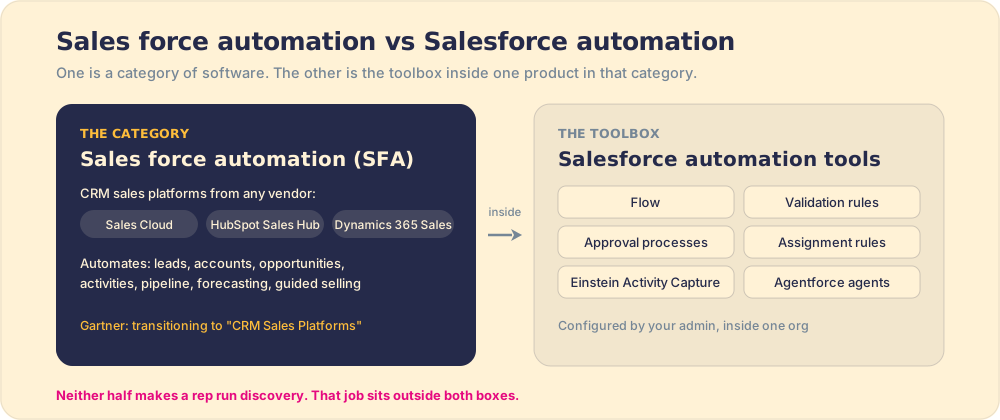
Both halves share a blind spot. An SFA platform records what happened and a Salesforce Flow reacts to it, but neither decides what the rep does in the next conversation. Keep that in mind through the rest of the list.
What are the main salesforce automation tools?
Flow. The primary automation engine, and the successor to Workflow Rules and Process Builder, which reached end of support on December 31, 2025. A Flow is a visual tool an admin builds in the flow builder interface. It runs when triggered by a record change, a scheduled time, a user action in a screen flow, or an incoming platform event. From there it can update any field, create or delete records, send an email, call an external API, branch on conditions, or loop through a set of records. Flow is the workhorse: most things you want the CRM to do automatically, it handles. Full documentation is at Salesforce Help.
Validation rules. These enforce data standards at the moment of save. You write a formula condition (a stage cannot advance to Closed Won if Amount is blank, for instance), and if the condition is true when a rep tries to save, the save is blocked with an error message you define. Validation rules are constraint tools, not action tools. They do not move anything; they stop bad data from entering. That is a different job than Flow, and the two are complementary: rules prevent the bad input, Flow handles what happens after the good input lands.
Like a bouncer at the door of a data record, a validation rule does not decide what happens inside. It decides what gets in.

Approval processes. A structured routing flow that sends a record (a discount request, a contract, a deal with unusual terms) to one or more people for a go or no-go decision. An approval process is triggered by a field condition or a button click, routes to a defined approver, and then either unlocks the record for the next step or routes it back for revision. Common uses: deal desk approvals for discounts above a threshold, contract reviews, budget commitments. Like all Salesforce automation, approvals handle the routing mechanics well; they do not influence what the rep said to the customer to get to that approval moment.
Assignment rules. These route incoming leads, contacts, or cases to the right person or queue based on criteria you define. A new lead from a particular territory goes to the rep who covers it; a case from an enterprise account goes to the enterprise support team. Assignment rules run automatically on new records (or on batch imports) and remove the manual triage work of deciding who owns what. They are setup configuration rather than ongoing automation, but they are usually the first automation a growing sales org builds, because the alternative is someone deciding manually every time.
What can salesforce workflow automation do, and what can it not?
The useful frame is to separate the jobs into two categories: what the system can execute and what a human must decide. Automation covers the first category well. Salesforce Flow can send follow-up emails on a schedule, update a close date when a deal goes stale, create a task for a manager when a deal stalls for more than a defined number of days, sync data across related records, or trigger an external notification to Slack or a customer portal. These are mechanical, reliable, and do not require judgment. Build them once and they run without error for years.
Validation rules enforce that the data coming in meets the standard. Approval processes route decisions to the humans who should make them. Assignment rules ensure the right person owns the right record. Each of these is a structural job, and Salesforce has built strong native tools for all of them.
None of these tools touches what the rep does in the conversation with the prospect.
A rep can satisfy every validation rule on an opportunity and still conduct a shallow discovery call, miss a champion, and lose the deal to a competitor who spent more time on the economic buyer. A perfectly configured Flow can send the rep a task reminder at the right time, and the rep can ignore it or mark it complete without doing the work. Automation configures the path. It does not make the rep take each step.
What are the types of automation in Salesforce, with examples?
Salesforce automation comes in ten working types in 2026: five kinds of Flow, plus validation rules, approval processes, assignment rules, Einstein Activity Capture, and Agentforce agents. Pick by the job, never by the tool’s popularity. A validation rule and a Flow can both “enforce” a field, and they fail in opposite ways: the rule blocks the save, the Flow fills the gap after it.
| Automation type | What triggers it | Example in a sales org |
|---|---|---|
| Record-triggered Flow | A record is created, updated or deleted | Deal moves to Proposal: create a task for the SE and post to the deal’s Slack channel |
| Schedule-triggered Flow | A time and frequency you set | Every Monday, flag open opportunities with a close date in the past |
| Screen flow | A user clicks a button or opens a page | A guided discount request form that asks four questions before submitting |
| Autolaunched Flow | Called by another Flow, Apex, or the API | A reusable “recalculate territory” routine several Flows share |
| Platform event-triggered Flow | A message from another system | Billing system sends “invoice paid”: mark the opportunity’s onboarding stage |
| Validation rule | A user tries to save | Block Closed Won when Amount or Close Reason is blank |
| Approval process | A field condition or a submit button | Discounts above 20 percent route to the sales director |
| Assignment rules | A new lead or case arrives | Leads from the EMEA web form go to the EMEA queue |
| Einstein Activity Capture | Email and calendar activity | Emails and meetings sync from Gmail or Outlook without the rep logging them |
| Agentforce agents | A prompt, a record event, or a schedule | Research an account and draft a first-touch email for the rep to review |
Two dates matter for anyone inheriting an older org. Salesforce ended support for Workflow Rules and Process Builder on December 31, 2025; existing ones keep running, but Salesforce no longer fixes bugs or answers support cases on them (Salesforce Help). New automation belongs in Flow, and old rules are technical debt to migrate on your schedule rather than Salesforce’s. And Agentforce Sales, Salesforce’s agent layer for lead qualification, pipeline management and proposal generation, starts at $125 per user per month as an add-on, or $550 per user per month in the Agentforce 1 Editions for Sales (Futurum Group, March 2026).
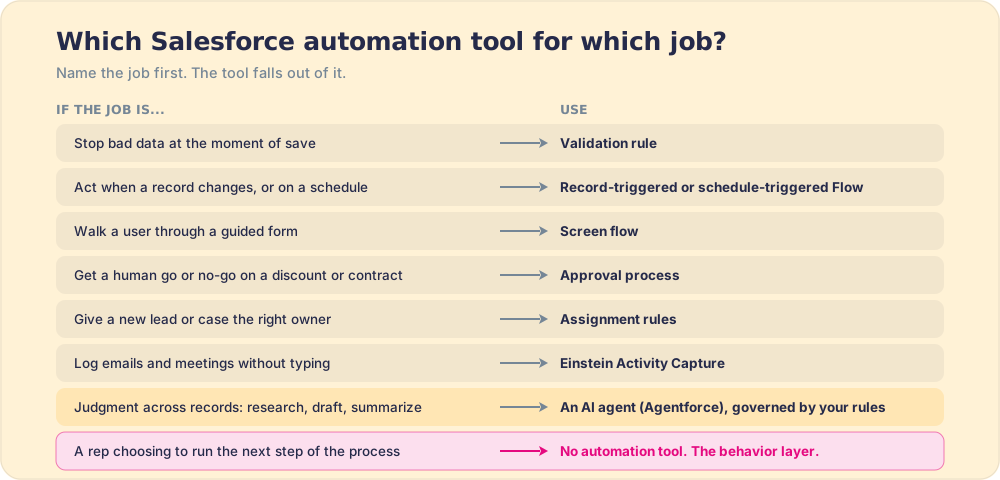
A common search, “what tools automate Salesforce field updates so reps don’t have to do it after every call,” has a two-part answer. Einstein Activity Capture or a conversation-intelligence tool logs the activity, and a record-triggered Flow updates the dependent fields. The judgment fields (next step, the buyer’s commitment, a revised close date) still need the rep, which is why a three-field update in the minutes after a call holds up better than a twenty-field one at the end of the week.
Do AI agents like Agentforce replace Salesforce automation tools?
No. AI agents extend Salesforce automation into work that needs judgment, such as researching an account or drafting a follow-up, but they still run on top of Flow, validation rules and permissions, and they are only as good as the rules you give them. An agent told to “keep the pipeline clean” with no written definition of clean will clean it to its own standard.
Our State of Sales Enablement data shows the dependency. Among teams with strong process adherence, 40 percent rate AI’s impact as high; among teams with weak adherence, 21 percent do. Teams without a followed process rate AI as high-impact about half as often. Teams already point AI at the CRM, too: 46 percent use it for CRM admin and cleanup.
The practical order:
- Rules before agents. Write the expectations an agent should enforce (a close date in the past is a violation; no amount past Discovery is a violation) where both reps and the agent can read them.
- Deterministic tools for deterministic jobs. If a validation rule or a Flow can do it, use that; it is cheaper, testable, and never improvises.
- Agents for the judgment jobs, with a check. Let the agent draft and propose, and measure whether the result matches the rule, record by record.
Agents also do not have to live inside Salesforce to act on it. Claude can read and update Salesforce through a connector, and the same written rules can govern it there, which is the idea behind our AI sales assistant post.
Why does salesforce workflow automation not fix adherence?
Because adherence is a behavior problem and automation is a configuration tool. This distinction matters, and it is worth understanding the mechanism rather than accepting the conclusion.
Salesforce workflow automation operates on the CRM record. It reads field values, evaluates conditions, and takes defined actions. It can see what is in the system; it cannot see what a rep is doing. A rep who marks a stage as Closed Won without a signed contract can satisfy every automation condition. A rep who logs a call without updating next steps has fed the system a complete record of incomplete work.
Gartner puts the cost of poor data quality at $12.9 million a year for the average organization (Gartner), and a CRM full of complete-looking records of incomplete work is one source of that bill. The automation configuration rarely causes it. What the rep does between the automated steps does.
In our survey of 198 sales leaders for The State of Sales Enablement, 89 percent of teams had a defined sales process and only 36 percent saw it followed. Automation does not address that gap. The gap is between the process documented in the playbook and the process the rep runs in the moment. The only thing that closes that gap is guidance reaching the rep in the flow of the work, deal by deal, when the decision moment arrives.
What is the best way to pair automation with the behavior layer?
The two tools are complementary, not competitive. Think of automation as the track and the behavior layer as the train: the track defines the route and enforces the structure; the train is what moves.
Build automation to handle everything the CRM can execute reliably on its own: stage-change notifications, data validation, lead routing, escalation timers, approval routing for deals above a threshold. These are stable, predictable, and worth the configuration investment because they remove error-prone manual work from humans who should be selling.

Then add the behavior layer for the job automation cannot do: surfacing the next right step of the sales process where the rep is working, in the moment, so the rep does not have to remember to check the playbook or open a separate tool. Supered is that behavior layer: it rides alongside Salesforce and delivers the playbook in the flow of work, captures the CRM update as a byproduct of the rep doing the step, and makes adherence visible deal by deal. The Salesforce Chrome extension guide covers this for the Chrome context, and the same principle applies whether reps are in Salesforce, Gmail, LinkedIn, or any other surface.
The practical sequence:
- Mechanical tasks. Use Flow for multi-step automation triggered by record events or schedules. This covers field updates, email alerts, record creation, and external API calls.
- Data validation. Use validation rules at stage gates to enforce the fields that matter for forecasting and coaching. Gate, not nag.
- Record routing. Use assignment rules for leads and cases, approval processes for deal desk and contract reviews. Let the system make the routing decision.
- Human steps. The sales process steps a rep must execute (discovery questions, next-step commitments, stage advancement) are not automation jobs. The behavior layer surfaces these in the flow of work and captures the CRM update as a byproduct of the rep doing them.
The best salesforce automation tools for mechanical work are the native ones, included in the Salesforce editions most sales teams run; agents are the paid add-on. The mistake is treating them as the whole answer. Automation configures a well-run org. The behavior layer is what makes the process get run, and that is the job that decides whether the org produces revenue. See how the best Salesforce Chrome extensions score across both jobs, and start with a demo to see the behavior layer running against your process.
What we recommend for Salesforce automation
A recap of what each tool is for, so the decision is clear:
- Flow. The workhorse for multi-step automation: field updates, email alerts, record creation, external integrations. Migrate old Workflow Rules and Process Builder to Flow; both lost support on December 31, 2025.
- Validation rules. Enforce data standards at the moment of save. Use at stage gates to require meaningful fields rather than running daily completeness audits.
- Approval processes. Route deal-desk decisions, discount approvals, and contract reviews to the right human at the right time without a manual escalation email.
- Assignment rules. Automate lead and case routing so the right rep owns the right record from the moment it enters the system.
- Behavior layer (Supered). The job none of the above do: getting the rep to run the next right step of the process in the moment of work, with adherence visible by rep and by stage. Supered surfaces the next step where the rep is working and captures the CRM field as a byproduct of doing it.
Run all five and you have a complete sales process operating layer. Run the first four without the fifth and you have a well-configured CRM that cannot tell you whether the process is being followed, because the configuration does not see what the rep does when no automation is watching.
Frequently asked questions
What are Salesforce automation tools?+
What is Salesforce Flow?+
What is the difference between Salesforce Flow and validation rules?+
Can Salesforce automation tools make reps follow the sales process?+
What are the best Salesforce automation tools for a sales team?+
What is sales force automation?+
What are the types of automation in Salesforce?+
Do AI agents like Agentforce replace Salesforce automation tools?+
Your process, running itself.